∙
Cooper
∙
Reading time:
17 min

AI tools are transforming Slack from a simple messaging platform into a powerful source of insights. By organizing unstructured conversations, analyzing patterns, and connecting to trusted knowledge repositories, teams can reduce repetitive questions, speed up support, and make better decisions. For example, AI can automatically summarize threads, detect sentiment changes, and even answer common questions using verified documentation. Tools like Question Base take this further by integrating Slack with platforms like Notion and Salesforce, ensuring accurate, traceable answers.
Key Benefits:
Save Time: AI answers repetitive questions, cutting response time to seconds.
Boost Accuracy: Verified answers from trusted sources ensure reliability.
Improve Efficiency: Reduce employee time spent searching for information.
Track Trends: Monitor sentiment, recurring issues, and knowledge gaps.
Quick Tip:
Start small - pilot AI on select Slack channels, set clear goals, and measure success with metrics like automation rate and resolution time. For enterprise needs, tools like Question Base offer advanced features like security compliance and knowledge management, ensuring your AI deployment is effective and secure.
AI-Driven Data Analysis: Slack ChatGPT Interacts with SQL Database
Preparing Slack Data for AI Analysis
To turn Slack conversations into meaningful insights, preparation is key. This involves pinpointing the right data, setting clear business objectives, and ensuring proper governance. The success of your AI efforts hinges on how well you prepare, as this phase lays the foundation for actionable outcomes.
Identifying Slack Data Sources
Start by examining the variety of data Slack offers: public channels, private channels (with consent), threads, direct messages, reactions, shared links, files, and metadata. Public channels like #it-help or #customer-support are especially valuable, as they capture recurring questions and collective team knowledge. Private channels may hold sensitive discussions that could be insightful but require explicit owner approval. Direct messages, on the other hand, are typically excluded from content-level analysis to maintain privacy, though anonymized metrics can sometimes be analyzed.
Reactions serve as quick indicators of sentiment or priority - a 👍 or ✅ might confirm resolution, while a ❓ could highlight confusion. Threads, offering deeper exchanges, can reveal patterns that AI tools can analyze. Unlike Slack's built-in AI, which primarily focuses on chat history, Question Base takes a different path. It integrates with trusted repositories like Notion, Confluence, Google Drive, and Salesforce, transforming Slack into a hub for verified answers rather than just a repository of past conversations.
Once you’ve identified the key data sources, it’s time to define specific business questions to guide the AI’s focus.
Defining Business Questions and Use Cases
Vague goals like "improve support" won’t give AI the direction it needs. Instead, frame precise questions: How often are the same questions asked each week? Which topics take the longest to resolve? Where are employees searching for answers but coming up empty?
Each team will have unique priorities. For example:
HR might track sentiment following policy updates.
IT could automate responses to recurring technical issues.
Operations might focus on quickly resolving payment failures.
Knowledge managers often aim to have AI extract new insights from Slack threads and integrate them into official documentation, creating a dynamic, self-updating knowledge base. Clearly defined metrics, like reduced resolution times or fewer unanswered queries, can help measure success.
Ensuring Data Governance and Compliance
Data security is just as important as the insights you aim to extract. AI systems must respect role-based access control (RBAC), ensuring users only see data they’re authorized to access. This means aligning the AI with Slack’s identity model to maintain strict control over private channels and sensitive information. Additionally, syncing only the necessary channels and data types, limiting retention to the past 6–12 months, and excluding irrelevant message types can help minimize risks.
For enterprise deployments, prioritize compliance standards like SOC 2 Type II certification, encryption (both at rest and in transit), and options for on-premise or VPC deployments. Question Base meets these high standards, offering robust security and control over content access, AI behavior, and escalation workflows[1]. Slack Enterprise Grid complements this by providing audit logs, compliance exports, and advanced tools for data loss prevention, which can integrate seamlessly with your AI strategy.
To begin, pilot your AI solution on select channels. Collaborate with your security and legal teams to ensure vendor compliance and configure RBAC and data scoping, ensuring the AI processes only the necessary information. This careful approach will help you maintain control while unlocking the potential of Slack data.
How AI Transforms Slack Data into Insights
Once your Slack data is properly organized and managed, the real magic begins: transforming raw conversations into structured, actionable insights. AI systems work through a series of steps - pulling in data, organizing it, analyzing patterns, and creating summaries. Each step builds on the last, turning chaotic chat logs into useful intelligence that helps teams make quicker decisions and achieve better results. This process ensures that teams can move from scattered messages to clear insights without a hitch.
Ingesting and Organizing Slack Data
AI tools first connect to Slack's Web and Events APIs, using permissions like channels:history, groups:history, and reactions:read. These tools collect a variety of data, including channel messages, thread replies, emoji reactions (like 👍 or ❓), and metadata such as timestamps, user IDs, channel names, and file attachments. The data arrives in a structured JSON format and is stored securely in a data warehouse or similar system [11] [10].
The next step is normalization. A single Slack thread can stretch across days, involve multiple users, and link to external files or resources. AI organizes this data by thread ID, parent message, and reactions, creating a consistent structure. For example, messages in #it-helpdesk might include ticket IDs, while threads in #customer-escalations could reference client names or renewal dates. Question Base further enriches this data by integrating with trusted repositories to verify answers and add context [8] [5] [10].
Extracting Meaning with Natural Language Processing
Once the data is structured, AI applies natural language processing (NLP) to make sense of it. NLP techniques include identifying entities (like product names or ticket numbers), detecting intent (e.g., is the message a question, complaint, or request?), analyzing sentiment (scoring messages between -1.0 and +1.0), and categorizing messages (e.g., "urgent IT issue" or "HR policy question") [10] [3].
For instance, if the #it-helpdesk channel sees a surge in messages mentioning "VPN down" with negative sentiment, the AI flags it as an urgent issue. Similarly, if messages in #customer-health frequently mention words like "churn" or "downgrade" alongside negative sentiment, the system can alert teams to address potential customer risks. Over time, tracking sentiment across channels can even highlight trends, such as a drop in morale during intense sprints in #engineering [3] [10].
Question Base also excels at reducing repetitive tasks. By clustering similar questions and standardizing answers, it can automatically respond to common inquiries like "How do I reset my password?" or "What’s our PTO policy?" Studies show that up to 40% of internal questions in large organizations are repeats, and AI Answer Agents can handle 35% of these, saving over six hours per week for each internal expert [1] [2].
Spotting Patterns and Trends
AI doesn’t just analyze individual messages - it also tracks patterns over time and across channels. By grouping related topics, monitoring activity levels, and comparing current data to historical trends, AI can uncover productivity bottlenecks, operational issues, or emerging risks [12] [4] [6].
For example, if questions in the #new-hires channel spike by 40% after a policy update, it may indicate a need for clearer onboarding materials. Similarly, a sudden increase in messages containing terms like "data breach" or "compliance issue" in #security-ops could trigger an alert, summarizing key messages and affected systems [7] [4]. These alerts are designed to minimize noise, focusing on critical issues by combining sensitive keywords, negative sentiment, and priority channels.
Organizations can also connect Slack data to business metrics from platforms like Salesforce or BI tools. For example, tools like Scoop Analytics and Breyta can send proactive insights directly into Slack, such as notifications about a "spike in support complaints from VIP customers" or warnings of "pipeline risks" based on sales conversations [12] [6]. This approach turns Slack into an analytics hub, allowing users to get insights without switching between tools.
Generating Summaries and Actionable Insights
Finally, AI condenses all this analysis into clear, actionable summaries. It can create channel or thread summaries, daily digests, and even convert scattered notes into project briefs or to-do lists [9] [5] [10]. This feature is particularly useful for catching up on busy channels or pulling out key takeaways from meetings.
Question Base integrates this summarization into its knowledge management system. It identifies new frequently asked questions in Slack threads and adds them to official documentation [1] [2]. When an unanswered question arises, the system prompts experts to document the response, ensuring it’s available for future use. As Monica Limanto, CEO of Petsy, explains:
"We now have a reliable and useful knowledge base, making it easy to share knowledge across the team. We no longer have staff waiting on busy managers for an answer, Question Base is there in seconds." [1]
For critical decisions, such as compliance or strategy, human review fine-tunes AI-generated summaries. But for routine queries - like onboarding or operational support - AI delivers answers in just 3.2 seconds with an accuracy score of 4.8 [1]. This efficiency allows experts to focus on more complex tasks while ensuring employees get the information they need, right when they need it.
Implementing AI Insights Directly Inside Slack
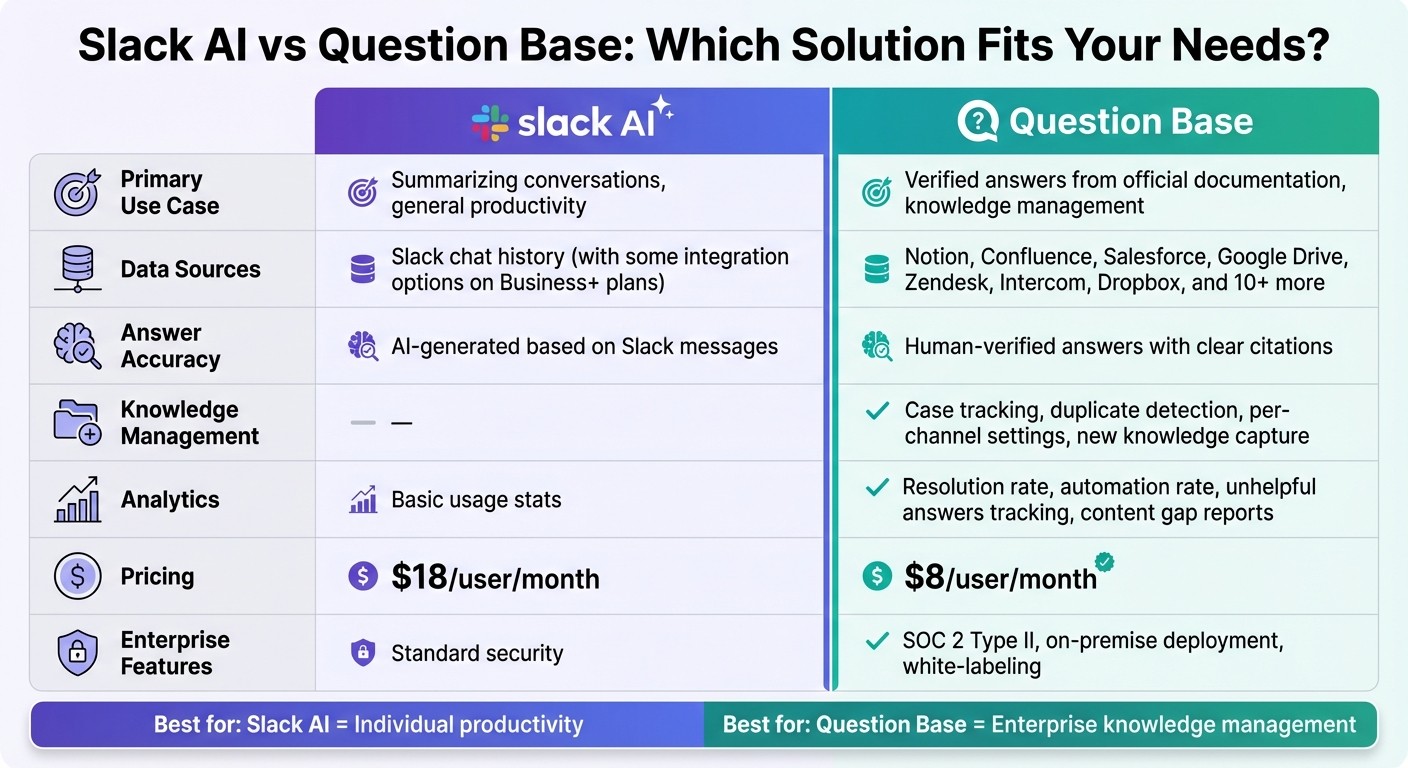
Slack AI vs Question Base: Feature Comparison for Enterprise Teams
Once you've structured your Slack insights, the next step is delivering answers and alerts directly within Slack. This approach ensures that actionable data integrates seamlessly into daily workflows, keeping teams focused and on task.
Choosing the Right AI Solution
Not all AI tools for Slack are created equal. For instance, Slack AI is geared toward general productivity. It excels at summarizing conversations, helping users catch up on busy channels, and searching Slack history. This makes it a handy tool for individuals who need quick overviews or key takeaways from threads. However, because Slack AI primarily relies on chat history, its responses are interpretations of past conversations rather than verified, documented information.
For teams that require accuracy and traceable answers, Question Base offers a different approach. It connects directly to trusted sources like Notion, Confluence, Salesforce, Google Drive, and Zendesk to deliver verified responses. This makes it especially useful for internal support teams, HR, IT, and operations, where precision and knowledge ownership are critical. While Slack AI helps individuals move faster, Question Base ensures entire teams stay aligned and informed.
Feature | Slack AI | Question Base |
|---|---|---|
Primary Use Case | Summarizing conversations, general productivity | Verified answers from official documentation, knowledge management |
Data Sources | Slack chat history (with some integration options on Business+ plans) | Notion, Confluence, Salesforce, Google Drive, Zendesk, Intercom, Dropbox, and 10+ more |
Answer Accuracy | AI-generated based on Slack messages | Human-verified answers with clear citations |
Knowledge Management | None | Case tracking, duplicate detection, per-channel settings, new knowledge capture |
Analytics | Basic usage stats | Resolution rate, automation rate, unhelpful answers tracking, content gap reports |
Pricing | $18/user/month | $8/user/month |
Enterprise Features | Standard security | SOC 2 Type II, on-premise deployment, white-labeling |
Ultimately, the best choice depends on your needs. If your priority is catching up on conversations or summarizing meetings, Slack AI is a solid pick. But if you're tackling repetitive questions, addressing knowledge gaps, or ensuring compliance-ready answers, Question Base is specifically designed for those challenges. Many organizations find value in using both: Slack AI for personal productivity and Question Base for enterprise-level knowledge management.
Setting Up a Slack-Native Answer Agent
Once you've chosen the right solution, the next step is setting it up within your Slack channels. The process is straightforward:
Install the app from the Slack App Marketplace.
Use
/invite @questionbaseto add the bot to active channels.Connect documentation sources like Notion, Confluence, or Google Drive, and configure per-channel settings for tone, escalation, and access permissions.
Once integrated, Question Base can start answering questions immediately. For example, you can configure the #it-helpdesk channel to draw from your IT knowledge base in Confluence, while the #hr-questions channel references HR policies stored in Google Drive. Each channel can have a tailored tone - formal for compliance topics or conversational for onboarding - and its own escalation rules, ensuring unanswered questions are routed to the right experts.
Another powerful feature is the system's ability to capture new knowledge. When an expert answers a question not yet documented, Question Base prompts them to save the response for future use. Over time, this turns everyday Q&A into a continuously evolving knowledge base.
Automating Reports and Alerts
To keep teams proactive, automate the delivery of insights based on your established answer layers. Schedule weekly reports on metrics like question volume, resolution rates, and automation performance, and deliver these directly to leadership channels. These reports provide managers with a clear view of how the AI is performing and highlight areas where documentation may need updating.
Event-based alerts add another layer of value. For instance, if there’s a surge in unresolved questions in the #customer-support channel, an automated alert can notify the support lead with a summary of the most common unanswered queries. Similarly, if response times in #it-helpdesk start exceeding a set threshold, the system can flag the issue for immediate review.
Question Base also tracks content gaps by logging questions it couldn't answer. These gaps are reported to knowledge managers, helping them prioritize which documentation to create or update next. By automating these insights, teams can stay ahead of potential issues without the need to manually sift through Slack threads or run separate reports.
Measuring Impact and Iterating Over Time
Defining Success Metrics
To gauge the effectiveness of your AI answer agent, focus on metrics like automation rate, resolution rate, and average response time. The automation rate reflects the percentage of questions the AI handles independently, while the resolution rate measures how often those responses fully resolve the query. Average response time shows how quickly employees get the answers they need - users of Question Base typically experience response times of just 3.2 seconds. Another important metric is hours saved per internal expert per week, which quantifies the time your subject matter experts save by not repeatedly answering the same questions.
For example, during a 30-day pilot, one organization using an AI agent in Slack found that 35% of repetitive questions were automatically answered, achieving an average accuracy score of 4.8 out of 5 [1]. To calculate the financial benefit, multiply the time saved by the fully loaded hourly rate of your employees. If saving 6 minutes per question on 10,000 monthly queries at $75/hour, the productivity gains would amount to roughly $75,000 [1]. These metrics not only showcase the AI’s value but also provide direction for ongoing improvements.
Monitoring AI Quality and Adjusting Over Time
Once you’ve established your success metrics, ongoing monitoring is essential to fine-tune the AI’s performance. A simple thumbs-up/thumbs-down feedback system can help maintain accuracy. Question Base tracks this feedback, flagging unhelpful answers for review. This enables knowledge managers to identify recurring issues and make necessary adjustments. Monitoring performance across departments can also uncover gaps. For instance, if your HR channel has high usage but low satisfaction, it might indicate outdated policies or missing documentation.
Regular testing of edge cases - such as legal or compliance-related queries - ensures the AI can handle sensitive topics appropriately. As your documentation evolves, periodically reviewing the AI’s performance on key queries ensures there’s no drop in quality after updates. This proactive approach keeps your AI aligned with organizational needs.
Expanding Use Cases Responsibly
With success metrics and quality controls in place, you can confidently expand the AI’s role to improve efficiency across more areas. However, expansion should be deliberate. Establish clear criteria, such as requiring a resolution rate above 70% and an accuracy score of at least 4.5, before rolling out to additional teams. Tailor the AI for specific departments by configuring per-channel settings - for example, using a formal tone for compliance-related queries and a conversational tone for onboarding materials.
As teams reorganize, audit connected workspaces, update access permissions, and review escalation policies to ensure smooth operations. Question Base’s case tracking feature logs unanswered questions, providing a roadmap for creating or updating documentation. This iterative process turns expansion into a cycle of continuous improvement, where each new deployment identifies knowledge gaps, strengthens documentation, and enhances AI performance across the organization.
Conclusion
AI is revolutionizing how Slack data is used, turning it into actionable insights for internal knowledge sharing and support. By processing messages, spotting patterns, and identifying knowledge gaps, AI reduces repetitive questions and frees up expert time. The real advantage lies in moving from generic AI tools that simply summarize conversations to specialized solutions that connect directly to trusted documentation, delivering precise, actionable answers.
While Slack AI enhances individual productivity, Question Base takes it a step further by providing verified answers through integrations with platforms like Notion, Confluence, and Salesforce. It also ensures enterprise-grade security with SOC 2 Type II compliance, making it a reliable choice for businesses.
For large organizations, inefficiencies in Slack searches can add up quickly. For example, a company with 1,000 employees could lose over $2 million annually to repeated searches [1]. Purpose-built AI answer agents tackle this issue by automating responses to common queries. Pilot programs have demonstrated that 35% of repetitive questions can be auto-answered with an impressive 4.8 accuracy score [1].
The shift toward integrated, specialized AI solutions is reflected in the surge of enterprise AI investments, which jumped from $2.3 billion in 2023 to $13.8 billion in 2024 [4]. Companies achieving success in this area share a few common practices: they set clear success metrics, use feedback systems to monitor AI performance, and gradually expand use cases based on resolution rates and accuracy. These strategies ensure that AI becomes a valuable asset for improving efficiency and reducing costs.
FAQs
How does AI provide accurate answers in Slack?
AI delivers precise answers in Slack by connecting directly to reliable documentation sources such as Notion, Confluence, and Salesforce. Rather than depending only on chat history, it draws from verified content, ensuring responses are accurate and current.
To further enhance quality, features like expert validation and case management play a key role. These tools help minimize the chance of misinformation and bolster trust in the responses shared. This system is particularly beneficial for enterprise teams that place a high value on accuracy and maintaining control over their knowledge base.
How is Question Base different from Slack AI?
Slack AI does a solid job summarizing chats and tackling straightforward questions based on message history. But Question Base takes things a step further, catering specifically to enterprise support teams like HR, IT, and operations. It provides precise, expert-approved answers by integrating directly with trusted documentation platforms such as Notion, Confluence, and Salesforce.
While Slack AI leans heavily on past conversations, Question Base stands out with advanced tools like case tracking, duplicate question detection, and customizable answer settings. It also emphasizes enterprise-level security with SOC 2 Type II compliance, ensuring your data stays protected. Plus, it gives organizations full control over their internal knowledge, making it a dependable and scalable choice for teams that demand accuracy and reliability.
How can AI improve Slack for managing organizational knowledge?
AI has the potential to turn Slack into an efficient knowledge management hub by automating how information is captured, structured, and accessed. While Slack AI is adept at summarizing conversations and making suggestions based on chat history, tools like Question Base take it a step further. They provide verified answers pulled directly from trusted sources such as Notion, Confluence, and Salesforce, ensuring responses are accurate and dependable.
Tailored for enterprise teams in HR, IT, and operations, Question Base addresses the issue of repetitive questions by transforming fleeting Slack messages into organized, searchable knowledge. This not only saves employees time and effort but also allows teams to integrate seamlessly with their existing documentation tools. The result? Teams stay aligned, efficient, and free to focus on work that truly matters.