∙
Cooper
∙
Reading time:
19 min

Repetitive questions waste time. If your team relies on a knowledge base that’s outdated or scattered across tools like Slack, Confluence, and Google Drive, productivity takes a hit. Employees spend hours searching for answers or re-explaining the same topics, while trust in your documentation erodes.
AI-powered tools solve this by automating updates, detecting gaps, and ensuring your knowledge base stays current without overburdening your team. From real-time content updates to intelligent search, AI transforms static documentation into a dynamic, reliable system.
Key Takeaways:
AI automates updates: Tools monitor queries and flag outdated content for revision.
Detects gaps proactively: AI identifies missing information by analyzing search patterns.
Improves search functionality: Advanced retrieval ensures employees find answers quickly.
Scales with growth: AI keeps pace with evolving data, reducing manual effort.
Companies like Intuit QuickBooks have already seen results, resolving cases 36% faster with AI-driven knowledge management. The right tools don’t just save time - they restore trust in your knowledge base.
Ready to streamline your Slack workflows? AI-powered solutions like Question Base integrate directly into Slack, pulling verified answers from trusted documentation sources like Notion, Zendesk, and Salesforce.
Common Problems with Knowledge Base Accuracy
Manual Updates and Outdated Information
Maintaining an up-to-date knowledge base can feel like an uphill battle. Every time a product changes or a policy gets updated, someone has to manually revise the documentation. Over time, this process becomes unsustainable, especially when experienced team members leave, taking their undocumented expertise with them [1].
Without AI tools for knowledge base accuracy to flag outdated content, knowledge bases can quickly fall behind [1][6]. As Stack Overflow puts it:
Train [AI models] on low-quality data and their output will be garbage: useless at best, actively damaging at worst [2].
When information becomes stale, it fragments your knowledge ecosystem, creating roadblocks for smooth operations.
Disconnected Systems and Missing Information
Knowledge often gets scattered across platforms like Slack, email, Google Drive, Zendesk, Intercom, and Confluence [2][8]. This fragmentation leaves gaps that can hinder productivity. For instance, 30% of developers say knowledge silos disrupt their work at least 10 times a week - essentially, twice every workday [1].
Disconnected systems make it harder for AI tools to piece together the full picture. A support agent might have a perfect answer buried in a Slack thread, but if that insight isn’t added to the knowledge base, it’s as good as lost. Employees end up manually bridging these gaps, which slows processes and increases the likelihood of errors [8].
The consequences vary depending on the industry. In finance, outdated credit ratings mixed with current data can lead to incorrect risk assessments [5]. In manufacturing, failing to track firmware versions accurately might cause misdiagnosed equipment issues [5]. In customer support, fragmented knowledge drives up ticket volumes and delays resolutions [8].
All these challenges combine to obscure critical information and add unnecessary strain to your support teams.
Effects on Employee Efficiency and Support Costs
When knowledge bases are inefficient, employees waste valuable time searching for information. This drags out onboarding and pulls experts away from meaningful, strategic work [1]. Excessive search time is a productivity killer, and 75% of developers report answering the same repetitive questions over and over again [1].
This inefficiency isn’t just a productivity issue - it’s a financial one too. Support teams spend countless hours addressing routine questions that could easily be self-served, while subject matter experts are bogged down handling basic inquiries [1].
Perhaps the most harmful effect is the loss of trust. Around 47% of employees avoid using their company’s knowledge base because they find it disorganized and difficult to search [4]. When trust erodes, employees turn to colleagues, external resources like Google, or struggle to figure things out on their own. As Stack Overflow warns:
The moment your team stops trusting your knowledge base is the moment it becomes redundant [1].
Fixing these issues is critical to restoring confidence in your knowledge base and laying the groundwork for effective AI-driven improvements.
How to Automatically Create Knowledge Base Articles using AI Agent
How AI Automates Knowledge Base Maintenance
AI revolutionizes knowledge base maintenance by turning static documentation into a dynamic, self-updating system. It achieves this by continuously monitoring employee queries, support tickets, and other data sources in real time. For example, when a support ticket is marked as "solved", the system automatically extracts the resolution and updates related documentation - cutting out the need for manual updates and reducing delays [7].
A key component of this process is the use of "Invalidation Agents", specialized AI tools that check the accuracy of existing information. These agents compare new data with current entries to detect contradictions and tag outdated content with an invalidation timestamp [5]. For instance, if product prices or software versions change, the AI flags the old information and suggests verified updates.
AI also integrates directly with structured data sources - like APIs, databases, or knowledge graphs - to fetch updates at regular intervals [3]. This ensures that the knowledge base reflects the latest changes in catalogs, pricing, or policies. As the OpenAI Cookbook notes:
"No matter how advanced your retrieval algorithms are, their effectiveness is limited by the quality and freshness of your database." [5]
The transition from manual to automated maintenance marks a major improvement. Traditional systems rely on editors to manually track down outdated content, while AI-driven systems use real-time data and user interactions to keep information accurate and current [3][6]. Tools like "thumbs up/down" buttons or "Did you find what you were looking for?" prompts allow users to flag inaccuracies, which the AI processes to suggest or implement updates [4]. These automated workflows not only keep the content fresh but also pave the way for more advanced AI-driven enhancements.
Real-Time Updates Based on User Interactions
AI doesn’t just monitor data - it learns from how people interact with the knowledge base. When users search for information or submit support tickets, the system tracks their queries and whether they found the answers they needed. If the same question keeps coming up without a documented solution, the AI flags it as a gap and can even draft a new article based on the resolution of similar issues.
This continuous feedback loop ensures that the knowledge base evolves in response to real-world usage. Simple user feedback in Slack like "Was this helpful?" prompts help the system prioritize urgent updates [4]. Instead of waiting for periodic reviews, the AI dynamically adjusts to user needs, making the knowledge base more responsive and effective.
Identifying Missing Information Before It's Needed
AI goes a step further by identifying gaps in the knowledge base before they cause problems. By analyzing search patterns and user queries, it pinpoints "content gaps" where users frequently ask questions that lack documented answers [4]. This proactive approach allows teams to address potential issues before they disrupt workflows.
Beyond structured queries, AI scans unstructured data sources like Slack conversations, email threads, and meeting notes to extract valuable insights [2][4]. For example, if an engineer solves a complex issue in a Slack channel, the AI can draft a formal knowledge base entry based on that discussion, preserving valuable expertise for future use.
Predictive tools also help maintain accuracy by flagging content that may soon become outdated. For instance, if a pricing page typically updates quarterly, the AI can alert the team as the next update approaches - even if no issues have been reported yet.
AI-Generated Content Recommendations
AI doesn’t just identify problems; it actively suggests solutions. By analyzing usage data and user feedback, the system recommends edits or the creation of new content to address gaps or improve clarity.
Content health monitoring plays a crucial role here. AI flags articles for review based on triggers like a high "thumbs down" ratio, low click-through rates, or infrequent updates [1]. For instance, Stack Overflow’s Content Health feature uses metrics like creation date, last update, and declining usage to identify articles that may need attention [1].
In industries where information changes quickly - such as finance or software - AI employs temporal tagging to manage data. It categorizes information into three types: Atemporal (unchanging facts), Static (valid from a specific time), and Dynamic (facts that evolve, such as job titles) [5]. This allows users to query what was true at a specific point in time, ensuring accuracy even in fast-changing environments.
The most effective systems combine AI recommendations with expert review [9]. This collaboration ensures that AI supports and enhances human expertise rather than replacing it, creating a balanced approach to maintaining knowledge bases.
AI Capabilities That Maintain Long-Term Accuracy
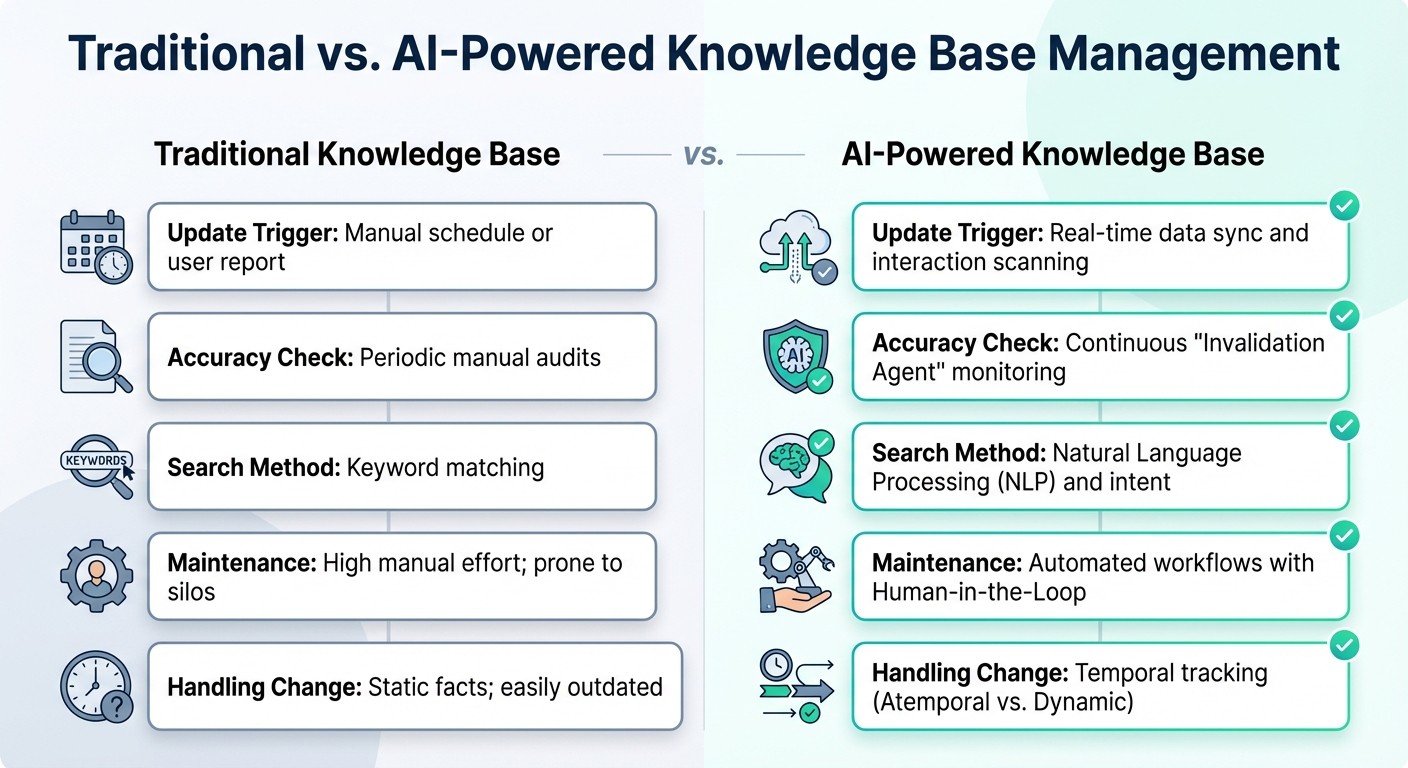
Traditional vs AI-Powered Knowledge Base Management Comparison
The difference between a knowledge base that remains effective and one that falls behind lies in how it adapts to change. AI-powered systems offer tools that traditional methods simply can't match when it comes to keeping information accurate at scale.
Traditional vs. AI-Powered Knowledge Base Management
Managing a knowledge base manually often involves scheduled reviews and periodic audits where teams comb through content to ensure accuracy. The issue? Information evolves much faster than these review cycles. Quarterly audits, for instance, can't keep pace with rapid changes, leaving outdated answers in their wake.
AI transforms this process by constantly monitoring the knowledge base. Instead of waiting for someone to flag an issue, the system tracks user interactions, identifies content that’s becoming less relevant, and updates it automatically using connected data sources. As Stack Overflow aptly puts it:
"The moment your team stops trusting your knowledge base is the moment it becomes redundant." [1]
Here’s a side-by-side look at how traditional and AI-driven methods stack up:
Feature | Traditional Knowledge Base | AI-Powered Knowledge Base |
|---|---|---|
Update Trigger | Manual schedule or user report | Real-time data sync and interaction scanning |
Accuracy Check | Periodic manual audits | Continuous "Invalidation Agent" monitoring |
Search Method | Keyword matching | Natural Language Processing (NLP) and intent |
Maintenance | High manual effort; prone to silos | Automated workflows with Human-in-the-Loop |
Handling Change | Static facts; easily outdated | Temporal tracking (Atemporal vs. Dynamic) |
In addition to keeping content fresh, AI also improves how users retrieve answers, ensuring they always find verified, accurate information.
Smart Retrieval for Verified Answers
While continuous updates ensure the knowledge base stays current, advanced retrieval techniques make it easier for users to find the exact answers they need. Traditional search systems depend on keyword matching - if the user doesn’t use the exact terms in the documentation, they might come up empty-handed. AI-powered retrieval, on the other hand, understands intent and context. For instance, if someone asks, "How do I reset a password?" the system knows they’re seeking help with authentication, even if the documentation refers to it as "credential recovery" or "account access."
This is achieved through semantic chunking and indexing. Instead of dividing documents at arbitrary character limits, AI breaks content into meaningful, context-rich segments. These segments are then converted into numerical "embeddings" that capture relationships between topics [5][4]. When a user submits a query, the system matches it to the most relevant content based on meaning, not just words.
Performance Tracking and Optimization
AI doesn’t just stop at providing updated content and smarter retrieval - it also tracks how well the system performs and continuously fine-tunes its effectiveness. By monitoring metrics like first-response resolution, automation efficiency, and time-to-solution, AI identifies areas where the knowledge base could improve [8][1]. For example, if users mark an answer as unhelpful or continue searching after viewing a result, the system flags the content for review.
This creates a feedback loop that drives ongoing improvements. Take Sony Network Communications Inc. (NURO Hikari) as an example: they implemented DocsBot AI to manage customer inquiries. In just one month, the AI system handled over 30,000 inquiries with an estimated 80% resolution rate, significantly reducing repetitive manual tasks [10]. As Matt Cromwell, Director of CX at StellarWP, puts it:
"The real power of AI in support isn't fewer tickets; it's better answers for more people. AI doesn't replace human support; it scales access to better answers." [10]
Performance dashboards make it easy to pinpoint where the knowledge base needs attention - whether it’s outdated content, missing details, or unclear explanations. Instead of guessing what to fix, teams can focus their efforts on areas that real usage data highlights as priorities.
Question Base: AI Built for Slack Knowledge Management

Question Base takes the power of AI and integrates it directly into Slack, the platform where many teams already spend their time. Instead of requiring employees to juggle multiple tools, it transforms Slack into a central knowledge hub, pulling accurate answers from your existing documentation. By seamlessly fitting into Slack workflows, Question Base ensures that teams can access the information they need without disruption.
Direct Connections to Your Documentation Tools
Question Base connects effortlessly to platforms like Notion, Confluence, Google Drive, Salesforce, Zendesk, Intercom, and Dropbox, creating a unified knowledge source right within Slack. When someone asks a question in a channel, the AI retrieves answers from these trusted systems instead of relying on unverified chat history. This is critical, considering 47% of employees report skipping their company’s knowledge base due to disorganized content and poor search functionality [4].
Getting started is simple. Install Question Base from Slack, invite the bot using /invite @questionbase, and link your documentation tools. No engineering setup is required. From the moment it’s activated, the system begins delivering accurate answers by pulling from verified sources, saving employees the hassle of searching across different platforms.
Enterprise Knowledge Management Features
Question Base goes beyond basic Q&A with features designed for enterprise-scale knowledge management. It tracks unanswered questions, ensuring no query is overlooked, and helps teams identify gaps in their documentation before they become recurring problems [8]. With analytics dashboards, leaders gain insights into automation performance, resolution times, and areas needing improvement.
For organizations handling sensitive data, Question Base offers SOC 2 Type II compliance, encryption for data in transit and at rest, and optional on-premise deployment. Teams maintain control over content access, AI responses, and escalation workflows, blending automation with human oversight to deliver accurate and reliable support [8].
Question Base vs. Slack AI
While Slack AI is great for summarizing conversations and surfacing past discussions, Question Base is specifically designed for enterprise teams that need reliable, verified knowledge at scale. Slack AI primarily pulls from chat history and channel data [4][11], while Question Base connects directly to trusted documentation, offering higher accuracy and auditability.
Feature | Question Base | Slack AI |
|---|---|---|
Primary Data Source | Notion, Confluence, Salesforce, Google Drive, Zendesk, and other documentation tools | Slack messages, channels, and files (additional sources limited to enterprise plans) |
Answer Accuracy | Verified answers from trusted documentation | Responses generated from Slack chat history |
Knowledge Management | Tracks unanswered questions, manages cases, detects duplicates, and highlights knowledge gaps | Focused on search and summarization |
Analytics & Reporting | Tracks resolution rates, automation success, and identifies unhelpful answers or content gaps | Basic usage statistics |
Enterprise Features | SOC 2 compliance, on-premise deployment, white-labeling, multi-workspace support, and customizable escalation workflows | General-purpose AI tool with enterprise security |
Best For | HR, IT, and operations teams managing internal support and verified knowledge | Individual productivity, conversation summaries, and general search |
For teams handling HR policies, IT troubleshooting, compliance guidelines, or operational procedures, Question Base delivers the structure, precision, and visibility needed for effective knowledge management - all while keeping everything within the Slack environment where your team already works.
Setting Up AI for Knowledge Base Management
Setting up AI for managing your knowledge base doesn’t have to be a drawn-out process requiring endless planning or a team of engineers. The key steps are straightforward: connect your existing documentation sources, establish workflows for human oversight, and monitor performance to address gaps before they turn into recurring issues. This approach works hand-in-hand with the real-time updates and gap detection mentioned earlier.
Linking Your Documentation Sources
Before integrating any AI tool, take the time to audit your documentation. Remove outdated content, eliminate duplicates, and fill in any missing information. As OpenAI wisely points out:
No matter how advanced your retrieval algorithms are, their effectiveness is limited by the quality and freshness of your database [5].
Starting with well-organized, up-to-date content ensures the AI delivers accurate answers from the very beginning.
With Question Base, linking your documentation is quick and simple. Install the app in Slack, use /invite @questionbase to add it to your channels, and connect platforms like Notion, Confluence, Google Drive, Salesforce, Zendesk, and Intercom. This process allows the system to pull information directly from verified sources rather than relying on unverified chat threads.
For better results, structure your content using semantic chunking and metadata, such as last-updated dates and priority tags. This helps the AI understand relationships between topics and reduces the risk of surfacing outdated or conflicting information when employees ask questions [4] [5].
Creating Review and Escalation Processes
While AI efficiently handles routine questions, human oversight is critical for maintaining long-term accuracy. Set up review queues where experts can validate AI-generated answers and address unresolved queries [3] [6]. Assign "knowledge base champions" within each department to ensure documentation remains accurate and up to date [4].
Question Base automatically flags unanswered questions, making it easier to spot and address documentation gaps before they become persistent problems. You can also configure escalation triggers - for instance, routing a query to a human expert after multiple failed attempts or for sensitive topics like compliance [6] [8]. Additionally, program the AI to include direct links to source documents with every response. This allows employees to verify information and report inaccuracies directly to the content owner [4].
Tracking Knowledge Base Performance
Analytics dashboards are invaluable for keeping tabs on your system’s performance. Use them to monitor resolution rates, automation success, and areas where the AI struggles to provide verified answers [4] [8]. Question Base offers insights into unanswered questions, helping teams identify documentation gaps that can be addressed during sprint cycles or quarterly planning.
To keep your knowledge base current, implement strategies like adding "thumbs up/down" buttons for real-time feedback, scheduling regular refresh intervals for the AI to retrain using updated documentation, and automating content health checks. These checks can flag materials based on criteria like creation date, frequency of use, and last-updated date [1] [3] [9]. This ensures employees receive accurate, timely information and helps maintain trust in the system. As Stack Overflow aptly warns:
The moment your team stops trusting your knowledge base is the moment it becomes redundant [1].
Conclusion
Keeping your knowledge base accurate means ensuring information stays updated, easy to find, and reliable as your organization grows. AI tools simplify this process by connecting directly to your documentation, identifying outdated content, and spotting knowledge gaps before they become issues. This shift from tedious manual reviews to automated, real-time updates allows your teams to focus on solving real challenges instead of wasting time searching for answers. Research shows that repetitive questions consume a significant amount of time [1], but AI-powered knowledge management breaks this cycle by providing verified answers instantly and capturing new insights from everyday conversations.
Within Slack, these AI-driven improvements become even more impactful. Question Base takes this to the next level by seamlessly integrating into Slack, ensuring every response is accurate and consistently updated. It pulls trusted answers from platforms like Notion, Confluence, Google Drive, Zendesk, and Salesforce, avoiding reliance on unverified chat history. With tools like automated gap detection, case tracking, and resolution rate analytics, Question Base helps teams maintain precision and scale without adding extra work for engineers.
At the heart of a successful knowledge base is trust. AI doesn’t just ensure accuracy - it builds confidence in the information teams use to make decisions, assist customers, and onboard new members. By replacing manual updates and disconnected systems, AI-powered knowledge management creates a living, evolving resource that gets smarter with every interaction.
FAQs
How does AI identify and address gaps in a knowledge base?
AI plays a crucial role in keeping a knowledge base both accurate and up-to-date by spotting gaps such as unanswered questions, outdated details, or responses lacking confidence. It analyzes user interactions to find patterns - like frequently asked questions that yield no results or topics that consistently receive inadequate answers. Once these issues are flagged, AI steps in to address them by:
Pulling updates from reliable sources such as CRMs, product catalogs, or documentation platforms.
Incorporating employee feedback, allowing team members to suggest updates or correct inaccuracies.
Automatically refreshing and re-training content, ensuring the information stays relevant and dependable.
Platforms like Question Base streamline this process by integrating directly with tools like Notion, Confluence, and Salesforce. This ensures updates happen effortlessly, so employees always get precise answers right within Slack.
How can AI tools enhance knowledge management in Slack?
Integrating AI tools into Slack turns it into a powerful knowledge center, allowing employees to find clear, conversational answers without switching platforms. By connecting with reliable sources like Notion, Confluence, or Salesforce, these tools provide teams with up-to-date information, cutting down on search time and ensuring there's a consistent, reliable source for company knowledge.
These AI tools go a step further by automating updates, identifying outdated content, and highlighting gaps in your knowledge base. This keeps your resources accurate and useful. The result? Faster problem-solving, smoother collaboration, and the preservation of vital institutional knowledge - helping your organization stay efficient and on the same page over the long term.
How does AI keep knowledge bases accurate as information changes?
AI keeps knowledge bases current by seamlessly syncing with reliable sources such as databases, documentation platforms, and APIs. It handles updates automatically, using methods like web crawling and leveraging large language models (LLMs) to identify and extract new or revised information. Additionally, human input plays a crucial role in reviewing and fine-tuning these updates, ensuring they remain both accurate and relevant.
By blending automation with human expertise, AI responds swiftly to changes, maintaining knowledge bases as trustworthy and up-to-date resources for users.