∙
Cooper
∙
Reading time:
15 min

Version control is a system that tracks changes to documents, ensuring teams work with the latest version while maintaining a full history of edits. It’s especially critical for knowledge articles, where outdated or conflicting information can lead to inefficiencies, compliance risks, and wasted time. With features like change tracking, rollback options, and collaborative editing, version control eliminates confusion and boosts productivity.
Key reasons why version control matters for knowledge articles:
Prevents "version chaos": Teams avoid confusion over which document is the authoritative source.
Saves time: Employees spend less time searching for accurate information or re-answering the same questions.
Supports compliance: Built-in audit trails meet regulatory requirements in industries like healthcare and finance.
Improves collaboration: Multiple contributors can edit without overwriting each other’s work.
For enterprises, version control ensures efficiency, accuracy, and compliance - all while enabling teams to manage knowledge seamlessly across tools like Confluence, Google Docs, and Slack.
Looking for a smarter way to manage version control in Slack? Learn more about Question Base and how it connects your version-controlled knowledge directly to your team’s workflows.
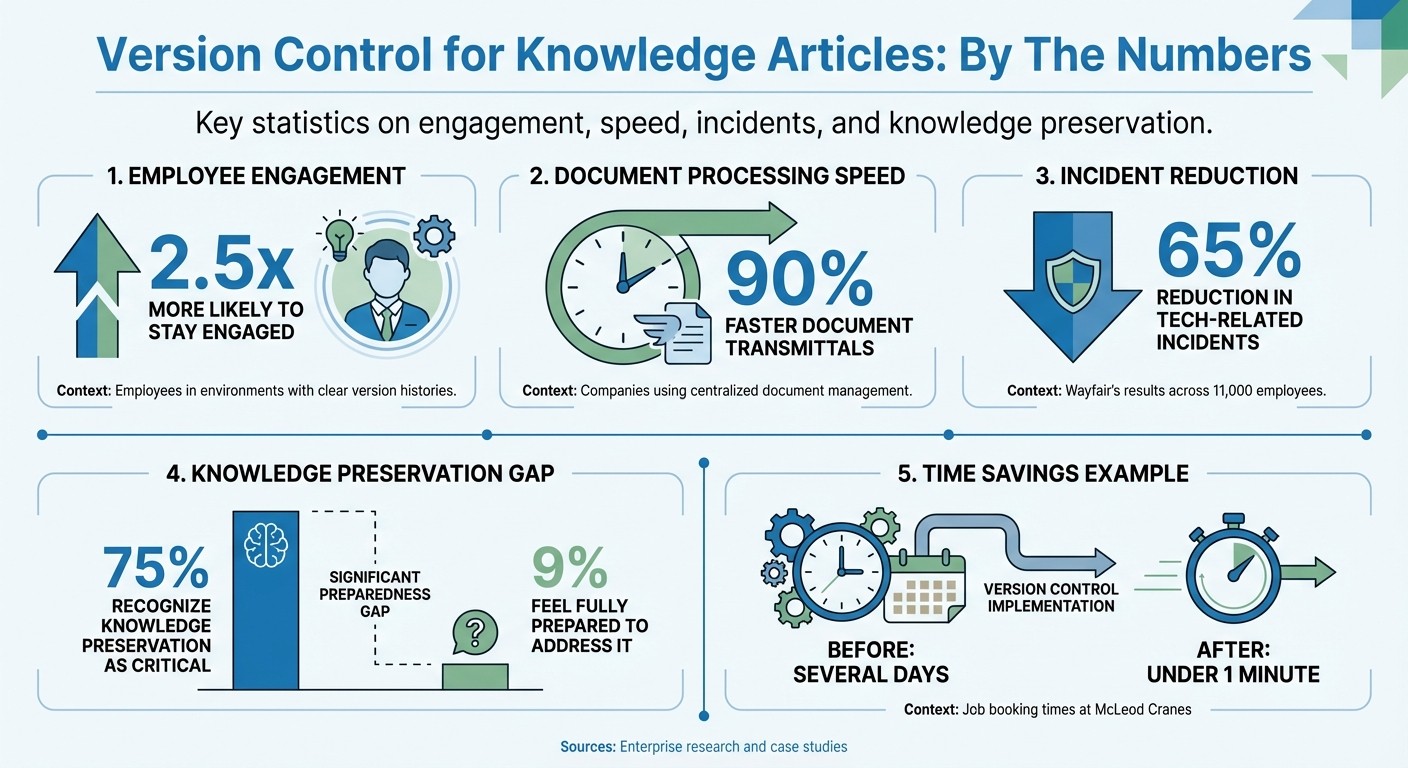
Version Control Impact: Key Statistics for Enterprise Knowledge Management
How Does Version Control Optimize Knowledge Base Management? - Customer Support Coach
Effective versioning is a key part of how you organize knowledge for AI retrieval to ensure your team always accesses the most accurate information.
Key Benefits of Version Control for Enterprises
Building on the basics of version control, let’s explore how it impacts enterprises in meaningful ways.
Better Collaboration and Accountability
Version control transforms how teams collaborate on knowledge articles. It allows multiple contributors to work on the same document without the risk of overwriting each other's updates. Every change is logged with a timestamp and the contributor's name, creating a detailed record of who made which edits [1][6].
This transparency fosters accountability. Research shows employees are 2.5 times more likely to stay engaged when they operate in environments with clear version histories [3]. When someone updates a critical document, their name is attached to the change. This discourages careless edits and makes it easier to identify subject matter experts when questions arise [1].
Advanced systems go even further by handling conflicts intelligently. For example, if two team members edit the same section at the same time, the software flags the overlap and prompts manual resolution. Some platforms even use a check-in/check-out model to manage concurrent edits [3]. Enterprises often integrate approval workflows, requiring drafts to be reviewed by content owners or experts before publication [4].
While collaboration is improved, version control also streamlines processes for greater efficiency.
Increased Efficiency and Accuracy
Version control eliminates confusion over outdated content. Teams no longer waste time trying to figure out which version of a document is correct - they work from a single, authoritative source [1][2].
The ability to roll back to previous versions ensures errors can be corrected quickly. Side-by-side comparison tools make it easy to pinpoint changes between versions, helping editors verify updates before finalizing them [1]. Companies that adopt centralized document management systems report dramatic time savings, with some seeing document transmittals speed up by 90% [3].
Real-world examples highlight the impact. McLeod Cranes, a family-owned business, used automated workflows and centralized knowledge sharing to cut job booking times from several days to under a minute [7]. Similarly, Wayfair integrated version control into their workflows, reducing tech-related incidents by 65% across their 11,000 employees [7].
This level of precision also plays a crucial role in meeting compliance requirements.
Regulatory Compliance and Audit Trails
In industries like healthcare, finance, and insurance, version control isn’t just helpful - it’s mandatory. These sectors must maintain detailed records of changes to policies, procedures, and critical documentation [1]. Version control systems provide an untampered audit trail, showing exactly when changes were made and who approved them.
Auditors benefit from comparison tools that reveal how content evolved over time, ensuring compliance with regulations rather than relying solely on current versions [1]. Access controls further protect sensitive information, ensuring only authorized personnel can make edits. This supports compliance with standards like SOC 2, ISO 27001, and GDPR [8]. And if an unapproved change occurs, rollback features allow teams to restore the last compliant version with ease [1][3].
Despite its importance, only 9% of organizations feel fully prepared to address knowledge preservation challenges, even though 75% recognize it as critical for success [3]. Automated version control systems close these gaps, replacing error-prone manual processes with reliable audit trails that meet regulatory demands [1].
Core Features of Effective Version Control Systems
Effective version control systems are essential for safeguarding your documentation while improving collaboration and ensuring compliance. However, not all systems are created equal. To find the right fit, look for features that align with your specific documentation needs.
Complete Revision History
A detailed revision history is the backbone of any robust version control system. It logs every change - down to the date, time, user, and modification details - creating a clear trail of accountability and mapping out internal expertise.
This feature is particularly helpful for identifying subject matter experts within your organization. For instance, when clarification is needed on a technical procedure or policy update, the revision history pinpoints exactly who authored or edited the relevant section. This transforms your documentation into a dynamic resource for locating internal expertise.
Top-tier systems go beyond tracking text changes. They capture metadata like document status (e.g., Draft, Review, Published), author information, and creation dates. This not only boosts searchability but also simplifies identifying key contributors. Some platforms even use "delta tracking", which records only the differences between versions rather than duplicating entire files. This approach keeps the system lightweight and easy to navigate.
Such detailed logs also allow for precise comparisons and seamless rollbacks when working in fast-paced environments.
Comparison and Rollback Capabilities
The ability to compare versions side-by-side is a game-changer. These tools highlight differences, flag overlapping edits, and make it simple to revert to a previous version if an update introduces errors or becomes obsolete. This ensures updates are both accurate and easily reversible when needed.
Advanced systems take it a step further by enabling branching and merging for larger updates. For example, technical writers can create separate branches to work on significant revisions. Once reviewed, these branches can be merged back into the main document without disrupting the live content that employees depend on daily.
In addition to tracking and comparing changes, effective systems also prioritize control over who can modify content.
Access Controls and Permissions
Role-based permissions are critical for maintaining the integrity of your documentation. These controls ensure that only authorized personnel can edit or approve content, safeguarding sensitive information. This is especially important for industries such as finance and healthcare, where audit trails are mandatory for regulatory compliance.
Many systems implement a "two-person rule", where content creators draft materials, but only designated approvers can publish them. This ensures all live content is thoroughly vetted for accuracy and compliance before employees access it.
To prevent version chaos, check-in/check-out procedures allow only one person to edit a document at a time. This eliminates the risk of team members overwriting each other's work - an issue common in systems lacking proper controls. Clear role definitions also help maintain order by ensuring everyone operates within their designated scope.
Role | Primary Responsibility | Permission Level |
|---|---|---|
Content Owner | Ensures accuracy and relevance | Full Edit/Approve/Delete |
Contributor | Drafts and produces content | Create/Edit Drafts only |
SME | Verifies technical accuracy | Review/Comment only |
Approver | Final gatekeeper for publication | Publish/Reject |
KB Administrator | Manages platform and permissions | System-wide Admin |
How to Implement Version Control in Your Knowledge Base
Adding version control to your knowledge base doesn't mean starting from scratch. By selecting tools that align with your team's workflow, setting up clear processes, and integrating with your existing systems, you can seamlessly introduce version tracking into your knowledge management practices.
Choosing the Right Tools
The tools you choose should complement the way your team already operates. For example, Confluence is ideal for teams using Atlassian products, offering features like page revision history and real-time update notifications. Helpjuice, on the other hand, simplifies version control with automatic tracking, side-by-side comparisons, and one-click rollback options - perfect for quickly fixing problematic edits. If your team handles technical documentation alongside code, Git/GitHub provides robust version control with branching and merging functionalities.
Integration is another critical factor. Confluence connects with over 3,000 tools, including Slack, Jira, and Microsoft Office, ensuring a consistent source of truth across platforms. Similarly, SharePoint and Google Docs offer centralized version history, making it easier to track changes. Opting for tools with built-in version control capabilities will save time and effort.
Once you’ve chosen the right platform, the next step is to establish structured workflows to make the most of these tools.
Setting Up Clear Workflows
A well-defined content lifecycle - spanning planning, drafting, review, approval, publishing, and maintenance - ensures that every piece of content undergoes thorough scrutiny before it reaches your team.
Introduce approval gates to keep quality in check. For instance, configure your system so that drafts remain in a "pending" state until reviewed and approved by a second party. Role-based access controls can also help by ensuring only authorized team members can publish content, safeguarding against unvetted information.
Establishing versioning policies is equally important. Use whole numbers (e.g., v1.0, v2.0) for major updates and decimals (e.g., v1.1, v1.2) for minor tweaks. Standardize file naming conventions, such as "DocumentName_v1.1_2026-01-17", to prevent confusion in shared drives. Automated notifications can further streamline the process by alerting content owners to edits or upcoming review deadlines.
With workflows in place, the final step is to ensure these systems integrate smoothly with your enterprise tools.
Integrating with Enterprise Systems
Version control becomes most effective when it’s connected to the tools your team already relies on. For example, Slack can serve as a central hub by integrating with GitHub, Google Drive, Jira, and Salesforce. This allows employees to access the latest version of a document directly within their Slack workflows, eliminating the need to switch between platforms. It also reinforces the benefits of streamlined revision histories and audit trails.
For teams using Question Base, integration is even more seamless. The platform connects with trusted sources like Notion, Confluence, Google Drive, Zendesk, Intercom, and Salesforce, ensuring accurate and up-to-date answers are delivered directly in Slack. Revisions are automatically reflected, and the system tracks unanswered questions to identify knowledge gaps, allowing you to prioritize updates during sprint cycles or quarterly planning.
Before rolling out these changes across your organization, consider piloting the workflow in a smaller setting. This helps identify potential bottlenecks, fine-tune permissions, and adjust notification settings based on actual usage. Once the pilot is successful, you can scale the process while keeping centralized oversight for compliance-critical content.
How Question Base Improves Version Control for Knowledge Articles

Managing version control becomes far more efficient when combined with AI-driven knowledge management. Question Base takes your existing version-controlled content from platforms like Confluence, Notion, and Google Drive and transforms it into an active, real-time knowledge delivery system within Slack.
Seamless Integration with Trusted Platforms
Question Base integrates directly with the tools where your version-controlled content already resides. Platforms like Confluence, Notion, Google Drive, Zendesk, Intercom, and Salesforce are supported, ensuring that the system works with the revision histories these tools already maintain. For example, if someone updates a Confluence page or modifies a Google Doc, those changes automatically sync with the answers delivered by Question Base in Slack. This ensures a single source of truth, cutting through the versioning headaches that many organizations face [3].
With this setup, employees always receive accurate, up-to-date answers directly from your version-controlled repositories. Plus, they can access links back to the original source for additional context. This streamlined integration lays the foundation for dynamic knowledge updates powered by AI.
Continuous AI-Driven Updates
Traditional knowledge bases often stagnate without frequent manual updates. Question Base changes the game by actively capturing insights shared in Slack and turning them into continuously evolving documentation. When employees provide solutions in a Slack thread, you can save those answers with a single click, enriching your knowledge base to reflect your team’s real-world needs.
The system also identifies unanswered questions, highlighting gaps in your content. This helps you prioritize updates during sprints or quarterly planning. Enterprises have seen tangible benefits from this approach - Wayfair’s IT team, for instance, leveraged Slack and AI-powered knowledge management to cut tech incident volume by 65% [9]. Question Base builds on this by organizing insights into a dynamic FAQ, transforming fleeting Slack conversations into structured, searchable documentation.
Security and Customization for Enterprises
For organizations with strict security standards, Question Base offers SOC 2 Type II compliance, with encryption both at rest and in transit. Optional on-premise deployment is available for those requiring even tighter control. Role-based permissions ensure that sensitive information remains accessible only to approved users, and customization features allow you to tailor the AI’s tone, behavior, and escalation processes to fit your company’s needs.
Jeff Lai from Canva's Internal Infrastructure team summed up the value of centralization: "Work becomes a lot more visible when it's all in one place. It makes collaboration a whole lot easier and facilitates that transparency" [5].
Question Base enhances this visibility further by providing analytics on automation rates, resolution times, and knowledge gaps. These insights empower leaders to refine support processes and maintain control over their version-controlled content, all while boosting overall efficiency.
Conclusion
Key Takeaways
Version control serves as the backbone of an efficient and reliable knowledge base. Without it, organizations face chaos - employees waste valuable time searching for the correct version of a document or, worse, rely on outdated information. The advantages are straightforward: version control provides a single source of truth, avoids conflicting edits, and ensures audit trails critical for compliance. It also acts as a fail-safe - if an update goes wrong, you can instantly roll back to a previous version instead of scrambling to recover lost data. As Rick Nucci, Co-founder and CEO of Guru, aptly states:
"Version control is a foundational piece of creating an AI Source of Truth" [3].
However, as teams grow, manually managing version control becomes impractical. Despite 75% of organizations acknowledging the importance of preserving knowledge for success, only 9% feel equipped to tackle the challenge effectively [3]. This gap between recognizing the need and implementing solutions is where many teams stumble.
Given these challenges, choosing the right tools to manage version control is crucial for long-term success.
Choosing the Right Tools for Success
To truly harness the benefits of version control, selecting the right tools can transform it from a basic necessity into a strategic advantage. For smaller teams, simple manual naming conventions might work. But as your organization scales beyond 20 employees, automated platforms become essential. Look for tools that handle revision tracking, offer role-based permissions, and seamlessly integrate into your existing workflows - whether you're using Confluence, Notion, Google Drive, or Salesforce.
Question Base takes this concept even further by linking version-controlled content directly to active knowledge sharing within Slack. This ensures your team receives accurate, up-to-date answers straight from trusted sources, eliminating the need to dig through repositories. When a Confluence page or Google Doc is updated, those changes sync instantly with your Slack workspace. On top of that, Question Base captures insights from Slack conversations and highlights knowledge gaps, turning version control into a dynamic, evolving system tailored to your organization's needs - all while adhering to strict enterprise security standards.
FAQs
How does version control help prevent confusion in knowledge articles?
Version control simplifies collaboration by assigning a distinct version to each update, ensuring every change is recorded and preserved. This system provides a single source of truth, enabling teams to easily review, compare, or roll back to earlier versions without the chaos of conflicting drafts. It ensures documentation stays precise, consistent, and manageable.
How does version control benefit compliance in regulated industries?
Version control plays a key role in helping regulated industries stay compliant by keeping a detailed record of every change made to knowledge articles. This process creates a reliable audit trail, simplifying the task of proving compliance with industry regulations and standards during inspections or audits.
By saving previous versions and documenting updates, version control minimizes errors, ensures information remains accurate, and holds teams accountable. It also promotes transparency by clearly showing who made changes, when they were made, and the reasons behind them - an essential practice for meeting regulatory demands.
How can enterprises integrate version control with tools like Slack and Confluence to keep knowledge up to date?
Enterprises can take advantage of Confluence's built-in version control to efficiently manage their knowledge articles. Each time a change is made, a new version is created, enabling teams to track updates, compare past revisions, and even restore earlier versions when necessary. This approach ensures documentation remains accurate and easy to audit.
By linking Confluence to Slack using APIs or webhooks, teams can receive instant notifications in Slack whenever a page is updated. This setup keeps everyone in the loop without disrupting their workflow, turning Slack into a central hub for staying updated on changes.
For even greater accessibility, businesses can integrate an AI-powered answer agent like Question Base. This tool connects seamlessly with Confluence and other platforms, delivering the latest, verified answers directly within Slack. It also identifies outdated content that needs review, ensuring knowledge stays current. By combining these tools, teams can share accurate information effortlessly while continuing to work in the tools they’re already familiar with.