∙
Cooper
∙
Reading time:
13 min

Repetitive questions in Slack drain productivity and overwhelm support teams. AI agents can solve this by automating answers to routine queries, turning Slack into a powerful knowledge hub. This guide outlines the key steps to deploy AI agents like Question Base effectively:
Plan: Identify repetitive questions, catalog knowledge sources, and set measurable goals (e.g., reduce query resolution time by 50%).
Configure: Install the agent, link documentation tools like Notion or Confluence, and apply security controls.
Test: Validate response accuracy (85%+), enforce permissions, and stress-test performance.
Optimize: Monitor usage, update knowledge bases, and refine AI settings based on feedback.
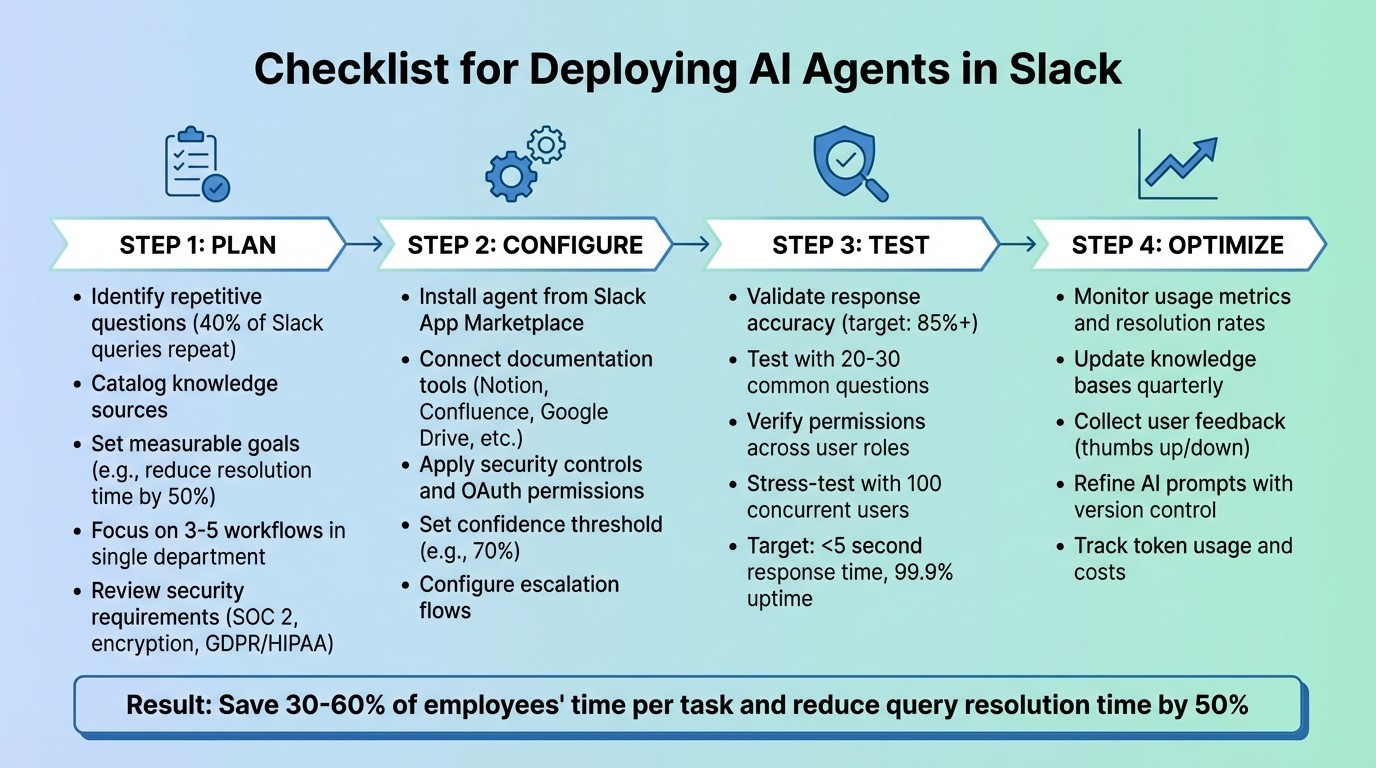
4-Step Process for Deploying AI Agents in Slack
Build a Slack AI Agent That Answers Questions (Step-by-Step Tutorial)
Step 1: Pre-Deployment Planning
A clear roadmap is essential to avoid poor adoption, security risks, and wasted resources.
Set Business Goals and Use Cases
Start by pinpointing specific problems your AI agent will address. Focus on high-volume, repetitive queries that drain your team’s time. Common examples include HR support (benefits questions, PTO policies, onboarding), IT help desk tasks (VPN setup, MFA resets, device troubleshooting), and operational workflows (software provisioning, approval processes).
Analyze your most frequent requests - 40% of Slack queries often repeat themselves - and highlight opportunities for automation[1]. Use a simple spreadsheet to list common IT and HR requests, tagging those that follow predictable, step-by-step processes. For instance, workflows like team transfers (updating permissions, removing old access) or license assignments (approval, provisioning, confirmation) are perfect automation candidates.
To start, focus on 3–5 straightforward workflows in a single department. This lets you measure results before expanding further[3]. Define clear success metrics, such as First Contact Resolution (FCR) rate, Mean Time to Resolution (MTTR), and a reduction in repeat queries. Set measurable goals, like cutting query resolution time by 50% or saving 30–60% of employees’ time per task[3]. Review your current support tickets to establish a baseline, then compare improvements after 30–60 days of deployment.
List Your Knowledge Sources and Data Tools
Create a detailed inventory of all platforms where your team stores documentation - Notion, Confluence, Google Drive, Zendesk, Salesforce, Intercom, Dropbox, and others. Incomplete catalogs can lead to inaccurate answers, so aim to be thorough. Include both formal documentation and informal sources, such as Slack threads, where valuable information often gets buried.
Ensure your AI agent has API access and the required permissions for these platforms. It’s crucial to control what content the agent can access and who can query it. Collaborate with your IT team to confirm API access is enabled and that service accounts have the right permissions. Address any mismatched permissions early, as these can delay deployment or create security vulnerabilities[3].
Once your documentation sources are fully cataloged and accessible, confirm they align with your organization’s security standards.
Review Security and Compliance Requirements
Enterprise AI agents must adhere to strict security protocols. Review your organization’s requirements for SOC 2 Type II compliance, encryption at rest and in transit, data residency rules, and optional on-premise deployment. For U.S.-based companies, ensure data residency within the U.S. and confirm compliance with regulations like HIPAA or GDPR if your industry demands it.
Implement layered permission checks to prevent unauthorized data access[2]. This ensures only approved employees can view sensitive information. For high-stakes operations, such as software provisioning or permission changes, design human-in-the-loop workflows - where the AI agent drafts actions but requires human approval before proceeding[2].
Question Base provides enterprise-grade security, including SOC 2 Type II compliance, encryption for data at rest and in transit, and optional on-premise deployment for organizations with strict residency requirements. Custom enterprise tiers also offer features like white-labeling, multi-workspace support, and tailored adjustments to meet your policies. Engage your IT and security teams early to conduct a gap analysis, ensuring the AI agent aligns with your standards before deployment begins.
Step 2: Deployment and Configuration
Now that your planning is complete, it’s time to bring your AI agent to life. This step puts all your groundwork into action by installing and configuring the system.
Install and Configure the AI Agent
Begin by installing the AI agent from the Slack App Marketplace. For Question Base, simply search for the app, click "Add to Slack," and approve the necessary permissions. Stick to the principle of least privilege by granting only essential OAuth scopes like chat:write and app_mentions:read.
Once installed, invite the agent to specific channels using the /invite @questionbase command. This approach ensures the agent doesn’t access sensitive conversations, such as those in executive or HR-only spaces. It’s best to start small - roll out the agent in 2–3 pilot channels, such as IT help desk or HR support, rather than deploying it across the entire workspace right away.
For testing, use the Slack CLI to set up a dedicated test workspace. This allows you to verify event subscriptions and message formatting in an isolated environment before going live.
The final step in this part of the process is connecting your documented knowledge sources.
Connect Documentation Tools and Knowledge Bases
Link the AI agent to your knowledge sources. Question Base supports integrations with platforms like Notion, Confluence, Google Drive, Zendesk, Intercom, Salesforce, and Dropbox - the tools you identified during the planning phase.
Authenticate each platform using OAuth and carefully filter access to specific folders or pages. For example, you might only link the "Employee Handbook" folder in Google Drive or specific Confluence spaces, such as "IT Policies" or "Benefits Documentation."
Check that your service accounts have the correct API permissions for each platform. Mismatched permissions can cause delays, so test each connection individually to confirm everything is working smoothly. Keep in mind that the Starter plan for Question Base allows one integration (up to 10 pages), while the Pro plan expands support to 200 pages per seat across multiple tools.
Adjust AI Settings and Access Controls
Fine-tune the AI agent’s behavior to match your team’s needs. For instance, you can set a formal tone for compliance-heavy industries or a more casual tone for a tech startup. Configure escalation flows for situations where the agent has low confidence in its response.
Set a confidence threshold for AI responses - for example, 70%. When the agent’s confidence dips below this level, it should escalate the question to a subject matter expert instead of risking an incorrect response. Define clear escalation rules to route these queries to the right people, such as tagging roles like @IT-oncall or @HR-lead for follow-up.
Map Slack roles (Owner, Admin, Member) to permissions for integrations, and enable audit logging to track activity for compliance purposes. For critical tasks, activate human-in-the-loop workflows, requiring manual approval before the agent takes action.
Finally, use structured prompts with version control. This allows you to A/B test adjustments and revert to earlier versions if new changes don’t perform as expected.
Step 3: Testing and Quality Assurance
Testing ensures your AI agent meets expectations for accuracy, security, and performance. This phase confirms that the planning and configurations from Step 2 deliver reliable and secure outcomes. By identifying and resolving issues early, you create a more effective and trustworthy system.
Test Answer Accuracy and Knowledge Retrieval
Start by running a test suite of 20–30 common questions through the agent. This helps you confirm it retrieves accurate information from your connected sources, like Notion or Confluence. Aim for responses to match the correct answers at least 85% of the time and to return within 3.5 seconds[2][1]. Test multi-turn conversations to ensure the agent keeps context during follow-ups and adapts to topic changes smoothly.
Add feedback buttons so users can flag incorrect or unhelpful answers. Each response should link back to its source document for easy manual verification. Use gap analytics to spot areas where the knowledge base needs improvement - especially if the agent struggles repeatedly with certain topics.
Verify Security and Access Permissions
Simulate unauthorized queries to test security and confirm access controls work as intended. Check permissions at every level: when users interact with the agent, when it accesses external data, and when it performs tasks in other systems. Test with Slack users assigned different roles (Owner, Admin, Member) to ensure restrictions are correctly enforced, including channel-specific limitations.
Enable Slack's Audit Logs API to track key activities like installations, permission updates, and data access attempts. This provides an added layer of security and transparency.
Run Load and Performance Tests
Once accuracy and security are validated, shift focus to performance. Stress-test the agent with 100 concurrent users, aiming for response times under 5 seconds and uptime of 99.9%. Ensure the agent remains functional during tool failures and speeds up responses by caching frequent queries[2].
Monitor token usage per query to manage costs effectively. Confirm the agent’s stateless design allows multiple instances to load state from shared storage, ensuring smooth operation even under heavy load. The system should handle unexpected data returns or temporary outages with minimal disruption.
"Since we started using Question Base we don't spend any time looking up our procedures in a support manual. Before, we could easily spend 5–10 minutes searching... Now, QB finds the relevant answers in a few seconds"[1].
Maria Jensen, UX Lead & Scrum Master, Ticketbutler
Step 4: Post-Deployment Optimization
Deploying your AI agent is just the beginning. To ensure it continues to deliver value, you’ll need to refine and improve it based on real-world usage. This ongoing optimization keeps your agent accurate, efficient, and aligned with your team’s changing needs. Here’s how to turn a functional deployment into a dynamic, high-performing knowledge system.
Track Usage Metrics and Identify Knowledge Gaps
Start by monitoring key metrics like resolution rates to see how well your AI handles queries independently. High escalation rates or frequent unresolved questions often highlight areas where your documentation falls short. For instance, if certain questions repeatedly go unanswered, it’s a sign that your knowledge base needs attention. Assign team members from HR, IT, or Ops to review these patterns regularly - weekly reviews can help pinpoint gaps and ensure your documentation tools, like Notion or Confluence, stay up to date.
Question Base simplifies this process with dashboards that provide insights into automation rates, resolution success, and user feedback, such as "unhelpful" flags. Its duplicate detection features can also identify overlapping content - like entries with 80% similarity - that might confuse both the AI and your users. By analyzing escalation trends, you can determine which topics are most often routed to human experts and prioritize those areas for improvement.
Once you’ve identified these gaps, update your documentation and adjust your AI prompts to better address these recurring issues.
"We no longer have staff waiting on busy managers for an answer. Question Base is there in seconds, plus it's easy to verify answers as new questions come along."
Monica Limanto, CEO, Petsy
Keep Knowledge Sources and Prompts Current
Your AI agent is only as good as the information it draws from. That’s why it’s crucial to regularly update your documentation to reflect changes in policies, products, or workflows. Cache frequently accessed documents with timestamps to ensure they’re always up-to-date while also keeping operational costs in check.
For added flexibility, implement prompt versioning. This allows you to test adjustments and easily revert if something doesn’t work as intended. Technical teams can align knowledge base updates with sprint cycles, ensuring the AI reflects the latest product changes. Across all teams, quarterly content audits are a good practice - during these reviews, subject matter experts can validate the accuracy of AI-generated responses against current company standards.
After refreshing your content and fine-tuning prompts, gather feedback to identify additional areas for improvement.
Collect Feedback and Plan Future Updates
Feedback is essential for ongoing optimization. Add thumbs up/down buttons to AI responses so employees can flag inaccuracies or suggest improvements. Create a test suite of common user interactions with expected outcomes - not every response will be identical, but the actions and tools triggered should remain consistent.
Keep an eye on token usage per user and conversation to spot inefficiencies, such as overly complex prompts or unnecessary API calls that inflate costs. Set usage budgets and enable alerts to avoid surprises. If you notice a drop in adoption, take the time to gather direct feedback from users to address any usability concerns.
Encourage employees to work in public Slack channels instead of private DMs. This expands the pool of information the AI can learn from, making it more effective over time. Question Base’s AI learning features enhance this process by analyzing how experts handle unresolved questions in Slack, then automatically converting those answers into new knowledge base entries. The result? A continuously evolving FAQ that grows alongside your organization.
Conclusion: Key Steps for Deploying AI Agents in Slack
Rolling out AI agents in Slack involves four main phases: planning your objectives and identifying knowledge sources, configuring the agent and necessary integrations, testing for accuracy and security, and refining based on how it performs in real-world scenarios. Each phase builds on the last, creating a smooth process that turns Slack into a central hub for knowledge sharing, cutting down repetitive questions and saving your team valuable time.
To keep your AI agent effective, rely on ongoing insights, analytics to uncover documentation gaps, and regular updates to prompts. Tools like Question Base simplify this process with features like duplicate detection, AI-driven learning to address content gaps, and dashboards that track resolution rates. These tools ensure your FAQ evolves alongside your organization’s needs.
For enterprise deployments, strict permission controls are essential. In sensitive workflows, consider using human-in-the-loop systems where agents can draft responses but require approval before sending[2]. For teams needing verified, expert-backed answers, Question Base turns Slack into more than just a messaging platform - it becomes a strategic knowledge center. With SOC 2 Type II compliance, encryption for data both at rest and in transit, and optional on-premise deployment, Question Base provides the control and security needed to manage your knowledge ecosystem effectively.
FAQs
How do I choose the best first Slack channels to pilot an AI agent?
Start by focusing on Slack channels that deal with frequent, repetitive questions or handle key workflows like IT support, HR onboarding, or operations. These areas are ideal for automation since they often involve predictable, recurring queries. Additionally, pay attention to channels where collaboration is crucial but currently inefficient - for example, project-specific or department-wide discussions.
When selecting channels, prioritize those with manageable access controls. This ensures security while allowing you to test, gather feedback, and measure performance effectively. By refining responses and processes in these channels first, you’ll set a strong foundation before rolling out automation on a larger scale.
What permissions should the agent have to stay secure in Slack?
To maintain the security of an AI agent in Slack, it’s crucial to limit its permissions strictly to what’s required for its functionality. Designate specific roles, such as Integration Owner and Security Reviewer, to handle app approvals and assess potential risks. Regularly perform quarterly audits to avoid permission creep and to keep an eye on any suspicious activity. For platforms like Question Base, ensure the agent only accesses necessary content and complies with enterprise security standards, including SOC 2 Type II certification.
How do I keep answers accurate as policies and docs change?
To keep answers accurate as policies and documentation change, it's essential to set up a consistent review process. Consider scheduling updates quarterly or immediately following major policy revisions. Tools like Question Base make this easier by syncing directly with trusted platforms like Notion or Confluence, ensuring your content remains current. Additionally, AI capabilities can flag outdated responses and recommend updates, making it simpler to provide your team with reliable and up-to-date information.