∙
Cooper
∙
Reading time:
15 min

Repetitive Slack messages slow down teams. From IT to HR, employees often spend hours answering the same questions, searching for information, or sifting through threads. AI-powered triage systems solve this by classifying, prioritizing, and routing messages automatically, turning Slack into an organized knowledge hub.
Key Benefits:
Save time: Employees reclaim up to 97 minutes weekly through smarter search and automation.
Reduce repetitive tasks: Automate 25–35% of internal queries in just a few months.
Improve accuracy: Answers are pulled from trusted documentation, reducing errors and confusion.
How It Works:
Intent recognition: AI identifies message context (e.g., HR, IT, or operations-related).
Smart prioritization: Urgency is determined using signals like deadlines or blocked workflows.
Instant answers: The system pulls verified info from platforms like Notion, Confluence, and Salesforce.
Unlike Slack AI, which focuses on summarizing conversations, tools like Question Base specialize in enterprise-level triage by connecting directly to trusted documentation. This ensures employees get accurate, verified responses without leaving Slack.
Ready to reduce Slack chaos and streamline your workflows? Start by integrating your documentation tools and setting up AI triage in high-traffic channels like IT or HR support.
Slack to Google Sheets | Prioritize Messages with AI Wizard 📊⚡
How AI Triage Systems Work in Slack
AI triage systems transform Slack from a flood of messages into a streamlined workspace by analyzing incoming messages in real time. Powered by natural language processing (NLP), these systems identify the intent behind each message, determine its urgency, and pinpoint the right audience. Instead of relying on manual sorting or simple keyword matching, AI examines the broader context - such as active Slack channels, recent conversations, calendar events, and shared files - to make smarter routing decisions [1][5]. The result? Each inquiry is quickly interpreted and routed based on its priority and relevance.
Here’s how it works: when someone asks a question in Slack, the AI first identifies the intent - whether it’s a request for company policy details, a technical issue, or an HR-related query. Then, it evaluates urgency by looking at real-time signals like recent notifications, deadlines on the user’s calendar, or signs that the issue is blocking critical work [5]. Depending on the situation, the AI either provides an instant answer by pulling from connected tools like Notion or Confluence or directs the query to the right team member or subject-matter expert [3].
How AI Classifies and Prioritizes Messages
Modern AI systems take a layered approach to classify and prioritize messages. They analyze the language used, the Slack channel where the message appears, and the sender’s role within the company. For instance, if an engineer posts "deployment failed in production" in a DevOps channel, the AI recognizes the message as both technical and urgent, flagging it for immediate attention by the on-call team. This nuanced understanding ensures that critical issues are escalated while routine questions remain low-priority [5].
To improve accuracy, the AI cross-references messages with external documentation systems. For example, if someone asks about the company’s remote work policy, the AI searches connected platforms like Google Drive or Confluence, retrieves the relevant document, and delivers an accurate response - all without human involvement. This process not only reduces repetitive questions by up to 40% but also ensures employees receive reliable, up-to-date information.
Benefits of AI Triage for Enterprises
The advantages of AI triage are hard to ignore. Employees save an average of 97 minutes per week thanks to features like channel recaps, thread summaries, and smarter search tools [6][3]. Organizations that implement AI triage systems can automate 25–35% of internal queries within just 2 to 6 months [2]. This automation allows IT teams, HR managers, and operations leaders to focus on higher-value tasks rather than answering the same questions repeatedly.
AI triage also helps reduce burnout for support teams by handling routine inquiries. Questions like "How do I submit expenses?" or "What’s our PTO policy?" are answered instantly with verified information pulled from company documentation. While complex or sensitive issues are still escalated to human experts, the significant drop in manual responses enables teams to concentrate on critical matters, ensuring faster and more efficient resolutions.
What to Look for in an Enterprise AI Triage Solution
When choosing an enterprise AI triage tool, focus on three key areas: smart categorization and escalation, seamless integration with existing tools, and rigorous security and compliance standards. These features ensure the solution can handle internal support efficiently and scale with your organization’s needs.
Smart Categorization and Escalation
Top-tier AI triage systems do more than just match keywords - they interpret context. They analyze signals like active Slack channels, shared files, and user roles to understand the query’s requirements [1]. For instance, if an employee asks about expense submission policies, the AI should evaluate urgency (e.g., based on upcoming deadlines or calendar events) and either provide an instant answer from connected documentation or escalate the issue to the right team.
Permission-aware retrieval is a must. This ensures employees can access only authorized data, reducing the risk of exposing sensitive information [7][8]. For complex or sensitive queries, the system should escalate seamlessly to a human expert, including all relevant context, so employees don’t have to repeat themselves.
Integration with Your Existing Tools
An AI triage solution is only as effective as its access to your organization’s knowledge. Look for tools with federated search capabilities that pull information from CRMs, code repositories, cloud storage, and documentation platforms - all without leaving Slack [4][8]. This reduces the need for context switching and simplifies workflows.
Prebuilt connectors for popular enterprise platforms are another must-have [5]. For example, Question Base integrates directly with these systems, pulling verified answers from trusted documentation rather than relying on AI-generated guesses or outdated Slack conversations. This ensures employees get accurate, up-to-date responses every time.
Security and Compliance for Enterprises
Security is non-negotiable, especially for enterprises handling sensitive data. Prioritize solutions with SOC 2 Type II certification, customer-managed encryption keys, and AES-256 encryption with HTTPS/TLS to protect data both at rest and in transit [9][10]. For industries with heightened security needs, look for options that offer on-premise deployment.
It’s worth noting that 79% of AI platforms lack publicly accessible SOC 2 Type II attestation, leaving compliance teams to navigate lengthy vendor verification processes [10]. Question Base addresses this gap by supporting enterprise-grade security requirements, including SOC 2 Type II readiness and optional on-premise deployment. These features allow security teams to maintain control without compromising functionality, turning Slack into a secure, centralized hub for enterprise knowledge.
Slack AI vs. Question Base: A Practical Comparison
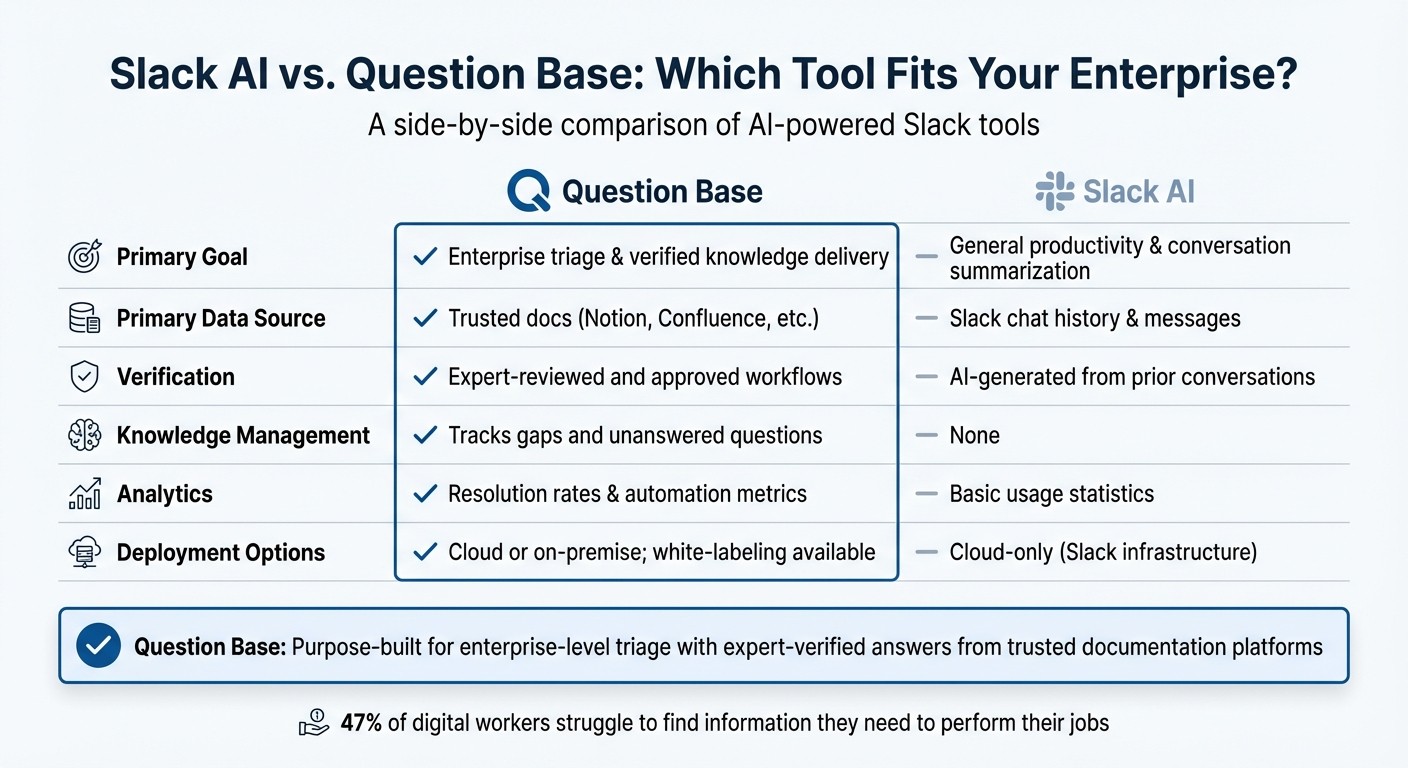
Slack AI vs Question Base: Enterprise Knowledge Management Comparison
Slack AI and Question Base both integrate AI into Slack, but they serve very different purposes. Slack AI focuses on boosting individual productivity - summarizing lengthy threads, helping users catch up on missed updates, and pulling up past conversations from integrated apps [3]. It’s tailored to help individuals work more efficiently within their daily routines. This sets the stage for a closer look at how these tools approach enterprise knowledge management.
On the other hand, Question Base is purpose-built for enterprise-level triage and delivering reliable, verified information. While Slack AI primarily draws insights from Slack conversations, Question Base connects directly to trusted documentation platforms like Notion, Confluence, Google Drive, Salesforce, and others. This distinction is critical in environments where accuracy is paramount: 47% of digital workers report struggling to find the information they need to perform their jobs [3].
Core Differences Between Slack AI and Question Base
Here’s a side-by-side comparison of how these tools differ in their approach to enterprise knowledge management:
Feature | Question Base | Slack AI |
|---|---|---|
Primary Goal | Enterprise triage & verified knowledge delivery | General productivity & conversation summarization |
Primary Data Source | Trusted docs (Notion, Confluence, etc.) | Slack chat history & messages |
Verification | Expert-reviewed and approved workflows | AI-generated from prior conversations |
Knowledge Management | Tracks gaps and unanswered questions | None |
Analytics | Resolution rates & automation metrics | Basic usage statistics |
Deployment Options | Cloud or on-premise; white-labeling available | Cloud-only (Slack infrastructure) |
Slack AI is a cloud-based tool offered as an add-on for paid Slack plans [3][6]. In contrast, Question Base provides custom enterprise solutions, including on-premise deployment, white-labeling, and multi-workspace support - features that are often essential for organizations with strict data residency or branding requirements.
Why Enterprises Choose Question Base for Internal Support
The technical differences between these tools highlight why enterprises often turn to Question Base for internal support. For teams managing large volumes of messages across HR, IT, and operations, Question Base offers capabilities that extend far beyond summarizing conversations. It tracks unanswered questions, identifies knowledge gaps, and provides resolution rate analytics - giving leaders insight into where documentation is incomplete or outdated. This operational visibility is crucial when scaling support across thousands of employees.
Christine McHone, Global Enterprise TMT Leader at Slalom, shares: "Instead of switching between multiple applications and windows and losing my train of thought, I can ask Slackbot questions, have it conduct research and create content without ever leaving Slack" [11].
Question Base takes this convenience further by ensuring the answers come from expert-verified sources rather than AI-generated interpretations. It also includes escalation workflows that route complex questions to the right human teams, complete with full context, so employees don’t have to repeat themselves.
While Slack AI helps individuals catch up on conversations, Question Base ensures entire teams stay aligned and productive. It transforms Slack into a dynamic knowledge hub by capturing key insights shared in threads, converting them into searchable documentation, and maintaining a living FAQ that evolves with your organization’s needs - all without requiring additional engineering resources.
How to Deploy AI Triage in Your Organization
Transforming your Slack workspace into a centralized knowledge hub with AI triage is a practical way to streamline workflows and improve productivity. To make this transition successful, start by mapping out where your knowledge currently resides and follow Slack knowledge base setup best practices to align those sources with your team’s existing processes. Many organizations find success by focusing on three core areas: integration, adoption, and measurement. Let’s break down the steps from connecting your systems to training your team and tracking performance.
Connecting Your Knowledge Systems
Start by auditing your documentation to pinpoint where employees typically search for answers. This could include tools like Notion, Confluence, Google Drive, Salesforce, or internal wikis. Research shows that 74% of tech leaders say employees waste considerable time searching across multiple platforms to find information [4]. By consolidating access through Slack, you can significantly reduce time lost to switching between tools.
Setting up with Question Base is straightforward. Install the app from the Slack App Marketplace and link your documentation tools using pre-built integrations. Begin with one or two high-traffic resources - like your HR handbook in Notion or IT troubleshooting guides in Confluence - and expand gradually. The Pro plan supports up to 200 pages per user, while the Enterprise tier offers unlimited capacity, on-premise deployment, and white-labeling options.
Prioritize integrations based on how often they’re used and their importance. For instance, if your IT team frequently handles password reset requests, start by connecting identity management documentation. Similarly, linking your employee handbook can quickly cut down repetitive HR queries. This focused approach ensures the AI becomes useful right away, avoiding the pitfalls of an overly broad or complex system.
Rolling Out AI Triage and Training Your Team
One common challenge in deploying AI is the knowledge gap many business leaders face regarding its practical use [12]. Generic training sessions often fall flat. Instead, tailor workshops to specific roles, showing how AI triage can simplify daily tasks. For example:
Walk HR teams through automating responses to policy FAQs.
Show IT teams how to handle common support requests without needing human intervention.
Help operations teams track unanswered questions to identify gaps in documentation.
Start with a pilot rollout in high-volume Slack channels like #it-support or #hr-questions. Use the /invite @questionbase command to add the bot, then create a pinned message or Slack canvas explaining how to interact with it. Include clear examples of effective questions and outline what the AI can and cannot handle. Assign a "triage captain" to monitor the channel during the initial rollout, ensuring the AI responds correctly and escalating edge cases to human experts as needed. Rotate this role among team members to prevent burnout and build broader team engagement.
Set up sandboxed channels where employees can test the AI without disrupting live workflows. Encourage them to share both successes and challenges to build trust and refine the system. As HC Madsen, Senior IT Systems Engineer at EasyPark Group, puts it:
"The 'single pane of glass' has always been the holy grail for CIOs: less toggling, less friction and more focus. If people can stay in Slack and get 75–80% of their work done, the productivity lift across the enterprise is significant" [11].
Measuring the Impact of AI Triage
Once the AI is live, tracking its impact is essential. Focus on three key metrics: model quality (accuracy of answers), system performance (response times and reliability), and business value (ROI and time saved) [12][14]. Question Base includes built-in analytics to monitor resolution rates, automation percentages, and unanswered questions. These insights help identify knowledge gaps and prioritize updates to your documentation.
One critical metric is time saved per employee. AI-powered search and summarization features save users an average of 90 to 97 minutes per week [13][11]. In a 500-person organization, this translates to freeing up time equivalent to the work of about 20 full-time employees. Additionally, track resolution rates by examining the percentage of questions the AI resolves without human escalation. Combine these quantitative metrics with qualitative feedback, such as monthly employee surveys, to ensure the system continues to meet your organization’s needs.
Conclusion: Transforming Slack into Your Knowledge Hub
Slack’s constant stream of messages can hinder productivity, but AI-powered triage tools provide a practical way to cut through the noise. By integrating your documentation tools directly with Slack, you create a centralized space for knowledge where employees can access verified answers without toggling between platforms. Research highlights the significant time lost due to scattered information and the difficulty employees face when trying to locate essential resources.
These obstacles underscore the real-world value of AI triage. Employees reclaim nearly 100 minutes each week, while first response times improve by up to 50%. Decision-making also becomes more accurate, with an increase of up to 82% [3][6][15][16]. These gains reshape how organizations manage and share knowledge.
Question Base builds on these advantages with a solution tailored for enterprise needs. Unlike Slack AI, which specializes in summarizing discussions, Question Base directly connects to trusted documentation platforms like Notion, Confluence, and Salesforce to deliver expert-verified answers. It also includes built-in analytics to track resolution rates, pinpoint knowledge gaps, and measure the impact of automation. With SOC 2 Type II compliance and on-premise deployment options, it’s designed to meet enterprise-level requirements from day one.
To get started, focus on your busiest Slack channels, link your most-used documentation systems, and monitor the results through metrics like resolution rates and time saved. By integrating Slack with your core knowledge tools, you’ll not only tackle message overload but also transform Slack into a scalable, central knowledge hub that grows alongside your organization.
FAQs
How does AI triage enhance Slack's productivity for enterprise teams?
AI triage transforms how enterprise teams use Slack by handling repetitive questions, flagging and prioritizing urgent messages, and directing more complex problems to the right experts. This approach simplifies communication, cuts down on delays, and allows employees to concentrate on more impactful work.
With AI managing the flood of messages, teams can respond more quickly, collaborate more effectively, and keep their workflows on track - all without adding extra manual work.
How is Question Base different from Slack AI?
Slack AI is a helpful tool for boosting general productivity, offering features like conversation summaries and the ability to pull insights from Slack messages. But when it comes to enterprises that demand accurate, verified answers and strong knowledge management, Question Base takes the lead. It integrates directly with trusted platforms like Notion, Confluence, and Salesforce, ensuring every response is backed by authoritative sources.
While Slack AI primarily relies on chat history, Question Base delivers specialized capabilities such as case tracking, duplicate detection, and content audits. These features are tailored for teams in HR, IT, and operations, where compliance, knowledge ownership, and scalability are non-negotiable priorities. With enterprise-grade security and full customization options, Question Base transforms Slack into a robust internal support and knowledge hub, perfectly aligned with the unique needs of your organization.
How can organizations implement AI-powered triage in Slack to manage message overload?
Implementing AI-powered triage within Slack can simplify internal communication and make accessing knowledge a breeze. Start by pinpointing the specific challenges your organization is dealing with - things like repetitive questions or trouble locating essential information. Once you’ve outlined these needs, set up an AI tool like Question Base, which integrates effortlessly with Slack and connects to popular documentation platforms such as Notion, Confluence, or Salesforce.
After the setup, tailor the AI’s behavior, tone, and access permissions to fit your organization’s security and compliance standards, including SOC 2 requirements. Next, add the AI bot to the relevant Slack channels so it can begin automating responses to frequently asked questions and organizing your team’s knowledge base. To keep things on track, use the tool’s built-in analytics to monitor its performance, track how quickly issues are resolved, and spot any gaps in your content. This way, the system can adapt and grow alongside your team’s evolving needs.