∙
Cooper
∙
Reading time:
13 min

Automating FAQs is transforming how teams manage repetitive questions, saving time and ensuring accurate answers. Support channels like Slack often get bogged down with repeated queries, slowing productivity and scattering knowledge across threads. AI-powered FAQ systems solve this by pulling verified answers from trusted sources like Notion or Confluence, turning Slack conversations into a searchable knowledge base.
Key Benefits:
Cuts repetitive tasks:Automates 60–80% of common questions like policies or IT issues.
Ensures accuracy: Pulls answers from vetted documentation, avoiding outdated or inconsistent replies.
24/7 access: Provides instant answers across time zones, improving team efficiency.
Dynamic updates: Automatically adjusts FAQs as policies change, eliminating manual upkeep.
For enterprise teams, tools like Question Base integrate directly with documentation platforms and Slack, creating a reliable, scalable system that reduces interruptions and boosts productivity.
The Problem: Why Knowledge Access Fails in Slack
Repeated Questions Drain Productivity
Support channels like #it-help or #hr-support often get bogged down with repetitive questions - think requests for VPN access or reimbursement policies. These types of queries make up 60–80% of support tickets[1][5]. Instead of dedicating their time to higher-priority tasks, subject matter experts end up acting as live FAQs, responding to the same inquiries in multiple threads across multiple channels.
This cycle creates a ripple effect. Channels become cluttered with redundant questions, making them harder to navigate. Employees wait longer for answers that could have been automated, while experts lose valuable time they could spend on more complex, strategic projects. The result? A frustrating loop where the same answers are typed out repeatedly, leaving everyone less efficient.
Critical Information Gets Buried in Chat
Slack isn’t a knowledge base by design; it’s built for real-time conversations, not long-term knowledge management. As a result, important answers often get buried under unrelated threads, making them difficult to find later. When employees search for information, they’re just as likely to stumble on old jokes, incomplete responses, or outdated data as they are to find the correct answer.
Knowledge becomes scattered across public channels, private groups, and DMs, creating a fragmented system where no single source of truth exists. Policies might change or product details might get updated, but old, outdated answers remain searchable. This leads to confusion, as employees unknowingly rely on incorrect information, and experts face constant interruptions to clarify what’s already been shared but is now lost in the chat history.
Outdated FAQs Undermine Trust
Even beyond the mess of Slack channels and buried answers, outdated documentation adds another layer of frustration. Manual updates can’t keep up with the pace of change in workflows, and when FAQs fall behind, they erode trust. If a process changes but nobody remembers to update the FAQ, employees end up relying on official documentation that no longer reflects reality.
This disconnect creates a domino effect. Employees lose confidence in public FAQs and start asking questions directly in DMs, isolating knowledge in private conversations. This not only forces others to ask the same questions later but also pulls experts away from their primary responsibilities to manually update scattered documentation. Over time, documentation decay sets in, as the effort required to maintain accuracy across multiple tools becomes unsustainable.
These challenges - repetitive questions, lost information, and outdated documentation - make it clear that automating FAQ creation is no longer just a convenience; it’s a necessity.
The Solution: What Automated FAQs Deliver
Cut Down on Repetitive Tasks
Automated FAQ systems are designed to tackle routine questions - think password resets, company policies, or onboarding steps - allowing your experts to focus on more impactful work. With AI handling these repetitive inquiries, support teams can save hours each week that would otherwise be spent retyping the same answers across various channels.
For example, Automation Anywhere’s support team reduced overhead by 30% and saw a 10% boost in customer satisfaction by automating responses, freeing up their experts for more complex tasks[2]. This kind of efficiency ensures that every answer provided is backed by accurate, up-to-date documentation.
Ensure Accurate Answers from Reliable Sources
The key to providing accurate responses lies in pulling information from trusted sources. Automated FAQ systems integrate with platforms like Notion, Confluence, Google Drive, Salesforce, and Zendesk to deliver answers that have been vetted by experts[3]. By relying on a single source of truth, these systems maintain consistency, ensuring employees receive the same reliable information every time.
To enhance transparency, the system often includes direct links to the original documents, allowing employees to verify details or dive deeper if needed. A human-in-the-loop process further ensures quality. Experts review and approve AI-generated responses before they’re added to the knowledge base, and analytics track any flagged answers, prompting updates to improve documentation. This layered approach guarantees reliability across all support interactions.
Access Information Anytime, Anywhere
Automated FAQ systems do more than save time - they ensure information is available 24/7. This is especially important for distributed teams. For instance, an employee in Seattle shouldn’t have to wait for a colleague in Boston to log in to get an answer about expense reimbursements. With automated FAQs, answers are instant and available around the clock, removing time zone barriers and human delays.
This constant availability reshapes how remote teams operate. New hires, for example, can onboard themselves in Slack by asking questions directly and receiving immediate responses - no need to book time with busy colleagues.
Build a Slack AI Agent That Answers Questions (Step-by-Step Tutorial)
How It Works: Turning Slack Conversations into Automated FAQs
Transforming Slack conversations into a constantly evolving FAQ system can revolutionize how teams manage and access knowledge. Here’s a closer look at how these systems work.
Extract Frequent Questions from Slack
The process starts with analyzing message patterns in Slack. AI-powered tools use natural language processing to identify and categorize common questions [1][7].
For example, platforms like Question Base can import 30–90 days of chat history to convert past conversations into a structured knowledge base. This process highlights recurring questions, such as those about password resets or onboarding procedures, giving you a clear picture of your team’s most frequent inquiries.
Connect to Your Documentation Tools
Once frequent questions are identified, the system pulls answers from your existing resources. Question Base integrates seamlessly with tools like Notion, Confluence, Google Drive, Zendesk, Intercom, Salesforce, and Dropbox [6]. Setup is straightforward - install the app from the Slack App Marketplace, invite the bot using /invite @questionbase, and connect your documentation tools. No technical expertise is needed [6].
After integration, the AI scans these platforms to find verified answers from your trusted sources. A single Slack message can trigger workflows across multiple systems, with real-time status updates posted back to Slack [7]. This integration ensures that the system becomes your team’s go-to source for accurate and reliable information.
Keep FAQs Updated as Needs Change
Static FAQs often fall out of date, but automated systems create dynamic, self-updating FAQs that adapt to changing needs [6]. These tools monitor unanswered questions, highlight content gaps, and automatically update answers when policies or procedures change.
For instance, Question Base tracks unanswered queries and flags them for managers, making it easy to identify areas where documentation needs improvement. When policies - like leave or expense reimbursement rules - are updated, the system reflects these changes automatically. This ensures employees always have access to the most accurate and up-to-date information without needing manual intervention.
This continuous cycle of extracting, updating, and refining FAQs ensures your team always has quick access to reliable, current knowledge, significantly boosting efficiency and reducing confusion.
Question Base vs Slack AI: Designed for Enterprise Support Teams

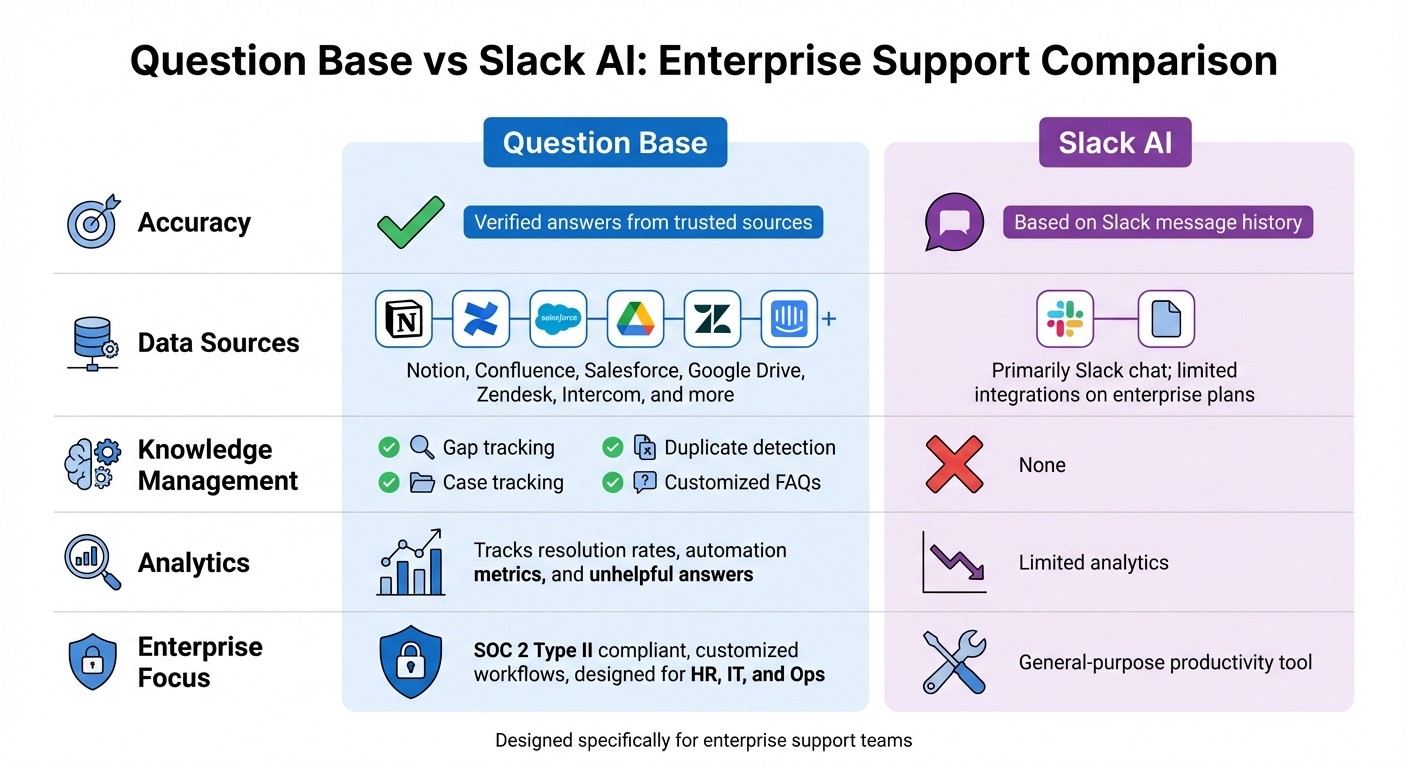
Question Base vs Slack AI Feature Comparison for Enterprise Teams
Question Base is tailored specifically for HR, IT, and operations teams, offering a solution that prioritizes verified information over conversational summaries. While Slack AI excels at summarizing discussions using chat history, Question Base stands out by delivering expert-verified answers directly from trusted platforms like Notion, Confluence, and Salesforce. This approach ensures that enterprise teams can depend on accurate, scalable knowledge rather than relying solely on historical chat data. The comparison below highlights how Question Base addresses the unique demands of enterprise support teams.
Feature Comparison Table
Feature | Question Base | Slack AI |
|---|---|---|
Accuracy | Verified answers from trusted sources | Based on Slack message history |
Data Sources | Notion, Confluence, Salesforce, Google Drive, Zendesk, Intercom, and more | Primarily Slack chat; limited integrations on enterprise plans |
Knowledge Management | Gap tracking, duplicate detection, case tracking, customized FAQs | None |
Analytics | Tracks resolution rates, automation metrics, and unhelpful answers | Limited analytics |
Enterprise Focus | SOC 2 Type II compliant, customized workflows, designed for HR, IT, and Ops | General-purpose productivity tool |
Why Enterprise Support Teams Prefer Question Base
Question Base goes beyond providing verified answers - it empowers support teams with advanced analytics to assess and improve their efficiency. For enterprises managing automated FAQs, scalability and reliability are key. Question Base addresses these needs by identifying unanswered questions, detecting knowledge gaps, and offering detailed resolution rate analytics. These tools enable leaders to make informed decisions and enhance their support strategies.
Security is another cornerstone of Question Base’s design. With SOC 2 Type II compliance and optional on-premise deployment, it’s well-suited for organizations handling sensitive data, whether it pertains to employees or customers. Its escalation workflows ensure that complex issues are routed to the right experts, maintaining both accuracy and efficiency.
For HR, IT, and operations teams, Question Base transforms Slack from a simple chat platform into a powerful internal knowledge assistant. It achieves this without requiring engineering resources, making it an ideal choice for teams where auditability, knowledge ownership, and precision are top priorities. By keeping FAQs accurate and up-to-date, Question Base helps organizations maintain a reliable and efficient support system.
Getting Started: How to Set Up FAQ Automation with Question Base
Quick Installation and Setup
Getting started with Question Base is fast and hassle-free - no engineering skills required. Begin by installing the app directly from the Slack App Marketplace. Once installed, invite the bot to your busiest support channels, such as #it-help, #hr-questions, or #ops-support, using the /invite @questionbase command. From there, connect your documentation tools like Notion or Confluence through a straightforward OAuth dashboard. Admins can define which folders or databases the AI can access, ensuring your data remains secure throughout the process.
To jumpstart your FAQ system, a one-time manual import pulls up to 90 days of Slack history. This approach captures valuable "tribal knowledge" that might otherwise stay buried in past conversations. The entire setup process takes less than 30 minutes, and once completed, answers start appearing instantly. Afterward, use the built-in analytics dashboard to track how well the system is performing.
Monitoring Success with Analytics
After installation, keeping tabs on your FAQ automation is simple. Question Base provides an analytics dashboard that offers deep insights into how your system is functioning. You can track key metrics like resolution rates and automation performance, showing how much time is being saved and identifying questions that still require human intervention.
The dashboard also generates content gap reports, highlighting unanswered questions that might indicate missing documentation. These insights empower support leaders to make informed decisions about where to refine processes or expand resources. Additionally, the system flags unverified answers for expert review, fostering confidence and reliability across your team.
Tangible Benefits for Enterprise Teams
Once installed and optimized, enterprise teams quickly see measurable improvements. FAQ automation powered by AI reduces repetitive tasks by 60–80%[1][5]. Moreover, automating customer support can lower service costs by up to 30%[4], allowing specialists to focus on complex challenges that demand human expertise. With 24/7 availability, employees get instant answers - no matter the time zone or business hours - eliminating delays that often disrupt workflows.
For teams handling sensitive data, Question Base provides enterprise-grade security. Complex questions are automatically escalated to the right experts, ensuring both efficiency and accuracy as your knowledge base evolves alongside your organization’s growth.
Conclusion: Why Enterprises Need Automated FAQs
Automated FAQs are transforming how enterprises manage internal knowledge. By replacing outdated, manual systems with faster, more accurate responses, they drastically cut down on repetitive tasks. This shift allows employees to dedicate their time to work that requires creativity and emotional intelligence instead of answering the same questions over and over again [2]. It’s a practical step toward smarter, more efficient knowledge management.
Question Base takes this efficiency a step further. With SOC 2 Type II compliance and seamless integration with trusted documentation sources, it ensures every response is grounded in verified internal content. This not only boosts accuracy but also gives organizations full control over the tone, behavior, and escalation processes [3].
What sets Question Base apart is its dynamic approach to FAQs. The platform uses analytics to identify and fill content gaps automatically, ensuring the FAQ evolves alongside changing workflows [3]. By centralizing scattered documentation, it breaks down silos and provides instant access to information across teams.
Designed to scale effortlessly, Question Base supports thousands of employees without requiring additional staff [2][4]. It’s available 24/7, eliminating delays caused by time zones, and frees up specialists to tackle more complex issues. For organizations with strict security and customization needs, Question Base offers on-premise deployment and white-labeling options, meeting the high standards that large enterprises demand.
FAQs
How does automating FAQs enhance team productivity?
Automating FAQs simplifies how teams access consistent and accurate answers, cutting down on repetitive questions and reducing unnecessary disruptions. This shift enables employees to concentrate on more pressing tasks, boosting overall productivity.
With automation delivering reliable information instantly, experts no longer need to repeatedly address the same inquiries. This gives them the freedom to focus on strategic, high-value work. At the same time, employees can quickly locate the knowledge they need, ensuring workflows stay efficient and uninterrupted.
How is Question Base different from Slack AI for managing knowledge?
Question Base is purpose-built for enterprise knowledge management, setting it apart from Slack AI, which serves as a general productivity assistant. While Slack AI mainly retrieves information from chat history, Question Base directly integrates with trusted company platforms like Notion, Confluence, Salesforce, and Google Drive. This ensures responses are accurate and based on expert-reviewed sources, rather than relying on AI's interpretation of previous conversations.
Moreover, Question Base includes features specifically designed for HR, IT, and operations teams. These include case tracking, duplicate question detection, and detailed analytics that provide insights into resolution rates and automation performance. It also offers enterprise-grade security, such as SOC 2 Type II compliance, encryption, and the option for on-premise deployment. Teams can further customize tone, content access, and escalation workflows to align with their unique needs. These advanced capabilities make Question Base a strong choice for organizations requiring reliable and auditable knowledge management at scale, whereas Slack AI is more suited for smaller teams or general productivity tasks.
How do automated FAQ systems provide accurate answers?
Automated FAQ systems ensure accurate and consistent answers by sourcing information directly from trusted, expert-approved platforms like Notion, Confluence, and Google Drive. By bypassing informal chat history, these systems align responses with your organization’s verified knowledge, maintaining reliability and clarity.
These systems also evolve alongside your organization. They regularly review the knowledge base to identify gaps and incorporate updates as new workflows or information become available. This ongoing process helps keep answers accurate and minimizes the risk of outdated or incorrect responses.