∙
Cooper
∙
Reading time:
13 min

In large organizations, Slack often becomes a cluttered space where critical information gets buried under repetitive questions and scattered messages. Teams like IT, HR, and operations spend significant time answering the same queries - “What’s the PTO policy?”, “How do I reset my VPN password?”, or “Where’s the onboarding checklist?” - leading to wasted time and reduced productivity.
The solution? Sync Slack with verified knowledge sources like Notion, Confluence, or Salesforce. This approach ensures employees get accurate answers directly in Slack, cutting down on inefficiencies and saving money. A 2023 study even found companies achieved a 294% ROI over three years by optimizing Slack workflows.
Key benefits include:
Fewer repetitive questions: Self-service tools reduce interruptions for support teams.
Faster access to information: Employees spend less time searching for answers.
Cost savings: Lower ticket handling costs and improved employee efficiency.
For enterprises, tools like Question Base can transform Slack into a reliable knowledge hub, delivering expert-verified answers and measurable ROI.
Common Problems with High-Volume Slack Usage
As Slack becomes a central hub for workplace communication, inefficiencies in its use can significantly impact productivity. Addressing these challenges can lead to measurable improvements in both time management and operational efficiency.
Repeated Questions Overload Support Teams
HR, IT, and operations teams often find themselves bogged down by a flood of repetitive questions. Queries like "What's our PTO policy?", "How do I reset my VPN password?", or "Where's the onboarding checklist?" may seem minor but quickly add up. These constant interruptions pull senior staff away from higher-priority responsibilities, leaving them stuck in a cycle of reactive problem-solving. The result? A staggering 41% of desk workers’ time is spent on low-value, repetitive tasks that do little to advance their core responsibilities[3].
"The average desk worker is spending two full days each week on this 'work of work.'" – Christina Janzer, Senior Vice President of Research and Analytics, Slack[3]
This constant barrage of repetitive questions isn’t just frustrating - it’s a drain on productivity that ripples across teams.
Slow Access to Company Knowledge
Information silos are another major roadblock. Employees often waste valuable time searching through Slack threads, scouring Google Drive folders, or pinging coworkers for information that should be easy to find. Instead of streamlining workflows, these inefficiencies replicate outdated office practices, where fragmented conversations and scattered documentation reign supreme[4].
This lack of centralized information creates delays, misalignment, and unnecessary duplication of effort. For industries like healthcare and finance, where compliance and precision are critical, these delays can have far-reaching consequences. Employees spend more time reinventing the wheel than building on existing resources, ultimately slowing down decision-making and collaboration.
Where Slack AI Falls Short for Enterprises
While Slack AI offers useful tools for general productivity - like summarizing conversations or catching up on missed threads - it has clear limitations for enterprises that need reliable, verified knowledge at scale. Slack AI relies heavily on past chat history, which can often include outdated or incomplete information. Its ability to integrate with external tools like Notion, Confluence, Salesforce, or Google Drive is frequently restricted to higher-tier enterprise plans, increasing the total cost of ownership. It’s no surprise that 36% of executives cite AI reliability and accuracy as a major concern when adopting these technologies for business operations[3].
Slack AI also lacks critical features for enterprise-level support, such as identifying duplicate queries, tracking cases, or pinpointing content gaps. These are essential capabilities for teams managing high volumes of internal questions and requests.
Adding to the challenge, 78% of tech leaders report difficulty in realizing ROI from productivity tools, and 74% say employees waste time searching across multiple platforms[5]. For organizations that require precise, expert-verified answers - not just AI-generated responses based on historical chats - a tailored solution for HR, IT, and operational support can bridge the gap. Solving these inefficiencies is key to unlocking cost savings and boosting productivity across the board.
How Better Slack Sync Delivers ROI
Streamlining Slack operations doesn’t just solve day-to-day challenges - it directly impacts your bottom line. By improving access to reliable information, businesses can reduce costs and boost productivity in ways that add up over time.
Faster Response Times for Internal Support
When employees get the right answers instantly, support teams can shift their focus from putting out fires to tackling higher-value projects. According to a Forrester study, teams using optimized Slack workflows cut average ticket handle time by 10.7% and reduced the cost per ticket by 15.1%[2]. This efficiency allows senior staff to dedicate more time to strategic work. Companies adopting AI-powered tools report a 31% boost in employee efficiency and a 21% drop in operating costs[1]. These faster response times set the stage for smoother operations and long-term success.
Employees Can Find Answers Themselves
Self-service tools empower employees to solve their own questions, removing delays caused by waiting on support teams. This not only speeds up workflows but also reduces repetitive inquiries. For example, a 20-person team can save around $13,000 annually by automating repetitive tasks, and cutting down on fragmented searches can reclaim roughly $195,000 per year in lost productivity. These savings highlight the power of enabling employees to find what they need without extra help.
Calculating Cost Savings and Productivity Gains
By combining faster response times and self-service access, businesses can quantify the financial benefits of optimizing Slack operations. Focus on four key areas: time saved through quicker information retrieval, the efficiency of AI-handled queries versus human responses, faster onboarding for new hires, and ticket deflection rates that lower internal support demands. For a 20-person team, these improvements can result in $211,000 in annual savings. And at scale, the numbers get even more impressive - 90% of companies in a global survey of 1,104 organizations reported or expected positive ROI from AI investments[1]. This reinforces how smarter knowledge management translates into real financial gains.
Why Question Base Works for Enterprise Slack

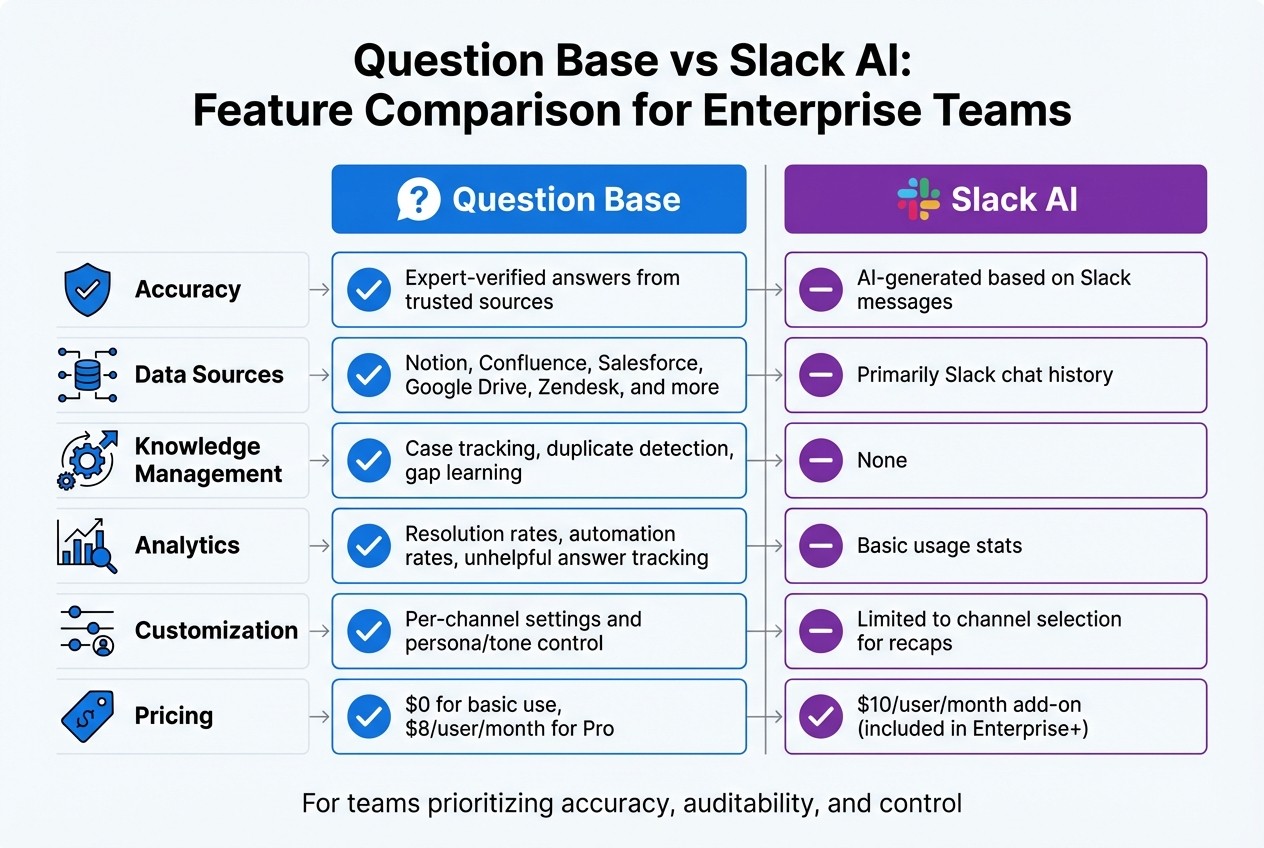
Question Base vs Slack AI: Enterprise Knowledge Management Comparison
When 74% of tech leaders reveal that employees waste time hunting through disconnected platforms, the solution goes beyond just improving search. The real game-changer is verified answers that link directly to your trusted documentation[5]. Question Base turns Slack into more than a chat tool - it becomes a powerful knowledge assistant designed to meet the demands of accuracy, security, and scalability in enterprise environments.
Verified Answers from Your Documentation
While Slack AI excels at summarizing conversations and recapping threads, it often falls short for teams needing expert-verified answers instead of AI-generated interpretations. Question Base takes a different path. It pulls verified answers straight from reliable sources such as Notion, Confluence, Salesforce, and Google Drive, bypassing outdated or incomplete chat logs. This ensures your knowledge stays current and dependable[7]. Whether it’s a finance team looking for the latest compliance policy or an IT department requiring precise troubleshooting steps, Question Base delivers answers rooted in your authoritative content - not approximations or guesses.
Easy Integration and Customization
Setting up Question Base is straightforward. Install it from the Slack App Marketplace and invite the bot with /invite @questionbase. From there, connect your documentation tools - no coding or engineering expertise needed. It integrates effortlessly with platforms like Notion for structured knowledge, Confluence for official policies, and Zendesk for support ticket history[6][7].
Unlike Slack AI, which offers limited customization, Question Base allows tailored personas and tone settings[6]. You decide what content is accessible, how the AI responds, and when to escalate issues to human support. Per-channel settings make it easy to adapt the experience for different teams, whether it’s HR answering benefits questions or IT resolving technical issues. This flexibility is backed by robust security features, making it ideal for enterprise-scale operations.
Enterprise Security and Scalability
Security is a cornerstone of Question Base. It includes SOC 2 Type II compliance, encryption for data at rest and in transit, GDPR alignment, and role-based access controls. For organizations with strict data requirements, on-premise deployment ensures sensitive information stays within your infrastructure. The Enterprise tier also offers white-labeling, multi-workspace support, and tailored features that scale effortlessly to thousands of employees.
While Slack AI provides enterprise-grade security on higher-tier plans, Question Base delivers these features as standard, specifically designed for knowledge management and internal support. These measures ensure that your trusted knowledge remains secure and scalable, making it a clear choice for enterprises.
Question Base vs. Slack AI
Both tools enhance Slack, but their focus differs. Slack AI speeds up individual workflows with summaries and recaps, while Question Base unblocks entire teams by managing verified knowledge effectively. Slack AI is available as a $10 per user/month add-on for Pro and Business+ plans (included in Enterprise+)[6]. In contrast, Question Base starts at $0 for basic use, with Pro features and premium integrations available at $8 per user/month.
Feature | Question Base | Slack AI |
|---|---|---|
Accuracy | Expert-verified answers from trusted sources | AI-generated based on Slack messages |
Data Sources | Notion, Confluence, Salesforce, Google Drive, Zendesk, and more | Primarily Slack chat history |
Knowledge Management | Case tracking, duplicate detection, gap learning | None |
Analytics | Resolution rates, automation rates, unhelpful answer tracking | Basic usage stats |
Customization | Per-channel settings and persona/tone control | Limited to channel selection for recaps |
For teams prioritizing accuracy, auditability, and control over their knowledge, Question Base provides the tools to transform your internal knowledge into a future-ready asset - not just a summary of past conversations.
Enterprise Examples: Results from Optimized Slack Sync
Building on the earlier points about cost savings and operational efficiency, real-world examples vividly illustrate how optimized Slack synchronization delivers measurable value. A Forrester Consulting study refers to this transformation as a "swarming" approach, where frontline teams collaborate to resolve issues without constant escalations[2].
Healthcare: Streamlining Access to Compliance Information
In the healthcare sector, where compliance requirements are stringent, organizations have reported tangible improvements: a 17.4% reduction in ticket escalations, a 10.7% decrease in handle time, and a 15.1% drop in cost per ticket[2]. Delayed access to updated protocols often disrupts workflows and creates inefficiencies. By enabling direct access to critical knowledge, clinical experts can dedicate more time to patient care rather than addressing repetitive administrative queries[2].
Finance: Ensuring Accuracy in High-Stakes Environments
For financial institutions navigating highly regulated environments, the stakes are high - misinformation can result in compliance violations and costly errors. With the average global data breach costing $4.45 million[8], secure and accurate knowledge becomes non-negotiable. Optimized Slack synchronization has helped finance teams streamline responses to regulatory inquiries, account procedures, and policy questions. This has led to a 31% boost in employee efficiency and a 21% reduction in operating costs[1], all while maintaining the precision and auditability required in these settings.
Finance professionals have noted the difference:
"Our frontline team can now reach out directly to product and cross-functional SMEs. We're now one larger team swarming tickets, instead of tier 1 vs. tier 2 vs. tier 3, etc."[2]
Education: Scaling Support Across Large Institutions
Universities and educational technology companies face the challenge of managing thousands of inquiries on topics like enrollment, course policies, IT systems, and administration. Scaling support without adding proportional staff is a critical need, often requiring Slack automation for internal support teams. By automating responses to frequently asked questions and maintaining a dynamic FAQ that adapts to each semester's unique needs, these institutions have eased the workload on their support teams. Integrating resources from student information systems, learning management platforms, and internal wikis directly into Slack has significantly accelerated response times.
Conclusion: Achieving ROI Through Slack Optimization
Main Benefits of High-Volume Slack Sync
Improving Slack synchronization can deliver tangible financial and operational advantages. Companies leveraging AI-powered tools have seen a 21% reduction in operating costs and a 31% boost in employee efficiency[1]. Beyond cutting costs, this optimization addresses a major productivity drain: employees spending nearly two hours daily searching for information can now find verified answers within minutes. These gains come from automating responses to repetitive questions and safeguarding institutional knowledge, ensuring it remains accessible even when team members move on. These figures highlight how high-volume Slack sync reshapes internal workflows for the better.
Why Enterprises Should Evaluate Question Base
To sustain these efficiency improvements, enterprises need a solution that scales seamlessly while maintaining verified and secure knowledge management. Considering the inefficiencies and repeated queries many teams face, a tailored tool becomes essential for long-term ROI. Question Base steps in as that solution, offering expert-verified answers sourced from trusted platforms like Notion, Confluence, Google Drive, Salesforce, and Zendesk - going beyond simply pulling data from past Slack conversations.
Security is a priority, too. Question Base is SOC 2 compliant, with encryption both at rest and in transit, and even offers optional on-premise deployment for teams with strict security protocols. Best of all, setup is effortless: install it via the Slack App Marketplace, link your documentation tools, and invite the bot into your active channels. From there, Question Base takes over - delivering expert-verified answers, tracking resolution rates, identifying knowledge gaps, and transforming Slack threads into a dynamic, ever-evolving FAQ.
For HR, IT, and operations teams managing thousands of internal questions, Question Base turns Slack into a secure, efficient knowledge hub. It ensures accuracy, provides auditability, and gives organizations the control they need to operate smoothly at an enterprise level.
FAQs
How does integrating Slack with trusted knowledge sources boost productivity?
Integrating Slack with trusted knowledge hubs such as Notion, Confluence, or Salesforce allows employees to access accurate, expert-approved answers in real time. This approach cuts down on the time spent hunting for information or addressing the same questions repeatedly, freeing up teams to tackle more meaningful, high-priority work.
By tackling these inefficiencies head-on, companies can reclaim thousands of hours each year, leading to noticeable cost reductions and stronger team cohesion. With streamlined knowledge access, Slack evolves into a central hub of productivity for your organization.
What are the ROI and cost-saving benefits of improving Slack workflows?
Improving how your team uses Slack - by automating repetitive tasks and turning chat history into a searchable knowledge base - can lead to impressive cost savings and a noticeable boost in productivity. Take this example: if a 20-person team saves just 1.5 hours per day per employee, with an average wage of $25 per hour, they could reclaim around $195,000 annually. Many businesses even report an ROI surpassing 1,000% when these savings are fully accounted for.
Beyond the financial impact, there are other key benefits: fewer repeated questions, quicker problem-solving, reduced support ticket volume, and happier employees. These changes not only free up senior team members to focus on higher-level projects but also create a more efficient and productive Slack workspace - directly supporting your company’s bottom line.
Why do enterprises choose Question Base over Slack AI for managing internal knowledge?
Enterprises choose Question Base because it delivers precise, expert-verified answers by seamlessly connecting to trusted platforms like Notion, Confluence, Salesforce, and OneDrive. Unlike Slack AI, which relies on chat history, Question Base ensures employees access reliable, auditable information that aligns with company policies.
On top of that, Question Base includes specialized knowledge-management tools such as case tracking, duplicate detection, and automated gap identification. These features transform Slack conversations into a dynamic, searchable knowledge hub. It also offers detailed analytics to monitor resolution rates and enhance support efficiency - far surpassing Slack AI’s basic metrics.
Designed with enterprise-grade security and flexibility, Question Base meets SOC 2 Type II compliance standards and even offers optional on-premise deployment. It’s tailored for HR, IT, and operations teams that demand scalable, verified knowledge management solutions.