∙
Cooper
∙
Reading time:
18 min

Repetitive questions in Slack waste time and money. Employees spend up to 30% of their week searching for answers, while internal experts lose 6–8 hours weekly responding to the same queries. For a 1,000-person company, this inefficiency can cost over $2 million annually. A Slack-native AI agent solves this by delivering instant, cited answers directly in Slack channels. Unlike Agentforce, which requires Salesforce integration, tools like Question Base make setup simple and effective.
Key Takeaways:
Slack-native agents reduce repetitive questions and improve productivity by pulling verified answers from sources like Notion, Confluence, or Salesforce.
Question Base offers a no-code solution with 99.99% accuracy, saving teams 6 hours weekly per expert and delivering answers in 3.2 seconds.
Choose from three approaches: build from scratch using Slack APIs, develop custom agents with LLMs, or use no-code platforms like Question Base for quick deployment.
For most teams, Question Base is the fastest way to deploy a reliable Slack agent without the complexity of Agentforce. It integrates with trusted tools, ensures secure data handling, and transforms Slack into a centralized knowledge hub.
Build a Slack AI Agent That Answers Questions (Step-by-Step Tutorial)
Prerequisites and Setup Requirements
Before you dive into building your Slack agent, make sure you’ve got the right tools and access in place. A paid Slack plan - either Pro, Business+, or Enterprise Grid - is typically necessary. These plans offer advanced app controls, better security settings, and higher API rate limits, all of which are crucial for running AI-powered apps effectively [6]. Free Slack workspaces, on the other hand, often limit app installations and lack built-in AI capabilities [5].
You’ll also need Workspace Owner or Admin permissions to handle app installations, approve requests, and configure settings. If you don’t have these permissions, you’ll need to request approval by explaining the required data scopes and their intended use [6].
For custom-built agents, you’ll need a few additional resources: an LLM API key (such as OpenAI or Anthropic), a runtime environment (like a server, serverless platform, or CLI tool), and optionally, a database to store internal documents [3][4][5]. While no-code platforms like Question Base simplify much of this process, it’s still important to confirm where your data is stored, which APIs are involved, and how credentials are managed.
Before deploying your agent, review your workspace’s security and compliance settings. This includes checking app management policies, data retention rules, and whether admin pre-approvals are required for apps. Additionally, ensure that both the agent and any external LLM provider comply with US data protection laws, activate relevant audit logs, and verify that the agent’s data access aligns with your company’s privacy policies. To test safely, consider creating a dedicated test channel (e.g., #ai-agent-sandbox) or even a separate staging workspace to experiment with prompts and permissions before rolling out the agent company-wide [4][5].
The sections below provide detailed instructions on the access levels and installation steps you’ll need to follow.
Slack Workspace and Admin Access
To set up and manage an AI agent, you must have Workspace Owner or Admin permissions. You can confirm your role by navigating to Slack settings → Workspace → Manage Members [6]. Admin access is essential because AI apps require bot tokens (e.g., xoxb-) and sometimes app-level tokens (e.g., xapp-) to handle socket connections and deliver events [3][7]. Common bot scopes include:
channels:historyorgroups:historyfor reading messageschat:writefor sending repliesapp_mentions:readfor responding when mentioned
These permissions are managed in the app’s OAuth & Permissions settings. If you need to update permissions, reinstall the app to apply the changes [7].
In Enterprise Grid setups, Org Owner or Org Admin approval may also be required if your organization enforces app approval workflows or restricts custom app installations [6][7]. For smooth operation, define clear support and knowledge-sharing channels (e.g., #it-help, #hr-questions, #sales-faq) so the agent operates in predictable, easily auditable spaces [4].
Installing Apps from the Slack App Directory
To install an app from the Slack App Directory, go to Apps → Browse App Directory, find your desired app, and click Add to Slack [6]. Depending on your workspace’s settings, the app may install directly or require admin approval. For custom apps, head to Manage Apps → Build, or use an app manifest to set up the app via the Basic Information or Install App page [3][7].
Once the app is installed, configure its behavior and event handling in the Slack app settings. This includes:
Setting up a Bot User (choose a name, display name, and enable “always online” status)
Enabling Event Subscriptions and specifying the Request URL where Slack will send events, or activating Socket Mode if your app uses app-level tokens instead of a public URL [3][7]
Subscribing to necessary events (e.g., channels, direct messages, mentions) so the agent can process all relevant messages [7]
Make sure the app has the chat:write scope and test its functionality by inviting the bot to a channel using /invite @your-bot. Confirm that it can send replies as expected [3][7].
With the app installed and configured, you’re ready to deploy and test your Slack agent in live channels.
3 Ways to Build a Slack Agent Without Agentforce
When it comes to building a Slack agent for internal support and knowledge management, you have three main options. Each approach varies in terms of technical complexity, time commitment, and the level of control it offers.
Method 1: Build from scratch using Slack's native APIs and developer tools. This gives you full control but demands significant engineering resources.
Method 2: Develop a custom agent powered by large language models (LLMs) like GPT-4 or Claude. This requires you to handle integration, hosting, and connections yourself.
Method 3: Use a no-code platform like Question Base, which lets you install a pre-built solution and connect your knowledge sources without writing any code.
The right choice depends on your team’s technical expertise, timeline, and whether you need a simple bot or an advanced knowledge agent. For larger organizations, where up to 40% of internal questions are repetitive [1], prioritizing accuracy and robust knowledge management is crucial. As Brigitte Lyons aptly puts it, "Slack is where documentation goes to die, brought up once in passing, and never to be found again" [1]. This highlights the importance of connecting your agent to verified knowledge sources rather than relying solely on Slack chat history. Let’s break down each method to help you decide what works best for your team.
Method 1: Using Slack's Native APIs
If you’re looking for complete control, Slack’s native APIs are the way to go. This involves creating an app through Slack’s developer portal, setting up event subscriptions, and coding the logic to process incoming messages. For example, you might configure triggers like message.channels so your bot can detect and respond to questions in specific Slack channels [2]. You’ll also need to host the app, which could mean using a server or a serverless platform.
However, there’s a catch. Unless you integrate external knowledge sources manually, your bot will primarily rely on Slack chat history for answers. While this approach works for simple tasks like summarizing conversations or triggering workflows, it falls short when employees need accurate information from official documentation. Plus, maintaining the bot can be a headache, as you’ll need to keep up with Slack’s API updates and documentation changes.
Method 2: Custom Development with LLMs
For teams with specific needs, custom development using large language models like GPT-4 or Claude offers unmatched flexibility. This involves securing API keys, writing integration logic, and possibly setting up a database to store and retrieve internal documents. It’s an ideal choice for organizations with unique workflows or specialized industry knowledge that off-the-shelf solutions can’t handle.
That said, this method comes with significant trade-offs. Building a production-ready agent isn’t a quick task - it often takes months and requires dedicated engineering support for updates and maintenance. If speed and efficiency are more important than complete customization, pre-built solutions might be a better fit.
Method 3: No-Code Solution with Question Base

No-code platforms like Question Base make it easy to deploy a Slack agent without the need for engineering resources. In just a few days, you can install the app from the Slack App Directory, invite the bot to your channels using /invite @questionbase, and link it to your existing knowledge sources such as Notion, Confluence, Google Drive, Zendesk, Intercom, or Salesforce. The agent immediately starts answering questions based on your verified documentation, rather than relying solely on Slack messages.
Why Question Base stands out:
It delivers 99.99% accuracy with answers grounded in verified sources [2].
Built-in analytics provide insights into automation rates, resolution metrics, and knowledge gaps.
Enterprise-grade security includes SOC 2 Type II compliance and optional on-premise deployment.
Features like unanswered question tracking, thread summarization, and one-click capture of Slack insights make it purpose-built for internal support.
Unlike Slack AI, which focuses on general productivity and summarization, Question Base is designed specifically for internal support. This approach empowers non-technical teams to manage and customize the agent without relying on engineering, making it a practical choice for organizations looking to streamline operations [8][9].
Choosing the right method depends on your team’s goals, resources, and the complexity of your needs. Whether you’re aiming for full customization or a quick, reliable solution, aligning your approach with your priorities is key to success.
Question Base vs. Slack AI: Feature Comparison
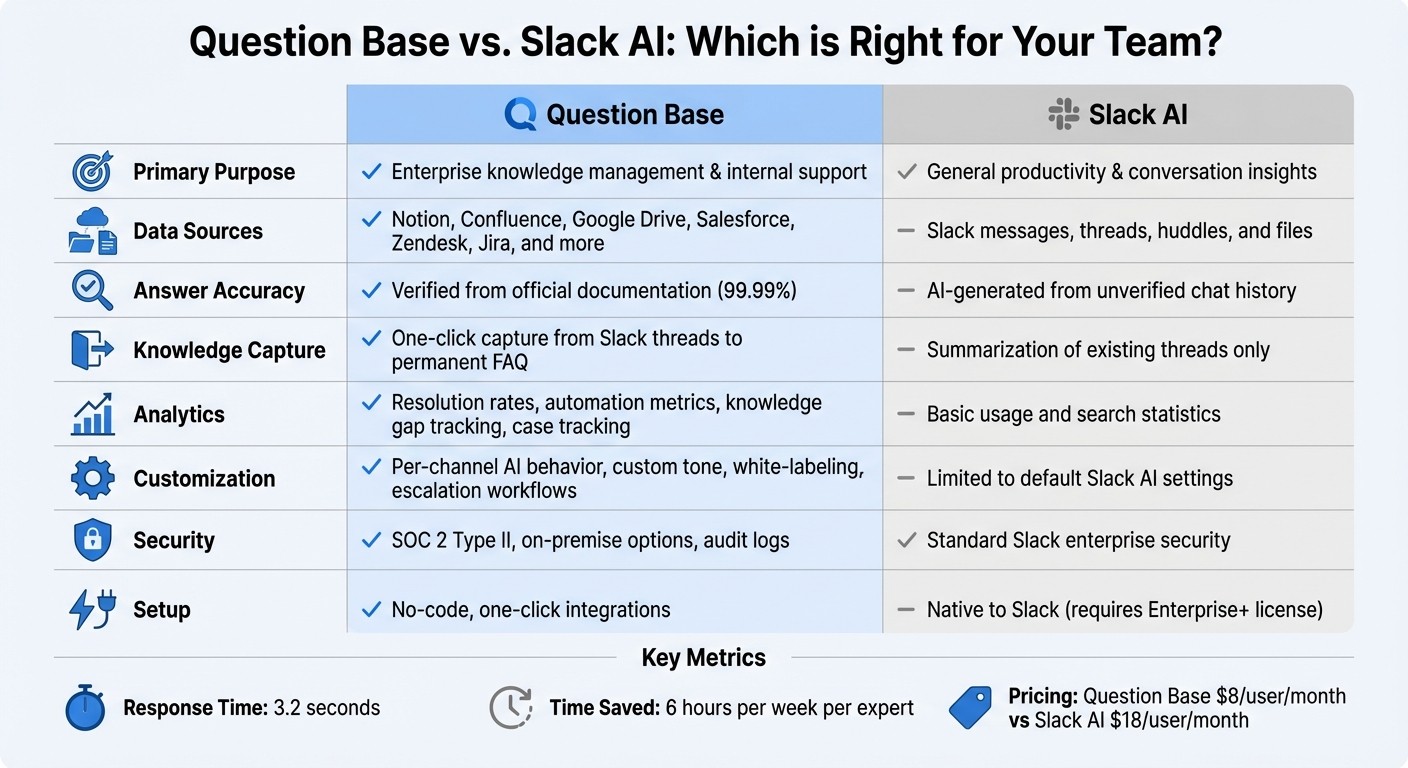
Question Base vs Slack AI Feature Comparison for Enterprise Knowledge Management
Slack AI is designed to boost productivity by summarizing conversations and retrieving past messages. However, when it comes to enterprise knowledge management and internal support, its scope is quite different from what Question Base offers. Slack AI relies solely on your chat history, while Question Base connects to verified documentation sources like Notion, Confluence, Salesforce, and Google Drive.
As previously mentioned, employees in large organizations spend 20–30% of their workweek searching for information, with repetitive questions accounting for up to 40% of internal queries[1]. This highlights the importance of relying on verified documentation rather than unverified chat threads. In departments like HR, IT, or operations, where precision and auditability are crucial, having an agent that pulls from trusted sources is not just helpful - it’s essential.
Question Base delivers a reported 99.99% accuracy rate on verified answers[2]. Companies using the platform save an average of 6 hours per week per internal expert[1], with response times averaging just 3.2 seconds inside Slack[1]. Monica Limanto, CEO of Petsy, shared her experience:
"Question Base eliminated repetitive questions and centralized information, saving us significant time."[1]
To better illustrate the differences, here’s a side-by-side comparison of the two platforms:
Feature Comparison Table
Feature | Question Base | Slack AI |
|---|---|---|
Primary Purpose | Enterprise knowledge management & internal support | General productivity & conversation insights |
Data Sources | Notion, Confluence, Google Drive, Salesforce, Zendesk, Jira, and more | Slack messages, threads, huddles, and files |
Answer Accuracy | Verified from official documentation (99.99%) | AI-generated from unverified chat history |
Knowledge Capture | One-click capture from Slack threads to a permanent FAQ | Summarization of existing threads only |
Analytics | Resolution rates, automation metrics, knowledge gap tracking, case tracking | Basic usage and search statistics |
Customization | Per-channel AI behavior, custom tone, white-labeling, escalation workflows | Limited to default Slack AI settings |
Security | SOC 2 Type II, on-premise options, audit logs | Standard Slack enterprise security |
Setup | No-code, one-click integrations | Native to Slack (requires Enterprise+ license) |
While Slack AI focuses on summarizing conversations, Question Base goes a step further by transforming institutional knowledge into actionable insights. By pulling directly from verified documentation, Question Base ensures teams stay aligned and efficient. For example, Ticketbutler's UX Lead, Maria Jensen, noted that her team used to spend 5–10 minutes searching through lengthy support manuals. After integrating Question Base, their AI agent provided answers in seconds, making their static Google support docs obsolete[1].
Deploying and Testing Your Slack Agent
Testing in Live Channels
Start by installing your Slack agent in a dedicated test channel, like #it-help-sandbox, and invite a small group of users to participate. Clearly label this channel as a testing space to set expectations.
Run test queries that reflect common scenarios your team encounters. Check each response against your source documents to ensure accuracy. If you're using Question Base, the agent should pull information from connected tools like Notion or Confluence, rather than relying on unverified chat history. Initially, limit the agent's responses to direct messages or @mentions to maintain control over its interactions.
Create a simple feedback system: users can mark responses as correct with a ✅ or incorrect with a ❌. Encourage team members to reply in-thread to flag inaccuracies. These corrections act as training signals for the agent. For example, if the agent overlooks a recent policy update, an expert can respond in the thread to highlight the gap, prompting an update to the knowledge base. Once you've validated the responses, keep an eye on the agent's performance to fine-tune its accuracy and reliability.
Monitoring Performance with Analytics
After initial testing, use analytics to measure how well your Slack agent is performing. Question Base offers dashboards that track key metrics like resolution rate (how often queries are resolved without escalation), response time (average time to reply), and knowledge gaps (questions the agent couldn’t answer). It also monitors automation rates and case tracking, giving you a clear view of what’s working and where improvements are needed.
Schedule weekly or biweekly reviews with teams like IT, HR, or Support to analyze these metrics. Look for patterns: Are certain channels seeing more unanswered questions? Are response times slowing during peak hours? If you notice frequent escalations about sales policies, it might signal the need to update documentation or tweak response routing. By identifying these trends, you can decide where to add content, refine prompts, or expand integrations. These insights transform raw data into meaningful improvements, helping your Slack agent grow more effective over time.
Enterprise Customization Options
Customizing Question Base for Your Organization
Question Base offers the flexibility to align the agent with your company’s branding, making it feel like a seamless part of your team. You can white-label the bot by uploading your logo, setting your brand colors (e.g., #0070D2), and renaming it from "Question Base" to something like "Acme Support Bot." Simply log into the admin dashboard, navigate to Customization > Branding, upload your assets, and apply the changes. This way, the assistant looks like an in-house tool rather than an external service.
You can also fine-tune escalation rules to ensure complex questions reach the right teams. For instance, you might configure the agent to notify the HR Slack channel for unresolved employee questions or automatically create a Zendesk ticket if the confidence score falls below 70%. These rules not only address knowledge gaps but also ensure experts are kept in the loop. The dashboard provides insights into unanswered questions, showing data by volume, topic, and resolution time.
For larger organizations, multi-workspace support makes it easy to manage deployments across different departments or regions. With centralized analytics and role-based access controls, you can oversee agents in multiple workspaces. Updates to your knowledge base are applied globally, saving time and maintaining consistency. One global enterprise reported an 80% reduction in setup time across 20 workspaces using this feature. These customization options ensure that your agent reflects your brand while scaling effortlessly with your organization’s needs.
Connecting Question Base to Other Enterprise Tools
Custom branding is just the beginning - integrating Question Base with your enterprise tools takes your knowledge management to the next level. The platform connects with Salesforce, Zendesk, Confluence, and more than 100 other tools, bringing scattered information into one place. For example, integrating Salesforce is straightforward: go to Integrations > Salesforce in the dashboard, authorize your account using OAuth, and select objects like Opportunities or Accounts. This allows sales reps to ask, "What's the status of Oppy-456?" and get instant deal updates in Slack, cutting response times by 40%, according to user feedback.
For Zendesk, enter your subdomain and API key, map ticket fields to Slack threads, and test it with a sample query. The agent can then pull ticket history into responses, so support teams see updates like "Ticket #12345 status: Open, assigned to Jane" without leaving Slack. Similarly, Confluence integration involves entering your site URL and API token, selecting spaces, and enabling real-time syncing. When someone asks, "What's our Q4 marketing playbook?" the bot retrieves the latest version from Confluence, reducing search time by 60%.
While Slack AI relies on chat history, these integrations allow Question Base to deliver verified answers from across your organization. Employees no longer need to jump between tools like Notion, Salesforce, and Zendesk to find answers. Instead, they get everything they need in one place, directly in Slack. This approach not only speeds up resolutions and reduces repeated questions but also creates a single, reliable source of truth for your enterprise. By centralizing knowledge and streamlining workflows, Question Base becomes the go-to hub for verified, enterprise-wide information.
Conclusion
Create a Slack agent without the hurdles of Agentforce's complexity or expense. This guide explored three approaches: leveraging Slack's native APIs, building custom solutions with LLMs, and adopting a no-code platform like Question Base. For most enterprise teams, Question Base stands out as the quickest way to launch a fully operational agent. It connects seamlessly to trusted knowledge hubs like Notion, Confluence, and Salesforce, ensuring 99.99% accuracy on verified answers [2].
Unlike Slack AI, which primarily depends on chat history, Question Base is designed specifically for managing knowledge. It delivers answers in just 3.2 seconds and automates processes to save internal experts over 6 hours each week [1]. With SOC 2 Type II compliance, white-label capabilities, and support for multiple workspaces, it offers secure scalability for organizations of any size - all for $8 per user per month [1], significantly less than Slack AI’s $18 per user per month [1]. This makes Question Base a powerful and cost-effective solution for streamlining knowledge management.
"Since we started using QB we haven't used our Google support docs. And if I go on vacation or sick leave, I feel comfortable that QB will just take over."
– Linn Stokke, Online Events & Marketing Specialist, Ticketbutler [1]
Question Base transforms scattered information into a single source of truth. By integrating with enterprise tools and turning valuable Slack threads into reusable FAQs, it not only identifies knowledge gaps but also helps teams refine their processes. This frees up experts to tackle more complex challenges, instead of revisiting the same questions time and again.
FAQs
How does Question Base ensure accurate and reliable answers in Slack?
Question Base delivers precise answers by pulling information straight from trusted enterprise tools like Notion, Confluence, Salesforce, and OneDrive. Unlike systems that depend on AI guesses based on chat history, every response is expert-verified and directly linked to the original document. Users can view the cited source alongside the answer, ensuring complete clarity and trust.
To uphold high standards, Question Base monitors key metrics like resolution rates and identifies unhelpful or duplicate responses for expert review. This blend of verified data, expert oversight, and continuous performance tracking guarantees your Slack team receives accurate, traceable, and dependable information every time.
What security measures does Question Base offer when deploying a Slack agent?
When it comes to safeguarding your data, Question Base goes above and beyond with enterprise-level security and compliance measures. It holds a SOC 2 Type II certification, which reflects adherence to rigorous standards for security, availability, processing integrity, confidentiality, and privacy. To further protect your information, all data is encrypted - both at rest and in transit. Additionally, audit logs are in place, allowing administrators to monitor access and track changes to your knowledge assets.
Control and Access Management
Question Base provides robust tools to manage access, including role-based access control (RBAC) and per-channel permission settings. These features let you decide who can view, edit, or approve answers, ensuring that sensitive data stored in platforms like Notion, Confluence, or Salesforce is only accessible to the right people. For organizations with more stringent requirements, an on-premise deployment option is also available, offering complete control over where your data resides and who can access it.
With these security measures in place, you can deploy a Slack agent that not only enhances productivity but also keeps your organization’s knowledge and workflows secure.
What makes Question Base a better choice than building your own Slack AI agent?
Question Base delivers a ready-made, enterprise-level solution that pulls accurate, verified answers from trusted platforms like Notion, Confluence, and Salesforce, rather than relying on Slack chat history alone. Building a custom Slack agent with these capabilities would demand a significant investment of time and resources.
What sets Question Base apart is its built-in advanced knowledge management tools. Features like case tracking, duplicate detection, and AI-driven learning from knowledge gaps are specifically designed for teams in HR, IT, and operations. On top of that, it offers analytics dashboards to monitor resolution rates, flag unhelpful responses, and measure the effectiveness of automation - critical insights that custom-built solutions often lack.
The platform prioritizes security, being SOC 2 Type II compliant, with enterprise-grade measures like data encryption and role-based access control. Thanks to its no-code setup, integration with your existing tools is quick and hassle-free, eliminating the need for ongoing development or maintenance. In essence, Question Base is a purpose-built solution that saves time, improves accuracy, and supports seamless, scalable knowledge management.