∙
Cooper
∙
Reading time:
18 min

Repetitive questions in Slack waste time and slow down teams. AI-powered Slack agents solve this by automating responses and connecting users to trusted knowledge sources like Confluence, Google Drive, and Zendesk - all within Slack. Teams using AI in Slack save up to 97 minutes per user weekly, according to Salesforce.
Here’s how Slack agents improve internal support:
Automate answers: Handle common queries like password resets and policy clarifications.
Reduce ticket volume: Escalate only complex issues to human experts.
Streamline workflows: Integrate with enterprise tools to keep work inside Slack.
You can build your own Slack agent using tools like Node.js, OpenAI, and retrieval-augmented generation (RAG), or skip the hassle with platforms like Question Base. At $8/user/month, Question Base offers ready-to-use Slack integration, verified answers, and analytics - no coding required. Whether you build or buy, deploying a Slack agent saves time and boosts efficiency for HR, IT, and support teams.
Build a Slack AI Agent That Answers Questions (Step-by-Step Tutorial)
Setting Up Your Slack Agent
Before diving into the technical setup, make sure you’ve got the right permissions, tools, and a clear understanding of your company’s security and compliance requirements.
What You Need Before You Start
First, confirm that your Slack workspace allows app installations - this usually requires an Owner or Admin role. To avoid disruptions in live channels, work within a dedicated test environment. On the technical side, ensure you’re using Node.js v18 or higher, as it supports modern features like built-in fetch and asynchronous operations, which are commonly used in Slack SDKs.
You’ll also need API keys from your preferred large language model (LLM) provider, such as OpenAI, Anthropic, or AWS Bedrock. These keys should be securely stored using environment variables or a secret manager. Regularly monitor usage to prevent unexpected billing spikes. For hosting, consider platforms like Cloudflare Workers, AWS Lambda, Google Cloud Functions, or Vercel. These options are cost-effective, automatically scalable, and follow a pay-as-you-go model in USD, which aligns well with typical enterprise budgets.
Creating and Configuring Your Slack App
Start by heading to the Slack API dashboard to create a new app. You can either build it from scratch or use a manifest. Assign your app a name, link it to your workspace, and create a bot user.
In the OAuth & Permissions section, assign only the permissions your app absolutely needs. Common scopes include chat:write, app_mentions:read, and, if required, channels:history or im:history. This approach ensures your app operates under the principle of least privilege, minimizing security risks.
Next, enable Event Subscriptions in your app’s settings. Provide a Request URL that points to your hosted agent’s endpoint - for example, a Cloudflare Worker URL. Slack will send a verification challenge to this URL, which your service must echo back to confirm ownership. Then, subscribe to the necessary bot events, such as app_mention for @mentions in channels and message.im for direct messages. If your agent needs to monitor specific channels, you can also subscribe to message.channels or message.groups.
For authentication, production-grade agents typically rely on OAuth 2.0, which integrates seamlessly with enterprise SSO and admin approval workflows. This method is ideal for multi-tenant or externally distributed apps, as it provides clear audit trails. Alternatively, you can use Socket Mode, which avoids exposing a public HTTP endpoint by establishing a WebSocket connection between your app and Slack. While this is useful for environments with strict firewalls, it can complicate serverless deployments.
Finally, configure environment variables for Slack tokens, signing secrets, LLM API keys, and database credentials. Use separate configurations for development, staging, and production environments, each with its own Slack app and keys. To cater to US-based teams, set your default time zone to America/Los_Angeles or America/New_York and use formats like MM/DD/YYYY, 12-hour clocks, and USD currency symbols.
Once your Slack app is configured, you’re ready to integrate AI models and connect to your trusted knowledge sources.
Want to skip the technical setup? Question Base provides a ready-to-use solution at $8 per user per month. Simply install the app from the Slack App Marketplace, link your documentation tools (like Notion, Confluence, Google Drive, or Zendesk), and your agent will start answering questions instantly. No need for Node.js, API keys, or hosting configurations. Plus, it’s SOC 2 compliant, with human-verified AI responses and analytics to track resolution rates and identify knowledge gaps. While custom solutions offer greater flexibility, Question Base is designed for HR, IT, and support teams that need reliable knowledge-sharing at scale - without the engineering headaches.
Connecting AI Models and Knowledge Sources
For your Slack agent to respond reliably, it needs two key components: an AI model capable of understanding and generating responses, and access to your company's trusted documentation. Without both, responses risk being too vague or misaligned with company policies.
Let’s start by setting up a strong AI model for your agent.
Adding AI Models to Your Agent
The first step is selecting a large language model (LLM) provider. Popular choices include OpenAI (GPT models), Anthropic (Claude), Google (Gemini), and AWS Bedrock. These providers offer APIs that your agent can use to send questions and receive natural language responses. Be sure to store your API key securely in an environment variable.
If you're using a no-code tool like Gumloop, the setup is straightforward. Add a Slack message reader node as the trigger, connect an "Ask AI" node for your chosen LLM (e.g., GPT or Claude), and then add a Slack message sender node to reply in-thread. For custom builds, you’ll need to write code that handles Slack events, sends the user’s message to the LLM’s API endpoint, and posts the response back to Slack.
AWS Bedrock is a popular choice for enterprises due to its ability to support multiple models, its compliance features, and its option to keep data within your infrastructure. However, it does require more technical expertise to configure.
To keep responses aligned with company policies, set a system prompt such as:
"You are an internal support assistant. Answer using only the provided company documentation. If unsure, suggest contacting HR."
This ensures the AI stays within its intended scope.
Once your AI model is ready, the next step is to connect it to your company’s trusted knowledge sources.
Connecting Your Documentation Tools
An AI model is only as reliable as the information it can access. To provide accurate, company-specific answers, connect your agent to internal documentation tools like Confluence, Google Drive, Notion, or Zendesk. This is where retrieval-augmented generation (RAG) comes into play. RAG enables the agent to search indexed content and include only the most relevant sections in its responses, ensuring answers are grounded in actual company documents rather than the model's general training data.
For a more hands-on approach, you can build a RAG pipeline by indexing your documentation by sections or pages, creating embeddings (vector representations of text), and running a semantic search to find the best-matching snippets. These snippets, along with the user’s question, are then passed to the LLM. To maintain security, implement permissions-aware retrieval - ensuring the agent only surfaces documents the user is authorized to access based on their Slack profile and your company’s access controls. This typically involves mapping Slack users to roles or groups and filtering results accordingly.
If you prefer a simpler setup, no-code platforms like eesel AI can make this process much easier. Eesel integrates with over 100 tools, including Confluence, Google Docs, Notion, Zendesk, and GitHub. Configuration is quick: define which spaces, folders, or repositories to index, set the sync frequency, and the platform handles updates automatically as your documents evolve. Eesel also supports "scoped knowledge", allowing you to limit the agent to specific topics or repositories - a crucial feature for internal support agents that need to stay focused on their domain.
Question Base offers similar capabilities, streamlining the integration of documentation into your Slack workflows. While Slack AI is primarily designed to search Slack’s message history and integrates with select enterprise apps on Business+ or Enterprise plans, platforms like Question Base or eesel are purpose-built to bridge the gap between Slack and external knowledge sources like wikis, help centers, and CRM systems. This ensures your team gets verified answers from trusted sources, not just Slack chat history.
Building the Agent's Core Logic
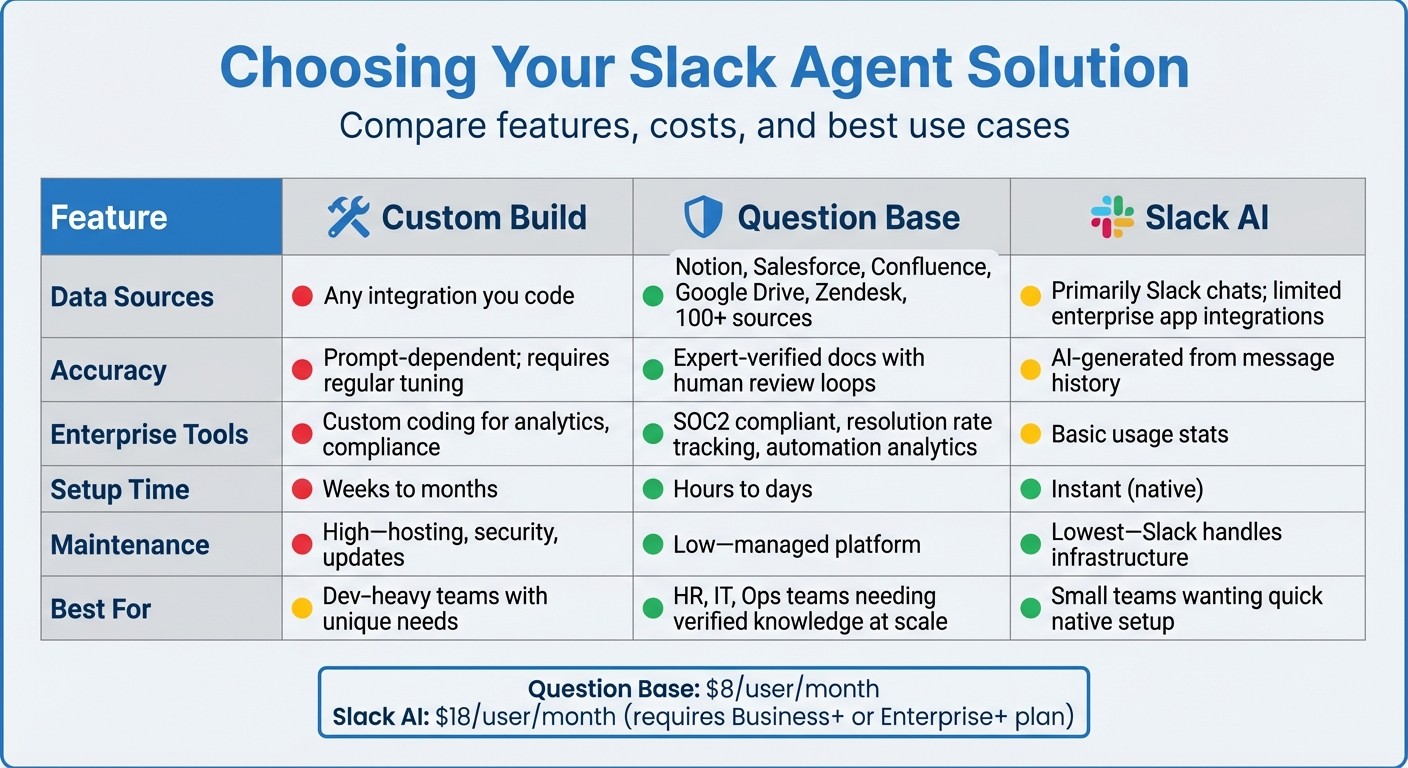
Slack Agent Solutions Comparison: Custom Build vs Question Base vs Slack AI
Time to program your agent's core logic, where it learns when to respond and how to deliver useful answers.
Responding to Slack Events and Messages
Your agent needs to know when to jump into action and what to say. To achieve this, subscribe to essential Slack events like:
app_mention: Triggers when someone @mentions your agent.message: Captures direct messages or posts in channels.app_home_opened: Handles interactions in the agent's home tab.
Using the @slack/bolt framework, listen for app_mention events. Then, fetch the relevant thread history with client.conversations.replies(), call your LLM API with the combined context, and respond in-thread using await say({text: response, thread_ts: event.ts}). To avoid repetitive or contradictory answers, structure the AI prompt like this: "Previous thread: {thread_history}. Current message: {user_message}." For sensitive topics, consider sending responses as direct messages instead of posting publicly.
Adding Keyword Triggers and Conversation Memory
Once your agent can handle basic event responses, you can make it smarter with keyword triggers and conversation memory.
Keyword triggers allow the agent to route queries more efficiently before involving AI. For example, you can define triggers using regex or string matching. If a message includes phrases like "refund policy", "VPN setup", or "reset password", the agent can skip straight to the relevant knowledge base or prompt template. Here's how it might look in code:
Make sure the matching is case-insensitive and includes a fallback. For instance, when a user posts "@agent refund policy", the agent detects "refund", retrieves the policy document, and replies with something like: "Refunds are available within 30 days, excluding custom orders."
Conversation memory ensures your agent can handle multi-turn interactions effectively. Store the conversation state (using tools like Redis or DynamoDB) tied to the channel and thread timestamp. Add recent exchanges to the AI prompt, such as: "Conversation history: {history}. User: {message}. Respond helpfully." Limit the stored history to around 4,000 tokens to avoid overwhelming the context window and incurring high LLM costs. This setup allows the agent to handle follow-ups like, "That didn’t work," by recalling previous steps and suggesting alternatives, such as: "Try using incognito mode or reach out to IT at it@company.com."
Custom Build vs. Question Base vs. Slack AI
With the core logic ready, you’ll need to decide how to deploy your agent. Options include building from scratch, using Question Base, or relying on Slack AI.
A custom build offers complete flexibility but demands significant engineering resources. You’ll need weeks - or even months - to develop, test, and maintain it. This includes creating your own admin tools for managing prompts, reviewing conversations, analyzing performance, and configuring knowledge sources. Plus, you’re responsible for hosting, security, and keeping up with Slack API changes.
Question Base, on the other hand, is a platform that provides prebuilt Slack apps designed to connect with knowledge sources like Notion, Confluence, Salesforce, and GitHub. It handles everything from retrieval-augmented generation (RAG) to conversation history and analytics. Unlike AI that relies solely on past chats, Question Base focuses on expert-verified answers from trusted documentation. Features like duplicate detection, case tracking, and resolution rate analytics are included, all for $8 per user per month. For teams prioritizing accuracy and minimal engineering effort, this is a strong option. You can even test the system with simulation tools to validate responses before rolling it out widely.
Slack AI is a native solution built into Slack, primarily aimed at boosting productivity through search, summarization, and agent apps. It integrates with Slack and Salesforce data, making it handy for summarizing threads or searching message history. However, it mainly learns from Slack messages and supports limited enterprise app integrations, available only on Business+ or Enterprise plans at $18 per user per month. While Slack AI is quick to set up and great for small teams, it may fall short for teams needing deeper knowledge management or advanced analytics.
Feature | Custom Build | Question Base | Slack AI |
|---|---|---|---|
Data Sources | Any integration you code | Notion, Salesforce, Confluence, Google Drive, Zendesk, 100+ sources | Primarily Slack chats; limited enterprise app integrations |
Accuracy | Prompt-dependent; requires regular tuning | Expert-verified docs with human review loops | AI-generated from message history |
Enterprise Tools | Custom coding for analytics, compliance | SOC2 compliant, resolution rate tracking, automation analytics | Basic usage stats |
Setup Time | Weeks to months | Hours to days | Instant (native) |
Maintenance | High - hosting, security, updates | Low - managed platform | Lowest - Slack handles infrastructure |
Best For | Dev-heavy teams with unique needs | HR, IT, Ops teams needing verified knowledge at scale | Small teams wanting quick native setup |
If you’re unsure where to start, begin with a simple prototype. Use no-code tools like Gumloop or platforms like Question Base to test your use case. If you need more specialized functionality, you can always transition to a custom build later.
Deploying and Monitoring Your Slack Agent
Installing the Agent in Your Workspace
To get started, create a Slack app with the necessary OAuth scopes: chat:write, im:history, channels:history, and app_mentions:read. Enable Event Subscriptions and set up a valid Request URL to verify the connection using Slack’s challenge process. Before rolling it out to your entire workspace, test the app in a smaller environment. Frameworks like @slack/bolt can simplify this setup by automating much of the process, but always confirm the connection is solid before moving forward.
Once verified, install the agent in your Slack workspace and invite it to a test channel using /invite @youragent. This approach allows you to identify and resolve potential issues, such as incorrect responses, permission errors, or event delays, before a full rollout. If you’re using a managed platform like Question Base, the process is even simpler. Add the app directly from the Slack App Marketplace, link your knowledge sources (e.g., Notion, Confluence, Google Drive), and invite the bot into the channels where it’s needed.
Testing and Improving Agent Responses
Testing is essential to ensure the agent performs effectively. Use a combination of scripted tests, scenario-based tests, and pilot programs to evaluate its accuracy and functionality:
Scripted Tests: Run through a predefined list of FAQs, such as "What's our PTO policy?" or "How do I reset my Okta password?" Check that the agent provides accurate, well-sourced, and appropriate responses.
Scenario Tests: Simulate end-to-end workflows, like IT ticket triage or onboarding a new hire. Confirm the agent can escalate issues, log tickets, or hand off tasks to humans when necessary.
Pilot Programs: Deploy the agent with a small group (50–100 users) for a trial period of 2–4 weeks. Collect feedback through Slack surveys or embedded forms in the bot’s replies to identify areas for improvement.
Pay close attention to issues like incorrect or “hallucinated” answers, outdated references (e.g., old policy details or outdated USD amounts), and tone inconsistencies. Address these by refining prompts, adjusting retrieval rules, or adding more robust knowledge sources. Use confidence thresholds to ensure the agent doesn’t guess when uncertain; instead, it should escalate such queries to a human or specialist channel. Regularly update prompts, expand the knowledge base to fill gaps, and fine-tune routing rules to ensure the agent adds value where it’s deployed.
After testing, continuous monitoring is key to maintaining long-term performance.
Tracking Performance and Identifying Gaps
Once the agent is up and running, monitor its performance using key metrics to identify areas for improvement:
Resolution Rate: The percentage of questions fully answered without human intervention.
Time to First Response: How quickly the agent replies to inquiries.
Escalation Rate: The frequency with which the agent hands off tasks to humans.
Unanswered Questions: Instances where the agent couldn’t provide a helpful response.
User feedback is another critical metric. Use simple Slack emoji reactions or short ratings after responses to gauge satisfaction and spot trends over time.
Platforms like Question Base offer built-in dashboards to track these metrics. These tools can highlight recurring questions, unresolved or escalated queries, and performance by department (e.g., IT vs. HR). They also reveal knowledge gaps, such as frequently asked questions that lack adequate answers or rely on outdated information. For U.S.-based organizations, these dashboards can even quantify support cost savings by estimating time saved per deflected ticket and multiplying it by the average fully loaded hourly rate.
To keep the agent performing at its best, schedule weekly reviews. Assign an owner to examine logs, update content, and publish improved versions of the agent as needed. This regular maintenance ensures the agent evolves alongside your team’s needs.
Choosing the Right Slack Agent Solution
When deciding on a Slack agent solution, it's essential to weigh the options: building a custom agent, using Slack AI, or choosing a third-party platform like Question Base. Each path has its advantages, but the best choice depends on your team’s specific needs.
Custom-built agents offer complete control, allowing you to tailor every detail. However, they require weeks - or even months - of development time, along with ongoing maintenance. Slack AI, on the other hand, provides quick setup for those on Business+ or Enterprise+ plans, but its functionality is mostly limited to searching Slack history and summarizing conversations. Third-party platforms like Question Base strike a balance, offering quick, no-code setup, integration with over 100 knowledge sources, and enterprise-focused features such as verified answers and customizable prompts.
For teams that prioritize accuracy and scalability, Question Base stands out. Unlike Slack AI, which mainly pulls information from chat history, Question Base connects directly to trusted sources like Notion, Confluence, Salesforce, and Google Drive. Its verification workflow ensures that AI-generated answers are reviewed by humans before being shared, eliminating inaccuracies and improving reliability. This approach ensures your team receives the right information every time.
Question Base also offers features designed specifically for support, HR, and IT teams. These include per-channel customization, case tracking, duplicate detection, analytics on resolution rates, and tools to identify knowledge gaps through unanswered questions. At $8 per user per month, it’s less than half the price of Slack AI’s $18 per user rate, and it doesn’t require an upgrade to Business+ or Enterprise+ plans. Setup is straightforward - install it from the Slack App Marketplace, connect your knowledge sources, and invite the bot to your channels. You’ll be up and running in minutes.
A custom build might still be worth considering if your team has unique requirements that go beyond what standard platforms offer. However, for most enterprises, the time saved, reduced maintenance, and robust enterprise-grade features of platforms like Question Base make them the practical choice. With SOC 2 compliance, on-premise deployment options, and the ability to test the agent against thousands of past conversations before launch, Question Base ensures you can deploy confidently without pulling your engineering team away from critical projects.
Choosing the right solution sets the foundation for a successful deployment. With these options in mind, you’re ready to move forward and refine your Slack agent to meet your team’s operational goals.
FAQs
What are the benefits of using a Slack-native agent for internal support?
A Slack-native agent simplifies internal support by delivering quick and precise answers right within Slack, eliminating the need for teams to dig through scattered systems. This approach helps reduce response times, automates repetitive inquiries, and ensures consistent knowledge sharing - all of which boost team efficiency.
Unlike generic AI tools, specialized agents like Question Base integrate with trusted platforms such as Notion, Confluence, and Salesforce to provide verified, reliable answers. This ensures accuracy, accountability, and alignment across teams, making it a perfect fit for support, HR, IT, and operations departments.
What’s the difference between Question Base and building a custom Slack agent?
Building a custom Slack agent might sound appealing since it offers control over workflows and integrations. However, it often demands extensive development time, specialized technical skills, and ongoing upkeep - a tall order for many teams.
Question Base, on the other hand, is a plug-and-play, enterprise-level solution tailored for internal support, HR, and operations teams. It comes equipped with features like expert-verified answers, seamless integrations with popular tools such as Salesforce, Confluence, and Notion, and advanced functionalities like case tracking, duplicate detection, and analytics. Best of all, it eliminates the need for custom development. Designed to prioritize accuracy, scalability, and knowledge ownership, Question Base ensures your team gets reliable and efficient support from day one.
How do I set up an AI-powered Slack agent for my team?
To get started with an AI-powered Slack agent, the first step is connecting your trusted data sources. Whether you rely on tools like Notion, Confluence, Salesforce, or OneDrive, linking these ensures the agent delivers precise, expert-approved answers. After that, tailor the agent to suit your team’s specific requirements. This includes configuring features such as case tracking, per-channel settings, and duplicate detection to keep things running smoothly. Once everything is set up, deploy the agent within Slack, allowing your team to ask questions and get accurate responses directly where they work.
For even better results, fine-tune workflows and automation rules to simplify tasks for teams like HR, IT, or support. Keep an eye on analytics, such as resolution rates and automation performance, to ensure the agent remains effective and aligned with your organization’s evolving knowledge base.