∙
Cooper
∙
Reading time:
16 min

Slack AI in 2026 transforms workplace productivity with enterprise search and context agents inside Slack. These tools streamline workflows by connecting over 55 data sources, enabling natural language queries, summarizing conversations, and pulling permission-aware information from apps like Google Drive, Salesforce, and GitHub. While Slack AI simplifies internal collaboration, it may fall short for teams needing verified, precise answers or advanced support workflows.
For organizations managing HR, IT, or operations, specialized tools like Question Base offer expert-verified answers, case tracking, and analytics to address knowledge gaps. This comparison of enterprise search vs. Slack AI highlights when to use Slack AI for quick searches and summaries versus Question Base for reliable, structured knowledge management.
Key Takeaways:
Slack AI: Ideal for conversational search and summarization within Slack. Limited to higher-tier plans for full functionality.
Question Base: Focuses on delivering accurate, expert-verified answers from trusted platforms like Notion, Confluence, and Salesforce.
Quick Comparison:
Feature | Slack AI | Question Base |
|---|---|---|
Accuracy | AI-generated from Slack messages | Expert-verified from trusted sources |
Data Sources | Slack, Google Drive, Salesforce, etc. | Notion, Confluence, Salesforce, etc. |
Knowledge Management | Basic summarization and search | Case tracking, analytics, and more |
Best For | Fast searches, chat summaries | Reliable, auditable knowledge |
For teams in high-pressure industries, combining Slack AI with Question Base can maximize efficiency while maintaining accuracy.
Slack Adds AI-Powered Enterprise Search To Take on Glean, Dropbox, Atlassian
Slack AI's Enterprise Search Capabilities in 2026
Slack's enterprise search now acts as a centralized knowledge hub, seamlessly connecting over 55 data sources into a single, searchable index [2]. Employees can ask natural language questions directly within Slack and receive immediate, synthesized answers from across their entire tech stack [2]. This conversational approach shifts away from traditional keyword-based searches, using semantic understanding to interpret intent - even when questions include misspellings or vague phrasing [2]. This evolution paves the way for delivering tailored results.
The system employs retrieval-augmented generation (RAG), trained on company-specific data, to provide results personalized to each user's role, past interactions, and accessed content [2]. Current integrations include Google Drive and GitHub, with SharePoint, OneDrive, and Jira integrations expected soon [2]. Importantly, all search results honor existing permission settings, ensuring users only access data they are authorized to see [2]. For example, a sales team querying Salesforce data alongside Slack conversations can do so securely without exposing sensitive information.
Slack AI extends its capabilities beyond search by summarizing lengthy threads into concise bullet points, comparing multiple documents side-by-side, and identifying subject-matter experts based on their contributions to conversations [2]. This shift from basic keyword matching to understanding user intent is best described by Slack itself as:
like having a super-smart research assistant you can check in with at any time [8]
Core Features of Slack's Enterprise Search
Slack's enterprise search operates through federated search, which queries all connected data sources simultaneously in real time, rather than relying on outdated indexed snapshots [5]. When a user submits a query, the AI interprets the intent, retrieves the relevant context, and ensures all results respect permission boundaries [1].
The unified indexing system combines structured data from business applications like Salesforce with unstructured content from Slack messages, canvases, and files [2]. This creates a comprehensive knowledge layer accessible to various teams - from support teams retrieving product documentation to HR teams locating policy details [5]. Slack also provides an analytics dashboard to track search trends and pinpoint content gaps, alongside detailed audit trails to enhance oversight and minimize compliance risks [2].
Where Slack AI Search Falls Short
Despite its real-time capabilities, Slack's search has limitations when it comes to delivering verified, accurate knowledge. Its reliance on Slack chat history means critical information stored in external systems - or not yet discussed in Slack - may go unnoticed [1]. Additionally, Slack AI cannot confirm the accuracy of its responses or flag outdated content [1].
For teams managing internal support workflows, such as HR addressing employee benefits questions or IT resolving access requests, Slack AI lacks essential features. It does not offer case tracking to monitor resolution rates, tools to identify unanswered questions and knowledge gaps, or mechanisms to consolidate duplicate queries [1]. Furthermore, enterprise-level customization is limited to higher-tier plans, leaving Business+ and Enterprise Grid customers without the Slack AI add-on restricted to Pro-level features [3].
For organizations prioritizing precision and reliability, specialized tools like Question Base provide a more robust alternative. Question Base directly connects to trusted documentation platforms - such as Notion, Confluence, Salesforce, and Google Drive - and delivers expert-verified answers rather than relying solely on Slack chat history. It also includes features like resolution tracking and content gap analysis, ensuring teams stay aligned and informed. While Slack AI enhances individual productivity through faster search, tools like Question Base empower entire teams by delivering accurate, auditable knowledge. For industries where precision is critical - like compliance, customer support, and operations - the distinction between "finding what was said" and "providing what's correct" is essential.
Context Agents in Slack: How They Work
Slack has taken enterprise search to the next level by introducing context agents that personalize in-chat support. These agents are embedded directly into your Slack workspace, learning from conversations, files, and threads to provide responses tailored to your organization. Using company-specific retrieval-augmented generation, they ensure all answers align with your internal data and respect permission settings [1][2]. This system operates through a federated search model, pulling real-time data from connected apps like Google Drive, GitHub, Salesforce, and Jira. Crucially, it maintains data privacy by avoiding the use of external language models for training [5][6].
What Context Agents Do in 2026
By 2026, Slackbot AI has expanded its capabilities to include intelligent search, summarizing Slack conversations, and task management [1]. It can pull key details from uploaded documents, manage calendar availability directly within Slack, and even identify subject matter experts. Profile summaries now show not only who someone is but also what they do and their recent projects, making collaboration more efficient [1].
Recent updates, such as the Updated Activity Hub (launched in Q1 2026) and AI-Suggested Channel Sections (available in Q2 for Business+ and Enterprise+ plans), further streamline workflows [1]. For instance, when you join a channel like #product-roadmap-q2, Slack might suggest grouping it with related channels, such as #product-vision and #product-feedback, under a "Product Strategy" section. Over time, the agent’s adaptive learning refines these suggestions by analyzing channel topics and collaboration patterns [1][7].
Context Agents vs. Purpose-Built Support Tools
While Slack’s context agents are excellent for improving individual productivity, teams that require verified and accountable support often turn to specialized tools like Question Base. The key difference lies in how information is sourced and managed. Slack’s agents rely on unstructured conversation data, while purpose-built tools pull verified information from trusted platforms like Notion, Confluence, Salesforce, and Zendesk. These tools also integrate expert validation and structured workflows, including features like case tracking, duplicate detection, and escalation paths.
For example, HR teams handling benefits inquiries, IT departments managing access requests, or operations teams overseeing internal processes benefit from these specialized solutions. Purpose-built tools proactively manage knowledge by identifying unanswered questions and encouraging timely documentation updates. This approach creates a dynamic knowledge base that evolves with your organization, rather than simply reflecting past Slack discussions. This makes tools like Question Base an ideal choice for teams needing reliable, auditable support.
Expected Slack AI Improvements by 2026
Slack is transforming into a smarter collaboration platform where conversations, data, and actions blend seamlessly. Instead of just retrieving information, Slack is now aiming to provide contextualized answers by analyzing chat history and shared documents.
New Features Coming to Slack AI
The Real-Time Search (RTS) API is a game-changer for developers, offering detailed access to Slack’s message history, threads, and files. This allows AI tools to better understand the context of conversations. When paired with the Model Context Protocol (MCP), these tools can pull only the most relevant information to answer questions, cutting down on unnecessary noise.
Custom API connectors are another exciting addition. These connectors link external platforms like Google Drive, Salesforce, and OneDrive directly to Slack’s search index. The Agentforce Integration takes it a step further by introducing pre-configured AI agents, also called Channel Experts. These agents can manage Salesforce workflows - like qualifying leads or approving deals - right inside Slack. This setup reduces the need to switch between multiple tools, streamlining workflows and saving time.
"To truly be useful at work, AI needs context: an understanding of your conversations, your tools, and how decisions actually get made." – Slackbot Launch Announcement [9]
Implementation Challenges to Expect
Despite these advancements, Slack AI will face hurdles during adoption. A major issue is that 47% of employees avoid using their company’s knowledge base due to disorganized content, ineffective search tools, and the constant need to switch between platforms [10]. To address this, businesses should review their documentation for outdated or missing information before rolling out Slack AI. Appointing "knowledge champions" to maintain content accuracy and flag issues can also help.
For larger organizations, starting small is key. Begin with 1–3 pilot departments, such as HR or IT helpdesks, and aim for an 80% satisfaction rate before expanding further. Assigning data stewards to oversee the external knowledge sources connected to Slack ensures data remains accurate and compliant. While Slack AI respects existing roles and permissions [9], these steps can smooth the transition and highlight when more specialized tools might be a better fit for certain enterprise needs.
Question Base vs. Slack AI: Which Tool Fits Your Enterprise Needs
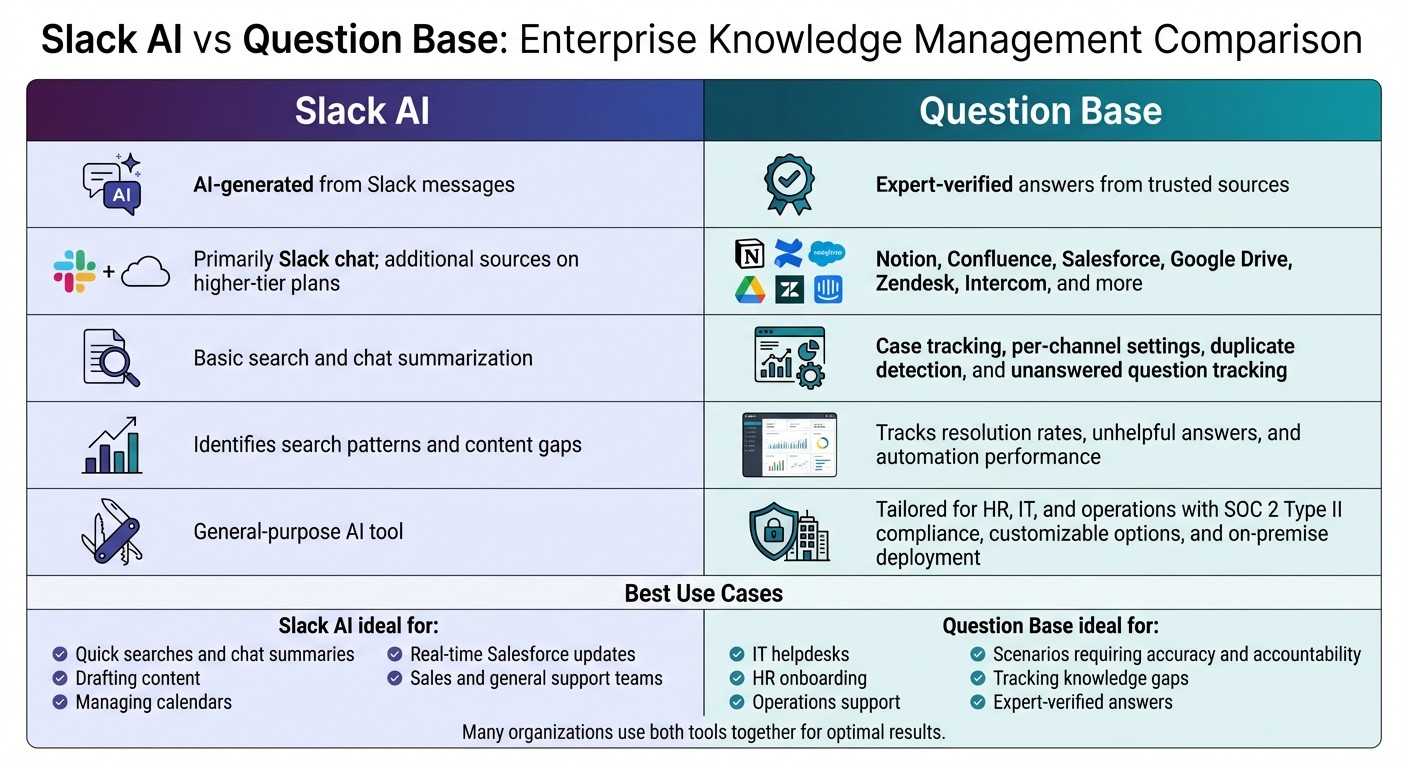
Slack AI vs Question Base: Feature Comparison for Enterprise Teams
As enterprise tools for search and context-aware support evolve, selecting the right solution hinges on understanding your team’s specific needs. Slack AI is great for summarizing conversations and drafting messages, but if your team relies on precise, enterprise-grade knowledge, you’ll need something more robust. Quick chat summaries are helpful, but for accurate answers tied to trusted documentation, tools that track knowledge gaps, and analytics that pinpoint workflow issues, a more specialized solution is essential.
Feature-by-Feature Comparison
Here’s a side-by-side breakdown of how Slack AI and Question Base compare:
Feature | Slack AI | Question Base |
|---|---|---|
Accuracy | AI-generated from Slack messages | Expert-verified answers from trusted sources |
Data Sources | Primarily Slack chat; additional sources on higher-tier plans | Notion, Confluence, Salesforce, Google Drive, Zendesk, Intercom, and more |
Knowledge Management | Basic search and chat summarization | Case tracking, per-channel settings, duplicate detection, and unanswered question tracking |
Analytics | identifies search patterns and content gaps | Tracks resolution rates, unhelpful answers, and automation performance |
Enterprise Focus | General-purpose AI tool | Tailored for HR, IT, and operations with SOC 2 Type II compliance, customizable options, and on-premise deployment |
Question Base integrates directly with your documentation - the trusted repositories your team depends on. Instead of repeatedly telling colleagues, “It’s in Notion - go look it up,” Question Base automates that process and even provides source citations for added transparency.
When to Use Slack AI vs. Question Base
To decide between these tools, consider their strengths:
Slack AI is ideal for quick searches, drafting content, managing calendars, or integrating real-time Salesforce updates into workflows. It’s a solid option for teams working with scattered or fast-changing data, such as sales or general support.
Question Base shines when accuracy and accountability are critical. For IT helpdesks, HR onboarding, or operations support - areas where incorrect answers can lead to bigger problems - it delivers unmatched precision. It tracks unanswered questions, learns from expert input, and provides dashboards that expose knowledge gaps. This transforms Slack from a simple communication tool into a powerful knowledge assistant, evolving alongside your team while keeping experts engaged.
How AI is Changing Enterprise Workflows
AI-powered search and context agents are redefining how enterprise teams access information and collaborate. Instead of toggling between apps or waiting for responses, employees can now ask questions in plain language and get instant, permission-aware answers. This evolution is turning Slack into what some industry leaders call a "super-smart research assistant" - a centralized workspace that integrates conversations, files, and third-party apps like Google Drive, Salesforce, and GitHub.[8][2] These developments build on earlier discussions about improving search and capturing knowledge effectively.
By reducing friction in workflows, AI tools are helping teams make decisions faster. Take sales teams, for instance: they can use Slack to pull customer data from Salesforce, reference recent conversations, and access Google Drive files in one step. This streamlined process allows them to focus on closing deals instead of chasing down information.[5] Similarly, IT and HR teams benefit from AI agents that provide verified answers to routine questions, freeing up their experts to tackle complex, high-value tasks.
How AI Tools Improve Team Collaboration
AI-driven search can cut search times by up to 50%.[1] This time savings doesn’t just boost productivity - it also enhances collaboration. When team members can quickly access context from past projects, locate subject-matter experts, or generate summaries from lengthy discussions, they align more effectively, and bottlenecks are minimized.[8][2]
Slack AI amplifies collaboration with features like auto-generated channel sections that group related conversations, profile summaries that highlight colleagues' roles and recent contributions, and action items that help teams stay aligned on priorities.[1][7] These tools are practical for fast-paced environments, aiding tasks like drafting messages, summarizing threads, and managing scattered data.
Question Base offers a more targeted solution, designed for scenarios where precision and accountability are critical. It delivers expert-verified answers from platforms like Notion, Confluence, and Salesforce. Beyond answering questions, it tracks unresolved queries to reveal knowledge gaps, learns from expert feedback, and provides dashboards to monitor resolution rates and automation performance. This tailored approach complements Slack AI by focusing on how AI can transform collaboration and operational efficiency.
Long-Term Value for Enterprises
The long-term potential of AI becomes even clearer when considering its strategic benefits. Slack AI provides a wide range of features, including reduced search times, automated content generation, compliance support with audit logs, and improved accessibility across teams.[1] However, full enterprise search functionality is only available on higher-tier plans like Enterprise+, and organizations may need to address challenges like managing audit log exports and setting up strong admin controls for AI data usage.[1][4]
Question Base, on the other hand, is purpose-built for large-scale knowledge management. With SOC 2 Type II compliance, on-premise deployment options, and the ability to customize AI tone, escalation paths, and accessible content, it goes beyond answering questions. It transforms fleeting Slack conversations into searchable documentation, speeding up onboarding, reducing repetitive queries, and generating actionable insights on content gaps. These insights can align with sprint cycles or quarterly planning, making it an adaptable tool for large enterprises. Ultimately, the decision hinges on whether your team needs a general-purpose AI assistant or a specialized knowledge management system that evolves with your organization’s needs.
Conclusion: Preparing for an AI-Enhanced Workflow
Slack AI now supports natural-language queries and delivers permission-aware results across more than 55 data sources. This feature simplifies routine searches and enables teams to make decisions faster, positioning Slack as a central hub for everyday collaboration.
However, while Slack AI shines in retrieving information and summarizing conversations, it doesn’t handle tasks like automating workflows, automating support ticket triage, or updating CRMs. Another limitation is that its full functionality is restricted to specific Business+ and Enterprise+ plans, which come with custom pricing.
For teams that deal with repetitive questions or need expert-verified answers from trusted platforms like Notion, Confluence, or Salesforce, Question Base offers additional capabilities. These include tracking unresolved queries, identifying knowledge gaps, and providing dashboards to measure resolution rates and automation performance.
Ultimately, the choice of tools depends on your team’s needs. Slack AI excels in chat-based collaboration, while Question Base focuses on scalable, verified knowledge management. Many organizations find value in combining both tools, creating a complementary system that boosts team efficiency and supports strategic goals.
FAQs
How is Slack AI's enterprise search different from traditional search tools?
Slack AI's enterprise search focuses on pulling information from Slack conversations, files, and connected apps. It provides context-aware responses and concise summaries by analyzing chat history. Unlike standard search tools that depend on basic keyword matching, Slack AI goes a step further by interpreting user intent to deliver more relevant results.
That said, Slack AI's capabilities are confined to Slack's ecosystem and its chat records. In contrast, traditional enterprise search tools often integrate with platforms like Notion, Confluence, or Salesforce, offering reliable and verified answers from a range of trusted sources. This positions Slack AI as a strong option for quick, Slack-specific insights, while broader enterprise tools are better suited for managing knowledge across multiple platforms.
What are the challenges of using Slack AI for teams that need accurate and verified information?
Slack AI shines when it comes to summarizing conversations and pulling information from past chats. However, it falls short for teams that require precise, verified answers. Its responses are based on Slack messages and files, meaning it relies on unverified, AI-generated content rather than pulling from authoritative, trusted sources. This approach can lead to errors, particularly in scenarios where decisions hinge on dependable data.
Unlike specialized tools like Question Base, Slack AI doesn’t integrate directly with platforms like Notion, Confluence, or Salesforce. It also misses key features such as knowledge gap tracking, duplicate detection, and auditability - all of which are essential for enterprise teams focused on accuracy, compliance, and maintaining control over their knowledge base. Question Base is specifically designed to address these needs, providing expert-verified, consistently reliable information at scale.
Why would an organization choose Question Base instead of Slack AI for managing knowledge?
Organizations might opt for Question Base over Slack AI because it’s designed specifically to deliver trusted, verified answers from reliable sources such as Notion, Confluence, and Salesforce. Unlike Slack AI, which emphasizes summarizing chats and pulling details from conversation history, Question Base integrates directly with your documentation to provide dependable, audit-ready knowledge.
It also includes features tailored for enterprise needs, such as knowledge gap tracking, duplicate detection, and case management. These tools are especially useful for HR, IT, and operations teams that rely on structured and consistent knowledge management. With enterprise-level security, compliance controls, and analytics, Question Base enables teams to track performance, refine workflows, and maintain alignment across the organization.