∙
Cooper
∙
Reading time:
12 min

Repetitive questions and scattered knowledge slow teams down. Slackbot and Question Base both promise solutions, but their approaches differ. Slackbot focuses on simplifying personal productivity within Slack, while Question Base prioritizes reliable, enterprise-ready knowledge management.
Key Takeaways:
Slackbot: Summarizes chats, drafts content, and automates tasks within Slack. Ideal for individual productivity but relies on unstructured data, which can lead to outdated or incomplete answers.
Question Base: Sources verified answers from trusted platforms like Notion and Salesforce. Built for HR, IT, and operations teams managing high volumes of recurring questions. Offers analytics, compliance features, and scalable support.
Quick Comparison:
Feature | Slackbot | Question Base |
|---|---|---|
Knowledge Source | Unstructured chat history | |
Task Focus | Personal productivity | Enterprise support |
Integrations | Limited by Slack plan tier | Full access across 12+ tools |
Analytics | Basic usage stats | Advanced dashboards for performance |
Pricing | Included in Slack Business+ plans | Starting at $8/user/month |
Bottom Line: Choose Slackbot for quick personal workflow improvements. Opt for Question Base if verified answers, advanced analytics, and scalable support matter most to your team.
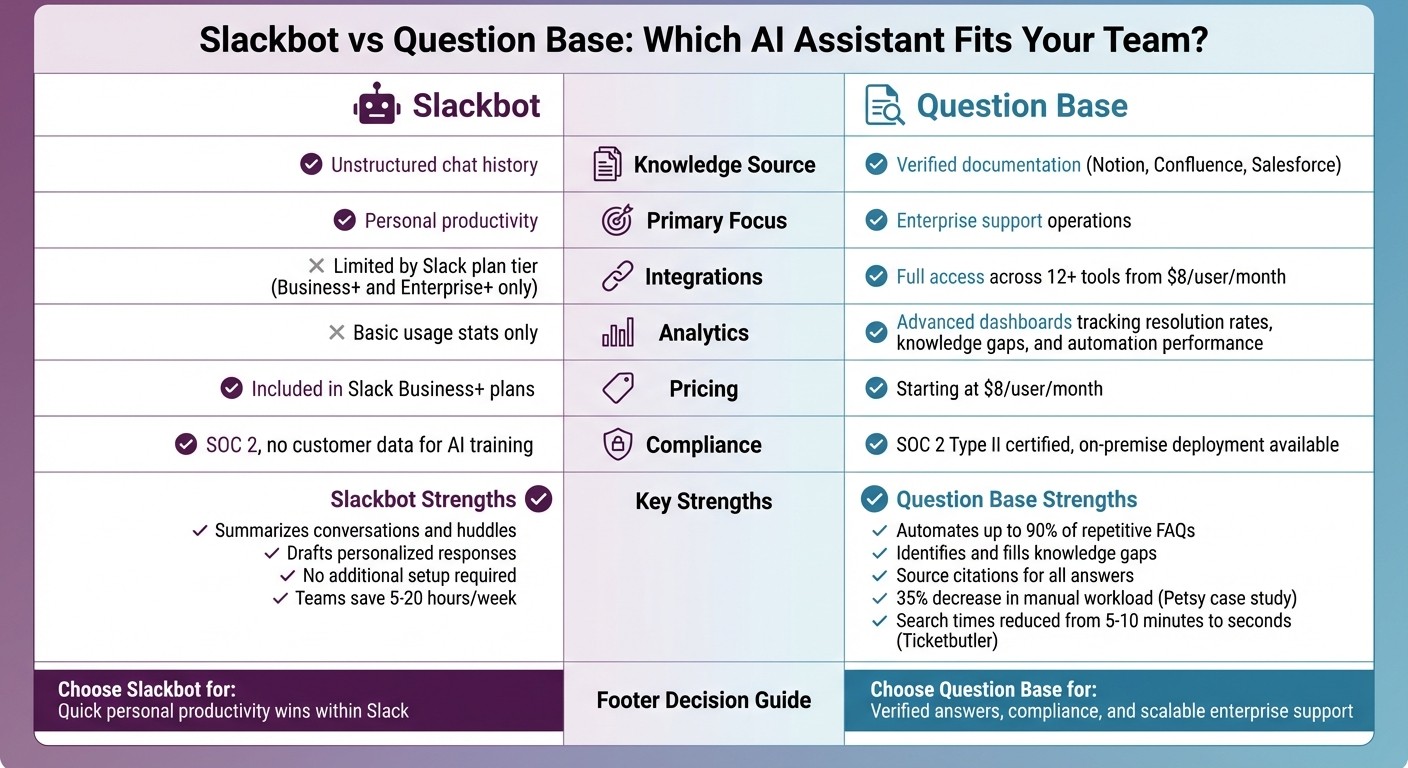
Slackbot vs Question Base: Feature Comparison for Enterprise Teams
Slack School | Meet Slackbot, your AI Agent for Work
1. Slackbot
Slackbot has grown from a basic notification tool into a productivity assistant with natural language processing capabilities, enabling it to provide context-aware responses. By indexing messages, threads, and file attachments from your team’s chat history, Slackbot aims to streamline workflows. Let’s take a closer look at how these features influence enterprise knowledge management.
Knowledge Management
Slackbot organizes and indexes channel messages, threads, and files to respond to queries. However, its reliance on unstructured data often creates challenges for enterprise teams. For example, while it can surface past discussions, it doesn’t guarantee alignment with Slack knowledge bases vs. traditional documentation stored in platforms like Notion, Confluence, or Salesforce. This gap becomes especially apparent when managing official policies, HR guidelines, or IT procedures. Additionally, Slackbot lacks tools to identify missing information, duplicate content, or unanswered questions, leaving teams to manually address these issues.
Task Automation
Slackbot excels in automating a variety of tasks. It can summarize lengthy conversations or huddles, draft responses based on user prompts, and flag potential blockers ahead of meetings. Its no-code builder supports multi-step workflows, making it easier to automate routine processes. Beyond this, Slack’s marketplace offers third-party integrations, such as interactive "Work Objects", which let users edit records or approve requests directly within Slack - eliminating the need to switch between apps and speeding up repetitive tasks.
Integration Capabilities
Integrating Slackbot with external tools often involves navigating OAuth2 protocols and managing client IDs, secrets, and tokens, which can be a hurdle for IT teams [2]. While Slack’s Workflow Builder simplifies basic integrations, enterprises may still face what’s often called a "plumbing problem": users need to remember multiple commands to maintain workflows, which can disrupt efficiency [3]. Additionally, integration flexibility may be restricted by pricing tiers. Lower-tier plans limit access to certain features, and some third-party services require separate paid subscriptions, adding complexity for teams trying to connect multiple documentation systems at once.
Enterprise Readiness
When it comes to enterprise needs, Slackbot addresses key areas like compliance and security. It adheres to stringent security standards, avoids using customer data for AI training, and minimizes data storage [1][4]. For AI-powered search results, Slackbot includes citations, allowing users to trace information back to the original message for verification [4]. However, it falls short in providing native analytics for tracking metrics like resolution rates or identifying knowledge gaps, which could help teams measure and improve their support processes.
2. Question Base
Unlike Slackbot, which relies on informal chat histories, Question Base pulls answers directly from verified documentation. By connecting to trusted sources like Notion, Confluence, Salesforce, Google Drive, Zendesk, Intercom, and others, it ensures responses are accurate and reliable. This approach avoids the pitfalls of Slackbot's unstructured data dependency.
Knowledge Management
Question Base is designed for teams that need precise, expert-backed answers. It extracts information from verified documents and provides source citations for transparency. If no answer exists, the system routes the query to a subject expert, creating a feedback loop that identifies and fills knowledge gaps. It also detects duplicate content across repositories and transforms valuable Slack conversations into structured documentation. This process turns fleeting discussions into searchable records, enhancing internal knowledge access.
In late 2025, Ticketbutler adopted Question Base to streamline internal support for their expanding team. UX Lead Maria Jensen highlighted a dramatic improvement, with search times dropping from 5–10 minutes per query to just a few seconds. Linn Stokke, an Online Events Specialist, shared that it managed knowledge sharing during staff absences, reducing reliance on static Google docs. Similarly, Petsy CEO Monica Limanto reported a 35% decrease in manual workload within the first month.
Task Automation
While Slack AI is adept at summarizing conversations and drafting responses, Question Base focuses on automating repetitive support queries before they reach human experts. It tracks resolution rates, flags ineffective answers, and measures automation efficiency. Teams can customize settings for each channel, deciding when the AI should respond automatically or escalate to a person. This feature is particularly useful for HR, IT, and operations teams handling procedural questions like onboarding in Slack, benefits enrollment, password resets, or company policies.
Integration Capabilities
Question Base seamlessly integrates with over 12 enterprise tools, including Notion, Confluence, Google Drive, Salesforce, Zendesk, Intercom, Dropbox, HubSpot, OneDrive, Jira, SharePoint, and Freshdesk. Setup is straightforward: install the app, link your sources, and invite the bot. Unlike Slack AI, which may limit integrations based on pricing tiers, Question Base includes full integration access starting at $8 per user per month. It also offers Smart Capture, enabling teams to turn expert responses in Slack threads into permanent knowledge entries instantly, without leaving the platform. These integrations ensure compliance and efficiency for enterprise users.
Enterprise Readiness
Built for organizations with strict compliance and security needs, Question Base meets SOC 2 Type II standards, encrypts data at rest and in transit, and supports on-premise deployment for teams with data residency requirements. It provides detailed analytics dashboards to track resolution rates, identify knowledge gaps, and measure automation performance - helping leaders optimize support processes. Additional enterprise features include white-labeling, multi-workspace support, and role-based access controls, ensuring scalability and secure data management for internal support operations.
Pros and Cons
Building on the earlier comparisons, let’s break down the operational differences between Slackbot and Question Base, highlighting their strengths and tradeoffs.
When it comes to Slackbot, its primary advantage lies in boosting individual productivity. It excels at tasks like summarizing conversations and drafting personalized messages. Since it’s built directly into Slack, there’s no additional setup required, making it instantly accessible for Business+ and Enterprise+ subscribers. Teams at companies like Salesforce, Slalom, and Beast Industries report saving anywhere from 5 to 20 hours per week using Slackbot [5].
That said, Slackbot has its limitations. Its reliance on chat history can lead to outdated or incomplete information. It doesn’t offer structured analytics for tracking metrics like resolution rates or identifying knowledge gaps. The analytics it does provide are limited to basic usage stats, and deeper integrations with tools like Confluence or Notion are only available on higher-tier plans.
Question Base, on the other hand, stands out for its focus on verified information. It sources answers from trusted platforms like Notion, Confluence, and Salesforce, ensuring accuracy and traceability with source citations. Beyond that, it identifies knowledge gaps, escalates unresolved queries, and provides leaders with clear insights into support performance. It’s also SOC 2 Type II compliant, supports on-premise deployment, and allows customization for tone and escalation workflows on a per-channel basis.
The tradeoff between the two tools boils down to their focus. Slackbot is ideal for general productivity tasks, such as creating meeting notes or summarizing conversations. In contrast, Question Base is purpose-built for internal support operations, such as HR onboarding, IT troubleshooting, and answering procedural FAQs. It automates repetitive queries before they reach human experts, offering a structured and accountable framework. For teams managing high query volumes, Question Base provides the scalability and precision that Slackbot lacks. However, for individuals looking for quick, Slack-native solutions, Slackbot’s immediate accessibility may be more appealing.
Feature | Slackbot Strengths | Slackbot Limitations | Question Base Strengths | Question Base Limitations |
|---|---|---|---|---|
Knowledge Management | Synthesizes context from conversations, files, and calendars | Relies on unverified chat history with no gap detection | Verified documentation with source citations and gap identification | Requires initial integration with documentation tools |
Task Automation | Automates daily recaps, meeting notes, and message drafting | Limited to Slack-native workflows | Automates up to 90% of repetitive FAQs while capturing expert responses | Focused on Q&A rather than chat summarization |
Integrations | Native integration | External tool access restricted to Business+ and Enterprise+ tiers | Full integration access from $8/user/month across 12+ platforms | Integration setup required |
Enterprise Features | Leverages existing Slack permissions with no extra setup | Basic analytics; no on-premise deployment or white-label options | SOC 2 Type II certified with on-premise deployment and detailed dashboards | Higher administrative effort for expert verification workflows |
This breakdown highlights why teams prioritizing verified, scalable support systems often gravitate toward Question Base.
Conclusion
Deciding between Slackbot and Question Base comes down to your team's specific needs and priorities. Slackbot is ideal for boosting individual productivity, offering features like summarizing conversations, drafting messages, and pulling insights from your Slack history. With minimal setup for Business+ and Enterprise+ users, it’s a quick way to turn scattered threads into verified answers. Teams that rely heavily on Slack for day-to-day communication will appreciate how Slackbot simplifies repetitive tasks, such as generating meeting notes or recapping channels, making workflows more efficient.
On the other hand, Question Base is built to tackle enterprise-level support challenges. For teams in HR, IT, or operations that manage a high volume of recurring questions - whether about policies, onboarding, or troubleshooting - accuracy and reliability are critical. Unlike Slackbot, which interprets past conversations, Question Base ensures all responses are verified and directly sourced from trusted documentation. It also tracks unresolved queries, identifies knowledge gaps, and provides analytics on resolution rates - features that Slackbot doesn’t offer.
The decision ultimately hinges on whether you prioritize individual task efficiency or enterprise-level accuracy and scalability. Slackbot works best for teams already on Business+ or Enterprise+ plans, especially when the goal is to streamline personal productivity in roles where context from conversations is key. On the other hand, Question Base is the better choice for teams that require dependable, auditable knowledge management - particularly in industries where outdated or incorrect information can lead to significant risks. For large organizations, combining both tools can be a powerful strategy: Slackbot for everyday productivity and Question Base as the authoritative source for compliance-critical knowledge.
Start by identifying where your team loses the most time. If the challenge lies in retrieving context from old Slack threads, Slackbot’s summarization tools might be enough. But if your team regularly faces repetitive HR or IT questions, Question Base can automate up to 90% of those queries while keeping subject matter experts in the loop. For larger teams that need precision and scalability, Question Base - starting at $8 per user per month and offering SOC 2 Type II compliance - provides enterprise-grade support. While Slackbot delivers quick wins in productivity, Question Base stands out for its robust, scalable approach to managing knowledge at the enterprise level.
FAQs
How does Slackbot manage outdated or incomplete information?
Slackbot works by tapping into Slack’s chat history and custom responses that users set up. While it can offer answers based on recent interactions or pre-programmed prompts, it doesn’t automatically refresh or correct outdated details unless someone manually updates it. This limitation means responses can sometimes be incomplete or based on outdated data if the source information isn’t kept up to date.
In contrast, Question Base integrates directly with trusted documentation tools like Notion, Confluence, and Salesforce. By pulling answers from these verified and always-current sources, it provides enterprise teams with accurate, up-to-date information - making it a dependable solution for organizations that need precision at scale.
How does Question Base integrate with other tools compared to Slackbot?
Question Base works effortlessly with enterprise tools such as Notion, Confluence, Salesforce, Google Drive, and Zendesk. By tapping into these platforms, it pulls precise, expert-approved information from trusted sources. This creates a centralized, dependable knowledge base accessible directly within Slack. With features like case tracking, duplicate detection, and knowledge gap analysis, it’s tailored for teams that demand consistent and scalable knowledge management.
On the other hand, Slackbot primarily depends on Slack chat history to provide answers and offers limited integration unless enhanced with third-party tools. While Slack AI excels at summarizing past conversations and performing quick searches, Question Base takes things further. It connects to external platforms, delivering verified, structured answers that fit seamlessly into complex workflows and meet enterprise compliance needs. It’s specifically designed for teams that prioritize accuracy and operational alignment.
Why would an enterprise team choose Question Base over Slackbot for internal support?
Enterprise teams often turn to Question Base instead of Slackbot because it’s purpose-built for managing knowledge at scale with precision and structure. While Slackbot focuses on simple automations and pulling from Slack chat history, Question Base integrates directly with trusted platforms like Notion, Confluence, and Salesforce. This integration ensures that teams get verified, expert-approved answers, offering a higher level of accuracy, compliance, and dependability.
On top of that, Question Base provides advanced tools like duplicate detection, knowledge gap tracking, and actionable analytics - features designed to help teams refine and expand their knowledge base over time. Tailored for HR, IT, and operations teams, it also adheres to enterprise-grade security and compliance standards, including SOC2. This makes it a strong fit for organizations that demand precision, transparency, and adaptability.