∙
Cooper
∙
Reading time:
16 min

AI in Slack can transform how teams manage knowledge - if done right. But without proper planning, these tools can lead to security risks, outdated answers, and inefficiencies. To ensure your Slack AI integration remains secure, reliable, and scalable, here’s what you need to focus on:
Scalability: Plan for high query volumes, multi-workspace setups, and sustained performance.
Security: Use SOC 2-compliant tools, audit permissions regularly, and control data access.
Flexibility: Connect to trusted knowledge sources like Notion or Salesforce and customize AI behavior.
Analytics: Track query resolution rates, identify knowledge gaps, and update content based on insights.
Enterprise Solutions: Consider tools like Question Base for secure, documentation-driven answers.
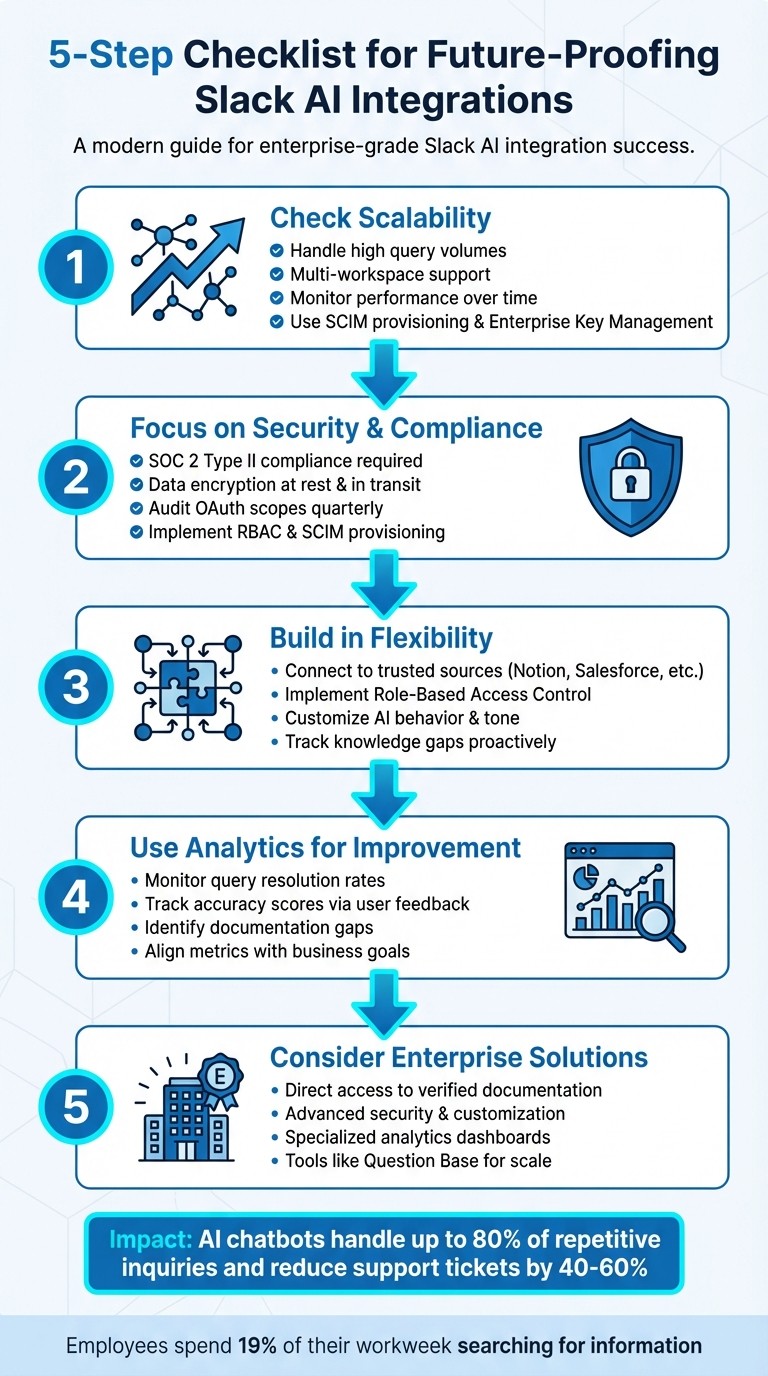
5-Step Checklist for Future-Proofing Slack AI Integrations
Build a No-Code AI Knowledge Base in Slack 🚀

1. Check Scalability for Growing Teams and Workloads
Scalability is the backbone of effective enterprise AI integrations, ensuring they can grow alongside your organization. For Slack AI integrations, this means maintaining performance, consistency, and compliance as workflows expand, all while minimizing risks.
1.1 Confirm AI Can Handle High Query Volumes
Your Slack AI integration should deliver quick responses, even during peak usage. Ask vendors about their system's ability to handle simultaneous queries, capacity thresholds, and how they manage performance spikes. Look for real-time indicators, like "searching company knowledge...", to reassure users the system is actively processing their requests rather than stalling [3].
Once you're confident in its ability to manage high query volumes, extend your planning to include support for multiple workspaces.
1.2 Plan for Multi-Workspace and Cross-Channel Support
If your organization operates across multiple Slack workspaces, it's essential to ensure your AI integration works smoothly within this setup. Enterprise Grid management provides a framework for global policies, ensuring uniform permissions and governance.
The integration should also support channel-specific configurations, such as using /invite @bot for inviting the bot to specific channels. Additionally, role-based access control (RBAC) is crucial for restricting data visibility based on job roles, even when the same AI is used across various workspaces.
Essential Capability | Purpose in Multi-Workspace/Cross-Channel Environments |
|---|---|
SCIM Provisioning | Maintains consistent user access and security across all organizational workspaces. |
OAuth Scope Auditing | Prevents apps from gaining excessive permissions over time. |
Enterprise Key Management | Gives organizations control over encryption keys for workspace data. |
Global Shortcuts | Allows users to trigger automations, like ticket creation, from any workspace or channel. |
Real-time Search API | Enables AI to search data across public channels in the entire workspace network. |
1.3 Monitor Integration Performance Over Time
Sustained performance is just as important as initial deployment. Establish performance benchmarks during the rollout phase and track metrics like response times, error rates, and query success rates on a monthly basis.
To avoid issues with custom integrations, use standardized Slack CLI templates with pre-approved scopes [2]. Regular load testing can help you identify and address bottlenecks before they disrupt your operations.
2. Focus on Security and Compliance
After addressing scalability, securing your integration should be your next priority.
Protecting sensitive data isn’t a one-time task - it’s a continuous effort. When assessing Slack AI integrations, SOC 2 Type II compliance is a critical benchmark. This certification ensures vendors adhere to strict standards for data encryption, access controls, and incident response. Solutions like Question Base meet SOC 2 requirements, offering encryption both at rest and in transit, with optional on-premise deployment for industries like finance or healthcare that face strict regulatory demands.
2.1 Choose SOC 2-Compliant Solutions
SOC 2 Type II compliance guarantees that security protocols are properly implemented and maintained. This is vital since AI integrations often handle large volumes of internal data, such as HR files or customer support logs. Look for vendors that provide Enterprise Key Management (EKM), which allows your organization to manage encryption keys independently, rather than relying solely on the vendor. This level of control is particularly important for sectors governed by HIPAA, GDPR, or financial regulations.
2.2 Ensure Data Ownership and Control
Maintaining control over your data and how AI operates is crucial. Slack enforces strict data boundaries, and you should demand the same from third-party AI tools. Use the App Home surface to inspect which data sources the AI accesses and the models it uses [3]. For instance, Question Base enables organizations to define which content the AI can access, adjust its tone, and set up escalation workflows to human support. This ensures the AI operates within your policies and doesn’t function as an uncontrollable "black box."
2.3 Audit Security Configurations Regularly
Regular security audits are essential to prevent gaps like permission creep. Conduct quarterly reviews of OAuth scopes such as search:read.public or channels:read to ensure they adhere to the principle of least privilege. Rotate tokens for custom apps periodically, and confirm that webhook endpoints use HTTPS with validated request signatures through Slack's signing secret.
If your AI tools integrate with external platforms like Notion, Salesforce, or Google Drive, audit the specific folders or document types the AI can access. Implement SCIM provisioning to sync Slack access with your HR system, ensuring former employees lose access immediately upon departure. Additionally, connect Slack's Audit Logs API with SIEM tools like Splunk or Microsoft Sentinel to monitor for unusual data access patterns in real time. Slack’s Real-Time Search (RTS) API ensures that if a user’s document access is revoked, the AI reflects this change immediately, preventing potential security lapses caused by delayed updates.
3. Build in Flexibility and Customization
Once your scalable and secure integrations are in place, the next priority is ensuring your AI tool can grow and adapt alongside your organization. Your Slack AI integration should evolve without disrupting workflows, enabling teams to handle shifting demands while maintaining effective knowledge management strategies.
Start by connecting to reliable knowledge sources instead of relying solely on Slack chat history. Identify the platforms your teams depend on daily - like Notion for product documentation, Confluence for engineering specs, Salesforce for customer data, or Zendesk for support materials - and link your AI directly to these systems. This ensures answers are pulled from verified, up-to-date information rather than outdated Slack threads. Tools like Question Base simplify this process with integrations for Notion, Google Drive, Confluence, Zendesk, Intercom, Salesforce, and Dropbox. These connections can be expanded as your tech stack grows, often without needing engineering support.
3.1 Integrate with Current and Future Tools
Opt for integrations designed with scalability in mind. When evaluating solutions, check if they support your current platforms and whether adding new tools requires custom development or just enabling pre-built integrations. Slack AI often relies heavily on Slack chat history, with broader integrations available only on enterprise plans. By contrast, platforms like Question Base offer ready-to-use connections with a wide array of documentation and support tools, ensuring your AI remains effective even as your organization adopts new technologies.
Implement Role-Based Access Control (RBAC) to align Slack roles with integration permissions. For instance, HR teams might need access to employee handbooks and benefits documents, while engineers require API references and technical specs. Segmenting access in this way prevents information overload and ensures users only see content relevant to their roles. This structure not only improves efficiency but also lays the groundwork for more tailored AI behavior.
3.2 Customize AI Behavior and Knowledge Base
Customization isn’t just about the tools you connect - it’s about how the AI interacts with your team. Use Slack's App Home to define your AI’s persona, communication style, and usage guidelines, so employees know what to expect. Set up clear escalation workflows that route unresolved or complex questions to the appropriate subject matter experts or support channels, ensuring no query goes unanswered.
Introduce human oversight into the process. Allow experts to review and refine AI-generated responses before they’re permanently added to the knowledge base. Add interactive features like thumbs up/down buttons to every AI reply, letting employees flag inaccuracies for immediate review [3]. This system not only improves the accuracy of your knowledge base but also builds trust by showing users that their feedback directly shapes the AI’s capabilities.
Include dynamic prompts and brief disclaimers to encourage users to verify AI-generated answers [3][1]. These adjustments ensure the AI aligns with your organization’s needs while supporting broader knowledge management goals.
3.3 Track and Address Knowledge Gaps
Your AI integration shouldn’t just answer questions - it should help identify what’s missing. Monitor "unhelpful" ratings or failed searches to generate reports on gaps in documentation. These insights allow managers to prioritize content updates during sprint cycles or quarterly planning. For example, Question Base provides tools for tracking content gaps and conducting audits, turning knowledge management into a forward-thinking process rather than a reactive one.
Perform quarterly audits of app permissions and knowledge base connections to prevent "permission creep" and keep content relevant. Incorporate these reviews into your existing audit processes to ensure permissions stay aligned with changing roles and responsibilities. This proactive approach helps maintain accurate, timely responses while continuously improving your knowledge infrastructure. By addressing gaps and keeping permissions up to date, your AI system remains a reliable resource for your team.
4. Use Analytics for Continuous Improvement
Analytics are the key to transforming your Slack AI integration into a system that evolves over time. Without the right metrics, it’s impossible to measure success, justify investments, or identify areas where the AI falls short. Building on the customization and gap-tracking strategies discussed earlier, analytics drive the ongoing refinement of your system. By consistently reviewing data, you can ensure your integration scales effectively, stays secure, and meets the growing demands of your organization.
4.1 Monitor Query Resolution Rates
One of the most telling metrics to track is the query resolution rate - the percentage of questions your AI resolves without human intervention. This figure reveals how well your automation is working and whether your AI is connected to the right knowledge sources. Combine this with automation coverage, which compares the number of AI-resolved queries to those that require escalation. A high escalation rate may indicate missing connections to trusted platforms or gaps in your documentation.
User feedback is another essential component. Monitor accuracy scores by collecting reactions through Slack, such as thumbs up or down. For example, subscribing to reaction_added events in Slack allows you to automatically capture feedback whenever users respond negatively to AI-provided answers [3]. This feedback highlights which integrations - like Notion, Confluence, or Salesforce - are reliable and which might need updates. Question Base goes a step further, offering detailed analytics dashboards to track these metrics, providing insights far beyond Slack’s basic usage stats. This data directly informs decisions about content updates and overall system performance.
4.2 Use Insights to Update Content
Analytics help you identify knowledge gaps by flagging unhelpful responses or null search results. These failures point to areas where your documentation needs improvement, helping you prioritize updates during your team’s sprint cycles. For instance, if analytics show that questions about a specific HR policy consistently receive low accuracy scores, it’s a clear sign that section of the employee handbook needs revision.
Tracking usage frequency is equally important. By analyzing which documents or integrations are accessed most often, you can focus on keeping high-traffic content up-to-date while phasing out underused or redundant tools. Analytics can even quantify productivity gains, such as reducing search times from 15 minutes to under 2 minutes - valuable data when demonstrating the system’s impact to stakeholders.
4.3 Align Reporting with Business Goals
Analytics should also support your broader business objectives. Create reports that align with quarterly or annual goals, focusing on metrics like reductions in IT or HR support ticket volumes. For example, if your analytics show a sharp decline in repetitive HR-related queries after implementing Slack AI, this is a concrete result that leadership can both understand and appreciate. Aligning analytics with business goals also reinforces governance and compliance standards, ensuring the system remains both effective and secure.
Metric | Purpose | Actionable Outcome |
|---|---|---|
Resolution Rate | Measures AI effectiveness | Identify if AI needs better data access |
Knowledge Gaps | Tracks failed/unhelpful queries | Prioritize new documentation creation |
Automation Coverage | Resolved vs. escalated queries | Measure ROI and expert time saved |
Usage Frequency | Tracks command/tool engagement | Retire underused or redundant integrations |
Accuracy Score | User-rated helpfulness | Audit and update specific data sources |
Question Base provides advanced analytics tailored for knowledge management, allowing you to track resolution rates, uncover content gaps, and measure automation coverage with precision. These insights ensure your AI integration remains a dynamic, reliable resource that adapts to your team’s evolving needs and scales with your organization’s growth.
5. Consider Enterprise-Grade AI Solutions Like Question Base

For enterprise teams, integrating AI solutions tailored for internal support can be a game-changer. While Slack AI is great at summarizing conversations, teams in HR, IT, and operations often need more than that - they require accurate, verified answers directly from official documentation. This is where purpose-built tools like Question Base shine, offering scalable, secure, and continuously improving integrations.
5.1 Direct Access to Reliable Knowledge Sources
Question Base connects seamlessly to platforms like Notion, Confluence, Google Drive, Salesforce, Zendesk, Intercom, and Dropbox. This ensures employees receive answers backed by verified documentation instead of relying on potentially outdated chat history. In contrast, Slack AI mainly relies on past conversations and offers broader integrations only for enterprise-level plans.
Getting started with Question Base is straightforward: install it from the Slack App Marketplace, link your documentation tools, and invite the bot using /invite @questionbase. From there, your team can access trusted answers instantly - no engineering setup required. The Pro plan allows up to 200 pages of documentation per user, with unlimited capacity available for Enterprise customers.
5.2 Customization and Security for Enterprise Needs
Enterprise-grade tools must prioritize both security and adaptability. Question Base delivers on this with SOC 2 Type II compliance, encryption for data both at rest and in transit, and optional on-premise deployment for organizations with strict data residency requirements.
Administrators can control content access, tailor the AI’s tone and response detail, and set up escalation protocols. Using Slack’s App Home, teams can manage which data sources are referenced and adjust settings based on user roles or departments. For enterprises managing multiple Slack workspaces, Question Base offers white-labeling, multi-workspace support, and custom enhancements through its Enterprise and Custom tiers. These features ensure the solution scales effortlessly while maintaining consistent branding and governance.
5.3 Advanced Analytics for Smarter Knowledge Management
Building on the analytics framework outlined earlier, Question Base offers specialized insights to refine knowledge management. It goes beyond basic metrics, tracking resolution rates, unhelpful answers, automation coverage, and documentation gaps - giving teams the data they need to fine-tune their support systems.
When the AI encounters a question it can’t resolve, Question Base logs it automatically, helping managers spot and address gaps in their documentation. Additionally, the platform captures insights from Slack threads, turning fleeting conversations into structured, searchable knowledge with a single click.
For teams working on sprint cycles or quarterly goals, Question Base provides content audit reports. These reports highlight outdated documentation, underused integrations, and areas where automation is driving the most impact. This level of insight ensures your Slack AI integration remains aligned with your organization’s strategic goals, making it a valuable asset for long-term success.
Conclusion
Building a future-ready Slack AI integration isn’t a one-and-done task - it’s an ongoing effort that requires attention to scalability, security, and continuous refinement. As your organization grows, your AI must keep pace by managing higher query volumes, supporting multiple Slack workspaces, and maintaining performance without compromising sensitive data. Considering that employees spend roughly 19% of their workweek searching for information [4], a well-implemented AI solution can cut inefficiencies and significantly enhance productivity across your teams.
Security should be a top priority. Look for solutions that meet SOC 2 Type II standards, provide encryption both at rest and in transit, and allow you to manage data access and permissions with precision. These safeguards ensure your AI integration operates reliably while protecting your organization’s information.
Equally important is flexibility. Tailor your AI to align with your workflows and address knowledge gaps proactively, preventing small issues from growing into major obstacles. This adaptability ensures your AI remains a valuable tool as your organization evolves.
While Slack’s AI tools are great for summarizing conversations, platforms like Question Base take it a step further - delivering accurate, verified answers pulled directly from trusted documentation. Some organizations report that AI chatbots handle up to 80% of repetitive inquiries without human involvement [4], and AI-powered knowledge bases have been shown to reduce support ticket volumes by 40–60% [4]. For teams in HR, IT, and operations where accuracy and auditability are critical, these specialized tools provide a dependable framework for managing knowledge at scale.
To make the most of your AI integration, focus on planning and measurement. Leverage analytics to track resolution rates, uncover content gaps, and ensure your AI strategy aligns with your broader business goals. With a thoughtful approach and tools like Question Base, your Slack AI integration can evolve into a powerful, scalable solution that drives efficiency and supports long-term growth.
FAQs
What metrics should we track to prove ROI from a Slack AI integration?
To showcase the return on investment (ROI) of a Slack AI integration, focus on tracking a few vital metrics. Start with time savings, such as the number of hours saved per user each week. Look at reduced support tickets, which indicates how effectively repetitive questions are being handled, and assess the impact on faster onboarding for new team members.
Another critical area is accuracy and reliability - monitor resolution rates and gather user feedback to gauge satisfaction. Lastly, ensure the integration meets security compliance standards, including SOC 2 certification and robust data access controls. These measurements highlight improvements in productivity, operational efficiency, and adherence to enterprise-level security requirements.
How can we prevent AI from exposing sensitive or role-restricted data?
To ensure AI systems don’t expose sensitive or restricted data, implement strict role-based access controls (RBAC) and robust permission management. Restrict AI tools to access only the data they require, aligning Slack roles with precise permissions. Conduct regular audits of permissions and activity logs, carefully configure AI behavior, and follow the principle of least privilege to safeguard sensitive information effectively.
What’s the best way to keep AI answers current as our docs change?
To ensure AI-generated answers stay relevant, integrate your AI tool - like Question Base - with reliable, frequently updated platforms such as Notion, Confluence, or Google Drive. Set up automated content syncing to keep information fresh and conduct regular audits of these sources. Establish feedback loops so users can flag outdated or incorrect responses for quick updates. For added precision and security, use role-based access controls and review permissions regularly to confirm that only authorized, current content is being accessed.