∙
Cooper
∙
Reading time:
14 min

When your Slack workspace becomes a maze of unread messages and repetitive questions, productivity takes a hit. Slack AI and Question Base are two tools designed to solve this problem, but they approach it differently:
Slack AI: Summarizes Slack conversations with features like channel recaps, thread summaries, and AI-powered search. It helps users quickly catch up on discussions but is limited to Slack’s chat history.
Question Base: Focuses on repetitive questions by connecting to external documentation (e.g., Notion, Confluence, Google Drive). It delivers instant, verified answers and builds a dynamic knowledge base over time.
Quick Comparison
Feature | Slack AI | Question Base |
|---|---|---|
Purpose | Summarize Slack conversations | Answer repetitive questions in Slack |
Data Sources | Slack messages, threads, files | Notion, Confluence, Google Drive, etc. |
Noise Reduction | Recaps and summaries | Auto-resolves FAQs, tracks unanswered Qs |
Knowledge Management | None | Builds a searchable knowledge base |
Best For | Small teams managing Slack overload | Enterprise teams with frequent FAQs |
Slack AI is ideal for smaller teams looking to organize Slack conversations, while Question Base is better for enterprises needing to handle repetitive questions efficiently. For teams with both challenges, combining the tools can maximize productivity.
How to Minimize Slack Distractions and Maximize Productivity - Razi Alakhdar, Salsita Software
How Slack AI Reduces Noise
Slack AI is an integrated feature designed to streamline how teams manage the overwhelming flow of information in Slack. By leveraging AI, it helps users quickly filter through vast amounts of data, offering clear summaries of conversation histories without the need to scroll endlessly through multiple channels. This makes it a valuable tool in today’s fast-paced, information-heavy workplaces.
Key Features of Slack AI
Here’s how Slack AI cuts through the noise:
Search Answers: Instead of sifting through endless search results, this feature lets you ask questions in plain English - like, "What did we decide about the Q3 launch?" - and delivers a concise answer with references to relevant messages, files, and channels.
Channel Recaps: This tool generates AI-powered highlights from selected channels, summarizing key updates so you can stay informed even after being away.
Thread Summaries: Lengthy discussions are condensed into quick overviews, allowing you to grasp decisions and next steps without digging through every reply.
What Slack AI Does Well
For individuals and small teams, Slack AI is a game-changer. It transforms cluttered chat histories into digestible summaries, making it easier to catch up after time away - whether you’re returning from vacation, navigating back-to-back meetings, or working across time zones. Instead of manually scrolling through conversations, users can simply ask direct questions and get the context they need.
Another strength lies in its seamless integration with Slack's existing security and permission settings. This ensures users only access content they’re authorized to see, adding a layer of trust to its productivity-enhancing capabilities.
Where Slack AI Falls Short for Enterprises
Despite its strengths, Slack AI has limitations when scaled to enterprise needs. Its functionality is confined to Slack chat history, meaning it doesn’t integrate with external documentation platforms like Notion, Confluence, or Google Drive. This lack of connection to a broader knowledge ecosystem can be a drawback for larger organizations.
Additionally, Slack AI doesn’t provide a way to define “verified” or approved answers. Its responses are based solely on what’s been discussed in channels, which may lead to outdated, inconsistent, or incomplete information. It also lacks tools for turning Q&A into structured, reusable knowledge assets with clear ownership, review dates, or deprecation workflows.
These gaps make Slack AI less effective for organization-wide knowledge management. Enterprises often require more robust solutions that address challenges like maintaining verified content, identifying knowledge gaps, and reducing repetitive questions across departments. While Slack AI excels at individual productivity, it doesn’t fully meet the demands of enterprise-level knowledge governance.
How Question Base Reduces Noise

While Slack AI helps summarize past conversations, Question Base goes a step further by addressing repetitive questions before they even arise. Designed specifically for internal support teams - like HR, IT, and operations - this tool tackles the hours spent each week answering the same queries over and over.
Unlike Slack AI, which focuses on summarizing existing discussions, Question Base connects directly to your trusted documentation sources such as Notion, Confluence, Google Drive, Salesforce, and Zendesk. This integration delivers instant, accurate answers, cutting down on unnecessary back-and-forth and preventing the buildup of redundant questions. Its features are tailored to stop noise at its roots.
Core Features for Noise Reduction
Question Base automatically pulls answers from verified documentation. When someone asks, “Where’s the vacation policy?” or “How do I submit expenses?”, the platform responds instantly with the correct information, complete with source citations. According to internal data, 35% of repetitive questions are resolved automatically, often within seconds [1].
Beyond answering queries, Question Base identifies duplicate questions across channels and logs unanswered ones for follow-up. This shifts support from being reactive to proactive. For example, if five separate conversations pop up about the same policy update, Question Base recognizes the pattern and consistently delivers the verified answer. These tracked instances also highlight gaps in your documentation, making it easier to update and improve resources. By addressing these inefficiencies, the platform ensures your team spends less time chasing answers.
Built for Enterprise Teams
Question Base is built to meet the demands of enterprise environments, offering features that general-purpose AI tools often lack. It’s SOC 2 Type II certified, with encryption for data both at rest and in transit. For organizations with strict data handling policies, it even supports optional on-premise deployment [1] [2].
A standout feature is its per-channel customization. You can tailor the AI’s behavior, tone, and accessible content for each Slack channel. For instance, your #hr-questions channel can pull from the employee handbook stored in Notion, while #it-support connects to your Confluence wiki and Zendesk tickets. This level of customization transforms individual channels into specialized helpdesks, ensuring users only see relevant information.
The platform’s integration capabilities align with how enterprises operate. Question Base connects seamlessly with tools like Salesforce, Confluence, OneDrive, Notion, Google Drive, Zendesk, Jira, SharePoint, Intercom, and Dropbox. Setup is straightforward: install the app from the Slack App Marketplace, invite the bot with /invite @questionbase, link your documentation tools, and it’s ready to start answering questions immediately.
"Since we started using Question Base, we no longer spend time digging through our support manuals. Previously, it could take 5-10 minutes to find the right procedure in a long document, often involving multiple colleagues. Now, QB finds the answer in seconds, and if it doesn’t, we can easily add a new one for future use." - Maria Jensen, UX Lead & Scrum Master, Ticketbutler [1]
But Question Base doesn’t stop at answering questions - it also turns fleeting conversations into lasting knowledge.
Turning Conversations into Knowledge
The true strength of Question Base lies in its ability to convert temporary chats into a permanent, searchable knowledge base. When an expert answers a question in a Slack thread, Question Base can capture that response with one click and integrate it into the knowledge base. The next time someone asks the same question, the AI provides the verified answer automatically.
This process creates what Question Base calls a "living FAQ" - a dynamic resource that evolves alongside your team’s needs. Experts answer questions once, and those responses are seamlessly added to the automated system. The platform also identifies recurring topics and suggests which answers should be formalized into your official documentation, helping teams stay ahead of emerging trends.
Analytics play a key role in this transformation. Question Base tracks metrics like the number of questions asked, resolution times, automation rates, and flagged unhelpful answers. Internal experts who previously spent an average of 6 hours per week addressing repetitive queries can now focus on more strategic tasks [1]. With every interaction, the system learns and improves, reducing noise as your knowledge base grows.
For teams dealing with rapid growth or frequent process updates, this approach solves a major pain point: 80% of employees prefer asking questions in chat over searching a wiki [1]. Question Base meets employees where they’re already working, delivering precise, wiki-level answers directly in Slack while quietly building a structured knowledge base to minimize future disruptions.
Slack AI vs. Question Base: Side-by-Side Comparison
Slack AI vs Question Base Feature Comparison Chart
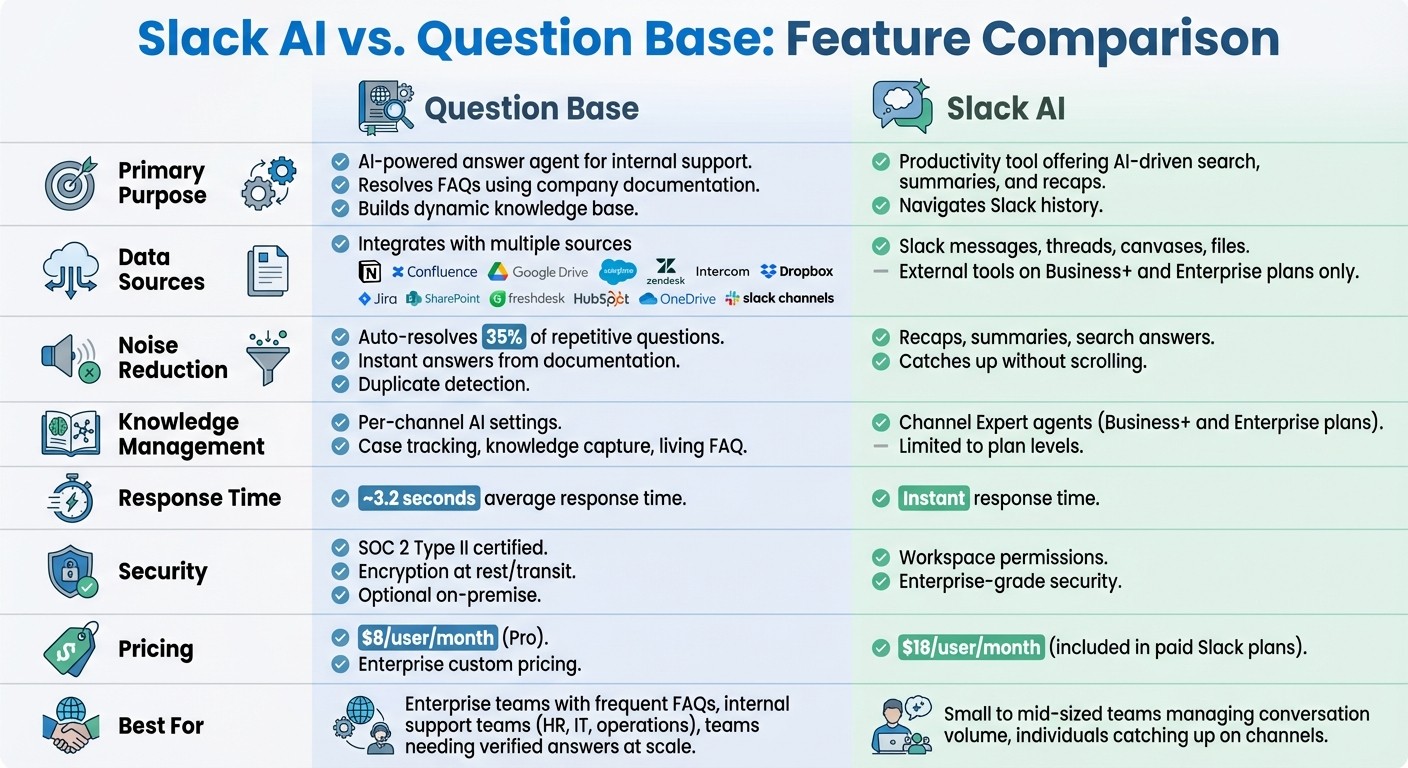
Both Slack AI and Question Base operate within Slack, but they tackle the challenge of reducing noise in distinct ways. Slack AI serves as a built-in productivity tool, aimed at helping users manage information overload by summarizing conversations, generating search-based answers from Slack history, and providing recaps. It's included in all paid Slack plans, with advanced features available at higher tiers. In contrast, Question Base functions as a dedicated answer agent, connecting to external documentation sources - like Notion, Confluence, Google Drive, Salesforce, and Zendesk - to automatically address repetitive questions before they clutter your channels.
While Slack AI reduces noise by providing summaries and retrieving context, Question Base takes a more proactive approach by preventing noise altogether. It instantly answers frequently asked questions, deflects repetitive queries, and transforms those interactions into a searchable knowledge base. This approach is particularly helpful for teams handling large volumes of internal questions. The table below highlights key differences between the two tools.
Feature Comparison Table
Feature | Question Base | Slack AI |
|---|---|---|
Primary Purpose | AI-powered answer agent for internal support; resolves FAQs using company documentation and builds a dynamic knowledge base | Productivity tool offering AI-driven search, summaries, and recaps to navigate Slack history |
Data Sources | Integrates with Notion, Confluence, Google Drive, Salesforce, Zendesk, Intercom, Dropbox, Jira, SharePoint, Freshdesk, HubSpot, OneDrive, and Slack channels | Pulls from Slack messages, threads, canvases, and files; external tools available only on Business+ and Enterprise plans |
Answer Types | Direct responses to FAQs with source citations; includes escalation to experts when needed | AI-generated search answers, channel recaps, thread summaries, and writing assistance based on Slack activity |
Noise Reduction Methods | Provides instant answers from trusted documentation, auto-resolves 35% of repetitive questions, detects duplicate queries, and enables escalation workflows | Offers recaps, summaries, and search answers to help users quickly catch up without scrolling through channels |
Knowledge Management | Includes per-channel AI behavior settings, case tracking, duplicate detection, knowledge capture from threads, and a living FAQ that evolves over time | Features pre-built Channel Expert agents (powered by Agentforce) available on Business+ and Enterprise plans |
Analytics | Tracks questions asked, resolution rates, automation rates, unhelpful answers, and content gaps | Provides basic usage statistics |
Security & Customization | SOC 2 Type II certified, with encryption at rest and in transit, optional on-premise deployment, and customizable AI tone, behavior, and content access per channel | Aligned with Slack workspace permissions and enterprise-grade security |
Response Time | Approximately 3.2 seconds within Slack | Instant summaries and recaps inside Slack’s interface |
Pricing | $8/user/month (Pro plan); Enterprise tier with custom pricing | $18/user/month (included in all paid Slack plans, with advanced features available at higher tiers) |
When to Use Each Tool
The comparison above highlights when each tool shines.
Slack AI is ideal for teams needing help managing conversation volume. For example, if you're a manager catching up on multiple channels after a few days away, or an individual contributor looking for quick context on a project discussion, Slack AI’s recaps and search features can save time. It's especially helpful for small to mid-sized teams where most critical information exists within Slack, making it easier for users to stay focused by summarizing past conversations.
On the other hand, Question Base excels in environments with frequent, repetitive internal questions that distract experts from more valuable work. For instance, HR teams fielding "Where’s the vacation policy?" multiple times a week, IT teams handling password reset requests, or operations teams regularly directing colleagues to scattered documentation across Notion, Confluence, and Google Drive can benefit significantly. Question Base addresses these challenges by delivering accurate, verified answers at scale. It’s designed for enterprise teams, offering SOC 2 Type II security, granular content controls, and the ability to turn Slack conversations into a permanent knowledge repository. According to internal data, Question Base resolves 35% of repetitive questions automatically, saving experts an average of 6+ hours weekly - time that can be redirected to more strategic tasks [1].
For teams seeking to minimize noise and maximize productivity, combining both tools can be a winning strategy. Slack AI helps individuals process information more effectively, while Question Base reduces information overload by automatically resolving common questions and building a structured knowledge layer within Slack.
Conclusion: Which Tool Is Right for Your Team?
Slack AI and Question Base serve distinct purposes, catering to different challenges your team might face. Slack AI simplifies managing information overload by summarizing channels, recapping threads, and improving search across Slack's history. It’s a productivity booster, helping users quickly catch up on conversations and locate relevant context. On the other hand, Question Base addresses repetitive queries by automatically delivering verified answers sourced from your company’s documentation - whether it’s stored in Notion, Confluence, Google Drive, Salesforce, Zendesk, or other systems.
The choice between these tools depends on your team’s specific needs. For smaller teams where the primary challenge is navigating fast-moving Slack channels, Slack AI’s built-in summaries and search capabilities may be all you need. It’s included in all paid Slack plans, requires no additional setup, and is ready to use immediately, making it a straightforward solution for managing message volume. However, if your team struggles with repetitive questions that drain your experts' time - like HR answering the same policy inquiries, IT resetting passwords, or operations redirecting people to scattered resources - Question Base is designed to tackle these issues. By auto-resolving recurring questions, it frees up your team for more strategic tasks and saves significant time each week [1].
For enterprise teams, especially those with compliance requirements, multiple knowledge platforms, and formal internal support needs, Question Base offers advanced features like SOC 2 Type II security, granular content controls, and customizable AI behavior. Unlike Slack AI, which relies on chat history, Question Base provides human-verified responses with source citations, escalation workflows, and detailed analytics. These insights - covering resolution rates, content gaps, and unhelpful answers - help leaders continuously refine their support processes and improve efficiency.
In reality, many teams find value in using both tools together. These solutions complement each other rather than compete. Slack AI helps individuals process Slack conversations more effectively, while Question Base overlays structured support and knowledge management at scale. To decide what your team needs, assess your "noise profile." Identify how much time is lost to repetitive questions, pinpoint recurring queries, and determine whether your pain point lies in channel overload or scattered answers. A practical starting point is piloting Question Base in one or two high-traffic Slack channels for a month. Track metrics like time-to-answer and repeat question volume, then compare these results to your baseline.
Use Slack AI to boost daily productivity. Add Question Base to deliver verified answers and streamline your internal support systems.
FAQs
How does Question Base manage repetitive questions better than Slack AI?
Question Base streamlines the way teams handle repetitive questions by integrating directly with trusted documentation platforms like Notion, Confluence, and Salesforce. Rather than relying solely on chat history, it delivers verified answers straight from your company’s established knowledge base, ensuring responses are both accurate and consistent.
By automatically capturing and organizing shared knowledge, Question Base prevents critical information from vanishing into endless chat threads. This approach not only reduces duplicate questions but also saves experts 6–8 hours each week and keeps teams aligned with quick, reliable access to the information they need.
How do Slack AI and Question Base differ in their data source integrations?
Question Base integrates seamlessly with trusted documentation platforms such as Notion, Confluence, Salesforce, Google Drive, Zendesk, and Intercom, ensuring teams receive accurate, expert-approved answers. In contrast, Slack AI primarily relies on Slack chat history with limited connections to external tools, which can make it harder to access verified information.
For teams that depend on precise and reliable answers drawn directly from their established knowledge bases, Question Base simplifies the process. It ensures quick access to the right information while cutting down on unnecessary noise and repetitive questions.
Why do enterprise teams choose Question Base over Slack AI for internal support?
Enterprise teams often prefer Question Base over Slack AI because it provides precise, expert-approved answers pulled directly from trusted platforms like Notion, Confluence, and Salesforce. This approach ensures dependable information and traceable responses - key priorities for HR, IT, and operations teams.
While Slack AI relies heavily on chat history to generate replies, Question Base takes a different route. It connects effortlessly with your documentation tools, keeps knowledge organized automatically, and evolves alongside your workflows. With enterprise-level security, extensive customization options, and the ability to transform Slack into a powerful knowledge assistant, Question Base is designed specifically to enhance internal support and boost productivity.