∙
Cooper
∙
Reading time:
17 min

Repetitive questions waste time and drain productivity. Employees spend 1.8 hours daily searching for information, while experts lose 6 hours weekly answering the same questions. For a 1,000-person company, this inefficiency can cost over $2 million annually. The solution? Documentation automation.
By centralizing knowledge, integrating with tools like Slack, and using AI for real-time answers, automation reduces repetitive inquiries by up to 35%, slashes response times to 3.2 seconds, and saves teams hours each week. Companies like PwC and Mercure Hotel have saved thousands of hours and cut costs with automated systems.
Key Benefits:
Faster answers: AI tools deliver responses instantly within Slack.
Centralized knowledge: All policies and FAQs in one searchable hub.
Up-to-date info: Automated updates prevent outdated content.
Automation doesn’t just save time - it transforms how teams manage knowledge. Ready to reduce repeated questions? Explore how tools like Question Base can help.
Research Findings: How Automation Reduces Repeated Questions
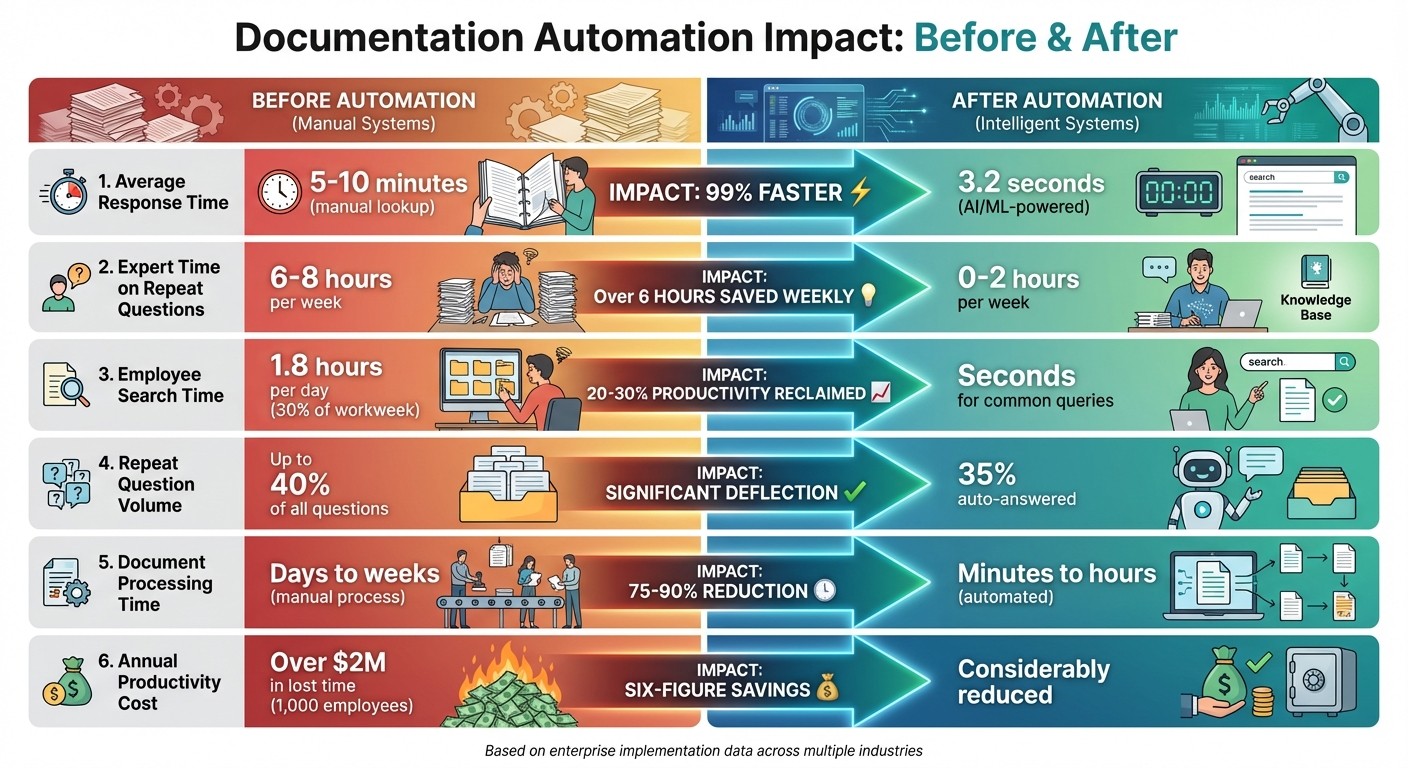
Before vs After Documentation Automation: Key Performance Metrics
The Hidden Costs of Repeated Questions
Repeated questions aren’t just frustrating - they’re expensive. Research shows U.S. employees spend an average of 1.8 hours each day, or nearly 30% of their workweek, searching for information that already exists. This inefficiency translates into substantial productivity losses. Internal experts, meanwhile, spend 6–8 hours weekly answering the same questions over and over. In large organizations, up to 40% of internal inquiries are repeats. IT service desks face a similar challenge, with 70–80% of their workload consumed by routine, repetitive issues. Considering that the average cost of handling an internal help desk ticket falls between $15 and $30, these repeated interactions can escalate into six- or seven-figure annual expenses.
How Automation Changes the Game
Automation steps in to tackle these inefficiencies by addressing routine inquiries at scale. Automated documentation systems can resolve up to 70% of common questions, slashing response times from several minutes to just 3.2 seconds. Companies leveraging self-service knowledge bases report up to a 25% drop in support tickets, while those using virtual agents and portals see ticket volumes reduced by 15–30%.
Real-world examples highlight the impact of automation. A real estate company, for instance, shortened its documentation process from 12–24 hours to just 2–4 minutes. Similarly, an engineering firm reduced its RFP response time from three weeks to one week and processed four times as many RFPs with the same team. In another case, PwC automated over 50 document templates, cutting preparation time by 1.5 hours per document and generating more than 1,000 documents monthly. This shift reclaimed thousands of hours annually that were previously lost to manual tasks and repetitive clarifications.
Automation in Action: Key Metrics
The benefits of automation become even clearer when comparing performance metrics before and after implementation:
Metric | Before Automation | After Automation | Impact |
|---|---|---|---|
Average response time | 5–10 minutes (manual lookup) | 3.2 seconds | 99% faster |
Expert time on repeat questions | 6–8 hours per week | 0–2 hours per week | Over 6 hours saved weekly |
Employee search time | 1.8 hours per day (30% of workweek) | Seconds for common queries | 20–30% productivity reclaimed |
Repeat question volume | Up to 40% of all questions | 35% auto-answered | Significant deflection |
Document processing time | Days to weeks (manual process) | Minutes to hours (automated) | 75–90% reduction |
Annual productivity cost (1,000 employees) | Over $2M in lost time | Considerably reduced | Six-figure savings |
Organizations with advanced knowledge management systems also report faster first-contact resolution - up to 50% quicker - and fewer repeat inquiries. Redirecting questions to self-service channels proves to be far more cost-effective, costing 11–12 times less than agent-assisted support. These results underscore the tangible value of automation in reducing inefficiencies and reclaiming lost productivity.
How Documentation Automation Reduces Repeated Questions
Documentation automation helps eliminate repeated questions by addressing three key areas: centralized knowledge repositories, automated updates, and real-time AI-powered answers. By tackling these challenges, organizations can streamline how employees access and manage information. Let’s explore how these elements work together to reduce inefficiencies.
Centralized and Searchable Knowledge Bases
When information is scattered across email threads, outdated SharePoint folders, or locked in employees’ heads, teams often waste time searching or asking the same questions repeatedly. Centralized knowledge bases solve this by consolidating information into a single, searchable system, promoting self-service access.
The impact is immediate. For example, at Ticketbutler, employees used to spend 5–10 minutes searching through long support manuals or consulting colleagues for answers. After implementing Question Base to centralize their documentation in Slack, UX Lead Maria Jensen observed that relevant answers could now be found within seconds, eliminating the need for manual searches.
However, simply dumping files into a folder isn’t enough. Modern knowledge bases leverage AI-powered semantic search, which matches natural language queries across platforms like Notion, Confluence, Google Drive, Zendesk, and Intercom. Question Base integrates these sources directly into Slack, allowing employees to ask questions within their usual workflows and get instant answers. As Brigitte Lyons explained:
Slack is where documentation goes to die, brought up once in passing, and never to be found again. ... Question Base helps you deliver answers to the team as they're asked (goodbye bottlenecks) and integrates with a lot of the popular platforms used for SOPs, so you can synch information across platforms.
Centralized systems also safeguard organizations from knowledge loss. Since 80% of employees prefer asking questions in chat over searching a wiki, the solution isn’t forcing wiki use - it’s making verified answers available directly in chat.
Automated Updates and Notifications
Outdated information can be just as problematic as missing information. When employees doubt the accuracy of a document, they often turn to colleagues for confirmation - even if the answer exists somewhere. Automated updates and version control address this issue by ensuring that approved, current information is always accessible and clearly marked.
Automated notifications take it a step further, proactively informing employees about changes to key documents. Instead of discovering outdated details mid-task and scrambling to verify them, employees receive timely updates through channels like Slack. Question Base supports this process by identifying content gaps and enabling regular content audits, keeping documentation aligned with business needs.
Real-time syncing also prevents discrepancies before they create confusion. For instance, at Signeasy’s implementation for Ruwacon, automated reminders reduced approval times from days to minutes. Tasks that previously required hours of back-and-forth emails and programmer involvement now take just minutes, with no need for additional technical support. While keeping information up-to-date is critical, providing instant access to answers is equally important.
Real-Time Answers Through AI Tools
Even with centralized and current documentation, employees may still face interruptions if they have to leave their workflow to search for answers. AI tools eliminate this friction by delivering verified responses directly within collaboration platforms.
Question Base exemplifies this approach. As a plug-and-play AI answer agent for Slack, it integrates seamlessly with documentation tools, requiring no engineering effort. Employees can ask questions in Slack and receive verified answers instantly, pulled from connected resources.
The productivity benefits are clear. During a 30-day pilot, Question Base answered 35% of repetitive questions automatically, saving internal experts over six hours per week. Monica Limanto, CEO of Petsy, shared her experience:
Question Base has exceeded our expectations - it's easy to use, intuitive and a massive time saver. We now have a reliable and useful knowledge base, making it easy to share knowledge across the team. We no longer have staff waiting on busy managers for an answer, Question Base is there in seconds, plus it's easy to verify answers as new questions come along.
What sets specialized AI agents like Question Base apart is their ability to transform fleeting chat interactions into structured, searchable knowledge. By maintaining a dynamic FAQ that evolves with new questions, these tools capture valuable insights that might otherwise vanish in Slack threads. As Brandon Horvatic put it:
We went from answering the same questions over and over, to setting it up once and it answers the same questions over and over for us :)
For enterprises, this approach scales effortlessly. Mercure Hotel, for instance, managed 10,000 documents per month without needing additional staff. Similarly, an engineering firm using intelligent document processing cut its RFP response time from three weeks to one and handled 400% more RFPs with the same team. Throughout, automation ensures enterprise-grade security (SOC 2 Type II compliance, encryption at rest and in transit, and optional on-premise deployment) while offering full customization of AI tone, accessible content, and escalation workflows. By delivering real-time AI answers, organizations turn fleeting conversations into lasting knowledge, significantly reducing repeated questions.
Case Studies: Organizations That Reduced Repeated Questions
HR Teams: Streamlining Onboarding and Policy Queries
These examples highlight how automation can drastically cut response times and reduce the flood of repetitive questions. HR departments, in particular, often face a barrage of the same onboarding and policy-related inquiries, which can sap time away from more strategic work. At Cigna, the insurance leader turned to ActiveDocs to automate policy updates. This shift reduced update times from a full hour to just 30 seconds - without requiring any programming expertise. The company completely removed its six-week update cycles, empowering business users to make instant changes. As a result, employees gained immediate access to accurate policy details, slashing the number of repetitive policy-related questions significantly.
Similarly, PwC implemented automation on a global scale, rolling out Legito across 53 offices in over 30 countries within a two-year span. They automated more than 50 document templates in multiple languages, onboarded over 2,500 users, and now generate more than 1,000 documents monthly. This automation effort saved an estimated 1.5 hours per document while improving document quality and user experience, which in turn reduced repetitive inquiries across their network.
Automation success stories extend beyond HR, proving equally effective in IT and operations by simplifying standard operating procedures (SOPs) and support processes.
IT and Operations: Simplifying SOPs and IT Support
IT and operations teams are often bogged down by constant requests for troubleshooting and SOP clarifications. Employsure tackled this challenge by deploying ActiveDocs to create adaptive workflows for business operations. This system minimized the need for manual document editing and streamlined SOP generation. By flagging only exceptional cases, the platform freed IT staff from the grind of repetitive troubleshooting, enabling them to focus on more complex issues. As one team member put it, they spent "less time typing, more time investigating."
At SOHAR Port and Freezone, manual documentation processes were prone to errors, often requiring complete restarts when mistakes occurred. After adopting Signeasy for automation, the organization significantly reduced IT support queries by ensuring faster and more accurate document processing. Similarly, Mercure Hotel Group scaled its operations to handle 10,000 documents monthly without increasing staff. By automating multi-signer approvals, they eliminated bottlenecks caused by manual handling of repetitive operational documents.
For teams operating heavily within Slack, platforms like Question Base provide a tailored solution to address repetitive questions in real time.
Question Base: Real-Time Slack Automation

Unlike one-size-fits-all tools, Question Base is built to integrate seamlessly into Slack, delivering real-time support right where teams work. By connecting with documentation platforms like Notion, Confluence, Google Drive, Zendesk, and Intercom, the platform provides instant AI-driven answers, sparing employees from switching between tools. During a 30-day pilot, Question Base managed to automatically resolve 35% of repetitive questions, saving internal experts more than six hours each week.
One standout example comes from Ticketbutler, where UX Lead Maria Jensen noted that employees used to spend 5–10 minutes searching through lengthy support manuals or asking colleagues for help. With Question Base in place, relevant answers appeared within seconds, completely eliminating the need for manual searches. The platform also ensures security with SOC 2 Type II compliance, offering encryption both at rest and in transit, along with optional on-premise deployment for enterprises with strict security requirements. This ability to reduce repetitive queries translates into greater efficiency for distributed teams, allowing them to focus on higher-value tasks.
Comparing Documentation Automation Tools
General Tools vs. Purpose-Built Solutions
When it comes to automating documentation and streamlining knowledge management, enterprises often weigh their options between general-purpose AI tools (like Slack AI), document automation platforms (such as ActiveDocs and Legito), and specialized Q&A solutions like Question Base. Each category serves distinct needs.
General-purpose collaboration AI, like Slack AI, is designed to enhance individual productivity by summarizing conversations and answering quick questions based on chat history. While helpful for day-to-day tasks, these tools aren’t built to tackle the problem of repetitive questions across an entire organization. On the other hand, document automation platforms like ActiveDocs and Legito focus on speeding up processes like template management, e-signatures, and workflow routing. These tools are great for reducing document generation times but don’t address broader knowledge-sharing challenges.
Then there are purpose-built knowledge and Q&A automation tools like Question Base. These tools integrate directly with platforms like Notion, Confluence, and Zendesk to deliver verified answers in Slack, complete with governance controls. Unlike general AI solutions that rely on potentially outdated or incomplete message histories, purpose-built tools pull responses from trusted, authoritative sources. This allows administrators to control what content is indexed, define AI behavior, and decide when to escalate to human experts - features that are crucial for enterprises managing sensitive policies, IT protocols, or compliance documentation.
This distinction becomes even more apparent when comparing their key features side by side.
Feature Comparison: Question Base vs. Slack AI
Feature | Question Base | Slack AI |
|---|---|---|
Primary Use Case & Focus | Slack-native knowledge and Q&A automation | General productivity and chat summarization |
Data Sources | Notion, Confluence, Google Drive, Zendesk, Intercom, Salesforce, Dropbox, and more | Primarily Slack messages; external tools limited to Business+ and Enterprise plans |
Answer Accuracy | AI-generated with human verification based on trusted documents | AI-generated based on chat history |
Knowledge Management | Per-channel settings, case tracking, duplicate detection, living FAQ, content gap analytics | Pre-built AI agent (Channel Expert) on Business+ and Enterprise plans |
Analytics | Resolution rate, automation rate, unhelpful answers tracking, documentation performance reports | Basic usage statistics |
Security & Compliance | SOC 2 Type II, encryption at rest and in transit, optional on-premise deployment | Standard SaaS security |
Deployment | Plug-and-play Slack app, no engineering required | Platform-level enablement |
Pricing | $8/user/month | $18/user/month |
The table highlights how Question Base delivers features tailored for enterprise-level knowledge management, while Slack AI remains focused on general productivity tasks.
Why Enterprises Choose Purpose-Built Tools
For organizations, having an accurate, centralized, and audit-ready knowledge base is critical to cutting down on repetitive questions. Enterprises place a premium on verified accuracy and governance over speed alone. While Slack AI excels at summarizing conversations, it doesn’t offer the structured knowledge management that Question Base provides. By transforming temporary Slack discussions into reusable, searchable documentation, Question Base ensures that once a question is answered, the information becomes accessible to the entire organization.
Advanced analytics and governance are other reasons enterprises lean toward purpose-built solutions. Question Base offers detailed insights into what questions are being asked, where documentation gaps exist, and how automation is improving over time. These analytics help teams align updates with sprint cycles and quarterly goals, ensuring that content stays relevant. Unlike Slack AI, which relies heavily on chat history, Question Base grounds its responses in trusted sources, offering audit-ready accuracy and robust governance capabilities.
For larger organizations managing thousands of employees across multiple regions, Question Base's Enterprise tier provides features like multi-workspace support, white-labeling, and optional on-premise deployment. These capabilities make it a scalable solution that aligns with compliance and security requirements - something general-purpose tools often struggle to deliver without extensive customization. By addressing these challenges head-on, tools like Question Base not only improve efficiency but also elevate the way enterprises manage and govern their documentation.
Conclusion: Improving Enterprise Productivity with Documentation Automation
Key Takeaways
Automation transforms productivity by drastically cutting down search times and minimizing repetitive tasks. Take PwC's example: after rolling out document automation across 30+ countries, they onboarded over 2,500 active users and produced more than 1,000 documents monthly in just one region, saving approximately 1.5 hours per document. In industries like legal and insurance, automation has driven a 350% increase in document processing efficiency and an 81% drop in non-billable hours. Some implementations have even saved companies upwards of $400,000 annually.[1][3] These numbers demonstrate how automation frees up skilled employees to focus on tasks that require their expertise.
Centralized, searchable knowledge bases are critical to any automation strategy. When documentation is scattered, employees waste valuable time searching for information, disrupting their workflow. Automation tools that integrate with platforms like Notion, Confluence, Google Drive, and Zendesk consolidate fragmented content, ensuring reliable and instant updates. For enterprises managing massive teams, this shift from ad-hoc clarifications to self-service access reduces support burdens, speeds up onboarding, and strengthens compliance. This accessible knowledge hub doesn’t just boost efficiency; it also equips organizations to adapt quickly to evolving needs.
Beyond operational gains, automation enhances enterprise agility. Automated workflows ensure updates are delivered without overwhelming teams, offering employees faster and more consistent answers. This reduces frustration, boosts engagement, and leads to better morale. Over time, analytics from these systems reveal patterns in questions and highlight content gaps, enabling leaders to make data-driven improvements. These insights allow organizations to respond swiftly to customer needs and regulatory changes while maintaining internal efficiency.[4][2] By addressing these areas, enterprises can lay the groundwork for a more responsive and streamlined knowledge management process.
Next Steps for Enterprises
Begin by identifying the most frequent repetitive questions within your organization. Review support tickets, Slack conversations, and internal emails to pinpoint high-volume queries - such as IT troubleshooting, benefits policies, or standard operating procedures - and estimate how much time is spent answering them weekly. Then, evaluate whether your current documentation is easy to find, updated regularly, and accessible within the tools your employees already use.
Once you’ve mapped out these workflows, focus on automating processes that generate the most inquiries or consume significant expert time. Centralizing and automating critical information can completely transform how your teams handle recurring questions. Consider tools that integrate seamlessly with your existing systems - whether it’s a document automation platform for standard contracts or forms, or an AI-powered solution like Question Base, which operates directly within Slack and connects to tools like Notion, Confluence, Google Drive, Zendesk, and Intercom. Set clear goals, such as reducing support tickets or improving response times, and review these metrics quarterly to fine-tune your strategy and maximize the impact of your automation efforts.
FAQs
How does automating documentation improve productivity in large organizations?
Automating documentation can significantly enhance productivity in large organizations by cutting down on repetitive questions, which often dominate internal inquiries. With tools like Question Base, teams gain access to instant, accurate answers directly within Slack by connecting to trusted knowledge sources such as Notion, Confluence, and Salesforce. This means no more manual searches, endless copy-pasting, or repeated explanations.
By simplifying workflows and bridging gaps in knowledge sharing, automation not only saves employees valuable time but also allows experts to concentrate on more critical, high-impact tasks. For large enterprises, this shift can lead to noticeable cost savings and greater operational efficiency.
How do purpose-built tools like Question Base differ from general AI solutions?
Purpose-built platforms like Question Base bring a sharp edge to internal support compared to general AI tools like Slack AI. While Slack AI excels at summarizing conversations and pulling quick insights from chat history, it leans heavily on past Slack messages. This can sometimes lead to outdated or incomplete responses.
Question Base, however, takes a different route by connecting directly to trusted sources such as Notion, Confluence, and Salesforce. This ensures it delivers accurate, up-to-date answers based on your organization’s verified documentation. Built with enterprise needs in mind, it includes features like case tracking, SOC 2 compliance, and advanced knowledge organization. These capabilities make it a strong fit for teams that demand scalable, reliable, and auditable internal support. By addressing repetitive questions and simplifying workflows, Question Base helps teams stay focused and efficient.
How can a centralized knowledge base reduce repetitive questions?
A centralized knowledge base acts as a go-to hub for reliable information, cutting down on repetitive questions. When employees have quick access to accurate and up-to-date answers, they can solve problems independently, saving time and boosting overall productivity.
With tools like Question Base, this process becomes even smoother. By integrating directly with platforms like Notion, Confluence, or Salesforce, it ensures that responses are both precise and easy to locate. This approach eliminates the chaos of digging through chat threads for critical details, keeping teams aligned and focused on tasks that truly matter.