∙
Cooper
∙
Reading time:
13 min

Slackbot can save teams time by automating repetitive tasks and answering common questions directly in Slack. For industries like healthcare, finance, and education, where teams handle frequent inquiries, this tool reduces interruptions and boosts productivity. However, its reliance on Slack’s chat history and limited integrations can create challenges, such as inaccurate responses, knowledge gaps, and low adoption rates.
Here’s a quick breakdown:
What it solves: Automates reminders, resolves repetitive questions, and summarizes conversations.
What it struggles with: Relies on temporary chat history, lacks integrations with external tools like Notion or Confluence, and can misfire if configured poorly.
Alternatives: Tools like Question Base connect to trusted sources for expert-verified answers, offering better knowledge management and analytics for enterprise needs.
The key takeaway? Slackbot works well for simple automation, but teams with complex workflows may need specialized tools to ensure accuracy and efficiency.
I Made AI Agent for Slack in 5 minutes - Step-by-Step Tutorial
Common Workflow Problems in Large Enterprises
Large enterprises managing bustling Slack workspaces often encounter obstacles that hinder productivity. These challenges are particularly pronounced in industries like healthcare, finance, and education, where teams handle hundreds of inquiries weekly across multiple platforms. Let’s break down the key issues.
Repetitive Questions Overwhelming Support Teams
HR, IT, and operations teams often find themselves bogged down by the same recurring questions - password resets, deadline reminders for benefits enrollment, software access requests, and policy clarifications. These repetitive inquiries consume valuable time that could be spent solving more complex problems. The result? Slower response times across the board. Tackling these routine questions effectively is a crucial step toward improving efficiency and freeing up support teams for higher-value tasks.
Knowledge Silos Across Tools
Important information is often scattered across platforms like Notion, Confluence, Salesforce, HubSpot, and Zendesk. When employees need answers, they’re forced to sift through these tools, leading to potential inconsistencies and outdated data. This fragmentation is especially concerning in regulated industries. For instance:
Healthcare providers must access the most up-to-date protocols to ensure patient safety.
Financial firms require accurate, auditable records to maintain compliance.
Educational institutions depend on consistent information to uphold institutional integrity.
Beyond the risk of misinformation, constantly switching between platforms disrupts workflow and wastes time.
Delays from Context Switching
Jumping between Slack and other tools to find answers breaks focus, making it harder to regain momentum. In fast-paced situations - like resolving IT issues or updating sales pipelines - these delays can snowball into missed deadlines and mounting frustration. Recognizing how these interruptions impact productivity is a key step toward finding solutions that keep workflows running smoothly.
How Slackbot Reduces Workflow Problems
Slackbot and Slack AI tackle workflow challenges by automating repetitive tasks and delivering timely information, helping enterprise teams manage the constant influx of requests. Below, we explore how these tools simplify day-to-day operations.
Automating Notifications and Reminders
With Slack's Workflow Builder, even non-technical team members can set up automated processes without needing to code. This tool enables teams to handle tasks like triaging incidents, routing requests, or sending reminders for approvals. For example, HR can automatically notify employees about benefits enrollment deadlines, IT can streamline password reset requests, and operations teams can consolidate approval workflows from various enterprise tools into a single Slack interface for managers. According to Slack, 80% of workflow creators are non-technical employees, and automation has been shown to save teams 28% more time[5].
Resolving Internal Queries with Contextual Answers
Slack AI leverages natural language processing (NLP) to provide instant answers to common questions by pulling relevant information from chat histories, threads, huddles, and canvas files. Employees can ask straightforward questions like "What’s the Wi-Fi password?" or "What’s our holiday policy?" and receive synthesized answers, all while adhering to enterprise permissions to ensure secure access. For example, in a pilot program completed in January 2026, Salesforce deployed its AI-powered Slackbot to 70,000 employees. This resulted in 25,000 weekly active users, a 50% reduction in search time, and a 70% drop in HR response times for routine policy inquiries[Question Base Blog, 2026].
Beyond answering questions, Slackbot also helps teams stay on track by summarizing key information from conversations.
Boosting Productivity with Chat Summarization
Busy channels and lengthy threads can overwhelm teams, especially when catching up after time away or joining a new project. Slack AI addresses this by summarizing conversations across threads, channels, and huddles, highlighting key points and actionable next steps. This feature not only simplifies information retrieval but also works hand-in-hand with solutions like Question Base. While Slack AI focuses on summarizing past discussions, Question Base ensures these insights are preserved in documented, verified formats, preventing valuable knowledge from getting buried in ephemeral chat histories.
Risks and New Problems Slackbot Can Create
Slackbot and similar tools can streamline workflows, but they also introduce risks that might undermine efficiency if not managed properly. Issues like inaccurate answers, low adoption rates, and knowledge gaps can arise when these tools are used without careful oversight. Let’s explore some examples of these challenges.
Misconfigurations and Inaccurate Answers
Slackbot pulls information from Slack’s conversation history, files, and interactions, which can lead to problems when the source data is outdated or incomplete. For instance, a finance firm saw a 15% rise in query escalations after a misconfigured Slackbot provided regulatory updates based on six-month-old conversations. This error forced employees to manually verify answers, ultimately slowing compliance workflows [3]. Similarly, a healthcare team encountered issues when Slackbot referenced outdated drug protocols from archived conversations, exposing the limitations of Slack’s temporary chat history in preserving reliable, institutional knowledge [4].
Poor Adoption Due to Limited Integrations
Slackbot’s limited ability to integrate with external tools like Notion, Confluence, or specialized knowledge bases can make it less effective in complex enterprise environments. While it offers some integrations - such as Salesforce - teams relying on a broader range of tools often face challenges. For example, healthcare teams frequently bypass Slackbot to access patient data stored in electronic health record systems that aren’t integrated, leading to a 40–50% drop in usage [3]. Similarly, education teams have reported adoption rates below 20% because Slackbot cannot pull data from their learning management systems, forcing users to switch between platforms and perpetuating knowledge silos.
These integration gaps, coupled with the temporary nature of Slack’s content, further limit its effectiveness.
Over-Reliance on Ephemeral Slack History
Slack’s chat history is inherently transient - messages can be deleted, channels archived, or conversations buried, making it difficult to retrieve critical information when needed. Over-relying on this history for institutional knowledge often results in inefficiencies. Teams may find themselves repeatedly answering resolved questions because the original answers were not properly documented, leading to a 20–30% loss in productivity [2]. Additionally, experts have noted that AI tools relying solely on chat logs fail in 25% of retrieval attempts due to missing context [2]. While Slackbot can save up to 90 minutes daily by handling routine queries effectively, those time savings are negated if teams must spend extra time verifying AI-generated answers or sifting through fragmented chat histories.
Comparison: Slackbot vs. Question Base for Knowledge Management

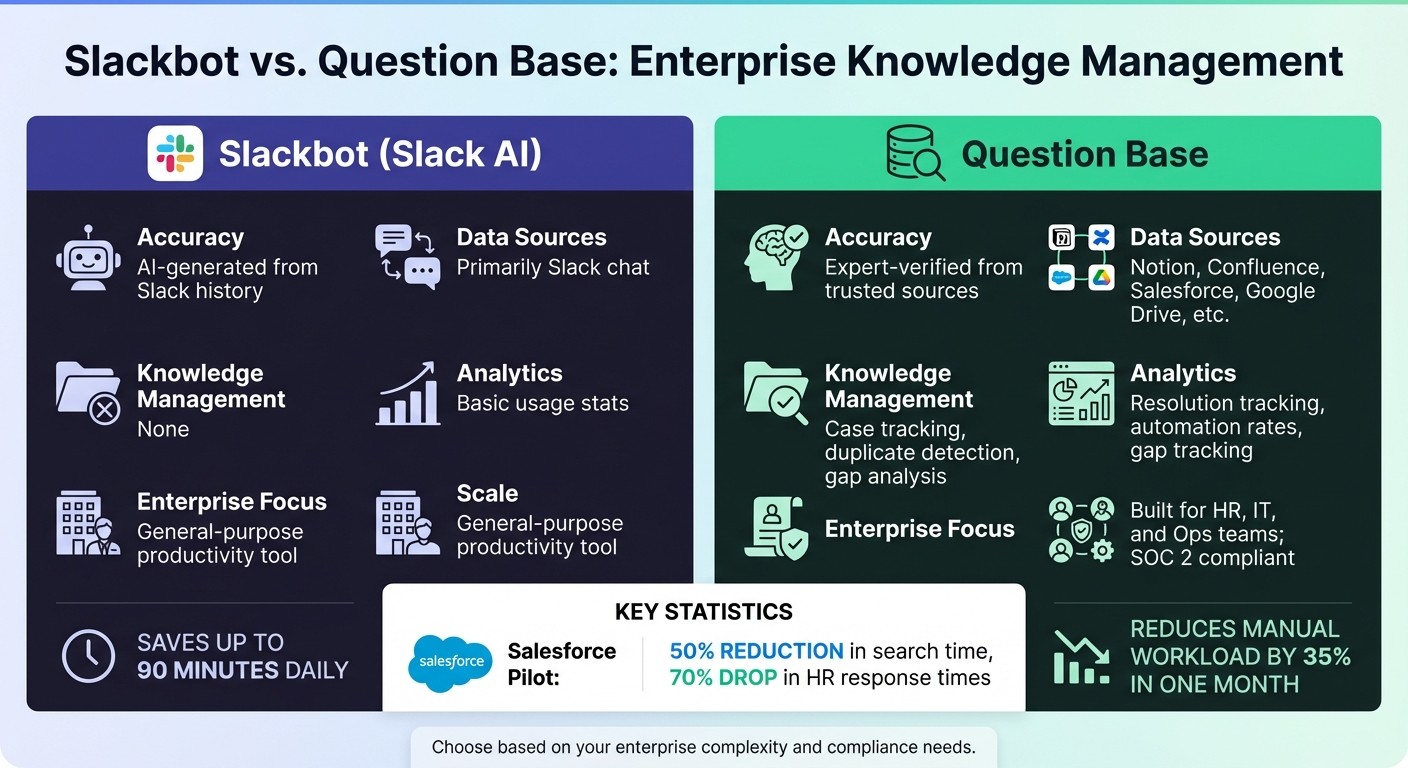
Slackbot vs Question Base Feature Comparison for Enterprise Knowledge Management
Expanding on earlier discussions about Slackbot's capabilities, let’s dive into how it stacks up against Question Base when it comes to managing knowledge effectively.
Slackbot shines when it comes to summarizing conversations and helping individuals catch up on missed messages. It’s a handy tool for personal productivity. However, when teams need reliable, scalable knowledge that’s accurate and up-to-date, the differences between Slack and traditional knowledge management are striking. Slackbot pulls its answers from Slack’s chat history, which can often include outdated or informal content. On the other hand, Question Base connects directly to trusted documentation platforms like Notion, Confluence, Salesforce, and Google Drive. This ensures responses are drawn from verified, expert-approved content - not from AI’s interpretation of old conversations.
Accuracy and reliability are critical for enterprise teams. While Slackbot offers basic metrics, Question Base provides advanced analytics, including resolution tracking, automation rates, and gap analysis. For example, teams using Question Base have reported cutting manual workloads by 35% in just one month [1].
Monica Limanto, CEO of Petsy, shared: "Question Base has exceeded our expectations - it's easy to use, intuitive, and saves us a ton of time. Our staff no longer have to wait on busy managers for answers" [1].
Feature Comparison Table
Feature | Slackbot (Slack AI) | Question Base |
|---|---|---|
Accuracy | AI-generated from Slack history | Expert-verified from trusted sources |
Data Sources | Primarily Slack chat | Notion, Confluence, Salesforce, etc. |
Knowledge Management | None | Case tracking, duplicate detection, gap analysis |
Analytics | Basic usage stats | Resolution tracking, automation rates, gap tracking |
Enterprise Focus | General-purpose productivity tool | Built for HR, IT, and Ops teams; SOC 2 compliant |
Slackbot is excellent for keeping individuals on track, but Question Base is built for team alignment and efficiency. Slack AI focuses on search and summarization, while Question Base adds a powerful answer layer that incorporates expert input and automates repetitive questions. For enterprise teams in industries like healthcare, finance, or education - where compliance, multi-source knowledge, and operational control are essential - Question Base offers SOC 2 Type II certification, on-premise deployment options, and the robust functionality that general-purpose tools can’t match. It’s clear why many teams turn to specialized solutions for managing their complex knowledge needs.
Best Practices: Optimizing Slackbot and Specialized Tools Like Question Base
Set Up Per-Channel Configurations
Customize AI behavior for each Slack channel to ensure answers are relevant to the context. For instance, configure #ask-hr to pull from employee handbook content, while #it-support connects to technical guides and system status updates. This targeted approach reduces irrelevant responses and boosts efficiency. This is particularly effective for Slack automation for high-volume teams where noise reduction is a priority.
Slackbot operates within managing data access by role, which is especially important for industries like healthcare and finance where compliance is critical[4]. Question Base goes a step further, allowing administrators to set channel-specific escalation rules and adjust the AI's tone. This ensures that responses in customer-facing channels are appropriately different from those in internal IT discussions.
The next step is making sure your AI tools are connected to reliable data sources.
Integrate Trusted Data Sources
Linking AI tools to platforms like Notion, Confluence, Salesforce, and Google Drive enables them to provide answers based on expert-approved documentation. While Slackbot has limited external integration options, Question Base offers broader connectivity, including platforms like Zendesk, Intercom, and Dropbox.
Using verified sources is key to maintaining trust. If your AI pulls from outdated or unverified content, the accuracy of its responses will suffer, eroding team confidence in automation. By integrating systems where subject matter experts actively update information, you ensure the AI delivers accurate and up-to-date answers.
Once your AI is set up with reliable data, focus on tracking its performance to refine its capabilities.
Track and Optimize Automation Metrics
Monitor metrics such as resolution rates, automation rates, and unanswered queries to identify areas for improvement. Question Base provides detailed analytics that highlight gaps in your knowledge base, while Slackbot offers basic usage statistics to measure productivity.
Regularly reviewing these metrics is essential. Recurring unanswered questions may point to missing documentation, while stagnant automation rates could indicate a need for better onboarding or more refined configurations. Tracking these insights helps you continuously improve your AI's effectiveness.
Conclusion: Balancing Automation with Control
While tools like Slackbot can save up to 90 minutes a day by automating routine tasks, they’re not without their challenges. Misconfigurations and over-reliance on fleeting chat history can introduce inefficiencies that offset their benefits[2]. Striking the right balance between automation and control is key, especially when weighing general-purpose AI against solutions tailored for enterprise needs.
Slack AI shines in boosting individual productivity by summarizing conversations. However, for teams that require verified, auditable knowledge, specialized platforms like Question Base stand out. Question Base not only delivers accurate answers but also ensures auditability and robust knowledge management - critical for enterprise-scale operations. It identifies knowledge gaps by tracking unanswered questions and provides detailed analytics on resolution rates and automation performance, offering a more strategic approach to managing internal knowledge.
To address workflow challenges like repetitive questions, scattered information, or frequent interruptions, it’s crucial to assess whether basic automation suffices or if a dedicated knowledge management system is necessary.
Effective automation isn’t just about setup - it requires ongoing refinement and clear boundaries to ensure it complements rather than replaces human expertise. Invest in training and adoption strategies to drive engagement[2], define which queries need human oversight, and implement feedback loops to enhance system performance over time. Organizations that thrive in this space treat AI as a partner to human expertise, ensuring their automation efforts remain accurate, transparent, and aligned with broader business objectives.
FAQs
How can Slackbot help streamline complex workflows and improve team productivity?
Slackbot can simplify complex workflows by automating repetitive tasks and delivering quick answers to frequently asked questions. With tools like Question Base, which integrates seamlessly with platforms such as Notion, Confluence, and Salesforce, users can access verified, reliable information directly within Slack - no need to switch between apps. This saves time and ensures teams stay aligned with consistent, accurate answers.
By consolidating institutional knowledge and enabling self-service options, Slackbots help lighten the load on support teams and remove bottlenecks in high-demand areas like IT, HR, and operations. This allows teams to dedicate their energy to higher-priority, strategic work while keeping workflows smooth and efficient.
What challenges come with using Slackbot for managing organizational knowledge?
While Slackbot is handy for quick tasks like setting reminders or offering basic responses, it falls short when it comes to managing organizational knowledge in a meaningful way. Its reliance on Slack chat history without seamless integration with tools like Notion, Confluence, or Salesforce often leaves teams working with outdated or incomplete information. This gap can be a real problem for teams that depend on accurate and verified answers sourced directly from trusted systems.
On top of that, Slackbot prioritizes individual productivity rather than addressing the broader challenge of scaling knowledge management across an entire organization. It lacks advanced capabilities such as detecting duplicate questions, identifying knowledge gaps, or providing detailed analytics - features that are critical for maintaining efficiency and compliance in high-stakes industries like healthcare, finance, and IT. For teams needing a more structured, scalable, and reliable approach to managing knowledge, a solution like Question Base is a much stronger choice.
Why would an enterprise choose Question Base instead of Slackbot for internal support?
Enterprises often opt for Question Base instead of Slackbot because it’s built to deliver accurate, verified answers by tapping into trusted platforms like Notion, Confluence, and Salesforce. Unlike Slackbot, which relies on simple rules and Slack chat history, Question Base integrates directly with your organization's knowledge systems, ensuring reliable answers that meet compliance standards.
What sets Question Base apart are its advanced tools, such as duplicate detection, knowledge gap tracking, and customizable workflows - features designed to meet the needs of large teams managing complex information. Its enterprise-level security and audit capabilities also give organizations the control they need to simplify internal support processes while keeping teams aligned and productive.