∙
Cooper
∙
Reading time:
10 min

Slackbots can either save time or create interruptions - it all depends on how they’re used. Slack AI and Question Base are two tools designed to address different workplace needs. Slack AI helps individuals catch up on missed conversations and find information faster, while Question Base focuses on improving internal support by providing accurate, verified answers directly from official documentation.
Key takeaways:
Slack AI improves individual productivity with features like chat summaries and daily briefings but struggles with repetitive, expert-level questions.
Question Base supports teams by automating answers to common questions, reducing interruptions, and maintaining accuracy through verified sources.
Quick Comparison:
Feature | Slack AI | Question Base |
|---|---|---|
Best For | Individual productivity | |
Data Source | Slack chat history | Verified documentation (e.g., Notion, Confluence) |
Knowledge Management | Summaries, quick answers | Case tracking, gap analysis, FAQs |
Customization | Limited | Detailed control over tone, behavior, access |
Security | Standard Slack security | SOC 2 Type II, encryption, on-premise |
Choose Slack AI for quick individual wins, but if your team faces repetitive questions and needs structured solutions, Question Base is the better fit.
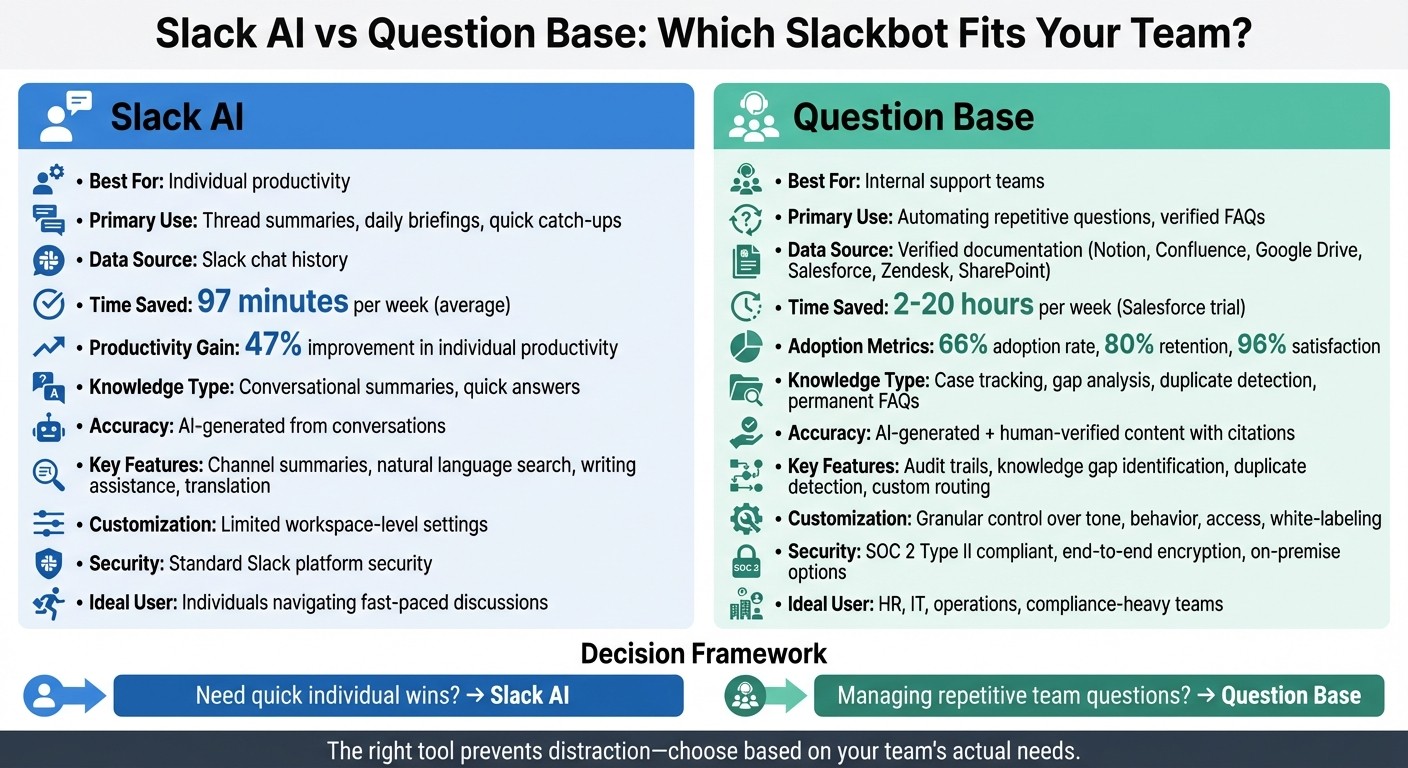
Slack AI vs Question Base: Feature Comparison for Enterprise Teams
Slack Workflows: No-code Automation in Slack
1. Slack AI
Slack AI is an extension of the Slackbot ecosystem, designed to make daily interactions smoother and more efficient. Available with all paid Slack plans, it simplifies catching up on conversations, speeds up information retrieval, and reduces the need to sift through long message threads. It learns from your workspace activity and connects seamlessly with third-party tools like Google Drive and Salesforce [1].
Productivity Impact
One of Slack AI's standout features is its ability to summarize channels, threads, and huddles. This means users can quickly catch up on missed discussions without scrolling endlessly. It also delivers daily briefings, spotlighting priority tasks and upcoming meetings. Using natural language queries, it pulls answers from Slack messages, shared files, and integrated tools. According to Slack, these capabilities save users an average of 97 minutes per week through recaps and enhanced search functionality [1].
Additionally, Slack AI assists with writing and translation, helping teams craft messages, adjust tone, and communicate across languages in real time. The revamped Slackbot is evolving into a round-the-clock AI assistant, offering personalized support to users.
While its summarization and productivity features are impressive, Slack AI's approach to verified knowledge deserves closer attention.
Knowledge Management
Slack AI shines when it comes to providing context from recent conversations. It generates responses based on Slack's chat history, making it great for recalling discussions or addressing routine questions. However, this approach has its limits. For teams like HR, IT, or operations that deal with repetitive inquiries, Slack AI struggles to deliver expert-approved, structured answers from official documentation. It’s a helpful tool for conversational summaries but falls short of serving as a comprehensive, dynamic knowledge base.
Customization and Security
Slack AI prioritizes security by displaying only authorized information. Customer data stays within Slack's secure infrastructure, and Slack ensures its language models are not trained on customer data [1]. Operating within a multi-layered security framework, it also safeguards against unsafe content and provides source attribution, showing which messages or files contributed to each response.
That said, Slack AI offers limited customization. Enterprises looking for features like white-labeling, on-premise deployment, or tailored workflows for escalation may find it less adaptable compared to dedicated knowledge management solutions. While its security measures are robust, its flexibility may not meet the needs of organizations requiring more personalized configurations.
2. Question Base

Question Base takes a fresh approach to workplace automation. Unlike Slack AI, which relies heavily on chat history, Question Base connects directly to your official documentation sources, such as Notion, Confluence, Google Drive, Salesforce, Zendesk, and SharePoint. This makes it a reliable knowledge layer tailored to the needs of enterprise support teams. Designed to handle high volumes of internal support inquiries, it transforms Slack into a responsive answer engine - no extensive engineering effort required. This foundation highlights how Question Base reshapes support workflows.
Productivity Impact
Early trials have shown notable time savings. For instance, during Salesforce's internal testing of a similar Slackbot-based knowledge agent, employees saved anywhere from 2 to 20 hours weekly by receiving instant answers to account-related questions. This allowed them to access structured data without interrupting colleagues. Adoption rates reached 66%, with 80% retention and a 96% satisfaction rate [2][3]. Sales reps like Haley Gault reported handling 5 to 6 additional queries daily, thanks to faster access to information. This reduction in context-switching directly boosted decision-making speed.
Question Base expands on this by introducing case tracking and duplicate detection. These features help support leaders identify recurring questions and highlight areas where documentation needs improvement. Teams can easily capture repetitive questions and archive them as permanent FAQ entries, streamlining future support efforts.
Knowledge Management
Rather than relying on chat history, Question Base draws its answers from verified expert sources. Each response includes a citation linking back to the original document, ensuring a clear audit trail. This is especially critical for areas like HR policies, IT security, and compliance-heavy workflows. AI-generated responses are reviewed by experts before being published, guaranteeing accuracy when precision matters most.
The platform also tracks unresolved queries, flagging gaps in knowledge so managers can identify where updates or new documentation are needed. This feedback loop shifts support from being reactive to proactive. Teams can even customize settings for specific Slack channels, such as routing HR-related queries to #hr-help or technical issues to #it-support, ensuring the right information reaches the right team. Beyond simply managing knowledge, Question Base equips organizations with tools to address gaps and build a more effective support system.
Customization and Security
Security and flexibility are at the core of Question Base. It is SOC 2 Type II compliant and offers end-to-end encryption, with options for on-premise deployment. Enterprises can white-label the agent, control access to specific content sources, adjust the bot’s tone, and set escalation rules for situations requiring human intervention. This level of customization provides organizations with precise control over how knowledge is shared and safeguarded across their workforce. For teams that need tailored solutions, Question Base addresses the limitations of Slack AI while ensuring security and adaptability for thousands of employees.
Pros and Cons
Let’s break down how these tools stack up for productivity and knowledge management. Each brings unique strengths to the table, tailored to different enterprise needs.
Slack AI shines when it comes to helping individuals stay on top of conversations and quickly summarize threads. In fact, its faster search capabilities have been shown to improve individual productivity by 47% [4]. This makes it a solid choice for anyone needing to navigate fast-paced discussions or find information quickly within Slack.
Question Base, however, is designed specifically for internal support teams handling a high volume of repetitive questions. Unlike Slack AI, it integrates directly with verified documentation, ensuring answers are accurate and come with citations and an audit trail. For teams in compliance-heavy areas like HR, IT, or legal, this feature is a game-changer. Question Base also offers advanced security features, including on-premise options and SOC 2 Type II compliance, addressing strict data residency and privacy requirements that Slack AI’s default setup may not cover.
The key difference lies in focus: individual productivity versus team-wide support. Slack AI is ideal for individuals who need quick summaries and better search functionality within their workspace. In contrast, Question Base tackles broader organizational challenges, such as tracking unanswered questions, identifying knowledge gaps, and building a dynamic FAQ system that evolves with the team. Features like case tracking and duplicate detection - absent in Slack AI - make it indispensable for reducing repetitive support tickets and creating a structured knowledge base.
Here’s a quick comparison of their core features:
Feature | Slack AI | Question Base |
|---|---|---|
Best For | Individual productivity, thread summaries | Internal support automation, verified FAQs |
Data Source | Slack chat history | Verified docs (Notion, Confluence, Salesforce, etc.) |
Accuracy | AI-generated from conversations | AI-generated + human-verified content |
Knowledge Management | Thread summaries, channel recaps | Case tracking, gap analysis, duplicate detection |
Security | Standard Slack platform security | SOC 2 Type II, encryption, on-premise options |
Customization | Limited to workspace-level settings | Granular control over tone, behavior, and access |
Ultimately, neither tool is a one-size-fits-all solution. Slack AI helps individuals work more efficiently, while Question Base ensures entire teams operate smoothly by transforming scattered knowledge into a dependable support system.
Conclusion
Slackbots can either streamline productivity or become a source of distraction - it all depends on the problem they’re solving. Slack AI is well-suited for helping individuals navigate their workspace quickly and efficiently. When scaling internal support or ensuring accurate knowledge management for HR, IT, or operations, tools like Question Base - designed specifically for support teams - stand out as game-changers. This highlights the importance of aligning tools with your team’s specific needs.
Distractions often stem from using the wrong tool for the job. For teams overwhelmed by hundreds of repetitive questions every week, generic chat-based AI can amplify the noise rather than address the root issue. Question Base tackles this challenge by connecting directly to verified documentation, identifying knowledge gaps, and reducing ticket volume with structured, auditable answers.
Understanding these distinctions is key when choosing the right solution. Ask yourself: Are you looking to improve individual productivity, or do you need to ease the burden on your support team? For individual speed, Slack AI’s summarization and search capabilities provide quick wins. But if your goal is to manage knowledge, track cases, and maintain compliance, Question Base offers the features you need. Aligning your Slackbot with your team’s workflow ensures it solves problems rather than creating new ones.
No tool is inherently a distraction - but a mismatch between the tool and your needs can turn it into one. Select the Slackbot that addresses your team’s challenges effectively and delivers measurable results without adding unnecessary noise to your workspace.
FAQs
What are the key differences between Slack AI and Question Base for managing knowledge?
Slack AI and Question Base take distinctly different paths when it comes to managing knowledge. Slack AI relies on analyzing past conversations within Slack to generate responses. This means its answers are drawn directly from historical chat data, which can be helpful for quick, informal insights but may lack precision or verification. On the other hand, Question Base connects directly to trusted systems like Notion, Confluence, Salesforce, and other enterprise platforms. This approach ensures expert-verified answers that are dependable, accurate, and aligned with compliance requirements.
What sets Question Base apart is its suite of advanced tools designed specifically for enterprise needs. Features like case tracking, duplicate detection, and identifying knowledge gaps help create a well-organized and continuously improving knowledge base. While Slack AI can boost general productivity, it doesn’t offer these specialized capabilities. For teams that need precision, governance, and a focus on building long-term knowledge resources, Question Base provides a more robust solution.
How does Question Base ensure security compared to Slack AI?
Question Base prioritizes enterprise-level security, incorporating features such as SOC2 compliance, customizable access controls, and strong safeguards for sensitive internal information. These capabilities enable organizations to meet stringent security and compliance standards, making it a trusted choice for HR, IT, and operations teams managing critical data.
While Slack AI benefits from Slack's reliable security foundation, its primary focus is on enhancing productivity and communication rather than addressing specialized security needs in knowledge management. For teams that emphasize verified answers, data governance, and strict compliance, Question Base offers a purpose-built solution that exceeds basic security provisions.
Which tool is better for managing repetitive workplace questions, Slack AI or Question Base?
Slack AI does a solid job of summarizing conversations and delivering quick, contextual responses within Slack. But it’s limited by its reliance on chat history and a narrow range of data sources, which can sometimes affect the accuracy of its answers.
Question Base takes a different approach, designed specifically to tackle repetitive workplace questions while prioritizing accuracy, scalability, and effective knowledge management. By integrating directly with trusted platforms like Notion, Confluence, and Salesforce, it delivers expert-verified answers and automates over 90% of FAQs. This makes it a powerful tool for enterprise teams that need to manage high volumes of repetitive questions and ensure they’re providing precise, reliable information every time.