∙
Cooper
∙
Reading time:
15 min

Answer Agents in Slack save time and reduce repetitive questions. These AI-powered Slackbots provide verified, instant answers by pulling from trusted tools like Notion, Confluence, and Salesforce. Designed for enterprise teams, they automate responses to common queries, freeing up experts to focus on more complex tasks.
Key Benefits:
Handles repetitive questions: Automates up to 35% of inquiries, saving 6+ hours weekly for internal experts.
Integrates with trusted sources: Syncs with HR, IT, and operations tools to deliver accurate, real-time answers.
Improves productivity: Reduces time spent searching for information by up to 30%.
Tracks knowledge gaps: Identifies missing documentation for continuous improvement.
With a response time of 3.2 seconds and 99.99% accuracy, Answer Agents turn Slack into a powerful knowledge hub, streamlining workflows across HR, IT, sales, and more. By automating routine support, they help organizations save millions in lost productivity annually.
Build a Slack AI Agent That Answers Questions (Step-by-Step Tutorial)
What Is an Answer Agent?
An Answer Agent is an AI-powered Slackbot that uses Retrieval-Augmented Generation (RAG) to deliver precise answers from trusted sources like Notion, Confluence, Salesforce, Google Drive, and OneDrive. Unlike generic bots, Answer Agents focus on pulling data that’s been verified by experts. For instance, when an employee asks, "What's our remote work policy?", the agent quickly retrieves the latest HR-approved document and provides an accurate answer. Beyond answering questions, these agents archive valuable Slack conversations, turning them into searchable knowledge to prevent important insights from getting lost[1][2].
The impact of this automation is undeniable. Answer Agents typically handle 35% of repetitive questions, freeing up over 6 hours per week for internal experts who would otherwise spend that time switching contexts and repeating answers[1]. This capability plays a critical role in boosting team productivity.
How Answer Agents Support Internal Teams
Answer Agents take the burden of repetitive inquiries off experts' shoulders. Employees often spend 20–30% of their week - around 12 hours - hunting for information across tools like Slack, email, and internal wikis[1]. By providing instant, accurate responses in the same Slack channel where questions are asked, Answer Agents streamline this process and eliminate unnecessary delays.
These time savings ripple across departments. HR teams no longer need to repeatedly address questions about benefits or PTO policies. IT support can automate common tasks like password resets or VPN setup instructions. Operations teams can avoid duplicating efforts in process documentation. Research shows that 77% of service agents believe automating routine tasks allows them to focus on more strategic, impactful work[6]. Additionally, Answer Agents boast an impressive 4.8/5 average answer score and maintain 99.99% accuracy for verified responses[1][2].
Another advantage is their ability to identify gaps in knowledge. By tracking unanswered questions, Answer Agents alert administrators to areas where documentation is missing or needs updating.
"Since we started using QB we haven't used our Google support docs. And if I go on vacation or sick leave, I feel comfortable that QB will just take over." - Linn Stokke, Online Events & Marketing Specialist, Ticketbutler[1]
These benefits extend across various teams and use cases, as outlined below.
Common Use Cases
Answer Agents shine across departments by automating repetitive tasks and improving efficiency. Here’s how different teams leverage them:
HR and onboarding teams: Automate responses to questions about PTO policies, expense reimbursements, and benefits enrollment. New hires receive onboarding checklists and key documents automatically, reducing the workload on HR staff.
IT support and operations teams: Handle routine issues like password resets, troubleshooting guides, and incident communications. Answer Agents can even file or route help-desk tickets through tools like Jira, streamlining workflows without manual effort.
Sales and marketing teams: Provide instant access to pricing details, competitive insights, and deal updates. Sales reps save time by avoiding interruptions or long searches, keeping deals on track.
Industries with strict compliance requirements also benefit. Healthcare organizations can access clinical protocols and compliance documents instantly, while financial services firms streamline policy and audit-related queries. Education institutions use Answer Agents to manage enrollment, benefits, and academic policy questions efficiently across their teams.
Real-world examples highlight the value of these tools. In 2024, reMarkable implemented an Answer Agent in Slack to automate IT support. Their agent handled tasks like answering IT-related questions, performing password resets, and filing Jira tickets directly within Slack, enabling the IT team to focus on more complex challenges[3].
Similarly, the global tech consulting firm Plative introduced three custom AI agents in Slack to support their sales team in 2024. This move cut sales call preparation time by 50% and increased upsell bookings by 50%, all while allowing the company to scale without hiring additional staff[3].
"We implemented Question Base to eliminate repetitive questions and to collate answers and information in one place for a growing team. Question Base has exceeded our expectations - it's easy to use, intuitive and a significant time saver." - Monica Limanto, CEO, Petsy[1]
How Answer Agents Work in Slack
Getting an Answer Agent up and running in Slack is straightforward. Start by installing the app from the Slack App Marketplace, granting the necessary permissions, and linking trusted knowledge sources like Notion or Confluence. During the setup, admins can pick specific pages, spaces, or objects to sync, ensuring the agent only pulls information from verified sources.
Installation and Setup
To begin, invite the agent using the command /invite @questionbase and adjust settings through the dashboard. For enterprise-level setups, admins can verify approvals and assign role-based access to ensure secure operations. The entire setup process is quick - usually just a matter of minutes - turning Slack into a centralized knowledge hub.
Query and Response Workflow
Team members can interact with the Answer Agent in several ways: by tagging it with an @mention (e.g., "@AnswerAgent How do I reset SSO?"), using slash commands like /ask (e.g., "/ask What's the sales policy?"), or sending direct messages for private inquiries. The agent processes these natural language queries, searches the connected knowledge base, and delivers concise answers along with direct links to the source material. For example, typing "/ask How do I reset SSO?" triggers the agent to locate relevant documentation and reply with clear, step-by-step instructions and source links. Responses are delivered within seconds, eliminating the need to switch between tools or wait for assistance.
The agent works using Retrieval-Augmented Generation (RAG), which ensures all responses are grounded in data from verified sources rather than relying on assumptions or guesswork. If it encounters a query it cannot confidently resolve, the agent escalates the issue to human experts and logs it for future updates. This method ensures a 99.99% accuracy rate for verified responses [2] while also identifying areas where documentation could be improved. Once a query is addressed, the agent updates the knowledge base to keep it current.
Keeping the Knowledge Base Updated
The Answer Agent actively monitors Slack conversations and syncs with external sources to keep the knowledge base updated. When experts resolve questions in Slack threads, the agent identifies key information and suggests saving it for future use - often with just a single click. Syncs with external platforms like Confluence or Salesforce happen in real-time or near-real-time, with updates occurring every few minutes via APIs. This ensures the knowledge base always reflects the latest information.
Admins are notified of any sync errors and can review auto-captured insights through the dashboard. The agent also tracks unanswered questions, identifying recurring queries or areas where confidence is low. These patterns help teams pinpoint where additional or updated documentation is needed. This ongoing learning process ensures that valuable institutional knowledge is captured and preserved, rather than lost in the shuffle of daily operations.
Answer Agents vs Slack AI
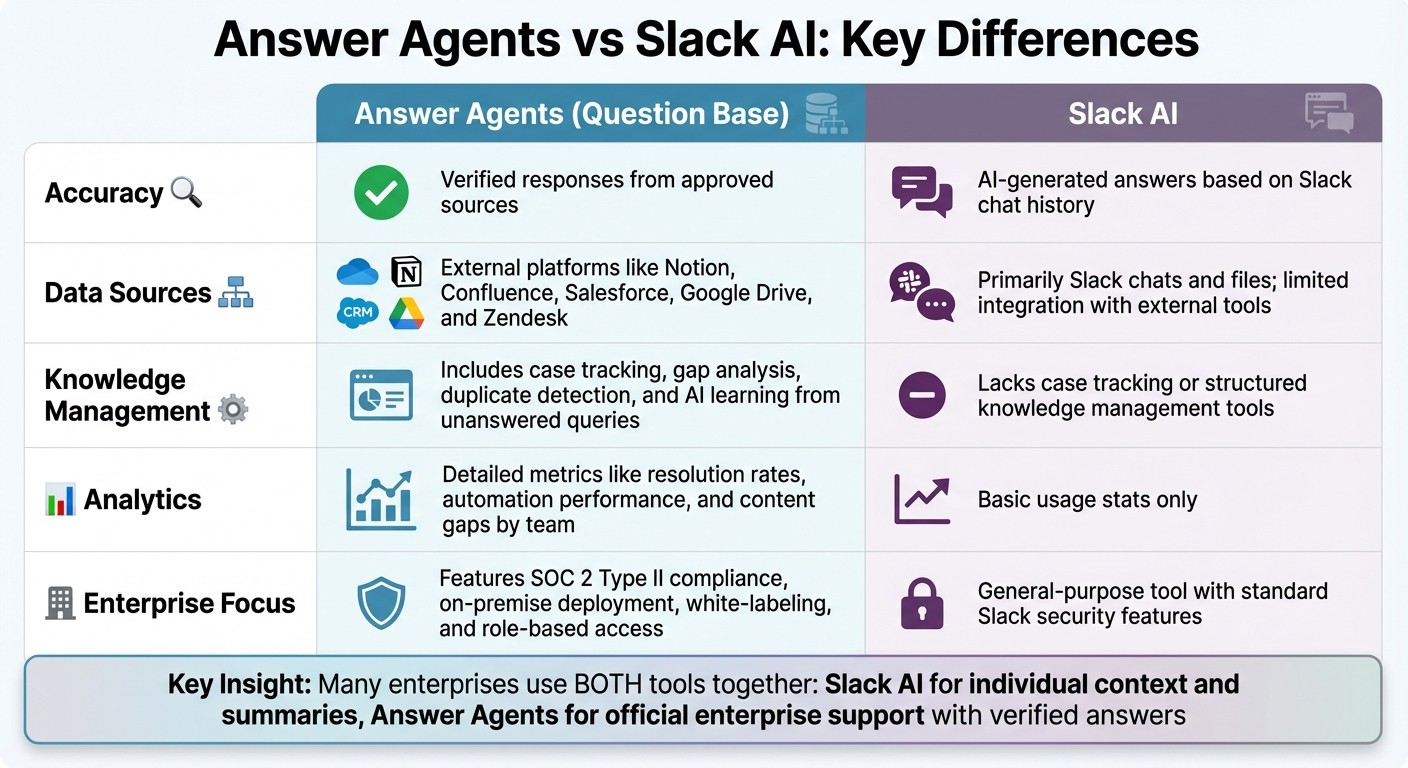
Answer Agents vs Slack AI: Feature Comparison for Enterprise Teams
Expanding on how Answer Agents simplify internal support, let’s dive into how they stack up against Slack AI.
Slack AI is great for summarizing conversations and retrieving past discussions, helping individuals work more efficiently. On the other hand, Answer Agents like Question Base provide expert-approved responses sourced from trusted documentation, making them ideal for scaling internal support.
The key distinction lies in the source and verification of information. Slack AI relies on Slack’s internal data - messages, threads, DMs, and some files - to generate responses by summarizing prior conversations [5][7]. In contrast, Answer Agents pull from verified external documentation, such as Notion or Confluence, ensuring every response is grounded in official, accurate sources [4]. This approach minimizes errors and ensures compliance with company policies, which is especially critical for teams in HR, IT, and operations that require consistent and reliable answers.
Key Differences
Feature | Answer Agents (Question Base) | Slack AI |
|---|---|---|
Accuracy | Verified responses from approved sources | AI-generated answers based on Slack chat history |
Data Sources | External platforms like Notion, Confluence, Salesforce, Google Drive, and Zendesk | Primarily Slack chats and files; limited integration with external tools |
Knowledge Management | Includes case tracking, gap analysis, duplicate detection, and AI learning from unanswered queries | Lacks case tracking or structured knowledge management tools |
Analytics | Detailed metrics like resolution rates, automation performance, and content gaps by team | Basic usage stats only |
Enterprise Focus | Features SOC 2 Type II compliance, on-premise deployment, white-labeling, and role-based access | General-purpose tool with standard Slack security features |
These differences explain why many enterprises choose to use both tools together. Slack AI works well for providing individual context - like summarizing conversations or catching up on project updates. Meanwhile, Answer Agents serve as the official gateway for enterprise support, ensuring policy-aligned, repeatable answers.
For example, teams might direct policy or "how do I" questions to channels like #ask-it or #ask-hr, where an Answer Agent delivers consistent, compliant responses. This setup not only saves time but also ensures that answers come from an authoritative source.
If your team handles a high volume of repetitive questions, needs a single source of truth, or requires detailed analytics on metrics like ticket deflection and resolution rates, an Answer Agent provides benefits that Slack AI alone cannot match. However, for teams primarily looking for faster access to past conversations and summaries, Slack AI remains a practical option.
Why Choose Question Base as Your Answer Agent?

Question Base takes the concept of Answer Agents and elevates it specifically for enterprise support teams. Unlike generic tools, it’s designed to meet the demands of HR, IT, and operations teams, ensuring they can provide consistent and verified answers at scale.
Core Features and Advantages
Question Base integrates seamlessly with trusted documentation platforms like Notion, Confluence, Salesforce, Google Drive, and Zendesk. This ensures responses are pulled directly from official company records rather than relying on chat history alone. Each response includes citations and source links, providing immediate clarity and confidence. With a 99.99% accuracy rate and an average response time of 3.2 seconds inside Slack, it’s a game-changer for fast-paced teams.[1][2]
The platform goes beyond just answering questions. It tracks unanswered queries and flags gaps in knowledge for subject matter experts to address. When an expert provides an answer in a Slack thread, they can instantly convert it into a permanent FAQ entry with a single click. Additionally, analytics dashboards give leaders insights into resolution rates, automation usage, top question topics, and content gaps - helping them measure ROI and identify areas for improving documentation.
Most organizations experience a 35% reduction in repetitive questions within the first 30 days, translating to approximately $2 million in recovered productivity annually for a company of 1,000 employees.[1]
Enterprise-Grade Security and Customization
Designed with regulated industries in mind, Question Base meets rigorous security and compliance standards. It’s SOC 2 Type II certified, employs encryption both at rest and in transit, and supports SSO/SAML and role-based access controls. These features ensure alignment with existing permissions in connected tools, making it ideal for handling sensitive data like PHI, financial records, or student information.
Admins have full control over AI behavior, tone, and operational guardrails. They can define when the agent should respond, when to escalate to a human, and which data sources it can access. For enterprises needing even more control, Question Base offers on-premise deployment and white-labeling options, giving organizations the flexibility to tailor the platform to their needs.
Use Cases Across Teams
HR teams streamline responses to common questions about benefits, PTO policies, pay cycles, and federal holiday schedules. Answers are pulled directly from official handbooks, ensuring consistency. New hires benefit from clear onboarding guidance without overburdening HR staff, while HR leaders gain insights into which policies generate the most confusion.
IT teams handle recurring issues such as SSO resets, VPN setups, software access requests, and device policies. Question Base can surface detailed runbooks and link directly to ticketing tools, all within Slack. In healthcare, it directs staff to EHR workflows; in finance, it provides guidance on approved tools and access controls; in education, it helps faculty find LMS procedures and FERPA guidelines.
Operations teams rely on Question Base to answer process-related questions, such as procurement thresholds, vendor onboarding steps, and incident response protocols. This reduces interruptions for specialists and keeps workflows moving smoothly.
"Question Base has exceeded our expectations - it's easy to use, intuitive and a massive time saver. We no longer have staff waiting on busy managers for an answer." - Monica Limanto, CEO, Petsy[1]
Conclusion
Answer Agents in Slack are revolutionizing how enterprise teams find and share internal knowledge. Instead of wasting time digging through endless documents or waiting on busy colleagues for answers, employees can access accurate information instantly, right within their workflow. For IT, HR, and operations teams managing a high volume of inquiries, this means fewer interruptions, quicker onboarding, and smarter use of expert resources - all while retaining key institutional knowledge that might otherwise get lost in individual minds or scattered chat threads.
Question Base takes these advantages to the next level by seamlessly connecting to your trusted documentation systems. While Slack AI handles general tasks well, Question Base is purpose-built for enterprise-grade support. By integrating with platforms like Notion, Confluence, and Salesforce, it delivers verified, auditable responses - ideal for regulated industries and growing organizations that demand precision and compliance. This ensures your team gets consistent, accurate answers without compromising control.
But it’s not just about automation. Question Base helps you capture and organize knowledge as it’s created. When experts respond to questions in Slack threads, those answers can be turned into permanent FAQ entries. Analytics dashboards highlight recurring issues, enabling leaders to address documentation gaps and track support ROI. With SOC 2 Type II certification, SSO/SAML support, and optional on-premise deployment, the platform also meets enterprise security standards, making it a reliable choice for teams handling sensitive information. This ongoing knowledge capture ensures your team always has access to the most up-to-date, verified answers.
For U.S. organizations navigating distributed teams, rapid growth, or complex regulations, an Answer Agent becomes a key tool for maintaining knowledge continuity. Starting with a pilot in a single high-traffic Slack channel allows you to quickly measure its impact, then scale across teams as you integrate more knowledge sources and refine workflows.
If you’re ready to turn Slack into a powerful knowledge hub with instant, reliable answers, Question Base provides the enterprise-grade solution to make it happen.
FAQs
How are Answer Agents different from Slack AI when it comes to data sources and accuracy?
Answer Agents draw their knowledge from external, expert-approved sources such as Notion, Confluence, Salesforce, Google Drive, and OneDrive. This approach ensures the responses are firmly rooted in reliable, vetted information that your organization has already documented and approved.
In contrast, Slack AI mainly generates answers by analyzing your Slack workspace, including chat history, files, and threads. While it does offer access to external data sources, this feature is limited to certain enterprise plans. Because Answer Agents rely on trusted, verified documents, they provide a higher level of accuracy and traceability compared to Slack AI, which interprets past conversations to generate its responses.
What are the benefits of using an Answer Agent for enterprise teams in Slack?
Answer Agents are AI-driven tools tailored to simplify internal support by delivering precise, instant answers directly within Slack. They bring a range of advantages for enterprise teams:
Cut down on repetitive questions: Instead of experts repeatedly handling queries like “What’s the PTO policy?” or “How do I reset my password?”, Answer Agents pull verified details from trusted platforms such as Notion, Confluence, or Salesforce. This speeds up response times and allows team members to focus on higher-value tasks.
Maintain accuracy and security: Responses are sourced from reliable, SOC 2-compliant documents, ensuring the information is trustworthy while meeting enterprise-level security standards - all without leaving Slack.
Improve over time with actionable insights: By analyzing metrics like resolution rates and spotting knowledge gaps, Answer Agents empower teams to refine their documentation and enhance automation efficiency as they go.
These capabilities make Answer Agents a game-changer for HR, IT, and operations teams, where speed, precision, and scalability are essential.
How do Answer Agents help identify and fix knowledge gaps in an organization?
Answer Agents keep a close eye on questions asked in Slack channels, flagging issues when a query gets a low-confidence response, is marked as unhelpful, or simply goes unanswered. These moments are logged in an analytics dashboard that showcases key metrics such as resolution rates, duplicate questions, and knowledge gaps. This setup gives teams a clear view of where their knowledge resources might be missing or outdated.
When a gap is spotted, the Answer Agent notifies the appropriate experts to either update existing documentation or create new content in platforms like Notion, Confluence, or Google Drive. Once the updates are made, the system automatically indexes the new information, and the AI is retrained to ensure it delivers accurate answers in the future. By consistently monitoring metrics like automation rates and unhelpful-answer frequency, teams can keep their knowledge base accurate, current, and in sync with the needs of their organization.