∙
Cooper
∙
Reading time:
14 min

Repetitive questions waste time and money. For companies using Slack, this inefficiency can cost millions in lost productivity. AI-powered solutions like Agentforce streamline internal support, but its cost and limitations leave many teams searching for better options. Here's a breakdown of alternatives that help enterprises manage knowledge and automate responses effectively:
Question Base: A Slack-native tool offering verified answers from trusted sources like Notion, Confluence, and Salesforce. It automates 90% of FAQs, saving teams over 6 hours weekly, at $8/user/month.
Slack AI: Focused on summarizing Slack conversations and improving individual productivity. Limited integration with external documentation, priced at $18/user/month.
Notion AI: Best for teams deeply embedded in Notion, but lacks real-time Slack integration without third-party tools.
Vectara: A developer-focused platform requiring custom API setups, ideal for teams with technical resources.
Quick Comparison:
Feature | Question Base | Slack AI | Notion AI | Vectara |
|---|---|---|---|---|
Slack Integration | Native app, one-click setup | Built-in with Slack | Requires third-party tools | Custom API integration |
RAG Capabilities | Verified sources, multi-tool links | Slack history summaries only | Limited without connectors | Developer-driven flexibility |
Knowledge Governance | SOC 2 compliance, expert-reviewed | Slack permissions only | Basic access control | Strong data privacy |
Cost | $8/user/month | $18/user/month | Varies with third-party tools | Custom pricing |
For teams overwhelmed by repetitive queries, Question Base delivers the best balance of cost, governance, and integration. It’s purpose-built for Slack workflows, making it the most practical choice for HR, IT, and operations teams.
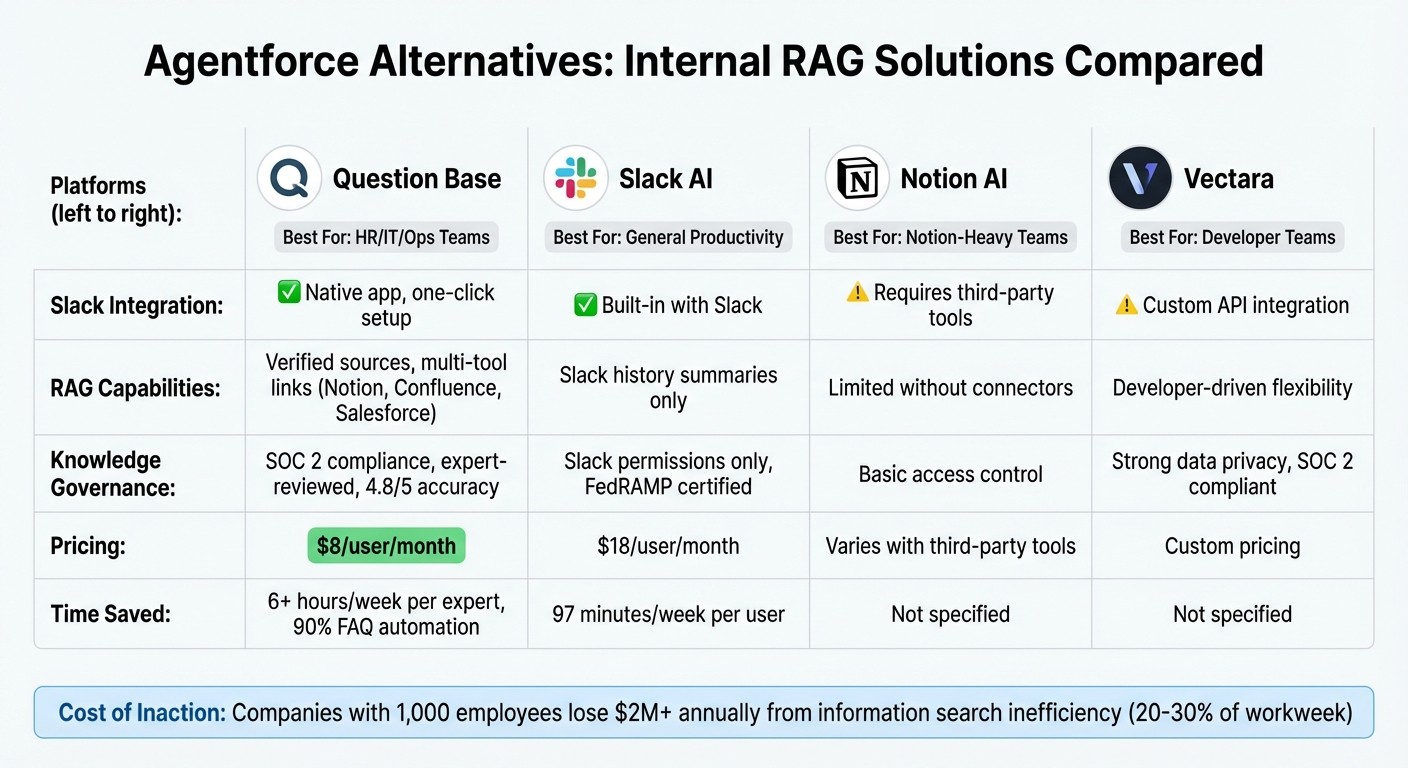
Agentforce Alternatives Comparison: Features, Pricing & Integration
Your Company’s Brain in Slack - AI Agent + RAG in 30 Min (no code)
1. Question Base

Question Base is an AI-powered Slack agent tailored for enterprise HR, IT, and operations teams. It delivers expert-approved answers from trusted sources in just 3.2 seconds [1].
Deep Slack Integration
Question Base operates seamlessly within Slack, working across channels and direct messages. It captures critical knowledge from conversations, turning Slack threads into searchable, lasting resources. Linn Stokke, Online Events & Marketing Specialist at Ticketbutler, shared:
"Since we started using QB we haven't used our Google support docs. And if I go on vacation or sick leave, I feel comfortable that QB will just take over" [1].
The platform allows per-channel customization, enabling HR teams to access HR-specific resources while IT teams pull from technical documentation. This tailored integration is the foundation for its advanced Retrieval-Augmented Generation (RAG) capabilities.
RAG: Retrieval-Augmented Generation
Question Base's RAG functionality connects to multiple enterprise tools - like Notion, Confluence, Salesforce, Google Drive, Zendesk, and SharePoint. It provides precise citations and source annotations for every response. While Question Base vs Slack AI comparisons show that Slack AI primarily summarizes Slack history, Question Base extends its reach to external documentation hubs, ensuring answers are backed by your organization’s most reliable resources. Impressively, the platform automates over 90% of frequently asked questions [3]. Maria Jensen, UX Lead & Scrum Master at Ticketbutler, remarked:
"Now, QB finds the relevant answers in a few seconds, and if not we can easily add a new answer that will be used the next time" [1].
Knowledge Governance
Question Base ensures accuracy with a human-in-the-loop model. Subject matter experts review AI-generated responses before they’re added to the permanent knowledge base, resulting in an accuracy score of 4.8/5 [1]. For industries with strict regulations, the platform includes audit trails and role-based access controls to safeguard sensitive information. It also holds SOC 2 Type II certification, reinforcing its commitment to secure and compliant operations.
Analytics and Efficiency
The platform provides detailed analytics through dashboards that track resolution rates, automation success, and knowledge gaps - highlighting areas where documentation needs improvement. By automating repetitive questions, internal experts save an average of 6+ hours per week [1]. Managers can easily spot recurring inquiries and prioritize updates to documentation. At $8 per user per month - significantly less than Slack AI’s $18 - Question Base offers a cost-effective solution with superior governance and multi-source integration [1].
2. Slack AI
Slack AI is designed to help users navigate Slack conversations more efficiently. Using Retrieval-Augmented Generation (RAG), it simplifies tasks like summarizing conversations, searching messages, and providing quick recaps of channels and threads. While it enhances individual productivity, its features may fall short when it comes to enterprise-level knowledge governance, especially compared to more specialized tools.
Slack Integration Depth
Slack AI works seamlessly within the Slack platform, analyzing activity across channels, direct messages, and shared files. It automates thread and channel summaries, saving users time by condensing lengthy conversations. According to Slack, these AI-powered features - such as channel recaps and advanced search - help users save an average of 97 minutes per week [4]. At $18 per user per month, Slack AI targets a different price point compared to more budget-friendly alternatives [1]. For instance, tools like Question Base go beyond Slack’s chat history to provide verified answers, offering a broader scope of functionality.
RAG Capabilities
Slack AI’s RAG approach focuses on retrieving and summarizing in-Slack data. While it can integrate with external sources like Google Drive or Confluence, this feature is only available on the Enterprise+ tier and comes with custom pricing [6]. Unlike competitors that connect to a variety of external data sources, Slack AI’s strength lies in summarizing past Slack conversations. However, this limited integration may not meet the needs of teams relying on external documentation hubs like Notion or Confluence for verified, up-to-date knowledge.
Knowledge Governance
Effective knowledge management isn’t just about retrieving data - it’s about ensuring accuracy and governance. Slack AI supports FedRAMP Moderate and High environments, maintaining data visibility based on Slack’s existing permissions framework [2]. Additionally, all data remains securely within Slack’s AWS infrastructure and is not used to train large language models. However, Slack AI lacks features like expert verification workflows or accuracy tracking. Its responses are based solely on past conversations, which means there’s no human review to ensure correctness. For organizations requiring audit trails, role-based access controls, or verified knowledge, this poses a significant limitation.
Analytics and Optimization
Slack AI offers basic usage statistics but falls short in delivering the detailed analytics that enterprise teams need. Metrics like resolution rates, unhelpful responses, or recurring questions - which could highlight documentation gaps - are not tracked. While the tool is effective for helping individuals manage their inboxes more efficiently, it doesn’t provide the in-depth analytics required to refine and optimize internal knowledge processes. These limitations highlight the tool’s focus on personal productivity rather than serving as a comprehensive enterprise solution, setting the stage for a broader comparison of its strengths and weaknesses.
3. Notion AI
Notion AI, while helpful for individual productivity, doesn’t fully meet the demands of enterprise Retrieval-Augmented Generation (RAG) workflows. Its limited Slack integration and lack of robust verification workflows make it less suitable for organizations seeking seamless, reliable knowledge management within Slack.
Slack Integration Depth
Notion AI’s Slack integration feels surface-level at best. It primarily supports link previews and notifications, but it doesn’t embed a functional answer layer directly into Slack channels. For teams aiming to access Notion content within Slack conversations, third-party tools are often necessary to fill this gap. This creates added friction, as users are forced to leave their Slack workflow and navigate back to Notion pages to find what they need. This extra step hinders smooth collaboration and slows down support processes, making it challenging for enterprise teams to manage knowledge effectively.
RAG Capabilities
Notion AI can pull and summarize information from pages, images, and databases within Notion. However, it lacks a critical feature: a built-in workflow for subject matter experts to review and validate AI-generated responses before they’re shared with end users. This absence of verification can lead to inaccuracies and reduced trust in the tool. Solutions like Question Base tackle this issue head-on by incorporating human-in-the-loop verification workflows, ensuring an impressive 99.99% accuracy rate for responses sourced from Notion [7][3]. Enterprises leveraging RAG tools that connect Notion to Slack can achieve over 90% automation of internal FAQs, saving their experts more than 6 hours per week [1][3].
Knowledge Governance
Notion AI adheres to standard Notion permissions, offering basic access control. However, it falls short of delivering the granular governance features that enterprise teams often require. Key capabilities are missing, such as per-channel AI behavior customization, assigning expert roles for response validation, and audit trails to track AI-generated responses and their usage. Aleksandar Ginovski, Head of Product at Enhancv, highlighted the importance of a verified RAG solution, saying:
"Before Question Base, we've been seeing repetitive questions all around our Slack channels" [1].
For effective governance, structured workflows are essential to ensure that shared information is accurate and up-to-date. Next, let’s explore how Vectara approaches these RAG challenges.
4. Vectara
Vectara is an API-driven RAG platform tailored for industries with strict regulatory requirements. Unlike plug-and-play solutions like Question Base or Slack AI, Vectara takes a developer-focused approach, requiring technical expertise for integration and customization.
Slack Integration Depth
Vectara does not come with a ready-to-use Slack app or bot for managing internal knowledge workflows. To connect Vectara with Slack, teams must develop custom API integrations. While this approach offers flexibility for developer-led teams, it also demands significant technical effort. This customization aligns with Vectara's focus on delivering advanced RAG and governance features, which we’ll explore further.
RAG Capabilities
Vectara employs the Hughes Hallucination Evaluation Model (HHEM) to evaluate the accuracy of AI responses. Through the Factual Consistency Score, enterprises can measure and audit the reliability of outputs. The platform enforces strict data silos and ensures that customer data is never used for training its models, prioritizing data integrity.
Knowledge Governance
Designed with privacy at its core, Vectara adheres to SOC 2 compliance standards, ensuring strong data separation and auditability. Its architecture prevents cross-tenant data exposure and offers enterprises tools to monitor output reliability through the Factual Consistency Score. These governance features make Vectara a strong option for organizations needing more tailored solutions compared to general-purpose platforms.
Comparison of strengths and weaknesses
The table below outlines how four platforms approach internal RAG (retrieval-augmented generation), emphasizing their features and functionality.
Feature | Question Base | Slack AI | Notion AI | Vectara |
|---|---|---|---|---|
Slack Integration | Native Slack app with one-click setup; ready to use with | Fully embedded in Slack; no additional installation required | Depends on third-party tools (e.g., ClearFeed or Siit) for real-time Slack integration | Requires custom API integration; no pre-built Slack app available |
RAG Capabilities | Pulls answers from verified sources like Notion, Confluence, and Salesforce; ensures expert-reviewed responses | Relies on Slack message history to generate responses | Strong at organizing documentation but limited in real-time RAG without third-party tools | Developer-oriented, requiring significant engineering effort |
Knowledge Governance | SOC 2 Type II compliant; includes case tracking, duplicate detection, and per-channel settings | Includes FedRAMP certification and Enterprise Key Management, leveraging Slack’s native permissions | Available in Business and Enterprise tiers, often costing an extra ~$10 per user/month | Offers limited governance details |
Analytics | Tracks resolution rates, flags unhelpful answers, and reports automation rates (~35%), saving experts over 6 hours weekly | Provides basic usage statistics but lacks detailed operational insights | Focuses on document engagement with minimal analytics | Limited analytics information provided |
This breakdown highlights each platform's core strengths and weaknesses, offering a clear view of their capabilities. Below is a closer look at how each platform stands out and where it may fall short.
Question Base provides the quickest path to value for teams swamped by repetitive internal questions. Its seamless setup and ability to pull from verified sources make it a powerful tool for addressing the time drain of information searches, which can take up 20–30% of an employee's workweek - essentially a full day lost [1].
Slack AI excels at summarizing past conversations and improving general productivity. However, its reliance on Slack message history rather than verified documentation may be a limitation for teams that require authoritative answers tied to official resources.
Notion AI is a natural fit for teams whose documentation lives in Notion. That said, its real-time Slack integration depends on third-party connectors, which can introduce additional complexity and slow down workflows.
Vectara, on the other hand, requires custom API integration, making it better suited for organizations with dedicated engineering teams. While this approach provides flexibility, the lack of detailed governance and analytics features may be a drawback for some teams.
For a company with 1,000 employees, the cost of lost productivity from searching for information can exceed $2 million annually, with as much as 40% of internal questions being repetitive [1]. Choosing the right platform depends on your priorities - whether that’s quick deployment with immediate impact, strong document-based knowledge management, or a customizable solution tailored to specific needs.
Conclusion
Each Retrieval-Augmented Generation (RAG) solution brings its own strengths, tailored to meet varying enterprise needs. The key to selecting the right one lies in identifying your priorities - whether that’s ensuring verified accuracy, achieving smooth integration, or maintaining technical adaptability. For teams grappling with repetitive questions - where up to 40% of internal queries are duplicates[1] - inaction can lead to a significant drain on time and resources.
Question Base is designed specifically for teams that need expert-verified answers at scale, with pricing set at $8 per user per month. It integrates seamlessly with trusted platforms like Notion, Confluence, and Salesforce, delivering auditable, verified responses. By automating 35% of repetitive queries[1][3] and providing fast, reliable answers, Question Base helps internal experts reclaim over 6 hours of their time each week[1][3]. This makes it a strong choice for HR, IT, and operations teams, especially where compliance and knowledge governance are priorities.
On the other hand, Slack AI focuses on boosting general productivity by summarizing threads and making chat history easy to search. While it doesn’t tap into verified external documentation, users save an average of 97 minutes weekly[5]. At $18 per user per month, it’s best suited for teams that prioritize quick conversation recaps over comprehensive knowledge management.
Notion AI works well for teams deeply embedded in Notion’s documentation ecosystem, though integrating with Slack in real time requires third-party tools. Meanwhile, Vectara offers high customization for engineering-driven teams but requires significant technical resources and lacks pre-built Slack integration.
FAQs
How is Question Base more cost-effective than Slack AI?
Question Base stands out as a budget-friendly solution with flexible pricing plans tailored for small to mid-sized teams. While Slack AI is only available as part of higher-tier Enterprise plans, Question Base offers Free and Pro options, making it accessible even for teams working with limited budgets.
Beyond competitive pricing, Question Base delivers additional savings by reducing labor costs. By minimizing repetitive questions and providing expert-verified answers instantly within Slack, teams can save an average of 6 hours per week per expert. These efficiency gains, combined with increased automation, result in a lower total cost of ownership compared to Slack AI's reliance on chat-history-based responses.
How does Question Base provide accurate and reliable answers?
Question Base strikes a balance between speed and precision by pairing AI capabilities with human oversight. When someone asks a question in Slack, the Answer Agent pulls data directly from trusted platforms such as Notion, Confluence, Salesforce, and OneDrive. To ensure the response meets high standards, human experts step in to review and validate the information before it’s shared. This process also includes citations linking back to the original source documents.
By combining quick access with expert verification, Question Base delivers answers that are not only accurate but also compliant and traceable - perfect for enterprise teams where accountability and reliability are non-negotiable.
Why would a team choose Vectara over other RAG solutions?
Vectara streamlines Retrieval-Augmented Generation (RAG) by offering an all-in-one, enterprise-level platform. Instead of juggling multiple tools or complex workflows, Vectara consolidates retrieval, grounding, and generation into a single solution. This approach helps organizations cut costs, minimize security risks, and reduce technical hurdles, all while delivering a consistent experience across teams and departments.
Key features like always-on AI governance, detailed access controls, and comprehensive observability make it easier for IT teams to handle compliance and audit requirements. With deployment options that include on-premises, virtual private cloud (VPC), or SaaS, Vectara enables enterprises to scale RAG applications securely and effectively - without needing to integrate separate components like vector stores or embedding models.