∙
Cooper
∙
Reading time:
22 min

Repetitive questions in Slack slow teams down. A private Slack AI agent solves this by automating answers to common queries, integrating with systems like Notion, Confluence, and Salesforce, and ensuring responses are secure and accurate. This guide explains how to build one, from architecture planning to deployment, so your team spends less time answering the same questions and more time on meaningful work.
Key Steps:
Plan architecture and security: Design a system with Slack apps, backend servers, AI engines, and retrieval layers. Choose secure hosting models (self-hosted, VPC-managed, or SaaS).
Set up a Slack app: Configure permissions, event subscriptions, and multi-workspace controls for enterprise use.
Integrate AI and knowledge sources: Use tools like OpenAI or AWS Bedrock, and connect internal platforms like Notion or Google Drive for accurate answers.
Deploy and refine: Test, track metrics like automation rates, and close knowledge gaps to ensure the agent improves over time.
For an out-of-the-box solution, platforms like Question Base simplify setup with pre-built integrations, SOC 2 compliance, and advanced analytics, helping teams automate up to 35% of repetitive questions in Slack.
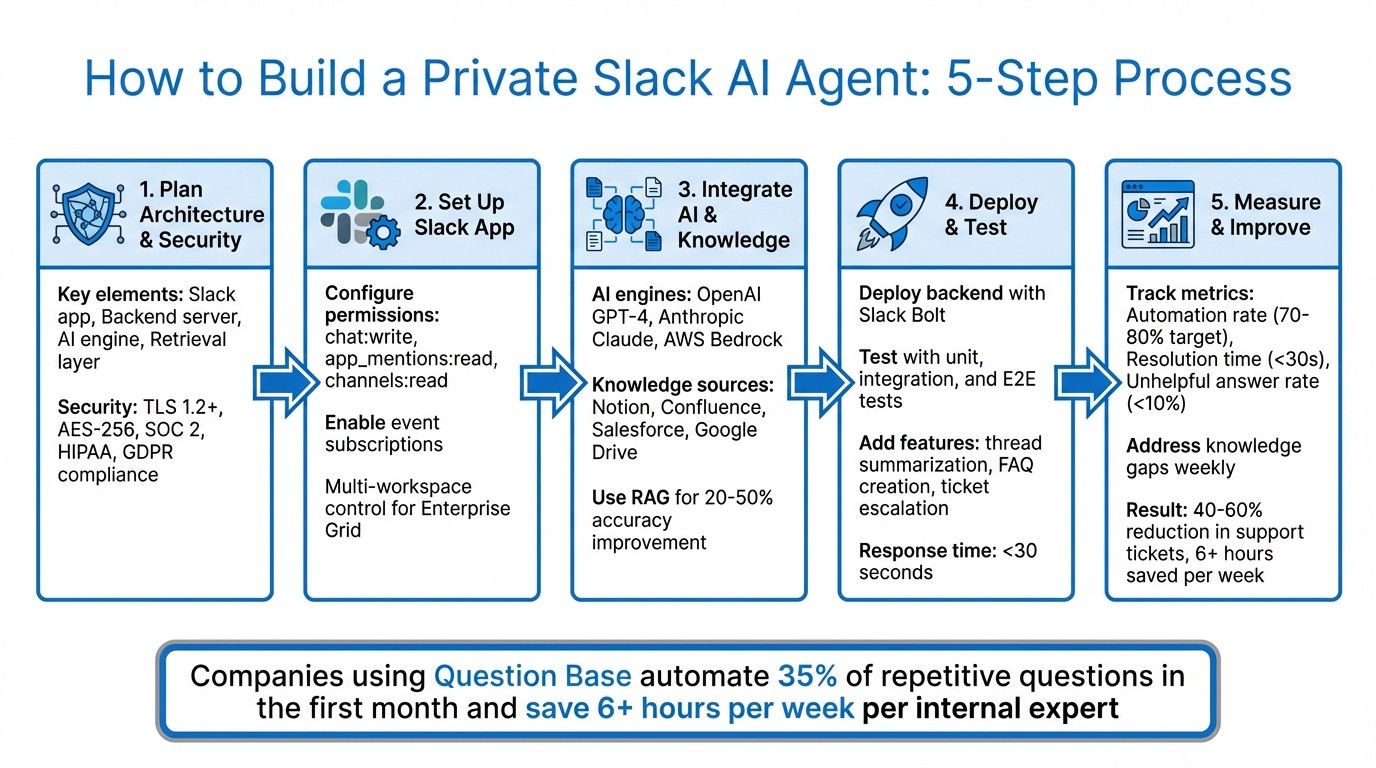
5-Step Process to Build a Private Slack AI Agent
Build a Slack AI Agent That Answers Questions (Step-by-Step Tutorial)
Step 1: Plan Your Architecture and Security Model
A well-thought-out architecture is the backbone of a secure and scalable enterprise Slack AI deployment. By carefully planning your data flow, permissions, and compliance measures, you can ensure both security and efficient scaling.
Design the System Architecture
A reliable Slack AI agent relies on four key components working together seamlessly:
Slack app: Handles events and commands.
Backend server: Built using frameworks like Node.js with Bolt SDK or Python with FastAPI, it verifies requests and routes them appropriately.
AI engine: Processes the requests using platforms like OpenAI, Anthropic, or AWS Bedrock.
Retrieval layer: Uses methods like Retrieval-Augmented Generation (RAG) and vector databases such as pgvector or Pinecone for contextual knowledge searches.
Here’s how the system works: Slack sends an event to the backend, which verifies it, queries the retrieval layer for relevant knowledge, passes that context to the AI engine, validates the response, and then posts the answer back to Slack. Throughout this process, interactions are logged for analytics and audits.
When choosing an architecture model, enterprises often weigh control against operational complexity:
Fully self-hosted: Offers maximum control over data residency and network security but demands significant internal DevOps resources.
VPC-managed: Balances enterprise controls with reduced operational effort.
Multi-tenant SaaS: Easiest to set up but requires rigorous validation of tenant isolation and compliance guarantees.
Industries like finance and healthcare often lean toward self-hosted or VPC-managed options to maintain strict control over Slack-related data and embeddings.
This clear architectural design lays the groundwork for implementing robust security measures.
Security and Compliance Requirements
To ensure secure operations, it’s essential to validate every Slack request using the signing secret and HMAC. Implement OAuth 2.0 with minimal scopes, such as chat:write and channels:history, to reduce risk in case of a compromise. Always encrypt access tokens and store them securely.
For enterprise-grade security, follow these practices:
Encryption in transit: Use TLS 1.2 or higher for all communications between Slack, your backend, the AI engine, and databases.
Encryption at rest: Secure stored data with AES-256.
Key management: Use centralized systems like AWS KMS or Azure Key Vault, enforce strict IAM policies, rotate keys regularly, and maintain separation of duties.
Secrets management: Avoid hard-coding API keys; instead, use secure secrets managers.
Network controls: Implement private subnets, security groups, and IP allowlists to limit access.
Compliance requirements vary by industry but shape your architecture significantly. For example:
SOC 2: Requires controls across security, availability, and confidentiality, including access management, change tracking, and continuous monitoring.
HIPAA: Demands a Business Associate Agreement (BAA) for handling protected health information (PHI) and mandates measures like role-based access controls, data masking, and channel-level policies.
GLBA/SOX: In finance, you’ll need detailed logging, clear data lineage, and strict controls to prevent data mixing across legal entities.
GDPR/CCPA: Even U.S.-based companies must prepare for deletion requests and data minimization if processing data from EU or California residents.
How Question Base Simplifies Setup

Setting up and maintaining this architecture can be resource-intensive, requiring significant engineering effort for infrastructure provisioning, security implementation, compliance maintenance, and admin tooling. Question Base simplifies this process by offering a ready-made solution with enterprise-grade security baked in.
The platform is SOC 2 Type II compliant, featuring encryption for both data at rest and in transit, centralized key management, and optional on-premise deployment for organizations with stringent data residency needs.
Installing Question Base through the Slack App Marketplace connects trusted sources like Notion, Confluence, Google Drive, and Salesforce without the need for custom integrations. Permissions from the source systems are automatically respected - if a user doesn’t have access to a document in Confluence, the AI agent won’t retrieve it for them. The Enterprise tier also includes multi-workspace support and per-channel configurations, enabling consistent security protocols while tailoring AI behavior for specific teams or departments.
By handling infrastructure, compliance, and maintenance, Question Base frees your team to focus on refining knowledge and measuring impact rather than worrying about servers and security updates.
With your architecture and security in place, the next step is setting up and integrating the Slack app.
Step 2: Set Up a Slack App and Configure Permissions
To get your Slack app up and running, you'll need to create it, configure the necessary permissions, and set up event handling. If you're deploying across multiple workspaces, there are additional steps to consider.
Create and Configure a Slack App
Start by visiting https://api.slack.com/apps and clicking "Create New App." Choose "From scratch," name your app (e.g., "Private AI Agent"), and select the workspace where it will operate. After hitting "Create App," you’ll be directed to the app dashboard, where the setup begins.
In the dashboard, go to OAuth & Permissions to define the bot token scopes. These scopes decide what your app can access within Slack. Key scopes include:
chat:write: Allows the bot to send messages.app_mentions:read: Detects when users mention the bot using@agent.channels:readandchannels:join: Grants access to channels and allows the bot to join them.im:readandim:write: Enables direct message interactions.users:read: Retrieves user information.
If you're managing multiple workspaces in an enterprise setup, include admin.conversations:read for broader administrative control. Begin with the minimum scopes needed for your app’s functionality, adding more only as required. This approach minimizes security risks and simplifies the review process.
Once the scopes are configured, click "Install to Workspace" (or "Request to Install" if admin approval is required). After authorization, the app will show up in your workspace's Apps list. You’ll also receive a Bot User OAuth Token (starting with xoxb-), which your backend will use to interact with Slack APIs. Make sure to store this token securely.
The next step is to enable event subscriptions to allow your app to respond dynamically to Slack activities.
Enable Event Subscriptions and API Connections
To make your app interact with Slack events, enable Event Subscriptions in the app dashboard. Turn on Events and set the Request URL to your backend endpoint (e.g., https://yourserver.com/slack/events). Slack will send a verification challenge to this URL, and your backend must respond with the provided challenge value to confirm the connection.
Subscribe to specific bot events based on where you want your app to listen. Common events include:
app_mention: Triggers when users mention the bot.message.channels: Captures messages in public channels.message.im: Monitors direct messages.
When these events occur, Slack sends a payload to your Request URL. To ensure security, your backend must verify incoming requests using HMAC-SHA256 with Slack’s signing secret. Here’s an example using Node.js to handle an app_mention event:
Make sure your backend is deployed over HTTPS and includes signature verification. Start small by subscribing to the app_mention event in a single test channel to minimize noise during initial testing. This configuration ensures your app is ready to handle secure, event-driven interactions.
manage multi-workspace and channel-level control
For organizations using Slack Enterprise Grid, you can install your app at the organization level and control access across workspaces. After an org-level installation, use the Enterprise Grid admin tools to distribute the app selectively, ensuring centralized management of permissions.
To manage channel-level access, restrict where the bot can operate by setting up an allow-list of channel IDs in your backend. When an event is received, check the channel ID and ignore events from non-approved channels. This approach keeps control centralized without requiring end-user configuration.
If you're looking for a streamlined solution, Question Base offers a Slack app that installs directly from the Slack App Marketplace. It’s designed for enterprise needs, respects permissions from tools like Notion, Confluence, and Salesforce, and supports multi-workspace setups with per-channel configurations in its Enterprise tier. This allows your security team to deploy the app once and tailor its behavior for specific channels, such as HR, IT, or operations, without additional development work.
With your Slack app configured and permissions in place, you’re ready to integrate AI and connect knowledge sources to deliver smarter, faster responses.
Step 3: Integrate AI and Knowledge Sources
Once you've secured your app setup and configured permissions, it's time to integrate an AI engine and connect it to your enterprise knowledge base. This step is crucial for ensuring your private Slack agent delivers precise and relevant responses, drawing from the information your teams rely on most.
Connect to an AI Engine
To process user messages, you'll need to integrate a large language model (LLM) like OpenAI's GPT-4, Anthropic's Claude, or Amazon Bedrock. Here's a quick overview of how to get started:
OpenAI: Install the Python library, set your API key as an environment variable, and route user messages through the Chat Completions endpoint.
Anthropic: Use the Claude API, which operates similarly to OpenAI, leveraging its messages endpoint for processing.
Amazon Bedrock: This platform offers serverless access to multiple foundation models via a single API. It includes built-in VPC endpoints and encryption, meeting compliance standards like SOC 2 and HIPAA. Bedrock also supports fine-tuning without requiring your data to leave your infrastructure, enhancing security and scalability.
Boost Accuracy with Retrieval-Augmented Generation (RAG)
While standard LLMs can handle general queries, they often fall short when it comes to providing specific, actionable answers. To address this, you can implement Retrieval-Augmented Generation (RAG), which grounds responses in your internal documentation.
Here’s how to set up RAG:
Choose a Vector Database: Use tools like Pinecone or FAISS to store and retrieve document embeddings.
Prepare Your Documents: Break your documents into smaller chunks (around 512 tokens each) and generate embeddings using a model like OpenAI's
text-embedding-ada-002.Index and Retrieve: Index these embeddings in your vector database. When a user submits a query in Slack, embed the query, retrieve the top 5–10 most relevant chunks using cosine similarity, and include this context in the LLM prompt. For example:
"Using this context {retrieved_docs}, answer: {query}."
This method can improve accuracy by 20–50% compared to relying solely on the LLM's general knowledge [3].
Configure Enterprise Knowledge Sources
The reliability of your agent depends on integrating trusted knowledge sources. Here's how to connect some of the most commonly used platforms:
Notion: Set up an integration at notion.com/my-integrations, get your API token and database/page IDs, and use the Notion API to query pages. Parse the content, chunk it, and add embeddings to your vector database. Regularly schedule syncs to keep your knowledge base up to date.
Confluence: Generate an API token from id.atlassian.com and use Atlassian's REST API with Basic Auth to fetch spaces and pages. Export the content, chunk it, and embed it. Use last-modified timestamps to track changes and perform delta syncs.
Salesforce: Use the OAuth 2.0 JWT bearer flow for headless authentication. Query relevant objects like Cases or Opportunities and embed the data while respecting field-level permissions.
Google Drive: Set up a service account with domain-wide delegation to access shared drives. Use the Drive API to list and export documents, ensuring you respect sharing permissions.
While Slack AI can summarize conversations well, teams needing verified and accurate responses from dependable documentation will benefit from connecting external sources. A platform like Question Base simplifies this process by integrating with tools such as Notion, Confluence, Salesforce, and Google Drive. With a straightforward installation from the Slack App Marketplace, it handles authentication, syncing, and permissions automatically - no custom coding required. This ensures your responses are grounded in authoritative content rather than just Slack message history.
Knowledge Source | Integration Method | Key Considerations |
|---|---|---|
Notion | API token + database/page IDs | Schedule syncs; parse Markdown exports |
Confluence | REST API + Basic Auth | Track last-modified timestamps for delta syncs |
Salesforce | OAuth 2.0 JWT flow | Query objects; respect field-level permissions |
Google Drive | Service account + Drive API | Use domain-wide delegation; filter by MIME types |
With your AI engine connected and your knowledge sources integrated, you're ready to deploy and fine-tune your Slack agent for optimal performance.
Step 4: Deploy, Test, and Refine Your Agent
With your AI engine set up and connected to its knowledge sources, it’s time to deploy your agent and ensure it performs effectively in real-world scenarios. This step involves launching the backend, testing its accuracy, and refining responses based on user feedback.
Deploy the Backend and Configure Routing Rules
Begin by implementing your backend using a framework like Slack Bolt, which simplifies event handling and API interactions. Install the Bolt SDK in your preferred language - Python, Node.js, or Java - then configure your app credentials and set up event listeners to capture user messages. Establish clear routing rules to define when your agent should respond. For instance, you can program it to reply only when mentioned directly or to monitor specific channels for keywords like "help" or "how do I."
When a user submits a query, your backend should pull relevant context from your vector database, process it through the language model, and deliver the response back to Slack via the chat.postMessage API. To enhance user experience, display a processing indicator and include a disclaimer that AI-generated content may require review. If the system encounters an error, reset the indicator and provide an error message.
Thorough testing is essential. Use a Testing Pyramid approach that includes unit tests, integration tests, and end-to-end scenarios. Tools like the @slack/test package can simulate incoming events during the development phase, helping you identify and fix issues early. Once your backend is live and routing rules are in place, focus on adding advanced support features and improving response accuracy.
Enhance Support Features
After deploying your backend, consider adding features that streamline internal workflows and improve user experience. For example, thread summarization can condense lengthy Slack discussions into quick, digestible overviews, allowing team members to catch up on conversations more efficiently. Similarly, FAQ creation tools can automatically extract high-quality answers from Slack threads and convert them into organized, searchable entries.
You can also implement ticket escalation to handle complex situations like billing disputes or cases of high user frustration. By triggering human intervention when AI confidence is low, you ensure that nuanced issues receive the attention they deserve, while routine inquiries are addressed automatically. Tracking metrics like the "Answer Acceptance Rate" can provide valuable insights into the quality of your agent’s responses. These features significantly reduce the time spent on manual query handling.
"Since we started using Question Base we don't spend any time looking up our procedures in a support manual... QB finds the relevant answers in a few seconds." - Maria Jensen, UX Lead & Scrum Master, Ticketbutler [1]
Refine Your Agent with Question Base
Once your agent is deployed and support features are in place, the next step is to refine its performance. While building a custom agent offers flexibility, platforms like Question Base simplify the refinement process. Question Base tracks unanswered queries, allows experts to review and verify responses, and consolidates duplicate questions into a single source of truth. On average, it delivers responses in Slack within 3.2 seconds and achieves an answer accuracy score of 4.8/5 based on user feedback [1].
One standout feature of Question Base is its ability to capture knowledge directly from Slack threads with a single click. This turns valuable team conversations into permanent FAQ entries without requiring manual effort. Its analytics dashboard provides critical metrics like resolution rates, automation percentages, and knowledge gaps, helping you measure ROI and prioritize updates effectively.
"We implemented Question Base to eliminate repetitive questions and to collate answers and information in one place for a growing team... It's easy to verify answers as new questions come along." - Monica Limanto, CEO, Petsy [1]
For teams requiring verified answers grounded in trusted documentation, Question Base integrates seamlessly with tools like Notion, Confluence, Salesforce, and Google Drive. This ensures that your Slack-based workflows are supported by reliable, well-organized knowledge sources, making it easier to capture and manage information efficiently.
Step 5: Measure Success and Improve Over Time
After setting up a secure architecture and ensuring smooth integration, the next step is to consistently evaluate your Slack AI agent's performance. Regular measurement helps refine its accuracy and maintain its relevance. Without this, even the best-designed agents can become less effective over time, leading to user dissatisfaction and reduced efficiency.
Focus on Key Metrics
Start by identifying the right KPIs to track, such as automation rate, resolution time, and unhelpful answer rate. These metrics provide a clear picture of how well your AI agent is performing:
Automation rate: This measures the percentage of queries resolved without human intervention. Aim for 70-80% for routine queries.
Resolution time: This tracks how quickly the agent provides answers. Top implementations often achieve response times of under 30 seconds.
Unhelpful answer rate: This highlights instances where users are dissatisfied, such as downvoted responses, escalations to human support, or repeated questions. Keep this rate below 10%.
Leverage Slack's Event Subscriptions API to gather data on timestamps, response times, and user feedback. Use your backend dashboard to calculate these metrics: automation rate as (automated resolutions / total queries) × 100, resolution time as the median latency, and unhelpful answer rate from escalation logs or negative feedback. Many enterprise teams report reducing support tickets by 40-60% and saving over six hours per week for internal experts by automating repetitive queries. These metrics can also guide improvements to your knowledge base.
Address Knowledge Gaps
Unanswered questions often reveal gaps in your knowledge base. Pay special attention to interactions with confidence scores below 70%. Review these weekly to identify patterns. For example, if 20% of policy-related queries go unresolved, it’s a clear sign that updates are needed.
Prioritize these gaps based on their frequency and impact on your business. Implement a human-in-the-loop process where flagged questions are reviewed by experts, who then provide verified answers to enrich the system. Teams that follow this iterative method often close 30% of knowledge gaps in their first refinement cycle. As the system matures, these improvements compound over time.
Comparing Analytics: Slack AI vs Question Base
To optimize your support operations, compare the analytics capabilities of Slack AI and Question Base. While Slack AI provides basic statistics, Question Base offers deeper, actionable insights designed for enterprise needs. These include query-level confidence scores, escalation tracking, and trends in knowledge gaps, allowing teams to make improvements twice as quickly as when relying on aggregate reports.
Analytics Feature | Question Base | Slack AI |
|---|---|---|
Primary Focus | Enterprise knowledge & support automation | General productivity (search, summarize messages) |
Metrics Depth | Query-level confidence, gap analysis, automation rate tracking | High-level usage stats, feature adoption |
Knowledge Gap Detection | Automated logs with trend analysis | Manual review of user complaints required |
Customization | Custom KPIs, per-channel metrics | Fixed metrics across workspace |
Actionability | One-click knowledge updates, A/B testing | Manual analysis and updates |
Scalability | Multi-workspace support with granular controls | Limited to workspace-level features |
For teams that rely on verified answers and trusted documentation, Question Base offers analytics that provide clear insights into what’s working and what needs improvement. Establish a regular review schedule - weekly for addressing top issues and spikes in escalations, and monthly or quarterly for broader updates to the knowledge base and permissions. Assign a dedicated owner, such as a knowledge manager or support operations lead, to oversee these efforts and ensure the system continues to deliver value.
Conclusion: Build a Scalable Slack AI Agent for Your Enterprise
Creating a private Slack AI agent requires careful planning across architecture, security, integration, and ongoing optimization, as covered in earlier steps. Key elements include setting up trust boundaries, implementing retrieval-augmented generation (RAG), and using robust access controls. A well-executed design blends stateless processing with precise administrative controls, ensuring your agent can grow securely alongside your team’s needs.
For those ready to deploy without the hassle of starting from scratch, Question Base offers a streamlined, enterprise-ready solution. It eliminates the weeks of custom development typically required, enabling faster deployment and paving the way for continuous improvement. With SOC 2 Type II certification and integrations with tools like Notion, Confluence, Salesforce, and over 200 others, Question Base is designed for cross-functional teams like HR, IT, and operations that need reliable answers - not just generic AI-generated summaries. Companies using Question Base report saving 6+ hours per week per internal expert and automating 35% of repetitive questions within the first month [1].
"Since we started using QB, we haven't used our Google support docs. And if I go on vacation or sick leave, I feel comfortable that QB will just take over."
Linn Stokke, Online Events & Marketing Specialist, Ticketbutler [1]
Once your agent is set up and integrated, the next step is ongoing refinement. This involves tracking key metrics like automation rates, resolution times, and recurring knowledge gaps. Regularly reviewing queries allows you to identify areas for improvement, ensuring your AI agent evolves to better serve your team. Enterprises committed to this process often see their Slack workspace evolve into a powerful, intelligent system that keeps teams efficient and aligned.
With daily AI usage up by 233% and administrative tasks reduced by nearly 40% [2], the benefits of deploying a Slack AI agent are clear. The real question isn’t whether to build one - it’s how fast you can implement a solution that delivers accurate, auditable answers at scale.
FAQs
How can I keep my private Slack AI agent secure and compliant?
To keep your private Slack AI agent secure and compliant, it’s crucial to opt for a solution built with enterprise-level security in mind. Question Base stands out by being SOC 2 Type II certified, which means it adheres to rigorous standards for confidentiality, integrity, and availability. Additionally, it provides encryption and detailed permission controls tailored specifically for Slack environments.
Here are some key practices to follow:
Implement role-based access control (RBAC): Assign specific roles - like viewer, editor, or admin - based on user responsibilities in each Slack channel. This ensures only the right people can modify or approve content.
Restrict data sources: Connect only trusted platforms such as Notion, Confluence, or Salesforce. Use OAuth or service tokens with the least amount of access necessary. Unlike some tools, Question Base pulls information from these secure repositories rather than Slack chat history, minimizing exposure.
Configure channel-specific permissions: Adjust settings to ensure sensitive data stays confined to the appropriate workspaces and doesn’t get shared unintentionally.
Leverage audit logs for monitoring: Use built-in analytics to keep an eye on resolution rates, unhelpful answers, and data access activities. This not only aids compliance efforts but also helps identify any unusual behavior.
By combining these strategies with the robust tools available in Question Base, you can ensure your Slack AI agent remains secure and compliant while still providing quick, reliable answers to your team.
What makes Question Base a better choice than building your own Slack AI agent?
Question Base delivers a ready-to-deploy, enterprise-grade solution that outshines custom-built Slack AI bots in several critical areas. By connecting directly to reliable sources like Notion, Confluence, Salesforce, and Google Drive, it ensures expert-verified answers that are both accurate and auditable. In contrast, custom bots often depend on chat history, which can lead to inconsistent or unreliable responses.
The platform also comes equipped with knowledge management tools that simplify operations. Features like case tracking, duplicate detection, and AI-powered gap learning are built in - eliminating the need for time-consuming custom development. On top of that, Question Base offers enterprise-grade analytics, SOC 2 compliance, and role-based access control, ensuring it meets stringent security and organizational standards.
For HR, IT, and operations teams looking for a scalable solution, Question Base provides a hassle-free setup with no-code installation and out-of-the-box integrations. Unlike DIY solutions that require heavy engineering and ongoing maintenance, this platform saves valuable time and resources while delivering verified, scalable knowledge management.
How can I connect external tools like Notion and Confluence to my Slack AI agent?
To link external knowledge sources like Notion and Confluence with your Slack AI agent, start by installing the Question Base app in your Slack workspace and completing the authorization process. Once that's done, head to the Question Base dashboard to connect your tools.
For Notion, log in via the Integrations section, grant the necessary permissions, and select the specific pages or databases you want the agent to access. For Confluence, enter your site URL and API token, then choose the spaces or pages to sync. You can also set up access restrictions to ensure proper control over shared information. After connecting, the agent will be able to pull verified answers directly from these platforms.
You can adjust settings like indexing frequency and permissions to determine how often data updates and who can view it. Test the integration by asking a question in Slack, and use the built-in analytics to fine-tune the setup, ensuring your team gets accurate and reliable answers every time.