∙
Cooper
∙
Reading time:
12 min
Repetitive questions in Slack drain time and resources. Enterprises lose millions annually as employees spend hours searching for answers or responding to the same queries. Question Base solves this by acting as a custom Slack agent that delivers verified answers instantly from trusted sources like Notion, Confluence, and Salesforce. With features like automating internal questions, creating FAQs from Slack threads, and analytics for identifying knowledge gaps, it streamlines internal support and saves teams over 6 hours weekly.
Key Features:
Instant Answers: Responds in 3.2 seconds with verified information.
Trusted Sources: Integrates with platforms like Google Drive, Zendesk, and more.
Customizable Settings: Tailors responses per channel and flags uncertain queries for review.
Analytics Dashboard: Tracks unanswered questions and automation performance.
Enterprise-Grade Security: SOC 2 Type II compliant with on-premise options.
Why it matters: Teams using Question Base report automating 90% of repetitive questions and saving over $2 million annually for 1,000-person companies. It’s a practical solution for improving efficiency while ensuring reliable, secure knowledge management in Slack.
Setting Up Question Base in Slack

Installing the Question Base App
Getting started with Question Base is quick and straightforward - it takes about five minutes. To ensure everything runs smoothly, a Slack Workspace Owner or Admin should handle the installation to avoid any permission hiccups. Begin by visiting the Slack App Marketplace, searching for Question Base, and clicking "Add to Slack." During the setup, you'll need to approve access to certain scopes, such as reading message content, accessing channel history, and viewing files. Be sure to verify these permissions align with your security policies.
Once the app is installed, bring the bot into your selected channels by typing /invite @questionbase in each one. To make the most of your initial rollout, start with high-traffic channels like #it-support, #hr-questions, or #general. This focused approach allows you to assess the bot's impact before rolling it out across the entire organization.
The next step is connecting your knowledge sources to ensure the bot delivers accurate and helpful responses.
Connecting Your Knowledge Sources
Question Base doesn’t just rely on Slack chat history - it integrates seamlessly with your existing documentation tools. After installation, log in to the Question Base web app and connect your preferred knowledge platforms using OAuth authentication - no need to involve your engineering team. The app supports a variety of tools, including Notion, Confluence, Google Drive, Salesforce, Zendesk, Intercom, Dropbox, and SharePoint.
To get started, focus on linking the knowledge bases your team uses most. For example, if HR frequently answers questions about benefits, connect your employee handbook stored in Notion or Google Drive. If IT regularly resolves recurring software issues, link your Confluence runbooks. Importantly, the system respects existing access controls - if someone doesn’t have direct access to a Confluence page, the bot won’t surface that content to them.
You can also jumpstart the bot’s knowledge by importing 30–90 days of Slack message history. This creates an initial FAQ, helping the agent handle common questions from day one.
Once your knowledge sources are connected, it’s time to fine-tune the bot to fit your team’s unique needs.
Customizing Agent Behavior and Settings
Question Base offers flexible options to tailor the bot’s behavior. Set a confidence threshold to ensure the bot only answers when it’s certain, flagging less confident queries for human review. You can also define a system prompt to establish clear boundaries for the bot’s responses, such as, "Only provide answers based on company-approved documents and sources."
For more control, adjust per-channel settings to match the tone and depth of responses to the channel’s purpose. For instance, in #exec-strategy, you might configure the bot to provide concise summaries with links to full documents. In #customer-support, you could enable detailed, step-by-step answers. Additionally, you can decide whether the bot responds to all messages or only when directly mentioned.
To streamline escalations, tag specific roles like @IT-oncall or @HR when the bot can’t resolve a question. This ensures experts stay in the loop without disrupting your Slack workflow.
Key Features and Benefits of Question Base
Verified Answers and Integration Flexibility
Question Base provides expertly verified answers by pulling information from trusted sources like Notion, Confluence, Google Drive, Salesforce, Zendesk, and Intercom - going beyond Slack chat history. With a 99.99% accuracy rate on verified answers [3] and an average answer score of 4.8 out of 5 from users [1], it ensures reliability you can count on.
Unlike tools that depend solely on past conversations, Question Base incorporates a human‑in‑the‑loop process. This means experts review and refine every answer to ensure compliance and maintain high-quality standards.
The platform also integrates seamlessly with your existing systems while respecting access controls. For example, if an employee doesn’t have permission to view a specific Confluence page or Google Drive folder, the bot won’t display that content. This safeguards sensitive information while ensuring accessibility for authorized users.
These features not only boost operational efficiency but also provide the foundation for secure and insightful analytics.
Analytics and Knowledge Management at Scale
Question Base includes a robust dashboard that tracks metrics like automation rates, resolution times, and question performance. Large organizations report automating over 90% of repetitive questions [2], with an average response time of just 3.2 seconds [1]. By cutting down on repetitive inquiries, internal experts save approximately 6+ hours per week [1][2].
The system also identifies knowledge gaps by logging unresolved queries and detecting duplicate questions. This helps experts refine and improve Slack documentation over time.
For teams managing high volumes of inquiries, the analytics highlight which topics generate the most questions and which answers are performing best. As Maria Jensen, UX Lead & Scrum Master at Ticketbutler, shared:
"Since we started using Question Base we don't spend any time looking up our procedures in a support manual." – Maria Jensen, UX Lead & Scrum Master, Ticketbutler [1]
With these insights, teams can continuously optimize their knowledge base while maintaining enterprise-level security.
Enterprise-Grade Security and Compliance
Question Base is built with SOC 2 Type II compliance and uses encryption both at rest and in transit to meet strict security standards. For organizations with specific data residency requirements, on-premise deployment options are available to keep sensitive information within your infrastructure.
The Enterprise tier offers additional customization through white-labeling. You can tailor the bot’s name, avatar, and messaging to align with your company’s branding. Multi-workspace support lets you deploy Question Base across several Slack workspaces while maintaining centralized control over knowledge sources and security policies.
This level of customization ensures you have complete control over what content the AI accesses, how it responds to queries, and when it escalates issues to human experts. It’s a solution designed to adapt to your organization’s unique needs while safeguarding critical information.
Build a Slack AI Agent That Answers Questions (Step-by-Step Tutorial)
Question Base vs Slack AI
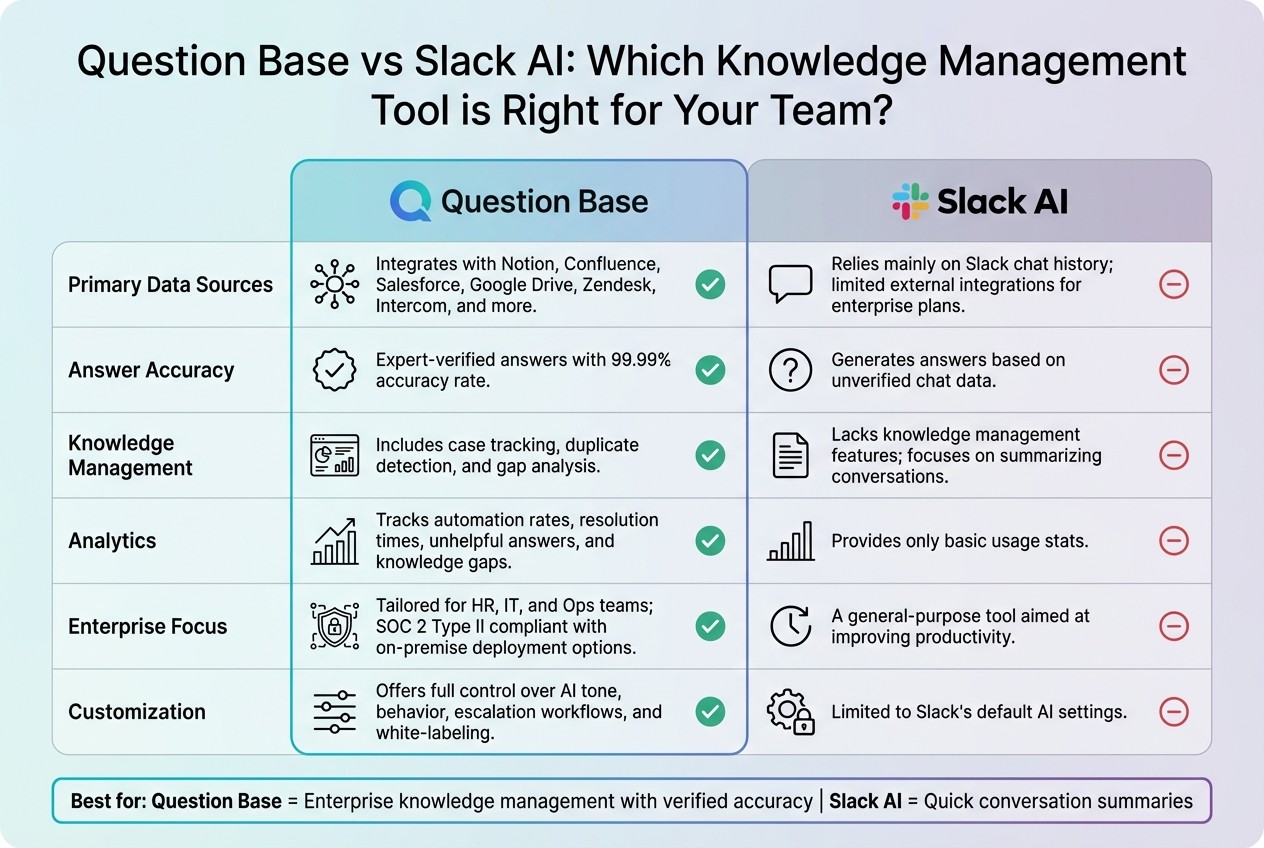
Question Base vs Slack AI Feature Comparison
Feature Comparison Table
While Slack AI is great at summarizing conversations and drafting messages, Question Base is designed specifically for managing verified, enterprise-level knowledge across support, HR, IT, and operations teams.
Here’s a breakdown of how the two tools stack up:
Feature | Question Base | Slack AI |
|---|---|---|
Primary Data Sources | Integrates with Notion, Confluence, Salesforce, Google Drive, Zendesk, Intercom, and more | Relies mainly on Slack chat history; limited external integrations for enterprise plans |
Answer Accuracy | Expert-verified answers with a 99.99% accuracy rate [3] | Generates answers based on unverified chat data |
Knowledge Management | Includes case tracking, duplicate detection, and gap analysis | Lacks knowledge management features; focuses on summarizing conversations |
Analytics | Tracks automation rates, resolution times, unhelpful answers, and knowledge gaps | Provides only basic usage stats |
Enterprise Focus | Tailored for HR, IT, and Ops teams; SOC 2 Type II compliant with on-premise deployment options | A general-purpose tool aimed at improving productivity |
Customization | Offers full control over AI tone, behavior, escalation workflows, and white-labeling | Limited to Slack's default AI settings |
The table highlights a key distinction: while Slack AI relies on chat history, Question Base integrates directly with trusted documentation to deliver verified answers. This makes it a better fit for teams that need accuracy and reliability, especially in industries requiring compliance and audit trails.
When to Choose Question Base Over Slack AI
Each tool has its strengths, but the choice depends on your team’s priorities and workflows.
If your organization deals with high volumes of repetitive questions - like HR managing benefits inquiries, IT troubleshooting access issues, or operations maintaining process documentation - Question Base is the ideal solution. Its human-in-the-loop verification ensures every answer aligns with official policies, and its analytics help pinpoint and address knowledge gaps over time.
For teams where accuracy, compliance, and knowledge governance are critical, Question Base delivers the structure and reliability general-purpose tools like Slack AI can’t match. Unlike Slack AI, which learns from past chats, Question Base pulls directly from trusted sources like Notion or Salesforce, ensuring responses are always grounded in your organization’s official knowledge base.
While Slack AI excels at speeding up individual tasks with summaries, Question Base focuses on aligning entire teams by operationalizing knowledge. If your enterprise values verified answers, auditability, and governance, Question Base is the clear choice for scaling knowledge management effectively.
Best Practices for Maintaining and Scaling Your Knowledge Base
Tracking and Addressing Knowledge Gaps
Your dashboard is an essential tool for spotting gaps in your knowledge base. It highlights unanswered questions and recurring patterns in user queries, making it easier to pinpoint areas that need attention. Make it a habit to review these gaps weekly, looking for clusters of unverified or incomplete questions. When you notice a trend, update existing content or create new entries in your connected platforms like Notion or Confluence. Features like duplicate detection can help merge similar answers, ensuring your knowledge base stays organized and easy to navigate as it grows. These insights are invaluable for guiding content audits and scheduling updates.
Keep an eye on key metrics such as automation rate, resolution time, and flags for unhelpful answers. Businesses using AI-driven knowledge bases have seen automation rates surpass 90% for frequently asked questions [2].
Periodic Content Audits and Updates
Beyond addressing gaps, regular audits are crucial for keeping your knowledge base accurate and reliable. Instead of waiting for problems to arise, schedule proactive reviews. Conduct quarterly audits where subject matter experts validate AI-generated responses against the latest company policies. Use these sessions to align your knowledge base with updated sources and ensure consistency. Testing AI responses with real-world queries can help confirm their accuracy and relevance. Additionally, use customization settings to fine-tune prompts and adjust routing logic based on user feedback.
As your organization grows, scaling your knowledge base requires consistent updates and domain-specific expertise. Assign dedicated knowledge managers to oversee areas like HR, IT, or operations. By updating content close to its source, you can maintain accuracy and ensure your knowledge base keeps pace with your enterprise’s expanding needs [4][5].
Conclusion
A custom Slack agent can deliver verified answers in seconds by pulling directly from trusted sources - cutting out lengthy engineering cycles and unreliable AI-generated outputs. Question Base transforms Slack into a dependable knowledge hub by integrating with tools like Notion, Confluence, and Salesforce, while also keeping human experts involved to maintain accuracy. For enterprises managing thousands of daily questions across HR, IT, and operations, Question Base offers the precision and accountability that generic chat-based AI often lacks.
The results speak for themselves: automated responses save experts more than 6 hours per week, achieving over a 90% automation rate - translating to more than $2 million in annual productivity gains for a 1,000-person company [1][2]. With an average response time of just 3.2 seconds and a verified accuracy rate of 99.99% [1][3], teams can access reliable information instantly without disrupting their workflow. Experts also trust Question Base to seamlessly step in during absences, thanks to features like SOC 2 Type II compliance, customizable agent behaviors, and analytics that pinpoint knowledge gaps before they slow things down.
Whether you're scaling a support team, improving onboarding, or simply tired of answering the same questions repeatedly, Question Base equips you with the tools to organize and operationalize your knowledge. It doesn’t just make knowledge searchable - it turns it into a productivity engine, ensuring accuracy and alignment as your organization grows.
FAQs
How does Question Base provide accurate answers for enterprise teams?
Question Base prioritizes accuracy by providing expert-verified answers drawn directly from reliable sources like Notion, Confluence, Salesforce, Google Drive, and others. Unlike systems that depend on AI-generated responses from chat history, every answer is anchored to a documented source and carefully reviewed by your subject-matter experts before being shared in Slack.
To uphold reliability, Question Base incorporates features such as case tracking, duplicate detection, and analytics. These tools help monitor resolution rates and continuously improve responses, ensuring your team always has access to precise, traceable, and up-to-date information tailored to their specific needs.
What security features does Question Base offer for Slack integrations?
Question Base prioritizes enterprise-level security to safeguard your data within Slack. With its SOC 2 Type II certification, the platform adheres to stringent standards for data protection, confidentiality, and availability. To further ensure your information remains secure, all data is encrypted both during transit and while stored. Additionally, role-based access control with customizable permissions guarantees that only authorized team members can access or modify content.
For organizations with demanding compliance requirements, Question Base provides on-premise deployment options. This allows you to host the system behind your own firewall while maintaining seamless integration with Slack workflows. This approach delivers both enhanced security and the flexibility to meet your enterprise's unique needs.
How does Question Base help uncover and address knowledge gaps in my organization?
Question Base keeps an eye on Slack conversations to spot unanswered or unclear questions, effectively identifying where knowledge gaps exist. Through actionable analytics, it pinpoints areas that require better documentation or improved content. Unresolved queries are logged into a case tracker, giving teams a clear focus on what needs attention - whether it's missing documentation or the absence of expert-verified answers.
When a gap is flagged, experts can step in to add verified information from trusted platforms like Notion, Confluence, or Salesforce. Question Base then seamlessly publishes these answers directly in Slack, ensuring teams can access accurate information without delay. This streamlined process not only reduces repetitive questions but also boosts efficiency and keeps critical knowledge up-to-date for HR, IT, and operations teams.