∙
Cooper
∙
Reading time:
14 min

Repetitive questions drain time and resources. For enterprise teams using Slack, this is a daily challenge. Employees spend up to 30% of their week searching for answers across tools like Notion, Confluence, and Google Drive, costing companies millions in lost productivity annually.
AI-powered answer agents solve this by delivering instant, verified answers directly in Slack - no external CRM like Salesforce required. Tools like Question Base integrate seamlessly with your existing documentation, automating up to 35% of repetitive questions in just 30 days. This saves internal experts 6–8 hours per week while reducing bottlenecks for HR, IT, and operations teams.
Key benefits include:
Instant answers in Slack: AI agents respond in 3.2 seconds on average, pulling from trusted sources like Notion and Confluence.
No CRM dependency: Skip Salesforce and work directly within Slack.
Human-verified accuracy: Responses are reviewed for compliance and quality, ensuring 99.99% accuracy.
Cost-effective: At $8 per user/month, Question Base is less expensive than Slack AI's $18 per user/month.
This Slack-native approach improves productivity, builds a dynamic knowledge base, and scales internal support without adding headcount. Learn how Question Base can transform your workflows and save your team time.
Use Cases for AI Answer Agents in Slack
Automating Answers to Repetitive Questions
Repetitive questions can bog down HR, IT, and operations teams, pulling them away from more strategic work. HR often deals with recurring inquiries about benefits, IT gets inundated with password reset requests, and operations repeatedly explains approval workflows. AI answer agents step in to handle these repetitive tasks, monitoring Slack channels and providing accurate, verified answers on the spot.
With Question Base, the agent connects directly to trusted sources like Notion, Confluence, and Google Drive - going beyond just Slack chat history. For example, if someone asks about PTO policies or expense reimbursement, the agent pulls the answer straight from your official HR documentation and cites the specific source. Every response is reviewed by a human to ensure an impressive 99.99% accuracy rate [3].
"Since we started using Question Base we don't spend any time looking up our procedures in a support manual. Before, we could easily spend 5–10 minutes searching... Now, QB finds the relevant answers in a few seconds" [1]
Maria Jensen, UX Lead & Scrum Master at Ticketbutler, shared her experience. Early adopters have reported automating up to 90% of frequently asked questions, with some teams managing to auto-answer 35% of queries within just 30 days [1]. Beyond simply answering questions, these agents help curate and preserve knowledge for future use.
Creating a Slack-Native Knowledge Base
AI answer agents don’t just provide instant answers - they also help build a reliable, searchable knowledge base. One common challenge for companies is that valuable information shared in Slack threads often gets buried and becomes hard to retrieve later. These agents solve this problem by capturing expert responses directly from Slack conversations and compiling them into a dynamic knowledge base. With just one click, team members can save detailed responses, eliminating the need for manual updates to wikis or other documentation [1].
Unlike Slack AI, which focuses on summarizing past conversations, Question Base pulls information from verified external documentation. This feature helps teams create a durable repository of knowledge that extends beyond individual conversations [2].
"Question Base has exceeded our expectations - it's easy to use, intuitive and a massive time saver. We now have a reliable and useful knowledge base, making it easy to share knowledge across the team" [1]
Monica Limanto, CEO of Petsy, highlighted the benefits. This approach also streamlines onboarding, cutting down the time it takes for new hires to become productive by weeks [4]. For a company with 1,000 employees, this could save over $2 million annually in recovered productivity [1].
Scaling Internal Support Operations
Once automated answers and a robust knowledge base are in place, scaling internal support becomes far more manageable. As organizations grow, the volume of internal queries often rises exponentially, but team sizes don’t always scale at the same rate. AI agents ensure consistent, verified answers across teams and time zones, helping enterprises handle increasing demands without additional headcount.
To make scaling effective, precise control over knowledge sources is essential. Question Base allows teams to define which documentation sources the agent can access in specific Slack channels, ensuring responses stay relevant and accurate [5]. Analytics tools further enhance this process, tracking automation rates, resolution times, and knowledge gaps so leaders can identify areas where documentation needs improvement.
"Since we started using QB we haven't used our Google support docs. And if I go on vacation or sick leave, I feel comfortable that QB will just take over" [1]
Linn Stokke, Online Events & Marketing Specialist at Ticketbutler, shared her confidence in the system. For industries with strict compliance requirements, Question Base offers an expert verification system to ensure every response meets organizational standards. It also maintains SOC 2 Type II compliance and enterprise-grade security [3]. Teams can even test the agent on thousands of past conversations before going live, minimizing risks and ensuring a smooth rollout from day one [5].
Build a Slack AI Agent That Answers Questions (Step-by-Step Tutorial)
Question Base vs. Slack AI: Feature Comparison

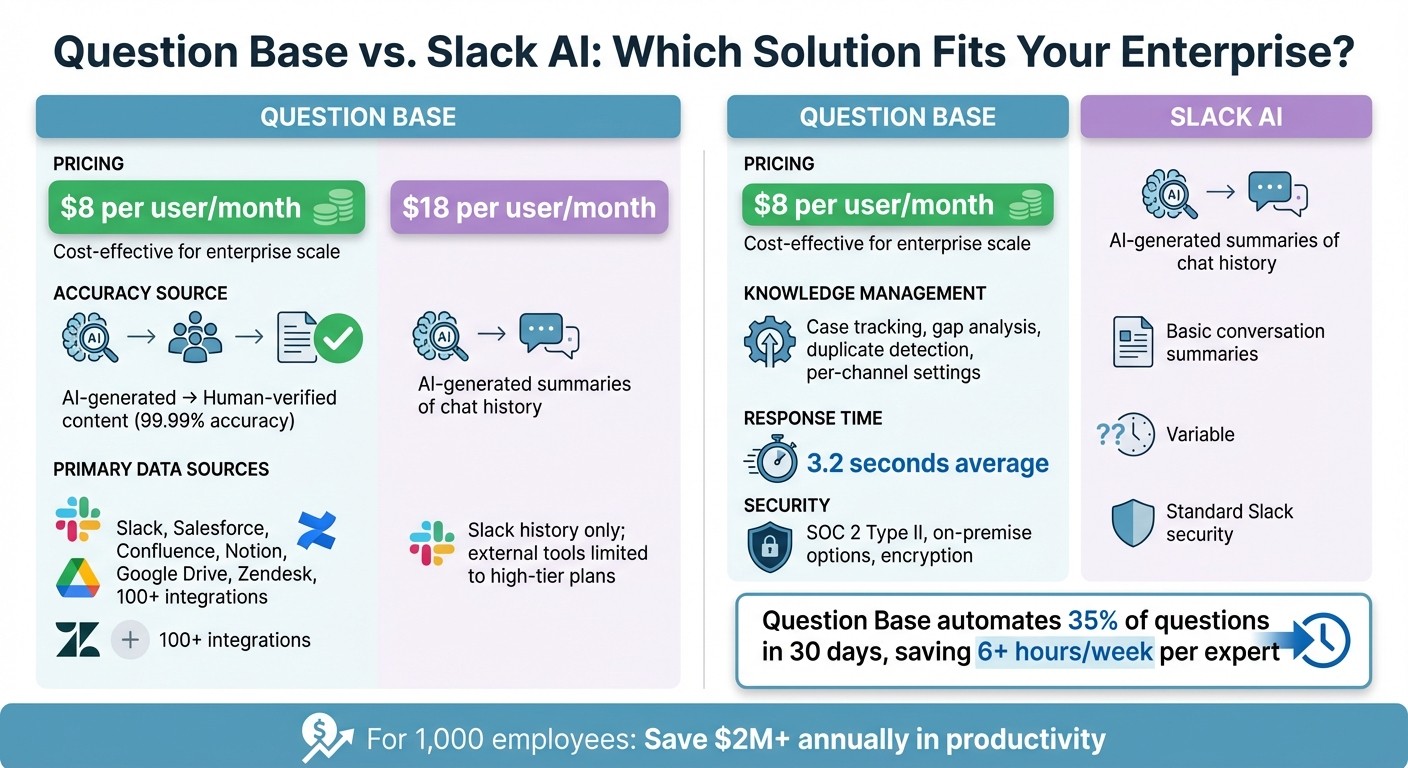
Question Base vs Slack AI Feature Comparison for Enterprise Teams
Feature Comparison Table
Slack AI provides general productivity tools like conversation summaries and chat history searches. However, when it comes to managing verified and scalable knowledge for enterprise support teams, Question Base steps in as a specialized solution tailored for these needs.
Feature | Question Base | Slack AI |
|---|---|---|
Price | $8 per user/month | $18 per user/month |
Accuracy Source | AI-generated → Human-verified content | AI-generated summaries of chat history |
Primary Data Sources | Slack, Salesforce, Confluence, Notion, Google Drive, Zendesk, 100+ integrations | Slack history (messages, threads, Huddles); external tools limited to high-tier plans |
Knowledge Management | Case tracking, gap analysis, duplicate detection, per-channel settings | Basic conversation summaries |
Analytics | Resolution rates, automation rates, unhelpful answer tracking | General usage statistics |
Security | SOC 2 Type II, on-premise options, encryption at rest and in transit | Standard Slack security framework |
Response Time | ~3.2 seconds average | Variable (based on search/summary) |
Verification | Expert-led verification workflow | No content verification system |
This table outlines the key differences between the two platforms. Let's dive into why these distinctions are critical for enterprise support.
Why Question Base Works Better for Enterprise Support
The data makes it clear: Question Base is designed to meet the demands of enterprise-grade knowledge management. While Slack AI focuses on summarizing chat history, Question Base connects to trusted sources like Confluence, Notion, and Google Drive, ensuring accuracy through a rigorous human-verification process. This approach delivers an impressive 99.99% accuracy rate [3].
For large organizations - such as a 1,000-person company - Question Base can automate 35% of repetitive questions within the first 30 days. This translates to over six hours of expert time saved each week and prevents more than $2 million in productivity losses annually [1]. By integrating seamlessly with Slack, Question Base ensures that teams can access verified knowledge without leaving their workflow.
Additionally, enterprise teams gain access to robust governance tools, including duplicate detection, unanswered question tracking, and customizable AI settings for specific Slack channels. These features go beyond Slack AI's basic summaries and are critical for managing complex support operations [1]. For industries with strict compliance requirements, Question Base offers SOC 2 Type II certification and the option for on-premise deployment, ensuring data security and regulatory compliance [1].
At just $8 per user/month - compared to Slack AI's $18 per user/month - Question Base provides a cost-effective solution without compromising on enterprise-level functionality [1]. The platform supports over 100 integrations, far surpassing Slack AI's limited ecosystem, and allows teams to test the system on their existing Slack conversations. This ensures smooth implementation and immediate compliance verification [5].
How to Set Up Question Base in Slack
Installation Steps
To get started, install Question Base directly from the Slack App Marketplace. Once you've added the app and authorized the necessary permissions, invite it to your desired Slack channel by typing /invite @questionbase.
Next, connect your key knowledge sources. Question Base works seamlessly with platforms like Notion, Confluence, Google Drive, Zendesk, Intercom, Salesforce, Dropbox, Freshdesk, HubSpot, OneDrive, Jira, and SharePoint. Setting up these integrations is straightforward: authenticate your account, choose the specific folders or pages to sync, and Question Base will begin indexing your content immediately. The Starter plan allows one integration (up to 10 pages), while the Pro plan ($8 per user/month) supports unlimited integrations, with up to 200 pages per user.
Once installed and connected to your knowledge sources, you're ready to fine-tune Question Base for your team’s unique workflows.
Customizing Question Base for Your Team
Tailoring Question Base to your team is simple and highly effective. The tool allows per-channel customization, so you can define answer sources and styles for each Slack channel. For instance, you might configure your HR channel to pull information exclusively from employee handbooks stored in Notion, while your IT channel connects to technical guides in Confluence. You can also adjust the AI’s tone to match the context - formal for compliance-heavy discussions or casual for day-to-day queries - and set up escalation workflows to ensure unanswered questions are routed to the right experts or contacts.
The Glossary feature is especially helpful for onboarding new employees. By teaching the AI your company’s acronyms and key terms, you can improve its response accuracy significantly. Additionally, any unanswered queries are logged in the Case Tracker, so nothing slips through the cracks. Experts can also save valuable Slack threads as verified answers, adding them directly to the knowledge base for future use.
Security and Compliance Setup
Question Base is designed to meet the highest security and compliance standards, making it a reliable option for enterprise environments. The platform is SOC 2 Type II certified and uses encryption both at rest and in transit to protect your data. For organizations with strict data residency requirements, Question Base offers on-premise deployment and white-labeling options through its Enterprise plan. The system also provides a 99.9% uptime SLA and maintains a 4.8/5 answer accuracy score, thanks to its human-in-the-loop verification process.
During setup, configure access controls to align with your organization’s policies. Question Base’s integration security ensures that only authorized users can access sensitive information. Additionally, the expert verification process gives compliance teams confidence that all responses meet regulatory standards. To measure the platform's impact, consider starting with a 30-day pilot in your busiest Slack channels. Many enterprises report that 35% of repetitive questions are auto-answered within the first month, saving over six hours per week for each internal expert [1].
Best Practices for AI Agents in Slack
Setting Up Channel-Specific Configurations
Each department in your organization has unique needs, so it’s essential to customize AI responses for specific Slack channels. For instance, your HR channel might pull exclusively from employee handbooks stored in Notion, while your IT channel could rely on technical documentation housed in Confluence. Adjust the tone to suit the audience - use a formal tone for Legal/Compliance channels and a more conversational style for Sales/Marketing discussions.
To keep everything running smoothly, set up escalation workflows. These can automatically tag experts or route complex issues to dedicated channels, ensuring no query gets overlooked. Additionally, train your AI using a glossary of internal acronyms and terminology to improve response accuracy and relevance [3].
These configurations lay the groundwork for ongoing improvements, which ties directly into tracking and addressing knowledge gaps.
Tracking and Closing Knowledge Gaps
When the AI encounters questions it can’t answer, it highlights gaps in your documentation. With Question Base, these unresolved queries are logged in the Case Tracker, offering a clear view of what’s missing. Regularly reviewing analytics for resolution rates and automation performance helps you identify patterns in unanswered questions, allowing you to prioritize new content effectively [1].
Empower your subject matter experts to transform helpful Slack thread resolutions into permanent knowledge base entries using one-click capture. This simple process ensures critical information doesn’t get lost in Slack’s chat history. To keep your resources up-to-date, schedule quarterly audits to review and update outdated documentation, ensuring the AI always references the most current information.
Connecting with Existing Knowledge Tools
Question Base enhances these practices by seamlessly integrating with the tools your team already relies on - like Notion, Confluence, Google Drive, Salesforce, Jira, Zendesk, and Intercom. By indexing your existing documentation, the AI provides accurate answers directly from verified company resources. Responses are marked as "Unverified" until reviewed by an expert, ensuring a high standard of accuracy - critical for teams managing sensitive or regulated information [3][2].
Unlike systems that rely on chat history, Question Base prioritizes verified documents, ensuring employees get reliable answers from trusted sources. This approach is particularly valuable for teams that need to meet compliance standards or maintain auditability in their workflows.
Conclusion
You can set up an AI agent in Slack without relying on external CRM systems like Salesforce. Question Base integrates seamlessly with tools your team already uses - such as Notion, Confluence, Google Drive, and Zendesk - while maintaining an impressive 4.8/5 answer accuracy score through human-in-the-loop verification [1].
For enterprise teams managing high volumes of questions, this approach saves substantial time. On average, users save 1.4 hours per week, while internal experts reclaim over 6 hours weekly by automating repetitive inquiries [3][1]. This efficiency highlights the benefits of a Slack-native knowledge management system.
Question Base goes beyond standard AI tools by offering features like case tracking, gap analysis, and duplicate detection. At $8 per user per month [1][2], it also ensures enterprise-grade security with SOC 2 Type II compliance [4].
If your documentation is scattered across multiple platforms or your experts are overwhelmed by repeated questions, Question Base provides a Slack-native solution designed to scale with your organization. By centralizing resources and automating routine queries, it shifts support from reactive problem-solving to proactive knowledge management - all without the need for a Salesforce license or heavy engineering resources.
To see the impact firsthand, start with a pilot in your busiest Slack channels. Setup takes just minutes, and the results are clear within 30 days, as shown by the 35% auto-answer rate achieved during this period [1].
FAQs
How does Question Base deliver accurate and reliable answers in Slack?
Question Base prioritizes accuracy and reliability by sourcing information exclusively from trusted, expert-approved platforms such as Notion, Confluence, Salesforce, Google Drive, and OneDrive. Rather than relying on Slack chat history, the platform retrieves precise, relevant content directly from these established sources, ensuring every response is both dependable and easy to trace back to its origin.
To uphold these standards, a designated knowledge expert reviews and approves each response, incorporating proper citations that link back to the original documents. This approach guarantees that answers are verifiable and transparent, steering clear of speculative AI-generated replies. On top of that, tools like case tracking, duplicate detection, and analytics help uncover any knowledge gaps, giving teams the opportunity to refine and enhance their knowledge base over time.
What makes Question Base a better fit for enterprise knowledge management compared to Slack AI?
Question Base is tailored for enterprise teams that require precise, verified answers at scale. It goes beyond the scope of Slack AI, which focuses on summarizing chats and conversation history. While Slack AI is useful for general productivity, Question Base takes it further by connecting directly to trusted platforms like Notion, Confluence, Salesforce, and Google Drive. This integration ensures that responses are backed by expert-reviewed, source-cited information.
Unlike Slack AI, which primarily depends on Slack messages, Question Base offers advanced tools such as case tracking, duplicate detection, and analytics to monitor resolution rates and automation performance. Additionally, it delivers enterprise-grade security with SOC 2 Type II compliance, making it a reliable choice for HR, IT, and operations teams handling sensitive data.
For organizations that prioritize precision, governance, and scalability, Question Base delivers a specialized solution designed to streamline processes and maintain alignment across teams.
How does Question Base work with tools like Notion and Confluence?
Question Base connects effortlessly with popular knowledge tools like Notion and Confluence through native, no-code integrations. Once linked, it continuously syncs and indexes content from these platforms, making sure your team always has access to the most up-to-date information - all within Slack.
When someone asks a question, Question Base pulls specific sections from your Notion pages or Confluence documents and provides expert-backed answers. There's no need to switch apps; everything happens directly in Slack. The system also keeps up with document updates, ensuring answers stay accurate. Additional features like per-channel settings, duplicate detection, and analytics help maintain answer quality and streamline workflows.
Getting started is quick and straightforward. Just install Question Base, grant it access to your knowledge tools, and your team will begin receiving precise, auditable answers in no time.