∙
Cooper
∙
Reading time:
19 min

AI document indexing in Slack transforms unstructured data from conversations and connected apps into searchable, context-rich knowledge. This approach allows teams to find information faster, improve workflows, and reduce repetitive questions. Tools like Question Base go beyond Slack’s native AI by connecting to platforms like Notion, Confluence, Salesforce, and Google Drive, offering verified answers with citations. Unlike Slack AI, which relies on chat history, Question Base ensures accuracy by pulling directly from trusted documentation. It also identifies gaps in knowledge, tracks unanswered questions, and provides enterprise-grade security features like SOC 2 compliance and role-based access controls.
Key Takeaways:
Question Base integrates with multiple platforms, delivering precise answers directly in Slack.
Slack AI focuses on conversation-based insights but lacks external document indexing.
Native integrations (e.g., Notion, Zendesk) offer basic sharing and notifications but no AI-driven search.
Quick Comparison:
Feature | Question Base | Slack AI | Native Integrations |
|---|---|---|---|
Data Source | External docs (e.g., Notion) | Slack chat history | Single platform data |
Answer Type | Verified with citations | AI-generated summaries | Search results/links |
Security | SOC 2, encryption, SSO | Standard Slack security | Platform-specific security |
Knowledge Gap Tracking | Yes | No | Limited |
For teams seeking efficient, reliable knowledge management inside Slack, Question Base offers a superior solution by turning disconnected documentation into actionable insights.
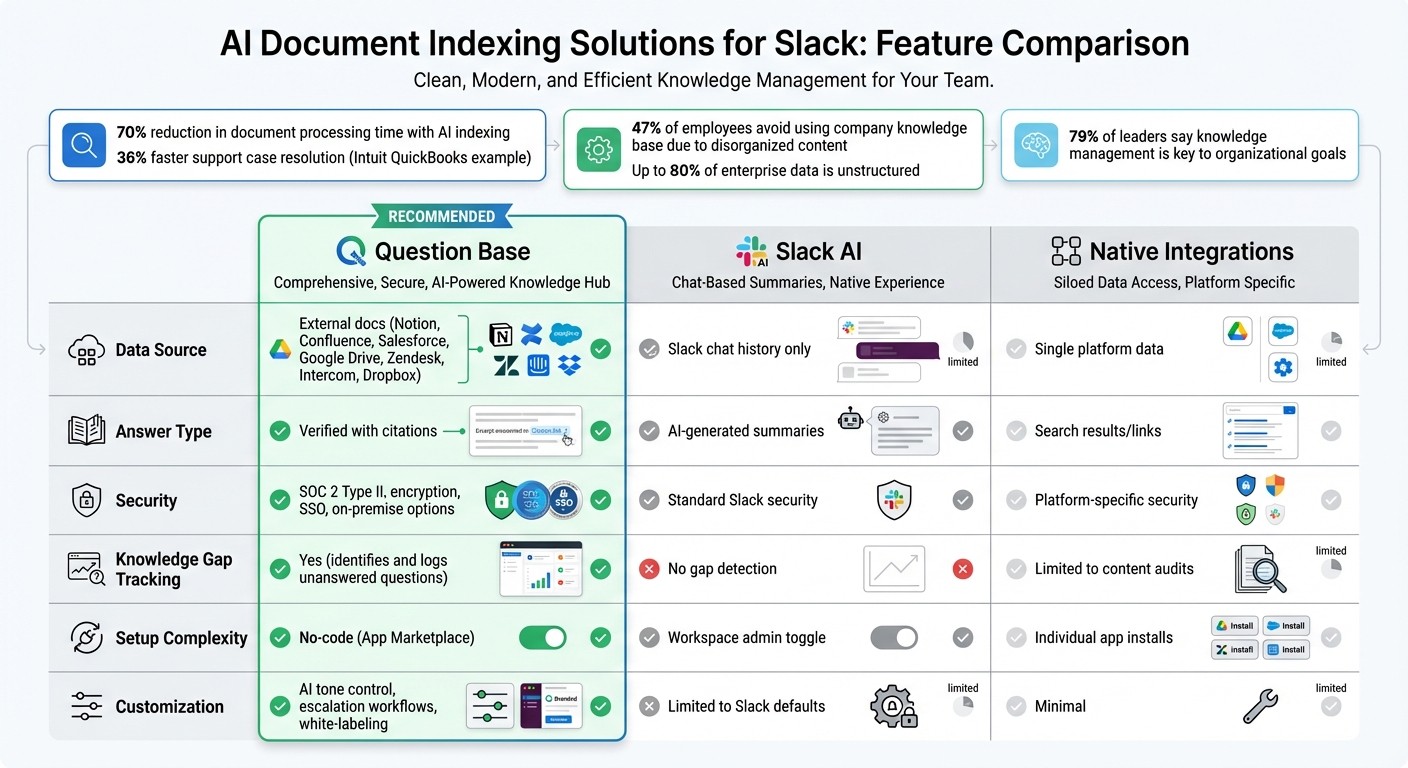
Question Base vs Slack AI vs Native Integrations Feature Comparison
Build Slack AI Agents Trained On All of Your SOP's, Documents, and Files (in 30 minutes) with n8n
1. Question Base

Question Base is a Slack-native AI answer agent designed specifically to enhance enterprise knowledge management. It transforms Slack from a simple communication tool into a powerful knowledge hub compared to traditional systems by integrating directly with your existing documentation platforms.
Integration Capabilities
Getting started with Question Base is quick and easy. Simply install it from the Slack App Marketplace, invite the bot using /invite @questionbase, and connect it to your documentation tools like Notion, Confluence, Google Drive, Zendesk, Intercom, Salesforce, or Dropbox. Through API connections, Question Base indexes your content in real-time. It even allows you to capture Slack thread answers with a single click, making them part of a searchable knowledge base.
Accuracy of Indexed Results
Question Base is built to deliver highly accurate answers, leveraging Retrieval-Augmented Generation (RAG) to pull information directly from trusted documentation rather than relying on Slack chat history. Each response includes source citations with links to the original content, ensuring employees can independently verify the information. If the AI encounters a question it cannot answer, it logs the gap for review and can escalate the issue to human experts or integrate with ticketing systems, ensuring no question goes unresolved.
Enterprise Security Features
Security is a top priority for Question Base. The platform adheres to SOC 2 Type II compliance, with encryption for data both at rest and in transit. For organizations with strict data residency requirements, on-premise deployment is an option. Role-based access controls ensure employees can only view information they’re authorized to see. Administrators have the ability to configure channel-specific settings, adjust the AI's tone, and establish custom workflows for escalations.
Customization Options
Question Base goes beyond basic functionality with a suite of customization features. Its analytics dashboard provides insights into automation rates, resolution metrics, and content gaps, helping teams identify areas for improvement. These insights make it easier for knowledge managers to align documentation updates with sprint cycles or quarterly planning, ensuring that your knowledge base stays up to date as your organization evolves. This level of adaptability sets Question Base apart from more generic solutions, as we’ll see when exploring Slack's built-in AI search capabilities next.
2. Slack's Built-In AI Search
Slack's native AI search is a versatile tool designed to help teams locate information quickly within their workspace. By pulling insights from Slack conversations, files, and messages, it simplifies the process of finding what you need.
Integration Capabilities
Slack AI searches through various types of Slack content, including public channels, direct messages, and uploaded files. For organizations using Enterprise Grid, it extends its reach to external platforms like Google Drive, Confluence, and Salesforce, while respecting existing permission settings.
Accuracy of Indexed Results
Slack AI performs well with straightforward, factual queries, especially those starting with "What" or "How." Using semantic search and natural language processing, it interprets user intent rather than relying on basic keyword matching. Each response includes citations that link back to the original source, allowing users to double-check the information. However, its performance falters when handling subjective or open-ended questions, particularly those about future scenarios. As Slack's documentation explains:
"Slack AI has trouble with subjective questions... and will be more likely to return inaccurate results for open-ended queries about the future." [3]
Additionally, Slack includes a disclaimer for users:
"Review carefully before acting on the response; it may contain bias or hallucinations." [2]
While Slack AI can speed up individual workflows, it is not a substitute for specialized knowledge management tools. Slack AI primarily learns from chat history, interpreting conversations rather than pulling from verified and trusted sources. For teams that require precise, auditable answers from platforms like Notion, Confluence, or Salesforce, dedicated AI answer agents offer a more dependable solution. This distinction highlights the value of exploring integrations that can enhance Slack’s ability to index and retrieve information from external documentation systems.
3. Notion Integration for Slack
Notion's Slack integration allows users to share pages, access databases, and receive update notifications. However, its native functionality is largely centered on sharing and notifications, rather than offering AI-driven document indexing or retrieval. This difference sets the stage for exploring deeper integration possibilities, as discussed in the sections below.
Integration Features
The default Notion-Slack integration includes link previews and manual content sharing through slash commands, instantly displaying page titles and snippets. While these tools improve content visibility, they lack the depth of AI-powered solutions. For teams looking for smarter answers, tools like Question Base can sync Slack with Notion databases, delivering precise, verified responses drawn from trusted documentation rather than relying on chat history interpretations.
Enterprise-Grade Security
Notion’s Enterprise plan offers advanced administrative controls for managing Slack integrations at scale. Admins can control who can install integrations and adjust organization-wide security settings to maintain tight oversight [4][5]. The platform integrates with Data Loss Prevention tools like Nightfall AI to redact sensitive information before it is shared in Slack and supports SIEM platforms such as Splunk, Datadog, and Sumo Logic for comprehensive security monitoring [4].
Additional security measures include workspace lockdown features, enabling admins to disable public page sharing, guest invitations, content exports, and the transfer of pages between workspaces [4]. For healthcare organizations, Notion is equipped with HIPAA compliance audits and offers Business Associate Agreements to handle Protected Health Information securely [4]. Notably, Notion does not use customer data to train its machine learning models, ensuring that proprietary information stays private [4].
Customization and Optimization
Admins can review page permissions, identify outdated content, and fine-tune access controls [4]. For teams building AI-enhanced knowledge systems on Notion, third-party tools offer features like per-channel answer settings, duplicate content detection, and analytics to track resolution rates and pinpoint content gaps. These tools help optimize knowledge management and ensure that documentation remains effective and relevant.
4. Confluence Integration for Slack
Confluence’s built-in Slack integration offers basic features like sharing pages and receiving update notifications. However, it doesn’t provide AI-driven document indexing capable of answering questions directly within Slack. For teams managing technical documentation, HR policies, or operational guides in Confluence, this limitation forces employees to leave Slack and manually search through multiple pages. Here’s how Question Base bridges this gap by enhancing Confluence’s capabilities.
Integration Capabilities
Question Base seamlessly connects with Confluence through your Atlassian account, syncing your documentation directly. If your engineering team restricts access to a specific Confluence space, the AI ensures that only authorized users in Slack can view answers from that space. Each response includes citations and direct links to the original Confluence page, making it easy for users to verify details or dive deeper. Unlike Slack AI, which relies on chat history, Question Base pulls answers directly from your Confluence content.
Accuracy of Indexed Results
With real-time syncing, any updates to troubleshooting guides or policies in Confluence are immediately reflected in Slack responses. This eliminates the risk of outdated information spreading across your team. Additionally, you can capture valuable answers from Slack threads with a single click and sync them back to Confluence, ensuring important knowledge doesn’t get lost. The system also provides content gap reports, identifying unanswered questions and pinpointing areas where documentation needs improvement.
Enterprise Security Features
To ensure secure access, Question Base supports SAML-based single sign-on (SSO), domain claiming, and user provisioning via SCIM. Slack Enterprise Key Management (EKM) adds another layer of control for handling sensitive data. For teams using Confluence Data Center, admins can fine-tune system properties like slack.search.max.results and slack.client.cache.expire.seconds to optimize performance. With SOC 2 Type II compliance and encryption both at rest and in transit, your knowledge management workflows are protected with enterprise-grade security.
Customization Options
Before syncing, review your Confluence spaces to identify trusted content while excluding drafts or sensitive materials. Test the integration with accounts of varying permission levels to ensure the AI respects access restrictions. Enable feedback mechanisms like Slack reactions - thumbs up or down - to let users rate AI responses. This feedback helps admins spot areas where Confluence documentation needs updating. Assigning IT or HR leads to review flagged queries can create a system of continuous improvement for your documentation.
5. Google Drive Integration for Slack
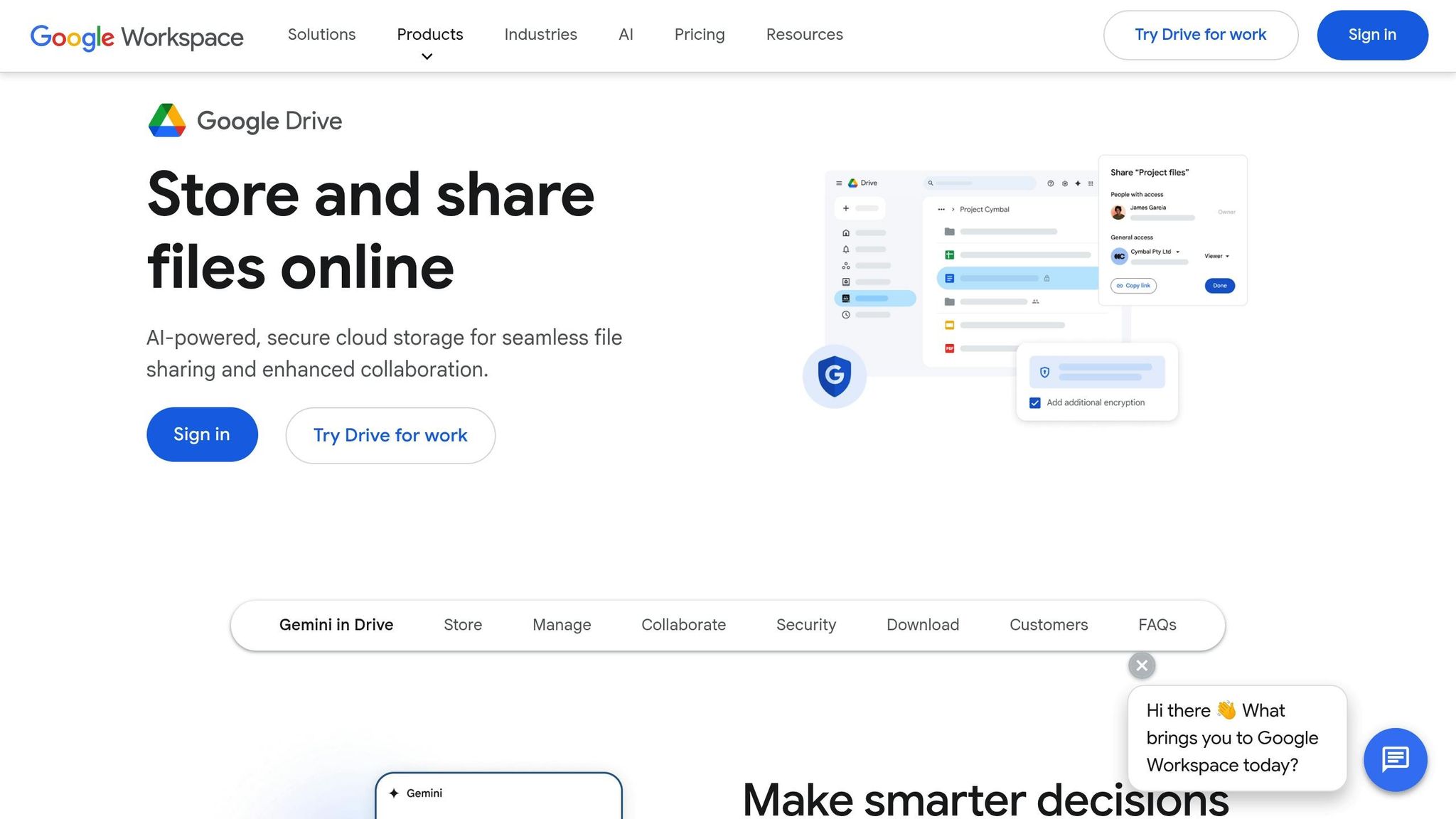
Google Drive's built-in Slack integration allows simple file sharing through slash commands, but it doesn't offer advanced features like AI-powered indexing. With Question Base, employees can ask questions like, "What is our expense reimbursement limit?" and instantly get accurate answers pulled directly from Google Docs, Sheets, or Slides. This integration doesn’t just share files - it transforms them into actionable insights, enhancing Slack's capabilities.
Integration Capabilities
The default Google Drive app enables users to create and preview Docs, Slides, and Sheets directly within Slack [6][7]. Question Base takes this a step further by syncing your Drive content and enabling natural language queries. Ask a question, and the system delivers precise, cited answers, all while respecting your existing Drive permissions. This ensures users only access information they’re authorized to see.
Accuracy of Indexed Results
Drive’s Slack integration allows searches based on file type, owner, or date [9], but it requires manual effort to sift through results. Question Base eliminates this hassle by indexing the full content of your files and automatically updating when documents are modified. For example, if Q1 budget details are updated, the system reflects those changes immediately. It also flags unanswered queries, helping you identify gaps in your documentation. This combination of dynamic indexing and proactive insights ensures your team always has the most accurate information at their fingertips.
Enterprise Security Features
Keeping your data secure is non-negotiable. Question Base ensures this with SOC 2 Type II compliance and encrypts data both at rest and in transit. Additional enterprise-grade features like SAML SSO, SCIM provisioning, and optional on-premise deployment provide secure, authenticated access tailored to your organization’s needs.
Customization Options
To optimize your integration, start by auditing your Drive folders to make sure only relevant and up-to-date documents are indexed. Slack reactions can be enabled to let users flag inaccurate responses, while managers can review flagged queries weekly to uncover gaps in documentation. Notifications can also be customized to deliver timely updates without overwhelming your team [6][8].
6. Zendesk Integration for Slack
Zendesk's native Slack integration allows you to send ticket notifications and create support cases, but it stops short of transforming your support documentation into an AI-driven knowledge base. That’s where Question Base steps in. By pulling Zendesk Help Center articles and support docs directly into Slack, Question Base enables employees to ask questions and receive verified, cited answers - all without disrupting their workflow. This integration ensures quick, accurate responses tailored to your team’s needs.
Integration Capabilities
Question Base syncs your entire Zendesk knowledge base into Slack, making it accessible through natural language queries. For example, when an employee asks, "How do I reset a user's password?", the system retrieves the exact answer from your Zendesk articles, complete with citations. It also respects existing Zendesk permissions, ensuring users only see content they’re authorized to access. If the AI can’t locate a verified answer, it automatically escalates the query - either by creating a Zendesk ticket or tagging a human expert for assistance.
Accuracy of Indexed Results
Much like its integration with Confluence, Question Base turns your Zendesk support docs into actionable insights within Slack. The platform indexes the full content of your Zendesk articles and updates automatically whenever changes are made. It even tracks unanswered questions to identify gaps in your content. This helps eliminate repetitive questions that drain team productivity. Companies like Intuit QuickBooks have seen real impact, resolving support cases 36% faster after implementing this solution [1].
Enterprise Security Features
Question Base is built with enterprise-grade security in mind. It complies with SOC 2 Type II standards, encrypts data both at rest and in transit, supports SAML SSO for secure corporate identity management, and syncs RBAC with Zendesk permissions. For organizations with strict data residency requirements, on-premise deployment is available to safeguard sensitive support data. Additionally, channel-specific scoping ensures the AI only accesses Zendesk documentation within designated Slack channels.
Customization Options
To get the most out of this integration, start by auditing your Zendesk articles to identify the most frequently accessed support documentation and internal guides for indexing. Schedule quarterly security reviews to ensure the AI’s access and usage patterns stay compliant with your policies. Configure escalation paths so that unanswered queries automatically generate Zendesk tickets. Regularly monitor unresolved questions to pinpoint documentation gaps and improve answer accuracy over time. This proactive approach ensures your knowledge base evolves alongside your team’s needs.
7. Salesforce Integration for Slack
While Salesforce's native Slack integration provides basic CRM notifications and record-sharing features, it doesn't go far enough in turning your sales strategies, product documentation, or customer success guides into a smart, searchable resource. This is where Question Base steps in. By indexing Salesforce knowledge articles, case documentation, and internal resources directly into Slack, Question Base creates a dynamic knowledge layer. For example, when a sales rep asks, "What's our discount approval process for enterprise deals?" or a support agent wonders, "How do we handle refund requests over $10,000?", they get precise Salesforce-based answers with direct citations - all without leaving their Slack workspace.
Integration Capabilities
Question Base takes Salesforce integration to the next level by enabling smooth access to CRM data within Slack. It syncs Salesforce knowledge articles, case histories, and documentation, making them instantly accessible through conversational queries. Permissions from Salesforce are automatically applied, ensuring users only see what they’re authorized to view [11]. If the AI can’t find a verified answer, it escalates the issue by either creating a Salesforce case or tagging the right team member for follow-up. This ensures every question is addressed efficiently.
Enterprise Security Features
Protecting CRM data is a top priority when integrating with communication tools. Question Base adheres to SOC 2 Type II standards and uses AES-256 encryption to secure data both at rest and in transit. It also supports SAML-based Single Sign-On (SSO) and Multi-Factor Authentication (MFA) for centralized identity management. Additionally, Salesforce permissions are inherited automatically, so users can only access data they’re authorized to view or edit within Slack [11].
For organizations with strict data residency requirements, Question Base offers on-premise deployment, ensuring sensitive sales and customer data stays within your infrastructure. To further enhance security, businesses should enable IP whitelisting to limit Salesforce API access to trusted addresses [10]. Regular audits of OAuth scopes are also recommended to ensure apps only have the minimum permissions needed [12].
Customization Options
Maximize the value of your Salesforce integration by identifying key documents - such as sales playbooks, pricing guides, or escalation procedures - for targeted indexing. Configure Slack channels to surface only the most relevant Salesforce content, ensuring focused and efficient workflows. Set up automated escalation processes to generate Salesforce cases when the AI cannot resolve a query. Additionally, schedule quarterly reviews to align Slack's data retention settings with Salesforce governance policies [11][12]. Monitoring unresolved queries can also help you identify gaps in your documentation, enabling continuous improvement.
Feature Comparison
When deciding on an AI document indexing solution for Slack, it’s important to understand how Question Base, Slack AI, and native integrations differ. Each option caters to specific needs in knowledge management, so finding the right fit depends on your team's priorities.
Question Base functions as a centralized knowledge hub, pulling content from multiple platforms - like Notion, Confluence, or Salesforce - into a single, AI-driven answer system. Slack AI, on the other hand, focuses on Slack-specific productivity tasks, such as summarizing conversation threads or searching through chat history. Native integrations, like Notion for Slack or Confluence for Slack, provide single-platform access, meaning users can search or share links from just one source at a time.
For enterprise teams, accuracy is non-negotiable. Question Base ensures precision by using Retrieval-Augmented Generation (RAG) to deliver verified answers directly from trusted documentation, complete with citations. In contrast, Slack AI creates responses based on chat history, which might include outdated or unverified information. This distinction matters, especially when nearly half of employees (47%) avoid using their company’s knowledge base due to disorganized content and poor search functionality [1].
Here’s a quick breakdown of the key differences between these solutions:
Feature | Question Base | Slack AI | Native Integrations |
|---|---|---|---|
Primary Data Source | External docs (Notion, Confluence, Salesforce, etc.) | Slack chat history | Single platform data |
Answer Type | Verified with citations | AI-generated summaries | Search results/links |
Security | SOC 2 Type II, on-premise options | Standard Slack security | Platform-specific security |
Knowledge Gap Tracking | Identifies and logs unanswered questions | No gap detection | Limited to content audits |
Setup Complexity | No-code (App Marketplace) | Workspace admin toggle | Individual app installs |
Customization | AI tone control, escalation workflows, white-labeling | Limited to Slack defaults | Minimal |
For teams in HR, IT, or operations that rely on verified and auditable answers, Question Base stands out by offering both precision and seamless integration with multiple platforms. While Slack AI is excellent for improving individual productivity within Slack, Question Base ensures entire teams stay aligned and have access to reliable knowledge they can trust.
Conclusion
Choosing the right AI document indexing tool for Slack can significantly influence how quickly and effectively your team accesses critical knowledge. With 79% of leaders acknowledging that building enterprise knowledge systems with AI is key to achieving organizational goals [15], it’s clear that disorganized information slows down decision-making.
Addressing these challenges, Question Base transforms Slack into a powerful knowledge hub by seamlessly integrating with your go-to documentation tools - like Notion, Confluence, Salesforce, and Google Drive. Unlike Slack AI, which relies on chat history for responses, Question Base pulls verified answers directly from trusted sources. This approach reduces the risk of outdated or incorrect information, a crucial advantage when up to 80% of enterprise data is unstructured and scattered across various platforms [14].
By leveraging AI-powered indexing, teams can cut document processing time by as much as 70% [13], freeing HR, IT, and operations teams from the burden of repetitive questions. Additionally, Question Base’s analytics and knowledge gap tracking provide insights into missing documentation, shifting support workflows from reactive to proactive.
For organizations that prioritize security and compliance, Question Base offers SOC 2 Type II readiness, encryption both at rest and in transit, and on-premise deployment options. Plus, it’s easily accessible through Slack’s App Marketplace, delivering near-instant answers where your team already works.
FAQs
How does Question Base improve document indexing in Slack?
Question Base transforms Slack into a streamlined, searchable knowledge hub by organizing scattered files, conversations, and documents into a cohesive system. Unlike tools that only tap into Slack’s message history, it connects directly with trusted platforms like Notion, Confluence, Google Drive, and Salesforce. By leveraging advanced AI, it delivers precise, expert-reviewed answers in real time, enabling teams to locate information quickly while cutting down on repetitive inquiries.
Beyond search functionality, Question Base includes features such as per-channel knowledge customization, duplicate content detection, and analytics to monitor resolution rates and uncover knowledge gaps. With enterprise-grade security (SOC 2 Type II compliance) and a no-code setup, it ensures critical information stays secure and updated, making Slack a powerful tool for internal knowledge management.
How does Question Base ensure enterprise-grade security compared to Slack AI?
Question Base is built with enterprise-grade security as a top priority. With its SOC 2 Type II certification, it adheres to stringent industry standards, ensuring that your data is handled with the utmost care. Data is safeguarded through encryption both at rest and during transit. For organizations with specific security needs, Question Base also supports on-premise deployment, allowing the AI model to operate securely behind your firewall. Furthermore, it provides granular role-based access controls, empowering administrators to define who can view or modify particular knowledge sources.
Although the security features of Slack AI aren't elaborated upon in the available information, Question Base stands out by emphasizing its compliance measures, robust encryption, and tailored access management - qualities essential for enterprises that place a high value on security.
How does Question Base help identify and address knowledge gaps in my organization?
Question Base tackles knowledge gaps by analyzing unanswered or unresolved questions in Slack. When someone asks a question, the AI searches connected tools like Notion, Confluence, or Google Drive to pull up verified answers. If no solution is found, the query is logged as actionable data for further review.
With built-in analytics, you can track resolution rates, spot frequently unanswered questions, and identify recurring themes. This data helps you flag missing or outdated information, which you can address during sprint or quarterly planning. By updating your documentation, refining content, and retraining the AI, you transform these gaps into updated, reliable knowledge resources.