∙
Cooper
∙
Reading time:
13 min

Repetitive questions in Slack can drain productivity and inflate costs fast. Usage-based pricing models, like $2 per conversation or $10 per user per month, can lead to unpredictable expenses for teams handling high query volumes. For example, a 500-person team with 100 daily queries could spend over $50,000 monthly on AI tools.
A smarter solution? Fixed-pricing models. Tools like Question Base charge a flat $8 per user per month, offering unlimited queries and predictable costs. This eliminates surprise fees, automates repetitive questions, and [integrates with platforms like Google Drive and Notion](https://www.questionbase.com/resources/blog/knowledge-management-integrations-slack) for verified answers.
Key benefits of fixed-pricing models:
Predictable costs: Pay the same amount regardless of query volume.
Efficiency gains: Automate up to 35% of repetitive questions.
Savings: Reduce AI-related expenses by 40-60%.
For enterprises using Slack, fixed-pricing tools like Question Base simplify budgeting while improving team productivity and knowledge management.
Build Slack AI Agents Trained On All of Your SOP's, Documents, and Files (in 30 minutes) with n8n
How Per-Interaction Fees Work and Why They Matter
Grasping how per-interaction fees accumulate is crucial when evaluating Slack integrations for cost efficiency.
What Per-Interaction Pricing Entails
With per-interaction pricing, you're charged for every completed conversation - from the moment a query starts to when it’s resolved. Take Agentforce, Salesforce's AI agent for Slack, as an example. It charges $2 per conversation, whether you’re using its pre-built agents, custom agent builder, or prompt builder[4].
This approach differs from fixed per-user pricing models, like Slack AI's flat monthly fee. In a fixed model, you pay the same amount regardless of whether an employee asks one question or a hundred. On the other hand, with per-conversation pricing, every single resolved query adds to your bill[4].
This structure can significantly increase costs in large-scale operations.
The Cost Burden at Enterprise Scale
The financial implications of per-interaction pricing can escalate quickly in high-volume settings. Imagine an organization handling 1,000 daily conversations at $2 each - that’s $60,000 a month[4]. Industries like healthcare, finance, and education, which often deal with strict regulations and geographically dispersed teams, are particularly vulnerable to these mounting costs due to their constant need for information. According to a 2023 Gartner report, mid-range pricing models like Slack’s per-user option can help sidestep some of these pitfalls. Meanwhile, Atlassian research highlights that knowledge workers spend about 20% of their time searching for information[3].
These figures underscore how variable pricing can complicate enterprise budgeting.
The Budgeting Challenges of Usage-Based Pricing
Variable pricing models make financial planning a headache for enterprises that need predictable monthly expenses. Interaction volumes often spike during onboarding, major product launches, or compliance audits, causing AI costs to swing unpredictably.
Repeated queries add to the problem. For example, if multiple employees ask the same question - like "What’s our PTO policy?" - you’re charged each time, even if the answer remains unchanged. Fixed per-user pricing, such as Question Base’s model at about $8 per user per month, avoids this inefficiency by offering consistent costs, regardless of how many questions are asked. This makes budgeting simpler and eliminates unnecessary expenses tied to repetitive queries.
Fixed-Pricing Models as an Alternative
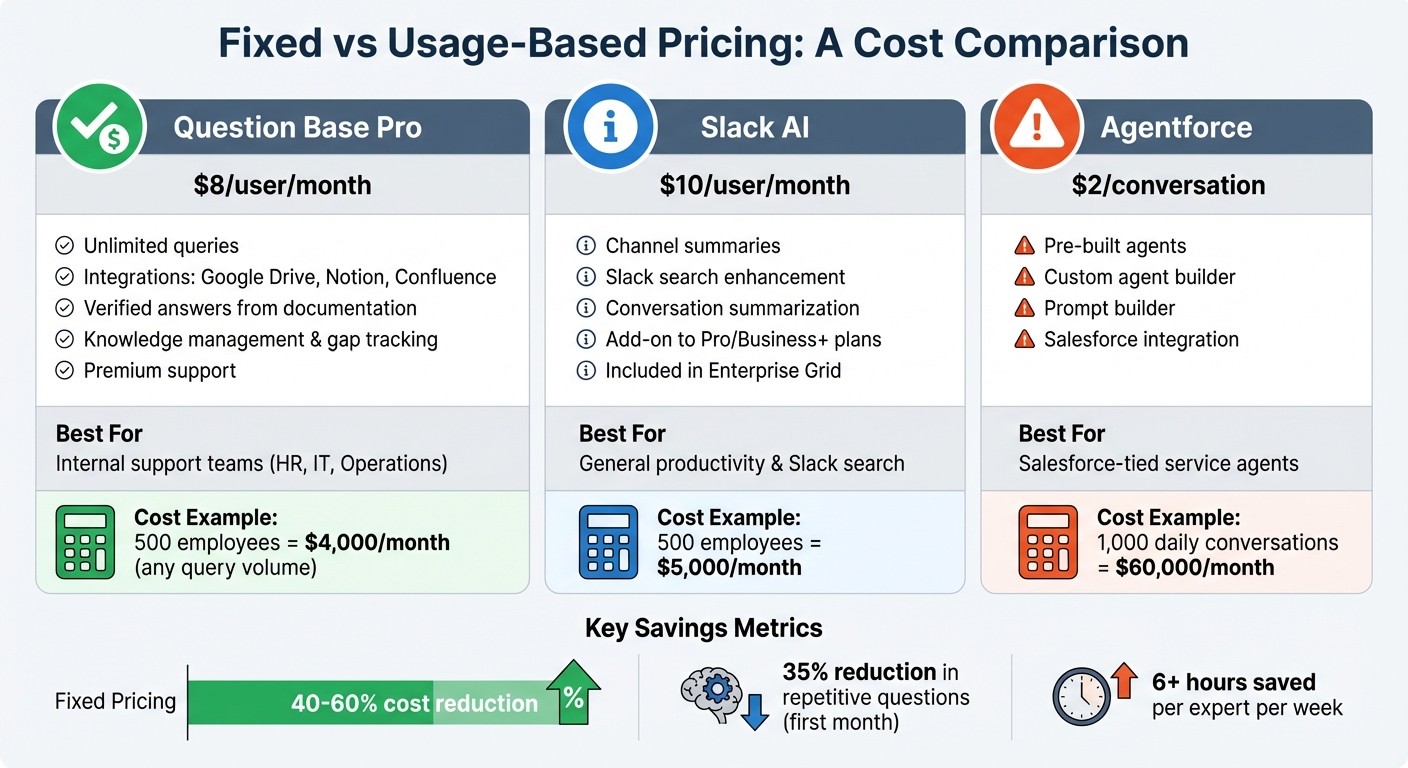
Cost Comparison: Fixed vs Usage-Based Pricing for Slack AI Tools
Fixed per-user pricing provides a simple way to manage AI costs in Slack. Instead of monitoring every interaction or conversation, you pay a flat monthly rate per employee - regardless of how many questions they ask. This removes the uncertainty from budgeting and supports any volume of queries without additional charges.
Question Base: Fixed Per-User Pricing

Question Base operates on a fixed per-user pricing model, ensuring cost predictability. The Starter plan covers basic needs, while the Pro plan, priced at $8 per user per month, includes integrations with tools like Google Drive, Notion, and Confluence, along with premium support. For larger organizations, the Enterprise plan offers custom pricing and advanced features such as on-premise deployment, white-labeling, and support for multiple workspaces.
For instance, a team of 500 employees would pay $4,000 per month, whether they submit 1,000 or 10,000 queries. This structure encourages high engagement without the fear of rising costs. Beyond Slack chat, Question Base retrieves verified answers from external documentation, tracks knowledge gaps, and provides insights into case details and automation performance.
Fixed vs. Usage-Based: A Direct Comparison
Breaking down the differences between pricing models highlights how fixed pricing can simplify budgeting. Slack AI, for example, charges $10 per user per month as an add-on to Pro or Business+ plans (or includes it in Enterprise Grid). Its focus is on summarizing Slack conversations rather than accessing external documentation. On the other hand, Agentforce, Salesforce's AI agent, charges $2 per conversation, meaning 2,000 conversations in a month would cost $4,000 - regardless of team size.
Platform | Pricing Structure | Best For |
|---|---|---|
Question Base Pro | $8/user/month | Verified answers from documentation, knowledge management |
Slack AI | $10/user/month | Channel summaries, Slack search |
Agentforce | $2/conversation | Salesforce-tied service agents |
With Question Base’s fixed pricing, there’s no risk of unexpected cost surges during busy times like onboarding or product launches. While Slack AI focuses on general productivity tasks, Question Base is designed specifically for internal support teams - such as HR, IT, and operations - that require accurate and auditable answers at scale.
Other Fixed-Price Options: Custom Apps and No-Code Tools
In addition to Question Base, enterprises can consider custom-built Slack apps or no-code platforms for specialized workflows. For example, Gumloop allows teams to create custom AI agents without coding. These agents can handle tasks like marketing lead qualification or proposal generation and integrate with platforms like Google Ads, HubSpot, and Salesforce, bringing real-time data into Slack conversations.
A sales team might use Question Base to handle policy-related questions at $8 per user per month while using a Gumloop agent for generating dynamic proposals based on deal size and customer history. This hybrid approach enables organizations to choose tools tailored to specific needs rather than relying on a single platform for all AI interactions. Custom apps built using Slack’s API offer even greater flexibility but require engineering resources and ongoing maintenance, making them a better fit for enterprises with dedicated development teams. This fixed-pricing strategy provides a clear path to managing AI costs effectively within Slack.
Setting Up Question Base for Your Slack Workspace
Installation Steps
Getting Question Base up and running in your Slack workspace is quick and straightforward. Start by heading to the Slack App Marketplace, searching for Question Base, and clicking "Add to Slack" to authorize the app. Once installed, invite the bot to key Slack channels like #it-help, #hr-questions, or #general. From there, use the dashboard to connect your existing documentation tools.
Question Base integrates seamlessly with platforms such as Notion, Confluence, Google Drive, Salesforce, Zendesk, Intercom, SharePoint, OneDrive, Dropbox, HubSpot, Freshdesk, and Jira. Depending on your plan, integration options vary: the Free Tier allows one integration (up to 10 pages), while the Pro plan, priced at $8 per user per month, supports up to 200 pages per user and includes premium support. Administrators can also customize the AI's tone, workflows, and response styles for each channel, ensuring alignment with your team’s communication preferences [1].
Once everything is set up, Question Base begins automating answers and identifying knowledge gaps almost instantly.
Automating Answers and Tracking Knowledge Gaps
Question Base is designed to respond fast - providing answers in just 3.2 seconds [1]. When someone asks a question in Slack, the AI pulls verified information directly from your connected documentation and posts it in the thread. If it doesn’t have an answer, the question is logged, and your team is notified, allowing you to spot and address knowledge gaps in real time. Organizations using Question Base typically see a 35% drop in repetitive questions within the first month, while internal experts save over six hours per week by automating routine inquiries [1][2].
"Since we started using Question Base, we don't spend any time looking up our procedures in a support manual... QB finds the relevant answers in a few seconds." – Maria Jensen, UX Lead & Scrum Master, Ticketbutler [1]
As team members refine answers directly in Slack threads, the AI continuously updates its knowledge base. This collaborative approach ensures accuracy and creates a dynamic FAQ that evolves alongside your team. Built-in analytics provide insights into automation rates, resolution times, and content gaps, helping leaders identify areas where documentation can improve.
Security and Compliance Features
Security is a top priority for Question Base. The platform is SOC 2 Type II certified, with encryption applied to data both at rest and in transit. Role-based controls ensure that only authorized users can access specific content. For industries with strict regulations, such as healthcare or finance, the Enterprise plan offers on-premise deployment. This allows organizations to host the AI agent within their own infrastructure, maintaining full control over data residency and compliance without losing Slack integration. Additionally, multi-language support enables global teams to ask questions and receive answers in their preferred languages [5].
Managing AI Costs in Slack
Using Fixed-Pricing Tools with Slack Features
Pairing Question Base with Slack’s built-in tools creates a budget-friendly knowledge system that sidesteps usage-based fees. Question Base offers fixed per-user pricing starting at $8 per user per month and integrates seamlessly with Slack's Real-Time Search API to fetch messages, files, and conversation data in seconds, outperforming standard Slack Search vs. AI Knowledge Agents in speed and accuracy. This approach eliminates the need for Slack's $10 per user per month AI add-on, while still allowing unlimited query volume.
Imagine a sales rep asking, "What's our discount cap for $50,000 deals?" in a Slack channel. Question Base instantly pulls verified answers from Slack threads and linked documentation systems, delivering accurate responses without extra charges for each interaction. Unlike Slack AI, Question Base connects directly to trusted sources, ensuring reliability while keeping costs predictable. For a company with 1,000 employees, this setup can reduce expenses by 40-60% compared to usage-based AI solutions.
With these integrations in place, analytics tools add another layer of control to help manage AI costs effectively.
Using Analytics to Control Costs
Beyond fixed pricing, Question Base provides analytics that help teams cut down on unnecessary interactions. The platform’s dashboard tracks essential metrics like resolution rate, automation rate, knowledge gaps, and unhelpful answer frequency, giving teams the insights needed to address gaps and reduce redundant AI usage by 30-50%.
For instance, if analytics reveal repeated unanswered queries about "Q4 pricing policy", admins can update the knowledge base to resolve the issue once and for all, preventing future escalations. By combining fixed pricing with actionable insights, teams can optimize their workflows and keep costs under control. Companies typically experience a 35% drop in repetitive questions within the first month, while internal experts save over six hours per week by automating routine inquiries. With these tools, your investment in a fixed-price model delivers strong returns as Slack usage grows across your organization.
Conclusion
Per-interaction pricing often comes with a "success tax" - the more your team relies on AI, the more you end up paying. For businesses managing thousands of internal support questions each month, this model makes budget planning unpredictable. Instead, fixed-pricing models like Question Base offer clarity and control, charging a flat $8 per user per month regardless of how many queries are handled. For a company with 1,000 employees, this can translate into 40-60% savings compared to usage-based models, while automating up to 35% of repetitive questions in the first month alone.
This predictable cost structure allows teams to embrace AI without hesitation, removing financial barriers to adoption. A fixed pricing model doesn’t just help manage expenses - it supports organization-wide adoption with confidence. When employees know they can ask questions without worrying about driving up costs, usage naturally increases, cutting down on wasted time spent searching for answers. With built-in analytics to track resolution rates and identify knowledge gaps, you also gain actionable insights to refine workflows and demonstrate ROI.
Beyond cost savings, Question Base stands apart by focusing on enterprise knowledge management. While Slack AI and Answer Agents differ in how they summarize conversations, Question Base prioritizes verified answers and auditability, connecting directly to trusted platforms like Notion, Confluence, and Salesforce. This ensures your team gets accurate, source-backed responses rather than AI-generated interpretations of chat history. For HR, IT, and operations teams where precision and accountability are non-negotiable, fixed pricing combined with expert-verified content provides a scalable solution that grows with your business.
FAQs
How can fixed pricing for Slack AI tools simplify enterprise budgeting?
Fixed pricing, such as Slack AI's $25 per user per month model, removes the uncertainty of per-interaction fees. This predictable structure simplifies cost management for enterprises, allowing teams to budget with confidence. It also supports seamless scaling, ensuring expenses remain consistent as usage grows.
How does Question Base provide a cost-effective alternative to per-interaction pricing models?
Question Base takes a straightforward approach with its flat subscription model, removing the hassle of per-interaction fees. Starting at just $8 per user per month, the pricing grows with your team size, not how much you use it. This means high-traffic teams can manage thousands of queries without facing surprise charges. In comparison, platforms like Slack AI often charge around $25 or more per user per month and may tack on per-interaction fees for larger plans - making them an expensive choice for teams with heavy usage.
What sets Question Base apart is its focus on accuracy and reliability. It delivers expert-verified answers by integrating with trusted platforms like Notion, Confluence, and Salesforce, minimizing the risk of misinformation. Unlike Slack AI, which leans heavily on chat history, Question Base ensures responses are audit-ready and tailored for enterprise teams such as HR, IT, and operations. With features like advanced analytics, knowledge-gap detection, and SOC 2 Type II compliance, it’s designed to meet the demands of modern enterprises, combining cost-effectiveness with operational precision.
How does Question Base connect with my team’s existing documentation tools?
Question Base connects effortlessly with the tools your team relies on every day, including Notion, Confluence, Salesforce, Google Drive, and OneDrive. Through the Integrations page in the settings, you can quickly authorize access and select specific pages or files to sync. Once linked, Question Base scans and organizes this content, delivering precise, expert-approved answers directly in Slack - eliminating the need to juggle between multiple apps.
Setting up an integration is straightforward: navigate to Settings → Integrations, pick the platform, grant the necessary access, and decide which content to sync. Any updates to your documents are automatically reflected, ensuring the information stays up-to-date. For larger organizations, features like on-premise deployment and support for multiple Slack workspaces offer the flexibility and control required for industries with strict compliance requirements.