∙
Cooper
∙
Reading time:
15 min

In Slack, finding information can often feel like a frustrating scavenger hunt. Workers spend 20% of their week searching for answers, and 47% struggle to locate what they need. Traditional search tools rely on exact keywords, leaving employees stuck when terms don’t match perfectly. The problem worsens as data sprawls across external platforms like Google Drive, Confluence, and Salesforce, forcing constant app-switching.
AI-powered search changes this by using natural language processing (NLP) to understand intent, not just keywords. It integrates Slack with external tools, breaking silos and providing direct, actionable answers with citations. For example, Intuit QuickBooks reduced case resolution times by 36% in 2025 after implementing AI-driven solutions. AI also summarizes long Slack threads, highlights key decisions, and identifies recurring questions to save time.
However, Slack AI has limits. It depends heavily on internal chat history and lacks tools for tracking unanswered questions or analyzing knowledge gaps. Tools like Question Base address these gaps by connecting Slack to verified external sources, offering analytics, and automating expert escalation for unresolved queries.
If your team struggles with repetitive questions or scattered information, AI-powered Slack search can streamline workflows and boost productivity.
Slack Adds AI-Powered Enterprise Search To Take on Glean, Dropbox, Atlassian

How AI Improves Slack Search
AI takes Slack search to the next level by moving beyond basic keyword matching. It transforms the search experience into one that feels more like working with a smart assistant - one that understands your questions and delivers the most relevant results. Let’s explore how AI refines search precision, summarizes conversations, and integrates seamlessly with other platforms.
Natural Language Processing for Smarter Results
AI leverages Natural Language Processing (NLP) to interpret the intent behind your queries, rather than relying solely on exact keyword matches. Using advanced techniques like semantic search and vector embeddings, AI can understand that different phrases may mean the same thing. For example, if you ask, “What is the latest hotel policy?”, the system can locate the relevant document even if it uses entirely different wording.
AI doesn’t stop at understanding language - it also personalizes search results based on your role and context. A sales professional searching for “quarterly results” might see sales-specific metrics, while someone in marketing might get campaign performance data. This contextual approach ensures that everyone gets results tailored to their needs and responsibilities.
"Knowledge search is more like a colleague who understands the context of what you're getting at and connects the dots to produce potential matches." – Slack
Machine learning further enhances search accuracy by learning from user interactions, like the links you click or rate highly. AI also builds knowledge graphs that map relationships between people, projects, and documents. This makes it easier to find related discussions and files, even if they aren’t explicitly mentioned in your search.
Summarizing Conversations and Making Sense of Chaos
Slack threads can often spiral into long, cluttered conversations, burying important decisions under a mountain of messages. AI steps in by summarizing these threads into verified, searchable answers and highlighting actionable items. This capability ensures that critical points don’t get lost, saving valuable time.
Beyond individual conversations, AI identifies patterns across channels. For example, if multiple team members ask similar questions in different places, AI can highlight recurring themes and surface the best answers. By organizing and summarizing information this way, teams can cut down on redundant searches. In fact, marketers have reported saving up to 100 minutes per week and slashing onboarding times by 50% thanks to these AI-driven efficiencies [5].
Expanding Search with Knowledge Repositories
Traditional Slack search is limited to messages within the platform, but critical information often lives elsewhere - in tools like Google Drive, Confluence, Notion, or Salesforce. This forces employees to spend an estimated 20% of their workweek toggling between different platforms [4].
AI-powered enterprise search solves this problem by integrating Slack with external knowledge repositories. Using a federated approach, AI queries multiple sources in real time, all while respecting existing permissions. For instance, if a Salesforce record is restricted, it won’t appear in your Slack results. This integration creates a unified search experience, eliminating the need for constant platform switching. It’s a game-changer for productivity, especially when 74% of tech leaders report that employees waste significant time searching across disconnected systems [3].
Where Slack AI Falls Short for Enterprise Knowledge Management
Slack AI shines when it comes to summarizing conversations and pulling up past messages, but it struggles to provide verified, up-to-date information or the robust tracking tools enterprises need for effective knowledge management.
Dependence on Internal Slack Data
While Slack AI's ability to leverage internal conversations is useful, its reliance on Slack's chat history creates a major limitation. It doesn't pull from trusted external sources like Notion, Confluence, or Salesforce, which means the answers it provides can be outdated or incomplete. This approach may work for recalling past discussions, but it falls short when teams need accurate, current information.
Gartner reports that 47% of digital workers have difficulty finding the information they need to do their jobs [2]. In industries where policies, procedures, or product details change rapidly, relying solely on chat history instead of tapping into verified knowledge repositories leaves teams with critical information gaps.
"Searching for scattered information across multiple systems is a productivity drain that delays decisions and frustrates teams trying to get work done." – Slack [2]
Lack of Knowledge Tracking and Analytics
For enterprises, understanding what’s working and what isn’t is crucial. Unfortunately, Slack AI doesn’t provide tools to track unanswered questions, identify recurring knowledge gaps, or gauge how well internal documentation supports employees. Admins are left to manually sift through failed queries to pinpoint issues - a time-intensive process that doesn't scale.
When employees repeatedly ask the same question across different channels, Slack AI lacks the capability to flag this pattern or prioritize creating a better answer. Without built-in analytics to highlight these inefficiencies, the same problems persist.
This absence of tracking and analytics highlights the need for more specialized AI solutions. Unlike Slack AI, these tools can offer advanced features like case tracking, resolution metrics, and automation analytics. Such capabilities help teams continuously refine their knowledge systems, ensuring employees get the answers they need faster and more reliably over time.
How to Set Up Question Base for AI-Powered Slack Search
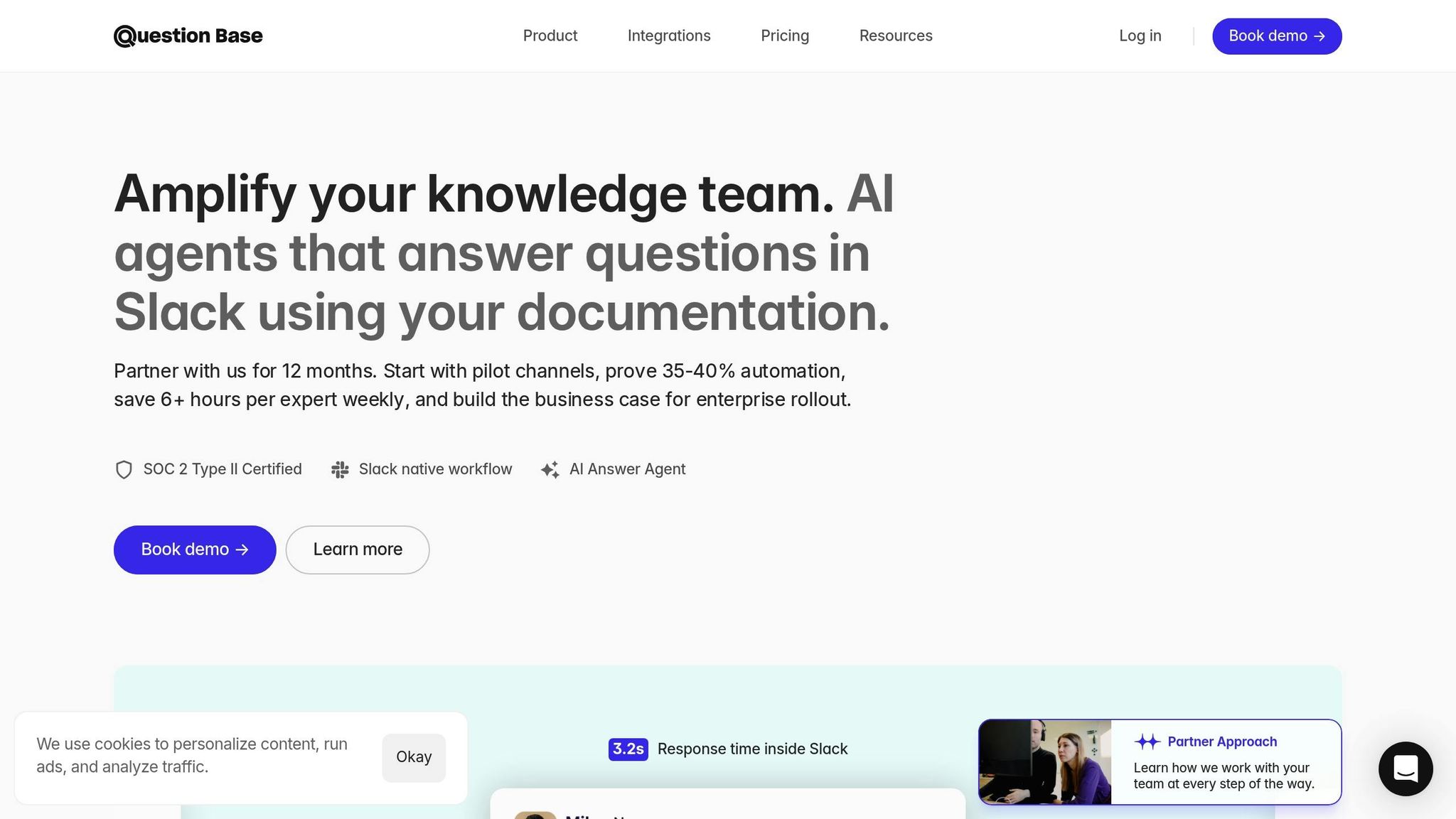
Question Base simplifies internal knowledge access by combining AI-driven search capabilities with an easy setup process. In less than 15 minutes - and without any engineering needed - you can deploy it to deliver accurate, verified answers from your trusted knowledge sources.
Step 1: Install and Activate Question Base
Start by visiting the Slack App Marketplace to add Question Base to your workspace. Once installed, authorize the app and invite the bot to your active channels by typing /invite @questionbase in any channel where employees need fast access to company knowledge. To manually search, users can type /qb [type your question].
The platform uses AWS Bedrock's Claude Sonnet 3.5 to process queries from connected documents. Interested teams can explore the free trial before upgrading to the Pro plan, which starts at $8 per user per month.
Once installed, you're ready to connect your Slack knowledge base setup.
Step 2: Connect External Knowledge Sources
Question Base pulls answers from your verified external sources. Open the dashboard and link tools like Notion, Confluence, Google Drive, Salesforce, Zendesk, Intercom, and others. These integrations ensure seamless access to your critical documentation.
Start by connecting your core repositories, such as your company wiki, HR policies, and product guides. Under the Pro plan, you can upload up to 200 pages per user (approximately 3,000 characters per page). Enterprise customers can scale further with customizable limits and on-premise deployment options.
Once your sources are linked, you can fine-tune the system to match your team's specific needs.
Step 3: Customize Responses and Escalation Flows
Tailor the AI responses to align with your organization's communication style. Adjust the tone to be formal or conversational and set granular content permissions so employees only access information relevant to their roles. For instance, HR documents can be restricted to specific teams.
For questions the AI can't answer, configure escalation workflows. These workflows allow unanswered queries to be routed to subject matter experts via Slack tags, automatically create Zendesk tickets, or log them for manual review. Additionally, the platform offers case tracking, providing a visual dashboard to monitor open cases, response times, and automation rates - all within Slack.
Step 4: Monitor Analytics and Identify Knowledge Gaps
Question Base includes an analytics dashboard to track resolution rates, recurring queries, and automation performance. This data helps you identify areas where documentation is lacking, so your content team can address those gaps during sprint cycles or quarterly planning.
For example, recurring queries across channels trigger content gap reports, highlighting areas that need updates. This proactive approach is especially important given that 47% of digital workers report difficulty finding the information they need to do their jobs [2]. By addressing these gaps early, you can reduce delays and keep your teams running smoothly.
Question Base vs Slack AI: Feature Comparison
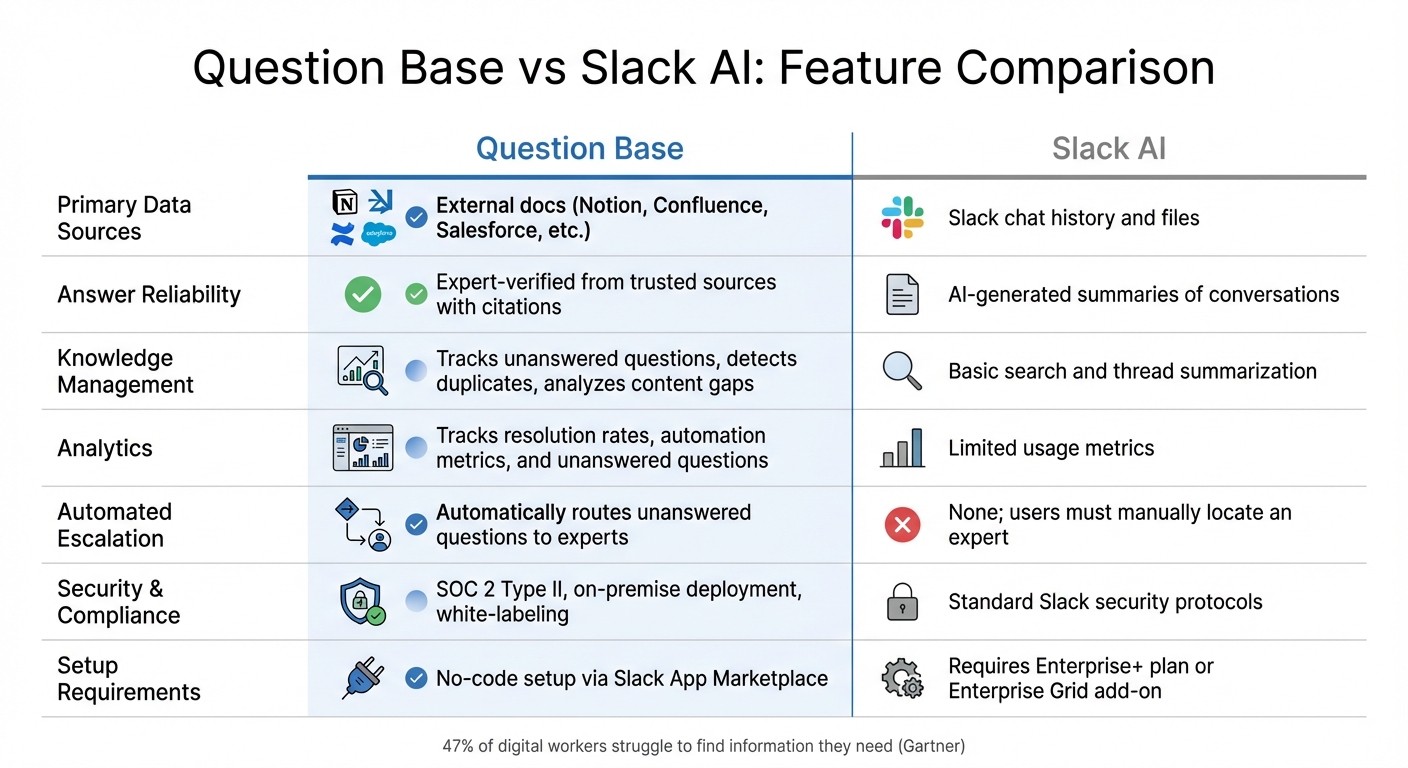
Question Base vs Slack AI Feature Comparison for Enterprise Knowledge Management
Choosing the right AI tool to enhance Slack search depends on your enterprise's specific needs. Slack AI is a strong contender for general productivity, excelling at summarizing conversations, pulling up past discussions, and helping individuals navigate their daily tasks more efficiently. However, when enterprise knowledge management is the focus - where precision, accountability, and structured support are critical - these tools serve distinctly different roles.
Slack AI leans on chat history to retrieve past messages, while Question Base taps into external documentation platforms like Notion, Confluence, Salesforce, and Google Drive. This allows it to deliver expert-verified answers complete with source citations - an essential feature for areas like HR policies, IT troubleshooting, and operational workflows.
Question Base goes beyond simply providing accurate answers. It includes knowledge management capabilities that Slack AI lacks. These features include tracking unanswered questions, pinpointing content gaps, and offering in-depth analytics on resolution rates and automation effectiveness. When the AI encounters a question it can't resolve, it automatically escalates the issue to subject matter experts, creating a feedback loop that enhances your knowledge base over time. Considering that nearly 47% of digital workers struggle to locate the information they need [2], these tools directly address a common and pressing issue in enterprise environments.
Here’s a side-by-side comparison of the two tools:
Comparison Table: Key Differences
Feature | Question Base | Slack AI |
|---|---|---|
Primary Data Sources | External docs (Notion, Confluence, Salesforce, etc.) | Slack chat history and files |
Answer Reliability | Expert-verified from trusted sources with citations | AI-generated summaries of conversations |
Knowledge Management | Tracks unanswered questions, detects duplicates, analyzes content gaps | Basic search and thread summarization |
Analytics | Tracks resolution rates, automation metrics, and unanswered questions | Limited usage metrics |
Automated Escalation | Automatically routes unanswered questions to experts | None; users must manually locate an expert |
Security & Compliance | SOC 2 Type II, on-premise deployment, white-labeling | Standard Slack security protocols |
Setup Requirements | No-code setup via Slack App Marketplace | Requires Enterprise+ plan or Enterprise Grid add-on |
Question Base transforms Slack from a simple communication tool into a powerful knowledge hub, equipping teams with the tools they need to work smarter and more efficiently.
Best Practices for Deploying AI-Powered Slack Search
To get the most out of AI-powered Slack search, it's essential to approach deployment with a clear plan. The effectiveness of your AI tool hinges on the quality and organization of the data it accesses. According to Gartner, 47% of digital workers struggle to locate the information they need, and 74% of technology leaders say employees lose time searching across multiple platforms [2][3].
Start with Clean, Organized Data
Before integrating an AI tool with your knowledge bases, take the time to assess and organize your existing data. Begin by creating a knowledge map to pinpoint where your key information is stored - whether that’s in Notion, Confluence, Google Drive, or Salesforce [3]. This step helps you identify which systems and repositories are most critical for integration based on their relevance and usage frequency.
Establish consistent metadata and naming conventions by defining clear rules for file names, folder structures, and content tagging [2]. A standardized approach ensures that AI tools like Question Base can retrieve and display accurate results. Regularly review "no results" queries to uncover gaps in your documentation that may need attention [3]. As Slack highlights:
"The goal isn't to have a perfect search system from day one. It's creating a system that gets smarter as your team uses it." [2]
Once your data is in order, focus on connecting the tools that will deliver the most immediate value.
Connect Critical Integrations First
Prioritize integrations that address high-impact use cases. These might include retrieving customer histories, locating project decisions, or accessing updates on products [3]. Start by identifying where your team’s expertise resides and prioritize indexing those channels or databases. For many organizations, this means tools like Notion or Confluence, where policies, onboarding materials, and operational procedures are typically stored.
With Question Base, setting up integrations is simple. Its no-code configuration via the Slack App Marketplace allows you to install the app, link your priority tools, and enable the bot in active channels using /invite @questionbase. Once these connections are live, ensure your team knows how to make the most of the system.
Train Teams on Feedback Loops and Permissions
Encourage team members to interact with the AI naturally, as if they’re chatting with a colleague. Providing specific details when asking questions can significantly improve the accuracy of responses [4]. Feedback loops are key - train users to rate AI responses with thumbs-up or thumbs-down buttons to help refine its performance over time [4].
With Question Base, unresolved queries are automatically escalated to subject matter experts. These experts handle the questions while the AI learns from their responses, improving its ability to automate similar queries in the future [7]. This human-in-the-loop approach ensures your knowledge system continues to evolve. Additionally, access permissions are seamlessly maintained across all integrated platforms [6][1].
Conclusion
AI-powered Slack search is reshaping how enterprises handle knowledge management, especially when paired with trusted knowledge repositories. Workers often waste time sifting through disconnected systems to find critical information, but this approach offers a smarter, more streamlined solution.
While Slack’s AI can turn Slack conversations into actionable insights effectively, businesses that need verified answers from reliable documentation require a specialized tool like Question Base. This platform integrates directly with key repositories such as Notion, Confluence, Google Drive, and Salesforce, ensuring employees always access accurate information from dependable sources.
The impact of combining AI search with structured knowledge systems is clear. For example, in 2025, Intuit QuickBooks reported resolving support cases 36% faster while boosting both Net Promoter Score and representative confidence[5]. This demonstrates how powerful AI becomes when paired with structured knowledge management, analytics, and human oversight.
Question Base is designed for enterprise needs - it’s SOC 2 Type II compliant, fully customizable, and easy to deploy through the no-code Slack App Marketplace. By transforming Slack into a dynamic knowledge assistant, it empowers HR, IT, operations, and customer-facing teams to work smarter and faster, adapting seamlessly as your organization grows.
FAQs
How does AI enhance search accuracy in Slack?
AI is changing the way Slack search works, stepping away from simple keyword matching and moving toward delivering context-aware results. By interpreting natural-language queries, it identifies the intent behind your search, offering precise answers rather than flooding you with every instance of a keyword. This approach ensures you can quickly locate the exact information you’re looking for, whether it’s buried in a message, stored in a file, or linked to a knowledge base.
Platforms like Question Base push this even further with Retrieval-Augmented Generation (RAG). This technology pulls verified information directly from trusted sources such as Notion, Confluence, Salesforce, and Google Drive. Unlike many AI tools that primarily lean on chat history, Question Base integrates with these external repositories to deliver accurate, expert-reviewed answers tailored to enterprise teams like HR, IT, and support. This makes searching not only faster but also more dependable, traceable, and scalable - an ideal solution for large organizations.
What are the challenges of using Slack AI for enterprise knowledge management?
Slack AI is a useful tool for tasks like summarizing conversations or retrieving recent messages, but it falls short when it comes to handling the complexities of enterprise-level knowledge management. Its functionality is largely centered on Slack messages, offering only limited integration with external platforms like Notion or Confluence. Moreover, it doesn’t provide a direct connection to trusted document repositories, which can be a critical need for many businesses.
The responses generated by Slack AI rely on chat history rather than verified or curated content, which can sometimes result in inconsistencies or inaccuracies. It also lacks advanced features that are essential for comprehensive knowledge management, such as case tracking, duplicate detection, or the ability to identify and learn from content gaps. For organizations that require detailed analytics, strict security compliance like SOC 2, or on-premise deployment options, Slack AI might not fully address those needs.
While it works well for quick, informal searches, teams that depend on precise and auditable answers from multiple knowledge sources may find its capabilities limiting, especially when scaling internal support or managing knowledge effectively.
How does Question Base make Slack search smarter for enterprises?
Question Base turns Slack into an intelligent, AI-powered knowledge assistant, delivering precise, verified answers to natural-language questions. Instead of relying on traditional search methods that simply match keywords, it leverages Retrieval-Augmented Generation (RAG) to extract exact information from trusted sources like Confluence, Notion, Google Drive, Salesforce, and even Slack messages and files.
By integrating seamlessly with these platforms, it centralizes scattered knowledge, eliminating repetitive questions like “Where can I find that document?” and ensuring employees have immediate access to the information they need. With enterprise-grade security, including SOC 2 Type II compliance, and an easy no-code setup, Question Base boosts productivity while giving your organization full control and the flexibility to customize as needed.