∙
Cooper
∙
Reading time:
15 min

Repetitive questions and outdated information can cost teams time and trust. If your AI knowledge base isn’t maintained, it risks spreading incorrect answers and creating inefficiencies. Regular updates and audits are essential to keep your system accurate and reliable. Here’s how you can stay ahead:
Audit content regularly using AI tools for knowledge base accuracy: Prioritize high-traffic and critical documents with tiered review schedules (e.g., 30–60 days for policies, 90 days for core docs).
Fill content gaps: Use support tickets, AI logs, and feedback to identify missing or unclear information.
Update with business changes: Sync updates with product releases and policy changes to avoid misinformation.
Standardize and organize: Use version control, consistent formatting, and glossaries to simplify updates and ensure clarity.
Monitor performance: Track metrics like resolution rates and escalation rates to spot weak points.
Secure access: Implement role-based access controls and meet compliance standards like SOC 2 and GDPR.
Question Base can simplify these processes by integrating with tools like Notion and Confluence, automating updates, and tracking gaps - all directly within Slack. Keep your knowledge base accurate, secure, and aligned with your team’s needs.
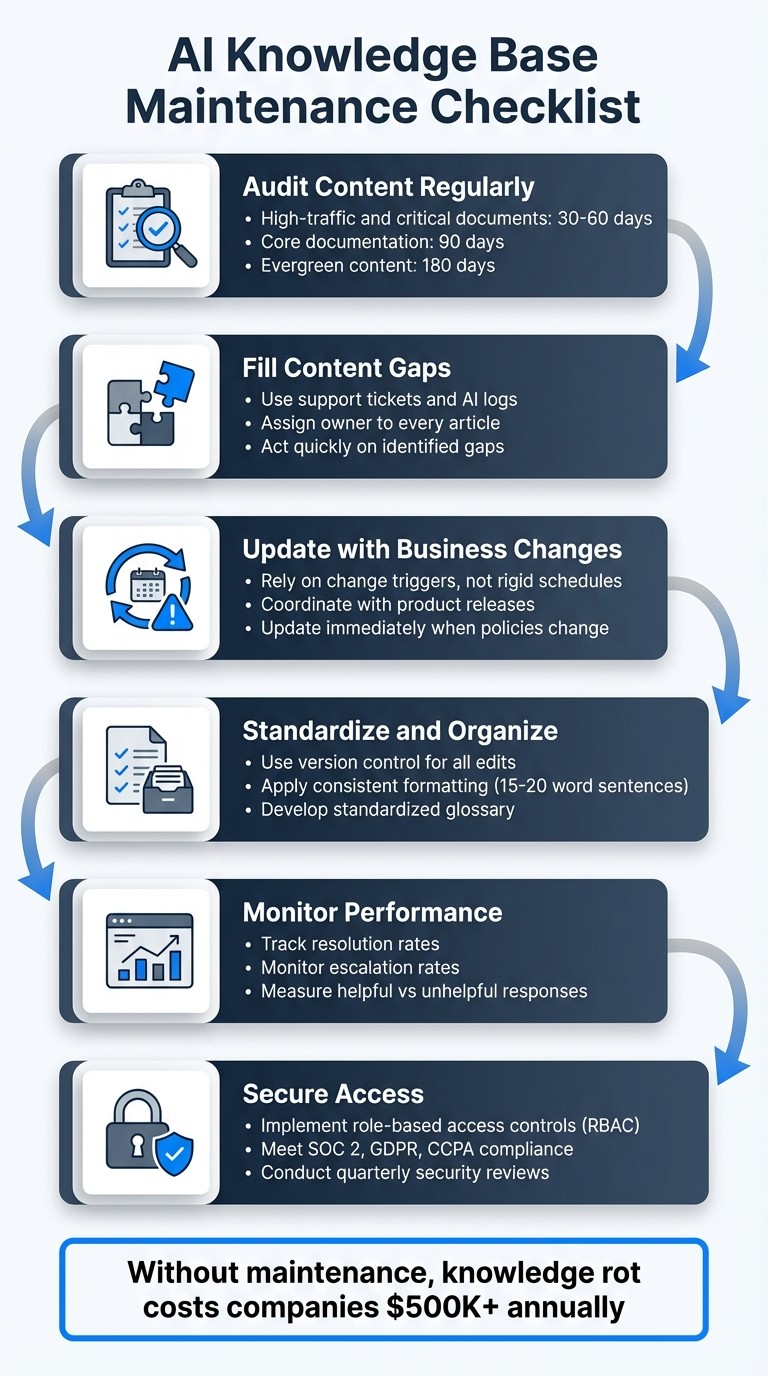
AI Knowledge Base Maintenance Checklist: 6 Essential Steps
How to use AI as a Knowledge Manager
Content Audits
Keeping your AI knowledge base aligned with your business's evolving needs requires regular audits. The key is prioritizing what truly needs attention. High-traffic articles and policy-critical content demand frequent reviews, while evergreen material can be checked less often.
Set Up Review Schedules
Create a tiered review system based on the importance and sensitivity of your content. For instance, review critical information like billing policies or security procedures every 30–60 days, core documentation every 90 days, and evergreen content every 180 days [3]. This approach minimizes burnout while ensuring crucial updates are addressed promptly.
Review Frequency | Focus Area | Key Tasks |
|---|---|---|
Daily | Accuracy Spot-checks | Check AI responses for accuracy and address flagged user feedback [1]. |
Weekly | High-Traffic Content | Refresh content tied to recent product updates or top search queries [1]. |
Quarterly | Comprehensive Audit | Evaluate regulatory compliance, technical accuracy, and structural quality [1]. |
Dedicate specific time for quality reviews. Set aside periods when your team pauses creating new content to focus entirely on refining existing materials [4]. This ensures maintenance isn’t endlessly delayed by the push for "urgent" new documentation.
Once your schedules are in place, address unanswered questions to expand and strengthen your knowledge base.
Identify Missing Content
Uncovering gaps in your knowledge base requires digging into support tickets, capturing knowledge from Slack conversations, and AI logs. If certain questions keep popping up, it’s a clear sign that information is either missing or hard to find.
Assign an owner to every article. Without clear ownership, content quickly becomes outdated [3] [2]. Whether responsibility falls to an individual or a team, having someone accountable ensures that content stays accurate and up to date.
When gaps are identified, act quickly to fill them - especially when business changes demand it.
Update Content When Business Changes
Audits and gap analysis only work if paired with timely updates driven by real-world changes.
Rely on change triggers instead of rigid schedules. Stay alert to updates from key sources like release notes or policy documents, and revise your knowledge base immediately [3]. This prevents scenarios where outdated information is confidently shared by your AI just because no one remembered to update it.
Coordinate updates with new releases. When rolling out a new feature or policy, ensure your knowledge base reflects these changes at the same time. This keeps your content accurate and your users informed.
Data Updates and Standards
Keeping your AI knowledge base accurate and reliable requires a strong focus on data updates and consistent standards. Without these, your AI might struggle to provide clear answers or update in real time.
Use Version Control
Break topics into focused, standalone articles. Each document should address one subject at a time [2]. When policies or procedures change, you only need to update the relevant document, saving time and reducing errors.
Track every edit with detailed histories. This allows you to quickly reverse changes if needed and monitor how policies evolve over time. A solid version control system also ensures that formatting stays consistent across all documents.
Apply Consistent Formatting
Consistency in formatting builds on version control to create a unified, easy-to-navigate knowledge base.
Develop a standardized glossary to align terminology [1]. For instance, if one team says "customer success" while another uses "client services", your AI might fail to link related data. A central list of approved terms ensures everyone speaks the same language, improving overall clarity.
Stick to concise sentences - 15 to 20 words - and focus each paragraph on a single idea [1]. Use descriptive anchor text instead of vague phrases like "click here" [1].
Include captions for diagrams and charts. AI can’t interpret images without context, so every visual should have a clear explanation of what it represents [4]. Similarly, avoid short yes/no answers in FAQs. Provide full-sentence responses that give AI the context it needs to deliver meaningful answers [4].
Collect and Apply User Feedback
Automate feedback processes with tools like Jira [3]. If a user marks an article as unhelpful, the system should create a task for the content owner to review. This ensures feedback doesn’t get overlooked.
Establish service-level agreements for fixing errors, such as reviewing policy mistakes within two business days [3]. Users lose trust when reported issues remain unresolved. Also, monitor repetitive questions and turn common responses into permanent FAQ entries.
Performance Monitoring and Analytics
Keeping your knowledge base effective isn't just about updating content - it’s about ensuring it delivers value. Performance analytics provide the insights you need to make informed decisions, so you’re not relying on guesswork to improve.
Measure Key Metrics
Start by tracking resolution rate, which reflects the percentage of user queries your AI resolves without needing human intervention. For instance, Sony Network Communications handles 30,000 inquiries monthly with an impressive 80% resolution rate.
Another critical metric is the ratio of helpful to unhelpful responses, which can reveal where your AI may fall short. Additionally, monitor the escalation rate, measuring how often users bypass the AI to seek human assistance. A high escalation rate for specific topics often signals gaps in your knowledge base, such as missing information or unclear guidance.
"The real power of AI in support isn't fewer tickets; it's better answers for more people. AI doesn't replace human support; it scales access to better answers."
Matt Cromwell, Director of CX, StellarWP
By tracking the ROI of these metrics, you can identify areas where your content needs improvement.
Find Content Gaps
Your analytics dashboard is a treasure trove for spotting patterns in failed queries. For example, if certain topics lead to repeated escalations, those areas should take priority in your updates. Measuring search success - how often users find the information they need versus escalating to human support - can also highlight where your knowledge base is falling short [1].
In industries like tech, outdated information can have serious financial consequences, costing companies over $500,000 annually [6]. Prioritize high-traffic articles that haven’t been recently updated as they often have the most immediate impact.
Align Reports with Business Cycles
Timing is everything. Align your analytics insights with your business cycles to ensure updates are made when they matter most. Schedule reporting to match the review intervals outlined in your maintenance plan.
For example, host monthly changelog meetings with product, engineering, and marketing teams [4]. When new features launch or policies change, your knowledge base should reflect those updates immediately - not weeks later during a routine audit. Assign specific content areas to subject matter experts and enforce service-level agreements, such as two days for policy updates and five days for new how-to guides [3].
"Review cadences fail when they are calendar-driven instead of change-driven."
Fitgap [3]
With Question Base, you can track resolution rates, unhelpful responses, and automation metrics automatically. This helps you identify high-volume topics, pinpoint where users struggle, and see which documentation needs attention - all while syncing with your sprint cycles or quarterly plans.
Security and Compliance
Your AI knowledge base holds sensitive company information - everything from employee data and customer records to internal processes and proprietary documentation. Without the right security measures, you open the door to data breaches, compliance failures, and unauthorized access that could jeopardize your business. Pair strong security controls with regular audits and governance to keep your knowledge base secure and compliant.
Set Up Role-Based Access
Role-Based Access Control (RBAC) is a system that limits access to specific content based on a user's role within the organization. It’s widely used - 94.7% of organizations have implemented RBAC at some point, and 86.6% rely on it as their primary access control model [9].
To enhance RBAC, apply the Principle of Least Privilege (PoLP), which ensures users only have access to the information they need for their job. For instance, HR staff should only access employee policies, while customer support teams should be restricted to customer-facing materials.
Regularly conduct role mining to review access patterns and eliminate unnecessary permissions [9]. You can integrate your RBAC system with HR tools like Workday or SAP SuccessFactors to automatically update access when employees join, switch roles, or leave the company [9].
"AI knowledge bases enhance information security with knowledge access controls, ensuring only people and tools with permissions can access sensitive data." - Slack [5]
Quarterly reviews are critical to maintaining governance. Without discipline, organizations often accumulate 40% to 60% more roles than necessary, creating unnecessary complexity [9].
Meet Compliance Requirements
Enterprise knowledge bases must comply with standards like SOC 2 Type II, GDPR, and CCPA, which are designed to protect data and avoid hefty penalties for violations.
Use data encryption to secure information both during transit and while stored [5]. Configure your AI agent to include source citations with every response, linking directly to the original document. This not only helps users verify information but also creates an audit trail for compliance reviews [5].
Schedule quarterly compliance audits to ensure your knowledge base keeps up with regulatory updates [1]. If your organization has strict data residency needs, consider on-premise deployment options to keep sensitive information within your infrastructure.
Create Governance Policies
Once compliance standards are in place, governance policies help maintain accountability for your knowledge base.
These policies should define how data is classified, how long it’s retained, and who owns it. Use the Adaptable Rule Foundation (ARF) to classify data into three categories: Core (essential for everyone), Common (shared across departments), and Unique (specific to individual teams) [7].
Introduce Separation of Duties (SoD) to avoid giving one person full control over critical processes. For example, no single user should both request and approve access to sensitive data. Formalize onboarding, internal transfer, and offboarding procedures to ensure security throughout the employee lifecycle [8][9].
Document each role’s responsibilities, permissions, and restrictions in a format that’s accessible to both auditors and users [9]. Engage subject matter experts to map roles to data classifications, as they often have a better understanding of the information’s sensitivity than IT teams alone [7].
Question Base offers enterprise-grade security, including SOC 2 Type II compliance, encryption for data at rest and in transit, and optional on-premise deployment. You can control access to content sources, set role-based permissions for Slack channels, and maintain detailed audit trails of AI interactions - all without adding engineering complexity.
Using Question Base for Maintenance

Maintaining an AI knowledge base doesn’t have to be complicated or require juggling multiple tools. Question Base simplifies the process for enterprise teams by keeping knowledge accurate, accessible, and secure - all directly within Slack.
Connect Documentation Sources
Question Base integrates seamlessly with your existing documentation platforms, including Notion, Confluence, Google Drive, Salesforce, Zendesk, Intercom, and Dropbox. This ensures it pulls verified information from trusted sources, unlike Slack AI, which primarily relies on chat history. With Question Base, employees receive answers rooted in expert-approved content, not AI interpretations of past conversations.
Getting started is quick. Install the app from the Slack App Marketplace and invite the bot using /invite @questionbase. Once connected, the AI instantly begins answering questions using your integrated knowledge. Updates to documentation in tools like Notion or Confluence sync automatically, so your team always has access to the most current information.
Customize AI Behavior
Beyond integration, Question Base allows you to tailor the AI’s behavior to fit your team’s needs. Assign different content sources to specific Slack channels: for example, HR channels can pull from employee handbooks, while customer support channels reference product guides. You can even adjust the AI’s tone to align with your brand - formal for compliance-related topics or more casual for internal IT support.
For sensitive topics, configure escalation workflows to ensure the right experts are notified. Questions about benefits can go to HR, technical issues to IT, and customer concerns to support managers. This setup lets you strike a balance between automation and human oversight, ensuring efficiency without sacrificing accuracy.
Track Gaps and Automate Updates
Question Base goes a step further by helping you monitor performance and address knowledge gaps. Its dashboard tracks unanswered questions, resolution rates, and automation metrics, giving you a clear view of areas that need improvement. When employees mark responses as "not helpful", these flags show up in your analytics, highlighting content that needs refinement.
Using Natural Language Processing (NLP), Question Base can identify useful insights from Slack threads and turn them into structured FAQ entries. With just one click, you can add shared answers to your knowledge base. The system also evaluates topic similarities to either update existing entries or create new ones (a process called "upserting"), keeping everything organized and free of duplicates.
To align maintenance efforts with your team’s workflow, use Question Base reports during sprint planning or quarterly reviews. Assign subject matter experts to oversee specific categories - like HR, IT, or Operations - so AI-suggested updates are verified by the right people. These features ensure your knowledge base stays reliable and up-to-date, meeting the high standards enterprise teams expect.
Conclusion
Keeping your AI knowledge base up-to-date is non-negotiable. Without regular maintenance, even the most advanced systems fall victim to "knowledge rot", which can cost companies over $500,000 annually and hinder their ability to adapt quickly [1]. By combining disciplined practices with effective tools, teams can avoid this costly decline.
The checklist shared here - regular content audits, consistent data standards, performance tracking, and security controls - lays the groundwork for a reliable knowledge base. Implementing structured updates, such as daily spot-checks, weekly refreshes, and quarterly deep dives, has proven to reduce employee onboarding time by 50% and save teams an average of 100 minutes per week [5]. Together, these steps create a proactive strategy that drives measurable results.
"The real power of AI in support isn't fewer tickets; it's better answers for more people. AI doesn't replace human support; it scales access to better answers."
Matt Cromwell, Director of CX, StellarWP
This insight underscores the importance of maintenance - it’s not just about automation, but about delivering accurate, scalable solutions.
To support these efforts, Question Base offers features like automated gap detection, tracking of unanswered questions, and seamless integration with trusted platforms like Notion and Confluence. While tools like Slack AI provide basic capabilities, Question Base is specifically designed for enterprise support. It connects directly to verified documents and delivers analytics that help teams continuously refine their knowledge base. Instead of relying on chat history, Question Base ensures answers are grounded in trusted, accurate content.
FAQs
What should I audit first in an AI knowledge base?
To maintain a reliable and effective knowledge base, begin by reviewing the accuracy and relevance of all content. This means identifying and correcting outdated or incorrect information, as well as removing any duplicate entries. Ensuring the content is up-to-date builds trust and usability.
Next, assess the organization and structure of your knowledge base. Take inventory of articles, noting their last update dates, and look for any gaps or redundancies. A well-structured system makes it easier for users to find what they need without frustration.
Finally, address content gaps and user feedback by analyzing search patterns and frequent queries. This helps pinpoint areas where users are struggling to find answers, allowing you to add or refine content to better meet their needs. Regular updates based on these insights ensure the knowledge base remains relevant and helpful.
How do I keep answers accurate during product or policy changes?
Maintaining accuracy requires a proactive approach: regularly reviewing and updating content, assigning clear ownership, and leveraging AI tools to flag outdated or conflicting information. Automated systems can keep an eye on platforms like Confluence or Notion, prompting updates whenever changes are detected. Routine audits are equally important, helping to spot duplicate or obsolete entries that could clutter your knowledge base. For enterprise teams, establishing regular review cycles and using AI-driven insights ensures accountability while reducing the risk of errors that could compromise the reliability of answers.
Which metrics best show if the AI knowledge base is working?
Key metrics to focus on are the resolution rate, the frequency of unhelpful answers, and how well content updates improve usability. Keeping an eye on change detection and setting up regular review schedules ensures the content stays accurate and aligned with user needs. Together, these metrics provide a clear picture of the AI knowledge base's accuracy and overall performance.