∙
Cooper
∙
Reading time:
16 min

Repetitive questions and scattered knowledge drain productivity. In large companies, employees spend up to 12 hours weekly searching for answers, while subject matter experts lose 6 hours answering the same questions repeatedly. Slack, designed for real-time communication, only worsens the problem by burying crucial information in endless threads. AI-powered tools can solve this by transforming Slack into an efficient knowledge-sharing hub.
Key Takeaways:
Lost productivity: Teams waste 20–30% of their workweek searching for information, costing $2M annually for a 1,000-person company.
Scattered knowledge: Information spread across Slack, Notion, Google Drive, and other tools creates inefficiencies.
Expert burnout: Repeated questions overwhelm experts, especially when informal Slack exchanges don’t become reusable knowledge.
Manual tools fall short: Wikis and Slack search lack context and require constant manual updates, leading to outdated or incomplete answers.
AI solutions: Tools like Question Base integrate with trusted documentation (e.g., Confluence, Salesforce) to deliver fast, accurate answers directly in Slack, saving time and reducing frustration.
AI doesn’t just make finding answers easier - it organizes knowledge, reduces repetitive questions, and ensures critical information is always accessible. Here’s how it works.
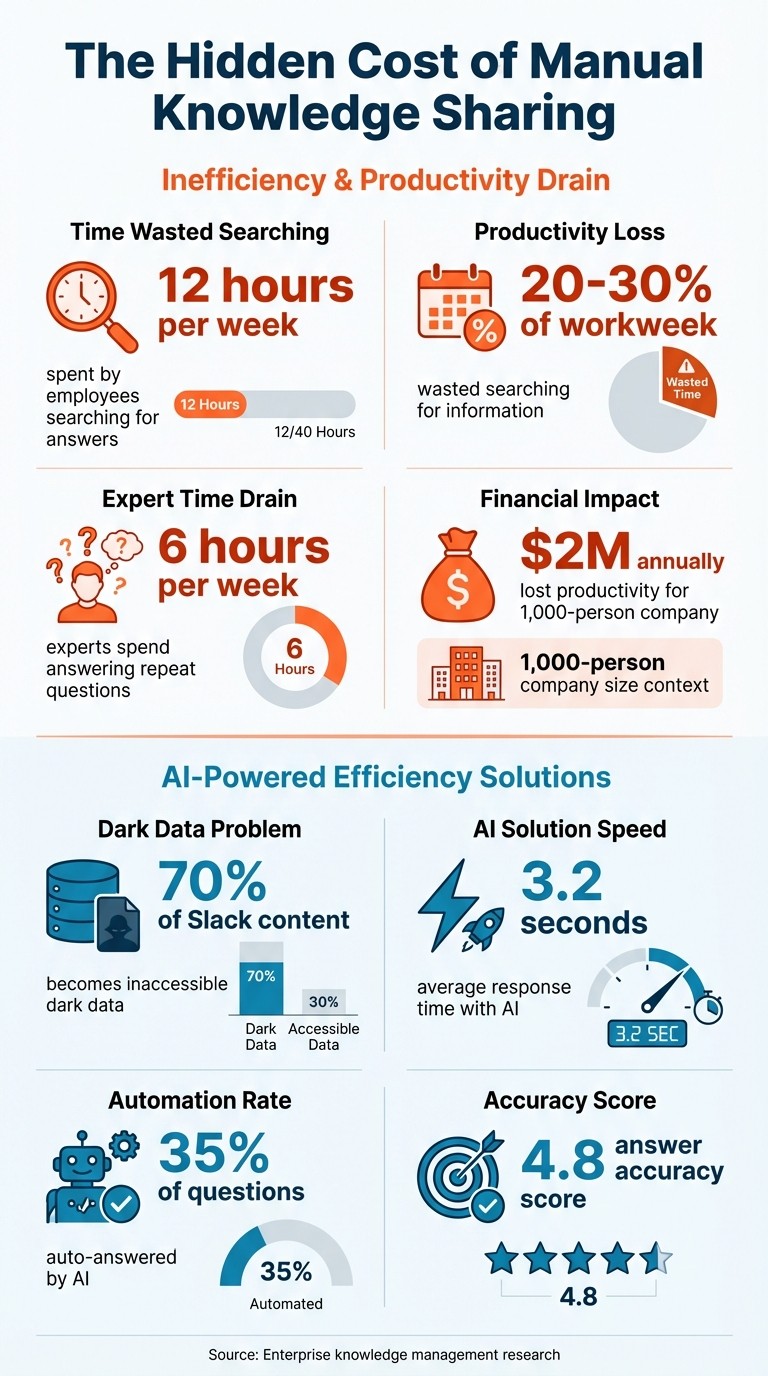
The Hidden Cost of Manual Knowledge Sharing: Key Statistics
AI in Action: Transforming Knowledge Capture and Retrieval
Main Problems With Manual Knowledge Sharing
Manual knowledge sharing doesn’t just come with hidden costs - it also suffers from inefficiencies that build up over time, creating significant challenges for teams.
Knowledge Scattered Across Multiple Tools
For teams heavily relying on Slack, knowledge is anything but centralized. Instead, it’s scattered across a range of platforms. Slack hosts real-time conversations, while documentation is stored in tools like Notion or Confluence. Files live in Google Drive or SharePoint, support data resides in Zendesk, product specs are in Jira, and customer details are tucked away in Salesforce.
This scattered setup results in "knowledge islands" - isolated pockets of information that are difficult for teams to access cohesively. For example, sales teams might turn to Slack threads for quick answers, while engineering teams depend on detailed records in Confluence. This disconnect forces employees to spend 20–30% of their workweek searching for information, which, for a company of 1,000 employees, translates to over $2 million in lost productivity annually [1].
Relying on manual copy-paste solutions only adds to the chaos. As companies expand, these workarounds lead to duplicated efforts, inconsistent processes, and wasted time. Ultimately, this fragmented approach overwhelms subject matter experts with repetitive questions and creates inefficiencies across the board.
Experts Overwhelmed by Repeat Questions
Subject matter experts often find themselves trapped in a cycle of answering the same questions over and over. On average, they spend 6 hours each week responding to duplicate inquiries [1].
"Before Question Base, we've been seeing repetitive questions all around our Slack channels."
The problem worsens when these experts are unavailable - whether they’re on vacation, out sick, or leave the company entirely. Much of their knowledge, often shared informally in Slack, disappears with them. This leads to longer onboarding times, more mistakes, and significant operational slowdowns.
"Since we started using QB we haven't used our Google support docs. And if I go on vacation or sick leave, I feel comfortable that QB will just take over."
Linn Stokke, Online Events & Marketing Specialist, Ticketbutler [1]
Without a system to organize and retain key information, even essential knowledge gets lost in the shuffle.
Too Much Information Without Organization
Slack’s ability to facilitate communication is also its Achilles’ heel when it comes to managing knowledge. In busy workspaces, thousands of messages flood channels daily, creating an overwhelming volume of content [1]. Important answers are quickly buried under a sea of updates, pings, and casual chatter.
Without proper organization, critical knowledge is mentioned once and then disappears. Research shows that 70% of Slack content becomes "dark data" - information that exists but is practically inaccessible when needed [1].
This disconnect between informal Slack exchanges and formal documentation, like standard operating procedures (SOPs) or wikis, leaves teams frustrated and hampers productivity. Instead of enabling seamless workflows, the lack of structure turns Slack into a black hole for information.
Why Standard Tools Don't Work Without AI
Many organizations already use tools like wikis, intranets, and Slack search. The problem isn’t the lack of tools - it’s that these tools weren’t built to handle the speed and complexity of today’s work environments. Their limitations highlight why traditional methods often fail without the help of AI.
Manual Content Can't Keep Up
Wikis and intranets depend on people manually updating information. Every time there’s a product release, pricing adjustment, or policy change, someone has to open multiple tools, edit each page, and notify others about the update. This manual process struggles to keep up with fast-changing standards, especially in U.S. enterprises that deploy updates weekly or even daily. The result? Inconsistent and outdated content that damages trust [4].
For instance, when sales reps search for "SOC 2 docs for prospects", they might find outdated or generic security pages instead of the latest PDF. This forces them to send repeated direct messages to the security team [4]. Similarly, support agents looking for refund policies often wade through piles of legal documents without finding a clear answer, leading to unnecessary interruptions for legal experts [6]. Over time, employees lose confidence in these tools, assuming, “The wiki is wrong,” and stop using them altogether.
Basic Search Misses the Context
Keyword-based search tools only match exact terms, leaving employees frustrated when they ask full-sentence, contextual questions. Without knowing the precise terms used in internal documents - like a codename, SKU, or field label - users either get no helpful results or an overwhelming list of loosely related documents.
These tools also falter with synonyms, typos, and industry-specific jargon [6]. For example, an engineering team searching Slack for an "incident playbook" might sift through years of historical messages without finding a clear, up-to-date runbook [5]. This inability to retrieve relevant, contextual information weakens Slack’s role as a reliable knowledge repository.
Slack Conversations Don't Turn Into Usable Knowledge
Slack is designed for real-time conversations, not long-term knowledge management. Important solutions often get buried in threads, reactions, and file attachments, with no clear way to identify the definitive answer. Search results depend heavily on channel names, message wording, and whether the user was part of the original conversation. If someone wasn’t involved or doesn’t know the right keywords, they might never find the information they need [6].
Manually transferring Slack conversations into structured tools like wikis is rarely assigned to anyone, meaning valuable exchanges remain scattered and temporary. This leads to repeated questions, as experts are forced to retype answers, resend files, or hop on ad-hoc calls to explain the same solutions over and over [3]. For new hires and distributed teams across U.S. time zones, access to knowledge often depends on knowing the right person or catching the right expert at the right time [2]. Without AI to automatically organize and surface critical information, Slack becomes a black hole where knowledge is easily lost.
How AI-Powered Slack Knowledge Bases Fix These Issues
AI-powered knowledge bases address the challenges of outdated content, inefficient search, and lost conversations. Instead of relying on team members to manually update wikis or sift through endless Slack threads, these systems seamlessly connect to trusted documentation platforms like Notion, Confluence, Google Drive, Salesforce, and Zendesk. When someone asks a question in Slack, the AI quickly scans these sources and delivers a verified answer in just 3.2 seconds, complete with citations for transparency.
Fast, Accurate Answers From Your Documentation
Gone are the days of frustrating keyword searches. AI understands the context and intent behind questions, making it far more efficient. For instance, when a sales rep asks about pricing updates, the AI pulls the latest policy from Confluence, cites the source, and delivers the answer instantly - no manual digging required. Tools like Question Base boast a 4.8 answer score accuracy, connecting directly to enterprise documentation and delivering precise, trustworthy answers with source annotations. This makes it easier for teams to rely on the information without hesitation.
"Since we started using QB we haven't used our Google support docs. And if I go on vacation or sick leave, I feel comfortable that QB will just take over." - Linn Stokke, Online Events & Marketing Specialist, Ticketbutler
Beyond providing instant responses, AI ensures that valuable insights shared in Slack don’t get lost in the noise.
Turn Slack Conversations Into Reusable Knowledge
AI takes the fleeting nature of Slack conversations and transforms it into structured, reusable knowledge. For example, during a product launch discussion, the AI can identify recurring questions about deployment steps and create a reusable knowledge entry with concise summaries and relevant links. This ensures that critical information doesn’t vanish into Slack’s chat history. Question Base goes a step further by auto-answering 35% of repetitive questions, capturing and refining answers directly within Slack. Over time, this self-improving system reduces the workload on experts, allowing them to focus on more complex tasks.
"This is sick, especially how you can update the answer to a question by simply replying in Slack! This is a pretty cool way of solving the tough problem of knowledge base being hard to maintain." - Tony Han
This continuous refinement process ensures the knowledge base stays relevant and actionable.
Find and Fill Knowledge Gaps With Data
AI doesn’t just answer questions - it also tracks unanswered ones and evaluates responses that fall short. By analyzing data on resolution and escalation rates, teams can identify content gaps. For instance, if 20% of queries require escalation, it’s a clear signal to update sources like Notion or Confluence with the missing details. This feedback loop keeps the knowledge base aligned with the organization’s evolving needs, reducing the strain on subject matter experts while improving overall accuracy.
"We now have a reliable and useful knowledge base, making it easy to share knowledge across the team. We no longer have staff waiting on busy managers for an answer. Question Base is there in seconds, plus it's easy to verify answers as new questions come along." - Monica Limanto, CEO, Petsy
Question Base vs. Slack AI: Built for Enterprise Support

Slack AI is a handy tool for general productivity, but when it comes to enterprise knowledge management, it serves a different purpose compared to Question Base.
Question Base is specifically crafted for HR, IT, and operations teams that require precise, verified answers at scale. While Slack AI relies on learning from chat history, Question Base integrates directly with trusted documentation systems like Salesforce, Confluence, Google Drive, Zendesk, Notion, Jira, and SharePoint. This distinction is key: instead of generating interpretations based on past conversations, Question Base delivers reliable, expert-approved answers sourced directly from your organization’s official documentation.
Data Sources and Answer Accuracy
The main difference between the two tools lies in how they source their answers. Slack AI searches through Slack message history and shared files, with additional integrations only available on Business and Enterprise plans. While this can help retrieve what was discussed last week, it doesn’t guarantee accuracy - especially for industries with complex workflows, compliance demands, or strict regulations.
Question Base takes a more structured approach by pulling answers from your single source of truth - the documentation systems your team already maintains. For instance, a pricing question will pull the latest policy from Confluence in just 3.2 seconds, complete with a source citation. Thanks to this method, Question Base achieves a 4.8 answer score accuracy, ensuring responses are grounded in verified data rather than fleeting chat threads. Plus, teams can refine answers directly within Slack, creating a feedback loop that transforms AI-generated responses into human-verified knowledge over time.
This direct connection to verified data also strengthens enterprise security and management protocols.
Enterprise Features and Control
For large organizations with stringent security and compliance needs, Question Base offers SOC 2 Type II certification, encryption both at rest and in transit, and even optional on-premise deployment for industries with strict regulations. Administrators have fine-grained control over which repositories are indexed, who can access specific content, and how the AI operates across different Slack channels.
Question Base also delivers advanced analytics that go beyond basic stats. Teams can monitor automation rates, resolution rates, and investigate unhelpful answers to identify gaps in documentation. Case tracking flags unanswered questions, signaling areas where content needs updates. This creates a continuous improvement cycle for knowledge management, transforming it from a simple search tool into a scalable, evolving system. And at $8 per user per month, Question Base is a more cost-effective choice compared to Slack AI’s $18 per user per month, while offering enterprise-focused features like white-labeling, multi-workspace support, and custom integrations.
Below is a quick comparison of the key features:
Feature Comparison Table
Feature | Question Base | Slack AI |
|---|---|---|
Price | $8 / user / month | $18 / user / month |
Accuracy | AI generated → Human verified content | AI generated |
Data Source | Salesforce, Confluence, OneDrive, Google Drive, Zendesk, Intercom, Notion, Dropbox, Freshdesk, Hubspot, Jira, SharePoint, Custom integrations | AI search across Slack history and other tools (Business Plan & Enterprise only) |
Knowledge Management | Per-channel settings & AI behavior, Case tracking, Duplicate check, New knowledge capture | Channel Expert - pre-built AI agent, powered by Agentforce (Business+ and Enterprise plans) |
Analytics | Questions asked, Resolution rate, Automation rate, Unhelpful answers investigation | Common usage of chat |
Enterprise Readiness | SOC 2 Type II Certified, Customizable AI agent, Escalation workflow to experts, Full control over AI responses | Available on Business Plan & Enterprise, Channel Expert powered by Agentforce |
How to Implement AI-Driven Knowledge Sharing
You don’t need a massive IT overhaul to roll out AI-driven knowledge sharing. By starting with clear ownership, integrating AI into your existing Slack workflows, and using analytics for ongoing improvement, you can make the transition seamlessly. Here’s how to break it down into actionable steps.
Assign Ownership and Establish a Centralized Knowledge Base
Before introducing any AI tools, assign specific owners to manage each knowledge area - whether it’s HR policies, IT workflows, or product documentation. These knowledge owners should identify where the most accurate and up-to-date information resides. This could be tools like Confluence, Notion, Salesforce, or Google Drive. With Question Base, connecting these sources is straightforward. During setup, the AI links directly to your official documentation, ensuring responses are pulled from trusted, maintained sources - not outdated Slack threads.
Deploy AI Agents in Slack Channels
After connecting your knowledge sources, install Question Base through the Slack App Marketplace. Invite the bot into your active channels using /invite @questionbase. The setup process is simple and takes just a few minutes. You can customize settings for each channel, specifying which documentation sources the AI should reference, the tone of its responses, and when to escalate queries to human experts. Encourage your team to consult the AI first before reaching out to colleagues. Question Base delivers responses in approximately 3.2 seconds[1], complete with source citations for verification. Once live, monitor the system’s performance and fine-tune it as needed.
Monitor Performance and Continuously Improve
The real value of AI-driven knowledge sharing lies in its ability to evolve. Analytics play a crucial role here. Question Base tracks metrics like automation rates, resolution rates, and instances of unhelpful answers, giving you insights to address any gaps. For example, use case tracking to pinpoint unanswered questions that highlight missing documentation. Knowledge owners can also refine AI-generated responses directly within Slack, transforming them into verified content for future use.
Monica Limanto, CEO of Petsy, shared her experience:
"We implemented Question Base to eliminate repetitive questions and to collate answers and information in one place for a growing team. Question Base has exceeded our expectations - it's easy to use, intuitive and a massive time saver. We now have a reliable and useful knowledge base, making it easy to share knowledge across the team. We no longer have staff waiting on busy managers for an answer, Question Base is there in seconds, plus it's easy to verify answers as new questions come along."[1]
To keep the system sharp, schedule quarterly reviews. Update AI settings, refresh documentation, and incorporate new insights. This ensures your AI knowledge base continues to improve and adapt as your team’s needs evolve.
FAQs
How can AI improve knowledge sharing within Slack?
AI is revolutionizing knowledge sharing in Slack by automating the process of capturing, organizing, and retrieving information. This not only saves time but also reduces the frustration of answering the same questions repeatedly. While tools like Slack AI are great for summarizing conversations or searching through chat history, specialized platforms like Question Base take it a step further. They integrate directly with trusted documentation systems - such as Notion, Confluence, and Salesforce - to provide precise, expert-verified answers in real time.
By ensuring that vital information doesn’t get lost in endless chat threads, these tools help teams maintain well-structured, dependable knowledge repositories. This approach is especially useful for HR, IT, and support teams, where getting accurate answers quickly and maintaining an auditable trail are critical for smooth operations.
What challenges arise with manual knowledge sharing?
Manual knowledge sharing can be a significant drain on efficiency. Employees often ask the same questions repeatedly, with nearly 40% of internal inquiries being duplicates. This redundancy can cost experts over six hours each week, cutting into productivity and creating unnecessary bottlenecks.
Another challenge is how easily vital information gets lost. Whether buried in chat threads or scattered across various documents, finding accurate answers quickly becomes a frustrating task. As businesses scale, relying on manual processes like copying and pasting from documents simply doesn’t hold up. It increases costs and slows teams down when speed and efficiency are needed most.
Consider this: employees typically spend 20–30% of their workweek searching for the information they need. For large companies, this wasted time can translate into millions of dollars in lost productivity every year. Automating knowledge sharing tackles these inefficiencies head-on, saving time and resources while letting teams focus on work that truly matters.
Why is Question Base better suited for enterprise support than Slack AI?
Question Base is crafted with enterprise support teams in mind, delivering precise, verified answers by integrating seamlessly with trusted documentation platforms like Notion, Confluence, and Salesforce. Unlike Slack AI, which primarily depends on chat history, Question Base ensures all information originates from dependable sources, minimizing mistakes and misunderstandings.
The platform also offers enterprise-level security with SOC 2 Type II compliance, along with full customization options to tailor tone and content. Its advanced knowledge management tools, such as case tracking and content audits, make it a powerful solution for HR, IT, and support teams. By simplifying workflows, cutting down on repetitive questions, and keeping teams aligned, Question Base ensures operations run smoothly with less hassle.