∙
Cooper
∙
Reading time:
17 min

Repetitive questions and scattered documents waste time. If your team uses Slack, you’ve likely felt the pain of searching for answers across Notion, Confluence, Google Drive, and more. AI knowledge base automation fixes this by delivering accurate answers instantly, learning from interactions, and keeping information up-to-date.
Here’s what you’ll learn:
Why manual knowledge management falls short as companies grow.
How AI tools like Question Base connect platforms, manage FAQs, and reduce repetitive inquiries.
Practical steps to audit, integrate, and improve your knowledge base.
A comparison of AI tools like Slack AI, Zendesk AI, and Question Base for enterprise needs.
AI-powered systems save time, reduce support tickets, and improve workflows. Let’s explore how to set up and scale a smarter knowledge base inside Slack.
Building AI Agents that actually automate Knowledge Work - Jerry Liu, LlamaIndex
Common Problems in Enterprise Knowledge Management
Before diving into automating your knowledge base, it’s essential to recognize the key obstacles that disrupt workflows and frustrate teams. Here are three major challenges that highlight why automation can be a game-changer.
Scattered Information Across Platforms
When enterprise knowledge is spread across tools like Notion, Confluence, Google Drive, GitHub, and Asana, it creates a fragmented mess. Employees waste valuable time hunting for answers across multiple systems, slowing down their work and increasing frustration.
Outdated or Inaccurate Documentation
Relying on outdated documentation can lead to serious consequences, including poor decisions, regulatory issues, reputational damage, and even financial setbacks [5][6]. When teams depend on incorrect information, it disrupts workflows and undermines critical operations.
Repeated Questions That Drain Time
HR, IT, and support teams often find themselves answering the same questions over and over again. This repetitive cycle eats into productivity and delays responses, which can stall important projects. Implementing a centralized AI-powered system can handle these recurring inquiries, freeing up teams to tackle more complex and meaningful work.
How to Automate Your Knowledge Base with AI
Automating your knowledge base begins by connecting AI tools to the various platforms where your company stores information. Instead of making employees sift through Notion, Confluence, Google Drive, or Zendesk separately, AI creates a unified search experience. This approach - often called a "single pane of glass" - uses natural language processing (NLP) to interpret conversational questions and machine learning (ML) to pull relevant answers from across your connected systems. Let’s explore how to link your data, ensure response accuracy, and transform Slack conversations into a living FAQ.
Connecting Multiple Data Sources
Modern AI tools bring all your documentation together into one centralized knowledge hub. For example, Question Base integrates effortlessly with platforms like Notion, Google Drive, Confluence, Zendesk, Intercom, Salesforce, and Dropbox. Once installed in Slack, the app connects to these sources and starts retrieving answers immediately. This process relies on retrieval-augmented generation (RAG), which trains AI models on your company’s actual data while respecting access permissions. The result? Employees get personalized, conversational answers without needing to remember where the information is stored. By consolidating your knowledge systems, you can significantly cut down on repetitive questions - a common pain point in large organizations.
Generating and Verifying AI Answers
AI tools use NLP and ML to understand user queries and refine their responses, but human oversight ensures these answers remain accurate and reliable. Feedback loops, like thumbs up or down buttons, allow users to rate responses, while subject matter experts can review and validate AI-generated answers. Teams can also assign content ownership by topic, ensuring that experts oversee and approve information before it’s widely shared. This combination of automation and human review not only keeps your knowledge base accurate but also helps meet compliance standards, addressing concerns about outdated or incorrect data.
Turning Slack Conversations into FAQs

A wealth of knowledge often hides in Slack threads, only to get buried in the chat history. AI tools can capture these conversations and turn them into structured, searchable FAQs. By tagging and categorizing content automatically, AI makes Slack discussions easy to reference later. Beyond just verifying answers, these tools summarize threads, create knowledge cards, and process both structured and unstructured data - like emails, chat logs, and file attachments - without manual effort. Over time, this process builds an evolving FAQ that reduces repetitive questions and allows support teams to focus on more complex challenges.
Comparing AI Knowledge Base Tools
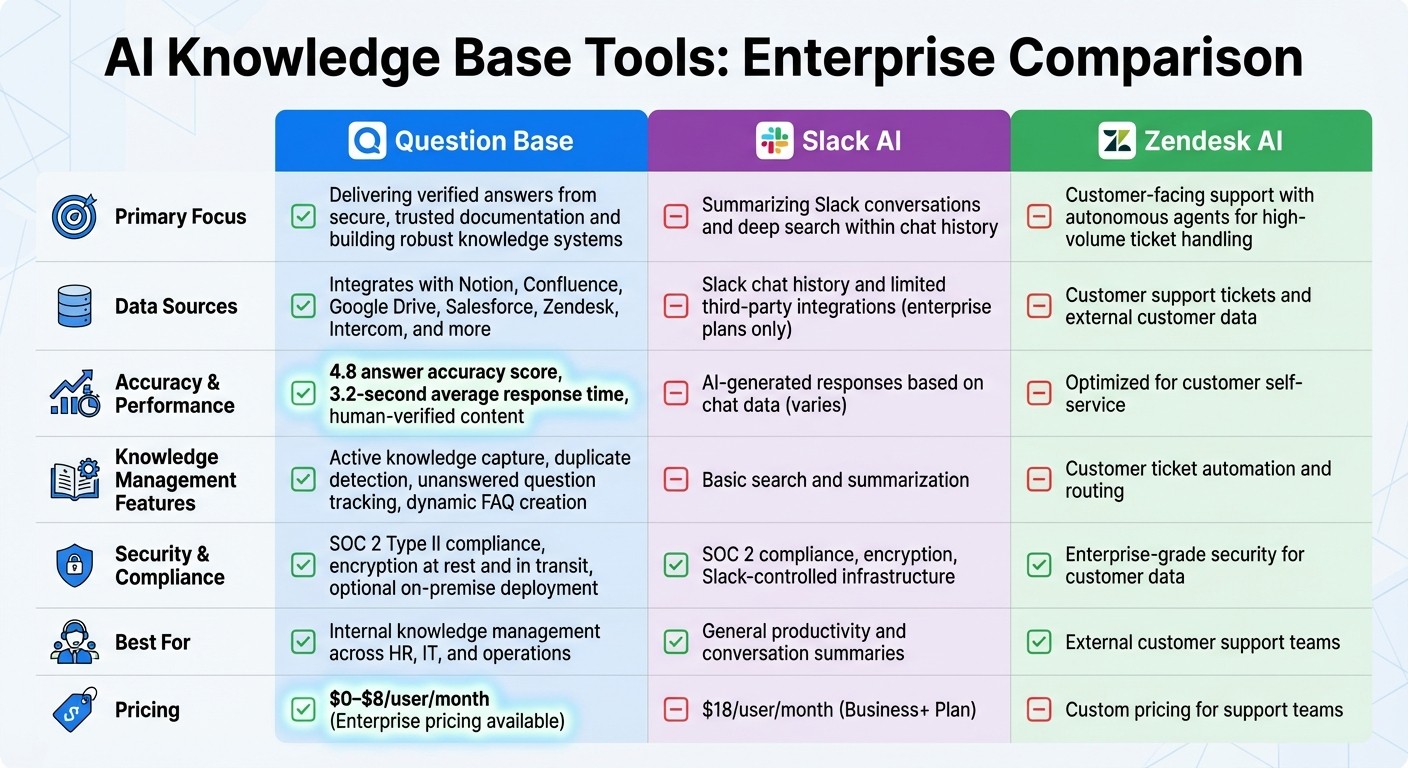
AI Knowledge Base Tools Comparison: Question Base vs Slack AI vs Zendesk AI
Dealing with the limitations of traditional enterprise knowledge management, it's essential to understand how different AI tools stack up. These tools vary widely - some focus on summarizing past conversations, while others excel at delivering accurate answers from verified sources. The right choice depends on whether your team prioritizes general productivity or needs a scalable knowledge management system that works across departments. Here's a closer look at how Question Base, Slack AI, Zendesk AI, and Streamline AI tackle enterprise knowledge automation.
Question Base vs Slack AI

Slack AI is a solid option for general productivity, offering features like conversation summaries and chat history searches. However, when it comes to building a dependable knowledge system, the differences between Slack AI and Question Base become clear. Slack AI relies heavily on learning from Slack chat history, with limited integration capabilities that are only available for enterprise users. On the other hand, Question Base connects seamlessly to trusted platforms such as Notion, Confluence, Google Drive, Salesforce, Zendesk, and Intercom.
This difference is reflected in performance metrics. Slack AI generates responses based solely on chat data and lacks features like tracking ownership, status, or follow-ups for work requests. Question Base, by contrast, delivers human-verified answers with an impressive 4.8 accuracy score and a swift 3.2-second average response time. It also includes advanced tools like duplicate detection, unanswered question tracking, and dynamic FAQ creation - features Slack AI does not offer.
For enterprise teams concerned about security and compliance, both tools meet SOC 2 standards. However, Question Base goes further with SOC 2 Type II compliance, encryption both at rest and in transit, and the option for on-premise deployment. It also provides extensive customization options, including AI tone adjustments, tailored content access, escalation workflows, and white-labeling. Slack AI’s customization capabilities are more limited, primarily offering admin controls.
Pricing highlights these distinctions. Slack AI costs $18 per user per month on the Business+ Plan, while Question Base ranges from $0 to $8 per user per month, with custom pricing available for enterprises needing on-premise setups or multi-workspace support.
Feature | Slack AI | Question Base |
|---|---|---|
Primary Focus | Summarizing Slack conversations and deep search within chat history | Delivering verified answers from secure, trusted documentation and building robust knowledge systems |
Data Sources | Slack chat history and limited third-party integrations (enterprise plans only) | Integrates with Notion, Confluence, Google Drive, Salesforce, Zendesk, Intercom, and more |
Accuracy Approach | AI-generated responses based on chat data | Human-verified content with a 4.8 answer accuracy score |
Response Time | Varies depending on search complexity | Average of 3.2 seconds for instant answers |
Knowledge Management | Basic search and summarization | Active knowledge capture, duplicate detection, unanswered question tracking, dynamic FAQ creation |
Analytics & Reporting | Basic usage stats for chat interactions | Resolution rates, automation metrics, and knowledge gap analysis |
Enterprise Security | SOC 2 compliance, encryption, Slack-controlled infrastructure | SOC 2 Type II compliance, encryption at rest and in transit, with optional on-premise deployment |
Customization Options | Admin controls to manage AI features by user or group | Full customization of AI tone, accessible content, escalation workflows, and white-labeling |
Pricing | $18/user/month (Business+ Plan) | $0–$8/user/month (Enterprise pricing available) |
Next, let’s explore how internal tools like Question Base compare to external support platforms such as Zendesk AI.
Zendesk AI for Customer Support
When it comes to customer-facing support, Zendesk AI stands out. Its autonomous agents are designed to handle high volumes of customer tickets by automating routine inquiries and providing personalized solutions. This makes it a go-to choice for external support teams managing customer interactions.
However, Zendesk AI focuses on customer self-service rather than internal knowledge management. For teams in HR, IT, or operations who need fast access to internal documentation, a tool like Question Base is better suited. Question Base connects directly to internal resources and delivers verified answers within Slack, offering a purpose-built solution for internal use cases.
Streamline AI for Specialized Work
Some tools cater to niche needs, and Streamline AI is a prime example. It’s designed for industries with specific operational workflows, offering tailored solutions for unique challenges. While this specialization works well for certain scenarios, it may not meet the broader demands of enterprise teams.
For departments like HR, IT, and operations that require a comprehensive internal knowledge solution, Question Base provides a more versatile option. With its flexible integrations, customizable AI behavior, and advanced knowledge management features, Question Base supports a wide range of use cases across multiple departments, making it a more adaptable choice for enterprise needs.
How to Set Up AI Knowledge Base Automation
You don’t need to overhaul your entire system to set up AI knowledge base automation. The process is straightforward and involves three main steps: reviewing your existing knowledge, integrating the right tools, and refining performance based on how it’s used. On average, knowledge workers spend 2 hours daily searching for information, adding up to over 400 hours per year [4]. A well-structured setup can help reclaim this time while creating a scalable solution for your organization.
Audit Your Current Knowledge
Before diving into AI tools, take a step back and assess where your organization’s knowledge resides and what’s missing. Define your goals - whether it’s cutting down repetitive questions, improving onboarding efficiency, or preserving institutional knowledge. Think about your audience too, as a knowledge base for company-wide use will differ from one designed for HR, IT, or customer support teams.
Start by gathering information from every relevant source: customer support tickets, product guides, company policies, workflows, shared files, emails, and even chat threads. Modern AI tools can streamline this process by analyzing data across platforms and integrations, saving you time compared to traditional audits. Use metrics to identify gaps in your documentation, and repurpose existing materials into self-service articles. Make sure related topics are linked so users can navigate easily.
It’s best to begin with a specific use case. Rather than trying to automate everything at once, focus on a pressing challenge - like reducing IT support tickets or boosting customer satisfaction - and set a measurable goal. For example: "Create an AI knowledge base capable of handling 30% of customer inquiries within six months" [1].
Once you’ve built a clear inventory of your knowledge, the next step is choosing the right tool for your needs.
Install and Connect Your AI Tool
After auditing your knowledge, evaluate tools that align with your goals. If your team uses Slack, platforms like Question Base offer a simple setup process. Install the tool via the Slack App Marketplace, invite it to active channels with /invite @questionbase, and connect your documentation sources - such as Notion, Confluence, Google Drive, Salesforce, Zendesk, or Intercom.
Organize your knowledge base with a clear taxonomy, using categories, tags, and metadata. Writing documentation in an FAQ format can also help the AI process user questions more effectively. By consolidating data from various tools and platforms into one system, you can address inefficiencies like scattered information. Don’t forget to set access controls to ensure sensitive data stays secure and accessible only to authorized users.
In 2025, Salesforce's internal rollout of Agentforce in Slack is expected to save the company 500,000 hours annually [3].
Once connected and organized, test how well the tool performs with real-world queries.
Test and Improve Over Time
Before launching your AI knowledge base across your organization, test it thoroughly. Have your team submit the 20 most common questions they encounter to see how accurately the system responds [1]. If needed, adjust the content or add new information to address any gaps.
A well-known accounting software company implemented an internal AI knowledge base to assist its customer service reps. The result? The bot now handles 60% of inquiries, reducing case resolution time from two days to 1.2 days and increasing the company’s NPS score by 12% [1].
Track performance metrics like click-through rates, resolution rates, search abandonment, and time saved. Collect user feedback and feed it into the AI’s training process to improve responses. Assign ownership of specific areas within the knowledge base to ensure updates are made regularly and with accountability.
Plan quarterly reviews to refresh content and make immediate updates when processes change, new products launch, or gaps are identified. You can also integrate the knowledge base with other systems, like sales tools or KPI dashboards, to pull real-time data and automate updates. Over time, machine learning can analyze user behavior and search trends, helping the system deliver more accurate results and better content recommendations.
Scaling AI Knowledge Base Automation
Expanding your AI knowledge base across an enterprise unlocks broader benefits, but it requires careful planning. Key considerations include managing multiple Slack workspaces, ensuring security and compliance, and leveraging analytics for ongoing improvement.
Managing Multiple Workspaces
Large organizations often operate across several Slack workspaces, whether divided by departments, regions, or functions. To manage AI knowledge tools effectively in such diverse setups, you need a balance between centralized oversight and localized customization. Platforms like Question Base enable consistent deployment across multiple workspaces while allowing workflows to be tailored to specific needs.
This setup ensures every team can access the most relevant information. For instance, HR teams can quickly pull up internal policies, while engineers can retrieve technical documentation from platforms like Confluence. A central repository serves as the single source of truth, eliminating conflicting information across departments. At the same time, teams retain the flexibility to adjust the AI’s behavior to fit their unique workflows. However, as workspaces expand, ensuring robust security measures becomes even more critical.
Security and Compliance for Enterprises
When scaling AI knowledge automation, security must remain a top priority. Enterprise-grade systems should provide encryption for data both at rest and in transit, enforce strict access controls, maintain detailed activity logs, and comply with standards like SOC 2 Type II and GDPR. These features are particularly vital for industries like healthcare, finance, and law, where sensitive information must be protected under stringent regulations.
A permission-aware governance model is equally essential. The AI should respect existing user permissions, ensuring employees only access information they are authorized to see. For example, if someone without clearance asks about restricted data, the system should block access. To address these needs, Question Base offers optional on-premise deployment, giving organizations full control over their data. Once security and compliance are established, analytics can take center stage in driving continuous system improvement.
Using Analytics to Improve Results
Scaling isn’t just about expanding reach - it’s about refining performance as your system grows. Analytics dashboards provide valuable insights into how employees interact with your knowledge base. Metrics like click-through rates, search abandonment rates, time saved, and documentation contributions can reveal areas for improvement. For example, frequent search abandonments may indicate missing content, while uneven contributions could signal unclear ownership of documentation.
Employee feedback also plays a vital role. Encouraging users to rate AI responses and leave comments can help refine answer accuracy over time. Question Base supports this process with reports on automation rates, resolution metrics, and content gaps, helping leaders prioritize updates. Analytics have shown measurable benefits, with 96% of AI users reporting they could complete tasks they previously couldn’t. These gains highlight the importance of ongoing refinement, not just the initial deployment phase.
Conclusion: Moving Forward with AI Knowledge Automation
AI-powered automation addresses the common pain points of scattered information, outdated documentation, and inefficient search processes. The numbers speak for themselves - nearly half of employees (47%) avoid their company’s knowledge base due to poor organization and search capabilities [7]. AI flips this script by providing real-time, precise answers directly within the tools teams already rely on.
The financial benefits are just as compelling. Businesses using Slack for service reported saving $2.2 million over three years, alongside a 16% reduction in cost per ticket [1]. These figures highlight the importance of building a strong and dependable knowledge base infrastructure.
For organizations looking to scale, the quality of their foundation is non-negotiable. A centralized, AI-enabled knowledge base ensures consistency, eliminates errors, and accelerates workflows [8]. As Raghunandan Gupta aptly puts it:
"A Knowledge Base isn't just another database - it's the foundation that makes AI agents truly intelligent and reliable. Without it, you're building AI systems that are disconnected from reality, prone to errors, and impossible to trust." [8]
Platforms like Question Base bring this vision to life by integrating with trusted tools such as Notion, Confluence, Salesforce, and Google Drive. These connections enable the delivery of expert-verified answers directly in Slack, addressing challenges like fragmented systems, outdated content, and repetitive inquiries. With SOC 2 Type II compliance, on-premise deployment options, and detailed analytics on resolution rates and knowledge gaps, Question Base is designed for enterprises that demand accuracy, security, and control at scale.
The transition from static knowledge repositories to dynamic, active knowledge delivery systems is already in motion [2]. Embracing AI knowledge automation today means unlocking operational efficiency, cutting support costs, and empowering teams to work smarter and faster.
FAQs
How does AI automation in knowledge bases enhance team productivity?
AI-driven knowledge base automation transforms the way teams access information, turning lengthy searches into instant answers. By indexing reliable enterprise resources - such as documents, tickets, and policies - AI ensures employees quickly find the exact information they need. This eliminates time wasted on manual searches, reduces interruptions, speeds up decision-making, and lets teams concentrate on more impactful tasks.
Beyond just search, AI agents take on repetitive tasks like addressing FAQs, routing approvals, and spotting gaps in organizational knowledge. With integrated enterprise search, information from platforms like Slack, Notion, and Confluence is consolidated, making it easily accessible in one centralized location. These capabilities come together to create a dynamic, searchable knowledge system that keeps teams aligned, removes barriers, and accelerates progress.
How does Question Base compare to Slack AI?
Question Base and Slack AI serve distinct purposes within Slack, catering to different organizational needs. Question Base is tailored for enterprises that require precise, expert-verified answers. It connects directly to trusted documentation platforms like Notion, Confluence, Google Drive, and Salesforce, ensuring fast and reliable responses. Alongside its accuracy, it offers enterprise-grade security, compliance features, and analytics to monitor performance effectively.
On the other hand, Slack AI is designed to boost general productivity by summarizing conversations and conducting basic searches within Slack messages. While it’s useful for quick insights, it doesn’t provide deep integration with external knowledge bases or the level of accuracy, auditability, and enterprise controls that large HR, IT, or support teams typically depend on.
For teams that need accurate answers from verified sources along with advanced security and tracking capabilities, Question Base is the ideal solution. Meanwhile, Slack AI shines in enhancing day-to-day collaboration and managing chat-based workflows.
How can enterprises ensure the security and compliance of their AI tools?
Enterprises can strengthen security and meet compliance standards by implementing strong identity controls. This includes using multi-factor authentication (MFA), single sign-on (SSO), and automating user provisioning and de-provisioning processes. Protect sensitive data by encrypting it both at rest and in transit, and consider managing your own encryption keys for an extra layer of security. Detailed audit logs are also essential - they help track activity, identify unusual behavior, and fulfill regulatory requirements.
When evaluating AI tools, focus on solutions that are SOC 2 Type II certified, comply with GDPR, and offer enterprise-level security features such as on-premise deployment or private model options. Limit the AI's access to trusted data sources like Notion, Confluence, or Salesforce, and set up role-based permissions to ensure users can only access content they are authorized to view. By taking these steps, enterprises can confidently integrate AI tools into their workflows while protecting sensitive data and staying compliant.