∙
Cooper
∙
Reading time:
11 min

Repetitive questions waste time. Teams spend up to 30% of their week searching for internal information, costing companies millions annually. Slack AI and Question Base offer solutions to streamline knowledge sharing directly in Slack.
Slack AI integrates with Google Drive to summarize conversations and retrieve linked files. It’s ideal for quick searches and file previews but relies heavily on Slack history and lacks advanced customization.
Question Base connects Slack to multiple tools like Google Drive, Notion, and Zendesk. It provides verified answers, tracks unanswered questions, and identifies documentation gaps. At $8/user/month, it’s a cost-effective option compared to Slack AI’s $18/user/month.
Quick Comparison:
Feature | Slack AI + Google Drive | Question Base |
|---|---|---|
Primary Use | File previews, Slack summaries | Verified answers from multiple sources |
Data Sources | Slack + Google Drive | Google Drive, Notion, Zendesk, etc. |
Customization | Limited | Full control over AI behavior |
Pricing | $18/user/month | $8/user/month |
If your team needs quick file management, Slack AI is a good fit. For broader, verified knowledge management, Question Base is the better choice. Combine both for maximum efficiency.
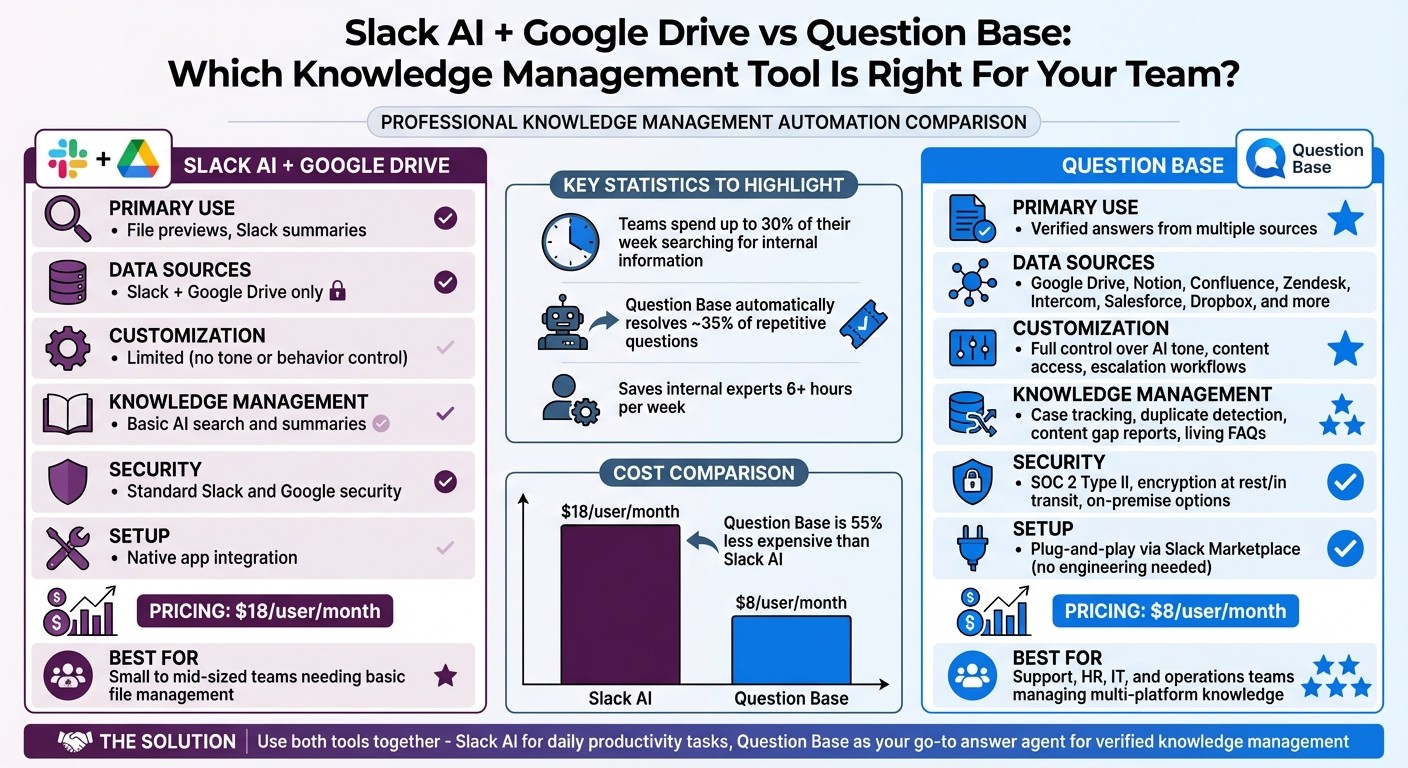
Slack AI vs Question Base: Feature Comparison for Knowledge Management
1. Slack AI with Google Drive
Primary Data Sources
Slack AI relies on two key sources: your Slack conversation history and Google Drive files, such as Docs, Sheets, or Slides, that are shared in Slack channels. When someone drops a Google Drive link into a channel, Slack AI can access the content and generate automatic previews using Slack’s built-in Google Drive integration [3][4]. While Slack AI does pull data from Slack history and other enterprise sources, it doesn’t treat Google Drive as a primary knowledge base [1][2]. These data sources form the foundation for Slack AI’s ability to summarize content effectively.
Knowledge Management Features
Slack AI enhances search functionality by scanning both Slack messages and linked Google Drive files. It provides channel summaries and file recaps, making it easier for teams to catch up on ongoing projects [3]. For example, asking Slack AI about a project might return insights from a shared Google Sheet alongside relevant Slack discussions. Enterprise plans offer additional tools like the Channel Expert agent, which focuses on summarizing existing content. However, Slack AI does not include structured features such as case tracking or duplicate detection [1][2][4].
Integration Capabilities
To integrate Google Drive with Slack, install the Google Drive app from Slack’s App Directory, link your Google account, and share Drive links for instant previews and notifications [4][5]. The Google Drive Bot also sends full comments from files directly into Slack threads, keeping discussions centralized [6]. That said, the integration lacks more advanced features like selective folder indexing or content filtering, which some enterprise teams might require for precise document management [3][5].
Enterprise Readiness
Slack AI is available on paid plans - Pro, Business+, or Enterprise Grid - at $18 per user per month. It operates securely with domain-wide authentication and admin-controlled file permissions [3][4][5][7]. However, it doesn’t offer advanced customization options like on-premise deployment or detailed AI configuration settings [3][5]. While Slack AI integrates smoothly with Google Drive, its primary focus is on quick content retrieval rather than creating a long-term, structured knowledge management system.
Build a Slack AI Agent That Answers Questions (Step-by-Step Tutorial)
2. Question Base

Question Base sets itself apart from Slack AI by focusing on creating an answer layer built from reliable and extensive documentation, rather than solely relying on conversation-based insights.
Primary Data Sources
Question Base connects to a wider range of enterprise tools compared to Slack AI's integration with Google Drive. While Slack AI primarily uses conversation history and linked Drive files, Question Base pulls information from Notion, Confluence, Google Drive, Zendesk, Intercom, Salesforce, Dropbox, and more. When users query the AI in Slack, it searches across all these connected tools simultaneously, not just the files shared within Slack channels. This eliminates the need for manual searches across multiple platforms, ensuring quick and accurate responses. By tapping into this broader pool of data, Question Base ensures that internal knowledge stays verified and up-to-date.
Knowledge Management Features
Question Base approaches knowledge management as a central focus. It identifies unanswered questions to uncover gaps in documentation, flags duplicate inquiries to reduce redundant responses, and captures new insights directly from Slack threads. If the AI is unable to answer a query, it logs the case for review, helping teams pinpoint areas where documentation needs improvement or expansion.
Maria Jensen, UX Lead & Scrum Master at Ticketbutler, shared, "Before, we could easily spend 5-10 minutes searching in a very long document for the exact support case and procedure plus involving several colleagues in trying to find the correct answer. Now, QB finds the relevant answers in a few seconds." [1]
Additionally, the platform provides analytics on metrics like resolution rates, automation rates, and unhelpful responses. This data gives leaders valuable insights into how well their knowledge base is performing. According to company data, Question Base can automatically resolve about 35% of repetitive questions, saving internal experts more than 6 hours per week [1].
Integration Capabilities
Setting up Question Base is effortless - no engineering expertise required. Simply install the app, connect your tools, and invite the bot (/invite @questionbase). The entire setup process takes just a few minutes. For example, when connected to Google Drive, the bot retrieves answers directly without requiring additional manual file sharing. This ease of use stands in contrast to other enterprise solutions that often involve complex integrations and technical support.
Monica Limanto, CEO of Petsy, remarked, "Question Base has exceeded our expectations - it's intuitive and saves significant time. We now have a reliable and useful knowledge base, making it easy to share knowledge across the team." [1]
Enterprise Readiness
While Slack AI relies heavily on chat history within Slack, Question Base ensures greater accuracy by pulling information from a company’s entire documentation ecosystem. Designed with enterprise needs in mind, it meets strict security standards, offering SOC 2 Type II compliance, encryption both at rest and in transit, and even an option for on-premise deployment.
Question Base also allows full customization, letting teams tailor AI tone, behavior, content access, and escalation workflows to human support. For businesses with additional needs, the Enterprise Custom tier includes white-labeling, multi-workspace support, and personalized enhancements. At $8 per user per month, Question Base is less than half the price of Slack AI’s $18 monthly fee, while delivering advanced knowledge management features tailored for internal support teams, HR, and IT operations [1] [2].
Advantages and Disadvantages
When it comes to automating knowledge sharing, the tools you choose need to align with your team’s specific requirements. Both Slack AI with Google Drive and Question Base bring different strengths to the table, catering to distinct use cases.
Slack AI with Google Drive is a solid choice for teams already using Slack on Business+ or Enterprise plans. It shines in managing native file workflows, offering seamless real-time document updates and AI-powered summaries of past conversations. For teams that primarily need basic file management and quick summaries, this integration is simple and effective.
However, the native integration has its shortcomings. It treats all information equally, whether it’s a formal policy document or an outdated chat thread, which can lead to inconsistent results. There’s no way to adjust the AI’s tone, test responses before they go live, or prioritize verified sources over casual Slack conversations. Additionally, if your team relies on knowledge stored outside of Google Drive, you’ll have to depend on third-party integrations, which can add unnecessary complexity.
Question Base, on the other hand, is designed to fill these gaps. Acting as a dedicated answer layer, it connects not just to Google Drive but also to tools like Notion, Confluence, Zendesk, Intercom, and more. This allows it to pull verified information from your entire documentation ecosystem, ensuring accuracy and relevance. It also offers advanced features like identifying unanswered questions, detecting documentation gaps, and providing analytics to improve your knowledge base. At $8 per user per month, it’s a cost-effective option compared to Slack AI’s $18 per user per month fee, while still delivering enterprise-grade security (SOC 2 Type II compliance and on-premise options).
The trade-offs are minimal. Setting up Question Base involves a quick installation from the Slack Marketplace and inviting the bot to your channels - a process that takes just a few minutes. Unlike Slack AI, which offers broader productivity tools like conversation summaries and file creation commands, Question Base focuses exclusively on delivering accurate, verified answers from trusted sources.
Here’s a quick comparison of the two solutions:
Feature | Slack AI + Google Drive | Question Base |
|---|---|---|
Primary Use Case | File sharing, previews, AI summaries of Slack history | Verified answers from multi-source documentation |
Data Sources | Slack chats + Google Drive (Business+ and Enterprise plans) | Google Drive, Notion, Confluence, Zendesk, Intercom, Salesforce, and more |
Customization | Limited; no tone or behavior control | Full control over AI tone, content access, escalation workflows |
Knowledge Management | Basic AI search and summaries | Case tracking, duplicate detection, content gap reports, living FAQs |
Security | Standard Slack and Google security | SOC 2 Type II, encryption at rest/in transit, on-premise options |
Setup | Native app | Plug-and-play via Slack Marketplace; no engineering needed |
Pricing | $18/user/month (Slack AI add-on) | $8/user/month |
Conclusion
Choosing the right tool for automated knowledge sharing ultimately depends on what your team needs most. If your primary challenge is improving file collaboration and search within Slack, Slack AI with Google Drive can be a great fit for small to mid-sized teams. For those already using Slack's Business+ or Enterprise plans, this native integration provides a simple way to boost productivity without bringing in another vendor - especially if most of your knowledge resides in Slack threads and Google Drive files.
On the other hand, for teams managing expertise across multiple platforms, Question Base offers a more comprehensive solution. It pulls verified answers from tools like Google Drive, Notion, Confluence, Zendesk, and Salesforce, making it especially useful for support, HR, IT, and operations teams. If your team handles a high volume of repetitive internal questions, Question Base can help ease the workload on subject matter experts by centralizing and automating responses.
One key difference lies in how these tools handle information. Slack AI treats all data equally, while Question Base allows you to prioritize trusted sources, customize responses, and verify answers. This level of control, along with its deeper integration options, makes Question Base a strong contender for teams requiring more tailored solutions.
From a cost perspective, Question Base is priced at $8 per user per month compared to Slack AI’s $18, offering a budget-friendly option for larger teams.
For many organizations, there's no need to pick just one. Slack AI can handle personal productivity tasks like summarizing threads, searching conversations, and managing everyday file workflows. Meanwhile, Question Base can serve as your go-to answer agent, delivering structured, reliable knowledge for internal support and documentation. Combining Slack AI for day-to-day tasks with Question Base for strategic knowledge management creates a powerful, well-rounded system to meet your team’s needs.
FAQs
How does Question Base improve knowledge management compared to Slack AI?
Question Base reshapes how teams manage knowledge by seamlessly integrating with trusted platforms like Google Drive, Notion, and Salesforce. It delivers expert-approved answers directly in Slack, cutting through the noise and providing instant clarity. While Slack AI focuses on summarizing conversations, Question Base goes a step further by building a structured, searchable knowledge layer that eliminates repetitive questions and streamlines workflows.
Designed with HR, IT, and operations teams in mind, Question Base prioritizes accuracy, transparency, and control through its customizable features. It also transforms insights shared in Slack into a dynamic, ever-evolving knowledge base, making it a perfect fit for enterprises that value precision and streamlined internal support processes.
What internal data sources does Question Base use to provide accurate answers?
Question Base integrates seamlessly with trusted internal tools such as Notion, Confluence, Salesforce, Google Drive, Zendesk, and Intercom. By drawing verified information from these platforms, it guarantees that responses are accurate, dependable, and always reflect your organization’s latest knowledge.
Why would a team use both Slack AI and Question Base together?
Teams can benefit from using both Slack AI and Question Base by leveraging their distinct capabilities. Slack AI is particularly effective at summarizing ongoing conversations and providing quick, context-aware suggestions based on chat activity. On the other hand, Question Base focuses on enterprise-level support by connecting to trusted sources like Google Drive, Confluence, and Salesforce to deliver precise, expert-reviewed answers.
When used together, these tools offer a powerful combination: Slack AI enhances real-time collaboration, while Question Base ensures dependable, structured knowledge retrieval. This synergy boosts productivity, minimizes repetitive questions, and provides the accuracy and security essential for workflows in HR, IT, and operations.