∙
Cooper
∙
Reading time:
16 min

Searching for answers wastes time. Employees spend up to 30% of their week tracking down information, costing enterprises millions annually. RAG bots solve this by delivering accurate, context-aware answers directly in Slack, where teams already collaborate. These bots connect to tools like Notion, Confluence, and Salesforce to pull verified information, reducing repetitive questions by 35% and boosting productivity.
Key Takeaways:
How it works: Combines document retrieval with AI to provide quick, accurate answers.
Why Slack: 80% of employees prefer asking questions in chat tools over wikis.
Enterprise impact: Saves support teams 6+ hours weekly and cuts inefficiencies.
Tech stack: Uses vector databases (e.g., FAISS), LLMs (e.g., GPT-4), and Slack APIs.
Question Base’s RAG bot stands out by integrating seamlessly with trusted sources, ensuring response accuracy and enabling knowledge gap analysis. It’s a smarter way to manage internal knowledge and eliminate wasted time in Slack.
Your Company’s Brain in Slack - AI Agent + RAG in 30 Min (no code)
How RAG Bots Work: Architecture and Workflow
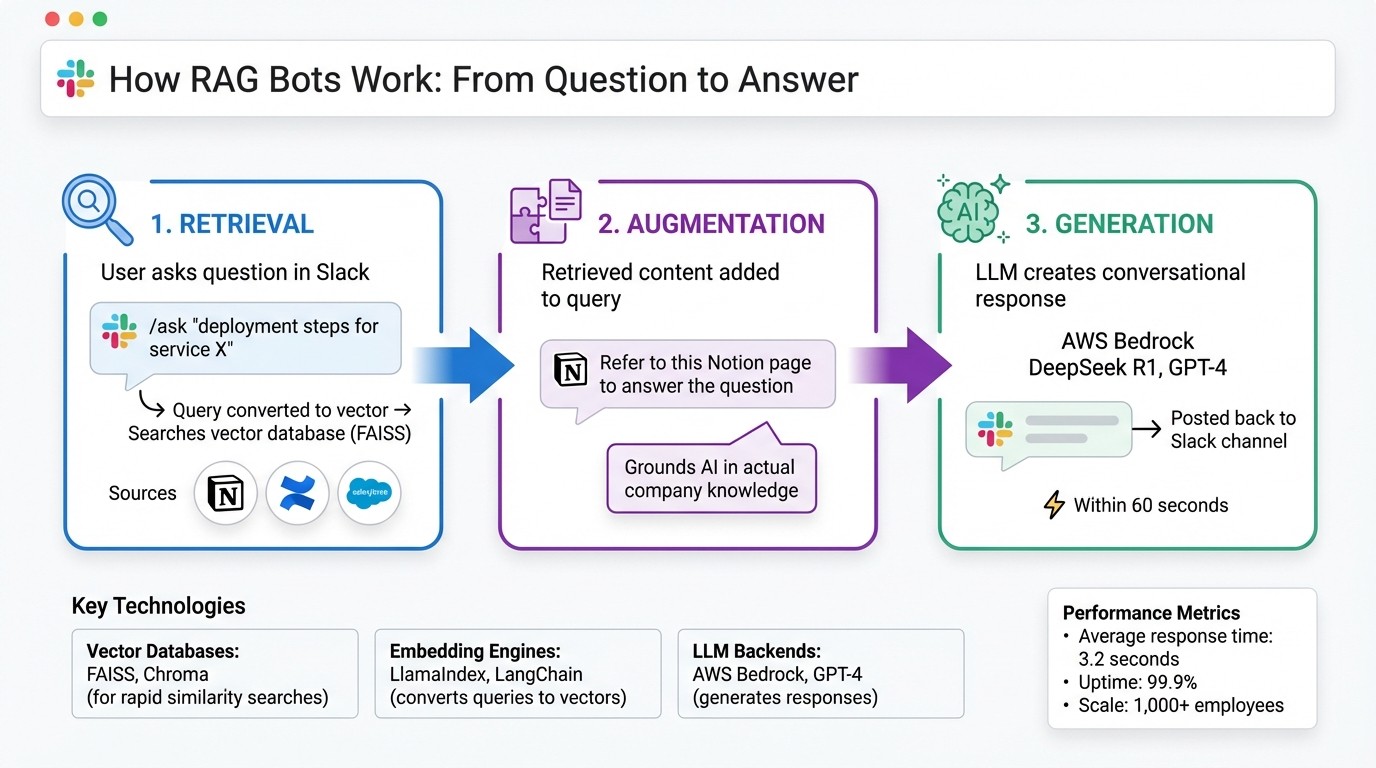
How RAG Bots Work: 3-Stage Process from Query to Answer in Slack
RAG bots combine three essential steps - retrieval, augmentation, and generation - with Slack's messaging capabilities to deliver fast, accurate answers. These bots use Slack's real-time infrastructure to create a smooth knowledge-sharing experience.
The 3-Stage RAG Process
The RAG workflow starts with retrieval. When someone types a question in Slack, such as /ask "deployment steps for service X", the bot converts the query into a numerical format called a vector. It then searches a pre-indexed vector database, like FAISS, for the most relevant content. This content could come from tools like Notion, Confluence, or Salesforce.
Next is augmentation, where the bot adds the retrieved information to the original query. Instead of relying solely on the AI's memory, it provides specific context - for example, "Refer to this Notion page to answer the question about deployment." This step is crucial for grounding the AI's response in your organization's actual knowledge, minimizing the chances of errors or fabricated answers [4][6].
Finally, in the generation phase, the augmented query is sent to a large language model (LLM) like AWS Bedrock's DeepSeek R1 or GPT-4. The LLM processes the information and crafts a clear, conversational response, which is then posted back to the Slack channel - typically within 60 seconds [4][7]. This streamlined process ensures real-time delivery inside Slack.
Integration with Slack
RAG bots connect to Slack using the Events API and frameworks like Bolt, which monitor specific triggers such as mentions, direct messages, or commands like /ask [4][5]. When a query is received, the bot immediately responds with a placeholder like "Thinking..." within three seconds to avoid Slack's timeout limit [5][8]. This quick acknowledgment ensures users aren’t left waiting while the system processes the request.
To manage heavy computational tasks without slowing down Slack, many implementations rely on asynchronous workflows, such as DBOS queues. These workflows handle retrieval and generation in the background and send the final answer once it's ready [5][8]. This setup ensures fast, uninterrupted responses, even for large-scale knowledge bases.
Supporting Technologies
Several technologies power this process. Vector databases like FAISS or Chroma store pre-computed document embeddings, enabling rapid similarity searches across extensive knowledge repositories [4][10]. Embedding engines, often built with tools like LlamaIndex or LangChain, convert both user queries and knowledge base content into these searchable vectors [5][7].
For the generation step, LLM backends are chosen based on specific needs. AWS Bedrock, for instance, offers models like DeepSeek R1 for technical queries and Llama 3.1 405B, while OpenAI's GPT-4 is favored for its conversational tone [4][7]. Together, these technologies create a system capable of serving enterprise-scale operations - handling over 1,000 employees with 99.9% uptime [2] - all while maintaining an average response time of just 3.2 seconds [1].
Features to Look for in a Slack RAG Bot
Selecting the right RAG bot for your enterprise involves focusing on features that ensure precision, scalability, and practical usability. While some bots cater to general productivity, others are specifically designed for internal support, delivering verified and context-specific answers. Below are the key features that set apart an effective Slack RAG bot for enterprise needs.
Knowledge Source Integrations
The accuracy of a bot heavily depends on the knowledge sources it can access. Choose platforms that seamlessly integrate with the tools your organization already relies on - like Notion, Google Drive, Confluence, Salesforce, OneDrive, SharePoint, Dropbox, Jira, and HubSpot. For example, DataDome documented over 500 technical procedures in Notion, enabling its RAG bot to pull answers directly from those records without requiring content migration[4].
If a bot only searches Slack’s chat history, it risks overlooking the wealth of knowledge stored in your documentation platforms. Brigitte Lyons from Podcast Ally put it best:
"Slack is where documentation goes to die, brought up once in passing, and never to be found again."[1]
The most effective RAG bots bridge this gap by indexing trusted knowledge repositories alongside Slack conversations. When assessing integrations, ensure the platform supports APIs or connectors for your existing tools to maximize its utility.
Answer Verification and Customization
Advanced language models can sometimes produce convincing but incorrect responses. To address this, prioritize RAG bots that include verification workflows, allowing subject matter experts to review, adjust, and approve AI-generated answers before they’re widely shared.
For instance, DataDome’s implementation ensures answer quality by making bot interactions visible to the tech department, enabling quick assessments and accountability for accuracy[4]. Some systems also offer emoji-based feedback loops in Slack, where users can flag helpful or unhelpful answers, prompting human review when necessary.
Customization is another critical feature. Teams should have the ability to tailor the bot’s tone, behavior, and response style for different channels. For example, HR responses might adopt a more empathetic tone, while IT answers remain highly technical and precise. Advanced platforms even allow training on internal acronyms and terminology, enhancing the bot’s ability to handle specific queries reliably.
Analytics and Knowledge Gap Detection
A strong RAG bot doesn’t just answer questions - it also helps refine your knowledge base by identifying gaps. The best platforms track metrics like unanswered questions, resolution rates, and user satisfaction scores, offering valuable insights into where your documentation falls short. If, for instance, users frequently ask about a particular process and the bot can’t provide an answer, it’s a clear signal that new documentation is needed.
Look for dashboards that provide detailed insights into commonly asked topics, the effectiveness of answers, and features like duplicate detection to eliminate redundant documentation. Some platforms even automate responses to repetitive questions, saving significant time. For example, a 1,000-person company could save six hours weekly and reduce annual search-related inefficiencies by over $2 million[1][2].
Deploying a RAG Bot in Slack: What to Consider
Setup and Permissions
Getting your RAG bot up and running starts with setting up OAuth in the Slack API dashboard. Begin by creating a Slack app, enabling either Socket Mode or HTTP endpoints for event subscriptions, and configuring OAuth scopes like chat:write, channels:read, and groups:read to control what channels the bot can access. Stick to the principle of least privilege by using dedicated bot tokens (xoxb-) or user tokens (xoxp-) to avoid granting unnecessary permissions[5].
To enhance security, store sensitive credentials - such as SLACK_BOT_TOKEN, SLACK_APP_TOKEN, and SIGNING_SECRET - in a .env file. This setup not only simplifies token rotation but also minimizes the risk of accidental exposure. In enterprise environments, you can leverage Slack's Enterprise Key Management (EKM) and Enterprise Grid features to meet data residency requirements and access audit logs for compliance purposes[4].
Data Indexing Strategies
Once permissions are configured, focus on optimizing your data indexing for fast and accurate retrieval. Break documents into manageable chunks of 500–1,000 tokens before embedding them with models like AWS Bedrock. Store these embeddings in vector databases such as FAISS or Postgres with vector indexes, which allow for quick retrieval. For example, DataDome successfully indexed over 500 Notion pages into FAISS, enabling their bot to match user query vectors and fetch relevant content in under a minute[4].
To ensure your knowledge base stays up to date, adopt a mix of full re-indexing and incremental updates. Use scheduled cron jobs or event-driven triggers, like webhooks from Notion or Slack, to handle recent changes. This approach balances system performance with the need for fresh content. When dealing with large Slack channel histories, use cursor-based pagination to efficiently fetch historical messages without hitting API rate limits[9].
Common Challenges and Solutions
After your bot is up and running, you’ll likely face a few hurdles, such as maintaining data freshness, ensuring security, and addressing unresolved queries. To keep your index current without frequent full re-indexing, deploy asynchronous change capture mechanisms that update only the most recent changes.
On the security front, enforce role-based access control (RBAC), encrypt vector embeddings, and log all bot queries and responses. For example, checking the HTTP_X_SLACK_RETRY_NUM header can prevent duplicate message processing and ensure idempotency[10]. When the bot encounters queries it cannot resolve, configure it to respond with "I don't know" while citing relevant sources to avoid generating inaccurate answers.
Start small by launching the bot in a single Slack channel. Monitor its response times (aim for under 3 seconds) and gather user feedback to make improvements. A gradual rollout helps you catch and fix issues early, building trust and confidence among your team before deploying it across the organization.
Question Base vs. Slack AI: Comparing RAG Solutions

Feature Comparison
Slack AI shines when it comes to summarizing conversations and pulling insights from past discussions. But when your team needs reliable, accurate knowledge at scale - especially for areas like HR policies, IT troubleshooting, or operational procedures - the differences between Slack AI and Question Base become clear.
Question Base is specifically designed for enterprise knowledge management and internal support. Unlike Slack AI, which relies on learning from chat history, Question Base connects directly to your trusted documentation sources such as Notion, Confluence, Salesforce, Google Drive, and Zendesk. This ensures that answers are derived from human-verified content, not AI interpretations of past messages.
Feature | Question Base | Slack AI |
|---|---|---|
Accuracy | Based on human-verified content from trusted sources | AI-generated from Slack messages |
Data Sources | Integrates with Notion, Confluence, Salesforce, Google Drive, Zendesk, and more | Primarily Slack chat history |
Knowledge Management | Includes case tracking, duplicate detection, and gap analysis | Limited to conversation summarization |
Analytics | Tracks resolution rates, automation metrics, and knowledge gaps | Basic usage statistics only |
Enterprise Compliance | SOC 2 Type II, on-premise options, audit logs | Standard Slack enterprise security |
Question Base delivers answers with an impressive 99.99% accuracy rate on verified content, with an average response time of just 3.2 seconds inside Slack[1]. Its analytics capabilities are a game-changer: it tracks resolution rates, identifies knowledge gaps, and measures automation effectiveness, giving you actionable insights into where your documentation can improve. In contrast, Slack AI offers only basic usage stats and lacks the tools to uncover systematic gaps or evaluate support team performance.
These distinctions highlight how Question Base is tailored to tackle enterprise knowledge challenges more effectively than Slack AI.
Use Case Alignment
The feature differences between the two tools directly influence how well they align with enterprise needs. For teams managing compliance-sensitive inquiries - such as questions about benefits, security protocols, or customer data policies - Question Base's verification layer is indispensable. For example, when DataDome implemented their RAG bot (DomeRunner) to manage more than 500 internal technical procedures, they achieved 100% accuracy for questions backed by solid documentation, with all responses made publicly visible for quality assurance[4]. This level of transparency and accountability is simply not achievable with Slack AI's chat-focused approach.
"Since we started using QB we haven't used our Google support docs. And if I go on vacation or sick leave, I feel comfortable that QB will just take over." - Linn Stokke, Online Events & Marketing Specialist, Ticketbutler
Question Base also saves internal experts over 6 hours per week by automating up to 35% of repetitive questions[1][2]. It achieves automation rates of 90% or higher for FAQs in enterprise settings, freeing up subject matter experts to focus on more complex, strategic tasks. While Slack AI can help individuals locate information faster, it lacks the structured knowledge management features needed to reduce the overall organizational workload.
If you've ever found yourself saying, "It's in Notion - go look it up", you'll appreciate how Question Base takes care of that for you.
Cost and Scalability
Question Base offers transparent, enterprise-friendly pricing. The Starter plan is free for one integration (up to 10 pages). The Pro plan costs $8 per user/month, with annual discounts of about 37%. This tier supports up to 200 pages per seat and integrates with tools like Google Drive, Notion, and Confluence. For larger organizations requiring on-premise deployment, white-labeling, or multi-workspace support, the Enterprise plan offers custom pricing along with SOC 2 Type II compliance.
Slack AI, on the other hand, operates within Slack’s standard pricing model, which is better suited for basic support needs. Question Base, however, scales seamlessly to meet enterprise-level demands. It offers specialized infrastructure designed for organizing knowledge by team or department. For a company with 1,000 employees, the cost of lost productivity - caused by searching for information and answering repetitive questions - can reach an estimated $2 million annually[1]. Question Base directly addresses this issue by reducing search times and eliminating redundant work.
"It's like having an extra person answering questions in Slack." - Willem Bens, Manager of Sales North EMEA, DoIT International[1]
The real question of scalability comes down to what your organization needs most: a dedicated knowledge management platform or a conversational productivity tool. Slack AI integrates effortlessly into your existing Slack workspace with minimal setup. Question Base, on the other hand, requires a more deliberate implementation process - connecting data sources, setting governance rules, and configuring escalation workflows. But the reward is a dynamic knowledge system that evolves alongside your organization.
For industries where precision, accountability, and ownership of knowledge are critical - such as healthcare, finance, or legal - Question Base's enterprise-grade capabilities far exceed what Slack AI's general-purpose approach can deliver.
Conclusion: Transforming Knowledge Management with RAG Bots in Slack
RAG bots are changing how enterprises manage knowledge. Instead of making employees sift through multiple documentation platforms, these bots deliver answers directly within Slack - where most employees already prefer to ask their questions[1]. By following a three-stage RAG process, they ensure responses are rooted in your organization’s specific documentation, avoiding generic answers while meeting the accuracy and compliance requirements enterprises depend on. The result? Tangible ROI and smarter workflows.
Question Base is purpose-built for enterprise environments. It integrates seamlessly with trusted tools like Notion, Confluence, Salesforce, and Google Drive, delivering answers with an impressive 99.9% accuracy on verified content[3]. Beyond just answering questions, it offers advanced features like case tracking, knowledge gap detection, and resolution analytics - tools that help teams refine and improve their documentation over time. Whether it’s HR teams clarifying benefits policies, IT teams resolving technical issues, or operations teams coordinating across departments, this precision and accountability are invaluable.
"Question Base transformed our internal knowledge access, ensuring every answer is accurate and instantly accessible. It's become an indispensable tool for our knowledge experts." - Monica Limanto, CEO, Petsy[1][2]
What sets Question Base apart is its direct connection to trusted sources, which eliminates knowledge silos and ensures the right information reaches the right people at the right time. With features like department-specific knowledge partitioning[11], enterprises can customize responses based on roles and responsibilities, creating tailored support for every team.
This isn’t just a search tool - it’s an answer layer designed to scale with your organization. As your company grows, RAG bots become even more valuable, leveraging your existing documentation investments to tackle the challenges of scattered knowledge and repetitive questions. They don’t just keep your team aligned - they keep them moving forward.
FAQs
How can RAG bots enhance team productivity in Slack?
RAG bots enhance team productivity in Slack by providing precise, context-specific answers right where your team communicates. They tap into trusted knowledge bases like Notion, Confluence, and Salesforce to deliver verified information, cutting out the hassle of manual searches or repeated questions.
By handling frequent queries automatically, RAG bots allow experts to concentrate on more strategic priorities. They simplify workflows and ensure teams have quick access to accurate, current information. This reduces distractions, keeps everyone on the same page, and helps save valuable time while improving overall efficiency.
What technologies power RAG bots and how do they work?
RAG (Retrieval-Augmented Generation) bots are designed to deliver accurate, context-aware answers by combining a large language model (LLM) with a robust information retrieval system. Here's how the key components work together:
Vector store or search engine: This indexes and retrieves documents efficiently, ensuring the bot can access relevant information quickly.
Data ingestion and embedding pipelines: These tools process and structure external knowledge sources, making the data usable for the system.
Orchestration code: Often written in Python and utilizing frameworks like LangChain, this integrates the various components and ensures that the right data is fed into the LLM.
By leveraging these technologies, RAG bots can access reliable external information and generate responses that are both precise and tailored to the user's needs.
How does Question Base deliver accurate answers in Slack?
Question Base prioritizes precision by pulling answers directly from reliable enterprise sources like Notion, Confluence, Salesforce, OneDrive, and Google Drive, instead of depending solely on chat history. This approach ensures that responses are grounded in your organization's most trusted knowledge repositories. Using Retrieval-Augmented Generation (RAG), the platform retrieves the most relevant information from these sources whenever a question arises.
To further ensure accuracy, every response is reviewed and verified by subject-matter experts. These experts validate the information and link it back to the original documents, providing clear citations. This process not only guarantees that answers are dependable and auditable but also ensures they align with your organization’s established knowledge standards. By delivering expert-verified, context-aware responses directly in Slack, Question Base helps teams maintain alignment and boost productivity.