∙
Cooper
∙
Reading time:
16 min

Every day, critical company information - HR policies, customer data, product plans - flows through Slack. Yet, employees spend 20–30% of their week searching for buried details, costing a 1,000-person company over $2 million annually in lost productivity. Worse, outdated or inaccessible info leads to repeated questions and poor decisions.
A private Slack RAG (Retrieval-Augmented Generation) agent solves this by delivering accurate answers directly from your trusted knowledge bases (Notion, Confluence, Salesforce) without exposing sensitive data to external servers. Unlike traditional AI tools, these agents respect access controls, keep data within your infrastructure, and meet compliance standards like SOC 2.
Here’s how it works:
Employees ask questions in Slack.
The agent retrieves answers from verified sources in 3.2 seconds.
Data stays secure, with no external storage or third-party training.
This guide covers setting up a private Slack RAG agent to improve productivity, protect sensitive information, and ensure compliance - all for as little as $8 per user per month.
How to Build a Slack RAG Agent with n8n (Step-by-Step Tutorial)
What is a Private Slack RAG Agent?
A private Slack RAG agent blends natural language processing with real-time data retrieval from your verified enterprise resources to provide precise, context-specific answers. Unlike systems that depend solely on pre-trained data, a RAG agent pulls information directly from trusted documentation, such as Notion pages, Confluence wikis, Salesforce records, and OneDrive files.
Here’s how it works: when a question is asked in Slack, the agent searches your connected knowledge bases and delivers an accurate, context-aware response in just 3.2 seconds on average [2]. The "private" aspect ensures that your data stays within your controlled environment. Whether hosted on AWS or on-premise, your customer data never leaves your infrastructure and is not used to train third-party language models [1][3]. The system transmits only the minimum data required for each task to the language model during inference, with no permanent storage on external servers.
This design tackles a common workplace challenge: 80% of employees prefer asking questions in chat rather than navigating a company wiki [2]. By integrating into Slack - where employees are already working - RAG agents provide accurate answers without exposing sensitive data to external APIs or training systems. This approach not only boosts productivity but also reinforces your organization's data security.
How RAG Enhances Slack Productivity
RAG agents elevate Slack from a basic communication tool to an intelligent knowledge hub. For example, when someone asks, "What’s our parental leave policy?" or "How do I reset a customer’s password?", the agent retrieves the answer directly from the relevant HR manual or IT documentation.
The impact on productivity is notable. Companies report saving over six hours per week per internal expert by automating repetitive questions [2]. In large organizations, where up to 40% of internal queries are repetitive [2], these agents reduce constant interruptions, allowing subject matter experts to focus on more strategic tasks.
Willem Bens, Manager of Sales North EMEA at DoIT International, describes it this way: "It's like having an extra person answering questions in Slack" [2].
While Slack AI is effective for summarizing conversations and recapping threads, it primarily relies on Slack message history. In contrast, RAG agents connect directly to verified documentation, ensuring answers are based on expert-approved sources and remain consistent.
In addition to enhancing productivity, RAG agents strengthen data security through robust access controls.
Security Benefits of Private RAG Agents
Private RAG agents keep your data within your organization’s secure boundaries. They retrieve information using short-lived "action tokens" that expire immediately after use, ensuring no customer data is stored on disk [5][1].
Security is further reinforced with visibility-based access controls. The agent retrieves only the content that the user requesting the information is authorized to access [4][3]. For instance, if someone in marketing asks about engineering roadmaps they don’t have permission to view, the agent won’t surface that information. It strictly adheres to your existing Access Control Lists (ACLs) across connected systems.
For organizations with stringent compliance needs, private RAG agents support frameworks like SOC 2 Type II, FedRAMP, and Enterprise Key Management (EKM) [4][2][3]. Question Base, for example, offers SOC 2 Type II compliance and on-premise deployment options at $8 per user per month [2]. This is significantly more cost-effective than Slack AI’s $18 per user per month pricing [2], which is only available on Business+ and Enterprise plans. With private RAG agents, enterprises can achieve top-tier security without the need for massive infrastructure investments.
How to Set Up a Private Slack RAG Agent
Setting up a private Slack RAG agent involves three key steps: configuring your Slack app with the necessary permissions, linking your enterprise data sources, and establishing robust access controls. While this process typically takes a few hours for technical teams, enterprise solutions like Question Base simplify deployment with guided setup options.
By following these steps, you can securely deploy your agent within Slack's environment. This ensures that customer data remains within your infrastructure during processing, offering both security and peace of mind [3].
Install and Configure the Slack RAG Agent
To begin, register a custom Slack app and enable the Agents & AI Apps feature in your workspace settings [5]. This step is crucial, as it activates the advanced capabilities needed for your RAG agent to function as a smart assistant rather than just a basic bot.
Next, assign the appropriate API scopes to your app to enable data retrieval and response functionalities. For retrieving information, configure the following scopes: search:read.public, search:read.private, search:read.mpim, search:read.im, and search:read.files [5]. To handle responses and assist users, add assistant:write, im:history, and chat:write [5]. These permissions ensure the agent can access Slack content securely while respecting privacy boundaries.
Real-time functionality requires event subscriptions. Subscribe to key events like app_mention, message.im, and assistant_thread_started to receive an action_token, a temporary credential used for secure RAG queries [5][1]. Every time a user mentions the agent or sends a direct message, these events trigger the agent to respond using the action_token.
Required Event | Purpose |
|---|---|
| Activates the agent when mentioned in a channel [5] |
| Enables the agent to reply to direct messages [5] |
| Alerts the app when a new assistant thread begins [5] |
To further secure your deployment, host your Large Language Model in a Virtual Private Cloud (VPC) on platforms like AWS. This ensures that data processing stays within your trusted infrastructure [3].
Connect Your Enterprise Data Sources
Once your Slack app is configured, the next step is linking your enterprise data sources. Instead of duplicating all your documents into a separate database, use a federated real-time retrieval approach [6]. This method queries your existing systems - such as Notion, Confluence, Salesforce, and OneDrive - on demand, only retrieving the information needed to answer specific questions.
Secure these connections using OAuth, requesting only the minimal "read" permissions necessary for each data source. This aligns with the principle of least privilege. As Ian Hoffman, a Staff Software Engineer at Slack, explains:
By leveraging OAuth, we ensure that enterprise search can never perform an action the user did not authorize the system to perform in the external system [6].
This approach avoids training models on your data and instead relies on Retrieval Augmented Generation (RAG). As Hoffman describes:
We use Retrieval Augmented Generation (RAG) instead of training LLMs. Using RAG, we supply an LLM with only the content needed to complete the task. This content is permissioned to the user and only available to the LLM at runtime [6].
Enable citations for every response to allow users to verify answers against the original documents. This builds trust and ensures employees can access additional context when needed [7][1].
Set Up Access Permissions and Controls
Your RAG agent must respect existing permissions across connected systems. Implement Access Control List (ACL) mapping to ensure the agent only retrieves information that the requesting user is authorized to access [6][3]. For example, if a marketing team member asks about engineering roadmaps they don't have permission to view, the agent will not surface that information.
Additionally, configure per-channel settings to tailor the agent's behavior based on the context. For instance, the #hr-questions channel might connect to HR documentation and benefits systems, while #engineering-support links to technical wikis and incident response guides. This segmentation ensures that answers remain relevant and prevents unintentional data exposure.
Enterprise-grade solutions like Question Base provide SOC 2 Type II compliance and on-premise deployment options for $8 per user per month [2]. This delivers strong security without requiring significant infrastructure investments.
Before rolling out the agent organization-wide, thoroughly test your access controls. Have employees from different departments and with varying permission levels ask questions to verify that the agent retrieves - or restricts - information correctly. This step ensures your security model is functioning as intended before the agent becomes part of your team's daily workflow.
Why Use Question Base for Slack RAG

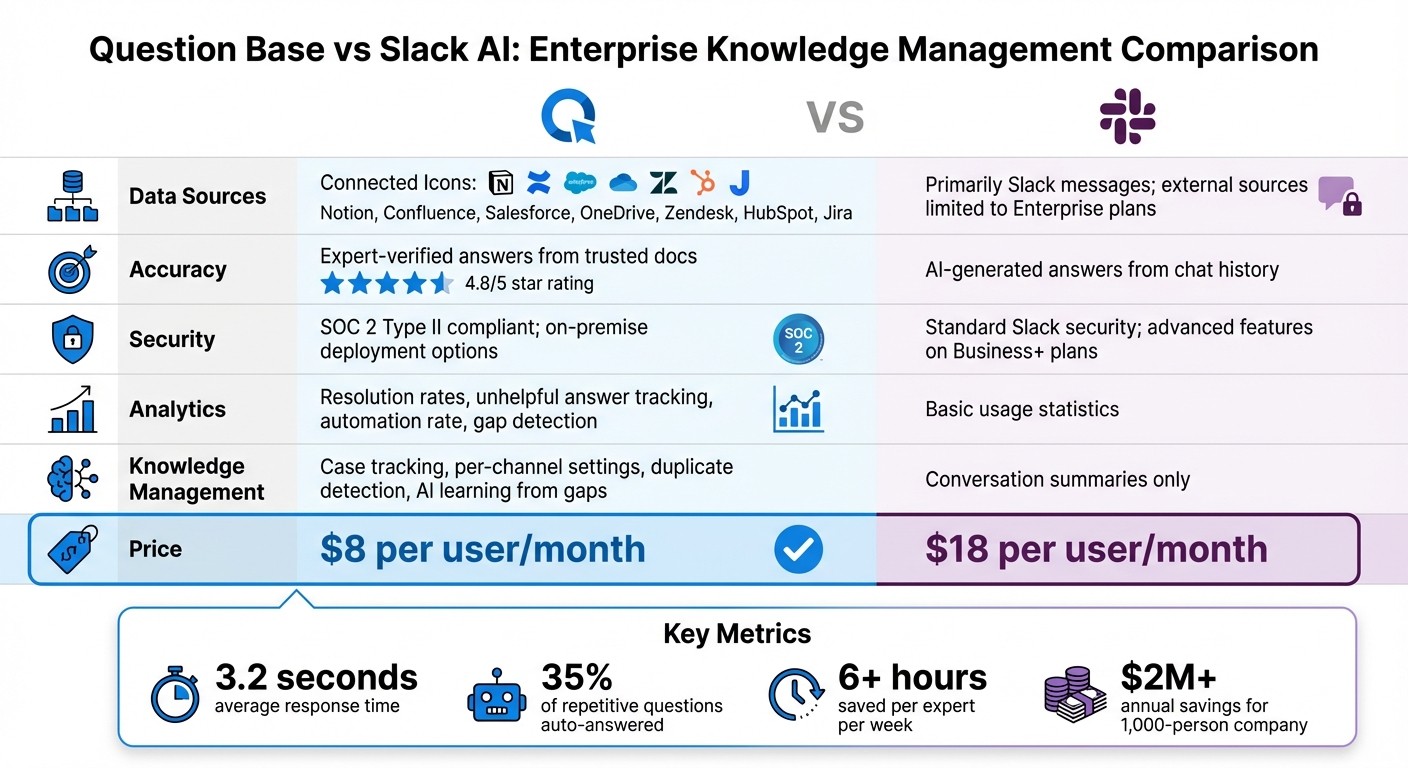
Question Base vs Slack AI: Feature and Pricing Comparison for Enterprise Teams
While Slack AI provides tools like conversation summaries, Question Base goes further by delivering verified, context-specific knowledge tailored for enterprise teams. It’s built with the needs of HR, IT, and operations teams in mind, offering precise, auditable control over internal knowledge.
What Sets Question Base Apart
Unlike Slack AI, which primarily depends on chat history, Question Base connects directly to your trusted documentation sources - including Notion, Confluence, Salesforce, OneDrive, Zendesk, HubSpot, Jira, and more [2]. This ensures that the answers your team receives are drawn from expert-approved resources, not AI-generated interpretations of past conversations. This approach allows you to capture team knowledge without losing context. The result? Fewer repetitive questions and more accurate responses, as confirmed by internal data.
Monica Limanto, CEO of Petsy, shared her experience with Question Base:
We implemented Question Base to eliminate repetitive questions and to collate answers and information in one place for a growing team. Question Base has exceeded our expectations - it's easy to use, intuitive, and a massive time saver [2].
In addition to its accuracy, Question Base offers significant cost advantages. Priced at $8 per user per month, it’s far more affordable than Slack AI’s $18 per user per month [2]. The platform also includes enterprise-grade features like SOC 2 Type II compliance, on-premise deployment options, case tracking, duplicate detection, and detailed analytics - features that help teams identify gaps in their knowledge and improve over time.
Here’s a closer look at how Question Base stacks up against Slack AI:
Question Base vs. Slack AI Comparison
Feature | Question Base | Slack AI |
|---|---|---|
Data Sources | Notion, Confluence, Salesforce, OneDrive, Zendesk, HubSpot, Jira | Primarily Slack messages; external sources limited to Enterprise plans |
Accuracy | Expert-verified answers from trusted docs (4.8/5 user rating) | AI-generated answers from chat history |
Security | SOC 2 Type II compliant; on-premise deployment options | Standard Slack security; advanced features available on Business+ plans |
Analytics | Resolution rates, unhelpful answer tracking, automation rate, gap detection | Basic usage statistics |
Knowledge Management | Case tracking, per-channel settings, duplicate detection, AI learning from gaps | Conversation summaries only |
Price | $8 per user/month | $18 per user/month |
This table highlights how Question Base is designed to streamline enterprise knowledge management in ways Slack AI simply cannot. By operationalizing internal knowledge, Question Base ensures teams stay aligned and productive. Linn Stokke, Online Events & Marketing Specialist at Ticketbutler, summed it up perfectly:
Since we started using QB we haven't used our Google support docs. And if I go on vacation or sick leave, I feel comfortable that QB will just take over [2].
Monitor and Improve Your Slack RAG Agent
Once your private RAG agent is up and running, the next step is ensuring it continues to perform effectively. Regular monitoring is key to maintaining accuracy, security, and relevance. Enterprises that actively track performance metrics find that roughly 35% of repetitive questions are resolved automatically, saving internal experts over 6 hours each week [2]. This ongoing oversight transforms your initial setup into a dynamic, evolving solution that delivers sustained value.
Track Performance and Identify Knowledge Gaps
Focus on metrics that boost productivity and reliability. Question Base offers built-in analytics to measure key indicators like resolution rate (the percentage of questions resolved without human help), automation rate (how many repetitive queries are handled by AI), and answer accuracy scores. These metrics reflect how well your knowledge base aligns with the actual questions your team encounters.
Pay attention to unanswered questions and gaps in knowledge. If the RAG agent can't find a suitable answer, it should log the query, allowing you to pinpoint missing documentation. Question Base includes tools for case tracking and duplicate detection, helping you identify recurring questions across different channels. This not only highlights areas needing updates but also creates a feedback loop that turns your AI from a static tool into one that continuously adapts and improves.
Keep an eye on response times. Enterprises using Question Base report an average response time of 3.2 seconds [2], which helps maintain productivity and reduces the need for employees to interrupt busy managers. If response times start to lag, it’s worth reviewing factors like data indexing or permission check processes to ensure everything runs smoothly.
Prioritize Compliance and Data Security
While performance tracking ensures functionality, compliance measures protect the integrity of your data. Security monitoring is non-negotiable for regulatory compliance. Your RAG agent should enforce query-time permissions using OAuth, ensuring it only retrieves data that users are authorized to access [6][1]. For instance, if an employee doesn’t have permission to view a private Confluence page or a restricted Salesforce record, the RAG agent won’t display that data in Slack - even if it exists in the knowledge base.
Leverage audit logs for transparency. By integrating your RAG agent with tools like Splunk or Microsoft Sentinel, you can monitor user access, AI responses, and any unusual patterns in queries. Question Base is SOC 2 Type II compliant and provides on-premise deployment options for organizations with strict data residency requirements [2]. For government agencies or highly regulated industries, ensure your system supports FedRAMP Moderate or High standards [3][4].
Adopt a minimal data retention policy. Store only what’s absolutely necessary and for as long as required. For example, conversation summaries should be temporary and automatically deleted if the original messages are removed per compliance policies [1]. Modern RAG agents use stateless retrieval, meaning data is only accessed during inference and isn’t retained for training [3][1]. This approach reduces risks while still providing personalized, context-aware answers.
Conclusion
Following the setup and monitoring steps outlined earlier, a private Slack RAG agent transforms how enterprises manage and secure access to corporate knowledge. By using a solution like Question Base, you’re adding a secure layer that enforces permissions, meets compliance requirements, and delivers verified answers in seconds. For large teams, these benefits translate into noticeable productivity improvements.
Question Base is designed specifically for enterprise-level knowledge management. While Slack AI excels at summarizing conversations and boosting general productivity, Question Base goes a step further by connecting directly to your trusted repositories like Notion, Confluence, and Salesforce. This ensures you get human-verified answers rather than AI-generated interpretations of chat history. At $8 per user per month, Question Base offers deeper integrations with tools like Notion and Confluence, and it’s more cost-effective compared to Slack AI’s $18 per user per month.
The impact is clear. Teams using Question Base have reported an average response time of just 3.2 seconds within Slack, with roughly 35% of repetitive questions being auto-answered. This efficiency saves internal experts over 6 hours each week [2]. Linn Stokke, Online Events & Marketing Specialist at Ticketbutler, shared her experience:
Since we started using QB we haven't used our Google support docs. And if I go on vacation or sick leave, I feel comfortable that QB will just take over [2].
With features like query-time permission enforcement, zero-data training policies, and built-in analytics to identify knowledge gaps, your private RAG agent becomes a continuously improving system. It ensures speed without compromising security or accuracy. For enterprises that prioritize protecting sensitive data while giving employees instant access to reliable knowledge, a private Slack RAG agent is a game-changer.
FAQs
How does a private Slack RAG agent protect sensitive company data and ensure compliance?
A private Slack Retrieval-Augmented Generation (RAG) agent ensures the protection of sensitive company data by integrating Slack’s enterprise-grade security features with its own permission-based access controls. Communication between the agent and Slack is encrypted using TLS 1.2, while any stored data is safeguarded with encryption at rest using FIPS 140-2 compliant keys. Operating entirely within Slack, the agent adheres to existing channel- and user-level permissions, ensuring it only retrieves approved documents from platforms like Notion, Confluence, Salesforce, or OneDrive.
These private RAG agents also align with Slack’s compliance standards, including ISO 27001, GDPR, CCPA, and SOC 2 Type II certifications. They maintain detailed logs of all retrieval requests, providing transparent audit trails to support security reviews and demonstrate compliance. By leveraging Slack’s secure infrastructure, these agents keep corporate knowledge encrypted, traceable, and safeguarded against unauthorized access - making them a reliable solution for HR, IT, and operations teams managing sensitive data.
How does Question Base offer better cost efficiency compared to Slack AI?
Question Base is tailored to meet the demands of enterprise knowledge management, offering standout features such as integrations with trusted tools like Notion, Confluence, and Salesforce, expert-verified answers, and advanced analytics. While Slack AI performs well for summarizing conversations and boosting general productivity, its capabilities are largely tied to chat history and don’t include some of the enterprise-level features that Question Base brings to the table.
Pricing information for both platforms isn’t readily available here, making a direct cost comparison challenging. To get a detailed understanding of the costs and benefits, consider visiting the comparison page on Question Base’s website or contacting the vendors directly for the latest pricing details.
How do I connect a Slack RAG agent to my enterprise tools and data sources?
Integrating a private Slack RAG agent with your enterprise tools is straightforward when using Question Base. Start by installing the Question Base app in Slack. Simply click Add to Slack and approve the required permissions. This step ensures the agent can respond seamlessly in any Slack channel where it’s invited.
Next, link your go-to data sources such as Notion, Confluence, Salesforce, or Google Drive through the Question Base dashboard. Once connected, the agent securely indexes your content, guaranteeing that responses are accurate and based on verified information from your trusted repositories.
Finally, fine-tune the agent’s behavior to suit your needs. Adjust permissions, define specific knowledge scopes, and activate features like case tracking. With everything configured, the agent leverages Retrieval-Augmented Generation (RAG) to provide concise, context-aware answers directly in Slack. All of this happens while keeping your data secure and accessible within your established ecosystem.