∙
Cooper
∙
Reading time:
16 min

Repetitive questions in Slack waste time and disrupt workflows. If your team struggles with scattered knowledge and constant context-switching, there are better tools than Agentforce for managing internal knowledge. While Agentforce is powerful, its high cost ($18/user/month), reliance on Salesforce, and engineering demands make it impractical for many teams.
Here’s a breakdown of five Slack-focused alternatives that deliver expert-verified answers from trusted sources, reduce repetitive queries, and simplify knowledge sharing - all without requiring heavy technical resources:
Question Base: AI-powered, Slack-native, connects to tools like Notion and Salesforce, and delivers verified answers in seconds.
Guru: Uses knowledge cards for verified information, integrates with 150+ apps, and supports contextual Slack searches.
Bloomfire: Offers AI-driven search and categorization for structured knowledge sharing across teams.
Document360: Focuses on scalable documentation with AI tools for organizing and searching content.
Confluence: A wiki-style hub with AI features for summarizing and answering questions in Slack.
Each tool caters to different needs, whether you’re optimizing Slack workflows, building a centralized knowledge base, or managing large-scale documentation. Below is a quick comparison of their features to help you decide.
Quick Comparison
Solution | AI Knowledge | Slack Integration | Customization | Analytics | Security | Cost |
|---|---|---|---|---|---|---|
Question Base | Verified answers from trusted sources | Native, seamless in Slack | Per-channel settings, AI tone control | Tracks resolution rate, content gaps | SOC 2 Type II, on-premise options | $8/user/month |
Guru | Verified knowledge cards | Context-aware in Slack | Card-based structure | Usage analytics | Enterprise-level controls | Contact for pricing |
Bloomfire | AI search & categorization | Integration-based | Structured sharing | Engagement analytics | Enterprise permissions | Contact for pricing |
Document360 | Integration-based | Versioning, smart search | Content gap analysis | SOC 2, GDPR compliance | Contact for pricing | |
Confluence | AI summaries, wiki-first | Integration-based | 70+ templates, 3,000+ apps | Standard Atlassian tools | Atlassian Cloud security | Contact for pricing |
Key Takeaway: If your team relies heavily on Slack, Question Base offers the most seamless, cost-effective solution for verified, real-time answers. For centralized documentation, consider Confluence or Document360, while Guru excels in surfacing contextual knowledge.
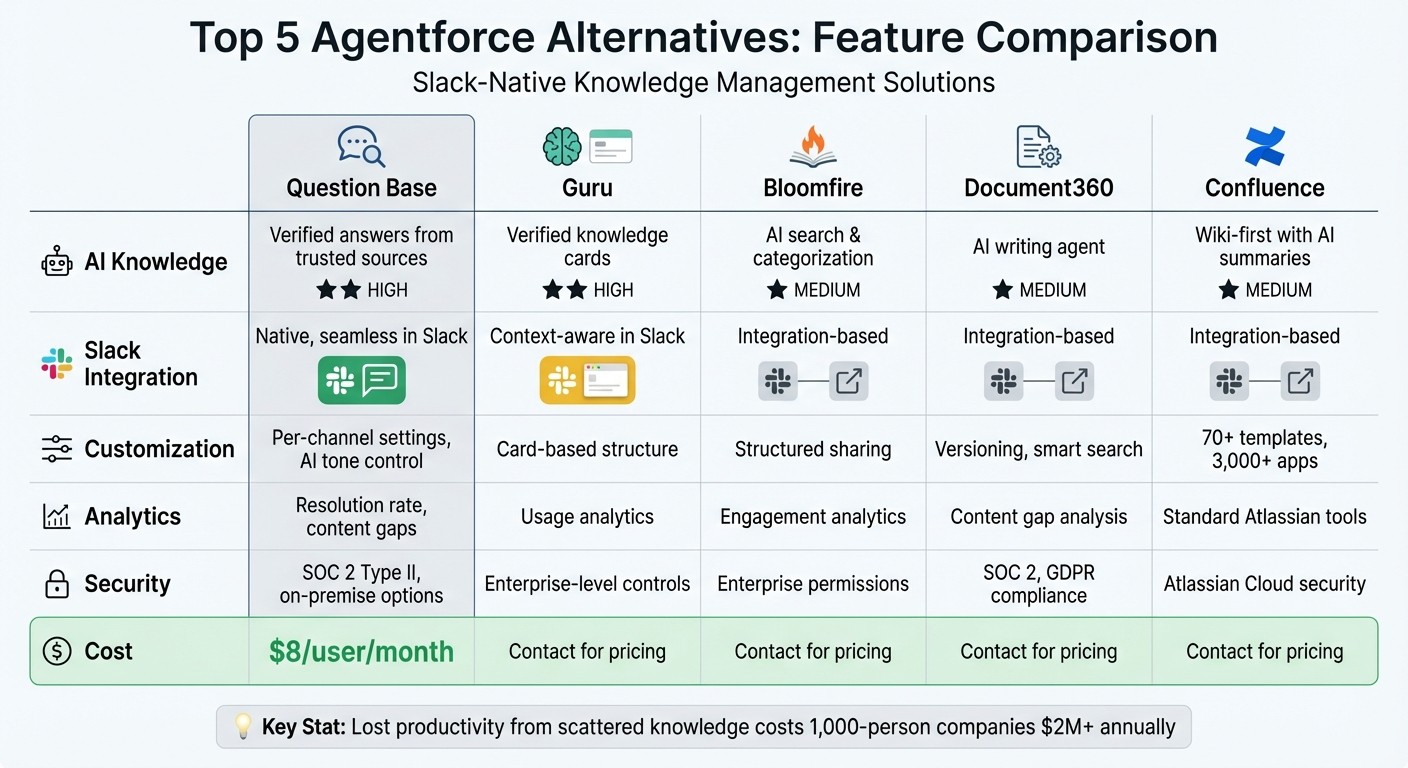
Agentforce Alternatives Comparison: Features, Integration & Pricing
How to build an AI Slack bot connected to company knowledge (Tutorial)
1. Question Base

Question Base is an AI-powered tool designed specifically for enterprise support teams using Slack. Unlike general AI tools that merely summarize past conversations, it directly connects to your trusted documentation sources - such as Notion, Confluence, Salesforce, Google Drive, and OneDrive - delivering verified answers with source citations in just 3.2 seconds on average [5].
AI Knowledge Capture
Question Base simplifies knowledge management by pulling answers directly from your trusted documentation and saving expert Slack responses with a single click. This approach has achieved a 35% auto-answer rate during initial pilot programs [2][5]. The AI also identifies connections across multiple answers, creating a more cohesive knowledge base [2].
Slack Integration
Fully integrated within Slack, Question Base requires no additional portals or logins. Once installed and invited using /invite @questionbase, it monitors Slack channels for questions, escalating unresolved ones to designated experts through customizable workflows [2].
"Since we started using QB we haven't used our Google support docs. And if I go on vacation or sick leave, I feel comfortable that QB will just take over" [5].
Linn Stokke, Online Events & Marketing Specialist, Ticketbutler
Customization
Admins have the flexibility to tailor the AI's tone, decide which channels it monitors, and set up escalation protocols. The system includes duplicate detection, alerting users when similar answers already exist to avoid redundant knowledge. For a 1,000-person company, the cost of lost productivity from searching Slack for information can exceed $2 million annually [5]. Question Base tackles this issue with a 99.99% accuracy rate for verified answers [2], saving internal experts over 6 hours per week by cutting down repetitive queries [5].
Analytics & Reporting
An intuitive dashboard provides insights into automation rates, resolution times, and case histories across all Slack channels. If users mark an answer as "unhelpful", the system flags it for review, enabling teams to refine training and identify content gaps [5]. By significantly reducing search times and offering actionable analytics, Question Base helps teams improve their overall knowledge management. Pricing starts at $8 per user per month for the Pro plan, undercutting Slack AI's $18 per user per month [5].
These features make Question Base a standout solution for addressing internal knowledge challenges.
2. Guru

If you're looking for a knowledge management tool that delivers the precision and integration capabilities of Question Base, Guru is a strong contender. It brings together information from over 150 app integrations - including Slack, Salesforce, Zendesk, and Google Drive [3] - and offers AI-driven, citation-supported search through its verified internal knowledge cards [1]. Let’s dive into Guru’s standout features.
AI Knowledge Capture
Guru leverages SME Verification and AI Answer Training to ensure its responses are built on reliable, up-to-date information [6]. Automated workflows identify and address content gaps, duplicates, and outdated entries. This efficiency has delivered impressive results, such as reducing HireVue's support onboarding time by 60% and trimming call handle times by 8% for Paraco Gas [6].
"Guru's automated workflows verify, clean up, and capture what's missing - so your teams and AI always work from trusted, up-to-date knowledge." [6]
Slack Integration
Guru’s Slack integration makes it easy for teams to search for, capture, and auto-suggest answers directly within Slack conversations [1]. Its AI assistant provides responses based on user permissions, and teams can convert Slack thread discussions into verified knowledge cards for future use [6].
Customization
Guru goes beyond simple Slack functionality by offering extensive customization options. Admins can configure AI agents and integrate them with over 100 pre-built connectors to fit seamlessly into existing workflows [6]. Unique features like "Employee Hubs" and "Targeted Announcements" help ensure information reaches the right people at the right time. Additionally, Guru uses a managed Retrieval-Augmented Generation pipeline with unified embeddings and robust access controls to enhance knowledge management [6].
Analytics & Reporting
Guru includes tools like audit logs and an "Insights & Analytics" dashboard to provide visibility into the platform’s performance. These features help teams identify high-value knowledge cards and pinpoint areas where documentation needs improvement [6].
Enterprise Security
Guru prioritizes security, meeting enterprise-grade standards such as SOC 2 Type II and GDPR compliance. It also supports SSO/SCIM integration and ensures data privacy with private AI models that retain zero data [6]. Furthermore, Guru extends its capabilities to external AI tools like Claude and ChatGPT through the Model Context Protocol [6].
3. Bloomfire
Bloomfire provides a knowledge management platform designed to foster collaboration through community-driven repositories. These repositories are tailored for specific departments like HR, Sales, and Engineering, offering a structured and secure way to organize and share information.
Customization
The platform supports a range of customization options, including white-label branding, user interface adjustments, custom folder organization, and multi-level tagging. These features allow businesses to align the system with their branding and operational workflows seamlessly.
AI Knowledge Capture
Bloomfire incorporates AI to optimize knowledge-sharing processes. Using natural language processing (NLP) and machine learning, the platform processes both structured and unstructured data - such as emails, chat logs, and files. This data is converted into embeddings that capture the underlying meaning and relationships between topics, making it easier to retrieve relevant information [4].
Security and Access
With robust access controls, Bloomfire ensures that sensitive information is only available to authorized users, maintaining confidentiality and compliance standards.
4. Document360
Document360 is a platform designed to create and manage scalable, searchable knowledge bases for support, HR, IT, and internal teams. It provides structured documentation with features like version control and AI-driven search capabilities. Let’s break down its key features, including AI-powered knowledge capture, Slack integration, analytics, and security.
AI Knowledge Capture
Document360’s AI writing assistant transforms text, video, or prompts into well-organized documentation. Using natural language processing and automated tagging, it ensures smarter search functionality. This helps tackle the problem of disorganized content, which discourages 47% of employees from finding the information they need [4].
Slack Integration
With its Slack integration, Document360 allows teams to access and search documentation directly within their Slack workspace. This streamlines cross-platform knowledge retrieval by centralizing information access. This feature can save teams roughly 100 minutes per week and reduce onboarding time by half [4].
Analytics & Reporting
The platform’s Pro Analytics offers detailed insights into documentation performance. Metrics like views, engagement time, likes/dislikes, search-to-click ratios, and zero-result queries help identify gaps in content and measure its impact [7]. Additionally, audit logs track all changes to documentation, maintaining compliance for periods ranging from 90 to 180 days [8].
"The documentation team shall embrace the data-driven culture and have the mindset to use evidence to substantiate their opinions" [9].
Selvaraaju Murugesan, Head of Data Science at Kovai.co
Enterprise Security
Document360 adheres to strict enterprise security standards, including SOC 2, ISO, and GDPR compliance. With over 3,000 reviews and an impressive 4.7/5 rating, it ensures secure access controls and detailed audit trails - making it a reliable choice for industries with stringent regulations [7].
5. Confluence
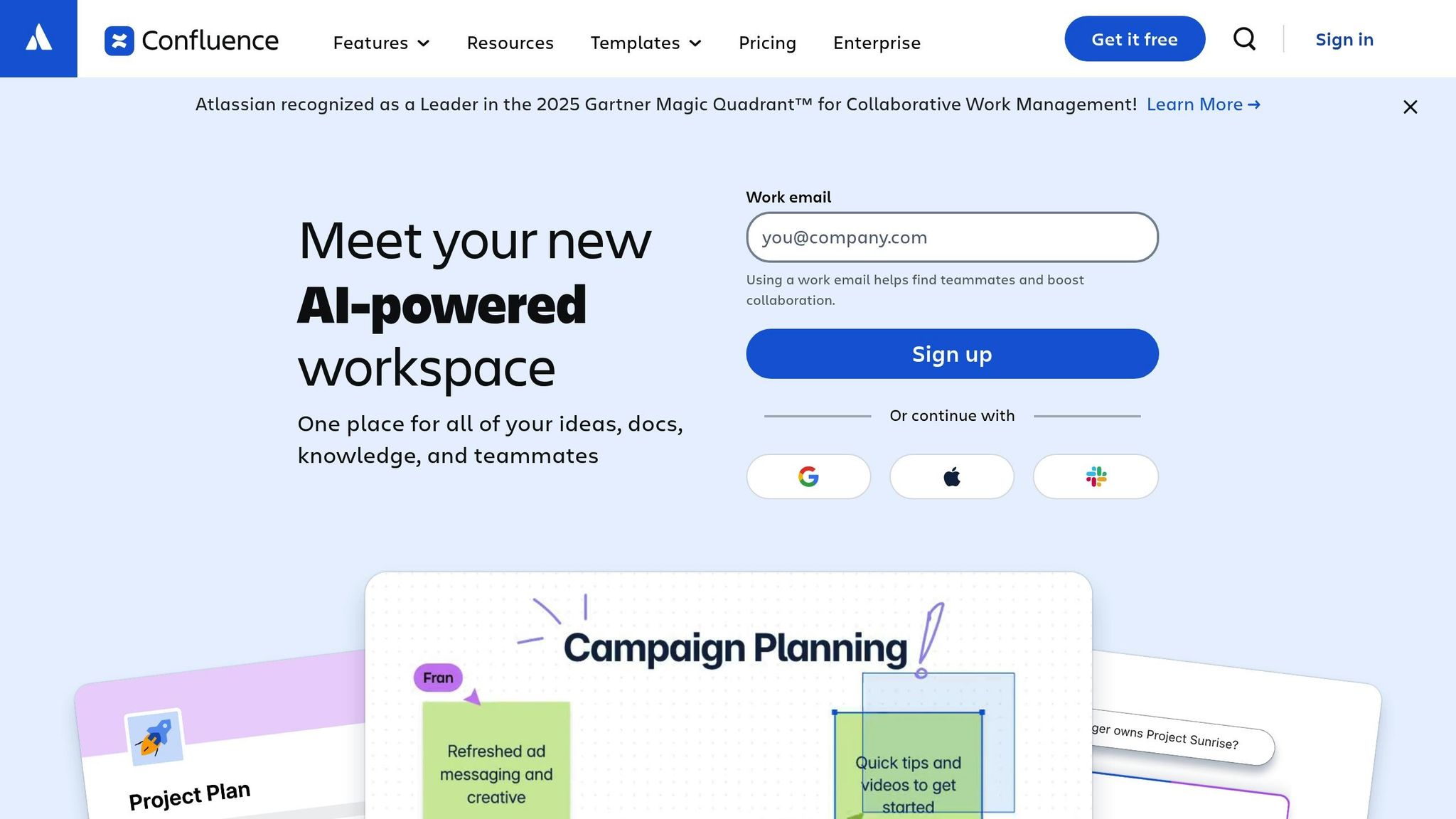
Wrapping up our comparison is Confluence, a platform that combines traditional documentation with modern AI-driven tools.
Confluence serves as a hub for company knowledge, organizing it into structured pages and spaces. It’s a go-to solution for standard operating procedures, departmental documentation, and in-depth guides. With Atlassian AI integrated into Confluence Cloud, the platform can summarize lengthy pages, provide answers based on existing content, and recommend related materials to enhance knowledge discovery [4].
AI Knowledge Capture
Atlassian AI changes the way teams handle documentation by streamlining searches and extracting insights from existing content. It can directly answer user questions by referencing Confluence pages and automatically highlight related documents, cutting down the time employees spend sifting through large volumes of information. To ensure the AI performs effectively, it’s essential to audit your documentation - using AI tools for knowledge base accuracy to eliminate duplicates and clarify content can make a big difference [4]. Notably, Confluence is recognized as a leading AI knowledge base platform for 2026, consistently earning ratings of 4/5 stars or higher on review platforms like G2 and Capterra [4].
Slack Integration
The Confluence Cloud for Slack integration lets teams access summaries and answers directly within their Slack workspace. Powered by Atlassian AI, this feature allows users to search across spaces, pages, blog posts, and databases - all without leaving Slack [4][5]. This integration has enabled enterprise support teams to resolve cases 36% faster [4]. The Slack connection also supports deep customization, making it a powerful tool for teams working in fast-paced environments.
Customization
Confluence shines when it comes to customization. It offers over 70 pre-designed templates, including those for troubleshooting and how-to guides, and also allows teams to create their own templates. The Atlassian Marketplace expands functionality further with over 3,000 apps and integrations. Popular options include "Refined" for creating branded sites and "Comala Document Management" for automating approval workflows [11][13]. Premium and Enterprise users can take things a step further by building a Company Hub - a centralized, branded space for company-wide news and resources, complete with customizable navigation and color schemes [10].
"Work becomes a lot more visible when it's all in one place. It makes collaboration a whole lot easier and facilitates that transparency." [12]
Jeff Lai, Internal Infrastructure, Canva
Enterprise Security
Confluence meets enterprise-grade security standards and provides detailed, group-based permission controls to simplify administration. With Confluence Automation, admins can set up rules to auto-label new pages or archive inactive ones [13]. Among surveyed customers, 96% rated Confluence’s integrations as superior to competitors, reinforcing its reputation for reliability in enterprise settings [12].
Pros and Cons
Here’s a breakdown of how each solution stacks up based on our in-depth review.
Each platform brings its own strengths and compromises to the table. Question Base excels at delivering expert-verified answers from connected tools like Notion, Confluence, and Salesforce. By reducing repetitive questions and offering case tracking and resolution rate analytics, it saves time for HR, IT, and operations teams managing high volumes of inquiries.
Guru provides context-aware suggestions directly in Slack and integrates seamlessly with tools like Salesforce and Zendesk [1]. Its verified knowledge cards ensure that information stays up-to-date. Bloomfire focuses on AI-powered search and categorization, paired with engagement analytics, making it ideal for structured knowledge sharing across departments [4]. Meanwhile, Document360 shines with its AI writing agent, which can transform text, video, or prompts into documentation. It also includes context-aware search and versioning capabilities [4]. However, both Bloomfire and Document360 rely on integration-based Slack connectivity rather than offering a native Slack experience.
Confluence, a staple in the Atlassian ecosystem, is a collaborative documentation hub that includes over 70 pre-designed templates and access to 3,000+ marketplace apps for extensive customization [11][13]. Its AI features can summarize pages and answer questions in Slack, helping enterprise teams resolve cases 36% faster [4]. Still, Confluence is primarily a wiki-first platform, where AI functions as a supplement to existing documentation rather than as a standalone answer agent. The cost of lost productivity - estimated at over $2 million annually for a 1,000-person company due to scattered information [5] - is a challenge these tools address in different ways.
To better understand the differences, here’s a side-by-side comparison of key features, including AI capabilities, Slack integration, customization, analytics, and security:
Solution | AI Knowledge Capture | Slack Integration | Customization | Analytics & Reporting | Enterprise Security |
|---|---|---|---|---|---|
Question Base | High; verified answers from trusted sources | Native; works seamlessly in Slack [5] | Per-channel settings, AI tone control | Resolution rate, automation rate, content gaps | SOC 2 Type II, on-premise options |
Guru | High; verified knowledge cards [1] | Context-aware suggestions [1] | Card-based knowledge structure | Standard usage analytics | Enterprise-level permissions |
Bloomfire | Medium; AI search & categorization [4] | Integration-based [4] | Structured knowledge sharing | Engagement & search analytics [4] | Enterprise-level permissions [4] |
Document360 | Medium; AI writing agent [4] | Integration-based; AI search [4] | Versioning & context-aware search | Content gap analysis [4] | SOC 2, ISO, GDPR compliance [4] |
Confluence | Medium; wiki-first with AI summaries [4] | Integration-based; answers in Slack [4] | Standard Atlassian analytics [4] | Atlassian Cloud security [4] |
Choosing the right platform depends on your team’s priorities. If you need a Slack-native solution for real-time responses, Question Base is a strong contender. For those seeking a wiki-style documentation hub with AI enhancements, Confluence fits the bill. Alternatively, Guru’s knowledge card system is ideal for surfacing contextual information. With 47% of employees struggling to locate the information they need [4], platforms that emphasize verified accuracy and streamline workflows can lead to measurable productivity improvements.
This comparison highlights how each tool caters to different team needs, from Slack-native solutions to comprehensive documentation systems.
Conclusion
Choosing the right internal knowledge solution comes down to where your team operates and the level of accuracy you need. For teams that live in Slack and deal with repetitive questions, Question Base is a practical option. It pulls verified answers from connected tools like Notion, Confluence, and Salesforce, delivering responses directly in Slack. At $8 per user per month, it’s designed for support, HR, and IT teams handling high volumes of internal requests [5].
If your team requires a centralized system with expert-verified knowledge cards, Guru might be a better fit. It integrates with over 150 apps and provides contextual information during workflows [1][3]. For those focused on structured documentation, Document360 offers a solution tailored to that need. Meanwhile, organizations already using Atlassian products may find Confluence appealing - it serves as a centralized documentation hub with AI-powered enhancements. However, Confluence is more suited for managing existing content rather than providing instant, chat-based answers.
When deciding, consider factors like how the tool integrates with your workflows, the range of data sources it supports, and any compliance requirements. Teams working within Slack should steer clear of standalone wikis that require extra logins - after all, 80% of employees prefer asking questions in chat rather than navigating a company wiki [5]. For those juggling multiple data sources while adhering to strict compliance standards, Question Base provides enterprise-grade security without adding engineering complexity [5].
FAQs
What makes Question Base a better choice than Agentforce for Slack-based teams?
Question Base brings a suite of advantages to Slack-based teams, setting itself apart from Agentforce in meaningful ways. While Agentforce leans heavily on real-time data from platforms like Salesforce and Confluence, Question Base pulls verified answers from a broader range of trusted sources. These include Notion, Salesforce, Confluence, OneDrive, and more, ensuring teams receive accurate, expertly maintained responses tailored to their specific needs.
What truly elevates Question Base is its enterprise-grade knowledge management tools. Features such as case tracking, per-channel customization, duplicate-question detection, and detailed analytics provide managers with deeper insights into team performance and support workflows. In contrast, Agentforce offers only basic usage statistics, leaving a gap in visibility and control.
Designed with HR, IT, and Ops teams in mind, Question Base delivers reliable answers directly within Slack. This efficiency translates into significant time savings - cutting repetitive workloads by approximately 6 hours each week - and lightning-fast response times averaging just 3.2 seconds. For teams seeking a scalable and auditable knowledge solution, Question Base is purpose-built to meet those demands.
How does Question Base provide accurate and reliable answers?
Question Base guarantees precision by connecting directly to trusted platforms like Notion, Confluence, Salesforce, and OneDrive. When a query comes in, the system crafts a response using these repositories, which is then reviewed and approved by a designated expert before being shared.
This process ensures that every answer is accurate, ready for audits, and grounded in verified documentation, rather than relying on previous chat logs. Each response also includes a citation of its original source, giving teams confidence in the accuracy of the information. This method is particularly beneficial for internal support, HR, and IT teams that depend on precise and accountable answers.
What types of teams benefit most from using Confluence over other tools?
Teams working in knowledge management, technical support, or enterprise content creation often find Confluence to be a powerful tool. Its design focuses on creating and maintaining structured documentation, making it a great fit for teams that handle detailed workflows, need version control, or collaborate on intricate projects.
Confluence offers features like approval workflows and integrations with enterprise tools, which are particularly useful for organizations dealing with regulated content or managing extensive internal knowledge bases. While platforms like Question Base specialize in Slack-native, expert-verified answers, Confluence stands out as a centralized, feature-rich solution for documentation needs.