∙
Cooper
∙
Reading time:
17 min

Repetitive questions waste time. Employees spend up to 30% of their week searching for scattered information across tools like Slack, Notion, and Confluence. This inefficiency can cost a 1,000-person company over $2M annually in lost productivity.
Enter LLM-powered Slack agents. These tools connect directly to your internal knowledge sources, answering repetitive questions in 3.2 seconds with 99.99% accuracy. They save experts 6+ hours per week and ensure employees get the right answers without leaving Slack. You can even build a knowledge base from Slack conversations to capture tribal knowledge automatically.
Key benefits:
Automatic answers to 35% of repetitive questions
Direct integration with tools like Notion, Confluence, and Salesforce
Analytics to track unresolved queries and improve documentation
SOC 2 Type II compliance for secure, enterprise-grade deployments
This guide walks you through deploying Question Base, a Slack agent that simplifies internal support and boosts productivity in less than 10 minutes. Let’s get started.
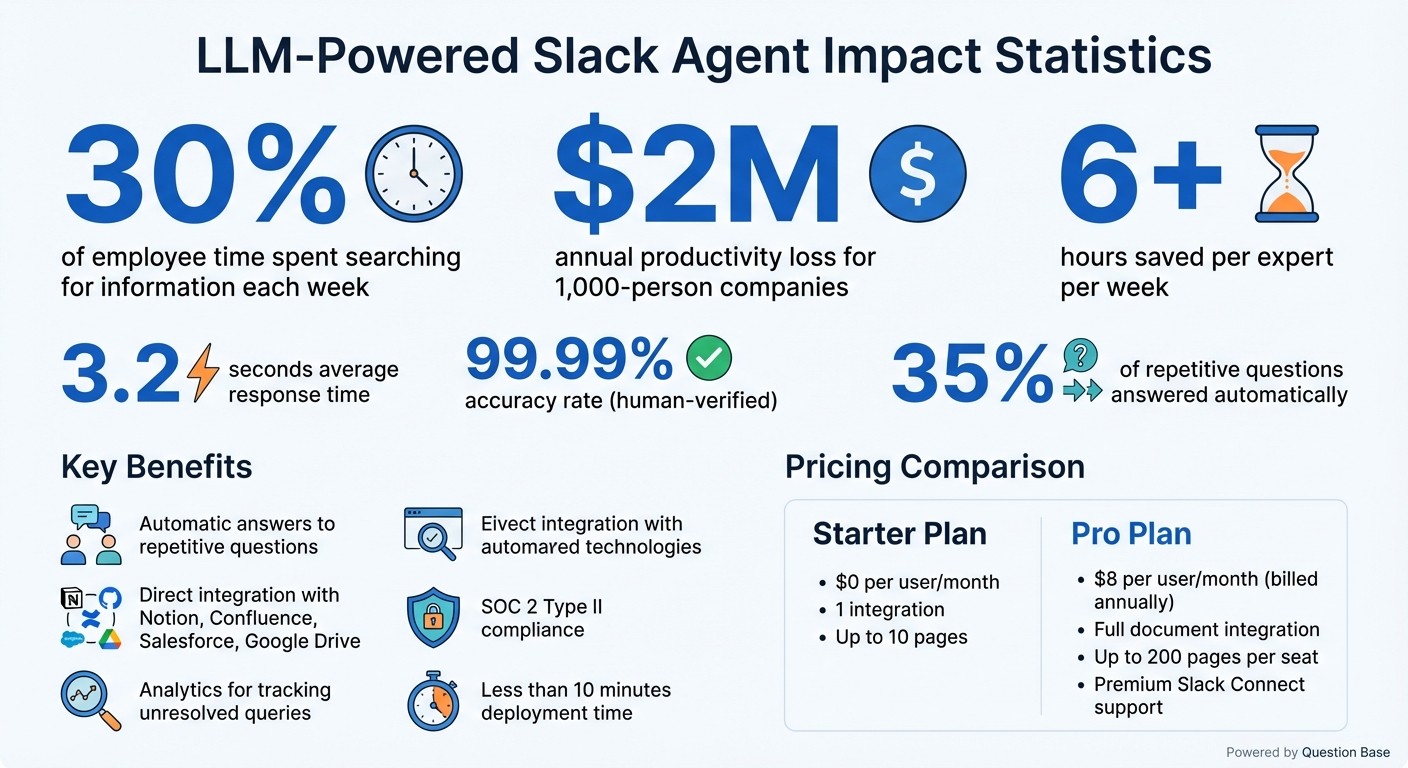
Question Base ROI: Time Savings and Productivity Impact Statistics
Step 1: Getting Ready for Deployment
Tools and Accounts You'll Need
Before you can deploy Question Base, there are a few essentials to have ready. First, make sure you have Slack workspace admin or owner access. This is crucial for installing third-party apps and granting permissions like chat:write, channels:read, and files:read, which allow the agent to post responses and access Slack channels.
You'll also need to set up a Question Base account. The Starter plan, priced at $0 per user per month, includes one integration (about 10 pages). For more advanced needs, the Pro plan is available at $8 per user per month (billed annually). The Pro plan unlocks full document integration capabilities with tools like Notion, Confluence, and Google Drive. It supports up to 200 pages per seat and includes premium support through Slack Connect.
Lastly, ensure you have access to your documentation platforms. Question Base integrates seamlessly with tools like Notion for wiki-style content, Confluence for structured knowledge bases, Google Drive for file sharing, and even platforms like Salesforce, Zendesk, and Intercom. Keep your account credentials handy, and enable single sign-on (SSO) if necessary.
Once you’ve secured these tools and accounts, you’re ready to move on to configuring your system settings.
Technical Requirements and Setup Options
The setup process for Question Base is straightforward, thanks to its no-code integration available through the Slack App Marketplace. This makes it an excellent choice for HR teams, IT support, and operations managers - even those without technical expertise.
You'll need a modern device running Windows 10+, macOS 12+, or Linux, along with Chrome version 100 or newer. A stable internet connection with at least 5 Mbps upload speed is also required. Additionally, make sure you’re using Slack’s desktop or web app version 4.0 or higher.
Since Question Base operates as a cloud-hosted SaaS solution, there’s no need for server maintenance on your end. The entire deployment process typically takes less than 10 minutes, making it quick and hassle-free to get started.
Step 2: Installing and Setting Up Question Base

How to Install the Question Base App in Slack

Getting Question Base up and running in Slack is quick and straightforward - no coding needed. Start by heading to the Slack App Directory in your workspace. Search for "Question Base", click on the app listing, and choose either "Add to Slack" or "Install to Workspace." You’ll then be asked to review the necessary permissions. Question Base needs access to:
chat:writeto post responseschannels:readto gather channel informationim:writefor direct messagingapp_mentions:readto detect when users tag the bot
Click "Allow" to grant these permissions and complete the installation.
If you’re not a workspace admin, Slack might require approval from someone with admin or owner privileges before you can finish the process. Once approved, the app will appear in the Apps section of your Slack sidebar. To enable it in specific channels, go to the desired channel and type /invite @QuestionBase in the message bar. The bot will join the channel instantly and send a welcome message confirming its activation.
With the app successfully installed, you’re ready to configure its settings.
Basic Configuration Steps
After installation, find the Question Base home tab in your Slack sidebar. This is your control center for setup. Depending on your subscription plan (see Step 1 for pricing details), you can connect your first documentation source here. Supported sources include platforms like Notion, Confluence, Google Drive, Salesforce, and more.
During the initial setup, make sure to set the response language to en-US and specify which channels the bot should monitor. Test the bot by typing a simple query, such as "@QuestionBase hello" or "What's our vacation policy?" The bot typically replies within 3.2 seconds[1]. If it doesn’t respond, check the OAuth token configuration in Slack’s OAuth & Permissions settings. Most issues can be resolved by regenerating tokens through this page.
Once the bot replies correctly, you can move on to linking your document sources for a seamless experience.
Step 3: Linking Your Internal Document Sources
Available Integrations and How to Connect Them
Question Base seamlessly integrates with the tools your team relies on daily - Notion, Confluence, Google Drive, Salesforce, Zendesk, Jira, OneDrive, and more. To connect your first integration, head to the Integrations tab in your Question Base workspace dashboard at questionbase.ai/questions. From there, choose the tool you want under Knowledge Sources and grant Question Base permission to access your content. For Confluence users, a secure connector ensures smooth syncing of relevant content[4].
After integration, Question Base automatically scans your documents and refreshes data every 4 hours[4]. When a team member asks a question in Slack, the agent searches across all linked sources and provides direct citations with clickable links to the original document - whether it’s a Notion page, a Confluence article, or a Salesforce case[4][2]. This process delivers answers in an average of 3.2 seconds, along with clear visibility into the source of the information[1].
Integration capabilities vary by plan. The Starter plan (free) allows for one integration and up to 10 pages, while the Pro plan ($8 per user per month) unlocks premium integrations and supports up to 200 pages per user[1][3]. For larger organizations, Enterprise plans offer unlimited integrations and custom sync schedules, ideal for handling extensive document libraries. Once your integrations are set up, you can refine access by assigning them to specific Slack channels.
Setting Up Channel-Specific Document Access
Not every Slack channel should have access to every document. Question Base gives you the flexibility to tailor document access to specific channels. In your workspace settings, you can map Slack channels to particular repositories. For example, the #sales channel can pull data exclusively from Salesforce and sales playbooks, while the #engineering channel can access technical materials from Confluence and Jira.
This targeted setup ensures employees only see the information relevant to their roles, cutting down on unnecessary clutter and repetitive questions. To test your configuration, invite Question Base to a channel using /invite @QuestionBase and ask a sample question. If the results aren’t pulling from the correct sources, adjust the channel mappings and try again. This feature helps streamline workflows while keeping information organized and accessible.
Build a Slack AI Agent That Answers Questions (Step-by-Step Tutorial)
Step 4: Tailoring the Agent for Your Organization
Once your integrations are set up, the next step is to fine-tune your agent to align with your organization's communication style and escalation processes.
Customizing AI Tone and Response Style
Adjust the way your agent interacts across your workspace and within specific Slack channels. Head to the Answer Context section at questionbase.ai/settings to define global terminology and guidelines that apply company-wide[5]. You can add custom terms in a "Term – Definition" format - like "ICP – Ideal Customer Profile" or "ARR – Annual Recurring Revenue" - so the AI incorporates them into its knowledge base for consistent and accurate responses[5].
For more tailored communication, set unique response guidelines for individual Slack channels[5][6]. For example, your finance channel might need formal, data-heavy responses with precise figures, while your sales channel could benefit from a more conversational approach with quick bullet points. You can even specify formatting preferences - like requiring analytics-focused channels to use numbers or ensuring high-traffic support channels prioritize brevity[5]. Channel-specific settings can override workspace-wide definitions, so the same acronym can have different meanings depending on the context or department[5].
Once you've customized the tone and style, it’s important to establish a process for verifying the quality of the agent's responses.
Configuring Verified Responses and Escalation Workflows
While Question Base delivers an impressive 99.99% accuracy on verified answers[2], its effectiveness is amplified by human oversight. The platform includes role-based access control (RBAC), allowing administrators to assign specific roles for editing, verifying, and managing the knowledge base[2]. Team members with these roles can review and refine AI-generated responses before they are added to the official knowledge library.
The system also tracks unanswered questions through built-in case tracking[1][2]. If the agent can’t resolve a query, it logs the question and routes it to the right expert based on your escalation rules. This process not only ensures unresolved issues are addressed but also helps identify gaps in documentation. By automating repetitive responses, internal experts can save an average of more than 6 hours per week while maintaining the quality of critical information[1].
Once these workflows are in place, the next step is to test how well the agent performs with real-world queries.
Testing Common Queries for Accuracy
Run tests using frequently asked questions from departments like HR, IT, and operations. Examples might include, "What’s our remote work policy?" or "How do I submit an expense report?" If the agent’s response isn’t accurate, use the Company Glossary feature to teach it internal acronyms and organization-specific terms[2], then retest.
Reports show that 35% of repetitive questions are automatically answered by the agent, with an average accuracy rating of 4.8 out of 5[1]. Monitoring cases where the agent doesn’t respond can reveal trends and guide updates to your FAQ. Ensure the agent’s responses reflect your customized tone and escalation protocols. Test scenarios across departments, refine your instructions as needed, and confirm the agent pulls information from the correct sources before rolling it out across the organization.
Step 5: Expanding and Improving the Slack Agent
Once your Slack agent is up and running, the key to keeping it effective lies in ongoing updates and improvements. By using analytics and conducting regular content reviews, you can ensure the agent remains reliable and ready to scale across your organization. Question Base provides the tools you need to manage and optimize your agent, helping it grow as a digital coworker for your enterprise while maintaining accuracy.
Using Analytics to Enhance Performance
Analytics are your secret weapon for fine-tuning your agent’s performance. Question Base offers resolution rate dashboards that track how often the agent resolves queries without needing human help. Aiming for resolution rates between 85% and 95% is a common benchmark, with performance data broken down by channel, department, and time period. These metrics are available through the admin console in Slack or via the web portal at questionbase.ai, where you can view real-time stats like "92% overall resolution, 78% for HR queries."
If you notice performance gaps in certain areas - say, engineering channels struggling with Terraform-related questions - unanswered query logs can provide clarity. This feature records unresolved questions, helping you identify recurring patterns. For instance, if expense report questions frequently go unanswered, it’s a clear sign that your documentation needs updating or a new FAQ entry is required. Teams using this approach have seen unanswered rates drop by 40% in just a week. With these insights, you can make targeted updates to improve your agent’s performance.
Keeping the Knowledge Base Up to Date
Analytics are just one piece of the puzzle. Keeping your knowledge base fresh and accurate is equally important. Question Base’s duplicate detection feature scans uploaded documents for overlapping content, flagging entries with 80% or higher similarity. By merging redundant information, you can avoid confusion and keep your knowledge base streamlined.
To stay on top of updates, schedule monthly reviews of unanswered queries. For technical teams, syncing these reviews with sprint cycles ensures the agent remains aligned with product updates and engineering changes. Additionally, Question Base’s AI learning feature can analyze expert responses to unresolved questions and automatically generate new knowledge entries. This process has been shown to improve resolution rates by 25–30% each month, reducing the need for constant manual updates.
For even greater accuracy, connect your agent to platforms like Confluence, Notion, or Google Drive that support version control. This ensures the agent always pulls from the latest, most reliable information, with automatic content monitoring keeping everything up to date.
"We implemented Question Base to eliminate repetitive questions and to collate answers and information in one place for a growing team… it's easy to verify answers as new questions come along." - Monica Limanto, CEO of Petsy
Question Base vs. Slack AI for Internal Documents
Once you’ve deployed your LLM-powered Slack agent, it’s worth examining how Question Base stacks up against Slack AI. Both tools integrate AI into your workspace, but they serve very different purposes. Slack AI focuses on summarizing conversations and helping individuals sift through chat history. On the other hand, Question Base is designed for enterprise teams, pulling verified, accurate answers from trusted document sources like Notion, Confluence, and Salesforce. Below, we break down the key differences to help you determine which tool aligns with your organization’s needs.
Main Differences Between Question Base and Slack AI
The primary distinction lies in how each tool accesses and manages knowledge. Slack AI relies on Slack chat history and messages to generate responses, making it a useful tool for recapping conversations or retrieving past discussions. In contrast, Question Base connects directly to external documentation systems, ensuring responses are grounded in expert-verified content. This is especially critical for questions about policies, technical procedures, or compliance issues where accuracy is non-negotiable.
Feature | Question Base | Slack AI |
|---|---|---|
Primary Data Source | External docs (Notion, Confluence, Google Drive, etc.) | Slack chat history and messages |
Accuracy Source | Expert-verified content | AI-generated from past conversations |
Knowledge Management | Case tracking, gap analysis, duplicate detection | Limited to chat-based search and summarization |
Analytics | Resolution rates, automation metrics, gap tracking | Basic usage statistics |
Security | SOC 2 Type II compliance, on-premise options | Standard Slack security |
Customization | Full control over tone and escalation flows | Limited to default AI settings |
Question Base goes beyond basic functionality by offering analytics that track resolution rates, identify unanswered queries, and highlight improvement areas. In contrast, Slack AI provides only basic usage statistics, which may not meet the demands of robust enterprise knowledge management. Additionally, Question Base’s SOC 2 Type II compliance and on-premise deployment options make it a strong choice for industries like finance and healthcare, where secure, audit-ready responses are essential.
When Question Base Is the Better Choice
Question Base stands out when precision and accountability are priorities. For example, HR teams managing benefits inquiries, PTO policies, or onboarding workflows can rely on responses tied directly to handbook sections, avoiding the risks of outdated or conflicting information from Slack threads. Similarly, IT support teams benefit from its ability to deliver accurate answers to technical questions about infrastructure, security protocols, or software configurations - thanks to its direct connection to verified documentation.
In compliance-heavy industries, the advantages are even more pronounced. When auditors ask about processes for GDPR data requests or financial reporting, Question Base delivers audit-ready responses complete with source citations. Slack AI, by contrast, offers conversational summaries that lack the verifiable documentation needed for regulatory reviews. Organizations that prioritize knowledge ownership, tailored workflows, and enterprise-grade security will find Question Base equipped with the specialized tools to rethink internal support to keep teams efficient and aligned. Companies using Question Base report saving internal experts over 6 hours per week by automating repetitive queries with trusted, verified answers.
Conclusion: Improving Internal Knowledge Access with Question Base
After walking through the setup and integration process, it’s clear how Question Base reshapes the way teams access and share knowledge internally.
Setting up a Slack agent powered by large language models (LLMs) is refreshingly simple. Once you’ve installed Question Base in Slack, linked it to your internal knowledge sources, and fine-tuned the agent’s tone and escalation pathways, you’re ready to roll.
The results speak volumes: average response times of just 3.2 seconds, saving each expert over 6 hours per week, and automating answers for 35% of repetitive queries. Together, these efficiencies help teams avoid over $2 million in annual productivity losses[1].
"Since we started using QB we haven't used our Google support docs. And if I go on vacation or sick leave, I feel comfortable that QB will just take over." – Linn Stokke, Online Events & Marketing Specialist, Ticketbutler[1]
What sets Question Base apart is its reliance on verified documents, not just Slack chat history like Slack AI. This ensures an impressive 99.99% human-verified accuracy rate[2]. Such precision is crucial in industries where compliance, HR policies, or technical support demand up-to-date and reliable information. With SOC 2 Type II compliance and on-premise deployment options, Question Base is ready to meet enterprise-level demands right out of the gate.
Ready to elevate how your team accesses knowledge? Try Question Base with a 30-day pilot - installation takes less than an hour. Visit questionbase.com for your free trial (no credit card needed) or to explore enterprise scaling and custom integrations.
FAQs
How does Question Base provide accurate and secure answers for enterprises?
Question Base prioritizes accuracy by providing expert-reviewed answers straight from reliable platforms such as Notion, Confluence, Salesforce, and Google Drive. Each response is carefully vetted and approved by designated specialists. To maintain reliability and refine responses over time, the platform incorporates features like case tracking, duplicate detection, and AI-powered analysis to identify knowledge gaps.
When it comes to security, Question Base meets SOC 2 Type II compliance standards, ensuring the protection of sensitive information. The platform includes secure integrations, role-based access controls, and audit-ready logs to meet enterprise-level requirements. For organizations needing even greater control, on-premise deployment options are available, offering a tailored approach to knowledge management.
What sets Question Base apart from Slack AI for managing knowledge in Slack?
Question Base and Slack AI serve distinct purposes, each tailored to different needs. Slack AI functions as a general productivity tool, helping users summarize conversations and search through Slack messages. On the other hand, Question Base is designed as an enterprise-grade solution, delivering precise, document-supported answers on a large scale.
While Slack AI primarily pulls information from chat history, Question Base connects directly to trusted platforms like Notion, Confluence, Salesforce, and Google Drive. This ensures that answers are sourced from verified documents, providing a higher level of accuracy and dependability. Beyond this, Question Base offers advanced capabilities such as a dynamic FAQ library, duplicate query tracking, and in-depth analytics. These features make it particularly well-suited for HR, IT, and operations teams in large enterprises that demand precise, auditable knowledge management.
How does Question Base enhance productivity and eliminate repetitive questions?
Question Base simplifies workplace productivity by delivering expert-approved answers directly from trusted sources like Notion, Confluence, Google Drive, and Salesforce. It actively monitors Slack channels, identifies new questions, and replies in-thread with precise, well-cited information. This eliminates the need for employees to sift through countless documents and allows experts to dedicate their time to more strategic tasks.
For example, routine questions like “What’s the PTO policy?” or “How do I reset my password?” are handled automatically, saving teams valuable hours each week. Unlike Slack AI, which primarily depends on chat history, Question Base ensures reliability by pulling data from up-to-date, verified documents. Additionally, its built-in analytics track resolution rates and highlight areas where automation can be improved, helping teams stay efficient and focused.