∙
Cooper
∙
Reading time:
19 min

Repetitive questions waste time and money. If your team uses Slack daily, you’ve likely felt this frustration - answers buried in threads, experts overwhelmed by the same queries, and hours lost searching for information. Slack knowledge base automation solves this by connecting tools like Notion, Confluence, and Google Drive directly to Slack, enabling AI-powered answers in seconds.
Here’s why it matters:
Employees spend up to 12 hours weekly searching for information.
40% of internal queries are repetitive, costing a 1,000-person company over $2M annually in lost productivity.
Experts lose 6 hours weekly answering the same questions.
This guide breaks down how to automate Slack with AI, organize your knowledge, and choose the right tools - like Question Base - to save time, reduce costs, and keep your team focused on meaningful work.
Build a Slack AI Agent That Answers Questions (Step-by-Step Tutorial)
Building Blocks of an Automated Slack Knowledge Base
To automate Slack responses effectively, you need a strong foundation. This starts with pinpointing where your knowledge currently resides, assigning clear ownership, and ensuring secure access. Most organizations already store documentation across various platforms - like Notion, Confluence, Google Drive, Salesforce, Zendesk, and SharePoint. The real challenge isn’t creating new content but linking these existing resources into a seamless system that Slack can access instantly. This groundwork directly supports the automation workflows discussed in later sections.
Identifying and Organizing Knowledge Sources
The first step is mapping out all your information sources. These could include help centers, internal wikis, standard operating procedures (SOPs) in Google Drive, support tickets in Zendesk, CRM notes in Salesforce, and even past chat resolutions. In 2025, Question Base showcased how this process works by integrating with platforms like Google Drive, Confluence, Zendesk, Intercom, Notion, Salesforce, Dropbox, Freshdesk, Hubspot, OneDrive, Jira, and SharePoint. This integration allows companies to pull accurate answers from trusted documents directly into Slack[1].
Once you’ve identified your sources, categorize and organize them using clear templates. Standardize formats for SOPs, onboarding guides, FAQs, and playbooks to ensure automated systems can retrieve consistent and reliable answers. Employ advanced search tools and AI tagging to prevent information from getting lost in scattered files or buried Slack threads[3][5]. The goal is to create a unified "base layer" of knowledge that automation can query seamlessly, sparing employees the hassle of figuring out where specific information is stored. With your knowledge sources organized, the next step is establishing governance.
Setting Up Ownership and Governance
Automation works best with proper oversight. Assign content owners to specific areas and set up regular reviews, version control, and strict access permissions. This ensures your documentation stays accurate and secure. Question Base supports features like per-channel settings, AI answer approval, and gap tracking[1][2]. This approach, often referred to as "human-verified content", ensures experts remain involved, validating answers and enhancing the system over time. As Monica Limanto, CEO of Petsy, shared:
"We now have a reliable and useful knowledge base, making it easy to share knowledge across the team. We no longer have staff waiting on busy managers for an answer, Question Base is there in seconds, plus it's easy to verify answers as new questions come along."[1]
Security and Compliance Requirements
For regulated industries in the US, security is non-negotiable. Your automated knowledge base must incorporate features like SSO/SAML and role-based access control to align with existing group permissions. It should also include audit logs and encryption for data both in transit and at rest[4]. Look for tools that meet SOC 2 Type II standards and, where applicable, HIPAA or ISO 27001 compliance[4].
Enterprise-grade platforms should enforce tenant isolation to ensure data from one customer remains inaccessible to another. Additionally, document retrieval must respect the original permissions set on the source files[4]. Question Base meets SOC 2 Type II requirements, offering full encryption and optional on-premise deployment for organizations needing stricter data residency and compliance measures. Before integrating any documentation with Slack automation, confirm that the tool aligns with your security policies and safeguards sensitive data from unauthorized access.
Core Automation Workflows for Slack Knowledge Bases
Once you’ve organized your knowledge sources, the next step is implementing workflows that deliver accurate answers directly in Slack. Modern Slack automation not only provides real-time verified responses but also learns from interactions to enhance content over time. These workflows elevate Slack from a basic chat platform to a dynamic knowledge hub that grows with your team’s needs. By connecting your structured knowledge with everyday Slack activity, you create a foundation for smarter, more efficient automation.
Event-Based Automation
Event-based workflows automatically respond to specific actions in Slack, like asking a question, using an emoji reaction, or joining a channel. For example, a 📌 emoji reaction could instantly send an expert’s response to a documentation queue or even start drafting a knowledge base article. Similarly, when messages include keywords like “how do I,” “VPN,” or “benefits,” they can trigger suggestions of related content or direct the query to the appropriate expert [6][7]. Some tools even display relevant knowledge cards based on keyword detection.
Slack data shows that teams using structured workflows for knowledge sharing can cut down search time by up to 35% and significantly reduce duplicate questions [6]. This kind of automation ensures that your team spends less time hunting for answers and more time focusing on their work.
AI-Powered Answer Automation
AI-powered automation takes things further by delivering precise, document-supported answers directly within Slack conversations - no need to switch apps or dig through files. These systems connect to trusted documentation platforms like Notion, Confluence, Google Drive, Salesforce, and Zendesk. They provide responses complete with source citations, ensuring accuracy and transparency.
Question Base offers this functionality through its AI Answer Agent, which responds instantly to questions asked in Slack. Drawing from verified documentation and previous Slack discussions, it delivers accurate answers with citations. The system is highly customizable, allowing teams to adjust tone, workflows, and answer styles for different channels. For complex or unresolved queries, the system escalates to human experts, ensuring quality and reliability.
During a 30-day pilot with Question Base, 35% of repetitive questions were auto-answered, with an average response time of just 3.2 seconds. This saved internal experts over 6 hours per week. For a company with 1,000 employees, the cost of lost productivity from searching in Slack can exceed $2 million annually [1]. AI-powered automation not only speeds up response times but also reinforces the value of your internal knowledge resources.
Using Analytics to Improve Content
Automation doesn’t stop at delivering answers - it also helps refine your knowledge base. Analytics provide insights into what’s working and where improvements are needed, turning your Slack knowledge system into a continually evolving resource. By tracking metrics like resolution rates, automation rates, and unanswered questions, teams can pinpoint gaps and update or create documentation accordingly.
Question Base includes dashboards that highlight key performance indicators, such as the number of questions asked, resolution rates, and automation success rates. It also offers tools to analyze unhelpful answers, helping teams refine content for greater clarity and accuracy. This data-driven approach ensures your knowledge base stays relevant and effective, adapting seamlessly to your team’s ongoing needs.
Tools for Slack Knowledge Base Automation
When it comes to automating your Slack knowledge base, selecting the right tools is crucial. Options range from Slack's built-in features to third-party platforms and specialized AI-powered answer agents. Each choice comes with its own set of strengths and trade-offs in terms of accuracy, integration, and scalability.
Native Slack Features and Slack AI
Slack offers several built-in features to help manage knowledge, including a robust search tool, bookmarks for saving key threads, and Slack AI for summarizing conversations and surfacing relevant past discussions. Available on Business and Enterprise plans, Slack AI functions as a personalized assistant that uses chat history to deliver quick answers. For instance, you can ask Slack AI to "Summarize #project-updates from last week" or "What decisions were made about the Q1 budget?" and it will provide responses based on prior conversations.
While Slack AI is excellent for improving productivity and catching up on updates, its primary strength lies in summarizing chat history. It also integrates with over 2,600 apps, enabling automated workflows like turning feedback into tickets. However, for deeper integration with external documentation or more advanced knowledge management, other tools may be a better fit.
Third-Party Knowledge Platforms
A variety of third-party tools can extend Slack’s capabilities, offering more advanced knowledge management options. For example:
Guru: Uses keyword-triggered knowledge cards to provide pre-approved answers when terms like "refund policy" appear in Slack conversations.
Confluence: Integrates with Jira to bring wiki articles directly into Slack discussions.
Zendesk Guide: Helps build self-service knowledge bases from support tickets and sends Slack notifications when new articles are published.
Notion: Facilitates collaborative documentation and updates teams via Slack integration.
Other platforms, such as Perfect Wiki, Kipwise, and Tettra, also offer knowledge management solutions. However, some of these tools may struggle with interface complexity, slower performance, or limited analytics. Many lack the scalability and advanced metrics needed to track automation success or identify content gaps as teams grow.
Question Base: AI Answer Agent for Slack

For enterprise teams seeking verified answers from trusted sources, Question Base stands out as a dedicated AI answer agent. Designed specifically for Slack, Question Base connects directly to your company’s documentation tools - such as Notion, Confluence, Google Drive, Zendesk, Intercom, and Salesforce - and delivers accurate, source-cited answers in real time. Installation is simple: add it via the Slack App Marketplace, invite the bot using /invite @questionbase into your channels, and it starts working instantly.
What sets Question Base apart is its focus on trusted documentation rather than chat history. This ensures higher accuracy and transparency, as answers are drawn directly from verified sources. Teams can customize the AI’s tone, behavior, and workflows to suit specific channels, and unresolved queries are escalated to human experts to maintain quality control. With a 4.8 accuracy score and an average response time of just 3.2 seconds, Question Base delivers both speed and reliability [1].
The platform also offers enterprise-grade features such as SOC 2 Type II compliance, encryption for data security, and optional on-premise deployment. It includes tools to track unanswered questions, detect duplicate content, and analyze key metrics like resolution rates. For larger organizations, enterprise tiers provide white-labeling, support for multiple workspaces, and tailored solutions.
"We implemented Question Base to eliminate repetitive questions and to collate answers and information in one place for a growing team. Question Base has exceeded our expectations - it's easy to use, intuitive and a massive time saver" [1].
Monica Limanto, CEO of Petsy
"Since we started using QB we haven't used our Google support docs. And if I go on vacation or sick leave, I feel comfortable that QB will just take over" [1].
Linn Stokke, Online Events & Marketing Specialist at Ticketbutler
For teams managing HR, IT, or operational support, Question Base transforms Slack into more than just a communication tool. It becomes a dynamic knowledge assistant, delivering fast, accurate answers while continuously organizing and updating internal information - all without requiring extra engineering resources.
Building a Scalable Automation System for 2026
System Architecture Overview
A Slack-based architecture forms the backbone of your AI answer agent, connecting it seamlessly to platforms like Confluence, Salesforce, Google Drive, SharePoint, and others. Slack acts as the user interface, while an AI-powered agent, such as Question Base, pulls verified information from these sources in real time. To ensure secure access, the system enforces SSO-based permissions, allowing users to view only the information they’re authorized to access, mirroring the permissions already established in your documentation tools.
For enterprises with stringent data residency or regulatory requirements, multi-tenant SaaS deployments offer strong logical isolation, encryption (both at rest and in transit), and compliance with SOC 2 and ISO 27001 standards. In industries with heightened regulatory needs, single-tenant, VPC-hosted, or on-premise deployments provide tighter control over data storage and network boundaries while maintaining secure Slack integration. The choice of deployment should align with your organization’s legal and security requirements, without compromising the speed and usability that Slack-native tools deliver. This architecture establishes a solid foundation for clear role definitions and rigorous compliance, both of which are essential for scalable automation.
Roles and Responsibilities
A well-structured system relies on clearly defined roles to ensure smooth operation. Three key roles are essential for managing and scaling the system effectively:
Knowledge Managers: These individuals oversee answer accuracy by managing per-channel AI settings, resolving unanswered questions, eliminating duplicate entries, and capturing new insights from Slack conversations to enrich company documentation. They transform daily Q&A into a continually updated knowledge base.
IT and Product Teams: Their focus is on the technical side, ensuring seamless integration, maintaining security, and troubleshooting any technical issues.
Operations Teams: They work to minimize repetitive questions in Slack, monitor metrics like resolution rates and response times, and identify gaps in content that could slow down team productivity.
Additionally, domain experts from departments like HR, IT, and Sales should take ownership of their respective knowledge areas, ensuring content stays current as policies and practices evolve.
Meeting Enterprise Compliance Standards
Achieving compliance with SOC 2 and ISO 27001 requires implementing role-based access control (RBAC), centralized logging, and formal change management across Slack, the AI platform, and documentation systems. RBAC ensures users access only the knowledge they’re authorized to view, with permissions enforced through SSO groups mapped to platforms like Confluence, Google Drive, or Zendesk. Centralized logs - covering Slack (app installations and channel access), the AI agent (queries, answer sources, and admin changes), and documentation tools - should be stored in a SIEM system and retained for the required audit period.
For industry-specific regulations such as HIPAA or FINRA, start by creating a data classification policy that defines what types of information can flow through Slack and the AI agent. For example, healthcare organizations might exclude repositories containing PHI from the AI index, while financial firms may require compliant archiving solutions for retention and e-discovery. Ensure vendors provide robust tenant isolation and options like IP allowlisting or private connectivity. GDPR compliance, when handling EU personal data, requires data processing agreements, support for data subject rights, and configurations for regional data residency.
Question Base vs. Slack AI and Other Tools
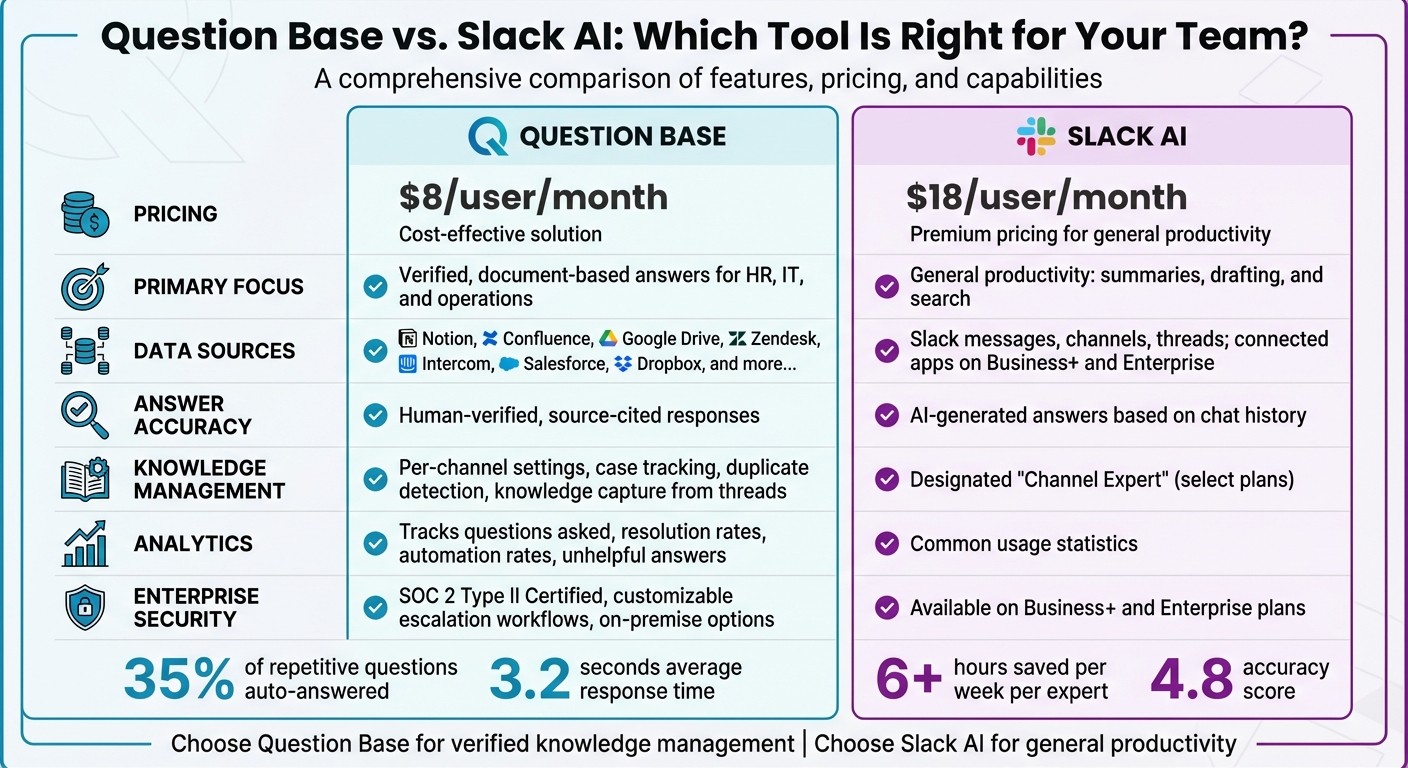
Question Base vs Slack AI: Features, Pricing, and Capabilities Comparison 2026
Slack AI vs. Question Base
Slack AI is designed to streamline individual workflows by offering tools like thread summaries, message drafting, and Slack history searches. These features are particularly useful for catching up on conversations or retrieving information from past chats. However, when teams need verified, accurate knowledge delivered at scale, Question Base offers a different solution. It integrates directly with trusted documentation platforms - such as Notion, Confluence, Salesforce, and Google Drive - to provide answers based on approved content, rather than relying on AI interpretations of Slack chat history.
The key distinction lies in data sources and accuracy. Slack AI pulls its insights primarily from Slack messages and channels, with broader access to connected tools available on Business+ and Enterprise plans. In contrast, Question Base focuses on external documentation platforms and emphasizes human-verified answers, complete with source citations. This level of precision is critical for scenarios like HR sharing the correct PTO policy, IT providing accurate security guidelines, or operations teams ensuring compliance-related queries are consistently addressed. By prioritizing accuracy and speed, Question Base supports knowledge-intensive workflows with confidence [1].
For enterprise-level needs, Question Base is SOC 2 Type II Certified and allows for extensive customization, including AI behavior settings, escalation workflows, and detailed analytics to identify knowledge gaps. On the other hand, Slack AI includes AI-powered search and summaries, along with a “Channel Expert” feature available on select plans. The cost difference reflects these capabilities: Question Base is priced at $8 per user per month, while Slack AI costs $18 per user per month [1][2]. These differences highlight the importance of choosing the right tool based on your team's specific needs.
Feature | Question Base | Slack AI |
|---|---|---|
Price | $8/user/month | $18/user/month |
Primary Focus | Verified, document-based answers for HR, IT, and operations | General productivity: summaries, drafting, and search |
Data Sources | Notion, Confluence, Google Drive, Zendesk, Intercom, Salesforce, Dropbox, etc. | Slack messages, channels, threads; connected apps on Business+ and Enterprise |
Answer Accuracy | Human-verified, source-cited responses | AI-generated answers based on chat history |
Knowledge Management | Per-channel settings, case tracking, duplicate detection, and knowledge capture from threads | Designated "Channel Expert" available on select plans |
Analytics | Tracks questions asked, resolution rates, automation rates, and unhelpful answers | Common usage statistics |
Enterprise Security | SOC 2 Type II Certified, customizable escalation workflows, and on-premise options | Available on Business+ and Enterprise plans |
How to Evaluate Automation Tools
When comparing automation tools like Question Base and Slack AI, it’s essential to consider both your knowledge sources and primary use cases. Start by identifying all your canonical systems - wikis, help centers, ticketing tools, PDFs, and Slack threads - and ensure the tool you choose integrates seamlessly with these platforms. For example, Perfect Wiki emphasizes SharePoint integration and structured categories, Guru uses knowledge cards triggered by keywords, and Slite Ask limits its scope to internal Slite notes. Question Base stands out for its flexibility in connecting to external documentation and its strong enterprise security features [3][5].
Next, define your team’s primary objectives. If you’re looking for tools to summarize conversations, assist with message drafting, or boost general productivity across apps, Slack AI may meet your needs. However, if your focus is on providing verified answers, conducting in-depth analytics on content gaps, and building a Slack-based knowledge base that evolves over time, a specialized solution like Question Base offers more value. Consider this: employees spend 20–30% of their week searching for information in tools like Slack, and repetitive questions can account for up to 40% of internal queries. For a 1,000-person company, this lost productivity can cost over $2 million annually [1].
When evaluating tools, prioritize those that emphasize retrieval quality and offer robust controls for answers. Look for platforms that cite sources, allow admin oversight for approving or editing answers, and provide analytics to track unanswered questions. Dashboards that show repeated questions, top topics, automation rates, and resolution metrics can significantly improve your documentation strategy over time. Additionally, ensure the tool aligns with your security and compliance requirements by checking for SOC 2 or ISO 27001 certifications, SSO (SAML/OIDC), role-based access, audit logs, and options for on-premise or VPC deployment if necessary [4].
Evaluation Criteria | Question Base | Slack AI | Perfect Wiki | Guru | Slite Ask |
|---|---|---|---|---|---|
Data Source Coverage | Notion, Confluence, Google Drive, Zendesk, Salesforce, Intercom, and more | Slack history and connected apps (Business+ & Enterprise) | SharePoint, structured wiki | Broad integrations, knowledge cards | Internal Slite notes only |
Answer Verification | Human-verified, source-cited | AI-generated | Structured templates, version history | Pre-approved cards | AI-recommended notes |
Knowledge Capture | One-click capture from Slack threads | Thread summaries | Wiki editing workflows | Card creation | Note creation |
Analytics Depth | Tracks questions, resolution rates, automation rates, and content gaps | Common usage statistics | Usage tracking | Card engagement | Basic metrics |
Enterprise Security | SOC 2 Type II, SSO, and on-premise options | Available on Business+ and Enterprise plans | Team-based access | Enterprise tier available | Limited enterprise features |
Setup Complexity | Install the app, connect your docs, and invite the bot | Native toggle in Slack | Integration and wiki setup | Card library setup | Requires a Slite account |
Conclusion
Scaling your Slack knowledge base in 2026 demands a solid foundation of governance, clear ownership, and smart automation tools. Each critical knowledge area - HR, IT, Finance, Sales, Legal - needs designated owners who ensure content remains accurate, up-to-date, and properly managed. Without this structure, AI-generated answers can veer off course, potentially introducing compliance risks or outdated information. This is particularly important in industries where audit trails and version control are non-negotiable. A lightweight RACI model can formalize these responsibilities, and revisiting it quarterly ensures your knowledge base stays aligned with evolving business priorities.
Once governance is in place, tools like Slack AI enhance productivity by summarizing threads and streamlining workflows, while Question Base focuses on delivering reliable, source-backed answers. Question Base integrates with trusted platforms like Notion, Confluence, and Salesforce, making it an ideal solution for internal support teams - HR, IT, and operations - who need to provide accurate, cited responses at scale. It also offers analytics to monitor key metrics like resolution rates, automation success, and content gaps.
For enterprise teams, features like SOC 2 Type II certification, SSO, RBAC, audit logs, and on-premise deployment options are essential. Pricing reflects functionality: Question Base costs $8 per user per month, while Slack AI is priced at $18. For teams looking to cut down on repetitive questions and maintain an evolving, verified FAQ, Question Base delivers tangible results. Organizations report saving over six hours per week per internal expert and automating 35% of repetitive inquiries.
To implement these strategies effectively, start by mapping your knowledge sources, identifying gaps, and assigning ownership. Use event-based automations to handle recurring questions, leveraging the AI-driven workflows discussed earlier. Track performance metrics like time-to-answer and automation rates to measure success. By combining Slack AI for individual productivity with Question Base for robust knowledge management, you can transform Slack into a powerful, scalable knowledge assistant for your team.
FAQs
How does Question Base deliver accurate answers in Slack?
Question Base delivers precise answers by linking directly to trusted documentation platforms such as Notion, Confluence, and Salesforce. This approach ensures it retrieves reliable, verified information from dependable sources, rather than relying exclusively on chat history.
Additionally, organizations have the ability to tailor which content the AI can access and adjust its behavior to align with their unique requirements. This combination of customization and oversight makes Question Base a reliable choice for enterprise teams.
What security features does Question Base offer for compliance in regulated industries?
Question Base prioritizes enterprise-level security, making it a reliable choice for industries with strict regulations. It aligns with SOC 2 Type II compliance, offering strong data safeguards. Data is encrypted both during storage and transmission, ensuring comprehensive protection. For organizations needing extra control, on-premise deployment is also available. These capabilities help secure sensitive information while meeting compliance standards.
How does Question Base analytics enhance our knowledge base over time?
Question Base analytics provides essential insights to fine-tune your knowledge base. By spotting content gaps, monitoring how accurate answers are, and measuring how quickly issues are resolved, it ensures your team always has the right information at their fingertips. This reduces the cycle of repetitive questions and streamlines workflows.
Through trend analysis - like identifying commonly asked questions or pinpointing responses that miss the mark - you can make targeted updates to your knowledge base. This ongoing refinement not only boosts efficiency but also keeps your content aligned with your team’s evolving needs, ensuring your internal resources remain relevant and practical.