∙
Cooper
∙
Reading time:
13 min

Slack, Notion, and Confluence are the backbone of many enterprise workflows, but switching between them wastes time. AI integrations are solving this by delivering verified answers from documentation directly into Slack. No more toggling between tools or digging through outdated pages - teams can now access trusted information in seconds.
Key Benefits:
Faster answers: AI retrieves information from Notion and Confluence in Slack using natural language.
Better search: Semantic search understands questions, even if phrased differently than in documentation.
Up-to-date knowledge: AI flags gaps in documentation and syncs updates, ensuring accurate answers.
Improved workflows: Slack becomes a central hub for real-time collaboration and knowledge sharing.
For enterprises, this means fewer repetitive questions, more efficient processes, and reduced frustration for HR, IT, and operations teams. Whether it’s automating updates, organizing Slack conversations into Notion, or syncing insights back to Confluence, AI-powered tools like Question Base are transforming how teams manage knowledge.
Chat with Notion Documents Using a Slack AI Chatbot
How AI Improves Slack Integration with Notion
AI transforms Slack–Notion connections from simple notification tools into a smart system that automatically captures, syncs, and retrieves information. This eliminates the tedious tasks of manual copying and searching across apps. Let’s break down how AI turns conversations into organized knowledge, automates updates, and improves search to streamline your workflow.
Converting Slack Conversations into Organized Knowledge
AI can extract valuable insights from Slack discussions - like user feedback or feature requests - and log them directly into Notion databases[4].
Notion AI's Slack Connector takes this a step further by indexing public Slack channels, allowing Notion AI to pull relevant details from both Slack and Notion when answering queries[1][2]. This feature is available with a Notion Business plan ($20 per user per month) or an Enterprise plan. Keep in mind that new Slack messages are typically indexed within about 30 minutes.
Automating Updates Between Slack and Notion
AI eliminates the need to manually sync tasks and updates between Slack and Notion. For example, request management teams can receive Slack notifications whenever a new item is added to their Notion database, keeping everyone informed without switching apps[4]. AI can also pull action items from Slack brainstorming sessions and automatically track them in Notion[4].
ClearFeed’s AI Agent takes this functionality even further. It enables users to update Notion databases or query information using natural language commands directly in Slack[3]. This integration has been praised for its smooth operation and ability to handle frequent queries effectively.
Enhancing Notion Search from Slack
AI doesn’t just sync updates - it also streamlines how you retrieve content from Notion without leaving Slack. This is a game-changer for productivity.
AI-powered search lets teams pull Notion content - such as pages, databases, or images - directly into Slack threads. This eliminates the need to toggle between apps. Notion's AI Slack Connector indexes workspace content, allowing it to combine information from both platforms for accurate responses[1]. Workspace admins can select public Slack channels for indexing, while users can add private channels individually, depending on Slack’s access permissions[2].
Unlike Slack AI vs. Answer Agents, where Slack AI primarily relies on chat history, specialized tools like Question Base draw answers from expert-verified documentation stored in platforms like Notion, Confluence, and Salesforce. This level of precision is especially important for HR, IT, and operations teams that require reliable, auditable, and well-managed knowledge systems.
How AI Improves Slack Integration with Confluence
AI is changing the way teams interact with Confluence, making Slack a seamless gateway to company knowledge. Instead of digging through Confluence manually, AI brings the answers directly into your Slack workflow.
Sharing Knowledge Across Teams
AI enhances how teams share and access Confluence content. Employees can retrieve pages, blog posts, and other materials by asking natural-language questions like, "How do I configure SSO?" The AI responds with concise, cited answers that link directly to the original source, all while respecting Confluence's permission settings. This ensures users only see content they’re authorized to access.
Notifications in Confluence can also be tailored by page, space, or activity type - such as mentions or watched content - giving teams control over what they monitor. Admins can oversee these permissions to maintain security while enabling better collaboration across departments. By streamlining access and sharing, AI sets the stage for faster and more efficient workflows.
Keeping Institutional Knowledge Current
AI tools help keep Confluence documentation up to date by capturing insights shared during Slack conversations. For example, when someone provides a detailed explanation or clarifies a policy in Slack, AI can sync that information back to Confluence with a simple click or emoji reaction. This ensures important updates don’t get lost in Slack threads but instead become part of your searchable documentation.
Advanced AI systems also continuously index Confluence spaces, automatically refreshing content when documents are updated. This guarantees that answers delivered in Slack always reflect the latest information. Additionally, analytics can flag unanswered questions, identifying gaps where documentation is missing or outdated. Assigning domain experts - like IT or HR leads - to review flagged gaps weekly helps ensure Confluence stays accurate and relevant.
Improving Search and Retrieval of Knowledge
AI simplifies knowledge retrieval by using natural language processing to understand queries and deliver verified, cited responses. Instead of clicking through multiple pages to find a single detail, users get a synthesized answer with links to the original source for verification.
While Slack’s built-in AI focuses on summarizing messages and basic productivity tasks, it doesn’t tap into the depth of institutional knowledge stored in systems like Confluence. Tools like Question Base fill this gap by connecting directly to trusted documentation across platforms like Confluence, Notion, and Salesforce. Features such as case tracking, gap analysis, and duplicate detection make it especially useful for HR, IT, and operations teams managing large knowledge bases. And with enterprise-grade security, including SOC 2 Type II compliance, sensitive data stays protected throughout the process.
Comparing AI-Powered Tools for Slack Integrations
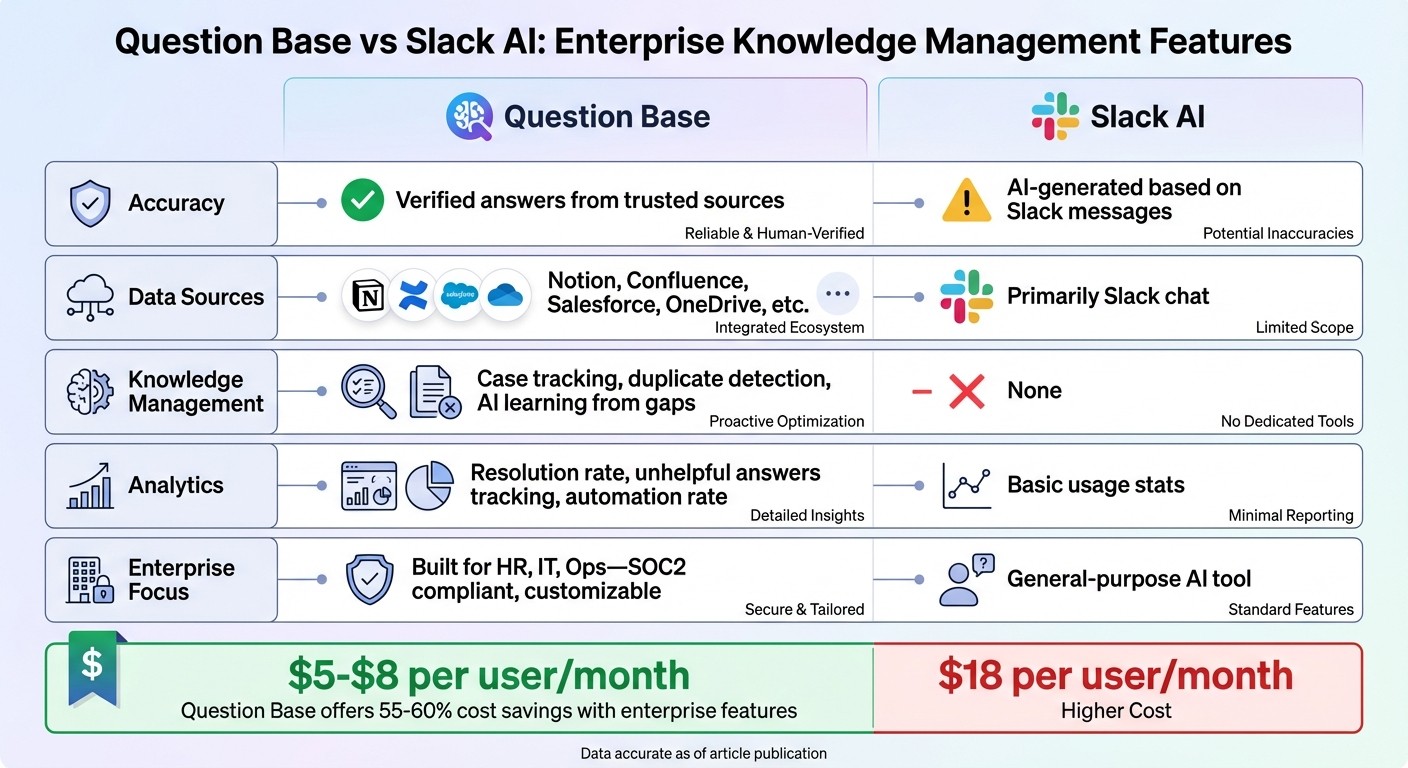
Question Base vs Slack AI Feature Comparison for Enterprise Knowledge Management
These comparisons highlight how AI-powered tools elevate Slack from a simple communication platform to a hub for managing and sharing knowledge.
Slack AI for General Productivity vs. Question Base for Verified Enterprise Knowledge

Slack AI is great for boosting individual productivity by summarizing past conversations. It pulls insights from historical chat data, making it useful for catching up on what’s been discussed. However, this approach has a key limitation: it reflects what was said, not necessarily what’s accurate or up-to-date.
Question Base, on the other hand, is designed for enterprise teams that need reliable, verified information. It sources answers directly from trusted platforms like Notion, Confluence, and Salesforce, ensuring that responses are expert-approved. This is critical for teams in HR, IT, and operations, where accuracy is non-negotiable. For example, when someone asks about benefits enrollment or security protocols, you need precise, current answers - not a summary of an old conversation.
While Slack AI helps individuals catch up on discussions, Question Base ensures entire teams stay aligned by delivering verified, trustworthy answers directly in Slack.
Feature Comparison: Question Base vs. Slack AI
Feature | Question Base | Slack AI |
|---|---|---|
Accuracy | Verified answers from trusted sources | AI-generated based on Slack messages |
Data Sources | Notion, Confluence, Salesforce, OneDrive, etc. | Primarily Slack chat |
Knowledge Management | Case tracking, duplicate detection, AI learning from gaps | None |
Analytics | Resolution rate, unhelpful answers tracking, automation rate | Basic usage stats |
Enterprise Focus | Built for HR, IT, Ops - SOC2 compliant, customizable | General-purpose AI tool |
Slack AI’s external integrations are limited by plan restrictions and indexing delays. In contrast, Question Base offers deep, immediate synchronization across platforms starting at $8 per user per month on its Pro plan.
Why Enterprises Choose Question Base for Knowledge Management
The differences in features make Question Base the preferred choice for enterprises managing large-scale knowledge operations. Its focus on verified accuracy, auditability, and ownership of knowledge stands out.
Question Base includes a verification process where experts - like IT leads or HR managers - can review and approve AI-generated answers before they’re shared. This ensures sensitive information, such as compliance policies or procedural details, remains accurate and reliable.
Additionally, Question Base provides enterprise-level security, including SOC 2 Type II compliance, encryption both at rest and in transit, and optional on-premise deployment for organizations with strict data governance needs. For teams overseeing thousands of employees across multiple departments, advanced tools like gap analysis, duplicate detection, and resolution tracking allow them to measure and improve their knowledge-sharing processes over time. While Slack AI focuses on summarization and search, Question Base builds an answer layer that scales support and keeps teams informed.
How to Implement AI for Better Slack Integrations
Setting Up AI-Powered Integrations
Begin by installing the AI integration through Slack's App Marketplace, ensuring you establish the right access controls. For tools such as Question Base, authorize access using OAuth, then invite the bot to the necessary channels with the command /invite @questionbase.
The next step is to link your documentation platforms. In the integration dashboard, navigate to the Integrations tab and authenticate tools like Notion or Confluence. Define the specific folders, spaces, or databases to be indexed, ensuring the AI pulls only from content that’s up-to-date and reliable. Before proceeding, take time to audit your content sources - exclude drafts, outdated files, or sensitive materials to prevent the AI from indexing information that shouldn't be shared.
Maintaining proper permission alignment is essential for enterprise security. The AI must adhere to the access controls of your source platforms, ensuring users only see content they are authorized to access.
Best Practices for Streamlining Workflows
Once your integration is set up, assign knowledge owners - team leads from HR, IT, or operations - who are responsible for reviewing unresolved questions and updating documentation weekly. This ensures accountability and keeps your knowledge base aligned with your team’s evolving needs. Utilize Slack’s native reactions, like thumbs up or thumbs down, to gather feedback on AI responses. This helps pinpoint areas where content needs improvement.
To keep documentation fresh, set up regular sync schedules. Daily automatic syncs combined with real-time webhooks can ensure updates are reflected immediately. If the AI's confidence level drops below 70%, configure it to tag a human expert or escalate the query to your support team. This human-in-the-loop AI process balances accuracy with efficiency, minimizing the workload for routine inquiries.
Finally, use analytics tools to refine workflows and improve your integration over time.
Monitoring and Optimizing Your Integrations
Leverage analytics dashboards to track key metrics like resolution rates, automation rates, and unhelpful answer tracking. These insights help you evaluate how well the AI is performing and identify areas where knowledge gaps exist. For instance, if certain questions are repeatedly unanswered, that’s a clear indicator to create new documentation in Notion or Confluence. Tools like Question Base can even analyze up to 365 days of Slack history to generate an initial FAQ database.
Schedule monthly reviews of your analytics to spot trends and prioritize updates. This proactive approach transforms your AI integration into more than just a support tool - it becomes a dynamic knowledge management system that adapts to your team’s real-world needs, ensuring your documentation stays relevant and effective.
Conclusion
AI integrations seamlessly connect platforms like Slack, Notion, and Confluence, eliminating the need for constant platform switching. This allows employees to access verified answers directly within their workflow, cutting down the 20–30% of the workweek often lost to context switching and manual searches. This streamlined approach paves the way for more efficient self-service support across departments.
By automating repetitive questions, teams in HR, IT, and operations can shift their focus to strategic projects instead of handling the same inquiries over and over. Additionally, automated knowledge capture transforms Slack conversations into structured documentation in tools like Notion or Confluence, preserving institutional knowledge that might otherwise be lost.
As we’ve discussed, while Slack AI is effective at summarizing past conversations for general productivity, enterprise teams that require accurate, verified answers often turn to specialized solutions like Question Base. The distinction lies in the data source: Slack AI relies on chat history, whereas Question Base pulls from trusted platforms like Notion, Confluence, Google Drive, and Salesforce to ensure responses are accurate and compliant.
For large organizations managing thousands of employees, the decision often comes down to cost and functionality. Question Base provides human-verified answers at a more affordable rate - $5–$8 per user per month compared to Slack AI’s $18 per user - while also offering advanced features like gap analysis, case tracking, and duplicate detection, which Slack AI lacks.
The real value becomes clear as AI integrations shift from simple search tools to dynamic knowledge management systems. Regular analytics identify gaps in documentation and encourage updates, enabling the system to adapt to evolving needs. Over time, Slack transforms into a scalable knowledge hub, meeting the enterprise demand for timely and accurate information with these AI-driven solutions. Together, these tools redefine how organizations manage and share knowledge.
FAQs
How does AI ensure accurate and up-to-date information from Notion and Confluence in Slack?
AI keeps information accurate by directly syncing with tools like Notion and Confluence, ensuring it pulls only verified, up-to-date content from trusted sources. This approach reduces the risk of outdated or incorrect data creeping into your workflows.
By automating updates and maintaining a live connection to these platforms, AI simplifies processes and guarantees that the knowledge shared in Slack remains consistent with your organization’s official documentation and systems.
How does Question Base stand out compared to Slack AI?
Question Base is built for enterprise teams that demand precise, expert-verified answers and strong knowledge management tools. Unlike Slack AI, which depends heavily on chat history for generating replies, Question Base integrates directly with trusted platforms like Notion, Confluence, Salesforce, and Google Drive. This ensures that the information provided is always reliable and up-to-date.
The platform includes features specifically designed for HR, IT, and operational teams, such as case tracking, duplicate detection, and AI that adapts to knowledge gaps. It also automates the process of syncing important Slack conversations into your knowledge base, transforming them into FAQs or structured content. With its advanced analytics, teams can monitor resolution rates, spot knowledge gaps, and refine workflows to maintain consistent, accurate information.
While Slack AI excels at summarizing discussions, Question Base takes it a step further by turning knowledge into action, ensuring accuracy and alignment across your organization.
How can integrating AI with Slack, Notion, and Confluence benefit enterprises?
Integrating AI with tools like Slack, Notion, and Confluence allows enterprises to simplify workflows, manage knowledge more effectively, and cut down on repetitive tasks. For example, platforms like Question Base automatically sync key Slack conversations with Notion and Confluence, ensuring vital information is centralized, easy to search, and consistently updated. This approach helps eliminate the risk of losing important insights in endless chat threads, giving teams quick access to accurate, verified answers when they need them.
AI integration goes beyond syncing - it automates updates, generates FAQs from discussions, and ensures access is tied to permissions, reducing manual effort and repetitive inquiries. These capabilities are particularly helpful for teams in support, HR, IT, and operations, where having precise, up-to-date information is essential for meeting internal demands effectively. By using AI, enterprises can create a more intelligent and connected knowledge system that enhances productivity and supports better decision-making.