∙
Cooper
∙
Reading time:
13 min

Repetitive questions in Slack can waste hours every week, especially for teams managing hundreds of employees. AI-powered FAQ automation solves this problem by instantly delivering accurate answers from trusted sources like Confluence or Google Drive - right inside Slack. This approach can handle up to 90% of repetitive queries, cutting response times to just 3.2 seconds and saving experts over six hours weekly.
Why it matters:
Repetitive questions consume time: IT, HR, and Ops teams often answer the same queries repeatedly, like password resets or PTO policies.
Slack buries information: Key answers get lost in threads, making it hard for employees to find what they need.
AI bridges the gap: By linking Slack to verified documentation, automation delivers fast, reliable answers without human intervention.
Key benefits:
Save $15,000–$25,000 annually per expert by automating routine queries.
Improve knowledge retention by turning Slack Q&As into searchable documentation.
Free up experts to focus on complex tasks.
How to start:
Audit busy Slack channels like #it-help or #hr-questions for repetitive queries.
Deploy AI tools like Question Base to automate answers using your existing documentation.
Continuously refine your knowledge base with analytics to fill gaps and improve accuracy.
For enterprises, this isn’t just about saving time - it’s about making Slack a reliable hub for internal knowledge.
Build a Slack AI Agent That Answers Questions (Step-by-Step Tutorial)
Finding FAQ Automation Opportunities in Slack
To uncover opportunities for automating FAQs in Slack, start by auditing your busiest channels. Slack often struggles with buried information, making it critical to identify recurring questions that eat up expert time. Channels like #it-help, #hr-questions, and #product-support are great starting points. These spaces often highlight repetitive inquiries - think password resets, PTO policies, or expense reimbursement procedures. Aleksandar Ginovski, Head of Product at Enhancv, noted:
"Before Question Base, we've been seeing repetitive questions all around our Slack channels" [1].
This scenario is familiar across many organizations, where a small group of repetitive questions can occupy significant time from subject matter experts. By conducting these audits, you can identify predictable patterns in team inquiries and start addressing them effectively.
Zeroing in on Unanswered Queries and Expert Messages
Unanswered questions in Slack often reveal knowledge gaps. These gaps are prime candidates for automation, as they not only slow down workflows but also signal areas where teams need consistent, accessible answers. Similarly, direct messages to experts about routine topics highlight where automation could save time and reduce interruptions. Tackling these patterns with automated solutions can significantly streamline operations.
Identifying Repetitive Question Patterns
Repetitive questions tend to follow clear and predictable trends. IT teams frequently receive requests for VPN credentials, software access, and hardware setups. HR fields questions about benefits enrollment, holiday schedules, and onboarding steps. Operations teams handle inquiries about travel policies, expense reimbursements, and office access. Willem Bens, Manager of Sales North EMEA at DoIT International, described the benefit of automation as:
"like having an extra person answering questions in Slack" [1].
Here’s a closer look at common patterns and the impact automation can have:
Department | Common Repetitive Question Patterns | Impact of Automation |
|---|---|---|
IT Support | Password resets, VPN credentials, hardware requests, software access | |
HR / People Ops | PTO policies, benefits enrollment, onboarding steps, holiday schedules | Saves time for HR teams and provides 24/7 information access |
Operations | Expense reimbursement, travel policies, SOPs, office access | Standardizes workflows and ensures compliance |
Sales / CS | Product specs, pricing tiers, refund policies, internal macros | Improves consistency and reduces search time for agents |
Prioritizing High-Value Use Cases for Enterprises
Not all automation opportunities are created equal. For enterprises, it’s essential to focus on areas where faster responses directly affect business outcomes. Take sales enablement, for instance: when sales reps need product pricing, compliance details, or competitor insights during live deals, delays can mean lost revenue. Similarly, engineering teams benefit when deployment runbooks or Jira workflows are instantly accessible, preventing wasted time sifting through old threads [3].
In industries like healthcare and finance, automating access to protocol information, compliance guidelines, and regulatory details can reduce risks while speeding up workflows [2]. Prioritize automation projects where quick answers can drive revenue or minimize critical risks.
Best Practices for Automating FAQs in Slack
Once you've identified areas ripe for automation, the next step is setting up a system that provides quick, accurate answers - allowing your experts to focus on more complex challenges. Here are some practical steps to fine-tune your Slack FAQ automation.
Focus on Frequently Asked Questions with High Impact
Start by automating the most common questions - those that account for around 40% of repetitive queries. Examples include password resets, PTO policies, expense guidelines, and product details. Link these answers to trusted sources like Notion, Confluence, or Google Drive to ensure accuracy. Roll out automation in high-traffic channels such as #it-help or #hr-questions, where repetitive inquiries often drain valuable time from your team.
AI-driven FAQ systems can handle over 90% of repetitive questions, significantly speeding up onboarding and reducing the time it takes for new employees to get up to speed [2]. By connecting your AI agent to reliable resources, you ensure consistent and accurate answers across the board.
Combine AI Workflows with Human Escalation
Design your automation to filter routine questions while leaving room for human intervention when necessary. For instance, straightforward inquiries can be handled automatically, but complex issues like payment disputes or system outages should be routed to the appropriate expert.
Establish clear escalation paths so employees can quickly get help from a person if the AI doesn't have the answer. Tools like Question Base make this process easier by allowing experts to save Slack responses as permanent FAQ entries with just one click. This approach ensures a balance between efficiency and accuracy - employees receive instant answers when possible and a seamless handoff to a human when needed.
Leverage Analytics for Continuous Improvement
Track metrics such as resolution rates and flagged responses to identify areas where your system might fall short. Use analytics dashboards and conduct regular audits to keep your knowledge base up to date. Reviewing logs of "unhelpful answers" can reveal gaps in documentation that need to be addressed. This ongoing feedback process transforms your FAQ system into a dynamic resource that grows and adapts alongside your organization’s needs.
Question Base vs Slack AI: Choosing the Right Solution for Enterprises

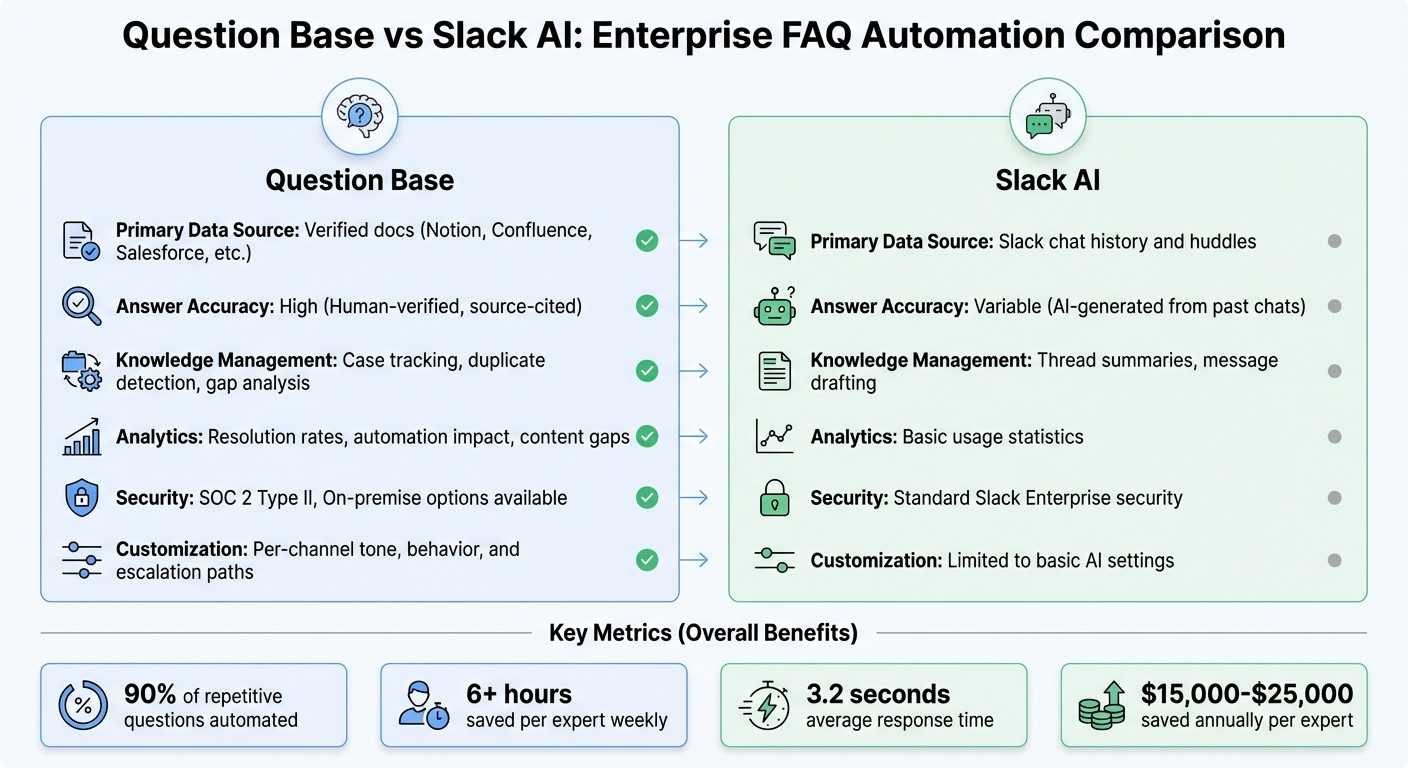
Question Base vs Slack AI Feature Comparison for Enterprise Teams
Key Differences Between Question Base and Slack AI
While Slack AI is great for summarizing threads and drafting messages, it falls short when enterprises need verified, reliable knowledge at scale. This is where Question Base steps in, directly connecting to trusted documentation platforms like Notion, Confluence, Salesforce, and Google Drive to deliver accurate, source-backed answers.
Unlike Slack AI, which pulls answers from historical messages and huddles, Question Base combines expert-verified responses with insights from Slack. This hybrid system ensures that all answers are vetted by subject matter experts before being added to a permanent FAQ. For teams in compliance-heavy industries, this human-in-the-loop approach is critical to maintaining accuracy and accountability.
Here’s a quick comparison of the two:
Feature | Question Base | Slack AI |
|---|---|---|
Primary Data Source | Verified docs (Notion, Confluence, Salesforce, etc.) | Slack chat history and huddles |
Answer Accuracy | High (Human-verified, source-cited) | Variable (AI-generated from past chats) |
Knowledge Management | Case tracking, duplicate detection, AI vs. manual knowledge gap analysis | Thread summaries, message drafting |
Analytics | Resolution rates, automation impact, content gaps | Basic usage statistics |
Security | SOC 2 Type II, On-premise options available | Standard Slack Enterprise security |
Customization | Per-channel tone, behavior, and escalation paths | Limited to basic AI settings |
Why Question Base Works Better for High-Volume Teams
The technical differences between these tools lead to real-world advantages for teams handling high volumes of repetitive queries. For such teams, having a secure and audited source of truth is non-negotiable. Question Base excels here, offering features like case tracking, duplicate detection, and role-based access controls. These tools help uncover gaps in documentation and guide content improvements proactively.
By automating over 90% of repetitive questions, Question Base saves experts an average of 6+ hours per week [1][2].
"We now have a reliable and useful knowledge base, making it easy to share knowledge across the team. We no longer have staff waiting on busy managers for an answer, Question Base is there in seconds, plus it's easy to verify answers as new questions come along."
This high level of automation and accuracy makes Question Base ideal for departments like support, HR, IT, and operations. While Slack AI focuses on search and summarization, Question Base builds an answer layer that ensures employees receive instant, reliable responses without leaving Slack - while keeping experts in the loop.
Security is another area where Question Base stands out. For organizations requiring SOC 2 Type II compliance, encryption both at rest and in transit, or on-premise deployment for regulated industries, Question Base offers enterprise-grade security that surpasses standard Slack permissions. Pricing starts at $6,000 per year ($500/month billed annually), and includes hands-on support and dedicated assistance [1].
Implementing Question Base for Slack FAQ Automation
Setting Up and Connecting Knowledge Sources
Getting started with Question Base is quick and straightforward. Begin by installing the app from the Slack App Directory - no technical expertise or engineering support needed. Once installed, activate the bot with the simple command /invite @questionbase. Deploy it in high-traffic Slack channels like #it-help, #hr-questions, or #onboarding - places where repetitive questions tend to pile up.
Next, connect your trusted documentation tools. Navigate to the Integrations tab and authorize access to platforms like Confluence or Google Drive. You have full control over what gets indexed - whether it’s specific Confluence spaces for product guides or designated Google Drive folders for HR policies. This ensures the AI only references accurate, up-to-date information from sources you trust.
Once your knowledge sources are linked, configure how the AI responds and set up escalation paths to align the system with your team’s specific needs.
Customizing AI Responses and Escalation Flows
Tailor the AI’s tone and behavior to fit different Slack channels using Answer Instructions. For instance, you can set a formal, policy-focused tone for #hr-benefits while opting for a more technical, detail-oriented style in #it-support. This customization ensures the AI aligns with your team’s communication style and compliance standards.
For more complex or sensitive queries, escalation workflows step in. Set up triggers based on keywords like "urgent", "compliance", or "legal" to automatically route these issues to the right human experts. If the AI isn’t confident in its response, it logs the query and notifies designated team members. This human-in-the-loop system not only ensures accuracy but also flags gaps in your documentation for future improvement.
One of the standout features is the ability to convert expert responses from Slack into verified FAQ entries with just one click. This prevents valuable knowledge from disappearing into chat history and helps your knowledge base grow naturally as new questions arise.
After customizing responses, keep an eye on performance metrics to refine and expand your FAQs over time.
Using Analytics for Continuous Improvement
The Question Base analytics dashboard provides real-time insights into automation rates, resolution times, and knowledge gaps, making it easy to track performance for busy teams. You can monitor how many questions the AI resolves versus those requiring human help - offering clear evidence of time saved.
The unanswered questions log is a goldmine for identifying content gaps. Conduct regular audits to spot recurring themes that lack documentation, then prioritize creating content based on their frequency and impact. Additionally, reviewing responses flagged as "unhelpful" gives subject matter experts a chance to fine-tune the AI for better accuracy.
Response time metrics are another valuable tool for tracking ROI for stakeholders. Use these insights during quarterly planning to align your documentation strategy with the actual needs of your team, showcasing measurable improvements across departments.
Conclusion: Scaling Knowledge Management with Slack FAQ Automation
For teams grappling with a flood of repetitive questions, FAQ automation can reshape Slack into an organized and efficient knowledge hub. Question Base tackles the common pain points enterprises face - lost answers buried in threads, hours drained on duplicate queries, and uncertainty around accuracy - by delivering instant, verified responses that significantly reduce the burden on experts while automating repetitive questions [1].
What sets Question Base apart is its enterprise-grade foundation. With SOC 2 Type II compliance, answers verified by experts and pulled from trusted documentation, and real-time analytics to monitor resolution rates and identify knowledge gaps, it ensures every response is both reliable and traceable. By connecting directly to your official documentation, Question Base guarantees that every answer is accurate and auditable.
The system creates a self-improving feedback loop, converting daily Q&A into a structured, searchable knowledge base. As questions arise, it logs unanswered queries, highlights content gaps, and allows expert responses to be turned into lasting FAQ entries with just one click. This process grows alongside your team’s needs - whether it’s onboarding new employees, managing IT and HR support requests for thousands of users. Together, these features help teams maintain up-to-date, reliable knowledge - critical for long-term success at scale.
The results are clear: faster responses, higher auto-answer rates, and measurable efficiency gains [1]. Start small with pilot channels to see immediate impact, then expand across your organization. With easy installation and ready-to-use integrations, Question Base transforms Slack into a powerful knowledge assistant, helping teams stay productive, freeing up experts for more complex tasks, and keeping your documentation aligned with evolving needs.
FAQs
How does automating FAQs in Slack help teams work more efficiently?
Automating FAQs in Slack delivers quick and precise answers by pulling directly from reliable documentation. This approach cuts down repetitive questions and minimizes the need for manual replies, saving teams between 20% and 40% of their time and effort. It also speeds up onboarding by approximately 30%, freeing employees to concentrate on more meaningful tasks instead of hunting for information.
By simplifying how teams access knowledge, FAQ automation boosts productivity while keeping information current and easy to find as workflows change.
What kinds of questions work best for automation in Slack?
Automation in Slack is particularly effective for handling routine and repetitive questions that pop up regularly across teams. Think about HR queries like PTO policies, IT issues such as password resets, or frequently asked product and pricing questions. These are predictable and simple to address, making them perfect candidates for AI-driven solutions that save time and minimize workplace disruptions.
How does Question Base deliver accurate answers in Slack?
Question Base delivers accurate responses by pulling information directly from trusted, expert-approved documentation such as Notion, Confluence, Salesforce, and Google Drive. Unlike tools that rely on AI-generated interpretations of chat logs, Question Base ensures every response is traceable and dependable, giving your team confidence in the answers they rely on.
By removing uncertainty, this method guarantees that answers reflect your organization’s official knowledge base. It’s a perfect fit for enterprise teams where precision and consistency are non-negotiable.