∙
Cooper
∙
Reading time:
14 min

Repetitive questions waste time. For enterprise teams using Slack, AI-powered tools can save hours by automating answers, consolidating knowledge, and improving workflows. Here's how AI sync solutions like Slack AI and third-party platforms such as Question Base help organizations streamline operations:
Time Savings: AI reduces search times and repetitive tasks, saving up to 90 minutes per user weekly.
Scalability: Handles billions of messages, enabling faster onboarding and improved support without extra staff.
Accuracy: Specialized tools like Question Base connect directly to trusted sources (e.g., Notion, Salesforce) for reliable answers.
Security: Ensure compliance with strict data retention policies and SOC 2 Type II standards.
Choosing the right platform and planning carefully ensures AI sync delivers real productivity gains. Whether you’re reducing IT tickets or speeding up onboarding, these tools can transform Slack into a hub for efficient knowledge sharing.
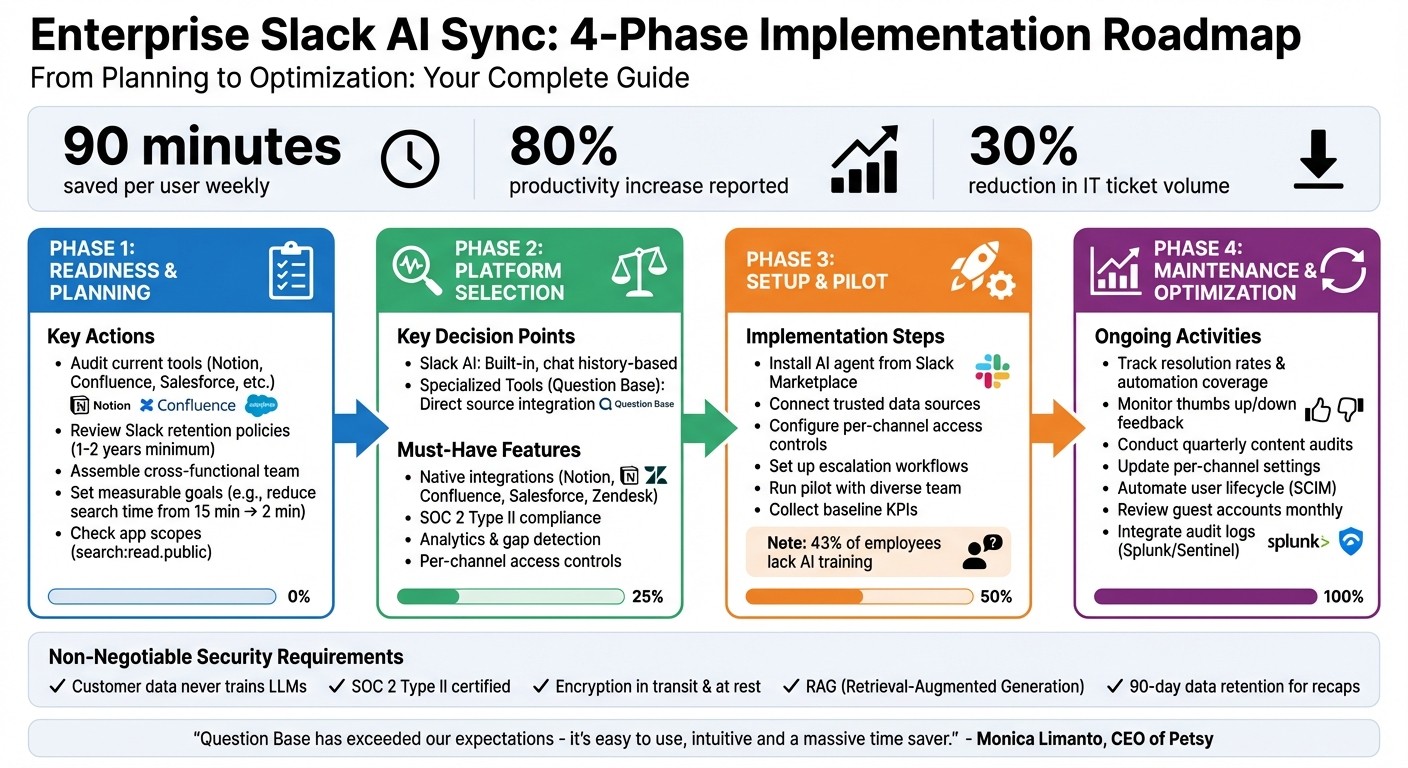
Enterprise Slack AI Sync Implementation: 4-Phase Roadmap
Build a No-Code AI Knowledge Base in Slack 🚀
Before You Start: Check Your Readiness and Set Clear Goals
Getting the most out of AI synchronization begins with a thorough review of your current tools and setting clear, measurable objectives. Skipping this foundational step can lead to underused tools and misaligned expectations. By laying the groundwork, you’ll ensure that your AI sync - whether it’s with Slack AI or enterprise solutions like Question Base - delivers meaningful results.
Review Your Current Tools and Connections
Start by mapping out the platforms your teams use daily - Notion, Confluence, Google Drive, Salesforce, Zendesk, Intercom - and identify key data sources and how often cross-platform searches occur. This audit helps shape your AI sync strategy by highlighting where integrations are most needed.
Next, take a close look at your Slack workspace’s existing integrations. Verify that app scopes and retention policies meet your compliance standards. For instance, when evaluating third-party AI tools, examine app scopes like search:read.public to understand exactly what data the app can access[3]. Also, ensure your Slack retention policies are set to retain data for at least one to two years, as AI tools cannot generate insights from deleted content[1].
Bring together a cross-functional team that includes IT administrators, communications leads, business stakeholders, and Slack champions. This group will ensure the AI sync aligns with both technical requirements and workflow needs. Once you’ve mapped out your tools and data flows, you’ll be ready to establish success metrics.
Set Specific Synchronization Goals
Define clear, measurable goals to guide your AI sync efforts. For example, you might aim to reduce search times from 15 minutes to under two minutes, lower IT ticket volume by 30%, or shorten onboarding for new hires from three weeks to one. Start by benchmarking current performance to measure progress effectively.
Focus on high-impact use cases, such as helping sales teams quickly ramp up on new accounts, enabling faster root cause analysis for incidents, or removing blockers for engineering teams[4][1].
Keep in mind that many users may not be familiar with AI tools. Clear goals not only guide the implementation but also support training and adoption, embedding AI sync into everyday workflows. To maximize your organization’s collective knowledge, encourage employees to work in public Slack channels instead of private DMs[1]. This approach broadens the pool of information available for AI synchronization and makes valuable insights accessible to everyone.
How to Choose the Right AI Sync Platform for Slack
Slack AI vs. Specialized Third-Party Tools
Slack AI is a solid option for general productivity tasks - summarizing conversations, pulling up past discussions, and streamlining individual workflows. It’s built into your existing Slack subscription and requires very little setup, making it convenient for day-to-day use. However, when your team needs to manage verified, reliable knowledge at scale, specialized platforms like Question Base stand out by directly connecting to trusted documentation sources such as Notion, Confluence, Salesforce, Google Drive, Zendesk, and Intercom. Unlike Slack AI, which leans heavily on chat history, these tools ensure accuracy by sourcing information directly from official repositories.
This difference is critical when precision and traceability are priorities. Question Base, for instance, delivers expert-verified answers from your knowledge base instead of relying on AI-generated interpretations of past Slack messages. It also offers advanced features like case tracking, per-channel configurations, duplicate detection, and analytics that highlight resolution rates and content gaps - capabilities that general-purpose AI tools typically lack[4].
In essence, Slack AI helps you dig into your past conversations, while platforms like Question Base enable you to structure and future-proof your organizational knowledge. Understanding these distinctions is key to identifying the features your team truly needs.
What Features Matter Most
The right AI sync platform should integrate effortlessly with essential tools like Notion, Confluence, Salesforce, HubSpot, Zendesk, and Intercom. Without these integrations, the AI cannot access verified, up-to-date information, limiting its usefulness.
Beyond seamless integrations, performance tracking through analytics is equally important. Look for platforms that offer actionable insights, such as metrics on unanswered questions (which highlight knowledge gaps), thread summarization, and the ability to turn valuable Slack discussions into permanent knowledge base entries. Studies show that 80% of desk workers using AI and automation tools report increased productivity[1], but this only holds true when the tools are connected to reliable data sources and offer meaningful analytics.
Customization and control are also crucial. Your organization should have the ability to decide what content the AI can access, how it responds, and when to escalate issues to human support. For example, Question Base allows teams to review and refine AI-generated answers before they’re shared, ensuring accuracy and maintaining organizational oversight.
Security and Compliance Requirements
When dealing with enterprise-level synchronization, robust security and compliance measures are non-negotiable. Start by confirming that customer data is never used to train third-party language models. Both Slack AI and Question Base explicitly guarantee this[2][4]. Additionally, ensure the platform employs Retrieval-Augmented Generation (RAG), which limits the data sent to the language model during inference, avoiding long-term storage in the model’s database[2].
Look for SOC 2 Type II compliance, encryption for data both in transit and at rest, and strict access controls. If your organization operates in a highly regulated industry, check whether the platform offers on-premise deployment options. Question Base, for instance, meets these requirements and also provides white-labeling and multi-workspace support for complex enterprise setups.
"Customer data never leaves Slack-controlled infrastructure and is never used to train large language models (LLMs)." - Slack[2]
Examine data retention policies closely. For example, Slack AI Recaps store data for 90 days but delete it if the original messages are removed according to compliance policies[2]. Ensure the platform you choose aligns with your organization’s retention needs and regulatory obligations. Additionally, review app permissions carefully. For instance, scrutinize scopes like search:read.public to understand exactly what data the app can access. Transparency in this area is essential to maintaining high security standards.
How to Set Up AI Synchronization Correctly
Plan Your Synchronization Workflow
Start by identifying the specific access needs of each department. For example, HR might rely on Notion, while IT may need data from Confluence and Zendesk. Set up managing data access by role to ensure sensitive information, like payroll data, stays protected and doesn’t accidentally appear in a general #help channel. This way, employees can quickly find the information they need without compromising security.
Use analytics to track which questions have the most significant impact on productivity, and focus on connecting the data sources that address these issues first. Additionally, establish clear escalation workflows so that complex or unresolved questions are automatically routed to the right subject matter experts. Once your workflow is mapped out, you’re ready to implement a strong two-way data sync.
Set Up Two-Way Data Sync
Begin by installing the AI agent through the Slack App Marketplace and linking it to platforms such as Notion, Confluence, Google Drive, Salesforce, Zendesk, or Intercom. Unlike tools that depend solely on Slack’s chat history, platforms like Question Base retrieve answers directly from these trusted sources, ensuring accurate responses from the start. Use the /invite @questionbase command to add the bot to specific Slack channels where employees need quick access to information.
Customize the AI’s tone and behavior through the App Home to align with your company’s communication style. Enable real-time status updates, such as "searching company knowledge…", so users know their queries are being processed. Add thumbs up/down feedback buttons to every response, allowing employees to quickly flag any inaccuracies for review.
Once synchronization is configured, test the system with a controlled pilot to ensure everything is working as planned.
Run a Pilot Test First
Launch the system with a small, diverse group that includes IT leads, communications managers, and Slack champions. Following Slack’s guidance, this approach provides valuable, on-the-ground feedback before rolling out the system across the organization. Set baseline KPIs like response times and the volume of repetitive questions to measure productivity gains after full implementation.
During the pilot, manually verify the AI’s responses by checking the provided citations to ensure the system isn’t pulling outdated information or generating inaccurate answers. Keep in mind that 43% of employees haven’t received formal training on using AI tools at work[1]. To address this, use Slack’s Workflow Builder to create post-interaction surveys that capture user feedback in real-time. Schedule weekly check-ins with the pilot group to resolve any issues and refine the system before expanding access to the entire company.
How to Maintain and Improve AI Sync After Launch
Track Performance Metrics
Keeping an eye on resolution rates is key to understanding how effectively the AI handles questions without human intervention. For instance, employees using AI and automation have reported up to an 80% boost in productivity[1]. By focusing on automation coverage - the percentage of repetitive questions resolved versus those escalated - you can measure whether your investment is delivering results.
Log every instance where users flag an answer as "unhelpful" or when the AI fails to provide a response. These knowledge gaps signal missing or outdated documentation in your connected platforms, such as Notion or Confluence. Unlike basic tools like Slack AI, Question Base offers detailed analytics that help pinpoint these gaps with precision.
Another useful metric is comparing pre- and post-launch search times to quantify time saved. Additionally, track the reduction in support tickets to showcase ROI and guide your quarterly reviews. Use these insights to adjust and optimize AI settings based on real-world usage patterns.
Adjust AI Settings Based on Feedback
Use thumbs up/down ratings and post-interaction surveys to identify trends in user satisfaction. If a particular documentation source consistently receives poor ratings, conduct an audit to verify its accuracy or adjust synchronization settings to prioritize more reliable resources. You can also tweak the AI's tone to better align with your company’s communication style.
As your organization evolves, update per-channel settings to ensure employees see only the most relevant information. Fine-tune escalation workflows to ensure that questions requiring human expertise are routed directly to the right specialists, avoiding unnecessary reliance on automated responses.
Set Policies for Long-Term Management
Building on performance tracking and regular adjustments, establish policies to maintain the system’s effectiveness over time.
Schedule content audits to align with sprint cycles or quarterly planning. Analytics can help you identify the most frequently accessed documentation, allowing you to prioritize updates for those resources.
"Question Base has exceeded our expectations - it's easy to use, intuitive and a massive time saver. We now have a reliable and useful knowledge base... We no longer have staff waiting on busy managers for an answer." - Monica Limanto, CEO of Petsy[4]
Implement automated user lifecycle management using SCIM to sync Slack access with your HR systems. This ensures that former employees are deprovisioned immediately, preventing unauthorized access. For guest accounts, consider setting expiration dates or conducting monthly reviews to avoid lingering "zombie" accounts with outdated permissions.
To enhance security, integrate Slack Audit Logs with tools like Splunk or Microsoft Sentinel. This allows you to monitor authentication events and administrative changes in real time. For organizations handling sensitive information, deploy Data Loss Prevention (DLP) tools to scan AI-synced messages for sensitive patterns, such as Social Security numbers or proprietary code. Additionally, establish clear data retention policies to meet your compliance requirements effectively.
Conclusion: Building Effective AI Synchronization for Enterprise Slack
Getting AI to work seamlessly within Enterprise Slack requires careful planning, choosing the right tools, and a commitment to ongoing refinement.
Start by conducting a comprehensive documentation audit to identify your most critical knowledge sources. Define clear objectives - whether it’s speeding up resolution times, cutting down on support tickets, or capturing valuable insights from Slack conversations. Without this groundwork, even advanced AI solutions may fall short of expectations.
Choosing the right platform is key. While Slack AI can assist with summarizing conversations and improving general productivity, teams that need reliable, accurate answers at scale should compare Question Base vs. Slack AI for FAQ search capabilities. Unlike Slack AI, which primarily pulls from chat history, Question Base accesses verified data from trusted sources. This distinction is especially important for teams managing sensitive or regulated information.
Once your system is up and running, make sure to include feedback mechanisms like thumbs up/down ratings and track essential metrics to measure the ROI of knowledge base automation, such as resolution times, automation rates, and knowledge gaps [3]. Regularly review this data to guide updates during sprint cycles or quarterly planning. Additionally, use SCIM to automate user lifecycle management, ensuring former employees lose access immediately, and conduct monthly reviews of guest accounts to avoid unauthorized data exposure. These practices help maintain a secure and efficient knowledge system.
FAQs
How can tools like Question Base enhance productivity in Slack for enterprise teams?
AI tools like Question Base turn Slack into a highly efficient knowledge hub, driving productivity by:
Delivering instant, reliable answers: Unlike Slack AI, which depends on chat history, Question Base integrates directly with trusted platforms like Notion, Confluence, and Salesforce. This eliminates the hassle of searching through threads or toggling between apps, making it easier to handle repetitive inquiries about policies or IT issues.
Creating smarter FAQs: Question Base spots recurring questions, builds a dynamic FAQ, and reveals knowledge gaps. This can cut down repetitive queries by as much as 35%, freeing up hours for experts each week while enhancing the team's shared knowledge base.
Maintaining enterprise-grade security: With SOC 2 Type II compliance, encryption, and adjustable settings, Question Base safeguards sensitive information. Admins can also manage access, set the tone for responses, and define escalation workflows.
While Slack AI excels at summarizing conversations and searching through messages, Question Base is designed specifically for teams that need document-backed answers they can trust, along with advanced analytics. This makes it a perfect fit for HR, IT, and operations teams.
What security measures should enterprises consider when using AI in Slack?
When integrating AI into Slack, enterprises must focus on data protection, access control, and compliance to safeguard their operations. Slack’s AI features operate within the platform’s established security framework, which includes encryption for both data at rest and in transit, multi-factor authentication (MFA), single sign-on (SSO), and detailed permission settings to manage access to AI tools. Since Slack AI relies on learning from chat history, it’s essential for organizations to remain vigilant about potential exposure of sensitive information. Enabling audit logs can help track AI-generated outputs and maintain oversight.
Question Base adds an extra layer of security designed specifically for enterprise environments. With SOC 2 Type II certification, it ensures encryption for data both at rest and in transit. For businesses seeking even greater control, it offers optional on-premise deployment, allowing AI processing to remain within your infrastructure. Administrators can fine-tune access to documentation sources like Notion, Confluence, or Salesforce, apply channel-specific policies, and gain complete visibility into AI interactions. These features work together to deliver secure, accurate, and reliable answers while protecting sensitive data.
How do we decide between Slack AI and a specialized tool like Question Base for our enterprise needs?
Choosing between Slack AI and Question Base comes down to what your organization values most and how you approach knowledge management.
Slack AI is tailored for on-the-fly assistance. It excels at summarizing conversations and pulling recent messages directly from Slack's chat history. This makes it a solid option for smaller teams or those looking for quick, conversational insights without needing much setup.
Question Base, however, steps up for enterprise-level needs. It integrates with trusted tools like Notion, Confluence, and Salesforce to provide verified answers rather than relying on AI-generated approximations. With options for advanced customization, detailed analytics, and enterprise-grade security, it’s built for teams like HR, IT, and operations where accuracy, compliance, and scalability are non-negotiable.
For fast, chat-based insights, Slack AI works well. But if your priority is delivering accurate, documented answers and maintaining a centralized knowledge hub, Question Base is the stronger option. Many teams find value in using both - leveraging Slack AI for day-to-day productivity and Question Base for structured, dependable support at scale.