∙
Cooper
∙
Reading time:
16 min

Slack is a powerful communication tool, but for regulated industries like healthcare, finance, and insurance, its default retention settings can create compliance risks. Strict regulations, such as SEC Rule 17a-4 (7-year retention) or HIPAA (6-year retention), require businesses to securely store and retrieve sensitive data, including messages and files. Failure to comply can result in hefty fines - up to $100,000 per month for certain violations.
Here’s what you need to know:
Default Slack Settings: Free plans delete messages after one year, while paid plans retain data indefinitely unless configured otherwise. These defaults often fail to meet regulatory standards.
Enterprise Features: Paid plans (Business+ and Enterprise Grid) offer advanced retention controls, including custom timelines, edit/deletion tracking, and legal holds. However, gaps remain, such as limited support for Slack Connect channels.
Third-Party Tools: Solutions like Mimecast Aware and Global Relay integrate with Slack to create tamper-proof archives and ensure compliance with strict regulations like FINRA and SOX.
Knowledge Management: Tools like Question Base organize Slack data into a searchable hub, ensuring teams access accurate, up-to-date information while maintaining compliance.
How to Archive Slack Messages for Compliance & Retention Needs
Slack's Retention Features Explained
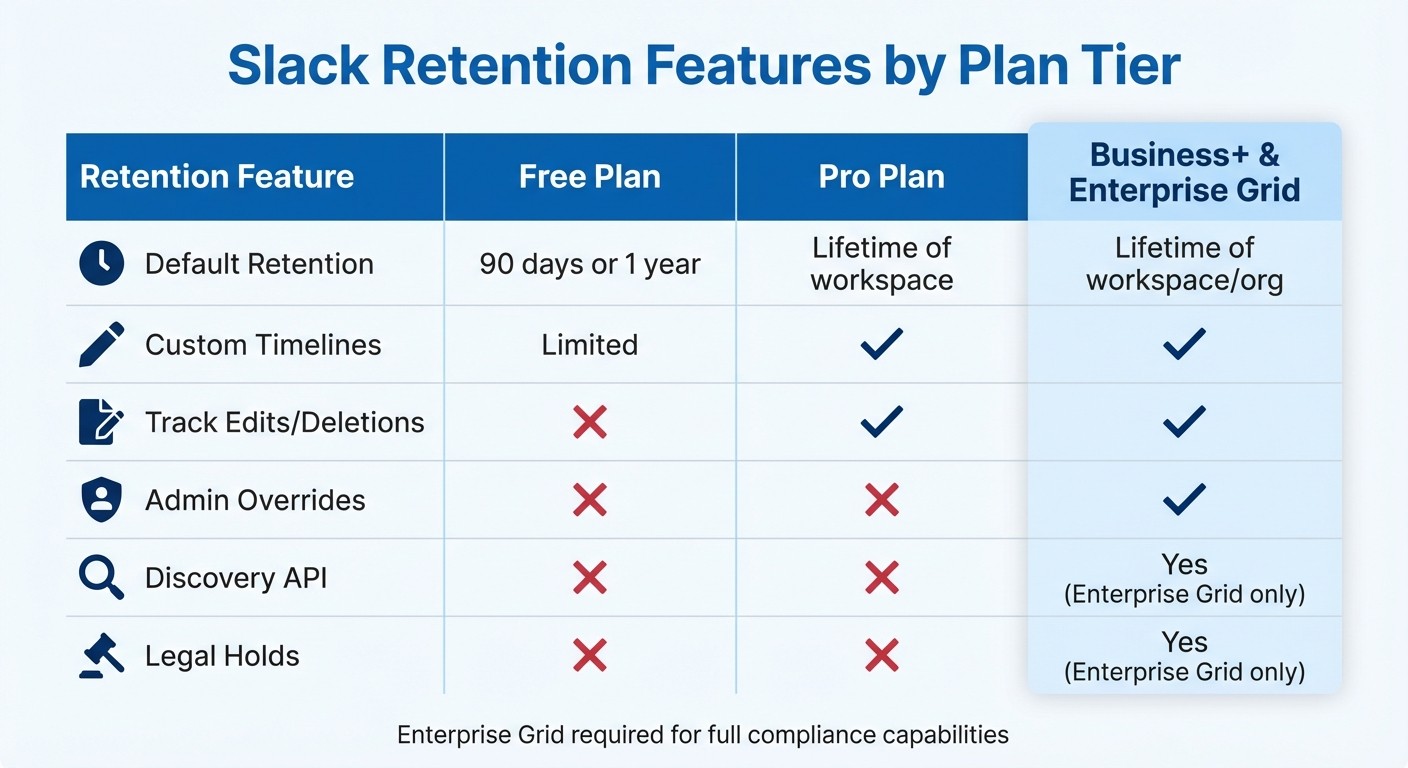
Slack Retention Features Comparison Across Plan Tiers
For teams on paid Slack plans, all workspace data is stored indefinitely, while free plans automatically delete data after one year [1][9]. As mentioned earlier, Slack’s default retention settings often don’t meet strict compliance requirements. Below, we’ll break down how these settings apply to messages, files, and individual channels, helping you better align Slack with regulatory standards through robust backup and retention strategies.
Message and File Retention Settings
On paid plans, workspace owners can choose to retain messages indefinitely or set them to auto-delete after a specific timeframe. They also have the option to track edits and deletions, ensuring a comprehensive audit trail [1]. Without this tracking, any edited or deleted message is gone for good, leaving potential compliance gaps [3].
File retention works the same way. Admins can opt to keep files indefinitely, delete them after a set period, or preserve deleted files for export using the Discovery API [1][9]. Slack processes deletions daily, and once data is deleted, it cannot be recovered [1][9].
Custom Retention by Channel Type
Slack offers flexibility by allowing custom retention rules for different types of channels. Organizations can set unique policies for public channels, private channels, and direct messages (DMs). On Business+ and Enterprise Grid plans, Admin Overrides allow administrators to enforce retention policies on specific channels, preventing users from setting conflicting rules [1][3]. Without Admin Overrides, users on paid plans can adjust retention settings for their private channels and DMs, which could inadvertently create compliance risks [1].
Enterprise Grid takes this a step further by enabling organization-wide retention policies. Org Owners can enforce global rules that override individual Workspace Owner settings, ensuring uniformity across all workspaces within the organization [1][4].
Where Slack's Native Features Fall Short
Despite its range of options, Slack’s retention tools have some critical gaps. For example, deleted channels are not covered by retention policies - once a channel is deleted, all its messages and revisions are permanently erased, regardless of workspace settings [1][9]. Similarly, Slack’s legal hold feature, available only on Enterprise Grid, doesn’t support Slack Connect channels, leaving shared conversations with external partners unprotected during investigations [4][6].
"Unless a data retention policy is in place that specifically captures revisions and deletions, these messages might be lost forever."
Emily Schwenke, Mimecast [3]
Another shortfall is Slack’s inability to provide the unchangeable, searchable archives required by regulations like SEC Rule 17a-4. While the Discovery API - available only on Enterprise Grid - allows integration with third-party archiving tools for exporting data, organizations without this setup may struggle to meet eDiscovery requirements [3][4]. This is especially concerning for industries handling sensitive information, as research shows that 1 in 17 Slack messages contains sensitive data like PII, PHI, or PCI [3]. Without robust safeguards, these gaps can expose organizations to compliance risks.
Retention Feature | Free Plan | Pro Plan | Business+ & Enterprise Grid |
|---|---|---|---|
Default Retention | 90 days or 1 year | Lifetime of workspace | Lifetime of workspace/org |
Custom Timelines | Limited | Yes | Yes |
Track Edits/Deletions | No | Yes | Yes |
Admin Overrides | No | No | Yes |
Discovery API | No | No | Yes (Enterprise Grid only) |
Legal Holds | No | No | Yes (Enterprise Grid only) |
These limitations highlight the need for additional safeguards, which will be explored in the next section.
Industry-Specific Compliance Requirements
In regulated industries, Slack messages must be preserved in formats that ensure they remain auditable and tamper-proof. Below, we explore the specific compliance needs for financial services, healthcare, and insurance.
Financial Services: SEC and FINRA Rules
Financial institutions face strict compliance requirements under SEC Rule 17a-4 and FINRA Rule 4511, which mandate that all business-related communications be stored in a WORM (Write Once, Read Many) format for at least seven years [4]. This ensures messages remain in their original, unaltered state [3].
"Rule 17a-4 obliges that firms retain and preserve all business records, including communications data such as that produced through Slack."
Jennie Clarke, Head of Content, Global Relay [4]
To meet these regulations, organizations must use Slack's Enterprise Grid plan, which provides access to compliance-critical tools like the Discovery API and Legal Hold features [4]. While Slack itself is "FINRA 17a-4 configurable", full compliance requires integrating third-party archiving solutions such as Global Relay or Mimecast. It's also essential to configure retention policies to "Never delete messages - save edits", ensuring all revisions are captured for a complete audit trail [4].
Healthcare: HIPAA Data Retention
In healthcare, managing Protected Health Information (PHI) within Slack requires adherence to HIPAA regulations. Only Slack's Enterprise Grid plan supports HIPAA-compliant collaboration, and organizations must sign a Business Associate Agreement (BAA) with Slack before handling PHI [12]. While HIPAA itself does not define specific retention periods, state or federal laws often require PHI to be preserved for at least six years.
Using the Enterprise Grid plan, healthcare organizations can rely on Discovery APIs to export messages and files, meeting audit and retention requirements [12][8]. To ensure compliance, external tools for Data Loss Prevention (DLP), Single Sign-On (SSO), and backup/archival are necessary. Additionally, channels where PHI is discussed should always be set to "Private", and patients or plan members should never be added as users or guests [12]. Platforms like Question Base can further enhance Slack's functionality by organizing shared knowledge while maintaining strict security protocols for PHI.
Insurance: SOX and State Regulations
Insurance companies, especially publicly traded ones, must comply with the Sarbanes-Oxley Act (SOX), which enforces the preservation of business records and financial communications to ensure data integrity and auditability [4]. Additionally, state laws like the California Consumer Privacy Act (CCPA) and international frameworks such as GDPR impose stringent rules on managing and deleting personal data [4].
To meet these requirements, insurance firms typically rely on Slack's Business+ or Enterprise Grid plans, which support robust retention policies across private channels and direct messages [4]. Leveraging the Discovery API to export data to third-party immutable archives is critical, and disabling "Member Overrides" ensures individual users cannot set shorter retention periods, which could lead to compliance gaps [1]. Configuring DLP rules to automatically flag or hide messages containing sensitive policy details further strengthens regulatory adherence [7].
How to Configure Slack Retention Policies
Setting up retention policies in Slack requires careful attention to ensure compliance with legal standards and to safeguard data. For teams using Business+ and Enterprise Grid plans, admins have access to detailed settings that allow them to align with regulatory requirements while minimizing risks of data loss [3][1]. Here’s a practical guide to configuring these policies effectively.
Start by establishing workspace-wide retention policies through the admin dashboard. These settings let admins decide whether to store messages and files indefinitely - with or without edit history - or to delete them after a specified period [1]. For organizations on Enterprise Grid, Org Owners can implement a unified retention policy across all workspaces by reaching out to Slack Support or using the "History" tab in Organization Settings [1]. This approach ensures consistency and prevents individual workspaces from inadvertently creating compliance gaps.
For sensitive channels - such as those used by finance or legal teams - admins can apply Admin Overrides. These overrides enforce stricter retention settings, like indefinite storage with full edit tracking, while general channels can follow less stringent policies [1][3]. Keep in mind that Slack’s daily deletion cycles mean data might be purged soon after changes are saved [1].
Setting Up Legal Holds
In industries where audits or litigation are common, preserving evidence is crucial. Legal holds in Slack prevent the permanent deletion of messages during such investigations. Available only on Enterprise Grid, this feature allows admins to preserve data for specific users, referred to as "custodians", regardless of the global retention settings [5][6]. Legal holds override standard deletion rules, ensuring that all messages involving the designated user remain accessible for export [2][5].
To activate a legal hold, use the Slack Legal Hold API, which supports holds for up to 1,000 custodians at a time [2][5]. While these holds preserve backend data, exporting the information for review requires the use of the Discovery API [6].
"When a Slack legal hold is placed, admins can retain messages from all conversations or direct messages an individual was specifically involved in... regardless of retention settings or if data is deleted afterwards."
Jennie Clarke, Head of Content, Global Relay [4]
It’s important to note that legal holds don’t cover Slack Connect channels. For comprehensive coverage, third-party tools are needed [2][6]. Additionally, in shared channels, the retention policies of the organization that sent a message determine how long it is stored [6].
Using Third-Party Archiving Tools
For industries requiring tamper-proof archiving, third-party tools are essential. Solutions like Mimecast Aware, Global Relay, and Theta Lake integrate with Slack’s APIs to capture real-time records of all messages, including edits and deletions [3][13][14].
Mimecast Aware (formerly Aware) is a Slack-approved vendor for eDiscovery and data loss prevention. It’s also a trusted partner for GovSlack. This tool captures message revisions and deletions in real-time, ensuring compliance with SEC Rule 17a-4 for WORM (Write Once, Read Many) storage [3]. It even uses natural language processing to flag sensitive data like credit card numbers - an important feature given that 1 in 17 Slack messages contains sensitive information such as PII [3].
Theta Lake offers unified compliance across Slack and more than 100 other platforms. Its AI-driven features proactively detect risks, making it an excellent choice for organizations managing multiple collaboration tools like Zoom and Microsoft Teams. This helps prevent data silos and ensures consistent policy enforcement [14].
Here’s a quick comparison of Slack’s native capabilities and third-party tools:
Feature | Slack Native (Enterprise Grid) | Third-Party Tools (e.g., Aware, Theta Lake) |
|---|---|---|
Data Format | Searchable, user-friendly archives [4] | |
Slack Connect Coverage | Often excluded from native holds [2] | Generally supported [2] |
Immutability | Preserves data in-place; risk of channel deletion [2] | |
Risk Detection | Manual/Basic | AI-powered real-time flagging [3] |
Multi-Platform Support | Slack only | Unified compliance across 100+ tools [14] |
Beyond using these tools, continuous monitoring plays a crucial role in maintaining compliance.
Auditing and Monitoring Slack Activity
Once retention and legal hold settings are in place, auditing Slack activity ensures compliance over time. Leverage Slack’s Audit Logs API to feed access data into a SIEM (Security Information and Event Management) tool. This allows you to monitor for suspicious behavior or unauthorized access [10]. Audit events include details like the actor (who), action (what), entity (on what), and context (where/when) [10].
For organizations using Slack’s native Data Loss Prevention (DLP) features on Enterprise Grid, regex-based rules can automatically "tombstone" (hide) messages containing sensitive data such as PHI or PCI until reviewed by a DLP Admin [7]. Be sure to check the DLP dashboard regularly, as alerts for violations expire after 90 days [7]. Given the potential fines for PCI violations - up to $100,000 per month [3] - proactive monitoring is essential.
Lastly, establish a clear Acceptable Use Policy. This should outline when to use public channels versus direct messages, making the eDiscovery and auditing process more straightforward by creating predictable data patterns [2]. For instance, client-related discussions in financial services could be restricted to specific channels with strict retention rules, while general team coordination may follow standard policies.
How Question Base Helps Regulated Industries

Retention policies and archiving tools are great for preserving Slack data to meet compliance needs, but they don’t solve the challenge of making critical knowledge easy to retrieve. Consider this: 100 employees can generate over 34,000 messages in a single month [2]. For teams in industries like healthcare, finance, or insurance, this volume of communication presents a real risk. Employees may waste time hunting for the right information or, worse, rely on outdated details from old conversations. What’s needed is a solution that not only stores data but also organizes and delivers it in a way that’s easy to access and trust.
Question Base steps in by turning Slack into more than just a messaging platform - it becomes a structured knowledge hub. Unlike Slack AI, which pulls answers from past messages, Question Base connects directly to trusted documentation sources like Notion, Confluence, Google Drive, and Salesforce. This ensures employees get accurate, verified answers straight from your organization’s official knowledge base.
Organizing Knowledge Shared in Slack
Question Base tackles the knowledge chaos by transforming Slack conversations into structured, searchable documentation. When someone asks a question, the AI agent instantly pulls a response from connected knowledge sources. If the answer is helpful, it can be saved with a single click, enriching a living FAQ that reduces repeated questions and saves time for HR, IT, and operations teams.
Another standout feature is how the tool tracks unanswered questions. This allows managers to spot gaps in the knowledge base and proactively update documentation. For regulated industries, where incomplete information can disrupt audits or compliance reviews, this feature is invaluable. For example, Question Base supports the meticulous record-keeping required by regulations like SEC Rule 17a-4 [4].
Security and Compliance Features
Question Base builds on Slack’s compliance tools but adds an extra layer of security to meet the tough standards of regulated industries. With enterprise-grade security and SOC 2 Type II compliance, the platform ensures data is handled securely while safeguarding client privacy [11]. All data is encrypted - both at rest and in transit - and organizations maintain control over content access, AI tone, and escalation workflows to human support.
For organizations needing even tighter security, Question Base offers an optional on-premise deployment. This is especially useful for industries that handle sensitive information, such as electronic protected health information (e-PHI) under HIPAA or firms bound by FINRA 17a-4 requirements. Since Question Base operates natively within Slack, it benefits from Slack’s secure environment, which can be configured to meet HIPAA and FINRA compliance standards [11]. Additionally, the platform integrates with enterprise audit tools, ensuring seamless compliance.
Ensuring Answer Accuracy in Regulated Settings
Accuracy is non-negotiable in regulated industries. Unlike Slack AI, which relies on historical chat data, Question Base sources answers directly from verified documentation. This minimizes the risk of employees sharing incorrect or non-compliant information, a critical safeguard for industries under strict oversight.
"Retention periods for highly regulated businesses apply equally to all forms of corporate communications, including collaboration tools like Slack."
Emily Schwenke, Author [3]
To further support compliance efforts, Question Base offers analytics dashboards that track automation rates, resolution times, and knowledge gaps. These insights empower compliance and knowledge management teams to evaluate how effectively information is shared and identify areas needing improvement. For organizations subject to SEC or FINRA audits, this visibility ensures that Slack communications align with official records and can be traced back to authoritative sources.
Conclusion
Setting up Slack retention policies to align with regulatory requirements is a smart way to protect your organization while keeping teams efficient. For industries like finance, healthcare, and insurance, the stakes couldn’t be higher. Research indicates that 1 in 17 Slack messages contains sensitive data such as PII or PHI [3], making manual oversight nearly impossible. This challenge calls for a two-pronged approach.
Using Slack's built-in retention features alongside third-party platforms creates a strong compliance framework. Slack’s native tools handle basic retention and legal hold needs, while external solutions ensure you capture immutable records - like message edits, deletions, and metadata - that regulators often require. This combination helps you meet strict compliance standards without losing the speed and collaboration Slack is known for.
But compliance is only part of the equation. Advanced knowledge management is equally critical. Question Base transforms Slack into an organized knowledge hub. While archiving tools secure data for compliance, Question Base focuses on fast, accurate information retrieval. By connecting directly to trusted sources like Notion, Confluence, and Salesforce, it ensures answers are up-to-date and reliable - an essential feature for regulated industries where outdated or incorrect information could lead to compliance risks.
Additionally, Question Base’s analytics dashboards provide valuable insights into automation rates, resolution times, and identifying knowledge gaps. This helps compliance teams understand how information flows within the organization. For businesses preparing for regulatory audits, Slack communications can be aligned with official records and traced back to verified sources, turning compliance into a proactive strength. By adopting these strategies, organizations not only safeguard sensitive data but also improve how knowledge moves internally.
A thoughtful mix of retention policies, archiving tools, and knowledge management solutions ensures compliance while maintaining a fast-paced, efficient workplace. Teams get the answers they need quickly, and compliance professionals stay in control - keeping your organization audit-ready without sacrificing productivity.
FAQs
Which Slack plan supports compliance retention?
To ensure your Slack workspace meets compliance retention requirements, you’ll need an Enterprise-level plan that supports advanced data retention and legal hold features. The Slack Enterprise Grid plan is designed for this purpose, offering tools to customize retention policies and manage legal holds, helping your organization stay aligned with regulatory standards.
How can we stop users from changing retention settings?
Admins can prevent users from altering retention settings by leveraging workspace roles and permissions. In Slack, only owners or admins have the authority to adjust retention policies, maintaining strict control over these configurations.
How can we ensure answers in Slack are accurate and auditable?
To keep answers in Slack both accurate and traceable, it’s crucial to set up retention policies and use monitoring tools. If your team is on Slack's Enterprise plan, you’ll have access to audit log APIs that let you track user actions and access patterns. Additionally, the Legal Holds API ensures data is preserved during legal proceedings. Pairing these features with strict access controls and routine audits can help your organization stay compliant and meet industry requirements, especially in highly regulated sectors.