∙
Cooper
∙
Reading time:
12 min

Cross-team misalignment slows projects, causes delays, and creates unnecessary confusion. Studies show 75% of cross-functional teams struggle with inefficiency, and only 48% of projects succeed. The solution? Automating custom Slack workflows to simplify communication, track progress, and eliminate repetitive tasks.
Slack workflows help teams manage daily updates, approvals, dependencies, incidents, and onboarding - all while reducing administrative time by nearly 30% and improving productivity by 20%-25%. Here are five practical workflows you can implement to keep your teams aligned:
Daily Standup Automation: Collect progress, priorities, and blockers asynchronously.
Dependency Tracking: Map task connections and set automated reminders to prevent delays.
Approval Workflows: Standardize requests with forms and emoji-triggered actions.
Incident Management: Automate reporting, notifications, and post-incident reviews.
Knowledge Sharing: Centralize onboarding and documentation for easy access.
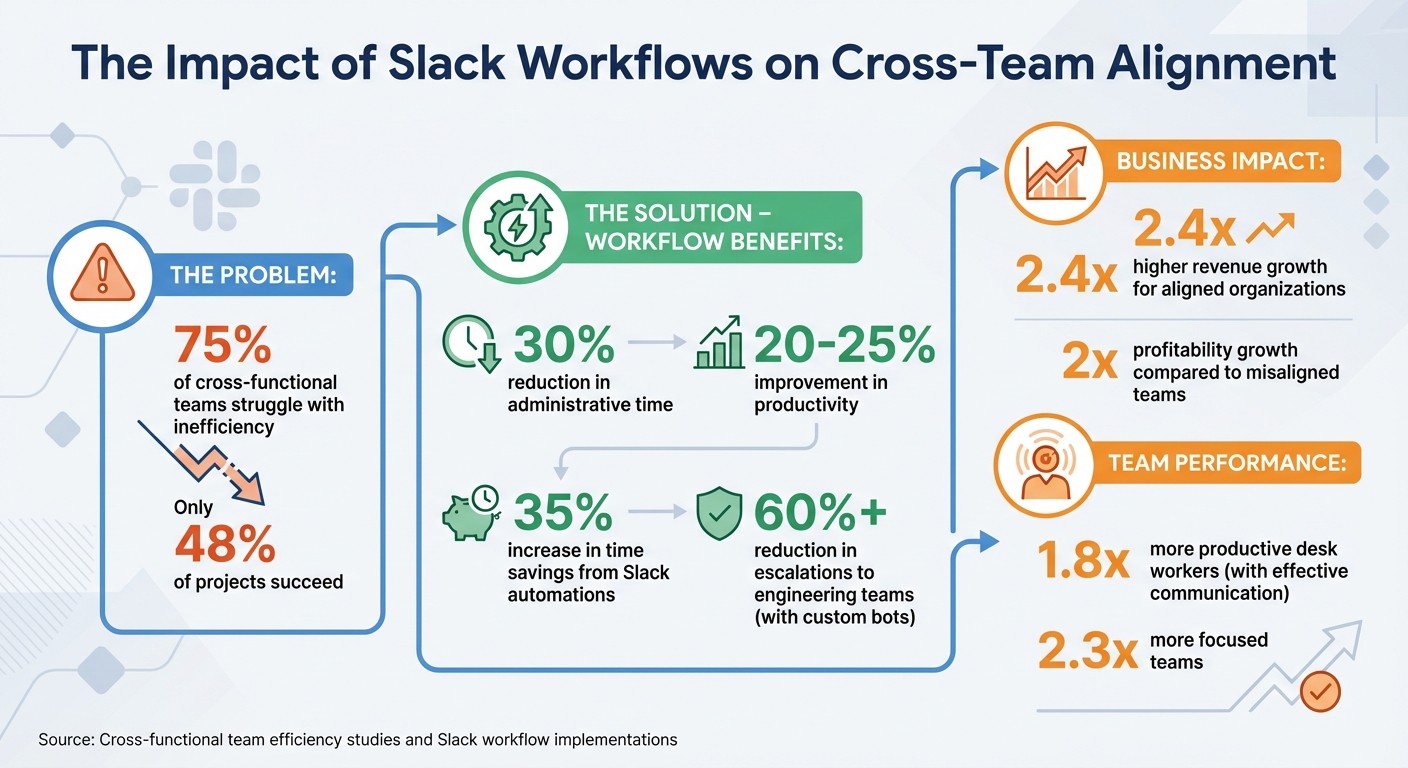
Slack Workflows Impact: Key Statistics for Cross-Team Alignment
Slack Workflows: No-code Automation in Slack
Slack Workflows for Cross-Team Alignment
These workflows target common challenges in cross-functional collaboration, like outdated updates, overlooked blockers, delayed approvals, and underutilized team knowledge. They form the backbone of smoother coordination and set the stage for introducing AI-powered tools later.
1. Daily Standup Automation
Set up a 9:00 AM form to collect Yesterday's Progress, Today's Priorities, and Current Blockers. Add an emoji trigger (like 🔥 or 🚨) that flags urgent issues and sends automated alerts to supervisors. Summaries can be routed to a central channel for better visibility across teams [6][8]. This asynchronous method eliminates the need for live meetings, making it ideal for teams in different time zones [6][8].
For recurring processes, tools like Manifestly can help track standard operating procedures (SOPs) alongside daily updates [7]. Pin the standup workflow or a Slack Canvas with the project roadmap to the top of the channel for quick access [2].
This setup also creates a solid foundation for managing dependencies and approvals, as described in the next workflows.
2. Dependency Tracking and Escalation
Managing inter-team dependencies can be simplified with automated workflows that reduce bottlenecks.
Start by using Slack Canvas to map out dependencies in a visual flowchart, showing how tasks connect across teams [9]. Set up automated reminders for overdue tasks to address delays before they escalate [9][11]. Use emoji triggers - like :team-product-specialists: - to send messages directly to a triage channel where subject-matter experts can step in and resolve issues [10][8].
For example, a custom Slack bot reduced the number of escalations to engineering teams by over 60% [10].
"Our first goal was to reduce the number of escalations that go from the CE team to our software engineering team. We found more than half could be resolved by CE ourselves if they were routed to the correct people." - Slack [10]
When an expert claims an issue in the triage channel, the workflow can automatically notify the original requester, keeping them informed about who is handling the problem [10][8]. Slack Lists are another useful tool to centralize deliverables, track owners, and monitor deadlines [12].
3. Approval Workflows for Cross-Team Decisions
Streamline decision-making with standardized request forms, conditional routing, and emoji-triggered approvals (e.g., 👀 for "under review" and ✅ for "approved") [8][11][3][1]. This eliminates unnecessary back-and-forth and speeds up the process.
Conditional routing can direct requests based on their content - for example, sending high-budget approvals to a VP while routing smaller ones to a manager [3][1]. To prevent duplicate or conflicting approvals, use the "Single-click" toggle on approval buttons, ensuring only one person can act on a request [13]. Highlight the workflow in the channel header by replacing the message field with a "Start Workflow" button, ensuring teams follow the official process [14].
4. Incident Management and Resolution
Create an incident reporting workflow that captures key details like Severity Level, Affected Systems, Business Impact, and Current Status. Use automated notifications to alert the right people based on the severity level, ensuring quick responses and clear communication [8][11][3][1].
For critical incidents, set up immediate Direct Messages to on-call engineers and leadership. For lower-priority issues, post updates to a general channel for visibility [3][1]. Use emoji reactions to track the status of incidents - 🔍 for "investigating", 🛠️ for "fixing", and ✅ for "resolved" [8].
After resolution, automate a post-incident workflow that requests a summary and action items from the incident owner within 24 hours. This ensures lessons are documented and shared across teams, helping to prevent future issues [11].
5. Knowledge Sharing and Onboarding
Automate onboarding with workflows that post welcome messages, share key documentation links, and schedule check-ins for new hires. For ongoing knowledge capture, use a 📝 emoji to document meeting decisions and update a centralized knowledge channel [8][11][6].
Integrate Slack with tools like Notion, Confluence, or Google Drive to provide instant access to verified answers when questions arise in a channel. For teams needing advanced search capabilities, platforms like Question Base integrate directly into Slack, offering AI-powered answers from your trusted documentation - no engineering setup required [questionbase.com]. This transforms Slack into a dynamic knowledge assistant, cutting down on repeated questions and saving valuable time.
These structured workflows not only improve collaboration but also pave the way for integrating AI tools like Question Base, ensuring teams have access to reliable, enterprise-grade knowledge directly within Slack.
Adding AI-Powered Knowledge Management to Slack
1. Why Verified Answers Are Essential for Cross-Team Alignment
In cross-functional projects, having accurate and dependable knowledge is non-negotiable. Teams need to work from the same playbook - whether it’s product specifications, compliance guidelines, or deployment procedures. However, relying on Slack chat history often leads to outdated, conflicting, or missing information. While Slack AI can summarize past conversations, it’s limited by the quality of those older chats. To ensure accuracy at scale, it’s crucial to connect Slack with trusted sources like Notion, Confluence, or Google Drive.
Question Base integrates directly with platforms like Notion, Confluence, and Salesforce. This ensures that teams in support, HR, IT, and operations can access expert-verified content rather than AI-generated summaries of past discussions. When accuracy, auditability, and ownership of knowledge are priorities, Question Base becomes the go-to solution. Slack AI is great for individual productivity, but Question Base keeps entire teams aligned and unblocked by delivering reliable, verified answers.
This solid foundation makes integrating and setting up Question Base in Slack straightforward and effective.
2. How Question Base Operates in Slack

Getting started with Question Base is simple. Download it from the Slack App Marketplace, invite it to your workspace using /invite @questionbase, and connect it to your documentation tools. Supported platforms include Notion, Google Drive, Confluence, Zendesk, Intercom, Salesforce, Dropbox, and more. From the moment it’s set up, the AI agent pulls answers directly from verified sources, avoiding the pitfalls of relying on chat history.
Question Base also prioritizes security and compliance. It supports SOC 2 Type II standards, encrypts data both in transit and at rest, and offers on-premise deployment options. Organizations maintain full control over which content the AI can access, how it formulates responses, and when it escalates complex issues to human support. Additionally, Question Base allows teams to capture verified answers shared in Slack threads with a single click, turning fleeting conversations into structured, searchable documentation that evolves alongside team needs.
3. Identifying Knowledge Gaps with Analytics
Question Base goes beyond delivering verified answers - it also equips teams with actionable insights. By tracking unanswered questions and analyzing frequent topics, the platform helps teams identify gaps in documentation and outdated policies. Leaders can use its dashboards to monitor key metrics like automation rates, resolution times, and content gaps, aligning content updates with sprint cycles or quarterly planning.
This transforms Slack from a reactive communication tool into a proactive knowledge system that continuously improves. By addressing knowledge gaps, teams can reduce repetitive inquiries and free up time for more strategic, high-value tasks. With these analytics, organizations can ensure their teams stay coordinated and efficient, no matter how complex their workflows become.
Best Practices for Implementing Slack Workflows
1. Start Small and Scale Gradually
When introducing Slack workflows, begin with a focused approach to ensure clarity and adoption. Start by automating one or two tasks that frequently slow down your team, such as delayed approvals, inconsistent onboarding steps, or repetitive status updates [1]. Take a close look at your current processes to identify where automation could make the biggest difference.
Set clear goals for these workflows, such as reducing approval times by 30% [5]. Research highlights that effective automation can lead to productivity boosts of 20%–25%, while well-structured workflows can cut time spent on administrative tasks by almost 30% [5]. Once you see success with these initial workflows, gradually expand to other areas, using feedback from early adopters to fine-tune your approach.
2. Connect Slack with Your Other Tools
The real power of Slack workflows comes from integrating them with the tools your teams use every day. Use Workflow Builder to link platforms like Jira, Asana, GitHub, or ClickUp [3][13]. While setting up these integrations may require authentication and admin approvals, the benefits are worth it - teams can trigger actions across multiple platforms without leaving Slack.
Question Base enhances this by tapping into trusted sources, delivering verified answers instead of relying solely on chat history. This type of automation not only saves time but also helps teams stay focused. Studies show that when leaders communicate these changes effectively, desk workers become 1.8 times more productive and 2.3 times more focused [1]. By integrating tools, you simplify processes and strengthen collaboration between teams.
3. Train Teams on Workflow Usage
Even a perfectly designed workflow can fall flat if teams don’t know how to use it. Effective training is key to successful adoption. Store workflow instructions in an easily accessible location, such as a Slack canvas, a dedicated channel, or a searchable knowledge base [1][5]. Use resources like flowcharts, quick guides, and short videos to help teams get up to speed.
"Today, documenting workflows isn't just about mapping each step, decision, and owner in a process. It's about turning static workflow documentation into adaptable, updatable documents that teams can access within the workflow." – Slack Blog [1]
Assign a specific owner and a backup for every workflow to ensure there's always someone available to answer questions [1][5]. Create a dedicated channel for workflow feedback, where users can flag issues or suggest improvements based on their day-to-day experience [5]. Teach teams how to quickly access workflows by typing "/" followed by the workflow name in the Slack message box, and pin essential guides to the top of relevant channels [13][1][5]. Plan quarterly reviews to evaluate workflow performance and update documentation as needed [1][5].
Conclusion
Slack workflows break down barriers between teams. By automating approvals, standardizing request processes, and shifting check-ins to asynchronous channels, workflows eliminate the chaos of email threads and the delays caused by manual approvals. The payoff? Organizations that focus on customer alignment see 2.4 times higher revenue growth and double the profitability growth compared to those that don’t [4]. This alignment isn’t just about efficiency - it’s a direct driver of business success.
But there’s more to it than just automation. Verified knowledge plays a key role in keeping teams aligned. While Slack AI can summarize past conversations, tools like Question Base go a step further by connecting directly to trusted documentation sources like Notion, Confluence, Salesforce, and Google Drive. This ensures that when teams need answers - whether it’s a legal review or an onboarding checklist - they get accurate, verified information from reliable sources, not just AI-generated interpretations of chat history.
Another benefit of structured workflows is the ability to identify unanswered questions and gaps in existing processes. This insight helps businesses refine their documentation or automate repetitive tasks. Companies using these workflows have reported a 30% reduction in time spent on administrative tasks [5], while Slack automations for high-volume teams have delivered a 35% increase in time savings for many teams [15].
To get started, focus on one or two workflows that will have the biggest impact. Integrate them with the tools your team already uses and provide training to ensure everyone can adopt them smoothly. Over time, these workflows will create a searchable record of decisions and solutions, making it easier for teams to stay on the same page - whether they’re seasoned contributors or new hires. This process is essential when building a knowledge base from Slack to preserve institutional memory. The result? Faster execution, clearer accountability, and teams that spend less time searching for answers and more time building solutions.
FAQs
Which Slack workflow should we automate first?
Automating repetitive tasks can save your team valuable time and energy. Start with processes like onboarding new team members or managing request submissions - think time-off requests or expense approvals. You can also streamline recurring reminders or status updates to ensure everyone stays on the same page. Using Slack's Workflow Builder, these tasks are straightforward to set up and can quickly boost efficiency, allowing your team to focus on more challenging automations down the line.
How do we keep Slack workflows from being ignored?
To ensure Slack workflows are consistently used and not ignored, it's important to design them with care and make them part of your team's everyday habits. Use tools like Slack Workflow Builder to automate repetitive tasks, and integrate AI-powered solutions such as Question Base to deliver quick, reliable answers. Keep workflows well-documented, easy to access, and updated regularly based on team feedback. Encouraging a mindset that prioritizes automation and clear communication will also help drive consistent adoption and engagement.
How can teams get verified answers in Slack from Notion or Confluence?
Teams can access verified answers in Slack from Notion or Confluence seamlessly with Question Base. By linking Slack to these platforms, Question Base syncs content, highlights key information, and delivers expert-approved answers directly in Slack. This guarantees your team always has quick access to accurate and reliable information.