∙
Cooper
∙
Reading time:
15 min

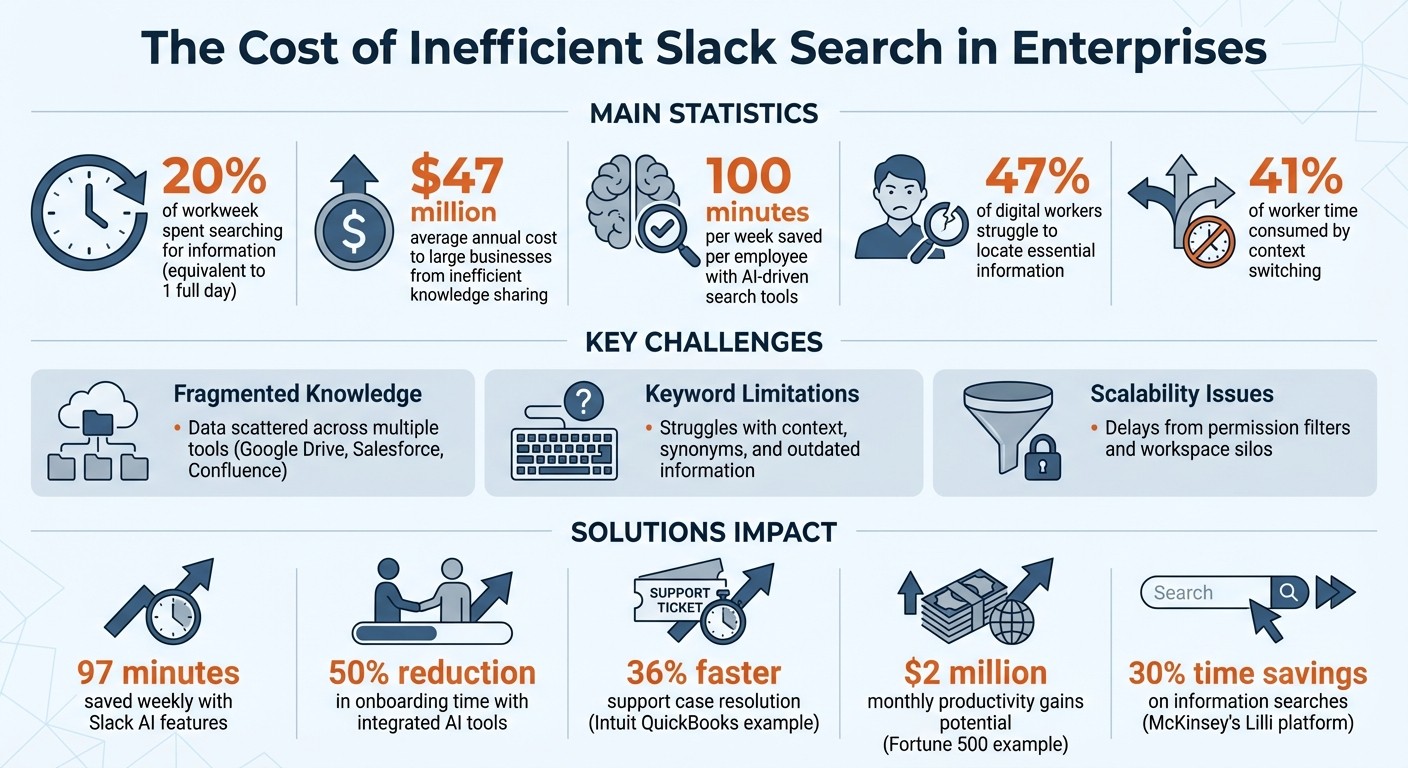
Finding information in Slack should save time, not waste it. Yet, as companies grow, Slack’s search can become a bottleneck, with employees spending up to 20% of their workweek searching for information. This inefficiency costs large businesses millions annually. The challenge lies in Slack’s limitations with fragmented data, keyword-based searches, and growing archives of messages, files, and app integrations.
Here’s what you need to know:
Fragmented Knowledge: Data is scattered across tools like Google Drive, Salesforce, and Confluence, making searches disjointed.
Keyword Limitations: Slack’s search struggles with context, synonyms, and outdated information.
Scalability Issues: Large organizations face delays due to permission filters and workspace silos.
Solutions to these challenges include:
AI-Driven Search: Tools like Question Base provide verified, context-aware answers from trusted sources.
Federated Search: Integrating external tools (e.g., Notion, Confluence) into Slack for centralized access.
Improved Indexing: Optimizing search with naming conventions, metadata, and Slack filters.
With tools like Question Base, enterprises can transform Slack into an efficient knowledge hub, saving 100 minutes per week per employee and reducing onboarding time by half. By addressing search inefficiencies, teams can focus on work, not hunting for answers.
The Cost of Inefficient Slack Search in Enterprises
Stop wasting experts time and get automatic answers in Slack
Challenges of Slack Search in Large Organizations
As your enterprise grows, scaling Slack search becomes a crucial task. What works smoothly for a small team can quickly turn into a roadblock when thousands of employees operate across numerous departments, channels, and workspaces.
Search Performance Bottlenecks
Slack’s permission filters are designed to ensure users only see messages they’re authorized to access [2]. While this approach works well for smaller teams, it introduces delays in larger organizations with complex visibility rules spanning public, private, and shared channels. These real-time security checks can slow down searches significantly [2].
This issue is often referred to as the "Slack Paradox":
"The more you use it, the harder it may seem to find the information you need to move work forward" [8].
As your Slack archive grows, it becomes harder to sift through the increasing volume of information. What starts as a tool for streamlined communication can morph into a source of inefficiency, making it harder to retrieve the right data.
The consequences of these delays are substantial.
"Inefficient knowledge sharing has been shown to cost large businesses an average of $47 million annually" [9].
With employees spending 20% of their workweek - equivalent to an entire day - searching for information [4], these inefficiencies translate directly into lost productivity. Addressing these bottlenecks is essential for scaling Slack search effectively.
Relevance and Accuracy Problems
Slack’s traditional keyword-based search can struggle with terminology differences across teams. For example, the finance team might use "budget planning", while operations refers to the same concept as "financial forecasting." Without a semantic understanding of these terms, Slack searches might miss important results [3].
Another issue is information decay. In large organizations, outdated and current data often coexist, making it hard for employees to determine which information is reliable.
Disorganized content adds to the problem. Poor data hygiene - such as inconsistent naming conventions, missing metadata, and scattered information - makes it difficult even for advanced search tools to deliver accurate results. With 47% of digital workers struggling to locate essential information [3], the challenge isn’t just technical; it’s also about managing knowledge effectively in Slack. This disarray is compounded by the presence of information silos, which further complicate search efforts.
Knowledge Silos Across Workspaces
Large enterprises often split their Slack environments into multiple workspaces - for example, separate ones for engineering, sales, and customer support. While this setup enhances security, it inadvertently creates information islands where critical data is isolated.
This leads to what’s often called a "digital scavenger hunt" [6][5]. Employees jump between apps, channels, and workspaces, trying to manually piece together the information they need.
For organizations with high-security configurations like GovSlack (FedRAMP High), the issue is even more pronounced. Data stored in separate environments cannot be searched or shared across boundaries [2]. While these measures ensure security, they can also disrupt the smooth flow of knowledge.
The next sections will dive deeper into the challenges that emerge as Slack scales with your organization’s needs.
Strategies for Scaling Slack Search
Scaling Slack search for enterprise needs requires a mix of smart indexing techniques, AI-driven tools, and external integrations. Together, these approaches ensure that teams can access critical information quickly and accurately, with context-rich answers that meet the demands of large organizations.
Improving Search Indexing and Query Handling
Slack employs advanced techniques to handle the high volume of queries typical in enterprise environments. One key approach is federated search, which retrieves data in real time from external sources while keeping the original content in its native repository. This ensures that searches respect existing permissions and return only authorized results [1][3].
"The use of child documents allows us to efficiently handle files shared across multiple channels without duplicating data in the index." – Slack [2]
Slack optimizes its indexing by organizing public channels by workspace ID, Direct Messages by member ID, and private channels based on membership. This structure, combined with custom connector APIs, ensures efficient and accurate search performance [2][1][7].
On the user side, adopting consistent naming conventions and metadata standards across organizational content can significantly improve search outcomes [3]. Additionally, encouraging teams to use Slack's built-in filters - like narrowing results to Google Drive or Confluence - helps reduce irrelevant results, especially in environments with heavy search activity [4].
Using AI for Smarter Search
AI enhances Slack search by going beyond traditional keyword matching to understand the context and intent behind queries. For example, semantic search using vector embeddings can identify related concepts, such as recognizing "budget planning" and "financial forecasting" as interconnected topics [3]. This capability addresses challenges around fragmented knowledge and irrelevant results.
Slack AI already offers productivity-boosting features like conversation summaries and thread recaps, which save users an average of 97 minutes weekly [13]. However, Question Base takes this further by delivering verified answers directly from your organization’s official documentation. For instance, when a team member asks, "What is our vacation policy?" in Slack, Question Base pulls the answer directly from HR documents stored in tools like Notion, Confluence, Salesforce, or Zendesk. It also tracks unanswered queries, helping teams identify content gaps and prioritize updates.
This distinction is critical. While Slack AI excels at summarizing conversations, Question Base focuses on providing precise, verified answers at scale - essential for teams that need accuracy and auditability. By integrating with your trusted sources, Question Base complements Slack’s native search, ensuring teams get the exact information they need.
Connecting External Knowledge Bases
Integrating external tools transforms Slack into a centralized search hub, allowing users to access information across conversations, business tools, and documentation from a single interface [1]. This eliminates the need for constant context switching, which can consume up to 41% of a worker’s time on low-impact tasks [10].
Slack’s enterprise search respects existing security permissions, ensuring that results only include content authorized for the user [2][1]. For organizations using proprietary systems or specialized tools without pre-built integrations, custom connector APIs can bring this data into Slack’s search index [1]. This is especially valuable for industries with unique workflows or tools.
Question Base simplifies this process with a no-code setup available through the Slack App Marketplace. By connecting tools like Notion, Confluence, Google Drive, Zendesk, Intercom, Salesforce, and Dropbox, Question Base starts delivering answers instantly - no engineering required. Setup takes just minutes, making it an accessible solution for busy teams [questionbase.com].
The results speak for themselves. Teams leveraging integrated AI in Slack save an average of 100 minutes per week and cut onboarding time by half [11]. Considering that 47% of employees avoid using their company’s knowledge base due to poor organization or search functionality [11], bringing that knowledge directly into Slack removes a significant obstacle to productivity.
How Question Base Improves Slack Search

How Question Base Works
Question Base is an AI-powered tool integrated directly into Slack, designed to simplify how teams access and share enterprise knowledge. It pulls verified answers from trusted documentation sources and delivers them right in Slack. The setup process is simple: install Question Base from the Slack App Marketplace, invite the bot to relevant channels using /invite @questionbase, and connect your existing documentation tools like Notion, Confluence, Google Drive, Salesforce, Zendesk, Intercom, and Dropbox. Within minutes, the AI starts retrieving answers from these connected sources. For instance, if an employee asks about the expense reimbursement policy, Question Base finds and shares the exact answer from HR’s documentation.
To ensure accuracy, subject matter experts can review and refine the AI-generated answers before they’re shared, keeping control over the information being distributed. Additionally, Question Base captures insights from Slack conversations, transforming fleeting chats into structured, searchable documentation that evolves with your team's needs.
With this quick setup and verification process, Question Base delivers features that make enterprise search more efficient and scalable.
Features for Scalable Search
Once installed, Question Base offers a range of features to tackle common enterprise search challenges. It integrates seamlessly with over 12 popular tools, ensuring teams can access knowledge from multiple platforms in one place. Organizations can also set per-channel access rules, making sure sensitive information stays secure while maintaining a smooth search experience across teams. This requires following cross-platform search UX best practices to ensure consistency.
The platform’s unanswered question tracking is particularly helpful. If the AI can’t resolve a query, it logs the question and escalates it to human experts. This not only ensures no question goes unanswered but also helps knowledge managers identify areas where documentation needs improvement. Analytics dashboards provide insights into resolution rates, automation usage, and content gaps, giving leaders actionable data to boost support efficiency.
For organizations with strict compliance needs, Question Base offers SOC 2 Type II certification, encryption for data at rest and in transit, and even on-premise deployment options for full control over data residency. The Enterprise tier adds advanced features like white-labeling, multi-workspace support, and custom development tailored to specific workflows.
Question Base vs Slack AI
For teams scaling Slack search, understanding the difference between Question Base and Slack AI is key. While Slack AI focuses on summarizing conversations and enhancing personal productivity, Question Base is specifically designed for managing enterprise knowledge. This distinction is critical for teams that prioritize accuracy, compliance, and control over their internal support processes.
Feature | Question Base | Slack AI |
|---|---|---|
Core Focus | Verified answers from trusted documentation | Conversation summaries and chat-based insights |
Data Sources | 12+ tools (Notion, Confluence, Salesforce, Google Drive, Zendesk, Intercom, Dropbox, etc.) | Primarily Slack chat history; limited external apps on Enterprise Grid |
Accuracy Mechanism | Pulls from official documentation with human oversight | AI-generated summaries of past conversations |
Knowledge Management | Tracks unanswered questions, captures Slack insights, identifies content gaps | None |
Analytics | Resolution rates, automation metrics, content gap reports | Basic usage statistics |
Customization | Extensive (AI tone, escalation flows, per-channel settings) | Minimal (general AI behavior only) |
Enterprise Security | SOC 2 Type II, on-premise deployment options | Enterprise Grid security features |
Pricing | Starts at $0; Pro at $8/user/month | $18/user/month (requires Enterprise Grid) |
For teams managing areas like HR policies, IT support, or operational knowledge - where accuracy and compliance are critical - Question Base offers the tools to scale search effectively without losing control. While Slack AI helps individuals work faster, Question Base ensures entire organizations stay aligned by delivering the right information to the right people at the right time.
Measuring Slack Search Performance
Key Metrics to Track
To ensure your Slack search strategy keeps up with your organization’s growth, it’s essential to measure its performance. By tracking the right metrics, you can determine if enhancements like AI integration or improved indexing are delivering results.
One critical metric is the search success rate, which reflects how often users find the information they need on their first try. If users frequently refine their queries or abandon searches, it’s a sign that the system isn’t meeting their needs.
Another important measure is the click-through rate (CTR), which shows whether search results are engaging enough to prompt action. Similarly, query refinement frequency highlights how often users need to rephrase their searches. High refinement rates could indicate issues with how the system interprets queries or how well the documentation is structured.
As search volumes increase, search latency - or how quickly results are delivered - becomes a critical factor. Slow response times can frustrate users, leading them to bypass the system entirely and turn to colleagues for help, which defeats the purpose of having a search tool. Additionally, tracking accuracy rates through user feedback, like thumbs-up or thumbs-down ratings, helps gauge whether AI-generated answers are resolving questions effectively [11].
For growing companies, these metrics provide more than just performance snapshots - they lay the groundwork for refining your knowledge base and improving search outcomes.
Using Analytics to Find Knowledge Gaps
Once you’re tracking key metrics, analytics can help uncover content weaknesses in your Slack search system. By analyzing search data, you can pinpoint areas where documentation falls short. For example, unanswered queries often indicate missing or incomplete content [3].
Question Base’s analytics dashboard simplifies this process by monitoring metrics like resolution rates, automation usage, and content gap reports. These insights give knowledge managers a clear picture of where improvements are needed. If employees repeatedly ask about a specific policy and the system fails to provide a helpful response, it’s a clear signal to update or expand the documentation.
Analytics also support ranking refinement, where user behavior - such as previous searches and clicked links - helps adjust how results are prioritized for different teams [12]. Additionally, analytics can identify AI proficiency gaps, revealing which departments or locations struggle with search adoption. This insight can guide efforts to improve training or clarify documentation [14].
"It's hard to manage what you don't measure, so tracking Slack AI use turns a fuzzy topic into a quantifiable KPI." - Worklytics [14]
For example, Intuit QuickBooks saw a 36% faster resolution of support cases after integrating a custom Slack-based knowledge base [11]. Regularly reviewing analytics and addressing gaps ensures your search strategy evolves with your organization’s needs.
Conclusion
For growing enterprises, effective Slack search is more than a convenience - it's a necessity. With workers spending nearly 19% of their workweek hunting for information[15], the stakes are high. A Fortune 500 communications company, for instance, estimated that improving search capabilities for 4,000 engineers could yield $2 million in monthly productivity gains[15].
This guide has outlined key strategies like federated enterprise search, AI-driven retrieval, semantic matching, and permission-aware indexing. Together, these tools create a cohesive framework for scalable search. But technology alone won't solve the problem. To truly maximize results, organizations must also focus on maintaining clean data, integrating high-priority systems, and tracking metrics such as resolution rates and query refinement trends to ensure continuous improvement.
While these strategies lay the groundwork, the tools you choose can make all the difference. Slack AI offers excellent summarization and search capabilities for chat history, but Question Base takes it a step further by delivering verified, accurate knowledge at scale. Purpose-built for enterprise needs, Question Base connects directly to trusted sources like Notion, Confluence, and Salesforce, ensuring employees receive expert-approved answers instead of AI-generated interpretations. Its advanced features - such as tracking content gaps, detecting duplicates, and meeting SOC 2 Type II compliance - turn Slack into a dynamic knowledge hub that grows with your team.
Consider some real-world examples: In July 2025, reMarkable adopted Slack's enterprise search to streamline knowledge sharing as the company expanded. Paul Kagoo, General Manager of Enterprises, noted that the tool quickly became the "go-to place" for business learning, delivering reliable answers across fragmented data sources[16]. Similarly, McKinsey's internal AI platform, "Lilli", now handles over 500,000 prompts monthly, saving employees up to 30% of the time they previously spent searching for information[15]. These examples highlight how improving search efficiency can drive substantial business outcomes.
FAQs
Why does Slack search slow down as our company grows?
As companies expand, Slack searches often become sluggish due to a combination of information overload, scattered data across multiple tools, and a lack of proper tracking or management systems. This overload clogs the search process, making it increasingly difficult to pinpoint the information you need.
How can we search across Slack and tools like Notion or Confluence in one place?
Organizations have several options for enterprise search solutions that allow them to search across platforms like Slack, Notion, Confluence, and more - all from one interface. These include unified APIs such as Unified.to, Slack's enterprise search, and AI-driven tools like Question Base. Question Base stands out by linking Slack with Notion and Confluence, ensuring synchronized content and offering AI-powered search capabilities. This minimizes the need to switch between tools and makes accessing knowledge faster and easier.
What should we measure to know if Slack search is improving?
To gauge progress in improving Slack search, focus on metrics such as search success rates, response times, user interaction with results, and the accuracy of retrieved information. These measurements provide insight into whether the search functionality is effectively addressing user needs and delivering precise, timely outcomes.