∙
Cooper
∙
Reading time:
14 min

Healthcare teams handle sensitive patient data daily, making privacy and compliance essential when using tools like Slack. Slack supports HIPAA compliance through its Enterprise Grid plan, offering features like data encryption, private channels, and audit logs and Slack backup strategies. However, third-party tools can fill gaps in Slack’s native controls, providing added security for Protected Health Information (PHI). Here’s what you need to know:
Slack’s HIPAA Compliance: Requires signing a Business Associate Agreement (BAA) and using Enterprise Grid.
Native Features: Includes encryption, private channels, Single Sign-On (SSO), and Data Loss Prevention (DLP).
Limitations: Slack’s built-in tools don’t cover third-party apps, metadata, or certain external collaborations.
Third-Party Solutions: Tools like Strac redact sensitive data in real time, while Question Base ensures secure knowledge sharing.
Key Takeaway: Combining Slack’s built-in features with third-party tools ensures a secure workspace for healthcare teams while meeting HIPAA standards.
How Healthcare Tech Companies Ensure Cloud Security
Slack's Built-In Privacy and Security Features
Slack's HIPAA-compliant security measures are available through its Enterprise Grid plan. This plan includes encryption, access controls, and the option to sign a Business Associate Agreement (BAA) [1][3].
Slack Enterprise Grid Encryption
Encryption is a key component of Slack's approach to safeguarding data. All data, whether at rest or in transit, is encrypted [6]. This ensures that messages and files containing electronically protected health information (e-PHI) remain secure both while stored on Slack's servers and as they move between users and the platform. Slack relies on Amazon Web Services (AWS) for secure storage and management infrastructure.
For organizations seeking greater control, Slack Enterprise Key Management (EKM) provides the ability to use custom encryption keys through AWS Key Management Service (AWS KMS) [7]. This feature empowers healthcare teams to manage how their data is encrypted and decrypted. Additionally, organizations can select specific regions or countries for storing their encrypted data, helping to meet data residency requirements.
"Slack Enterprise Key Management (Slack EKM) ... allows organizations to use their own encryption keys to protect their data." - Slack [7]
Business Associate Agreement (BAA) for HIPAA
When healthcare organizations sign a BAA with Slack, the platform becomes a Business Associate under HIPAA regulations [1][3]. This agreement ensures that the secure storage and transmission of e-PHI is covered for direct messages, group messages, channels, and file uploads [1][2].
The BAA requires organizations to provide a detailed list of all workspaces where PHI will be shared [1]. They must also adhere to Slack's "Requirements for HIPAA Entities", which specify configuration and usage guidelines. It’s important to note that Slack's BAA does not cover third-party apps in the Slack Marketplace. If PHI is shared via these apps, separate agreements with those vendors are necessary [3].
"Teams collaborating on Enterprise Grid can share Protected Health Information (PHI) within direct, group and channel messaging, and in file uploads." - Slack [1]
Next, let’s look at how Slack’s access controls and audit logs enhance security.
Access Controls and Audit Logs
Slack offers tools to manage who can access sensitive information and to monitor its use. Features such as Single Sign-On (SSO) and Enterprise Mobility Management (EMM) ensure that only authorized personnel using approved devices can access healthcare data. Specific roles, like Data Loss Prevention (DLP) Admins, oversee data protection [7][4].
To maintain HIPAA compliance, PHI-related channels must remain private [1]. Additionally, patients, plan members, or their families cannot be added as users or guests in Slack workspaces [1][3]. Slack's audit logs capture key events, such as file uploads, downloads, and changes to administrative settings [1][8]. Through Discovery APIs, organizations can integrate third-party tools for ongoing monitoring of access, activity, and data [1][8].
These tools provide a detailed view of data movement within Slack, ensuring compliance and security.
Feature | Capabilities for Healthcare Teams |
|---|---|
Audit Logs | Tracks file uploads, downloads, and admin setting changes [1] |
SSO & EMM | Limits access to authorized users and approved devices [7] |
Discovery APIs | Connects third-party tools for monitoring and exporting data [1][8] |
DLP Dashboard | Centralizes management of flagged PHI violations [4] |
Retention Policies | Retains all versions of edited or deleted messages [6] |
Healthcare teams should configure retention policies to preserve all versions of edited or deleted messages, creating a complete audit trail for compliance [6]. DLP rules can also be set to "tombstone" noncompliant messages or files until they are reviewed by an administrator [4].
Privacy Tools That Extend Slack's Capabilities
Slack's built-in features lay a solid groundwork for privacy, but third-party tools can take it a step further, especially for healthcare organizations with specific compliance needs. These tools enhance Slack's native controls, offering additional layers of security for sensitive healthcare communications.
Data Loss Prevention (DLP) and Discovery APIs
For organizations using the Enterprise Grid plan, Slack's Discovery APIs allow integration with third-party DLP providers. These tools monitor enterprise data in real time, identifying and managing noncompliant content by quarantining or removing it as needed[1][8]. Unlike Slack's native DLP alerts, which automatically expire after 90 days, third-party solutions provide more durable data management capabilities[4]. To maintain full HIPAA compliance, healthcare organizations must execute Business Associate Agreements (BAAs) with both Slack and any third-party DLP provider they choose to integrate[1][5].
Question Base for Secure Knowledge Sharing
Healthcare teams frequently share critical information like clinical protocols, policy updates, and operational guidelines. However, ensuring this process doesn't expose Protected Health Information (PHI) is essential. Question Base offers a SOC 2 Type II compliant solution for verified knowledge sharing. By connecting to trusted documentation platforms such as Notion, Confluence, Google Drive, and Salesforce, it retrieves accurate answers from validated sources instead of relying on Slack's chat history. While Slack AI works well for summarizing past conversations, Question Base is specifically designed for healthcare teams needing reliable, verified information. It supports Slack Enterprise Grid and safeguards data with encryption both at rest and in transit. To meet HIPAA requirements, organizations should ensure that channels used for sharing sensitive information via Question Base are set to private[1].
For additional security, other tools focus on protecting sensitive data at the message level.
Strac for DLP Redaction
Strac broadens HIPAA-level data protection to all Slack plans, including Pro and Business+, not just Enterprise Grid[9]. This tool offers real-time redaction of sensitive data - such as Social Security numbers, phone numbers, and email addresses - directly within Slack. Instead of deleting or hiding messages entirely, Strac redacts sensitive content while allowing authorized users to access the original data securely through a vault, ensuring workflows remain uninterrupted.
"Most HIPAA incidents in Slack are not caused by missing security features; they are caused by how people naturally communicate and share information."
Hans Hermans, Founding Engineer, Strac[9]
In early 2025, healthcare organizations reported 160 data breaches to the HHS Office for Civil Rights, affecting the PHI of over 5.6 million patients[9]. Tools like Strac help prevent such incidents by intercepting violations before they escalate. As with other third-party tools, organizations using Strac must establish a separate BAA with the provider to maintain full compliance.
Slack Native Features vs. Third-Party Add-Ons
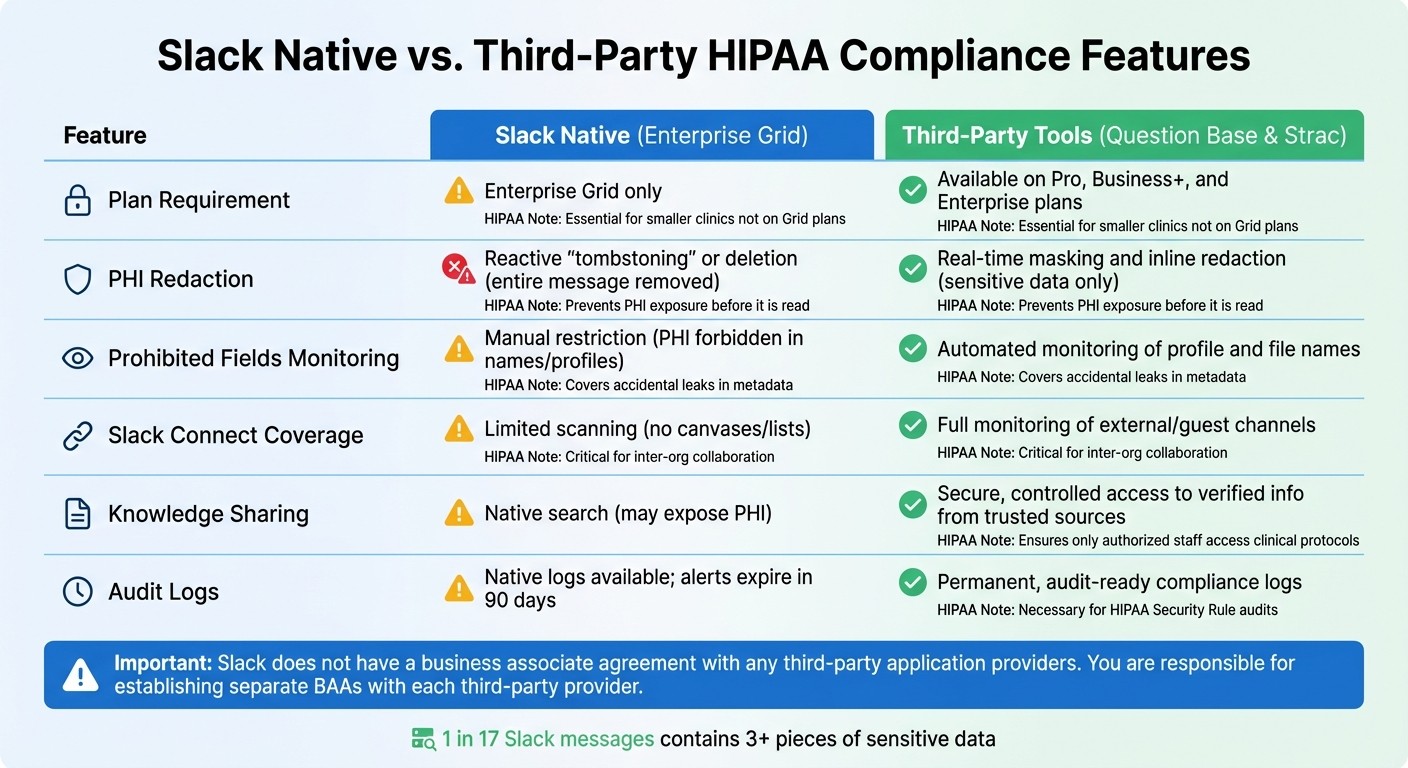
Slack Native vs Third-Party HIPAA Compliance Features Comparison
Slack's built-in privacy controls provide a solid starting point, but they have limitations that healthcare teams need to navigate carefully. For example, HIPAA compliance through Slack's native features - such as the required Business Associate Agreement (BAA) - is only available on the Enterprise Grid plan[1][3]. This means smaller clinics or departments using Pro or Business+ plans cannot rely on Slack’s native tools to meet HIPAA standards. This gap highlights the importance of third-party tools in bridging these compliance needs.
Take Slack's native Data Loss Prevention (DLP) as an example. When a policy breach is detected, Slack typically "tombstones" the entire message, effectively deleting it[4]. On the other hand, third-party tools like Strac offer a more refined solution by redacting only the sensitive data - such as Social Security numbers or patient birth dates - while keeping the rest of the message intact, ensuring workflows remain uninterrupted.
Another critical area of concern is the risk of sensitive data appearing in prohibited fields, like usernames, custom emojis, file names, or status updates[1][9]. While Slack relies on manual enforcement to prevent this, third-party DLP tools provide automated monitoring and remediation, catching sensitive data that might inadvertently appear in metadata. Additionally, Slack’s native DLP does not scan canvases in Slack Connect conversations or lists[4], leaving gaps that third-party integrations are specifically designed to address.
When it comes to knowledge sharing, Slack's native search function can unintentionally expose Protected Health Information (PHI) to unauthorized users if channel restrictions aren’t properly set up[1]. Question Base offers a more secure alternative by connecting directly to verified documentation sources - like Notion, Confluence, Google Drive, and Salesforce - delivering accurate answers from trusted content rather than pulling from chat history. While Question Base vs Slack AI comparisons show both are useful for summarizing conversations, Question Base is tailored for healthcare teams needing controlled, verified access to clinical protocols and policy updates.
Integrating purpose-built third-party tools with Slack’s native controls creates a more secure and privacy-focused workspace for healthcare teams.
HIPAA Compliance Feature Comparison
Feature | Slack Native Support (Enterprise Grid) | Question Base Enhancement | Strac Enhancement | HIPAA Relevance |
|---|---|---|---|---|
Plan Requirement | Enterprise Grid only [1] | Available on all plans | Works on Pro, Business+, and Enterprise [9] | Essential for smaller clinics not on Grid plans |
PHI Redaction | Reactive "tombstoning" or deletion [4] | Secure knowledge retrieval | Real-time masking and inline redaction [9] | Prevents PHI exposure before it is read |
Prohibited Fields | Manual restriction (PHI forbidden in names/profiles) [1] | N/A | Automated monitoring of profile and file names [9] | Covers accidental leaks in metadata |
Slack Connect | Limited scanning (no canvases/lists) [4] | N/A | Full monitoring of external/guest channels [9] | Critical for inter-org collaboration |
Knowledge Sharing | Native search (may expose PHI) [1] | Secure, controlled access to verified info | N/A | Ensures only authorized staff access clinical protocols |
Audit Logs | N/A | Permanent, audit-ready compliance logs [9] | Necessary for HIPAA Security Rule audits |
"Slack does not have a business associate agreement with any third-party application providers, including those in the Slack Marketplace, so you are responsible for determining whether an agreement is necessary."
Slack Help Center [3]
Healthcare organizations must ensure separate BAAs are in place for each third-party provider, whether it’s Strac for DLP redaction or Question Base for secure knowledge access.
How to Configure Slack for HIPAA Compliance
Recommended Slack Settings for Healthcare
To ensure HIPAA compliance within Slack, start by leveraging its privacy features and taking deliberate configuration steps. First, sign a Business Associate Agreement (BAA) with Slack and identify all workspaces where Protected Health Information (PHI) will be shared. This step must be completed before any PHI is exchanged[1]. Upgrade to Slack Enterprise Grid, as it offers the necessary administrative controls, and ensure that all channels handling PHI are set to private. Public channels should never be used for sharing PHI[1].
Disable the email-to-Slack feature, as HIPAA regulations prohibit its use in healthcare settings[1]. Strengthen user authentication by enforcing Two-Factor Authentication (2FA) or implementing Single Sign-On (SSO) for all accounts.
Set message and file retention policies to automatically delete data after the required retention period. This minimizes the risk of storing PHI longer than necessary[1]. Additionally, enable audit logs through the Enterprise Grid API to track key activities, such as file downloads, message edits, and administrative changes. For deeper security insights, integrate these logs with a Security Information and Event Management (SIEM) tool.
Implement Data Loss Prevention (DLP) measures to scan for sensitive information. Use Slack's native DLP tools or partner with a third-party provider to set up regex-based rules. Configure these rules to "tombstone" (hide) non-compliant messages until reviewed[4]. Limit or disable third-party app integrations, as Slack's BAA does not extend to external developers. Also, restrict external file sharing and guest access to prevent unauthorized exposure of sensitive data[1].
"Channels in which PHI may be shared through messages or documents should be set as private." - Slack[1]
After configuring these settings, focus on maintaining security through regular reviews and updates.
Maintaining Data Security in Slack
Initial configuration is just the first step. To comply with HIPAA over time, healthcare teams must adopt ongoing security practices.
Conduct quarterly reviews of your Slack settings to align with any updates to HIPAA or internal policies. Regularly monitor DLP alerts, which expire after 90 days, to ensure compliance is upheld[4].
Train staff to avoid placing PHI in metadata fields like channel names, user profiles, custom emojis, file names, or status updates. While PHI is allowed in message content and file uploads, these metadata fields require manual oversight to prevent misuse[1]. Use pinned posts in mandatory channels or custom terms of service to remind users of proper practices.
Slack should not be treated as the primary system of record for health information or as part of the "designated record set." Furthermore, patients, plan members, and their families or employers cannot be added to Slack workspaces, whether as users or guests. These restrictions are critical to maintaining HIPAA compliance and must be strictly followed[1].
Conclusion: Creating a Privacy-First Slack Workspace
Building a HIPAA-compliant Slack workspace requires more than just signing a Business Associate Agreement (BAA). Healthcare teams need to upgrade to Enterprise Grid, use private channels for handling Protected Health Information (PHI), enforce two-factor authentication or Single Sign-On (SSO), and establish automated retention policies. While these steps lay the groundwork, maintaining compliance demands regular audits, staff training, and strict adherence to policies - like avoiding PHI in metadata fields such as channel names and user profiles. To further bolster compliance, integrating specialized tools can provide an extra layer of security.
Third-party integrations can extend Slack’s capabilities but come with added responsibilities - each external provider requires its own BAA. For instance, tools leveraging Discovery APIs can monitor all content, including private channels and direct messages, offering real-time remediation that goes beyond Slack’s built-in features like tombstoning.
As communication practices evolve, so must strategies for managing internal knowledge. For teams that prioritize verified, document-based answers over AI-generated summaries of chat history, Question Base offers a reliable solution directly within Slack. Unlike Slack AI, which focuses on summarizing past conversations, Question Base connects to trusted sources like Notion, Confluence, and Salesforce to deliver accurate, verified answers. It’s SOC 2 Type II compliant, supports encryption both at rest and in transit, and even offers optional on-premise deployment for organizations with strict data residency needs. Additionally, Question Base identifies unanswered questions and documentation gaps, helping teams improve their knowledge base without requiring developer support.
Maintaining a privacy-first Slack workspace is an ongoing process, not a one-time task. Slack should remain an internal tool - it’s not designed for patient communication, family interactions, or serving as a health information record system. By respecting these boundaries and combining Slack’s built-in features with carefully vetted third-party tools, healthcare organizations can create a secure and compliant collaboration environment.
With research showing that 1 in 17 Slack messages contains three or more pieces of sensitive data[10], healthcare teams must stay vigilant. Regular monitoring, continuous staff education, and proactive enforcement of privacy policies are critical to safeguarding patient information at every level.
FAQs
Does signing a Slack BAA cover third-party apps?
To ensure HIPAA compliance when using Slack, it’s important to understand that signing a Business Associate Agreement (BAA) with Slack only applies to Slack’s own services and infrastructure. This agreement does not automatically extend to any third-party apps you integrate with Slack. For these third-party tools, you’ll need to secure separate HIPAA agreements to maintain compliance.
What Slack settings most reduce PHI exposure?
To reduce the risk of exposing Protected Health Information (PHI) in Slack, make sure to use the Enterprise Grid plan along with a signed Business Associate Agreement (BAA). This setup allows you to implement granular access controls and ensures data encryption both at rest and in transit. These measures follow HIPAA compliance guidelines, providing an added layer of protection for sensitive patient information.
How can teams prevent PHI leaks in profiles and filenames?
Teams can minimize the risk of PHI (Protected Health Information) leaks by implementing strict access controls and leveraging Slack’s built-in security features. For organizations that need to comply with HIPAA, the Enterprise Grid plan is a must. It provides encryption, logging, and advanced access management tools to safeguard sensitive data.
To further enhance security, enforce policies that limit the inclusion of PHI in user profiles or filenames. Slack’s data loss prevention (DLP) tools can also play a key role in identifying and mitigating potential risks. Additionally, thorough user training and careful configuration of workspace settings - such as restricting profile visibility and editing rights - help ensure PHI stays protected at all times.