∙
Cooper
∙
Reading time:
11 min

Repetitive questions and scattered tools are productivity killers. Imagine a Slackbot that doesn’t just answer vaguely but delivers precise, data-backed responses from trusted tools like Salesforce, Notion, or Confluence - all without leaving Slack. That’s the power of context-aware Slackbots.
Here’s what makes them a game-changer:
Instant access to business data: Salesforce records, customer updates, or operational documents are retrieved directly in Slack.
Time savings: Teams save up to 90 minutes daily by avoiding app-switching and manual searches.
Better decisions: Responses are rooted in verified data, not just Slack chat history.
This integration transforms Slack into more than a messaging tool - it becomes a central hub for workflows, cutting search time by 30% and boosting cross-team coordination by 76%. Whether it’s sales, support, or operations, context-aware bots streamline tasks and improve outcomes.
How Salesforce Integration Adds CRM Context to Slackbots
Get Customer Data Instantly in Slack
Integrating Salesforce with a Slackbot transforms your workspace into a direct link to your CRM, offering immediate access to vital customer data. Sales teams can ask questions like, "What’s the status of the Acme Corp deal?" or "Show me recent activity for account #12345," and instantly pull up detailed CRM insights.
This setup ensures responses are rooted in verified business records, not just chat history. By combining permissioned Slack conversations with Salesforce records, the bot delivers answers based on actual pipeline details.
"Instead of switching between multiple applications and windows and losing my train of thought, I can ask Slackbot questions, have it conduct research and create content without ever leaving Slack."
– Christine McHone, Global Enterprise TMT Leader, Slalom [2]
This seamless access speeds up data retrieval and provides the foundation for quicker issue resolution.
Solve Issues Faster with CRM-Connected Slackbots
Salesforce-connected Slackbots don’t just retrieve data - they analyze records and suggest actionable next steps. Support teams can quickly check customer case histories, sales teams can draft account updates, and operations leaders can prepare briefings - all without jumping into Salesforce. This eliminates the hassle of navigating CRM systems and reduces the interruptions caused by switching between tools.
Mollie Bodensteiner, SVP of Operations at Engine, highlighted the efficiency gains, noting that using the summary feature alone saves 15 to 20 minutes per use [2]. For teams handling numerous customer inquiries daily, these time savings add up fast. In fact, organizations using AI with business context report completing tasks 25% faster and achieving a 3× boost in revenue per employee [2].
Additionally, Salesforce integrations remain within Slack’s trusted environment, adhering to existing permissions and access controls. Importantly, customer data is not used to train large language models [2].
Connected Apps: Going Beyond Salesforce
Access Knowledge from Multiple Tools in One Place
Enterprise teams depend on a variety of tools to keep things running smoothly - Confluence for HR policies, Google Drive for IT runbooks, Notion for product documentation, and Zendesk for support articles, to name a few. Yet, over 70% of these enterprise applications operate in silos, leaving employees stuck toggling between platforms just to find straightforward answers.
Integrating these tools with a Slackbot eliminates those silos. Instead of jumping between apps, teams can simply ask questions in Slack and instantly get verified answers from all connected systems.
"Because so much of our work happens in Slack, Slackbot already understands our world. I don't have to write a long brief to get it up to speed... it just gets the context from day one."
– Megan Harrigan, Director of Global CX Projects & Readiness, Xero [2]
Question Base takes this integration to another level. While Slack AI primarily relies on chat history (and has limited access to external sources for enterprise plans), Question Base connects directly to platforms like Notion, Confluence, Google Drive, Salesforce, Zendesk, Intercom, and more. It transforms Slack into a centralized knowledge hub, where employees can access everything they need without leaving the app.
This streamlined setup translates into real, measurable efficiency.
Real Examples of Efficiency Gains
The benefits of integration aren’t just theoretical - they’re backed by results. In 2025, Intuit QuickBooks introduced a custom AI knowledge base within Slack. By enabling representatives to search across messages, files, and connected apps, they resolved support cases 36% faster and improved both team confidence and Net Promoter Scores (NPS) [3].
The impact goes beyond support teams. Employees across departments can retrieve files, review documentation, and access account details without the constant interruptions of switching between tools.
Question Base also brings advanced features like per-channel knowledge source controls, duplicate question detection, and analytics that monitor resolution rates and identify knowledge gaps. These tools help HR, IT, and operations teams maintain accurate, audit-ready information across the organization, ensuring everyone has what they need when they need it.
How Salesforce Uses Slack Agents to Scale Internal Support | Dreamforce 2025
Question Base vs Slack AI: Comparing Context and Accuracy

Question Base vs Slack AI: Feature Comparison for Enterprise Teams
Integration Depth: Salesforce and Other Tools
Slack AI excels at general productivity, offering tools to summarize conversations and help users stay on top of missed messages. However, when it comes to connecting with external knowledge systems, its approach is more limited.
Slack AI primarily depends on Slack message history as its main data source. While enterprise plans provide some access to external tools, the capabilities don’t match what specialized knowledge management platforms can deliver. As Denise Dresser, CEO of Slack, has pointed out:
"To truly be useful at work, AI needs context: an understanding of your conversations, your tools, and how decisions actually get made" [1].
Question Base builds on this idea by directly integrating with the tools that house your verified knowledge - platforms like Salesforce, Notion, Confluence, Google Drive, Zendesk, and Intercom. This means employees get answers pulled from official, up-to-date documentation such as HR policies, CRM data, or operational runbooks, rather than relying on what someone casually mentioned in a Slack thread months ago.
For teams managing critical information, like customer accounts, this difference is crucial. For example, a sales rep querying a client’s contract status gets the latest, accurate data from Salesforce through Question Base, avoiding outdated or incomplete references from Slack history.
This level of integration ensures not only relevance but also a higher standard of accuracy and enterprise functionality.
Accuracy and Enterprise Capabilities
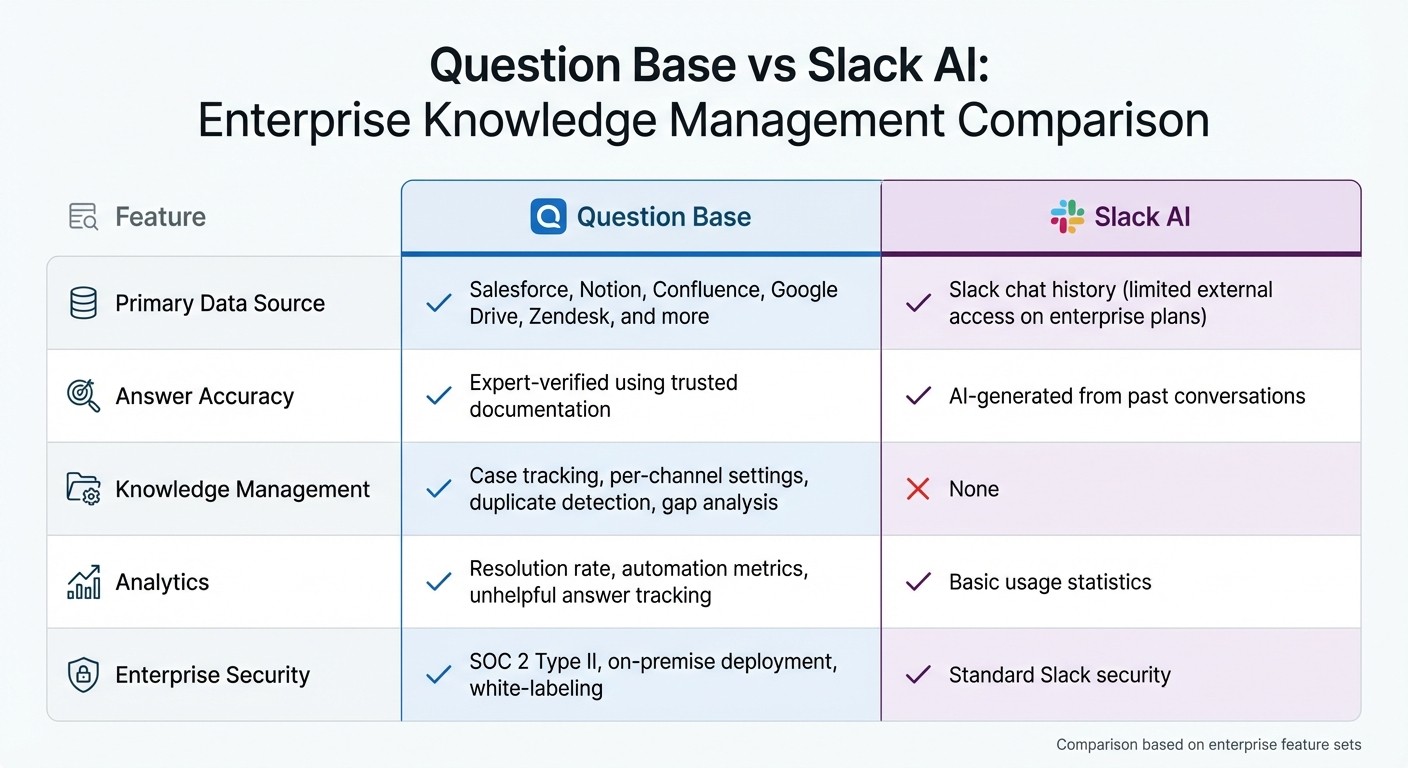
With its robust connections to external tools, Question Base delivers a level of accuracy tailored for enterprise needs. The choice of data source plays a key role here: Slack AI generates responses from past conversations, which is useful for recalling discussions but less reliable for providing verified, audit-ready information. In contrast, Question Base provides answers vetted against trusted documentation, ensuring teams can confidently rely on the information they receive.
Question Base also includes advanced features designed for HR, IT, and operations teams. These include per-channel knowledge source controls, detection of duplicate questions, and analytics that identify resolution rates and knowledge gaps. Such tools support organizations in maintaining SOC 2 compliance, tracking automation performance, and continuously refining their internal support processes.
Feature | Question Base | Slack AI |
|---|---|---|
Primary Data Source | Salesforce, Notion, Confluence, Google Drive, Zendesk, and more | Slack chat history (limited external access on enterprise plans) |
Answer Accuracy | Expert-verified using trusted documentation | AI-generated from past conversations |
Knowledge Management | Case tracking, per-channel settings, duplicate detection, gap analysis | None |
Analytics | Resolution rate, automation metrics, unhelpful answer tracking | Basic usage statistics |
Enterprise Security | SOC 2 Type II, on-premise deployment, white-labeling | Standard Slack security |
For teams that prioritize accuracy, auditability, and ownership of their knowledge resources, Question Base provides the tools and control needed to support complex enterprise operations effectively.
Implementation and ROI: Making Slackbot Integrations Work
Step-by-Step Integration Setup
Getting Salesforce and other connected apps integrated into Slack doesn’t require heavy technical lifting. Question Base simplifies this with one-click integrations for platforms like Salesforce, Notion, and Confluence. Teams can quickly link their trusted knowledge sources by verifying account credentials, choosing which sources to sync, and setting channel-specific controls for how information is displayed.
For companies with more advanced needs, a curated approach to the knowledge base can lead to better results. Take Salesforce as an example: their internal IT team rolled out the "Techforce Agent" using Agentforce for 28,000 employees. Before launch, they refined their 2,000-article knowledge base down to 600 AI-optimized articles. This streamlined approach allowed the agent to instantly resolve 35% of IT issues, saving 16,800 hours annually without requiring human intervention [4].
Once the integration is live, monitoring its performance is crucial to ensure it’s delivering real value.
Track Success with Analytics
To measure the impact of your Slackbot, focus on key enterprise metrics. Question Base provides analytics tailored for internal support teams, offering insights into resolution rates, automation success, unhelpful responses, and cost-per-ticket calculations. These metrics go beyond simple usage stats to reveal the actual business value being delivered.
"The real power of the agent is that it gives people the exact piece of information they need without the back-and-forth." – Neil Cummins, Director of Techforce Support, Salesforce [4]
Cutting out unnecessary back-and-forth leads to measurable time savings across the organization.
Metric to Track | What It Measures | Why It Matters |
|---|---|---|
Resolution Rate | Percentage of questions resolved without human help | Reflects how effective the automation and knowledge base are |
Time Saved per Query | Average time saved by instant answers versus waiting | Highlights productivity gains across the team |
Cost per Ticket | Total support costs divided by resolved tickets | Helps assess ROI and justify ongoing investments |
Knowledge Gap Identification | Unanswered questions flagged by users | Pinpoints areas where documentation needs improvement |
Metrics like these empower support teams to showcase ROI to stakeholders and continuously improve their operations. For organizations handling thousands of internal queries each month, these insights elevate Slackbots from helpful tools to strategic assets that deliver measurable results.
Conclusion: Context Is the Competitive Edge
What separates a simple Slackbot from one that genuinely transforms enterprise workflows is context. When your AI agent can seamlessly integrate with tools like Salesforce for real-time customer insights, Notion for verified documentation, or Confluence for the latest policy updates, it evolves beyond basic search functionality. It becomes an intelligent support layer that enhances team efficiency and productivity.
While Slack AI Search vs. AI Knowledge Agents highlights that summarizing past conversations is useful, enterprise teams often need more than speed - they need accuracy and reliability. For teams managing large-scale internal support - whether it’s HR fielding benefits inquiries, IT troubleshooting access problems, or operations clarifying processes - verified knowledge and precision are non-negotiable. Question Base steps in to fill this gap by connecting directly to trusted systems and incorporating expert validation, ensuring every response is accurate and actionable.
FAQs
How does integrating Salesforce with Slackbots improve team productivity?
Integrating Salesforce with Slackbots enhances team efficiency by providing immediate, precise answers to internal queries - all without leaving Slack. By tapping into real-time Salesforce data, teams can simplify their workflows, cut down on repetitive tasks, and dedicate more time to critical priorities.
This connection ensures that sales, customer support, and operations teams can quickly access crucial details - such as customer records or case updates - right within Slack. The outcome? Faster decisions, smoother collaboration, and a significant reduction in manual processes that typically slow teams down.
What makes Question Base a better choice than Slack AI for enterprise teams?
While Slack AI excels at summarizing conversations and extracting insights from chat history, Question Base takes a different approach. It’s specifically designed for enterprise teams that need verified, accurate answers sourced directly from trusted platforms like Salesforce, Notion, and Confluence. This ensures responses are always current and dependable.
What sets Question Base apart is its focus on advanced features like case tracking, duplicate detection, and customizable channel settings. These tools go beyond chat-based insights, helping teams streamline internal support processes, cut down on repetitive questions, and keep knowledge well-organized. Built with HR, IT, and operations teams in mind, Question Base lightens the load on experts by automating FAQs, making it an ideal solution for scaling knowledge management in large organizations.
How do integrations with apps like Notion and Confluence make Slackbots more efficient?
Integrating tools like Notion and Confluence with Slackbots takes efficiency to a new level by enabling them to access reliable, up-to-date information directly from your organization's trusted sources. This means Slackbots can deliver precise, context-aware answers by pulling in relevant details - whether it's customer data, operational procedures, or the latest project updates - straight into Slack conversations.
These connections remove the hassle of manually searching through multiple platforms, saving time and simplifying workflows. When Slack is linked to knowledge repositories like Salesforce, Google Drive, or Confluence, bots can provide real-time insights, handle routine inquiries, and empower enterprise teams to make quicker, better-informed decisions. This shift turns Slackbots into more than just helpers - they become essential tools for boosting productivity and teamwork.