∙
Cooper
∙
Reading time:
15 min

In 2026, Slackbots have become advanced AI tools that do more than just respond to messages - they manage workflows, analyze data, and save users time. But with this power comes a critical challenge: balancing productivity with security and compliance. Without proper context awareness and granular permissions, Slackbots can create risks like data breaches, regulatory violations, and inefficiencies.
Here’s what enterprises need to know:
Context awareness ensures bots pull accurate, role-specific data from trusted platforms like Salesforce or Confluence, instead of outdated Slack chats.
Granular permissions enforce strict access controls, preventing bots from exposing sensitive information to unauthorized users.
Real-time updates sync permissions immediately, closing gaps that legacy systems leave open.
Industries like healthcare, finance, and education demand these features to meet strict compliance standards and avoid costly mistakes.
Tools like Question Base excel by integrating with verified sources, automating 90% of FAQs, and offering enterprise-grade security at just $8 per user/month - half the cost of Slack AI. For enterprises, this isn’t optional; it’s the baseline for safe and efficient Slackbot operations in 2026.
Risks of Ignoring Context and Permissions in Slackbots
Overlooking the importance of context and permissions when deploying Slackbots can lead to serious consequences for enterprises. Without these safeguards, Slackbots risk causing operational disruptions, security breaches, and compliance failures - undermining productivity and trust.
Compliance Failures in Healthcare, Finance, and Education
Mismanaged permissions are a key factor in over 70% of data breaches [2]. AI systems, like Slackbots, inherit the same access levels as human users but process data on a much larger scale, significantly increasing the risk of exposure.
For instance, a Slackbot without proper HIPAA-level verification could inadvertently reveal outdated medical protocols or grant unauthorized access to sensitive patient data. Similarly, bots without granular permission controls might expose confidential client information or regulatory documents to employees who shouldn’t have access, potentially violating GDPR or CCPA regulations. In education, the stakes are equally high - bots mishandling data boundaries could leak student records or internal procedures, creating legal and reputational risks.
The situation becomes even more complex when unsupervised algorithms are at play. Without clear, auditable trails linking bot responses to verified source documents, organizations may struggle to demonstrate compliance during regulatory audits. These scenarios highlight why strict permission controls are not just optional - they’re essential.
Productivity Losses from Poor Context Awareness
Slackbots that fail to connect to verified documentation and rely solely on chat history can become more of a hindrance than a help. These bots often pull answers from casual conversations or outdated threads instead of official, up-to-date policies. The result? Incomplete or incorrect responses that force subject matter experts to step in, wasting valuable time - over 6 hours per week on repetitive questions alone [2].
This inefficiency doesn’t stop there. Employees receiving inaccurate information may take incorrect actions, leading to escalations with HR or IT to fix the resulting issues. Instead of streamlining workflows, poorly designed bots end up reducing productivity, with workers spending 20–30% of their time searching for information the bot should have delivered accurately in the first place.
Security and Privacy Risks
Legacy security models that depend on obscurity are no match for the capabilities of AI-powered Slackbots, which can surface hidden data at scale. Without robust access controls, these bots can inadvertently expose sensitive information.
One major issue is permission creep. Many integrations request overly broad OAuth scopes - like channels:read for the entire workspace - when only limited access is actually required. Over time, these permissions accumulate, granting bots excessive access. In Slack environments that include external partners or contractors, this overreach can lead to the unintentional exposure of internal communications or proprietary data.
The numbers are telling: 61% of people remain wary of trusting AI, and only 24% of AI projects implement adequate security measures [1]. Without safeguards like role-based access control (RBAC) and regular permission audits, enterprises risk data leaks, unauthorized access, and even AI-specific attacks like prompt injection, where poorly governed systems are manipulated to reveal sensitive information.
These risks underscore the critical need for enterprise-level oversight when deploying Slackbots. Without it, the promise of automation can quickly turn into a liability.
Required Features for Context-Aware and Secure Slackbots
To address the challenges mentioned earlier, enterprise Slackbots in 2026 must go beyond simple automation. They need advanced capabilities to ensure accurate responses, maintain strict security protocols, and provide measurable operational benefits.
Integrations with Trusted Knowledge Sources
Relying on Slack chat history for answers is unreliable. Conversations in Slack are often informal, outdated, and rarely reflect official company policies. For accurate responses, enterprise Slackbots must connect directly to verified sources like Notion, Confluence, Salesforce, Google Drive, and Zendesk. These integrations ensure access to up-to-date, authoritative information.
Using verified knowledge bases within Slack can automate over 90% of FAQs [2]. Instead of experts repeatedly handling the same questions, Slackbots pull answers directly from trusted sources, ensuring consistency and accuracy.
While Slack AI can summarize past conversations and improve individual productivity, teams often require verified answers instead of AI-generated interpretations of chat history. Purpose-built tools like Question Base excel in this area by directly linking to trusted documents. Slack AI’s external tool search is limited to higher-tier plans costing $18 per user per month, whereas Question Base offers seamless integration with your knowledge ecosystem at $8 per user per month. This ensures every response is backed by an authoritative source [2].
Additionally, the RTS API ensures bot responses remain accurate by syncing with real-time permission updates [1].
Granular permissions further enhance security when paired with these verified integrations.
Granular Permissions and Admin Controls
Accurate information is only part of the equation; controlling access to that information is equally critical. Broad OAuth scopes like channels:read across an entire workspace pose unnecessary risks. Enterprise Slackbots must support per-channel access controls and role-based permissions that align with an organization’s existing security framework. This ensures employees only receive responses to questions they’re authorized to ask, keeping sensitive information secure.
Real-time syncing of access permissions is now a necessity. For example, if a user’s access to a document is revoked, the change must reflect immediately in their next bot query, not hours later during a delayed sync [1]. This eliminates security gaps that older systems often leave exposed.
Admin tools should also include opt-in settings for sensitive channels, giving teams control over where the bot operates and what content it can access. Question Base incorporates these granular controls into its enterprise-ready design, empowering knowledge managers to decide how information is shared and with whom [2].
Enterprise-Grade Security and Compliance
To complete the framework for modern Slackbots, robust security and compliance features are essential. Nearly 60% of organizations have reported security incidents tied to SaaS integrations [1]. Key security measures like SOC 2 Type II compliance, encryption (both at rest and in transit), and detailed audit trails are non-negotiable for enterprise Slackbots.
A zero training guarantee is also critical. Leading solutions in 2026 ensure proprietary organizational data is never used to train large language models (LLMs), maintaining strict boundaries of trust [1]. This safeguards intellectual property and ensures compliance with privacy and data residency regulations.
Audit trails add transparency by logging every bot interaction - tracking who asked what, when, and the response provided. This level of accountability is especially crucial in regulated industries like healthcare, finance, and education, where compliance during audits can significantly impact organizational success.
Question Base is designed with these needs in mind, offering SOC 2 compliance, optional on-premise deployment, and white-labeling for enterprises requiring maximum control [2]. While Slack AI focuses on general productivity, Question Base delivers the security and customization that high-stakes teams demand.
How Question Base Handles Enterprise Context and Permissions

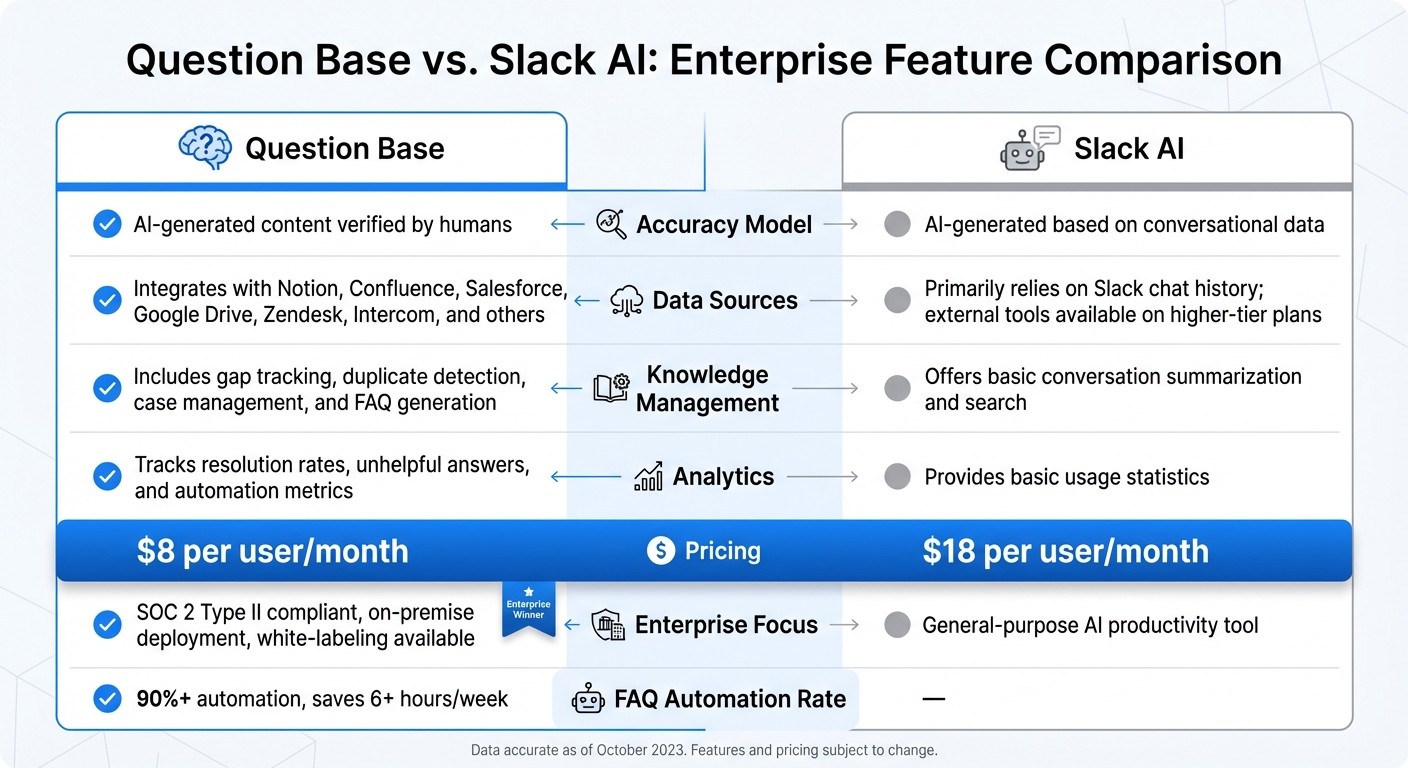
Question Base vs Slack AI: Enterprise Slackbot Feature Comparison
Question Base is purpose-built for enterprises that prioritize verified and accurate knowledge. Unlike Slack AI, which leans heavily on previous conversations, Question Base pulls answers directly from trusted documentation sources like Notion, Confluence, Salesforce, Google Drive, and more. With its powerful data integrations and detailed permission controls, Question Base effectively addresses the compliance and security challenges that enterprises face.
Question Base vs. Slack AI: Feature Comparison
Let’s break down how Question Base stacks up against Slack AI in key enterprise features:
Feature | Question Base | Slack AI |
|---|---|---|
Accuracy Model | AI-generated content verified by humans | AI-generated based on conversational data |
Data Sources | Integrates with Notion, Confluence, Salesforce, Google Drive, Zendesk, Intercom, and others | Primarily relies on Slack chat history; external tools available on higher-tier plans |
Knowledge Management | Includes gap tracking, duplicate detection, case management, and FAQ generation | Offers basic conversation summarization and search |
Analytics | Tracks resolution rates, unhelpful answers, and automation metrics | Provides basic usage statistics |
Pricing | $8 per user per month | $18 per user per month |
Enterprise Focus | SOC 2 Type II compliant, on-premise deployment, white-labeling available | General-purpose AI productivity tool |
With Question Base achieving over a 90% automation rate for frequently asked questions, it saves subject matter experts more than 6 hours per week by reducing repetitive inquiries [2].
Designed for High-Volume Enterprise Teams
Beyond its features, Question Base is optimized for the demands of large, high-volume teams in HR, IT, and Operations. These teams often handle a constant stream of employee queries, where inaccuracies or security lapses are not an option. The platform’s role-based controls and channel-specific permissions ensure sensitive data - like meeting transcripts or aggregated metrics - remains secure.
Admins can fine-tune access at the folder, page, or document level within integrated systems, with changes reflected instantly in bot responses. A human-in-the-loop process allows experts to review and approve AI-generated answers before they’re added to the knowledge base. For unresolved or sensitive inquiries, the system routes these to subject matter experts or designated emergency contacts. Every access and modification is logged, aiding SOC 2 Type II compliance and supporting internal security reviews.
These features are essential for handling the unique challenges of different industries.
Industry Applications: Healthcare, Finance, and Education
In industries like healthcare, finance, and education, Question Base delivers precise protocols, strict data controls, and consistent responses tailored to their specific needs:
Healthcare: Teams can access clinical protocols with defined escalation paths for urgent cases, ensuring critical information is always accurate and accessible.
Finance: Client Support Mode enforces tight controls over sensitive data, helping compliance teams meet audit and regulatory standards.
Education: Custom data integrations streamline support for both staff and students, especially during high-demand periods like registration or financial aid deadlines.
These examples demonstrate how Question Base adapts to the rigorous demands of various sectors, providing reliable and secure knowledge management.
Checklist for Rolling Out a Slackbot in 2026
Launching an enterprise Slackbot requires careful planning to ensure it meets security requirements, integrates seamlessly with trusted data sources, and fits naturally into your team’s workflows. Follow these steps to deploy a bot that delivers accurate, verified answers while staying compliant with organizational standards.
Step 1: Review Permissions and Security Settings
Start by auditing your Slack workspace permissions to ensure they align with compliance requirements. Assign clear governance roles to maintain control:
An Integration Owner to approve app installations.
A Security Reviewer to assess data risks.
Department Champions to ensure the bot meets specific team needs.
Set up role-based access control (RBAC) by mapping Slack roles - Owners, Admins, Members - to integration-specific permissions. Apply the principle of least privilege, granting only the minimum access necessary. Limit the bot’s visibility by inviting it to specific public or private channels using /invite @botname. This keeps sensitive conversations, like those in executive or HR channels, restricted.
Enable detailed Audit Logs to monitor installations, permission changes, and data access for compliance reporting. Schedule quarterly audits to remove unused integrations and adjust access levels as team roles evolve.
Once you’ve locked down permissions, move on to connecting your bot with reliable knowledge sources.
Step 2: Connect Slackbot to Trusted Knowledge Sources
Integrate your Slackbot with verified platforms to ensure it pulls from accurate and up-to-date information. Key systems to connect include:
Notion, Confluence, and SharePoint for policies and procedures.
Google Drive, OneDrive, and Dropbox for shared files and manuals.
Salesforce and HubSpot for customer and sales data.
Zendesk, Intercom, and Freshdesk for support protocols.
Question Base excels by directly accessing these trusted sources, bypassing the need to rely on Slack chat history. This approach helps subject matter experts save over 6 hours per week by reducing repetitive questions [2].
Enable real-time permission syncing to ensure the bot updates instantly when user access changes. For added accuracy, implement a human-in-the-loop process where experts review AI-generated answers before they’re added to the knowledge base. Set up escalation flows so unresolved or sensitive queries are routed to the right subject matter experts instead of allowing the bot to make assumptions.
With your bot securely connected to reliable data, the next step is to fine-tune it for your team’s workflows.
Step 3: Test and Customize for Team Workflows
Begin with a pilot program targeting teams that manage high volumes of questions, where precision and security are critical. Tailor the bot’s tone, response style, escalation paths, and per-channel settings to align with how your teams operate. For instance, you might enforce stricter verification in compliance channels while enabling quicker responses in general support channels.
Use analytics to monitor key metrics like resolution rates, unhelpful responses, and automation performance. Adjust your knowledge sources and workflows based on these insights to continuously improve the bot’s effectiveness.
For streamlined user management, integrate the bot with identity providers like Okta or Azure AD. This allows for automated provisioning and deprovisioning of access as employees join or leave your organization, maintaining security without adding manual overhead.
Conclusion: Enterprise Slackbots in 2026 and Beyond
Features like context awareness and granular permissions aren't just nice-to-haves - they're essential for any Slackbot built to meet enterprise standards. Without real-time syncing and verified sources, organizations face risks to compliance, security, and overall efficiency.
These challenges highlight why enterprise teams need tools that don’t just address risks but actively improve operations. While general-purpose tools like Slack AI and Question Base help individuals by summarizing conversations and searching chat logs, they often fall short in industries like healthcare, finance, and education. In these fields, accuracy, auditability, and compliance are critical. Purpose-built solutions, such as Question Base, are designed to meet these demands. By connecting directly to trusted documentation platforms like Notion, Confluence, and Salesforce, Question Base automates over 90% of FAQs, saving experts more than 6 hours each week[2]. And at just $8 per user per month, it’s less than half the cost of Slack AI’s $18 pricing, while still providing human-verified answers, case tracking, and SOC 2 Type II compliance[2].
As AI continues to evolve, the push toward "agentic" systems will enable Slackbots to do more than answer questions - they’ll generate documents, design workflows, and manage tasks across multiple platforms. For organizations that prioritize features like RBAC, escalation workflows, and regular audits, scaling AI safely is within reach. On the other hand, relying solely on chat history and generic summarization tools could lead to misinformation, regulatory headaches, and frustrated teams.
FAQs
What are the main security concerns with using Slackbots in enterprises?
The key security challenges associated with Slackbots in enterprise settings revolve around data exposure and permission mismanagement. If access controls aren’t properly enforced, Slackbots can unintentionally access or reveal sensitive information, particularly when permissions are too broad. With AI systems handling vast amounts of data, even small configuration errors can open the door to potential breaches.
Another major issue is maintaining compliance and governance. Mismanaged role-based access controls (RBAC) or poorly configured integrations can result in unauthorized data sharing, regulatory violations, or difficulties in tracking and auditing activities. To address these risks, enterprises need to routinely review permissions, assign roles with care, and actively monitor bot activity.
The risks escalate when Slackbots integrate with external platforms like Salesforce, Notion, or Google Drive. Without strict permission management, the chances of data leakage increase significantly. To safeguard organizational data, it’s crucial to restrict access to only what’s necessary and verify that AI-generated outputs are both secure and accurate. Implementing strong permission controls and conducting regular audits are essential steps to ensure a secure enterprise environment.
How does Question Base deliver accurate and secure Slackbot responses for enterprises?
Question Base guarantees precise and secure answers by integrating directly with trusted knowledge platforms such as Notion, Confluence, and Salesforce. Unlike Slack AI, which depends on chat history, Question Base taps into verified, expert-reviewed sources to ensure responses are consistent and dependable.
Security and compliance are at the core of its design. With role-based access controls (RBAC) and regular permission audits, Question Base aligns seamlessly with organizational policies, reducing security risks. It also meets stringent enterprise standards like SOC 2 compliance. Built with high-stakes industries in mind - such as healthcare, finance, and education - Question Base merges accurate data, robust permission controls, and human oversight to provide reliable responses tailored to complex enterprise demands.
Why are detailed permission controls critical for deploying Slackbots in regulated industries?
Granular permission controls are essential for deploying Slackbots in regulated industries because they safeguard data security, compliance, and controlled access to sensitive information. In sectors like healthcare, finance, and education - where strict privacy standards like SOC 2 are mandatory - role-based access control (RBAC) plays a pivotal role. It ensures that organizations can restrict access based on user roles, reducing the likelihood of accidental data leaks or misuse while keeping confidential information secure.
These detailed permissions also address the issue of over-permissioning, where users are granted unnecessary access, which can lead to security vulnerabilities. By enforcing strict access limits, organizations can align with internal policies and meet external regulatory requirements. Moreover, such controls enhance auditability, offering a clear record of who accessed specific data and when - critical for regulatory audits and maintaining governance standards. For industries under heavy regulation, robust permission management isn’t just an option - it’s a fundamental requirement for deploying secure and trustworthy Slackbots.