∙
Cooper
∙
Reading time:
15 min

Slackbot GA is here to change how enterprises work inside Slack. Announced at Dreamforce, this AI assistant is no longer just about notifications - it’s a context-aware tool designed to automate repetitive tasks, retrieve knowledge, and streamline workflows. Starting January 2026, it’s available for Business+ and Enterprise+ customers, with broader access planned for February.
Key Highlights:
Contextual AI: Understands messages, files, and tools to automate tasks like meeting prep in seconds.
Knowledge Retrieval: Pulls answers from Slack, Google Drive, Salesforce, and more - complete with citations.
Automations: Handles IT, HR, and CRM tasks via natural language commands, reducing manual effort.
Productivity Tools: Summarizes threads, drafts emails, analyzes documents, and creates action plans.
Slackbot GA integrates deeply with Salesforce, making Slack a hub for enterprise workflows. By combining automation with real-time insights, it aims to save employees up to 90 minutes daily while improving team collaboration. Whether it's answering FAQs or managing tasks, Slackbot GA is designed to make work simpler and faster.
For teams already using Slack, this rollout offers a practical way to bring AI into everyday operations without disrupting workflows.
Salesforce Turns Slackbot into an Enterprise AI Agent
Core Features of Slackbot GA
Slackbot GA brings three standout capabilities to the table, reshaping how enterprise teams access information and streamline workflows. Built on Slack's solid foundation, it introduces AI-driven tools that understand context, pull insights from various sources, and handle routine tasks automatically. Together, these features simplify daily operations and push the boundaries of enterprise AI.
AI-Powered Knowledge Retrieval
Slackbot GA takes the hassle out of finding information. It transforms Slack into a knowledge hub by pulling answers from Slack messages, files, and connected platforms like Salesforce, Google Drive, OneDrive, Dropbox, and Notion, sparing teams from time-consuming manual searches [1][2][3].
One of its standout tools, the Channel Expert, delivers instant answers by leveraging historical Slack context. This feature is especially helpful for addressing frequently asked questions, reducing the load on experts who often deal with repetitive queries [2].
To ensure reliability, all answers come with verifiable citations and respect enterprise data permissions [1].
Context-Aware Automations
Beyond retrieving information, Slackbot GA powers seamless interactions with CRMs and internal systems. It integrates directly with Salesforce, acting as a conversational interface for Agentforce services across Sales, IT, and HR [2]. This means employees can interact with CRM data, update records, and manage workflows using simple, natural language - all without leaving Slack.
For IT teams, Agentforce automates tasks like password resets and sets up incident channels for more complex problems, ensuring the right people are notified with all the necessary context [2]. On the HR side, it simplifies processes like onboarding, benefits inquiries, and time-off requests through conversational commands. Looking ahead, users will even be able to create custom agents without writing code, empowering Slackbot to take action on their behalf [2].
"By making Slack the conversational interface for Salesforce, we're giving every employee a trusted, unified home for AI and agents - and transforming how work gets done." - Slack (official announcement) [2]
Personal Productivity Features
Slackbot GA also focuses on boosting individual efficiency while enhancing team collaboration. Its suite of AI tools eliminates repetitive administrative tasks. For instance, it can summarize long threads, channel discussions, and huddles into concise overviews, saving employees from wading through countless messages [2][3]. It also helps draft customer emails, meeting scripts, blog outlines, and onboarding guides in the user’s tone [1][3].
When it comes to document analysis, Slackbot is a powerhouse. It reviews transcripts, spreadsheets, PDFs, and slide decks to identify trends, risks, and actionable insights [1][3]. It highlights daily priorities, flags urgent messages, and extracts action items from meeting notes, packaging them into shareable canvases for easy collaboration [2][3].
Early users have reported significant time savings thanks to these automated features. For example, creating meeting canvases has become a breeze. According to a BCG study, such efficiency gains can lead to a 30% boost in employee productivity, which could translate into a 50% increase in top-line revenue [2].
How Slackbot GA Advances Enterprise AI
Slackbot GA transforms enterprise support and knowledge management by moving beyond basic search functions to deliver proactive, context-aware assistance. This smart integration reduces the hassle of routine tasks while making institutional knowledge more accessible. Let’s dive into how Slackbot GA automates repetitive queries and enhances knowledge accessibility with precision.
Automating Repetitive Questions
Repetitive questions can bog down experts in channels like #it-help or #hr-benefits, but the Channel Expert agent steps in to handle these efficiently. For example, Agentforce IT Service manages tasks like password resets and sets up incident channels for more complex issues. Similarly, Agentforce HR Service addresses common policy inquiries and time-off requests, only escalating to human staff when necessary - and with full context provided.
This automation doesn’t just save time; it allows skilled team members to focus on more strategic work, ultimately boosting productivity and driving revenue growth.
Making Knowledge More Accessible
Slackbot GA goes beyond answering questions - it ensures that essential information is always within reach. Through unified enterprise search, users can access content from platforms like Gmail, Outlook, Google Drive, OneDrive, Dropbox, Notion, and Salesforce - all without leaving Slack. The Real-Time Search (RTS) API ensures responses are grounded in the most current team context.
Slackbot has been reimagined as a personalized AI assistant. It doesn’t just answer questions; it synthesizes insights from conversations and files, builds project plans from meeting transcripts, analyzes reports, and highlights daily priorities. It even organizes detailed analyses into shareable canvases, streamlining collaboration. Early adopters report saving at least 90 minutes per day thanks to these automated features.
Integration with the Salesforce Ecosystem
Slackbot GA’s deep integration with Salesforce further solidifies its role as the conversational hub for enterprise workflows. For example, Agentforce Sales embeds customer records and AI agents directly in the Slack sidebar. This setup allows sales teams to update records, uncover insights, and strategize - all through natural language commands, eliminating the need to switch tabs.
"Slack and Salesforce give us the structure to automate the work that slows people down and the flexibility to keep innovating as we grow." - Mollie Bodensteiner, SVP of Operations at Engine [2]
For developers, Slack’s Model Context Protocol (MCP) server bridges Salesforce business logic with Slack’s contextual data and third-party agents. This combination creates AI agents that don’t just process chat history - they understand the broader business context, making Slackbot GA a powerful tool for enterprise innovation.
How to Deploy Slackbot GA in Your Organization
Setting up Slackbot GA is refreshingly simple, especially when compared to the complexity of most enterprise AI rollouts. Slack began a phased deployment in January 2026, continuing through February 2026, targeting customers on Business+ and Enterprise+ plans [1]. There's no need for intricate installations or lengthy training sessions - just follow these straightforward steps to unlock its advanced AI features.
Enabling Slackbot for Your Workspace
To get started, look for the Slackbot icon located to the right of the search bar at the top of your Slack workspace [1]. This icon serves as your gateway to Slackbot's capabilities. If you're on a Business+ or Enterprise+ plan but don’t see the icon yet, it’s likely due to the phased rollout. In that case, reach out to your Slack admin to request access [3].
"To get started, find the Slackbot icon just to the right of the search bar at the top of your workspace. Then simply strike up a conversation." - Slack [1]
Once Slackbot is enabled, you can send it direct messages to inquire about files, messages, or even your calendar. The AI adheres to your existing permissions, ensuring it only accesses channels, files, and messages you’re already authorized to view [1][3].
Connecting Data Sources
After activating Slackbot, you can expand its functionality by linking it to your organization’s key apps. Slackbot uses your tech stack to provide context for its responses. Apps like Google Drive, Salesforce, and OneDrive can be integrated via the Slack app directory, enabling Slackbot to update records and retrieve insights directly [1][2].
Customizing Slackbot for Your Organization
With data sources connected, you can tailor Slackbot to match your team’s specific workflows. For example, deploy Channel Expert agents in channels like #it-help or #hr-benefits. These agents leverage the channel’s historical context to address FAQs, allowing your team members to focus on more complex tasks [2]. Slack has also announced upcoming features that will enable non-technical users to create custom agents using natural language commands [2].
"Every company is asking where their agents will live, how they'll get context, and how to make them useful. Slack is the answer." - Denise Dresser, CEO, Slack [2]
For organizations needing more advanced customization, Slack’s AI Developer Toolkit offers resources like pre-built Block Kit Tables and work objects. These tools make it easier to create custom UI experiences for AI agents, ensuring they can process not just chat history but also broader business contexts. This option is ideal for teams that require deeper integration into their workflows and systems.
Slackbot GA vs. Question Base: Which Tool Fits Your Needs?

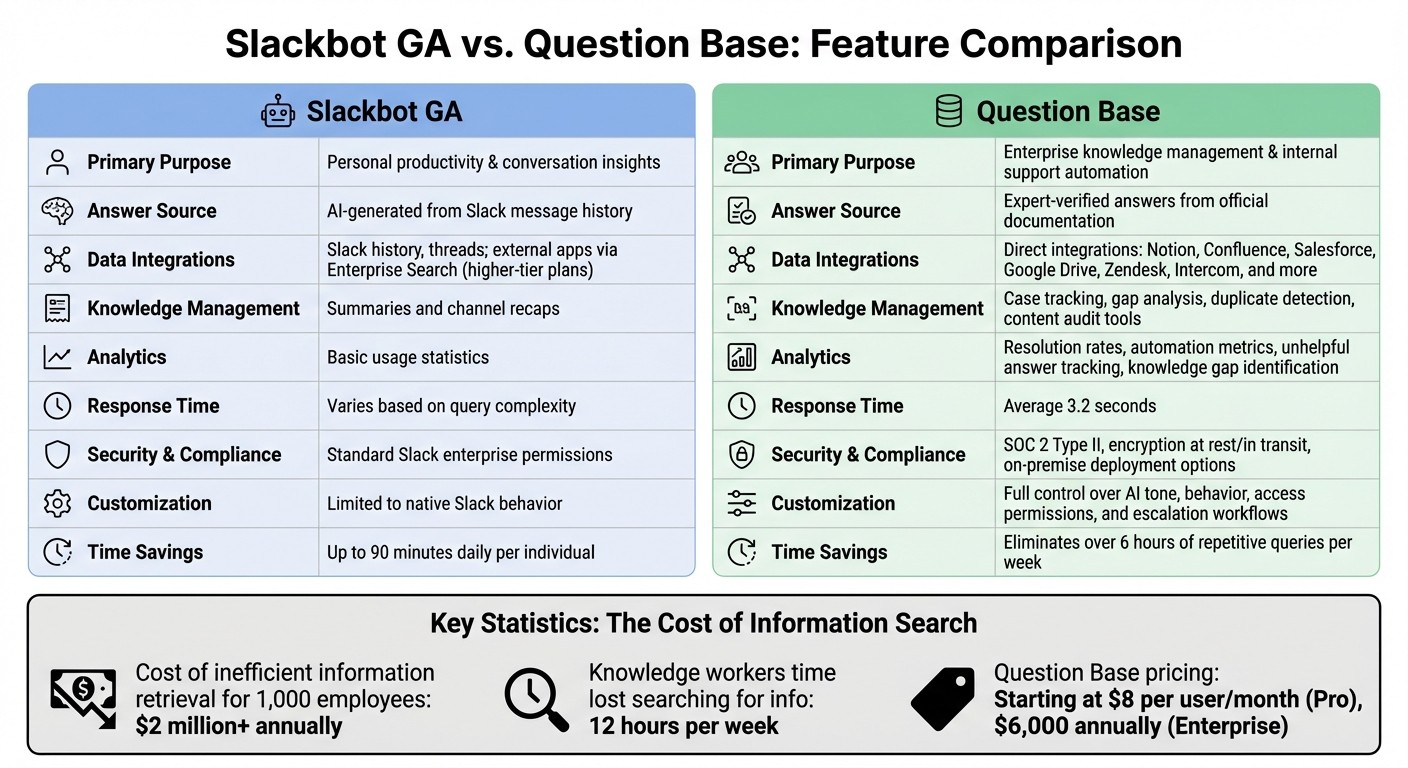
Slackbot GA vs Question Base: Enterprise AI Knowledge Management Comparison
While Slackbot GA focuses on personal productivity, Question Base is designed for enterprise-level knowledge management. Slackbot GA helps individuals catch up on missed conversations, draft content, and navigate their Slack history. On the other hand, Question Base delivers verified answers from trusted documentation, making it a robust tool for internal support.
Feature Comparison: Slackbot GA vs. Question Base
Here’s a quick look at how these tools differ in their approach to enterprise AI:
Feature | Slackbot GA | Question Base |
|---|---|---|
Primary Purpose | Personal productivity & conversation insights | Enterprise knowledge management & internal support automation |
Answer Source | AI-generated from Slack message history | Expert-verified answers from official documentation |
Data Integrations | Slack history, threads; external apps via Enterprise Search (higher-tier plans) | Direct integrations with Notion, Confluence, Salesforce, Google Drive, Zendesk, Intercom, and more |
Knowledge Management | Summaries and channel recaps | Case tracking, gap analysis, duplicate detection, content audit tools |
Analytics | Basic usage statistics | Resolution rates, automation metrics, unhelpful answer tracking, knowledge gap identification |
Response Time | Varies based on query complexity | Average 3.2 seconds [5] |
Security & Compliance | Standard Slack enterprise permissions | SOC 2 Type II, encryption at rest/in transit, on-premise deployment options |
Customization | Limited to native Slack behavior | Full control over AI tone, behavior, access permissions, and escalation workflows |
The differences between these tools translate into measurable time savings. Slackbot GA can save individuals up to 90 minutes daily by automating tasks, while Question Base eliminates over 6 hours of repetitive queries per week [1][4][5]. For companies with 1,000 employees, inefficient information retrieval can cost more than $2 million annually [5]. Question Base addresses this challenge by providing verified, scalable knowledge access.
When Slackbot GA Makes Sense
Slackbot GA is a great fit when individual productivity is the priority. It’s especially helpful for employees who often miss messages, need to catch up on long threads, or want to draft responses using Slack context. This tool simplifies daily workflows, making it easier to recap meetings, locate files, and draft quick replies. It’s particularly effective for teams using Slack’s Business+ or Enterprise+ plans.
When Question Base Makes Sense
For organizations that require accuracy and compliance, Question Base is the go-to solution. Unlike Slackbot GA, which pulls answers from unverified chat history, Question Base connects directly to trusted documentation sources.
"Question Base transformed our internal knowledge access, ensuring every answer is accurate and instantly accessible. It's become an indispensable tool for our knowledge experts." – Monica Limanto, CEO of Petsy [4]
For HR, IT, and operations teams managing frequent questions about benefits, policies, or technical procedures, Question Base offers a human-in-the-loop verification system that ensures consistency and compliance. Its analytics go beyond basic usage stats, tracking resolution rates, identifying knowledge gaps, and measuring the impact of automation.
With pricing starting at $8 per user per month (Pro plan) and enterprise solutions starting at $6,000 annually [4][5], Question Base is ideal for teams that need more than just conversation summaries. It provides a scalable, secure knowledge layer to keep teams aligned and efficient.
If your team often hears, "It’s in Notion - go look it up", or if compliance demands verified answers instead of AI-generated interpretations, Question Base is the purpose-built tool you’ve been looking for.
Conclusion: Moving Enterprise AI Forward
Slackbot GA is reshaping the way enterprises use AI by turning Slack into a centralized, AI-driven operations hub. Instead of spending time searching for information, teams can now focus on identifying, planning, and acting on tasks seamlessly [1]. By integrating multiple AI agents - ranging from Salesforce Agentforce to OpenAI and Anthropic - it creates a unified conversational interface where employees can simply ask for what they need and get results.
This shift is significant, especially as AI solutions are projected to generate a global economic impact exceeding $22 trillion by 2030 [2]. These advancements are directly tied to increased productivity and revenue. The real question for organizations isn't whether to adopt AI tools, but which combination of tools will deliver the greatest value.
Key Takeaways for Decision-Makers
Assess your data sources: Slackbot GA uses conversation history for productivity, while Question Base pulls from verified platforms like Notion, Confluence, and Salesforce to ensure accuracy and compliance. In areas like HR, Legal, or IT, where precision is critical, incorporating human-in-the-loop verification ensures AI-generated responses are reviewed by experts before being shared more broadly.
Focus on high-inquiry departments: Deploy AI in areas such as IT support, HR, or operations to quickly show ROI and build confidence within the organization. Use analytics to identify knowledge gaps by tracking frequently asked questions without proper documentation. Addressing these gaps can save time - knowledge workers currently lose about 12 hours per week searching for internal information, while automation can save internal experts over 6 hours weekly[4][5].
Combine complementary tools: Slackbot GA and Question Base are not an either-or choice. Slackbot GA enhances individual productivity by summarizing threads, drafting responses, and navigating Slack history. Question Base, on the other hand, provides a scalable knowledge framework with features like case tracking and duplicate detection. Together, they tackle different challenges: Slackbot GA accelerates individual workflows, while Question Base keeps teams aligned and informed.
What's Next for AI-Powered Slack Tools
Looking ahead, AI integration in Slack is set to deepen, with a growing emphasis on automated workflows for high-volume teams. Slackbot is poised to become an even more powerful coordinator, managing multiple third-party agents and acting as the primary interface for specialized tools [1]. The adoption of protocols like the Model Context Protocol (MCP) will streamline how AI retrieves data and executes tasks across various applications.
Another emerging trend is the shift toward context-first AI that prioritizes internal knowledge over general data. As an OpenAI representative explained:
"We're pleased to bring ChatGPT even closer to where work happens in Slack - so teams can tap into frontier AI as naturally as talking to a teammate" [2]
This evolution highlights the need for tools that understand not just the content of conversations but also the decisions made, workflows followed, and sources of authority within an organization.
FAQs
How does Slackbot GA boost productivity for enterprise teams?
Slackbot GA boosts team efficiency by embedding AI-powered assistance directly into Slack. This allows enterprise teams to find accurate, context-specific information seamlessly within their existing workflows. By connecting to reliable platforms like Notion, Confluence, and Salesforce, it provides expert-approved answers, moving beyond the limitations of relying solely on past chat logs.
With its ability to automate repetitive questions and simplify knowledge retrieval, Slackbot GA enables HR, IT, and operations teams to tackle issues more quickly and with less hassle. Built with enterprise-grade security, it safeguards sensitive information, making it a reliable choice for organizations with stringent compliance requirements. The result? Smoother workflows, fewer interruptions, and a noticeable boost in team productivity.
How does Slackbot GA compare to Question Base for enterprise knowledge management?
Slackbot GA and Question Base cater to different needs, each excelling in its own domain. Slackbot GA, introduced by Slack, acts as a context-aware AI assistant aimed at boosting individual productivity. It operates entirely within Slack, leveraging chat history, files, and channels to provide quick insights and summaries in a conversational manner. This makes it a handy tool for personal tasks and on-the-go assistance.
Question Base, however, is built with enterprise knowledge management in mind. It integrates with trusted platforms like Notion, Confluence, and Salesforce to deliver accurate, expert-verified answers. Designed specifically for HR, IT, and operational teams, it emphasizes precision, compliance, and scalability. Unlike Slackbot, Question Base identifies knowledge gaps, provides detailed analytics, and ensures all answers come from reliable, documented sources. This makes it a stronger choice for organizations that need structured, auditable knowledge management solutions.
How can organizations tailor Slackbot GA to their specific workflows?
Organizations can customize Slackbot GA to seamlessly fit their workflows by integrating it with internal tools like Notion, Confluence, or Salesforce. This setup enables Slackbot to deliver accurate, context-aware answers tailored to the specific needs and processes of the company. Teams can also configure automation rules to simplify repetitive tasks - whether it’s handling frequently asked support questions or triggering predefined actions based on particular conditions.
Slackbot GA makes use of Slack’s advanced context-aware AI features, such as the Model Context Protocol and Real-Time Search API, to provide precise and relevant responses. These capabilities allow for detailed customization, transforming Slackbot into a specialized assistant that enhances enterprise workflows while adhering to strict compliance and security requirements.