∙
Cooper
∙
Reading time:
12 min

Repetitive internal questions waste hours every week, slowing teams down and costing businesses millions annually. AI answer agents, like Question Base, solve this by automating Slack responses to common queries - pulling verified answers from trusted sources like Notion, Google Drive, and Salesforce. Companies using these tools see a 40% drop in repetitive questions, saving 6+ hours per week for internal experts and achieving 300%+ ROI in six months.
Key Insights:
Problem: Employees lose up to 12 hours weekly searching for answers, with 40% of questions being repetitive.
Solution: AI answer agents provide accurate answers in 3.2 seconds, reducing bottlenecks and improving productivity.
Setup: Simple Slack integrations for knowledge management connect to existing documentation tools, ensuring up-to-date, reliable answers.
Impact: Automates 80-90% of routine questions, saving time and enabling teams to focus on higher-value work.
By turning Slack into a reliable answer hub, organizations streamline workflows, reduce interruptions, and boost efficiency.
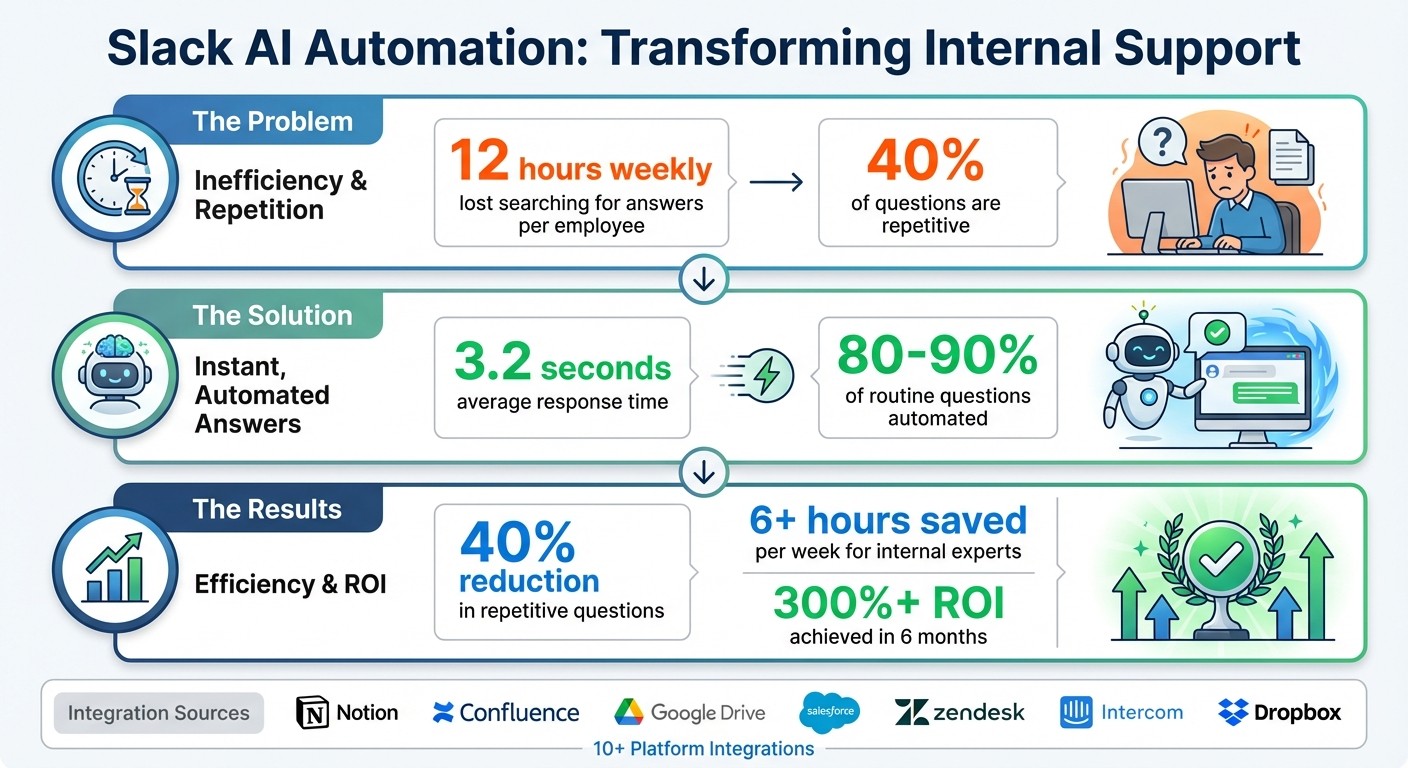
Slack AI Automation Impact: 40% Reduction in Internal Questions and 6+ Hours Saved Weekly
Build an AI chat Slackbot in 5 minutes
Step 1: Installing AI Answer Agents in Slack
Setting up an AI answer agent in Slack is a straightforward process that doesn’t require engineering expertise. Designed for quick implementation, the agent begins responding to queries in just 3.2 seconds on average [1]. Instead of relying on outdated Slack threads, it pulls accurate answers directly from your existing documentation.
How to Set Up Question Base

To get started, search for "Question Base" in the Slack App Marketplace, add it to your workspace, and authorize its access. The entire installation process takes only a few minutes. Once installed, bring the bot into relevant channels by typing /invite @questionbase in any channel where employees frequently ask questions. For example:
HR channels for benefits and policy inquiries
IT channels for technical support
Operations channels for process-related questions
The next step is connecting your documentation tools. Question Base integrates seamlessly with platforms like Notion, Confluence, Google Drive, Salesforce, Zendesk, Intercom, Dropbox, and more. Through the integrations dashboard, authenticate these tools and select the documents you want the agent to access. On the Pro plan, each user can connect up to 200 pages (approximately 3,000 characters per page), while Enterprise plans allow for even more scalability based on your organization’s needs [1].
Once your first knowledge source is connected, the agent begins answering questions immediately. This eliminates the hassle of employees sifting through folders or waiting for managers to respond.
Configuring Your Answer Agent Settings
Tailor the agent to suit your team’s needs with customizable settings. The Answer Instructions feature lets you adjust the AI’s tone to fit your industry. For instance, you can choose a formal tone for compliance-heavy sectors like finance or healthcare, or keep it conversational for creative teams [1]. Specific instructions can also be added, such as requiring the agent to cite policy numbers for HR-related queries or include relevant links when handling IT questions.
Channel-specific settings further enhance functionality by controlling what information is accessible in each Slack channel. For example, your finance team’s channel can pull from budget spreadsheets and expense policies, while your customer success channel accesses product documentation and troubleshooting guides. This ensures sensitive information stays secure and answers remain relevant to the context.
To handle complex or unverified questions, the agent uses escalation workflows. When it encounters a question without a verified answer, it flags the query for human review and notifies subject matter experts. These unanswered questions present an opportunity to improve the knowledge base - experts can review and save their responses for future automation. This iterative process helps organizations automate up to 90% of repetitive questions [1].
With installation and configuration complete, your team is ready to experience smoother internal support and noticeable productivity improvements. The next step is to connect additional knowledge sources and address any remaining gaps.
Step 2: Connecting Knowledge Sources and Improving Accuracy
The effectiveness of an AI answer agent depends on the quality and reliability of the information it provides. Unlike Slack AI, which primarily relies on chat history and unstructured conversations, Question Base pulls directly from your verified documentation, ensuring answers are grounded in trusted, up-to-date sources.
Linking Your Documentation Tools
Question Base seamlessly integrates with over 10 platforms where your company’s knowledge is stored, including Notion, Confluence, Google Drive, Salesforce, Zendesk, Intercom, Jira, and Dropbox [1]. Using the integrations dashboard, you can authenticate these tools and specify which documents the agent should reference. The system automatically accesses the most current version of linked documents, so when your sales team updates a policy in Google Drive, the agent reflects the change instantly. This real-time syncing ensures your team always has access to accurate and updated information.
By connecting directly to these trusted sources, Question Base ensures that responses are based on human-verified content rather than AI-generated interpretations of past Slack conversations. This feature is especially critical for industries like healthcare, finance, or education, where precision and accountability are non-negotiable. While Slack AI vs. Answer Agents highlights different strengths—Slack AI excels at summarizing conversations while Question Base is designed for teams that require auditability and complete control over their knowledge.
Even with these integrations, there’s always a chance that gaps exist in your documentation. That’s why continuously identifying and addressing these gaps is a key part of maintaining accuracy.
Finding and Fixing Knowledge Gaps
No matter how thorough your documentation is, some areas might still be missing critical details. Question Base identifies every unanswered question and tracks queries that lack sufficient context. Through its analytics, the system highlights patterns, such as undocumented policies, and helps you prioritize which gaps to address first. Early results show a **35% reduction** in repetitive questions by resolving these gaps [2].
When the agent encounters a question it can’t answer, it escalates the query to subject matter experts, records their response, and incorporates it into the system for future use. This human-in-the-loop approach ensures that your knowledge base evolves over time, turning unanswered questions into opportunities to improve accuracy and enhance your team’s efficiency.
Step 3: Measuring Results and Maintaining Efficiency
Setting up an AI answer agent is just the beginning. To sustain a 40% reduction in internal questions, you need to monitor its performance and fine-tune its efficiency. Question Base offers powerful analytics to help you track key metrics and pinpoint areas for improvement.
Tracking Performance with Analytics
The Question Base analytics dashboard focuses on three key metrics: resolution rate (the percentage of queries resolved without human help), automation rate (the share of questions fully handled by AI), and unhelpful answer tracking (responses flagged by users for improvement). Aiming for an 80-90% resolution rate and keeping automation above 70% can lead to noticeable results [4][5].
For example, a sales team using Question Base achieved a 92% automation rate for policy-related questions, reducing interruptions by 40% [4][5]. In the healthcare sector, analytics-driven updates boosted resolution rates from 60% to 95%, as teams identified gaps and refined their protocols [5].
Custom dashboards can further enhance tracking. Monitor daily query volume, automation rates, and response times, aiming for response times under 30 seconds and keeping unhelpful answers below 5% [4]. Establish a baseline - such as the average number of daily questions before deploying AI - and compare it weekly to automated resolutions. This helps quantify your progress toward that 40% reduction [4][5].
Keeping Your Knowledge Base Current
To maintain accuracy and efficiency, your system must evolve alongside your organization. Regular updates, such as monthly refreshes informed by employee feedback, are crucial for sustaining improvements over time [5][3]. Question Base analytics can identify recurring unanswered questions, allowing subject matter experts to address gaps. For instance, healthcare organizations track resolution rates for compliance questions, automating 88% of HIPAA-related queries, and update their protocols quarterly to reflect regulatory changes [5].
Experts suggest letting AI handle 80% of routine queries, leaving the remaining 20% to human oversight. This balance, combined with regular content audits, ensures your knowledge base stays relevant and effective. By keeping automation levels high and addressing gaps proactively, your team can stay focused and productive [5][3].
Question Base vs Slack AI: Choosing the Right Tool for Enterprise Support
Slack AI is designed to summarize workspace conversations. But when your team needs reliable, verified answers - especially in critical areas like HR, IT, or operations - enterprise support requires a more robust solution.
Feature Comparison: Question Base vs Slack AI
Feature | Question Base | Slack AI |
|---|---|---|
Accuracy | Expert-verified answers from trusted sources | AI-generated, based on Slack messages |
Data Sources | Notion, Confluence, Salesforce, Google Drive, Zendesk, and 10+ platforms | Primarily Slack chat history |
Knowledge Management | Case tracking, duplicate detection, per-channel settings, gap analysis | None |
Analytics | Resolution rates, automation metrics, ROI tracking | Basic usage stats |
Enterprise Focus | SOC 2 Type II compliance, on-premise options, built for HR/IT/Ops | General-purpose AI tool |
This comparison underscores the importance of pulling answers from trusted platforms, especially when accuracy and compliance are non-negotiable.
Why Verified Answers Are Crucial for Enterprise Support
Relying on AI-generated responses based solely on Slack chat history can introduce risk. Workspace conversations often include outdated details, informal opinions, or incomplete context. Imagine an employee asking about HIPAA compliance and receiving an answer based on an old discussion rather than the latest policy stored in Confluence. That’s a liability no enterprise can afford.
Question Base eliminates this uncertainty by connecting directly to verified documentation sources. Instead of trying to interpret past conversations, it retrieves accurate, up-to-date information from platforms like Notion, Salesforce, or Google Drive. This ensures employees get the right answers every time - essential for workflows that demand precision. Many users have noted how Question Base keeps support running smoothly, even during staff shortages.
For regulated industries, where compliance and accountability are paramount, tools like Question Base are more than helpful - they’re indispensable.
Why Enterprises Need Specialized Answer Agents
Industries such as healthcare, finance, insurance, and education have unique demands: they require verified, auditable responses to meet strict compliance standards. For example, one healthcare organization automated 88% of HIPAA-related queries by linking directly to official compliance protocols rather than relying on Slack chat logs [5]. Similarly, financial services teams depend on answers grounded in official policies, not AI interpretations of informal discussions.
Question Base offers features like case tracking, duplicate detection, and gap analysis, enabling support teams to scale operations without sacrificing accuracy. While Slack AI is effective for quick summaries and individual searches, enterprise teams managing thousands of support tickets in regulated environments need a purpose-built solution that prioritizes compliance, accountability, and measurable efficiency.
Conclusion: Turning Slack into Your Company's Answer Hub
Turning Slack into a central hub for answers doesn't replace human expertise - it amplifies it. Companies using AI-powered tools like Question Base have seen over a 40% drop in repetitive internal questions during pilot programs. This shift allows subject matter experts to focus on strategic initiatives instead of repeatedly addressing the same inquiries [1].
Unlike Slack AI, which focuses on summarizing past conversations, Question Base connects directly to verified documentation. This ensures Slack becomes an efficient, reliable source for accurate, compliance-ready answers. By integrating with platforms like Notion, Confluence, Salesforce, and Google Drive, it guarantees responses are both precise and trustworthy. For industries such as healthcare, finance, and education, this level of accuracy can significantly enhance daily operations.
Key Takeaways
To make the most of AI-driven answer agents, organizations need to focus on three key areas: linking trusted knowledge sources, identifying performance gaps, and keeping their knowledge base updated as the company evolves. Analytics play a crucial role here - track unanswered questions and fill those gaps by connecting additional documents or refining how the agent responds [4]. Businesses that treat their answer agent as a continuously improving system often achieve a 300%+ return on investment within six months [2].
The best approach? Start small, test frequently, and let your team's real questions shape your knowledge strategy. Companies that successfully reduce support volume rely on verified answers integrated directly into Slack, streamlining workflows with tools tailored for enterprise-level demands.
FAQs
How does Question Base provide accurate and reliable answers compared to Slack AI?
Question Base stands out by pulling answers directly from reliable enterprise systems such as Notion, Confluence, Salesforce, and Google Drive. Unlike Slack AI, which relies heavily on chat history to generate responses, Question Base taps into current and verified documentation, ensuring responses are accurate and consistent with your organization's established knowledge.
This method minimizes mistakes and boosts dependability, making it a perfect fit for enterprise teams where precision, compliance, and trust are non-negotiable. By leveraging expert-approved content, Question Base helps teams stay aligned and maintain momentum without unnecessary delays.
How can I connect Question Base to tools like Notion or Google Drive?
Integrating Question Base with tools like Notion or Google Drive is a straightforward process, built to meet the demands of enterprise teams. To get started, install the Question Base app directly from Slack's marketplace. After installation, connect your preferred documentation tools - such as Notion, Confluence, or Google Drive - right from the Question Base interface. This setup enables the AI to pull verified information from your trusted knowledge repositories.
You can adjust the integration settings to prioritize specific content or align with your team's unique workflows. The process is designed to be secure and simple, ensuring that Question Base provides accurate, context-aware answers using your existing documentation - all without leaving Slack.
How does Question Base ensure compliance and accuracy compared to Slack AI for enterprise teams?
Question Base is designed specifically for enterprise teams, delivering expert-verified answers from reliable sources like Notion, Confluence, and Salesforce. This approach ensures answers are not only accurate but also meet strict compliance and regulatory standards - an essential feature for industries where audits and adherence to guidelines are critical. Furthermore, Question Base is SOC 2 compliant, offering organizations a secure and auditable way to manage their knowledge.
On the other hand, Slack AI relies on Slack chat history to generate responses. While this can enhance general productivity, it may fall short when it comes to the precision and compliance that enterprise environments demand. For teams that prioritize accuracy, auditability, and trusted information, Question Base provides solutions tailored to meet the rigorous requirements of enterprise operations.