∙
Cooper
∙
Reading time:
20 min

In 2026, Slackbots are transforming how enterprises handle employee support by automating repetitive tasks, answering common questions, and turning Slack conversations into actionable knowledge. With Salesforce’s new AI-powered Slackbot, organizations can manage thousands of daily queries without adding headcount. Here’s why this matters:
Instant Answers: Slackbots integrate with tools like Salesforce, Notion, and Google Drive to provide real-time, context-aware responses.
Scalable Support: Automate up to 90% of repetitive questions, freeing up HR, IT, and operations teams for higher-value work.
Knowledge Creation: Summarize Slack threads, extract action items, and build searchable knowledge bases automatically.
Smart Escalations: Route complex issues to the right experts, reducing resolution times by up to 50%.
Enterprise-Grade Security: Features like SOC 2 compliance and on-premise deployment ensure data integrity and compliance.
Whether it’s simplifying IT ticketing, improving HR onboarding, or enhancing operational workflows, Slackbots are helping enterprises save time, reduce bottlenecks, and create efficient support systems - all directly within Slack.
If your team is overwhelmed by repetitive Slack queries, it’s time to explore tools like Question Base, which offers verified answers, advanced analytics, and enterprise-focused automation to streamline support at scale.
n8n at Scale - Episode 1: Unlocking Slack's Potential with n8n Automation
Benefits of Slackbots for Enterprise Teams
Slack automation saves time by streamlining repetitive tasks and transform Slack conversations into organized, accessible knowledge for HR, IT, and operations teams.
Faster Query Resolution
Slackbots deliver instant answers by pulling information directly from workspace chats, documents, and integrated systems like Salesforce CRM. This eliminates the need for employees to dig through folders or wait for responses. For instance, during a Salesforce internal trial, 25,000 weekly active users accessed answers seamlessly without switching between apps.
Using natural language processing (NLP), Slackbots understand the subtleties of questions and provide contextually accurate responses. IT teams can quickly review deployment blockers or incident reports, while HR teams can address onboarding queries on the spot. This ability to respond swiftly ensures efficient, scalable support across the enterprise.
Scaling Support Across Large Teams
Slackbots excel at managing high volumes of repetitive questions by searching across unified enterprise data sources, achieving automation rates as high as 90% for common queries[1].
"It's like having an extra person answering questions in Slack."
Willem Bens, Manager of Sales North EMEA, DoIT International
A Salesforce pilot program showcased this scalability, with adoption spreading organically across sales, engineering, and support teams in just weeks. Salesforce CEO Denise Dressler described the system as providing employees with "instant superpowers", eliminating the need for tedious information searches. As Slackbots scale support, they also turn each interaction into a valuable source of operational insights.
Converting Slack Conversations into Knowledge
One of the standout features of Slackbots is their ability to transform Slack threads into structured, searchable knowledge. They can extract action items from meetings, document workflows, and create summaries from ongoing discussions. For example, operations teams can turn lengthy Slack conversations into actionable project plans, while IT teams can analyze technical threads to generate solution proposals.
This process happens automatically. When employees discuss client meetings, Slackbots can compile the conversation along with relevant Salesforce data into concise briefings for future use. HR teams benefit by capturing trends in onboarding FAQs and building documentation that reduces repetitive queries over time. This creates an evolving enterprise knowledge base, ensuring critical insights are preserved rather than buried in chat history.
Required Features for Enterprise-Grade Slackbots
For enterprise teams looking to fully automate employee support, Slackbots need to go beyond simply answering FAQs. They must handle escalation workflows, integrate seamlessly with enterprise tools, and provide actionable performance analytics. Together, these features ensure that Slackbots can meet the demands of high-pressure, knowledge-driven environments.
Escalation Workflows
Escalation workflows are essential for managing queries that exceed a bot's capabilities. When an employee encounters a complex IT issue or a question that's not covered in existing documentation, the bot should flag the query and route it to the right expert. For example, Salesforce’s Channel Expert feature handles this by identifying when a bot lacks the context to respond and notifying the appropriate team members for follow-up[4].
This blend of AI-driven triage and human intervention can reduce resolution times by 30-50% in high-volume scenarios[4]. Engineering teams, for instance, benefit when the bot identifies blockers in deployment threads or incident reports and escalates unresolved issues to specialists[4]. Once queries are effectively escalated, the next step is ensuring smooth data flow through robust integrations.
Integrations with Enterprise Tools
To deliver accurate and contextual responses, enterprise Slackbots must integrate with tools like Salesforce CRM, Google Drive, Notion, Confluence, OneDrive, and Dropbox[2][4][8]. These integrations allow the bot to pull real-time data and provide actionable insights directly in Slack. For instance, when linked with Salesforce, the bot can summarize account details, generate reports, and connect conversations to customer data - all without requiring users to leave Slack[2][3].
Connections to platforms like Notion and Confluence further enhance cross-platform search capabilities. Employees can ask for specific files, such as “Find the budget spreadsheet from Notion shared last week,” and the bot retrieves the relevant document, cutting through the clutter of documentation silos[4].
While Slack AI focuses on summarizing chat history and learning from Slack messages, Question Base stands out by offering expert-verified answers. It pulls information from trusted sources like Notion, Confluence, Salesforce, and OneDrive, ensuring teams get reliable responses rather than AI-generated interpretations. These integrations lay the groundwork for analytics that help measure and refine the bot's performance.
Analytics for Measuring Performance
Performance analytics are crucial for understanding how well Slackbots are serving your team. Dashboards track metrics like resolution rates (the percentage of queries resolved without escalation), automation rates (AI-resolved versus human-handled queries), average resolution times, knowledge gaps, and user satisfaction scores. These insights highlight recurring escalations and pinpoint areas where the knowledge base needs updates[4].
For instance, automation metrics can reveal gaps in the bot’s knowledge, prompting timely updates, while resolution metrics help HR, IT, and operations teams streamline workflows. Salesforce’s pilot program with over 70,000 users demonstrated rapid improvements in these areas, showcasing the value of actionable analytics[4][9].
Question Base takes analytics a step further by offering detailed tracking of resolution rates, unhelpful answers, and automation performance. In contrast, Slack AI provides more basic usage statistics. For teams aiming to measure ROI on support automation, this distinction is critical. Advanced analytics enable continuous improvement, helping refine AI accuracy and ensuring the bot evolves alongside your team’s needs[9].
Comparing Slackbots: Question Base vs Slack AI

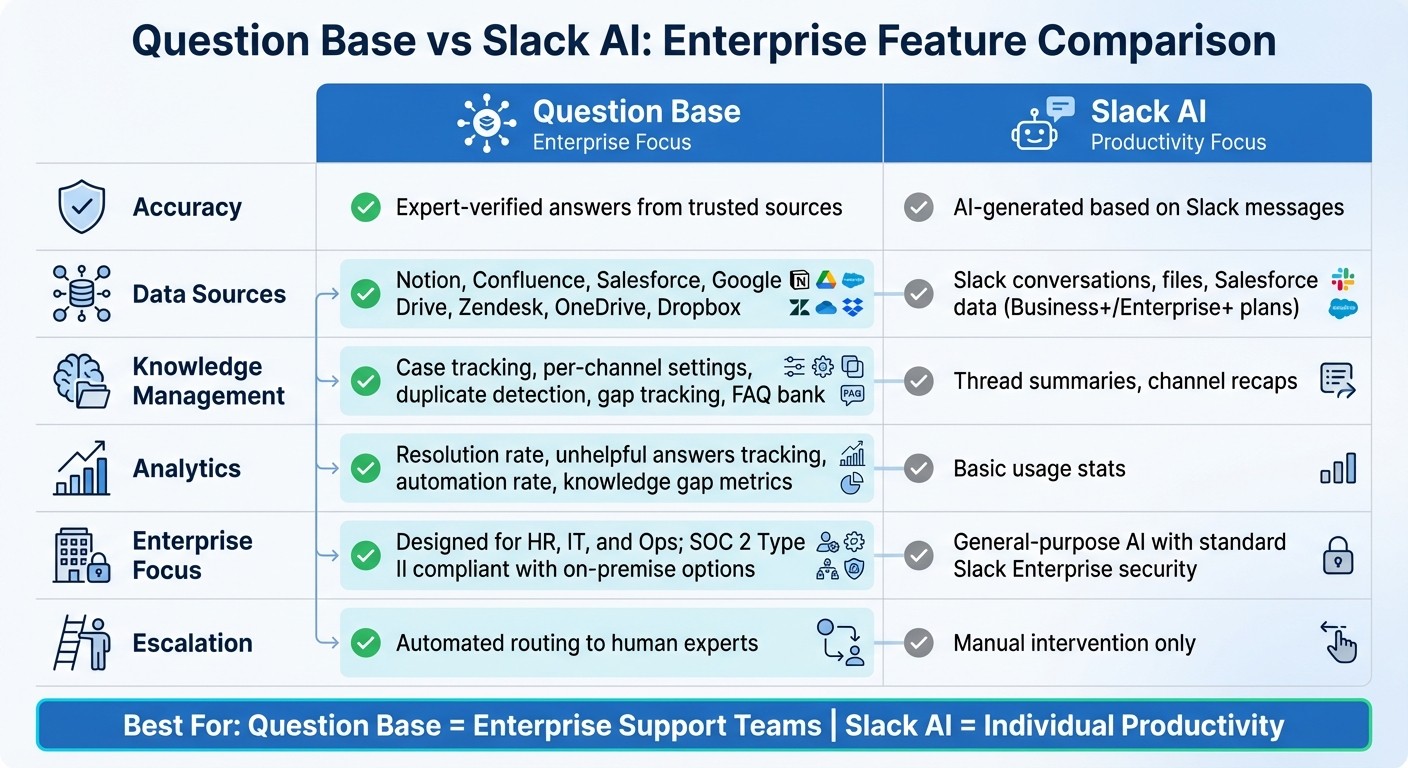
Question Base vs Slack AI: Enterprise Slackbot Feature Comparison 2026
When deciding between Question Base and Slack AI, the key consideration is whether your enterprise prioritizes verified, document-sourced answers or general productivity tools. Slack AI is tailored for summarizing conversations, drafting content, and managing calendars, making it a personal productivity assistant designed to help individuals streamline their workday [3]. On the other hand, Question Base is specifically designed for enterprise support teams - HR, IT, and operations - requiring precise, auditable knowledge. The comparison table below highlights the core differences.
Feature Comparison Table
Feature | Question Base | Slack AI |
|---|---|---|
Accuracy | Expert-verified answers from trusted sources | AI-generated based on Slack messages |
Data Sources | Notion, Confluence, Salesforce, Google Drive, Zendesk, OneDrive, Dropbox | Slack conversations, files, Salesforce data (Business+/Enterprise+ plans) |
Knowledge Management | Case tracking, per-channel settings, duplicate detection, gap tracking, FAQ bank | Thread summaries, channel recaps |
Analytics | Resolution rate, unhelpful answers tracking, automation rate, knowledge gap metrics | Basic usage stats |
Enterprise Focus | Designed for HR, IT, and Ops; SOC 2 Type II compliant with on-premise options | General-purpose AI with standard Slack Enterprise security |
Escalation | Automated routing to human experts | Manual intervention only |
This breakdown highlights the strategic decision enterprises face when optimizing Slack automation for high-volume teams.
Why Enterprises Choose Question Base
For enterprises, accuracy and control over knowledge are often non-negotiable. Unlike Slack AI, which generates responses based on informal chat history, Question Base connects directly to trusted documentation in tools like Notion, Confluence, and Salesforce. For example, a 10,000-employee company using Question Base automated IT and HR inquiries, deflecting 65% of questions and saving 20,000 hours annually [4][9].
Question Base also tracks performance metrics like resolution rates and automation impact, giving teams clear insights into their support automation ROI. In Fortune 500 deployments, Question Base’s escalation workflows have reduced the time to resolve complex queries by 30–50% [4].
Another standout feature is its enterprise-grade customization. Organizations can adjust per-channel settings to fine-tune the AI’s tone and content access. Additionally, SOC 2 Type II compliance and on-premise deployment options ensure that strict data residency requirements are met. These features make Question Base an ideal choice for enterprises prioritizing structured support and knowledge ownership.
Slack AI's Strengths for General Productivity
Slack AI shines as a tool for boosting individual productivity. In Salesforce’s internal pilot involving over 70,000 users, Slack AI cut search time by 50% [2][4][9].
As Parker Harris, Salesforce Co-Founder, describes it:
"the front door to the Agentic Enterprise"
This highlights Slack AI’s role in helping users stay organized and efficient [3]. Whether summarizing past conversations or assisting with meeting prep, Slack AI delivers value for teams focused on day-to-day productivity. However, for enterprises that need verified answers, advanced escalation workflows, and comprehensive knowledge management, Question Base offers a more precise and tailored solution.
Use Cases for Slackbots in Enterprises
Slackbots are transforming how departments like HR, IT, and Operations handle routine tasks. These teams often face a flood of repetitive questions, making them ideal candidates for automation. Below, we explore how enterprises are using Slackbots to streamline workflows, reduce response times, and scale support without needing to expand their teams.
HR: Streamlining Onboarding and FAQs
HR departments are putting Slackbots to work by automating answers to common onboarding and policy-related questions. For example, new hires can ask, "What is our 401(k) matching policy?" and instantly receive accurate information pulled from centralized HR systems. In one Salesforce pilot, this approach cut HR response times by 70%.
When it comes to onboarding, Slackbots can generate tailored checklists by tapping into CRM data. This reduces the back-and-forth on topics like remote work policies, PTO, and benefits. By automating these repetitive queries, HR teams can shift their focus to more strategic tasks.
IT: Simplifying Ticket Escalations
IT teams use Slackbots to streamline support by automatically sorting and responding to common issues. Straightforward requests, like password resets or software access, are resolved instantly, while more complex problems - such as deployment blockers - are flagged for escalation to the right engineers.
In one pilot example, engineers could ask, "Find deployment blockers from last sprint", and the bot provided concise summaries, highlighting key teammates and relevant threads. For unresolved problems, the bot generated detailed reports and routed them to the appropriate team. With Question Base, this process is further refined through automated workflows that route issues based on confidence levels and topics, ensuring that critical problems are addressed efficiently. This seamless transition from triage to actionable solutions highlights the value of Slackbots in IT workflows.
Operations: Turning Slack Threads into Knowledge Assets
Operations teams rely on Slackbots to transform chaotic Slack conversations into organized, searchable knowledge. After a planning session or process review, team members can request a summary of a channel like #ops-review. The bot then compiles a structured brief, pulling insights from discussions, attached files, and connected tools like Salesforce CRM. This eliminates the need for manual note-taking while preserving key decisions for future use.
Salesforce has found that these capabilities speed up decision-making by cutting down the time spent searching across systems. Slackbots can generate summaries, prioritize tasks, and package insights effectively. Question Base takes this a step further with features like case tracking and gap analysis, helping operations teams identify missing documentation and refine their knowledge base. With verified answers achieving accuracy rates as high as 99.99% through human-in-the-loop review [1], enterprises gain confidence that their captured knowledge is both dependable and actionable.
How to Deploy Slackbots in Enterprises
To effectively deploy Slackbots in an enterprise setting, start by focusing on teams that can benefit the most, then gradually expand to the entire organization.
Setting Up and Configuring Slackbots
The process kicks off with your Slack Org Owner or Admin accessing the Slack App Directory to add the desired Slackbot to your workspace. For instance, Salesforce's Slackbot became widely available on January 13, 2026, as a built-in feature for Business+ and Enterprise+ plans, removing the need for separate installation [3].
Once installed, the next step is configuration. This typically involves completing the OAuth flow to grant the bot access to specific channels, messages, and files. To ensure enterprise-grade security, you can integrate Single Sign-On (SSO) through providers like Okta or Azure AD. This allows the Slackbot to align with your existing identity system, enabling seamless employee authentication. For third-party tools like Question Base, authorization is followed by inviting the bot using /invite @questionbase and setting up escalation rules via Slack's workflow builder.
Internal testing with a workforce of over 70,000 employees showed that a straightforward setup paired with immediate utility significantly boosts adoption, leading to 25,000 weekly active users without additional promotion [4][9]. After setup, connect the bot to your existing knowledge systems to unlock its full range of features.
Connecting to Knowledge and Support Tools
A Slackbot becomes truly effective when integrated with your existing knowledge and support tools. For example, authorizing the Notion-Slack integration allows employees to query pages and databases with semantic searches like "What's our remote work policy?" Similarly, Atlassian's connector for Confluence enables the bot to search Jira and Confluence documentation. Salesforce users on Business+ and Enterprise+ plans can enjoy native integration, granting direct access to CRM records, account summaries, and reports without additional setup [2][3].
To integrate these tools, begin by installing the connector app, granting OAuth permissions (such as read access), and testing queries. Enable enterprise search to retrieve data from platforms like Google Drive, OneDrive, or Dropbox [4]. Question Base simplifies this process by offering direct integrations with tools like Notion, Confluence, Google Drive, Zendesk, Intercom, Salesforce, and Dropbox. These connections are managed through a single interface, eliminating the need for engineering assistance.
With these integrations in place, your teams can fully leverage the bot's capabilities to streamline workflows and improve efficiency.
Training Teams and Tracking Performance
The success of your Slackbot deployment hinges on proper training and performance monitoring. Start by hosting admin-led workshops to demonstrate key commands, such as "@questionbase find the Q1 budget spreadsheet" or "Summarize last week's #ops-review thread." Identify champions within pilot channels who can share tips and encourage adoption across teams.
Develop department-specific guides tailored to their needs - HR might focus on onboarding FAQs, while IT could prioritize ticket triage. Provide cheat sheets for common commands and encourage employees to share feedback using commands like /feedback or through dedicated Slack channels.
Performance tracking is equally critical. Use built-in analytics dashboards to monitor metrics such as query resolution times, adoption rates, and deflection rates (the percentage of queries resolved without human intervention). Salesforce's Slackbot, for instance, provides insights into how often it retrieves information from conversations versus files [2][8]. Question Base offers additional metrics, such as resolution rates, unhelpful answer frequency, and automation rates. These insights help identify knowledge gaps and improve documentation. IT teams can track reduced ticket volumes, while operations teams measure time saved on manual searches, turning deployment into measurable ROI.
"Since we started using QB we haven't used our Google support docs. And if I go on vacation or sick leave, I feel comfortable that QB will just take over." - Linn Stokke, Online Events & Marketing Specialist, Ticketbutler [1]
Begin with small-scale pilots in workflows with high activity, such as approvals, status updates, or knowledge retrieval. Document effective prompts, identify smooth escalation paths, and note areas that need improvement. Use these findings to refine your configurations and gradually build confidence across the organization, all while adhering to strict security and compliance requirements [6][7].
Security and Compliance for Enterprise Slackbots
Deploying Slackbots in industries with strict regulations requires a strong focus on security and compliance. Enterprises managing sensitive data or customer information need Slackbots that not only meet high security standards but also ensure transparency and auditability. These measures include encryption, on-premise deployment options, and detailed audit trails to maintain control and compliance.
SOC 2 Type II Compliance and Encryption
Slackbots must adhere to certified security frameworks to operate safely in regulated environments. For instance, Salesforce’s Slackbot runs exclusively within an AWS virtual private cloud, ensuring that customer data stays within the firewall and is not used to train large language models [4]. This design aligns with standards like the NIST AI Risk Management Framework, the EU AI Act, ISO 27001, and SOC 2 compliance [6].
Question Base also upholds SOC 2 Type II compliance, offering encryption both at rest and in transit. With a 99.9% uptime SLA for enterprise users, the platform ensures uninterrupted access to critical knowledge. As Monica Limanto, CEO of Petsy, shared:
"Question Base has become our single source of truth. The expert verification process gives us confidence that every answer meets our compliance standards." - Monica Limanto, CEO, Petsy [10]
For industries like healthcare, finance, and government, verifying encryption methods and data processing environments is essential. Enterprises should review a Slackbot’s Trust Center documentation to confirm that data is processed in isolated environments rather than external servers [4]. For organizations with specific data residency needs, deployment options tailored to those requirements are often available.
On-Premise Deployment Options
While many Slackbots operate in cloud-based environments, some enterprises demand on-premise deployment to meet strict data residency regulations. Question Base addresses this need with on-premise deployment options as part of its Enterprise tier, allowing organizations to maintain full control over data residency and processing. This flexibility is particularly valuable for industries with stringent regulatory requirements that cannot rely solely on cloud solutions. Enterprises should confirm whether their chosen Slackbot platform offers this deployment flexibility [4].
Audit Logs and Knowledge Ownership
Beyond encryption and deployment controls, maintaining detailed audit logs and ensuring knowledge ownership are critical for governance. Enterprises should verify what events are logged, such as who accessed specific information and when [4][5].
Question Base enhances governance with integrated case tracking and comprehensive audit logs. These tools help knowledge managers monitor resolution rates, identify problematic answers, and demonstrate compliance during audits.
Before deploying a Slackbot, establish governance policies with role-based access controls. Slack’s Org Owners and Admins can configure permissions to restrict bot access to specific departments, channels, or data sources. For example, HR teams might limit access to payroll data, while IT teams could restrict visibility to infrastructure documentation.
Additionally, if you’re using Slack’s audit logs, ensure you export records before the April 30, 2026 deadline to maintain compliance [7]. Document what types of information the Slackbot can access and set up clear procedures for purging sensitive data in line with regulations like GDPR or CCPA.
"Slackbot isn't just another copilot... It's the front door to the Agentic Enterprise, powered by Salesforce... elevating every human with enterprise-grade AI." - Parker Harris, Co-Founder, Salesforce & CTO, Slack [3]
Conclusion: Scaling Employee Support with Slackbots in 2026
Choosing the Right Slackbot for Your Enterprise
To select the best Slackbot for your organization, start by identifying your team's most pressing challenges. For instance, if your HR department is repeatedly handling onboarding queries or your IT desk is bogged down with password reset requests, you’ll need a tool that can handle these repetitive tasks effectively while offering features like escalation and analytics. Question Base addresses these needs by grounding its AI responses in reliable, pre-approved documentation rather than just Slack chat history. This foundation ensures accuracy and auditability - critical factors for enterprises that prioritize trust and compliance.
When evaluating Slackbots, focus on features like SOC 2 Type II compliance, advanced escalation workflows that seamlessly transfer complex issues to human experts, and analytics dashboards that track resolution rates and highlight knowledge gaps in Slack. While Slack AI is excellent for summarizing conversations or managing schedules - boosting individual productivity - Question Base goes further. It offers enterprise-focused capabilities such as case tracking, duplicate detection, and on-premise deployment, providing the level of governance and customization large organizations require. Start with a pilot program targeting high-demand areas like ticket triage or FAQ automation. Measure the impact by tracking time savings and reductions in query volume before expanding the solution company-wide. These steps demonstrate why tailored tools like Question Base excel in meeting enterprise demands.
The Future of Employee Support Automation
Looking ahead, Slackbots are redefining what’s possible in employee support. The pace of innovation is quickening, with AI-powered tools setting new standards for efficiency. As Parker Harris, Salesforce Co-Founder and Slack CTO, put it:
"Slackbot isn't just another copilot... It's the front door to the Agentic Enterprise, powered by Salesforce."
By late 2026, Slackbots will seamlessly integrate with CRMs, service desks, and knowledge repositories, automating tasks that once required human input. This transformation turns Slack into an intelligent workplace hub, streamlining operations and boosting productivity.
This shift mirrors the growing emphasis on unified, AI-driven knowledge management. Modern AI agents are no longer just answering questions - they’re capturing organizational knowledge from conversations, identifying gaps in documentation, and building smarter, more searchable repositories. Enterprises adopting purpose-built tools like Question Base aren’t just automating support tasks; they’re creating scalable knowledge systems. These systems evolve alongside their teams, maintaining the security, compliance, and expert oversight essential for industries with strict regulatory requirements.
FAQs
How do Slackbots work with enterprise tools like Salesforce and Notion?
Slackbots work effortlessly with enterprise tools like Salesforce and Notion, enabling teams to manage and access data without ever leaving Slack. Take Salesforce, for instance - it connects with Slack to deliver instant access to CRM data. This means users can update records, pull up customer insights, or collaborate on deals directly within their Slack workspace. Similarly, Notion’s integration lets users search, access, and share workspace content, making it simple to retrieve documents or even summarize threads during Slack conversations.
By reducing the need to constantly switch between platforms, these integrations help streamline workflows. Employees can access reliable, up-to-date information from familiar tools right inside Slack, boosting efficiency and ensuring teams stay aligned across their operations.
How does Question Base compare to Slack AI for enterprise support?
Question Base and Slack AI cater to different aspects of enterprise support. Question Base focuses on delivering precise, verified answers by connecting directly to trusted platforms like Notion, Confluence, Salesforce, and Google Drive. This approach ensures responses are compliant, auditable, and validated by experts. In contrast, Slack AI leans on Slack chat history, making it more suitable for quick lookups or summarizing past conversations rather than handling structured knowledge.
What sets Question Base apart are its advanced tools, such as knowledge gap detection, duplicate detection, and detailed analytics. These features make it a strong fit for HR, IT, and support teams operating in compliance-heavy environments. While Slack AI enhances individual productivity within Slack, Question Base is tailored to keep entire teams aligned and efficient through scalable, enterprise-focused knowledge management.
How do Slackbots improve security and compliance for regulated industries?
Slackbots play a crucial role in maintaining security and compliance for regulated industries by aligning with stringent enterprise standards and utilizing advanced contextual capabilities. For instance, Slackbots built on platforms like Salesforce prioritize safeguarding sensitive information while meeting compliance benchmarks such as SOC 2 and ISO 27001.
These bots ensure that access to organizational knowledge remains secure by strictly adhering to permission settings, allowing only authorized users to view or retrieve sensitive data. By combining data protection, audit trails, and permission management, Slackbots help regulated industries improve efficiency without compromising their compliance requirements.