∙
Cooper
∙
Reading time:
15 min

Repetitive questions slow teams down, and vendor lock-in makes it worse. If your Slack AI agent ties you to a single provider’s tools, switching platforms or customizing solutions becomes expensive and time-consuming. Enterprise teams need control over their workflows, data, and costs - without being limited by proprietary ecosystems like Salesforce.
Here’s the smarter approach: Build your own Slack-native AI agent. A custom solution lets you:
Integrate directly with trusted tools like Notion, Confluence, or Google Drive.
Manage sensitive data securely with encryption and compliance controls.
Automate up to 40% of repetitive queries, saving time and cutting costs.
Scale efficiently without depending on vendor upgrades or hidden fees.
No-code platforms like Question Base make it easy to deploy an AI agent in minutes, offering flexibility, security, and performance. For teams with specific needs, a DIY route using tools like AWS Bedrock provides full customization - though it requires more technical effort.
Avoid vendor lock-in and take control of your Slack workflows. Whether you choose a no-code solution or custom development, the key is ensuring your data and processes stay in your hands, not a vendor’s.
Build a Slack AI Agent That Answers Questions (Step-by-Step Tutorial)
What Enterprises Need from a Flexible Slack AI Agent

For enterprises, three factors are essential when choosing a Slack AI agent: data integration, strict compliance, and scalable performance. These elements are critical for avoiding reliance on additional resources. While Slack AI is great for general productivity tasks like summarizing conversations, enterprise teams - especially those managing sensitive HR, IT, and operational knowledge - require much more. They need accurate answers sourced from trusted systems, strong security measures, and the ability to manage thousands of queries weekly without burdening engineering teams. Let's break down how integration, security, and scalability influence your AI agent's effectiveness.
Connecting Your Data Sources and Integration Requirements
The true power of an AI agent lies in its ability to tap into a wide range of reliable knowledge sources. Slack AI primarily uses public channel conversations and shared files within Slack, which limits its ability to address questions that rely on information stored in external documentation systems. For teams that need precise, verified answers - not just AI-generated summaries - seamless integration with trusted tools like Notion or Confluence is essential.
Question Base excels in this area by connecting directly to various data sources and pulling in real-time information. For example, it can extract policies from Notion or retrieve Salesforce data to provide contextually accurate answers - all without requiring users to leave Slack [3][4]. This eliminates the need for constant context switching, ensuring that responses are both reliable and up-to-date, which ultimately boosts team productivity.
Meeting Compliance and Security Standards
Integration is just one piece of the puzzle. Security is another non-negotiable factor, especially for teams handling sensitive data. A Slack AI agent must adhere to SOC 2 Type II compliance, encrypt data both in transit and at rest, and offer flexible deployment options to meet data residency requirements. These features ensure that sensitive employee, customer, and proprietary information remains secure while staying accessible only to authorized users.
Question Base meets these high standards with SOC 2 Type II certification, advanced encryption protocols, and the option for on-premise deployment to support organizations with strict data sovereignty needs. It also provides audit logs and expert verification workflows, giving compliance teams peace of mind. As one enterprise customer shared:
"Question Base has become our single source of truth. The expert verification process gives us confidence that every answer meets our compliance standards" [2].
This level of control sets Question Base apart from cloud-based solutions that can tie your data to specific vendor ecosystems. For instance, Slack AI’s built-in integration with Salesforce Agentforce may create dependencies that restrict how and where your data is stored [4][5]. For enterprises with regulatory requirements or operations across multiple regions, maintaining control over encryption, hosting, and access permissions is essential.
Scaling for High-Volume Support Teams
Once integration and security are addressed, the next challenge is ensuring your AI agent can handle high volumes of queries without compromising performance. Large organizations often deal with thousands of weekly questions, and studies show that up to 40% of internal queries are repetitive, such as requests for policy details or password resets [1]. A Slack AI agent should automate these repetitive tasks efficiently, without sacrificing response quality or creating bottlenecks.
Question Base is designed for this kind of workload. It includes features like duplicate detection, case tracking, and analytics to monitor resolution rates and identify knowledge gaps. With these tools, Question Base achieves a 90%+ FAQ automation rate, saving internal experts over six hours per week by managing routine questions automatically [1][2]. This operational efficiency contrasts with Slack AI’s general-purpose setup, which lacks a knowledge management system to track unresolved questions or route complex issues to the right team members.
Scalability also requires thorough testing before deployment. No-code platforms like Question Base allow teams to simulate performance using historical Slack conversations, identifying gaps and refining responses before going live [4]. This approach minimizes risk and ensures the AI agent is ready to handle real-world query volumes from day one - without requiring ongoing engineering support.
How to Build a Custom Slack AI Agent: Tools and Options
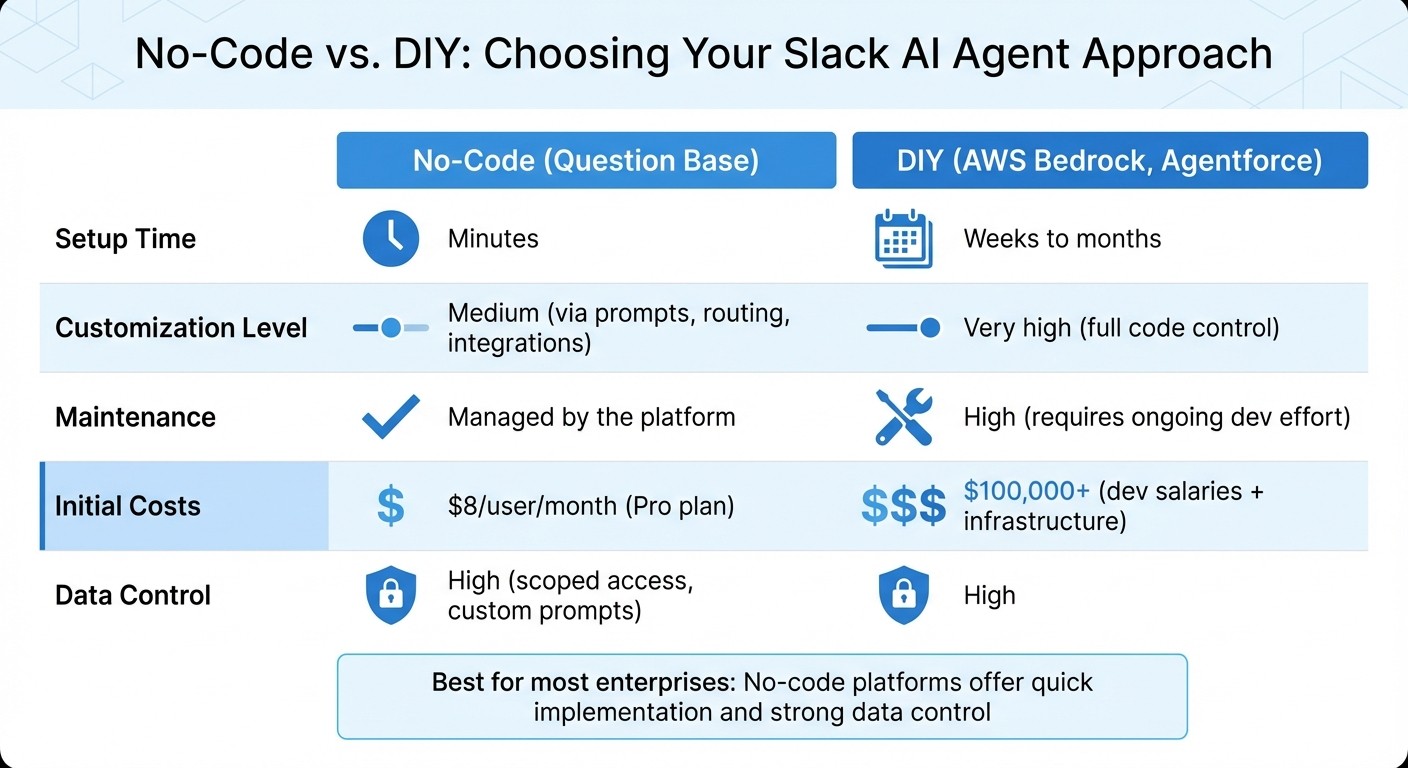
No-Code vs DIY Slack AI Agent: Setup Time, Costs, and Maintenance Comparison
Once you've clarified your requirements, the next step is deciding how to build your Slack AI agent. You can opt for a no-code solution for speed and simplicity or take the DIY route for more control and flexibility.
No-Code Option: Question Base for Fast Deployment

If you're looking for a quick, hassle-free setup, Question Base is a powerful no-code platform designed for seamless Slack integration. It avoids vendor lock-in, giving you control while enabling rapid deployment. Installation is straightforward: add the app from the Slack App Marketplace, invite the bot to your channels using /invite @questionbase, and link it to your documentation sources like Notion, Confluence, Google Drive, or Salesforce. From there, the AI agent automatically pulls information from these sources and starts answering employee questions in real time.
Customization is simple and doesn't require coding. You can define which documents the agent accesses, adjust its tone, and set up routing rules for more complex queries. For instance, an HR team might configure the agent to fetch policies from Notion while directing benefits-related questions to a specific Slack channel for expert input. Question Base also allows for iterative testing - using historical Slack data to simulate queries - so you can fine-tune the agent before going live. This ensures it delivers accurate responses from day one [3].
Maria Jensen, UX Lead & Scrum Master at Ticketbutler, highlighted the impact of this approach:
"Since we started using Question Base we don't spend any time looking up our procedures in a support manual. Before, we could easily spend 5-10 minutes searching... Now, QB finds the relevant answers in a few seconds" [1].
This kind of efficiency is a game-changer for organizations handling large volumes of queries, where even minor delays can add up to significant productivity losses.
DIY Option: Open-Source and Custom Development
For businesses with specialized needs, building a custom Slack AI agent from scratch offers unmatched control. Tools like AWS Bedrock provide access to advanced language models that can integrate with Slack's APIs. However, this route requires significant technical effort. You'll need to set up a Slack app, manage authentication, connect to Bedrock, code the agent's logic, and handle hosting and admin controls [4].
Another option is Salesforce Agentforce, which bridges the gap between no-code and custom development. For organizations already using Salesforce, it offers both no-code Agent Builder tools and the ability to write custom code. Agents can be deployed directly into Slack. Keep in mind, though, that this ties your solution more closely to Salesforce, potentially limiting future flexibility [4][5].
While DIY solutions provide the highest level of customization - allowing you to tailor everything from prompt engineering to database integrations - they come with substantial responsibilities. Your team will need to manage hosting, apply security patches, update APIs, and monitor performance. Initial development alone can take months, and ongoing maintenance will require dedicated engineering resources [4].
No-Code vs. DIY: Which Approach Fits Your Needs
The choice between no-code and DIY depends on factors like setup time, integration challenges, customization needs, maintenance demands, and budget. No-code platforms like Question Base are ideal for teams that prioritize speed and simplicity, as they deploy in minutes and handle backend infrastructure automatically. On the other hand, DIY solutions are better suited for organizations with unique technical requirements and the resources to support long-term development.
Factor | No-Code (Question Base) | DIY (AWS Bedrock, Agentforce) |
|---|---|---|
Setup Time | Minutes | Weeks to months |
Customization Level | Medium (via prompts, routing, integrations) | Very high (full code control) |
Maintenance | Managed by the platform | High (requires ongoing dev effort) |
Initial Costs | $8/user/month (Pro plan) | $100,000+ (dev salaries + infrastructure) |
Data Control | High (scoped access, custom prompts) | High |
For most enterprises, no-code platforms strike the right balance, offering quick implementation and strong data control through scoped integrations and customizable workflows [3][4]. However, if your organization has highly specific needs that no existing platform can meet, a DIY approach might be worth the investment - just be prepared for the significant time and resources required to build and maintain a custom solution.
This decision not only affects deployment but also influences how you manage your data and workflows, a topic we'll explore further in the next section.
Maintaining Control Over Your Data and Workflows
Once you've deployed your tools, keeping control over your data and workflows becomes essential to avoid reliance on vendors. For enterprise teams managing sensitive information in areas like HR, IT, and operations, having ownership of data and clear visibility into workflows is non-negotiable. Vendor lock-in isn’t just about limited integrations - it’s about ensuring you have full control over your data and system performance. This is where strong data ownership and encryption practices come into play.
Data Ownership and Encryption Practices
Maintaining full ownership of your data is critical. Opt for platforms that allow customer-managed keys and on-premise deployment. For example, Question Base offers on-premise deployment combined with AES-256 encryption, safeguarding your data both in transit and at rest. This means all queries are processed locally, without transferring sensitive information to third-party clouds, which helps meet agentic AI compliance requirements.
Compare this to solutions like Slack AI, where encryption is fully controlled by the vendor, or Agentforce, which locks your data into Salesforce's ecosystem. Self-hosted platforms give you the freedom to migrate or switch tools without compromising your data. With these options, you manage encryption keys, decide where your data is stored, and set access permissions. This level of control ensures that if you ever switch providers, your data remains portable and accessible in open formats. This approach gives Question Base a clear advantage over more restrictive, generic solutions.
Using Analytics to Track Performance and Knowledge Gaps
Securing your data is just one piece of the puzzle - keeping an eye on performance is equally important. Analytics go beyond just tracking success; they help uncover inefficiencies and gaps in your workflows. Dashboards can identify unanswered questions, pinpoint bottlenecks, and highlight areas where documentation falls short. With Question Base, you gain access to tools like resolution rate tracking, knowledge gap heatmaps, and metrics such as average response times. These insights allow you to fine-tune your knowledge base continuously, without waiting on vendor intervention.
In contrast, Slack AI provides only basic usage stats - like query counts and general trends - without the depth needed to identify specific knowledge gaps or assess automation impact. With detailed analytics, you can quickly refine your workflows and achieve resolution rates of 90% or higher in days [3]. This real-time feedback loop ensures your workflows stay efficient and your data remains firmly within your control as your team scales.
Conclusion: Building Your Slack AI Agent Without Vendor Lock-In
Platforms like Question Base are designed to give enterprise teams the best of both worlds: fast deployment and complete control. With the ability to connect seamlessly to your existing tools - such as Notion, Confluence, Salesforce, and Google Drive - you’re not locked into proprietary systems or rigid pricing models. This combination of flexibility and speed ensures strong performance while meeting compliance requirements.
One of the standout benefits is maintaining control without compromising efficiency. Developing your own solution can take months of developer effort and ongoing maintenance, while native Slack AI keeps you tied to Slack’s ecosystem with limited options for managing knowledge. Question Base, on the other hand, offers enterprise-grade security, including SOC 2 Type II compliance and on-premise deployment options. Plus, your data remains yours - you can export it in standard formats whenever needed, making migration straightforward.
Another critical factor is having full visibility into how your system performs, enabling continuous improvement. With Question Base, you gain access to tools like resolution rate tracking, knowledge gap analysis, and automation metrics. These features allow you to fine-tune your agent on your own terms, without depending on vendor updates or paying extra for analytics. This level of transparency ensures your workflows adapt as your organization grows, rather than being limited by a vendor's roadmap.
For HR, IT, and operations teams handling sensitive data, vendor independence is a game changer. You control where your data is stored, who can access it, and how encryption keys are managed. At just $8 per user per month, Question Base delivers enterprise-level capabilities without locking you into a rigid system, giving you the freedom to scale and customize as your needs evolve.
Question Base strikes the perfect balance between control and simplicity. It’s purpose-built for teams that need accurate, scalable knowledge management without giving up flexibility or data ownership. By steering clear of vendor lock-in, you ensure your solution grows alongside your organization.
FAQs
What are the benefits of creating a custom Slack AI agent for your enterprise?
Building a custom AI agent for Slack gives enterprises a powerful way to centralize and simplify access to expert-approved knowledge - all within the platform your team already uses. Instead of wasting time digging through endless chat threads, wikis, or scattered tools, your team can get instant, accurate answers pulled directly from trusted sources like Notion, Confluence, Salesforce, or Google Drive. This eliminates repetitive questions like, “Where can I find that document?” and lets your specialists focus on tasks that truly matter.
These custom solutions are designed with data accuracy, compliance, and security in mind. Features like SOC 2 compliance, encryption, and permission controls ensure your information stays protected. Unlike generic tools that depend on chat history, a custom agent taps into your controlled knowledge bases, delivering reliable and traceable information. Plus, built-in analytics provide insights into resolution rates, highlight knowledge gaps, and help refine your documentation over time.
Another advantage of building your own AI agent is avoiding vendor lock-in. You retain full control over your data, workflows, and integrations. This means the AI can adapt to your specific policies, scale effortlessly across large teams, and integrate smoothly with your existing enterprise platforms. The outcome? A tailored, enterprise-grade solution that keeps your team on the same page and informed - right where they work.
How does Question Base keep enterprise data secure and compliant?
Question Base is built with enterprise-grade security and compliance in mind, meeting the SOC 2 Type II certification standards. This certification reflects a high level of assurance for encryption, access controls, and data protection, ensuring that sensitive information is managed securely and aligns with strict industry guidelines.
To further enhance security, the platform includes role-based access controls and flexible permission settings. These features allow administrators to carefully manage who can access integrated tools like Notion, Confluence, Salesforce, and OneDrive. All data exchanges are encrypted and logged, offering complete transparency and a detailed audit trail - an essential feature for industries with strict regulatory demands. By combining expert-verified answers with these robust security measures, Question Base empowers organizations to retain control over their knowledge while remaining compliant with industry standards.
How do I choose between a no-code platform and a custom-built Slack AI solution?
When choosing between a no-code platform and a custom-built Slack AI solution, it’s essential to weigh how complex your needs are and how much customization you require. If your goal is to quickly set up basic workflows - like routing FAQs or automating simple tasks - no-code tools are a great fit. They don’t demand engineering skills and can get you up and running fast. On the flip side, custom-built solutions shine when you need more control. They let you fine-tune prompts, integrate proprietary data, and create advanced logic tailored specifically to your organization.
You’ll also want to consider time, cost, and expertise. No-code platforms are quicker to deploy and eliminate the upfront costs of development, making them a budget-friendly choice for straightforward applications. However, if you have an in-house development team and need more control over data and functionality, custom solutions might be a smarter long-term investment, even though they require more time and resources initially.
Finally, think about scalability and future flexibility. Custom-built solutions offer room to grow, with the ability to scale and adapt as your business evolves. They also allow for tighter security measures. On the other hand, no-code platforms can sometimes limit integrations and may lock you into a specific vendor, especially if their capabilities don’t match your future needs. Carefully balancing these considerations will help you choose the option that aligns best with your goals.