∙
Cooper
∙
Reading time:
20 min

Repetitive questions cost time and money. Teams spend up to 30% of their week searching for answers, and experts lose six hours weekly on repeat queries. If your Slack channels are full of the same questions, there’s a better way: a Slack-native AI agent that connects directly to your documentation systems - no Salesforce required.
Key benefits of a standalone Slack AI agent:
Automates over 90% of FAQs, saving experts hours every week.
Pulls verified answers from trusted sources like Confluence, Notion, and Google Drive.
Provides enterprise-grade security with SOC 2 compliance.
Costs less than Salesforce-dependent solutions and is faster to set up.
How to set it up:
Organize your knowledge hubs (e.g., HR, IT, sales docs).
Use tools like Question Base to connect Slack with your documentation.
Let the AI handle repetitive queries while experts focus on complex tasks.
Why Question Base stands out: It’s purpose-built for enterprise teams, ensuring answers are accurate, traceable, and based on approved documentation - not chat history. With features like case tracking, content gap analysis, and fast response times, it transforms Slack into a reliable support hub.
Want to cut inefficiencies and streamline internal support? A Slack-native AI agent is the solution.
Build a Slack AI Agent That Answers Questions (Step-by-Step Tutorial)
Building a Slack-Native AI Agent Without Salesforce
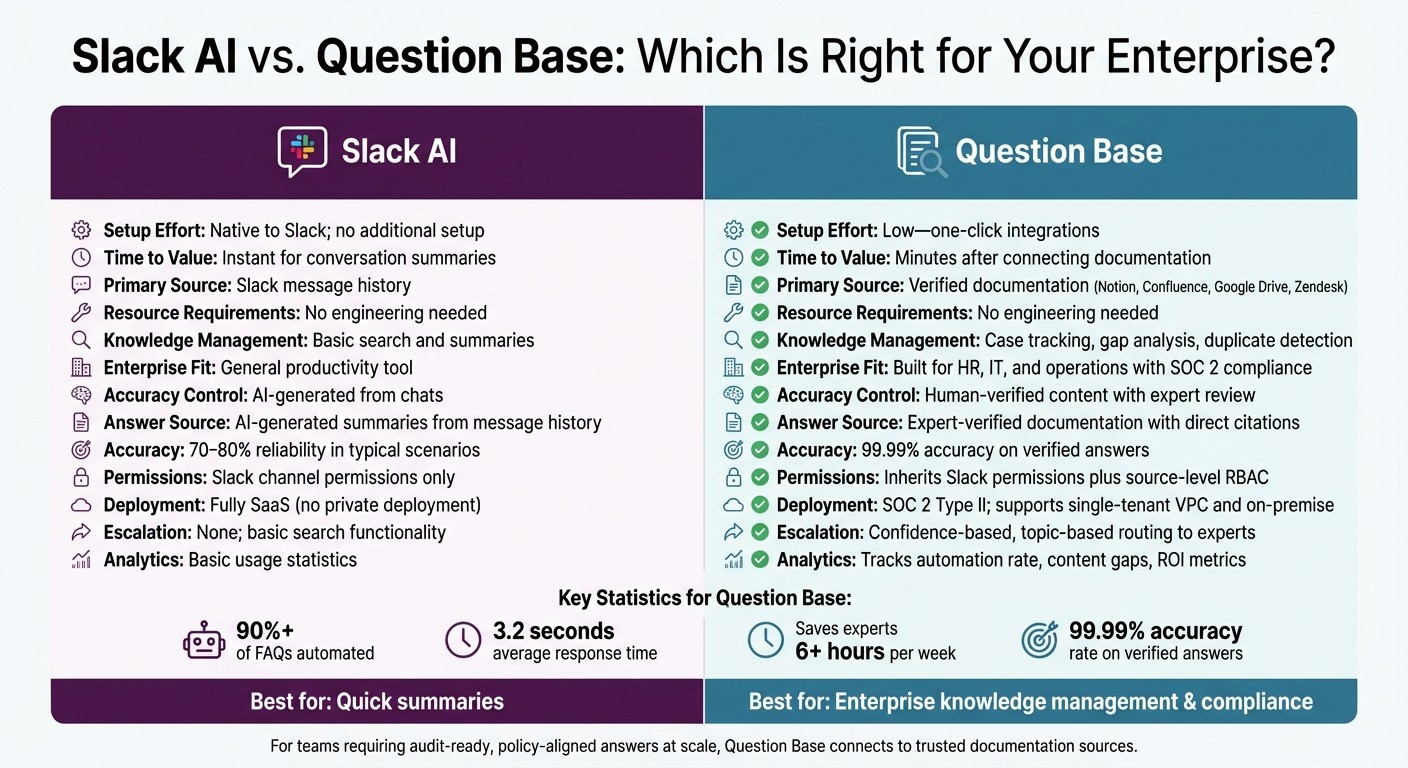
Slack AI vs Question Base: Feature Comparison for Enterprise Teams
Deploying a Slack AI agent without Salesforce is entirely feasible, with three main approaches that differ in setup complexity, customization options, and how well they integrate with enterprise knowledge management needs. Below, we’ll explore each method and explain why Question Base stands out as the best choice for enterprise teams.
3 Ways to Build a Slack AI Agent
Native Slack AI
Available in paid Slack plans, this option provides quick conversation summaries and the ability to search message history. However, it doesn’t deliver structured or verified knowledge, as its AI interpretations depend solely on chat history.
Custom-built Slack apps
This path offers the highest level of flexibility but comes with a hefty engineering burden. Teams must build a Slack app from scratch, handle tokens and secrets, and link it to external large language models (LLMs) like Amazon Bedrock or OpenAI’s GPT-4. Additionally, you’ll need to manage your own infrastructure and security. This route is ideal for teams with unique workflows or strict compliance requirements.
Managed platforms
Platforms like Question Base simplify the process by offering a ready-to-use Slack agent. These tools connect seamlessly to your documentation sources - such as Confluence, Notion, Google Drive, or Zendesk - with minimal setup. Installation is straightforward: add the app from the Slack Marketplace, invite it to the relevant channels, and connect your systems via OAuth. The platform then handles infrastructure, scaling, and security, making it an efficient and hassle-free solution.
Why Question Base Works for Enterprise Teams

Question Base is designed specifically for enterprises with heavy Slack usage and a high volume of internal queries. Unlike native Slack AI, it pulls answers directly from verified documentation, ensuring accuracy and auditability - a critical need for HR, IT, and compliance teams.
What sets Question Base apart is its ease of use. No custom development is required. Once integrated, the platform imports 30–90 days of Slack history to create an initial FAQ. Experts review and verify these AI-generated answers before they go live, ensuring a robust "human-in-the-loop" process. This approach underpins an impressive 99.99% accuracy rate for verified answers [3].
For teams seeking more than basic search capabilities, Question Base offers advanced features like case tracking, duplicate detection, and search insights on unanswered questions. These tools help knowledge managers identify documentation gaps and improve coverage over time. With an average response time of 3.2 seconds [1] and over 90% of FAQs automated [2], Question Base significantly reduces the burden on internal experts, saving them more than six hours per week on repetitive questions.
Comparison: Slack AI vs. Question Base Setup
Aspect | Slack AI | Question Base |
|---|---|---|
Setup Effort | Native to Slack; no additional setup | Low - one-click integrations |
Time to Value | Instant for conversation summaries | Minutes after connecting documentation |
Primary Source | Slack message history | Verified documentation (Notion, Confluence, etc.) |
Resource Requirements | No engineering needed | No engineering needed |
Knowledge Management | Basic search and summaries | Case tracking, gap analysis, duplicate detection |
Enterprise Fit | General productivity tool | Built for HR, IT, and operations with SOC 2 compliance |
Accuracy Control | AI-generated from chats | Human-verified content with expert review |
While Slack AI is useful for summarizing past conversations and helping individuals work faster, Question Base goes a step further by aligning entire teams with verified, trusted knowledge. Instead of relying on manual lookups in tools like Notion, Question Base automates the process and only involves experts when absolutely necessary. This ensures that teams can focus on what truly matters, without getting bogged down by repetitive inquiries.
Preparing Your Knowledge Sources
To ensure your Slack AI agent provides accurate and reliable answers, your documentation must be well-organized, easy to access, and dependable. For enterprises in the US, relying on curated documentation instead of chat history guarantees responses that are audit-ready and aligned with company policies.
Organizing Your Documentation Systems
Start by cataloging all your knowledge repositories. Many US enterprises typically use a mix of tools like wikis (Confluence, Notion), file storage platforms (Google Drive, SharePoint), helpdesk systems (Zendesk, ServiceNow), HR portals, and engineering runbooks. Focus on systems that house high-volume FAQ content, such as HR benefits, IT access requests, and sales playbooks.
Next, standardize folder structures by function. Create clear hierarchies like "HR > Benefits", "IT > Access Requests", or "Sales > Playbooks", making it easier for teams to locate information. Use versioning to distinguish current guidance from outdated materials. Move older, irrelevant content into "Archive" or "Legacy" folders and configure your AI agent to skip these during indexing.
Assign ownership of critical content areas - HR, IT, Finance, Legal - to specific team members, and set up regular review schedules. Policies might be reviewed quarterly, while fast-changing content like sales playbooks could benefit from monthly updates. You can also create an "AI-approved" tag or folder in each tool to signal which documents are ready for indexing. Proper organization not only streamlines retrieval but also ensures compliance with enterprise audit standards. Structuring your documentation this way sets the stage for seamless AI integration.
How Question Base Connects to Your Documentation
Question Base integrates directly with your documentation systems - like Confluence, Google Drive, and Zendesk - while preserving vital metadata, such as titles, content owners, and last-updated timestamps. For example, in Confluence, you can select key spaces like "Employee Handbook" or "IT Support" rather than indexing every wiki. With Google Drive, you might limit indexing to specific shared drives, avoiding unnecessary clutter. Zendesk users can focus on published articles tagged "internal-KB", ensuring only the most relevant support content is included.
This setup allows Question Base to pull from structured, maintained documentation instead of relying on Slack conversations. Admins have control over sync frequency (real-time or scheduled), the scope of indexed content (all spaces or selected ones), and permissions mapping to ensure the AI agent respects user access levels when responding in Slack. Unlike other tools that lean heavily on chat history, Question Base prioritizes trusted repositories, making it easier to prove that responses are based on approved documentation. This direct connection to reliable sources is a key differentiator, as shown below.
Comparison: Knowledge Sources in Slack AI vs. Question Base
Aspect | Slack AI | Question Base |
|---|---|---|
Primary Data Source | Slack messages and conversation history | Verified external docs (Notion, Confluence, Google Drive, Zendesk) |
Control Over Indexed Content | Limited; based on available Slack data | Full admin control via space/folder selection and AI-approved tags |
Use of Verified Documentation | Minimal; relies on chat-based retrieval | Core design; connects directly to trusted external repositories |
Support for Helpdesk Knowledge Bases | Not natively supported | Native integrations with Zendesk, ServiceNow, Freshdesk |
Compliance & Auditability | Basic; chat logs lack formal approval workflows | Enhanced; answers traceable to approved, version-controlled sources |
Risk of Outdated or Incorrect Info | High; unstructured chats may include superseded advice | Low; only approved, maintained documents power responses |
While Slack AI and Question Base can both help summarize past conversations and assist individuals in searching message history, Question Base is designed for teams that need reliable, policy-aligned knowledge at scale. If your organization handles regulated processes or high-stakes internal support, connecting to curated documentation ensures your AI agent delivers answers you can trust - and defend during an audit. With your documentation properly organized and connected, you're ready to set up Question Base in Slack for consistent, approved responses.
Setting Up Question Base in Slack
Installing and Connecting Question Base
To get started with Question Base, begin by installing it from the Slack App Directory. Once installed, authorize the necessary permissions and generate your API key through the Question Base dashboard. Invite the bot to your key support channels using the /invite @QuestionBase command or by adjusting channel settings. For better control, manage channel access through the admin console. Focus on important channels like #it-help, #hr-questions, or #sales-enablement to maximize impact.
Next, link your knowledge sources to Question Base. Navigate to Integrations in the dashboard and connect tools your team already uses, such as Notion, Confluence, Google Drive, or Zendesk. For Confluence, simply input your Atlassian URL (e.g., yourcompany.atlassian.net), generate an API token, and select the spaces to sync. For Notion, provide a workspace API token and choose the pages or databases you want indexed. Most integrations are ready in under five minutes, with automatic indexing kicking off immediately. To keep things focused, you can limit syncing to specific folders or spaces - like "Employee Handbook" or "IT Support" - to avoid unnecessary content. Importantly, Question Base respects your existing permissions, ensuring employees only access information they’re authorized to see.
Once the setup is complete and knowledge sources are connected, Question Base is ready to deliver accurate, instant answers directly in Slack.
How Question Base Delivers Answers in Slack
With your documentation linked, Question Base is now equipped to monitor Slack channels and provide precise answers. It listens for questions in designated channels and responds directly in the same thread. Using retrieval-augmented generation (RAG), the system searches through verified sources, delivers answers with citation links in less than 3.2 seconds, and keeps the thread open for further discussion. For instance, if someone asks, "What's our PTO policy?" in #hr-questions, the bot will reply with the relevant policy excerpt and a direct link to the source in Confluence or Notion.
Question Base also incorporates confidence scoring to ensure accuracy. If the confidence score of an answer is below 90%, the system automatically escalates the query to a designated human expert. This approach guarantees reliable responses while reducing the burden of repetitive questions on your team’s experts. Threaded replies maintain the channel’s history, allowing follow-ups like "Can you clarify this?" without interrupting other discussions. Unlike pop-ups or private messages, this Slack-native design ensures that knowledge remains visible to the entire team, creating a searchable archive of verified answers.
“Since we started using QB, we haven’t touched our Google support docs. And if I’m out on vacation or sick leave, I know QB will handle everything.”
This seamless process strengthens enterprise governance by linking every answer to a traceable, approved source.
Comparison: Answer Quality in Question Base vs. Slack AI
Feature | Question Base | Slack AI |
|---|---|---|
Answer Source | Expert-verified documentation (Notion, Confluence, Google Drive, Zendesk) with direct citations | AI-generated summaries based on Slack message history |
Reusability | Permanent knowledge capture; answers stored and refined over time | Temporary thread recaps; not built for long-term use |
Accuracy Focus | RAG with confidence scoring; 99.99% accuracy on verified answers | Generative summaries; 70–80% reliability in typical scenarios |
Enterprise Fit | Custom prompts, audit trails, compliance-ready (SOC 2 Type II) | General-purpose AI tool; tied to Salesforce for large organizations |
Knowledge Management | Tracks unanswered questions, identifies duplicates, and highlights content gaps | None; focuses on conversation summaries and search |
While Slack AI excels at summarizing past conversations and helping individuals catch up on missed messages, Question Base is designed for teams that need reliable, reusable answers at scale. For US-based enterprises managing regulated processes - like HR policies, IT requests, or compliance documentation - linking to curated resources ensures your AI agent provides answers you can trust and validate during audits. With Question Base installed and your knowledge sources connected, you can confidently configure security settings and escalation workflows to align with your organization’s governance needs.
Security and Enterprise Controls
Access Control and Data Protection
Fast and accurate answers are essential, but they mean little without solid security and control - especially for enterprises. Question Base integrates seamlessly with Slack's permission system to ensure that only authorized users see specific content. For instance, if your HR policies are stored in a private Confluence space accessible only to managers, a non-manager asking about them in Slack won’t see that information. This is achieved through per-request checks that factor in Slack user IDs and channel context.
The platform meets SOC 2 Type II compliance standards, uses AES-256 encryption to secure data at rest, and relies on TLS 1.2+ for data in transit. For organizations with stricter security needs, Question Base can be deployed in a single-tenant VPC or even on-premise. Role-Based Access Control (RBAC) adds another layer of oversight, allowing security teams to manage who can add knowledge sources, specify which Confluence spaces or Google Drive folders are indexed, and access organization-wide analytics. Detailed audit logs - covering configuration changes, source connections, and answer overrides - can be exported to SIEM tools for compliance checks and investigations.
These access controls also lay the foundation for efficient escalation workflows.
Setting Up Escalation and Approval Workflows
When the system encounters a query where the model's confidence dips below a set threshold, it automatically escalates the question to a designated human expert. You can further customize this by enabling topic-based routing, ensuring sensitive queries - such as those related to legal, compensation, or compliance - are escalated no matter the confidence level. For example, if an employee asks about a complex equity scenario, the system forwards the query, along with its draft response and citations, to the HR-Comp team for review.
In high-stakes channels, you can activate an approval-required mode. This feature routes AI-generated responses to a review queue where knowledge managers can edit, approve, or reject them before they are shared. Once approved, the response is stored as a curated Q&A entry, allowing the agent to prioritize it in future queries. You can also establish periodic review schedules and set global guardrails to ensure sensitive topics like medical or legal advice are always handled with care.
"Question Base has become our single source of truth. The expert verification process gives us confidence that every answer meets our compliance standards." – Question Base
Together, these workflows and controls give enterprises complete oversight of the AI agent’s operations.
Comparison: Governance Features in Question Base vs. Slack AI
Governance Feature | Question Base | Slack AI |
|---|---|---|
Permissions Model | Inherits Slack's permissions plus source-level RBAC with scoped indexing by space/folder | Slack channel permissions only |
Deployment Options | SOC 2 Type II compliant; supports single-tenant VPC and on-premise deployment options | Fully SaaS (no private deployment options) |
Escalation Workflows | Confidence-based, topic-based, and user-triggered routing to human experts | None; basic search functionality |
Answer Approval | Review queue with edit-before-publish and versioned, curated Q&As | No content verification system |
Audit & Analytics | Comprehensive audit logs exportable to SIEM tools | Basic usage statistics |
Compliance Controls | Redaction rules, guardrails, periodic review cycles, and retention policies | Standard Slack security framework |
Scaling Your Slack AI Agent
Measuring Performance and ROI
Once your Slack AI agent is up and running, tracking the right metrics is key to proving its value. Question Base provides detailed dashboards that highlight metrics like automation rate (the percentage of questions resolved without human intervention), average response time, and resolution metrics across different teams. For instance, an automation rate of 90% signals that the agent is effectively handling queries.
To calculate ROI, start by establishing a baseline. During the first 30 days, gather data on your current support volumes by channel, average handling time per request, and the cost of Tier 1 support staff in USD. Over the following 60 days, monitor the agent’s performance - track how many questions are resolved directly in Slack, the decrease in tickets escalated to human agents, and the total hours saved. You can calculate saved hours by multiplying the number of automated queries by the average handling time. By the third month, translate those saved hours into dollar savings, subtract platform and LLM costs, and present the payback period to your finance team. On average, experts save over six hours per week by automating repetitive questions, and organizations often experience a 35% drop in repeat inquiries during pilot phases.
Question Base also identifies content gaps - instances where the agent couldn’t provide an answer or had to escalate to a human. These gaps should be reviewed weekly with content owners in HR, IT, and operations. For example, if you see a spike in unanswered questions about a new benefits policy, it’s a cue to update your Confluence or Notion page and re-sync the source so the agent can respond effectively in the future. This process creates a continuous improvement cycle: identify gaps, address them, measure the results, and repeat. These metrics not only validate the agent’s performance but also drive ongoing refinement.
Expanding Across Teams and Departments
After seeing measurable success, the next step is scaling the agent across departments to deliver consistent, tailored support. Set up domain-specific channels like #ask-hr, #ask-it-help, and #ask-ops, and invite the Question Base app into each one with scoped knowledge collections. For example, #ask-hr can pull content exclusively from your HR Confluence space and benefits documentation, while #ask-it-help connects to your IT knowledge base and ticketing system. Keeping knowledge sources scoped ensures each team gets accurate, relevant responses. This separation also makes analytics more meaningful and allows content owners to maintain control - all while leveraging the same Question Base deployment.
For organizations with multiple Slack workspaces (e.g., by business unit, region, or subsidiary), Question Base supports a hub-and-spoke model. Each workspace can connect to its own scoped knowledge collections and permissions, while global policies like data retention and audit logging remain consistent. For regulated industries, stricter access controls can be applied to ensure sensitive information is confined to authorized users.
In high-volume environments with tens of thousands of employees, Question Base’s autoscaling backend ensures smooth operations during peak activity, such as shift changes or product launches. Frequently asked questions are cached to reduce latency and cost, ensuring fast response times even during message surges. To manage scaling effectively, consider forming a cross-functional AI steering group. This group can oversee configuration, guardrails, and rollout strategies. Assign content and analytics owners for each major function, and have them report to the steering group monthly or quarterly. This approach ensures a consistent tone, adherence to safety policies, and measurable business value as you scale.
Comparison: Analytics and Scaling in Question Base vs. Slack AI
Feature | Question Base | Slack AI |
|---|---|---|
Performance Dashboards | Tracks automation rate, escalation rate, resolution time, and content gap reports by topic | Limited to basic usage and engagement metrics |
ROI Tracking | Measures cost-per-ticket savings, expert time recovered (hours/week), and help desk deflection rates | Does not include dedicated internal support ROI tools |
Multi-Workspace Support | Offers hub-and-spoke deployment with scoped knowledge per workspace; includes single-tenant VPC or on-premise options | Fully SaaS; lacks private deployment or per-workspace scoping |
High-Volume Handling | Features autoscaling backend, caching, and controls for peak bursts, ensuring rapid response times | General-purpose AI without tailored support-channel scaling features |
Content Gap Analysis | Highlights unanswered questions, recommends new documentation, and tracks progress over time | No tools for identifying knowledge gaps or enabling continuous improvement |
Governance & Ownership | Includes role-based analytics, cross-functional steering, and designated content owners | Relies on standard Slack admin controls with no support-specific governance options |
Conclusion
Implement a Slack-native AI solution that seamlessly integrates with your trusted documentation platforms - like Confluence, Notion, Google Drive, SharePoint, and more - without relying on Salesforce or requiring heavy engineering resources. Question Base ensures accurate and reliable responses by pulling information directly from verified, centralized knowledge sources, not from chat history. Designed for high-demand internal support teams in IT, HR, and operations, it tackles the costly inefficiencies of scattered knowledge retrieval that burden enterprises every year.
With its strong focus on integration and security, Question Base delivers tangible performance improvements. Enterprise-grade features such as SOC 2 compliance, role-based access controls, escalation workflows, and audit trails provide the governance and security enterprises need. The platform automates up to 90% of repetitive questions [2] and delivers answers in an average of 3.2 seconds [1]. Additionally, its analytics dashboards offer clear insights into automation performance and efficiency gains.
To get started, focus on one high-impact department - such as IT or HR - to quickly demonstrate value. From there, you can scale across other teams using tailored knowledge collections and dedicated Slack channels like #ask-it or #ask-hr. Since it operates independently of Salesforce, Question Base allows organizations the flexibility to adapt their CRM, ITSM, or LLM stack without disrupting the employee experience. The platform’s gap analysis highlights areas where documentation can improve, transforming Slack into a long-term hub for scalable, knowledge-driven automation that grows alongside your workforce.
FAQs
How does Question Base deliver accurate answers in Slack?
Question Base delivers precise answers by pulling information directly from your organization's trusted knowledge sources, including Notion, Confluence, Salesforce, OneDrive, and Google Drive. Before any response becomes available, it is carefully reviewed and approved by a knowledge expert, ensuring your team receives accurate and up-to-date information they can rely on.
For added clarity, the AI provides citations for every response, pointing to the exact document where the information originated. This not only allows users to verify the source but also supports auditability. Beyond delivering answers, Question Base tracks key metrics like resolution rates, flags unhelpful responses, and highlights knowledge gaps. These insights help refine its performance over time, providing your team with dependable, enterprise-level support.
How does Question Base ensure security compared to Slack AI?
Question Base prioritizes enterprise-level security, featuring SOC 2 Type II certification to safeguard sensitive information and provide a fully auditable trail for every response. It integrates seamlessly with trusted platforms like Notion, Confluence, and Google Drive, giving administrators precise control over which documents the AI can access. This ensures responses are both verified and secure.
In contrast, Slack AI relies on Slack channel history to generate answers and lacks dedicated security certifications or the ability to manage data sources with the same level of detail. Its protections are limited to those offered by the Slack platform itself.
For organizations that demand compliance, verified accuracy, and advanced security measures, Question Base delivers a specialized solution that surpasses the general capabilities of Slack AI.
How does Question Base enhance internal support efficiency?
Question Base turns Slack into a self-service knowledge powerhouse, delivering quick and precise answers to repetitive questions directly within Slack. By tapping into reliable sources like Notion, Confluence, Salesforce, Google Drive, and OneDrive, it eliminates the constant need for experts to answer the same questions over and over - freeing up to 6 hours of their time each week. With an impressive average response time of just 3.2 seconds, teams can maintain momentum without unnecessary interruptions.
What sets Question Base apart from Slack AI is its reliance on expert-verified, auditable answers rather than suggestions based solely on chat history. This approach reduces guesswork, ensures compliance, and builds trust in the responses provided. Additionally, it offers actionable analytics - tracking metrics like resolution rates and automation performance - so teams can pinpoint gaps in documentation and fine-tune their knowledge base over time. Built with enterprise needs in mind, Question Base delivers SOC 2 Type II compliance and detailed permission controls, ensuring data stays secure while keeping workflows smooth and efficient inside Slack.