∙
Cooper
∙
Reading time:
15 min

Finding information in Slack shouldn’t feel like a scavenger hunt. Yet, for many enterprises, it does. Teams waste hours switching between Slack and tools like Google Workspace, Notion, or Salesforce to locate answers. This inefficiency slows productivity and frustrates employees.
Here’s the solution: integrating Google Workspace search into Slack. Instead of toggling between platforms, employees can pull verified, up-to-date information directly into Slack conversations. This eliminates repetitive questions, minimizes distractions, and ensures access to accurate data when it matters most.
Key Takeaways:
47% of workers struggle to find information due to disconnected tools.
40% of internal questions are repetitive, pulling experts away from critical tasks.
Native tools like Slack AI are limited to chat history, while Google Workspace search is confined to its ecosystem.
Question Base bridges this gap, delivering verified answers from Google Workspace and other platforms directly in Slack.
By reducing platform switching and ensuring real-time, accurate results, tools like Question Base transform Slack into a centralized knowledge hub. At just $8 per user per month, it’s a practical solution for teams looking to boost productivity without overhauling their workflows.
Common Knowledge Retrieval Problems in Enterprises
Fragmented Information Across Multiple Tools
In many enterprises, knowledge is scattered across a range of tools. For example, a sales representative might need to pull customer history from Salesforce, locate contract details on Google Drive, and reference pricing guidelines stored in a Notion wiki - all to answer a single client inquiry. With nearly 70% of enterprise applications functioning in isolation, employees often face disconnected data silos that force them to jump between systems to piece together the information they need.
This issue becomes even more pronounced during critical moments. Imagine a product manager on an important client call, scrambling to locate the latest roadmap details using AI-powered Slack search. They might find themselves flipping between Google Docs, Slack threads, and Confluence pages. In larger organizations, vital information can also get buried under countless Slack messages spread across hundreds of channels, turning retrieval into a time-consuming task.
This fragmentation doesn’t just slow down workflows - it actively disrupts productivity.
Lost Productivity from Platform Switching
Switching between platforms doesn’t just waste time; it also breaks focus. Every time an employee leaves Slack to dig through Google Drive or Gmail for a document, they lose momentum, making it harder to stay on task.
Difficulty Accessing Accurate, Current Information
Traditional keyword searches often fall short when employees use terms that don’t match the exact phrasing in a document. For instance, someone looking for "time off" might not find a document titled "Paid Leave Policy", even though the two are closely related. This can lead employees to either give up their search or rely on incomplete information.
Adding to the complexity, many search tools depend on indexing methods that can quickly become outdated. For example, an employee might unknowingly pull an old pricing sheet or follow an obsolete process because the system hasn’t been updated. Tools like Slack also lack built-in mechanisms to distinguish between verified company policies and casual opinions shared in chat, increasing the risk of acting on incorrect or unofficial guidance.
Summary of Key Challenges
The table below outlines the primary obstacles enterprise teams face when retrieving knowledge:
Problem | Impact on Enterprise Teams |
|---|---|
Siloed Data | Employees often have to switch between 10+ apps to piece together answers |
Stale Information | Risk of relying on outdated policies or technical specifications |
Repetitive Pings | Subject matter experts lose up to 6+ hours weekly addressing the same questions |
Context Switching | 74% of leaders report productivity losses from constant platform jumping |
Unverified Answers | Employees may act on informal chat opinions instead of official policies |
These problems underscore the need for better-integrated search solutions, which the next section will address.
Why Native Search Tools Fall Short for Enterprises
Slack AI Works Primarily with Chat History
Slack AI is great for keeping up with conversations, summarizing threads, and revisiting past discussions. However, it relies heavily on chat history rather than pulling from verified documentation. This becomes a problem when employees need accurate answers about policies, technical specs, or other critical information. Slack AI pulls responses from previous chats, which might be outdated, incomplete, or even incorrect.
The lack of distinction between casual, informal messages and official, up-to-date policies stored in platforms like Google Workspace creates a real risk. For teams that depend on accurate, verified answers, relying solely on Slack AI can lead to operational headaches.
Standalone systems add to the challenge, creating even more friction for teams.
Google Workspace Search Stays Within Its Own Ecosystem
Google Workspace offers reliable search capabilities across tools like Docs, Sheets, Drive, and Gmail. But here’s the catch - it’s limited to Google’s ecosystem. If your team spends most of their day in Slack, they’ll need to pause their workflow, open a browser, and manually search Google Workspace to find what they need. This constant switching disrupts productivity.
"Data silos are more than an inconvenience - they're a systemic barrier to operational efficiency and decision-making." - Rebecca U. Shin, Coveo [1]
For many technical teams, finding the right information often means searching through four to six different repositories [1]. This fragmented process slows everyone down.
No Cross-Platform AI Answer Solution
The gaps in these tools highlight a pressing need: a unified, cross-platform knowledge retrieval solution.
Right now, no AI tool seamlessly connects Slack with Google Workspace and other enterprise systems to deliver verified answers in real time. Slack AI improves workflows within Slack. Google Workspace search does the same within Google’s tools. But neither bridges the gap to provide accurate, cross-platform answers where employees are already working.
Take Tyler Technologies as an example. In April 2025, they faced a major challenge with customer data scattered across four CRMs and nine additional platforms. By implementing an AI-powered retrieval system that unified access to all their content, they eliminated unnecessary guesswork for support agents and boosted efficiency [1]. Similarly, SAP Concur streamlined their self-service support by unifying knowledge assets, which led to a 30% drop in case submissions and a 91% decrease in searches per session [1].
These examples show why relying on chat history or isolated systems isn’t enough. Enterprise teams need a solution designed to deliver verified answers from all knowledge sources, directly within Slack.
Session 4 - Lesson 3: Demo on Slack integration with Google Workspace
How Google Workspace Search in Slack Addresses These Issues
Dealing with scattered information is a common challenge, but integrating Google Workspace search into Slack helps centralize access and streamline daily operations.
Search Google Workspace Tools Directly in Slack
With Google Workspace search embedded in Slack, there’s no need to toggle between apps. Employees can access Google Drive, Docs, Sheets, Slides, and Gmail without stepping out of their Slack conversations, keeping their focus intact.
This integration ensures that when someone asks for the latest pricing sheet or the current travel policy, they can retrieve it instantly, directly from the chat. It queries Google Workspace in real time, guaranteeing access to the most updated documents while respecting existing permissions.
"Joint Google Workspace and Slack customers will be able to securely access information from their favorite collaboration apps, right within Slack."
– Google Workspace Representative [2]
This setup not only simplifies workflows but also makes accessing essential tools and information more efficient.
Less Platform Switching, Faster Workflows
Switching between platforms disrupts focus, and this integration eliminates that issue. By keeping employees within Slack, their productivity remains steady and uninterrupted.
The integration leverages natural language processing (NLP), so users can ask complete questions like, "What is our travel policy?" instead of relying on exact keywords. The AI interprets the intent and pulls relevant results from Google Docs or Drive, making searches faster and easier to navigate.
With fewer distractions and smoother workflows, teams can access the information they need without wasting time.
More Accurate, Real-Time Search Results
The integration uses federated search, meaning it queries data sources in real time to provide the most up-to-date results. It also syncs permissions automatically, ensuring employees only see what they’re authorized to access. For example, if someone loses access to a Google Drive folder, that content will no longer appear in their Slack search, keeping sensitive data protected.
Question Base: Built for Verified Answers in Slack

Question Base takes Slack's document search capabilities to the next level by providing verified answers instead of generic search results. Designed for enterprises, it ensures employees get accurate, expert-approved information - not just AI summaries of previous conversations.
Seamless Integration with Google Workspace and Enterprise Tools
Question Base connects with over 12 enterprise platforms, including Google Drive, Notion, Confluence, Salesforce, Zendesk, and Jira. By centralizing documentation within Slack, it eliminates the hassle of searching across multiple systems. Employees can ask natural language questions, and the AI retrieves answers from trusted sources - whether it’s a Google Doc, a Confluence page, or a Salesforce knowledge article.
This system respects existing permissions, ensuring employees only access content they’re authorized to see. The integration bridges the gap between Slack’s conversational ease and the reliability of verified documentation.
Verified Answers, Customized for Your Team
Unlike Slack AI, which pulls responses from chat history, Question Base lets experts review and approve AI-generated drafts before they’re added to the knowledge base. This creates a dependable "Source of Truth" for essential information like HR policies, compliance guidelines, and technical procedures.
If the AI encounters a question it can’t confidently answer (below a 70–90% confidence threshold), it escalates the query to designated experts through Slack tags or ticketing systems like Zendesk. This process ensures employees always receive accurate information, while experts only step in for complex or unique cases - leaving repetitive questions to the AI.
Analytics That Identify Knowledge Gaps
Question Base doesn’t just provide answers - it improves knowledge management over time. The platform tracks unanswered questions, helping teams identify knowledge gaps where documentation needs to be updated. Its analytics dashboard offers insights into resolution rates (how many queries are answered without human help) and automation rates (how many repetitive questions are handled by AI). These metrics help leadership measure the impact of their knowledge management efforts.
Additionally, teams can convert valuable Slack threads into permanent FAQ articles with a single click, turning fleeting conversations into reusable knowledge. Weekly reviews of unanswered queries help content owners prioritize updates, ensuring documentation aligns with ongoing projects or quarterly goals. By combining speed with accuracy, Question Base transforms Slack into the go-to hub for verified, reliable knowledge.
Question Base vs. Slack AI: Feature Comparison
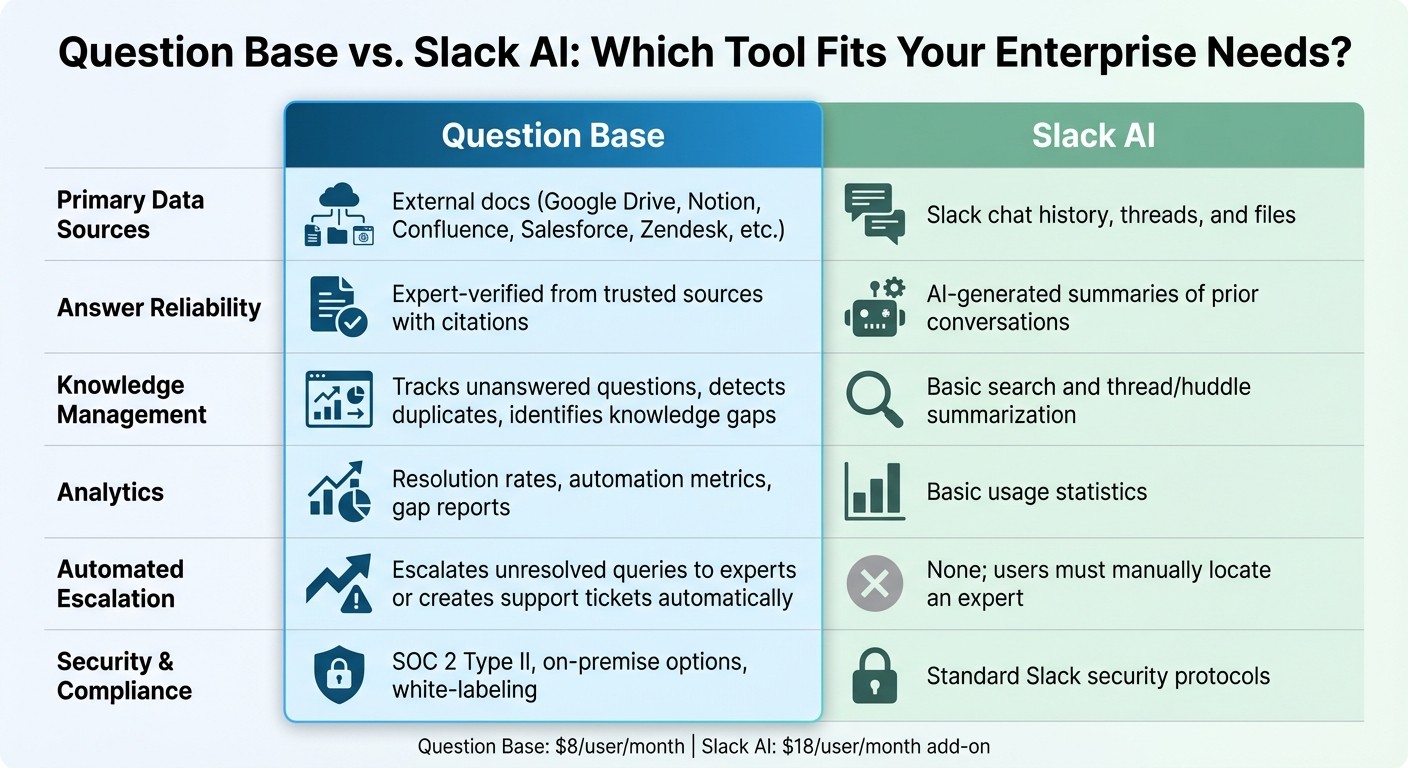
Question Base vs Slack AI Feature Comparison for Enterprise Knowledge Management
When it comes to tackling the challenges of fragmented and outdated knowledge retrieval, a side-by-side comparison highlights the differences between these tools and their intended use cases.
Slack AI is designed to boost general productivity. It shines when summarizing conversations, pulling out key points from threads, and helping users catch up on discussions they’ve missed. However, for teams that need expert-approved, cross-platform answers, Question Base offers a solution tailored specifically for support teams, HR, IT, and operations.
The core difference lies in their approach to information: Slack AI relies on chat history, while Question Base pulls directly from verified documentation like Google Drive, Notion, Confluence, Salesforce, Zendesk, and more. This ensures employees get answers backed by trusted sources instead of AI-generated interpretations of past conversations. By integrating verified, cross-platform search, Question Base addresses the enterprise need for a centralized, reliable knowledge hub.
Comparison Table
Feature | Question Base | Slack AI |
|---|---|---|
Primary Data Sources | External docs (Google Drive, Notion, Confluence, Salesforce, Zendesk, etc.) | Slack chat history, threads, and files |
Answer Reliability | Expert-verified from trusted sources with citations | AI-generated summaries of prior conversations |
Knowledge Management | Tracks unanswered questions, detects duplicates, and identifies knowledge gaps | Basic search and thread/huddle summarization |
Analytics | Resolution rates, automation metrics, and gap reports | Basic usage statistics |
Automated Escalation | Escalates unresolved queries to experts or creates support tickets automatically | None; users must manually locate an expert |
Security & Compliance | SOC 2 Type II, on-premise options, white-labeling | Standard Slack security protocols |
This breakdown underscores why enterprises focused on accuracy and auditability often turn to Question Base for internal support. For industries managing sensitive HR policies, compliance requirements, or technical workflows, having a system that prioritizes reliability is crucial. Question Base’s human-in-the-loop verification system ensures that when confidence in an answer drops below a set threshold (typically 70–90%), queries are automatically escalated to subject matter experts. This approach not only ensures accuracy but also creates a knowledge source that evolves alongside your organization. Meanwhile, Slack AI remains a solid option for improving individual productivity within conversations.
Enterprise Benefits and Implementation Steps
Addressing the challenges of fragmented knowledge retrieval, these advantages simplify the setup process while ensuring secure integration for enterprises.
Quick Setup Without Engineering Support
Question Base offers a plug-and-play deployment that doesn’t require developer involvement. By installing it through the Slack App Marketplace, authorizing the app, and connecting your tools with OAuth, you can have the system up and running in under 15 minutes.
After installation, activating Question Base in specific Slack channels is as simple as executing the command /invite @questionbase. From there, administrators can designate which Google Drive folders or documents will act as the "Sources of Truth" for verified answers. This streamlined process eliminates the need for ongoing engineering support, which is often required with other solutions.
To maximize impact, consider starting with a pilot deployment in departments like IT or HR, where the benefits of faster resolution rates are easily measurable. Scaling up is simplified by leveraging existing Identity Provider (IDP) groups, which allow permissions to be assigned by teams (e.g., Engineering, Finance) rather than configuring access for individual users. This approach mirrors how employees already interact with Google Workspace, ensuring permissions sync seamlessly without extra manual adjustments.
Once the setup is complete, you’ll benefit from robust security measures and customizable options.
Enterprise-Grade Security and Customization
With SOC 2 Type II compliance, Question Base ensures encryption for data both in transit and at rest, and it even offers on-premise deployment for organizations with specific requirements. Permissions sync instantly, meaning that if an employee loses access to a Google Doc, they’ll also lose the ability to retrieve it through Slack. This integration helps enforce existing access controls, keeping sensitive information secure.
Organizations can further tailor the system by adjusting AI tone, setting up escalation workflows, and managing content access. The Enterprise tier includes advanced features like white-labeling, multi-workspace support, and custom development for specific workflows. For teams handling sensitive HR policies, compliance documentation, or technical resources, these options ensure the system adapts to their needs rather than forcing process changes.
While secure integration is critical, Question Base also delivers measurable productivity gains.
Tangible Return on Investment
Question Base provides an analytics dashboard to track key metrics, including resolution rates, automation performance, and knowledge gaps. This data reveals which queries are resolved automatically, which require expert involvement, and where documentation needs improvement. By regularly monitoring unanswered queries, teams can address gaps in company knowledge and refine their documentation.
When confidence in an answer falls below a preset threshold, Question Base steps in to escalate queries to subject matter experts or create support tickets. This ensures no query goes unresolved while continuously improving the knowledge base.
Starting at $8 per user per month, the Pro plan offers a cost-effective alternative to Slack AI’s $18 per user per month add-on. It delivers verified, cross-platform answers without the need for custom-built search infrastructure or ongoing engineering support, making it a smart choice for enterprises aiming to streamline knowledge management.
Conclusion
Enterprises often grapple with a common problem: vital information lives in Google Workspace, while daily work happens in Slack. This disconnect forces employees to jump between platforms, a habit that 74% of tech leaders say drags down productivity. The answer isn’t about picking one tool over the other - it’s about linking them in a way that makes collaboration seamless.
While Slack AI can summarize conversations, it primarily relies on chat history, not expert-approved documentation. For teams that need precise, reliable answers from trusted sources like Google Drive, Notion, or Salesforce, a more tailored solution becomes indispensable. For example, in 2025, Intuit QuickBooks cut case resolution times by 36% by adopting an AI-powered knowledge retrieval system to simplify how employees access information across platforms.
This is where Question Base steps in, turning Slack into a centralized knowledge hub - no engineering required. At $8 per user per month, it delivers verified answers directly from your documentation, highlights knowledge gaps, and adheres to SOC 2 Type II standards. With a quick setup and seamless Google Workspace integration, teams can see productivity gains almost instantly.
For large enterprises, the decision is straightforward: bring your knowledge to where your team already works. Whether it’s HR policies, IT troubleshooting, or operational workflows, consolidating knowledge access in Slack helps your team work faster and more effectively. By bridging your information sources with Slack, you empower your team to achieve more with less friction.
FAQs
How does Google Workspace search work inside Slack?
Google Workspace search in Slack connects external tools like Google Drive, enabling users to perform secure, organization-wide searches. By leveraging natural language queries, it helps locate files, conversations, and data across platforms while adhering to existing permission settings. This feature simplifies access to relevant information within Slack, improving workflows and maintaining secure access to company knowledge.
Will results respect my Google Drive and Gmail permissions?
Question Base prioritizes security and privacy by ensuring that its results align with your Google Drive and Gmail permissions. This permission-aware access guarantees that users can only view content they are authorized to see, keeping sensitive information protected.
What makes Question Base answers 'verified' in Slack?
Question Base answers are considered verified because they pull directly from trusted, company-approved platforms like Notion, Confluence, Salesforce, and Zendesk. This guarantees that the information shared in Slack is accurate, dependable, and fully aligned with your organization’s established content.