∙
Cooper
∙
Reading time:
16 min

In Slack, automation tools can save teams time and effort, but choosing the right one depends on your needs. Slack Workflow Builder is a no-code tool for automating structured, repetitive tasks like onboarding checklists or approval workflows. It uses triggers and predefined steps but requires manual updates when processes change. On the other hand, AI agents like Question Base handle unstructured queries by automating internal questions with real-time, verified answers from external platforms like Notion or Google Drive. They learn over time, making them ideal for managing dynamic knowledge and reducing repetitive questions.
Key Takeaways:
Slack Workflow Builder: Best for predictable, rule-driven tasks within Slack. Limited to Slack’s ecosystem and requires manual updates.
AI Agents: Ideal for answering dynamic questions and syncing with live documentation. Offers advanced features like knowledge tracking and enterprise-grade security.
Quick Comparison
Feature | Slack Workflow Builder | AI Agents (e.g., Question Base) |
|---|---|---|
Automation Type | Rule-based | Intelligent |
Ease of Use | Drag-and-drop, no-code | Natural language interface |
Data Sources | Slack inputs, app connectors | External platforms (Notion, Confluence) |
Primary Use Case | Process automation | Knowledge retrieval |
Security | Standard Slack security | SOC 2, encryption, on-prem options |
Learning Capability | Static, manual updates | Continuous, machine learning |
Both tools excel in different areas. Use Workflow Builder for routine processes and AI agents for scalable, real-time knowledge management.
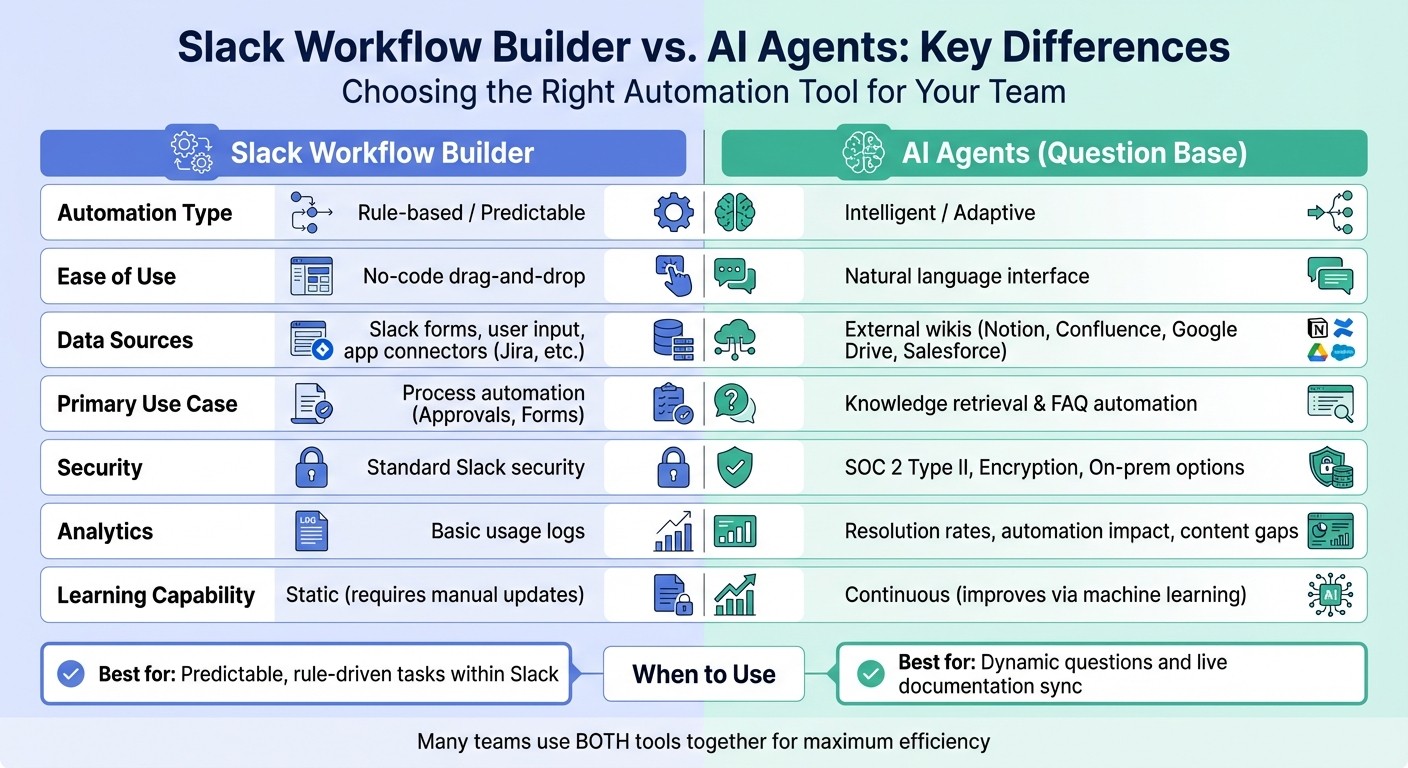
Slack Workflow Builder vs AI Agents Feature Comparison
Slack Workflows: No-code Automation in Slack
What Is Slack Workflow Builder?
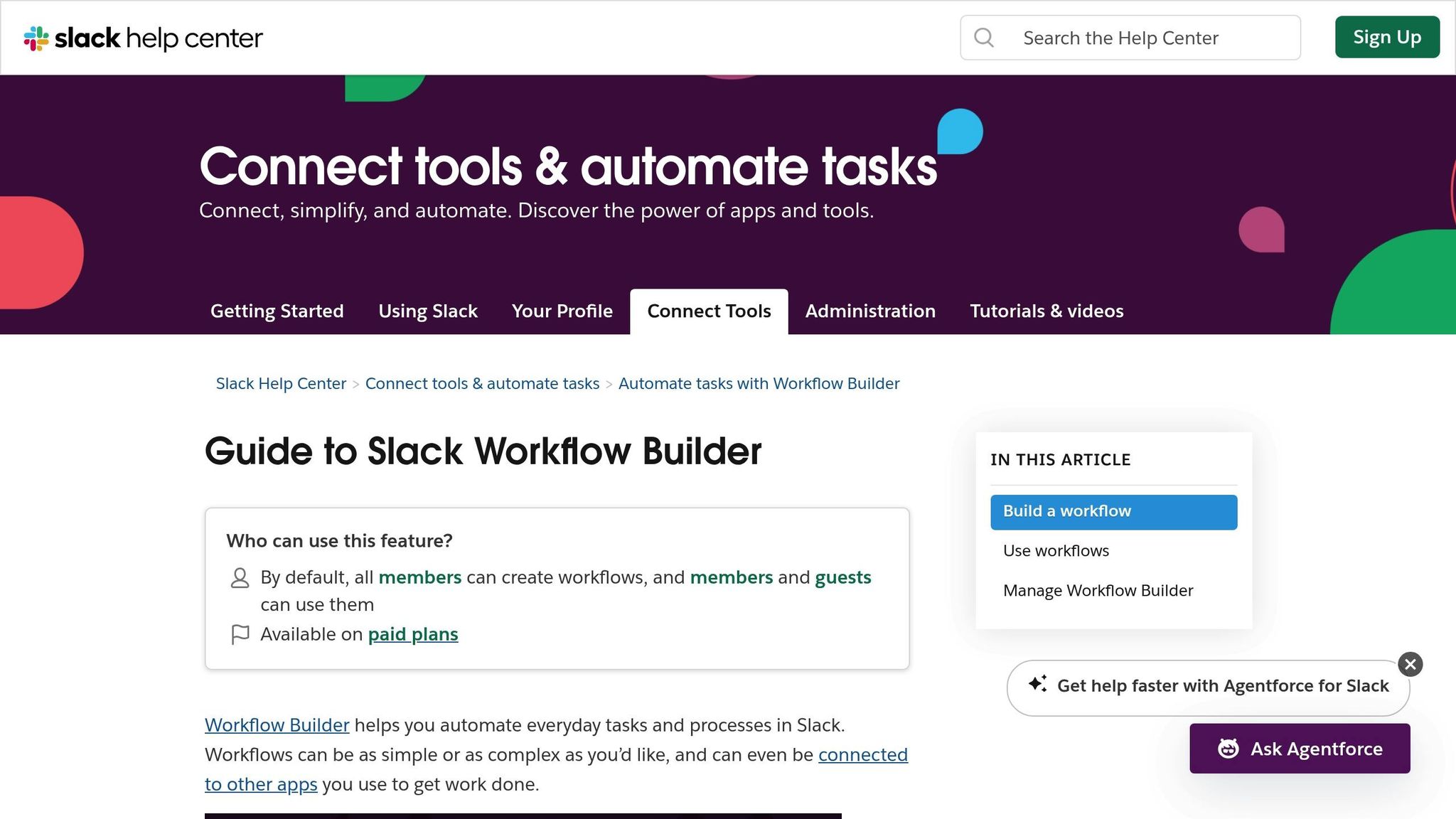
Slack Workflow Builder is a built-in tool that allows users to automate routine, rule-driven tasks within Slack - no coding required. Using a straightforward drag-and-drop interface, it’s accessible to anyone on your team, regardless of technical expertise. Let’s break down how it works and why it’s useful.
At its core, Workflow Builder operates through triggers - events that kick off a workflow. These could be anything from a user joining a channel or clicking a shortcut to a scheduled event. Once triggered, the workflow executes predefined steps, such as sending a message, collecting information through a form, or connecting with third-party apps using integration steps. You can even add conditional logic, enabling workflows to adapt based on specific inputs. For instance, if a form response indicates high urgency, the workflow might notify a manager, while lower-priority requests could go to a general queue.
It’s worth noting that Workflow Builder is only available on Slack’s paid plans [4]. By default, all team members can create workflows, though admins and workspace owners can modify these permissions. Each workflow can include up to 100 steps [3][5], giving teams the flexibility to design detailed automations. However, there are some limitations: workflows only function within your Slack workspace, and activity logs cannot be exported for external analysis [3].
Features of Slack Workflow Builder
Workflow Builder includes several key elements that make automation simple and effective:
Triggers: These initiate workflows and can range from user actions like clicking a shortcut or reacting with an emoji to scheduled events, such as a reminder every Monday at 9:00 AM.
Steps: These define the actions a workflow takes, such as posting a message in a channel, sending a direct message, or requesting approval from a manager.
Forms: These custom interfaces collect structured data from team members [4]. For example, you might use a form to gather details for IT requests, collect feedback after a meeting, or handle time-off requests in a standardized way.
Variables: These allow workflows to incorporate dynamic data, such as a user’s name, form responses, or even the current date, creating a more tailored experience.
Conditional Branching: This feature introduces “if-this-then-that” logic, enabling workflows to adapt based on user input. For instance, a high-priority request could trigger an immediate notification to a manager, while a low-priority one might simply be added to a queue. All of this is managed through an intuitive visual interface, designed for non-technical users [3].
Common Uses for Slack Workflow Builder
Workflow Builder shines when it comes to automating repetitive, structured tasks. Some popular examples include:
Sending automated welcome messages to new channel members
Setting up scheduled reminders for recurring meetings or deadlines
Creating approval workflows for tasks like time-off requests or budget approvals
It’s also highly effective for gathering information. Teams frequently use it for onboarding checklists, IT ticket submissions, or post-event feedback surveys. Since workflows can integrate seamlessly with tools like Google Sheets, Jira, or Salesforce, they’re perfect for transferring data between systems without manual effort.
If you’re just getting started, Slack offers pre-built templates for tasks like “Welcome Messages” or “Request Collection” [4]. For more dynamic needs, consider using AI integrations for open-ended queries or complex interactions.
What Are AI Agents?
AI agents take automation to a whole new level compared to Slack Workflow Builder's rule-based system. These systems are designed to observe their environment, make decisions independently, and act without constant supervision to achieve specific objectives [6][1]. Instead of sticking to rigid "if-this-then-that" rules, they operate on a Sense, Plan, Act, Learn cycle, allowing them to adapt to different situations and improve over time through machine learning [6].
To put it simply, Workflow Builder works like a vending machine - you push a button and get a set result. AI agents, on the other hand, are more like a skilled assistant who listens to your needs, searches through resources, and provides answers tailored to your specific question.
How AI Agents Work
AI agents rely on natural language processing to interpret questions phrased in everyday language. Employees don’t need to memorize commands or fill out forms - they can simply ask, "What’s our PTO policy?" or "How do I file an expense report?" right in Slack.
What sets AI agents apart is their ability to tap into external knowledge sources. Tools like Question Base connect seamlessly with platforms such as Notion, Confluence, Google Drive, Salesforce, Zendesk, and Intercom. When a question is asked, the agent uses Retrieval-Augmented Generation (RAG) to pull precise information from these trusted sources, rather than relying solely on past Slack conversations.
If the agent encounters a question it can’t answer, it escalates the query to an expert and learns from the response [2]. Over time, this creates a system that becomes smarter without requiring frequent manual updates to workflows.
Thanks to these capabilities, AI agents bring advanced features that elevate knowledge management to the next level.
Features of AI Agents
AI agents designed for enterprise knowledge management - like Question Base - offer a range of capabilities that go far beyond simple automation:
Context-aware, adaptive responses: By integrating with platforms like Notion, Confluence, and Salesforce, AI agents provide answers that reflect the latest company knowledge. They tailor responses based on the person asking, the Slack channel, and the most up-to-date information, dynamically adjusting as documentation evolves.
Knowledge gap tracking and analytics: These tools identify unanswered questions and provide insights into resolution rates, automation success, and content gaps. This data helps teams pinpoint where documentation is missing or outdated, making it easier to align updates with sprint cycles or quarterly planning. This directly contributes to smoother workflows and improved accuracy within Slack.
Customizable escalation flows: Companies can configure AI agents to match their tone, behavior, and escalation protocols. For sensitive topics - like HR policies or high-stakes decisions - teams can implement "human-in-the-loop" oversight [6].
Enterprise-grade security: Built for large organizations, these agents support SOC 2 Type II compliance, encrypt data in transit and at rest, and even offer on-premise deployment for businesses with strict data governance needs.
Common Uses for AI Agents
With these advanced features, AI agents excel in scenarios where accuracy and efficiency are critical. HR, IT, and operations teams often rely on them to handle large volumes of employee questions without overwhelming support staff. Instead of repeatedly answering questions like "Where’s the benefits enrollment form?" or "How do I reset my VPN password?", AI agents resolve these queries instantly.
The results can be transformative. For example, Vercel used AI agents in Slack to save over 70,000 hours of meeting time annually [6]. Similarly, Lumina Solar leveraged AI-powered Slack workflows to automate sales reminders and follow-ups, cutting average project management time by 30% [6].
AI agents also help preserve tribal knowledge that might otherwise disappear in Slack chat history [2][7]. When important insights surface in conversations, teams can capture team knowledge directly from Slack with a single click, creating a living FAQ that evolves with the organization. This feature is especially useful during periods of rapid growth or when experienced employees move into new roles.
Recent studies show that teams using AI automation are 242% more likely to achieve high productivity, with AI saving an average of 3.6 hours per user per week [6]. For organizations with thousands of employees, these time savings quickly translate into reduced costs and faster access to critical information.
Slack Workflow Builder vs. AI Agents: Main Differences
After examining these tools individually, it’s time to compare them side by side to understand their unique strengths and where they fall short.
Comparison Table: Slack Workflow Builder vs. AI Agents
Feature | Slack Workflow Builder | AI Agents (e.g., Question Base) |
|---|---|---|
Automation Type | Rule-based / Predictable | Intelligent / Adaptive |
Ease of Use | No-code drag-and-drop | Natural language interface |
Data Sources | Slack forms, user input, and specific app connectors (Jira, etc.) | External wikis and docs (Notion, Confluence, Google Drive, Salesforce) |
Primary Use Case | Process automation (Approvals, Forms) | Knowledge retrieval & FAQ automation |
Security | Standard Slack security | SOC 2 Type II, Encryption, On-prem options |
Analytics | Basic usage logs | Resolution rates, automation impact, content gaps |
Learning Capability | Static (requires manual updates) | Continuous (improves via machine learning) |
Maximum Complexity | Up to 100 steps per workflow | Handles multi-step reasoning across systems |
This table highlights the core differences between rule-based workflows and AI-powered automation, offering a clearer picture of their capabilities.
Rule-Based vs. Intelligent Automation
Slack Workflow Builder operates on fixed rules. For example, it can route a PTO request to the same manager every time, ensuring consistency and reliability. This makes it ideal for standardized processes where predictability is more important than flexibility.
AI agents, on the other hand, adapt to context. They don’t just respond - they analyze and resolve. For instance, when someone asks, "How do I submit expenses?", an AI agent like Question Base searches across connected documentation - whether it’s in Notion, Confluence, or Google Drive - and delivers an accurate, up-to-date answer. If the policy changed last week, the agent automatically reflects the latest update without requiring manual adjustments to workflows.
As Slack's blog aptly puts it:
"The difference? Chatbots respond. AI agents resolve." [1]
While Workflow Builder relies on predefined triggers and actions, AI agents go a step further by reasoning through available data and learning from every interaction.
Data Sources and Knowledge Management
The automation styles of these tools differ largely due to how they handle information. Workflow Builder works within Slack’s ecosystem, using predefined inputs. For example, you can route a support ticket to Jira or log a meeting in Google Calendar, but it only operates within the constraints of the connected steps you’ve set up.
AI agents, however, connect directly to your external "sources of truth." Tools like Question Base integrate seamlessly with platforms such as Notion, Confluence, Google Drive, Salesforce, Zendesk, and Intercom. This allows them to pull verified, up-to-date information from wherever your team stores its documentation. Instead of embedding static answers, AI agents retrieve dynamic responses with citations, enabling employees to trace information back to its original source.
This capability ensures that documentation stays current and traceable. Workflow Builder, by contrast, is static, requiring manual updates whenever processes change. AI agents can even identify unanswered questions, flag knowledge gaps for experts, and transform Slack conversations into searchable FAQs.
For structured, repeatable tasks - think onboarding checklists or hardware requests - Workflow Builder’s reliability shines. But when it comes to high-volume knowledge retrieval, where accuracy and adaptability are critical, AI agents like Question Base deliver the intelligence and depth that rule-based tools simply can’t provide.
Which Solution Should You Choose?
The right choice depends on the type of automation you need and how often your processes or information change. Slack Workflow Builder is ideal for structured, repetitive tasks with consistent steps. On the other hand, AI agents like Question Base excel at managing unpredictable questions and ensuring your knowledge stays up-to-date across various systems. Let’s break down when each tool works best.
When to Use Slack Workflow Builder
If your process follows a fixed series of steps that rarely change, Slack Workflow Builder is your go-to tool. It’s perfect for tasks like PTO requests, hardware intake forms, meeting reminders, or straightforward approval chains. Essentially, if you can map out the process from start to finish and it stays consistent, Workflow Builder can handle it with ease - and no coding is needed.
The drag-and-drop interface makes it accessible even for non-technical teams. In fact, Salesforce reports that 80% of Slack workflow creators are non-technical users [8]. However, keep in mind that if your process changes, you’ll need to manually update the workflow to reflect those adjustments.
When to Use AI Agents
AI agents are designed for retrieving dynamic, up-to-date information. For example, when employees ask, “What’s the expense policy?” or “How do I configure SSO?”, they need accurate, verified answers - not a form to fill out. Question Base connects directly to trusted sources like Notion, Confluence, Google Drive, and Salesforce, pulling information directly from your documentation. It even provides citations, so employees can trace answers back to their original source.
While Workflow Builder handles static, rule-based tasks, AI agents dynamically update answers by syncing with your live documentation. If your expense policy changes, for example, Question Base automatically reflects the update. It also tracks unanswered questions and routes them to experts, creating a feedback loop that keeps your internal knowledge current without extra manual effort.
This makes AI agents particularly useful for HR, IT, and operations teams managing high-volume Slack automation for inquiries. With enterprise-grade features like SOC 2 Type II compliance, encryption (both at rest and in transit), and optional on-premise deployment, Question Base is ready to meet the security needs of large organizations.
Many teams find value in combining both tools. Use Workflow Builder for automating processes like ticket submissions, while Question Base handles knowledge delivery - often preventing the need for a ticket in the first place. Together, they create a seamless system for both process automation and information management.
Conclusion
Slack Workflow Builder and AI agents like Question Base excel in different areas, creating a powerful combination for enterprise teams. Workflow Builder is ideal for automating structured, repeatable tasks such as PTO requests, onboarding workflows, or approval processes. It’s included with Slack’s paid plans, requires no coding, and is easy for non-technical teams to implement quickly.
AI agents, on the other hand, specialize in dynamic knowledge retrieval. When employees need accurate, real-time answers, Question Base delivers by connecting directly to trusted sources like Notion, Confluence, Google Drive, and Salesforce. This ensures the information is always current, as Question Base automatically syncs with live documentation - unlike Workflow Builder, which relies on manual updates.
For enterprise teams handling complex, high-volume inquiries in areas like HR, IT, and operations, Question Base offers advanced features tailored to meet these demands. It adheres to enterprise-grade security with SOC 2 Type II compliance, strong encryption, and on-premise deployment options. Pricing starts at $6,000 per year for 10–100 users, including analytics and case tracking in the Annual Pilot package. For larger teams, the Enterprise+ tier begins at $20,000 per year, adding features like white-labeling and multi-workspace support [9].
Both tools shine in their respective roles, and many organizations benefit by combining them. Use Workflow Builder to automate routine tasks like ticket submissions and routing, while Question Base handles knowledge management, often eliminating the need for tickets altogether. Together, they create an efficient system where rule-based automation and intelligent knowledge delivery work seamlessly.
The key is to align the tool with the task: rely on Workflow Builder for predictable processes and turn to AI agents for scalable, real-time knowledge delivery.
FAQs
How do AI agents evolve compared to Slack Workflow Builder?
AI agents have the unique ability to evolve by learning from every interaction, unlike Slack Workflow Builder, which stays unchanged unless you manually update it. Take Question Base as an example - it doesn’t just answer questions; it keeps track of unanswered ones, escalates them to experts, and learns from those expert responses to improve its future accuracy. On top of that, it offers valuable analytics, such as resolution rates and insights into knowledge gaps, ensuring it continuously gets better over time.
Slack Workflow Builder, by comparison, is a straightforward tool that connects specific triggers to predefined actions. It’s fantastic for handling repetitive tasks, but any changes - whether it’s tweaking steps or fixing an error - require hands-on adjustments. AI agents eliminate this hassle by dynamically adapting through data and user interactions, making them a far better fit for teams with growing and shifting knowledge needs.
What security features does Question Base offer?
Question Base prioritizes enterprise-level security, ensuring your internal knowledge remains safe. It adheres to SOC 2 Type II standards and employs encryption both during storage and while data is being transmitted. Administrators can fine-tune permissions, giving them control over who can view or edit content within Slack. For organizations with stringent security needs, there’s even an option for on-premise deployment. These robust measures make it a dependable choice for businesses focused on compliance and safeguarding their data.
When should a team use an AI agent instead of Slack Workflow Builder?
A team should opt for an AI agent like Question Base instead of Slack Workflow Builder when the priority is managing and accessing knowledge rather than automating routine tasks.
When accuracy and trusted sources matter: AI agents integrate directly with platforms like Notion, Confluence, or Salesforce to pull verified, expert-backed answers. In contrast, Workflow Builder is limited to sending static messages or triggering predefined actions.
For smarter knowledge management: AI agents come equipped with tools like case tracking, duplicate detection, and analytics to streamline knowledge workflows. These advanced features are absent in Workflow Builder, which focuses on automating simpler tasks.
For enterprise-grade security and flexibility: With SOC 2 compliance, encryption, and detailed admin controls, AI agents ensure secure handling of sensitive information and customizable escalation flows - ideal for HR, IT, and support teams operating under strict governance policies.
While Slack Workflow Builder excels at automating repetitive, rule-based processes like onboarding checklists or approval workflows, an AI agent is the better choice when your team needs scalable, accurate answers and robust knowledge management.