∙
Cooper
∙
Reading time:
16 min

Repetitive questions in Slack can slow teams down, leading to wasted time and scattered information. AI tools like Question Base solve this by transforming Slack conversations into a searchable knowledge base - capturing insights in real time and making answers instantly accessible.
Here’s why it matters:
80% of employees prefer asking questions in Slack over using wikis, but this leads to experts spending over 6 hours a week on repeat queries.
Question Base automates up to 90% of repetitive questions, freeing up valuable time.
It integrates with tools like Notion, Confluence, and Google Drive, ensuring employees get answers from trusted sources in seconds.
Add a Knowledge Base to Your Slack AI Agent in n8n (Step By Step)
This setup allows you to automate tasks in Slack by connecting your chat history to a structured database.
Step 1: Install an AI Knowledge Bot in Slack
Setting up an AI knowledge bot in Slack is a straightforward process that can be completed in just a few minutes. The key is selecting a tool designed for enterprise-level knowledge management. Question Base is an excellent choice, as it integrates seamlessly with your existing documentation sources while adhering to the strict security and compliance standards required by large organizations. Follow the steps outlined below to install and configure Question Base in your Slack workspace.
How to Install Question Base
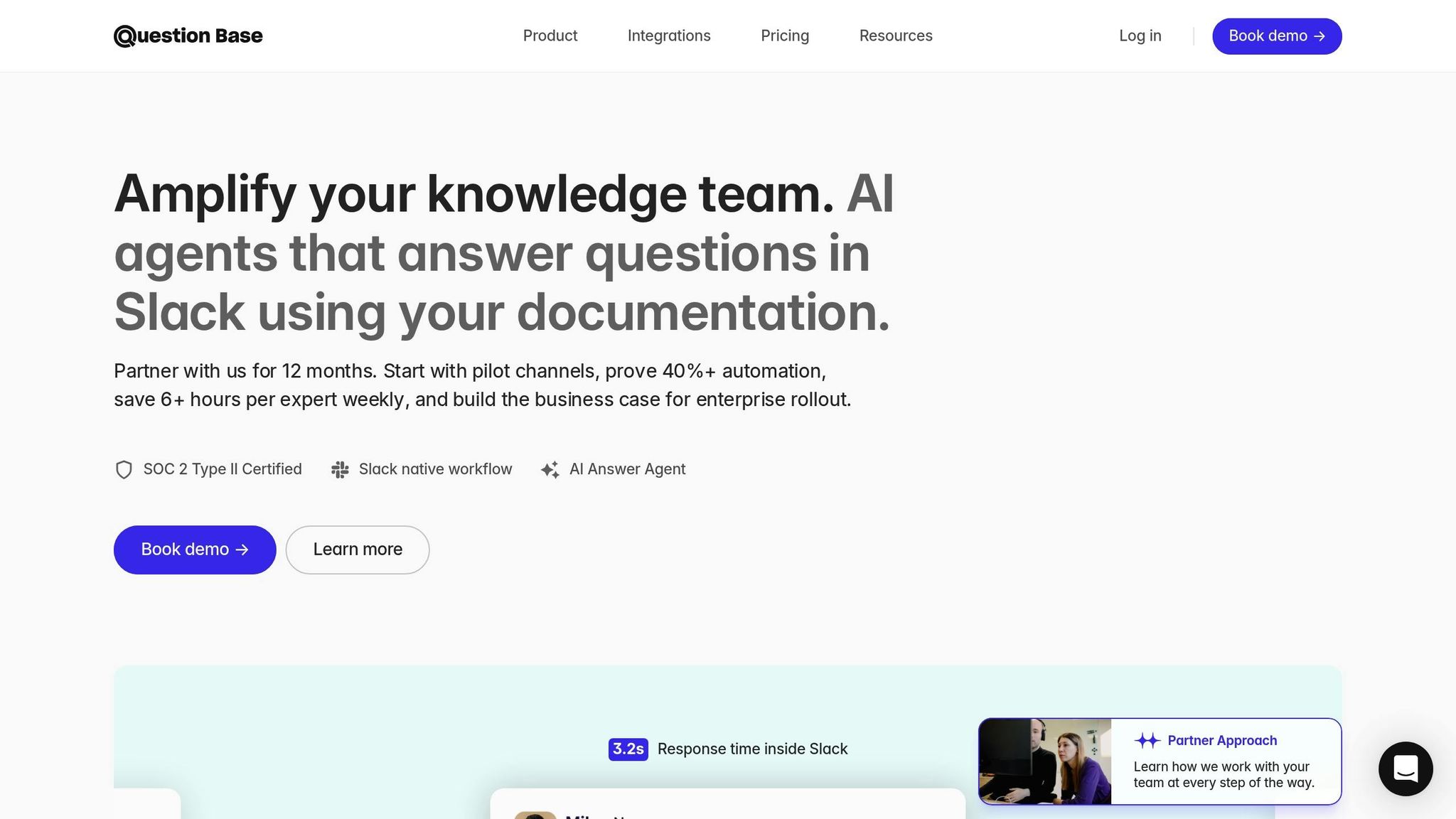
To get started, visit the Slack App Marketplace and click "Add to Slack" to install Question Base. Once you've authorized the app to access your workspace, the bot will be ready to use. You can invite it to specific Slack channels by typing the command /invite @questionbase.
A good strategy is to begin with pilot channels, such as #it-help or #hr-queries, to fine-tune the bot's settings before rolling it out across your organization. Once added to a channel, Question Base automatically monitors public conversations, capturing relevant knowledge without interfering with private channels.
"It's like having an extra person answering questions in Slack." - Willem Bens, Manager of Sales North EMEA, DoIT International
After installation, you’ll be prompted to connect your documentation sources through a simple setup process. Question Base supports integrations with tools like Notion, Confluence, Google Drive, Salesforce, and more. For most teams, the entire process - from installation to answering the first question - takes less than 15 minutes. Once installed, proceed to verify permissions and ensure your documentation sources are correctly configured, as detailed below.
What You Need Before Setup
Proper access and security compliance are essential for a smooth installation, especially in enterprise environments. Before you begin, confirm that you have the necessary permissions and meet the following requirements:
Requirement | Details |
|---|---|
Workspace Access | Slack Workspace Admin permissions |
Compatible Plan | Slack Pro, Business+, or Enterprise Grid |
Documentation Access | Admin/OAuth access to Notion, Confluence, Google Drive, etc. |
Security Standards | SOC 2 Type II compliance (provided by Question Base) |
You'll need Slack Workspace Admin permissions, as the bot requires this level of access to monitor channels and post responses. Additionally, your workspace must be on a Slack Pro, Business+, or Enterprise Grid plan, as these plans support the integrations needed for Question Base to function effectively.
Make sure you have admin or OAuth access to your documentation tools, such as Notion, Confluence, Google Drive, Zendesk, or Intercom. This ensures that Question Base can retrieve information from your knowledge sources and deliver accurate, context-aware answers.
Before deploying the bot, decide which team members will have access and determine which documentation sources it can query. Question Base allows you to configure access controls, ensuring the bot only references approved resources while adhering to your organization’s data governance policies. With SOC 2 Type II compliance, encryption for data in transit and at rest, and optional on-premise deployment, Question Base is built to handle sensitive information securely. For organizations with advanced compliance needs, the Enterprise Custom tier offers features like white-labeling, multi-workspace support, and tailored security options, making it adaptable to your specific requirements.
Step 2: Connect Your Documentation Tools
Once you’ve installed Question Base, the next step is linking your external documentation systems. This connection enables Question Base to pull verified answers directly from your trusted repositories.
Link Notion, Google Drive, and Other Platforms
As mentioned earlier, Question Base integrates seamlessly with tools like Notion, Confluence, Google Drive, Salesforce, Zendesk, Intercom, Dropbox, HubSpot, OneDrive, Jira, and SharePoint. These integrations allow the bot to access specific documents, pages, and databases tailored to your needs.
To connect a tool, navigate to the Question Base setup interface in Slack. Choose the platform you want to integrate - say, Notion - and authenticate via OAuth by logging into your account. During this process, you’ll grant permissions for specific workspaces, folders, or pages that the bot should access. The entire setup is quick, taking less than five minutes, and doesn’t require any engineering expertise. With OAuth encryption and SOC 2 Type II–level security, your data remains secure throughout.
Question Base respects the permission settings of your integrated platforms. For example, if an employee doesn’t have access to a private Confluence space or a restricted Google Drive folder, Question Base will ensure that content stays inaccessible to them in Slack. This safeguards sensitive information and maintains your organization’s data policies.
"We now have a reliable and useful knowledge base, making it easy to share knowledge across the team." - Monica Limanto, CEO, Petsy
Customize Channel-Specific Settings
One of the standout features of Question Base is its ability to configure settings for individual Slack channels. This gives you precise control over what content the bot can access and how it operates in different contexts. Start by inviting @questionbase to a specific channel, then use admin commands to adjust integrations and fine-tune the bot’s behavior. For instance, you might enable Notion in the #marketing channel while restricting Google Drive access in #engineering.
This level of customization ensures that information stays relevant and secure. For example, sales teams can limit access to Salesforce data in #sales channels to handle deal-specific inquiries, while engineering teams might connect only the necessary Confluence pages in #dev channels for technical documentation. You can also adjust the bot’s tone to suit the audience - formal for HR policy channels or more casual for product teams. Additionally, you can set up escalation rules to route complex questions to human experts when needed.
For organizations that require advanced compliance options, the Enterprise Custom tier offers additional features like on-premise deployment, white-labeling, and support for multiple workspaces. These capabilities make it easy to scale and manage configurations across large, distributed teams. With these settings in place, Question Base ensures accurate, team-specific answers while aligning with your workflows.
Step 3: Turn Slack Messages into Searchable Knowledge
Question Base takes your Slack conversations and transforms them into a well-organized, searchable knowledge base, making internal support more efficient.
Save Important Slack Threads
With Question Base, vital insights from Slack channels - like step-by-step guides, problem-solving exchanges, or detailed policy explanations - are automatically identified in real time. When someone shares a technical fix or explains a process, the system flags these important discussions without any extra effort on your part.
For manual input, you can capture a thread instantly by reacting with an emoji or using a simple command. This turns the conversation into a searchable FAQ entry. The system preserves all the context: the original question, the solution, and any relevant back-and-forth. This means no more digging through old messages or waiting for answers - everything is ready to retrieve when needed.
By capturing knowledge naturally, this approach avoids the hassle of manual documentation, reduces repetitive questions, and ensures consistent answers across the board.
Question Base vs. Slack AI: Data Sources and Accuracy
While both Question Base and Slack AI aim to improve productivity, they take very different paths when it comes to building and managing knowledge.
Slack AI focuses on summarizing recent conversations and files directly from your Slack history. It’s great for quick recaps or referencing recent discussions, but it doesn’t connect to external documentation systems or include expert oversight for accuracy.
On the other hand, Question Base pulls information from trusted sources like Notion, Confluence, and Google Drive, ensuring responses are backed by verified documentation. Additionally, it incorporates a human-in-the-loop process, where subject matter experts review and approve AI-generated entries before they’re added to the knowledge base. This step guarantees accuracy and allows organizations to maintain control over shared information.
For teams handling sensitive or compliance-heavy information - such as HR, IT, or operations - Question Base offers a tailored solution. It not only ensures accuracy but also tracks resolution rates, identifies unanswered questions to expose knowledge gaps, and provides analytics on how automation is performing. While Slack AI is a helpful tool for individuals looking to summarize and search conversations, Question Base empowers entire teams by turning Slack into a knowledge assistant that’s backed by expert-reviewed documentation.
Feature | Question Base | Slack AI |
|---|---|---|
Data Sources | Trusted tools like Notion, Confluence, Salesforce, Google Drive | Primarily Slack chats and shared files |
Verification | Expert-reviewed answers with human-in-the-loop workflows | AI-generated summaries from message context |
Enterprise Focus | Built for HR, IT, Ops teams with SOC 2 compliance | General-purpose productivity tool |
Knowledge Management | Case tracking, duplicate detection, knowledge gap identification | Conversation summaries and basic AI search |
Analytics | Resolution rate, automation effectiveness, unanswered question tracking | Basic usage statistics on team communication |
Step 4: Answer Questions and Build a Living FAQ
With your documentation tools now connected, employees can automate internal questions in Slack, and the AI immediately pulls answers from trusted sources like Notion, Confluence, or Google Drive. It processes natural language queries effortlessly - whether it’s “How do I request time off?” or “What’s our expense policy?” - delivering responses in an average of 3.2 seconds[1]. This rapid turnaround ensures employees get the support they need without delay.
Answer Questions and Fine-Tune Responses
Question Base doesn’t just answer questions - it learns and improves with every interaction. When the AI provides a response, team experts can review and refine it within Slack. This human-in-the-loop process ensures responses adhere to company policies and maintain the appropriate tone before being added to the knowledge base. If the AI encounters a question it can’t confidently answer, it flags the query and routes it to the right expert based on the topic or Slack channel. For example, HR-related questions are sent directly to HR specialists. Once the expert provides an answer, it’s logged and added to the FAQ, steadily growing your knowledge base.
The AI’s tone and behavior can also be tailored to suit your organization’s communication style. Whether you need a formal tone for HR policies or a more technical approach for engineering issues, the system adapts accordingly. Teams using Question Base report that up to 90% of repetitive questions are handled automatically[1]. This efficiency translates to significant time savings, with internal experts reclaiming over 6 hours per week[1] that would otherwise be spent answering the same questions repeatedly.
Automatically Build an Evolving FAQ
As employees ask questions and experts provide answers, Question Base works behind the scenes to build a living FAQ. Using natural language processing (NLP), it identifies problem-solution pairs in Slack conversations, summarizes them, and organizes the information into a searchable knowledge base. This process captures valuable insights - like troubleshooting steps or policy clarifications - without requiring manual input.
The system also spots similar questions across different channels and consolidates them, reducing redundancy and preventing information from becoming scattered. If users flag an answer as “unhelpful,” the system notifies an expert to review and improve it, creating a feedback loop that continuously enhances the FAQ. Organizations using Question Base have reported a 50% increase in their knowledge base content[1] as the AI learns from real conversations and adapts to evolving workflows. By transforming Slack into a dynamic internal knowledge assistant, this approach ensures your team’s FAQ grows smarter and more useful over time. It also sets the stage for tracking performance and addressing knowledge gaps in the next step.
Step 5: Track Performance and Fill Knowledge Gaps
Identify Unanswered Questions
Question Base keeps a close eye on unanswered or escalated queries, making it easy to spot where your documentation might be falling short. For instance, if employees ask about something not covered in your connected resources - like a recently introduced policy or a procedure only shared verbally - the system flags these gaps and routes the queries appropriately[2].
This tracking uncovers recurring themes. For example, if multiple teams repeatedly ask variations of "How do I submit a vendor invoice?" within a short span, it’s a clear sign that your finance documentation could use an update. The case tracker ensures these escalated queries are logged, helping you systematically address knowledge gaps[3][4].
By identifying these gaps, you gain actionable insights for refining your knowledge base.
Use Analytics to Improve Over Time
The platform’s dashboard provides key metrics - such as resolution and automation rates - that help pinpoint areas for improvement. The resolution rate shows how many questions the AI answers successfully versus those needing human input, while the automation rate highlights the volume of queries resolved without manual intervention. Metrics like "unhelpful answers", which are flagged as inaccurate or incomplete, guide experts toward content that needs attention.
These analytics also show which documentation employees rely on most and which areas might require better coverage. With this data, teams can synchronize content updates with sprint cycles or quarterly planning, delivering measurable results like faster response times, fewer repeated questions, and significant time savings[2].
"Question Base has exceeded our expectations - it's easy to use, intuitive and a massive time saver. We now have a reliable and useful knowledge base, making it easy to share knowledge across the team." – Monica Limanto, CEO, Petsy[1]
Additionally, the platform tracks how your knowledge base evolves over time, capturing new insights from Slack conversations and adding them to your verified resources. This feedback loop ensures your knowledge base stays sharp and keeps your internal support running smoothly.
Question Base vs. Slack AI: Which Tool Fits Your Needs?
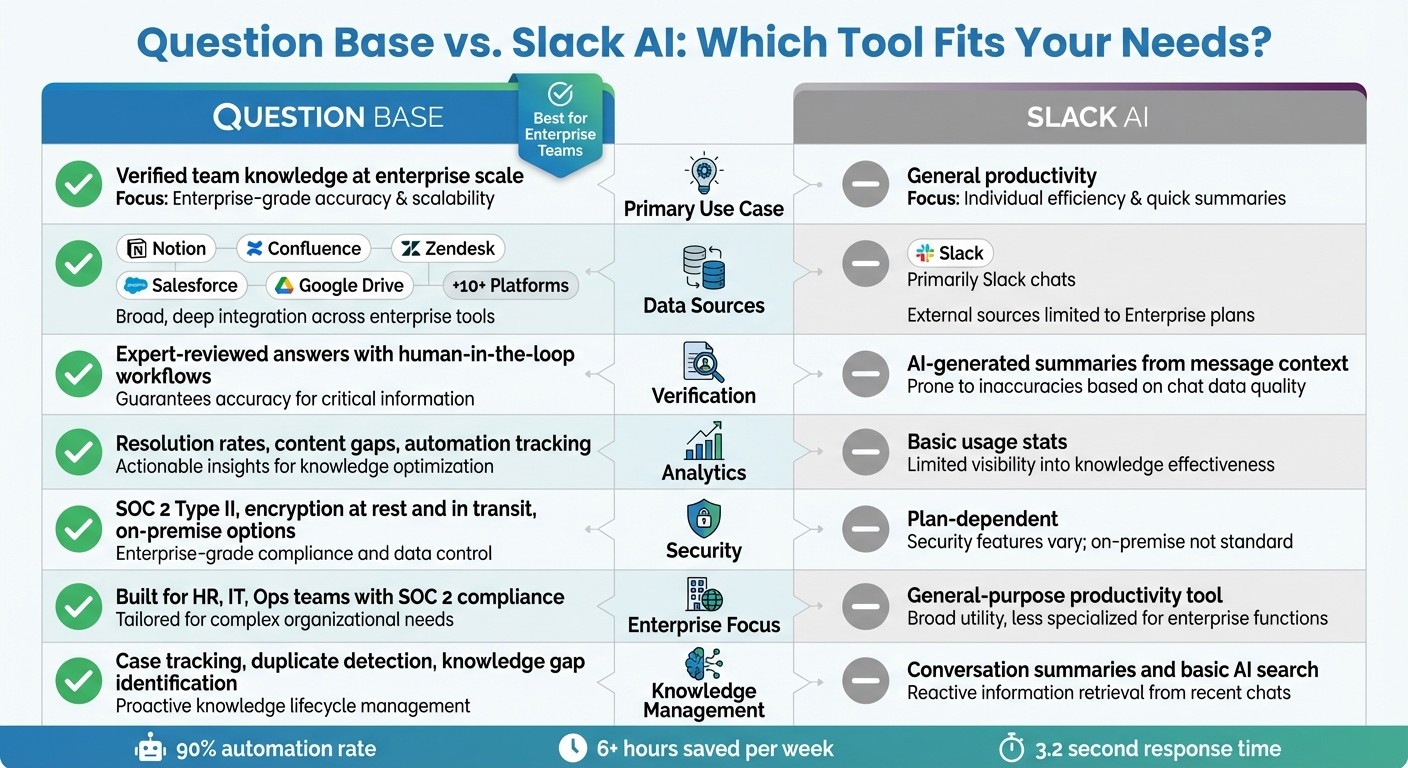
Question Base vs Slack AI: Feature Comparison for Enterprise Knowledge Management
How the Tools Differ: Data, Accuracy, and Use Cases
Slack AI focuses on summarizing recent conversations by pulling from Slack chat history, while Question Base takes a different approach. It connects directly to your trusted documentation systems, delivering answers that are backed by expert verification. Unlike Slack AI, which relies primarily on chat history to build knowledge, Question Base integrates with pre-approved documentation to ensure accuracy and reliability.
This distinction is critical for teams that need precise, validated information - especially at scale. Question Base offers advanced features like case tracking, duplicate detection, and per-channel customizations. It also provides detailed analytics, including resolution rates and insights into content gaps. In contrast, Slack AI offers more basic usage statistics.
Feature | Question Base | Slack AI |
|---|---|---|
Primary Use Case | Verified team knowledge at enterprise scale | General productivity |
Data Sources | Notion, Confluence, Zendesk, Salesforce, Google Drive, and 10+ platforms | Primarily Slack chats (external sources limited to Enterprise plans) |
Analytics | Resolution rates, content gaps, automation tracking | Basic usage stats |
Security | SOC 2 Type II, encryption at rest and in transit, on-premise options | Plan-dependent |
Let’s break down how each tool manages and builds your team’s knowledge.
When Question Base Is the Better Choice
The differences between these tools become especially important for teams dealing with repetitive questions and strict compliance requirements. Question Base shines for high-volume support teams like HR, IT, and operations, where repetitive inquiries are a daily challenge. By automating answers to frequently asked questions, internal experts using Question Base can save over 6 hours per week, with automation rates reaching as high as 90% for common queries[1].
Industries with strict compliance needs - such as financial services and healthcare - gain additional value from Question Base. Its SOC 2 Type II certification, robust encryption standards, and optional on-premise deployment meet the audit and data governance requirements of regulated organizations. These features ensure accountability and security while enhancing internal support efficiency.
For teams managing knowledge across multiple platforms, Question Base offers a centralized answer layer with expert oversight. It transforms Slack from a simple chat tool into a powerful knowledge assistant. Verified information remains accessible and evolves with your organization, all without adding engineering complexity.
Conclusion
Transforming Slack conversations into a structured, searchable knowledge base doesn’t have to be a complex process. With tools like Question Base, you can seamlessly capture key insights from daily discussions, link them to your trusted documentation, and deliver verified answers in seconds - all within the Slack environment your team already knows and uses. This integration turns routine Slack interactions into a powerful knowledge resource.
While Slack AI focuses on summarizing past conversations, Question Base excels at providing instant, verified answers from reliable sources. Its expert-led verification workflows and human-in-the-loop oversight ensure the high-quality standards that enterprise teams demand. This method underscores the importance of embedding trusted documentation into your internal knowledge systems.
"Question Base has exceeded our expectations - it's easy to use, intuitive and a massive time saver. We now have a reliable and useful knowledge base, making it easy to share knowledge across the team" [1].
For organizations handling large volumes of internal support requests, this streamlined approach speeds up onboarding and allows experts to dedicate their time to more strategic priorities.
Security is built into the foundation. Question Base meets SOC 2 Type II compliance standards, encrypts data both at rest and in transit, and even offers optional on-premise deployment for industries with strict regulatory requirements.
FAQs
How does Question Base deliver accurate answers in Slack?
Question Base delivers precise answers by seamlessly integrating with trusted documentation platforms such as Notion, Confluence, and Salesforce. Rather than depending on Slack's chat history alone, it taps into these verified sources, organizing the information into a structured and easily searchable format.
With the help of AI, Question Base categorizes and refines this data, ensuring responses remain accurate and current. This method builds confidence in the answers provided, streamlining internal support and boosting team efficiency.
How does Question Base ensure the security of sensitive information?
Question Base takes security seriously, offering enterprise-grade protections to keep your data safe. It adheres to SOC 2 Type II standards, ensuring rigorous controls over data handling. Additionally, all data is secured with encryption both at rest and in transit, providing an extra layer of protection. For organizations with heightened security needs, the platform also offers optional on-premise deployment, allowing you to maintain complete control over your information. These measures work together to safeguard your sensitive data while using the platform.
How does Question Base work with tools like Notion and Confluence?
Question Base integrates effortlessly with tools such as Notion and Confluence, bridging your Slack conversations with trusted documentation. This integration automatically gathers key insights from Slack and organizes them into a structured, searchable knowledge base. The result? Accurate information at your fingertips, with minimal manual effort.
Beyond Notion and Confluence, Question Base also works with platforms like Salesforce, Google Drive, Dropbox, and Intercom. The setup process is simple and doesn’t require engineering expertise. Once connected, the system keeps evolving alongside your conversations, ensuring your team can easily retain and access critical information without breaking a sweat.